



Introduction
Fieldnote is a small weekend events journal. A useful search link should describe the view: keyword, category, ordering and results page. A friend opening that link should see the same events, including the right time and place for two events with the same title. You will build that state relationship around a prepared responsive website and a small local catalog.
You need basic terminal paths, HTML forms, CSS layout and focus, and JavaScript arrays, objects, functions, DOM selection and events. This lab introduces array filtering, comparators, page boundaries, URL and URLSearchParams. Search and URL parsing have many uses; here the outcome is one complete, reproducible four-value view. The prepared renderer creates the cards from the records your code selects. No backend or framework knowledge is required. All events are synthetic. The 55-minute duration is an author estimate including reading and ordinary mistakes.
Use Workspace for commands and Fieldnote for the entry page. This lab starts independently. Edit only /home/labex/project/fieldnote/work/selection.js, state.js and url.js; app.js is the prepared controller in this lab and becomes your work in the next one. Preserve catalog.js, view.js, index.html, style.css, the separate Study view and the prepared service. The controller already submits forms and redraws the page, using replaceState to update the current entry. Browser history is prepared behavior here, not a learning requirement yet. Website labels remain English.
Select Real Records in a Stable Order
In this step, open a working shared view, then give your work page predictable keyword, category and ordering behavior.
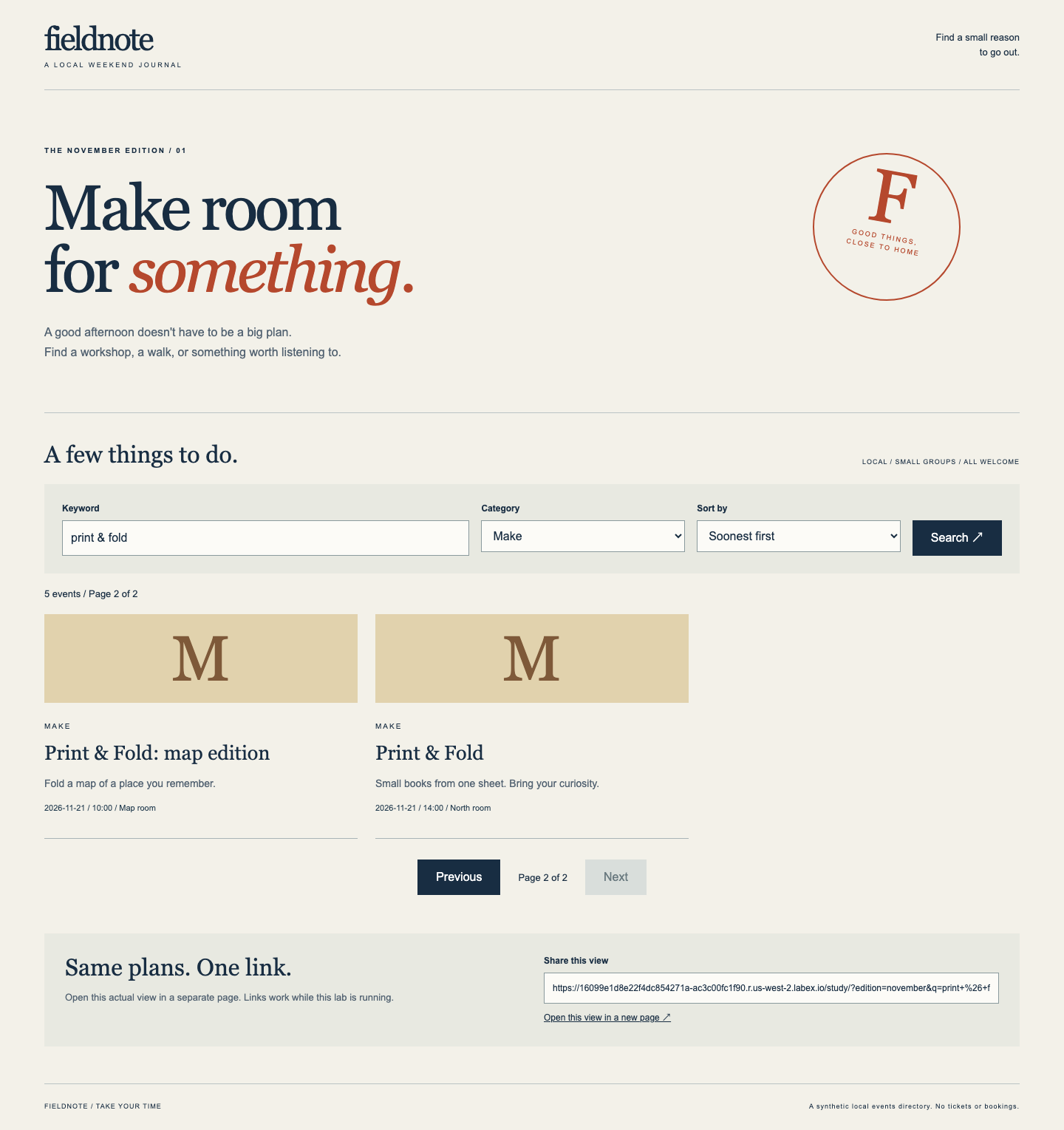
In Fieldnote, choose Open Study view in a new page. This real link opens a standalone browser page, outside the product's embedded Tab. Use that new page for the website actions. Its address contains q, category, sort and page; its keyword is print & fold, its category is Make, and it shows Page 2 of 2 with Print & Fold: map edition and Print & Fold. The latter is the 14:00 event in North room, not the earlier event with the same title. Choose Open this view in a new page below the results. The new page must show the same controls, page, titles, dates and places. The link works only while this lab and its proxy route are running. This is an independent example, not your work or a scoring result.
The independent Study view below shows the two page-2 records; compare the date, time and place as well as the titles.
Close the extra example pages. In the Fieldnote entry page, choose Open Work view in a new page. Keep this standalone work page open. Switch back to the product's Workspace Tab to edit files; switching Tabs is different from choosing a website link or pressing the browser's Back button. Your work starts incomplete even though Study view works.
cd changes this terminal's directory; the absolute path begins at /. pwd prints the current directory. cat prints a small text file without changing it:
cd /home/labex/project/fieldnote/work
pwd
cat catalog.js
Read three records: FN-101 and FN-102 both start at 2026-11-14 / 10:00; FN-108 has the same title as FN-102 but a later date. The catalog's input order is intentionally different from display order. Predict the first three matches for print & fold, category make, soonest order: FN-101, FN-102, FN-104. Compare actual record identities, not just a count of cards.
We will filter without changing the catalog. filter creates a new array of matching objects. includes tests a literal substring; toLowerCase makes the search case-insensitive. Search the single joined string title + ' ' + description, so a match may cross that joining space. && means both conditions must hold; || means either condition may hold. all admits every category. The arrow function receives each event.
sort changes the array it sorts; sorting the new filtered array preserves the prepared catalog. A comparator returns a negative number, zero or a positive number. The helper below uses JavaScript string < and > comparisons. Soonest order compares date + 'T' + time, then the ASCII event ID for ties. Title order compares lowercase titles, then ID. This fixed text ordering does not depend on browser locale or original array positions. The prepared dates share one time zone; you are not implementing time-zone scheduling.
The conditional expression condition ? first : second chooses one value. Here primary || ... uses the ID comparison only when the primary result is zero. CATALOG is the prepared object loaded before your files. state is an object with q, category, sort and page; the next step makes its values safe and consistent.
Save the complete function in selection.js. cat > filename replaces that file. The quoted <<'JS' begins a here-document: paste the lines until the closing JS alone on its own line. Quoting the marker keeps JavaScript punctuation literal. This is terminal editing and saving; it does not automate the WebIDE editor.
cat > selection.js <<'JS'
function compare(a, b) {
  return a < b ? -1 : a > b ? 1 : 0;
}
function matches(state) {
  return CATALOG.events.filter(event =>
    (state.category === 'all' || event.category === state.category) &&
    (event.title + ' ' + event.description).toLowerCase()
      .includes(state.q.toLowerCase())
  ).sort((a, b) => {
    const primary = state.sort === 'title'
      ? compare(a.title.toLowerCase(), b.title.toLowerCase())
      : compare(a.date + 'T' + a.time, b.date + 'T' + b.time);
    return primary || compare(a.id, b.id);
  });
}
JS
Return to the standalone work page and refresh. Wait for the controls and cards. Type print & fold in Keyword, select Make under Category, leave Soonest first, and activate Search. You should see the predicted three records, with the two 10:00 events distinguished by their titles and places. Change Sort by to Title A–Z, submit again, and expect Print & Fold, Print & Fold, Print & Fold: colour. Read the dates: the identically titled events are FN-102 then FN-108. Merely changing a select edits a draft; Search commits all three filters together. The share URL is not complete yet.
If results are empty, check the keyword and category first. A typo such as prnit legitimately has no matches; change it to print & fold and submit again. If the page stops responding after editing, return to Workspace, run cat selection.js, compare the braces and quotes with the complete block, and replace the file again. Refresh the work page after saving; there is no need to reset the VM.
Use this step's Check after observing both orders. It runs your original frontend files in a disposable browser fixture and checks complete record relationships; it does not fill in the live page or count Study view as your result.
Normalize Filters and Page Boundaries
In this step, turn draft or incoming values into one predictable state, including empty results and the last available page.
Stay in the standalone work page. With print & fold, Make, Soonest first, submit and choose Next. There are five matches and three places per page, so page 2 contains the last two. Three records per page is prepared data, CATALOG.pageSize; the renderer uses array slice(start, end) to take a page without changing the full list. Indices start at zero and the end is excluded: page 1 uses slice(0, 3), page 2 uses slice(3, 6). Each displayed card uses the selected event object, including its own ID, title, description, date, time and place.
Now consider an incoming page 999, an unknown category, or a keyword with outer spaces. A normalization function gives these values a public meaning before rendering. Missing keyword becomes empty; trim only its two ends, preserving interior spaces and the user's case. Match case-insensitively as before. Unknown/missing category becomes all; unknown/missing sort becomes soon. Convert page with Number: a positive safe integer is allowed, including equivalent 2.0. Invalid, zero, negative, fractional or unsafe values become 1. Clamp a valid overlarge page to the last matching page. Zero results still use page 1 of 1 with both page buttons disabled.
Number.isSafeInteger avoids imprecise whole-number values. Math.ceil rounds up: five matches divided by three gives two pages. Math.max(1, ...) keeps an empty result's page count at one; Math.min clamps the requested page. Array.includes also checks membership in the allowed category and sort lists. The || defaults handle missing or empty input. A normalized state contains values, not already-encoded URL text.
Switch to Workspace, still in /home/labex/project/fieldnote/work. Replace state.js with this complete function:
cat > state.js <<'JS'
function normalize(raw) {
  const state = {
    q: (raw.q || '').trim(),
    category: CATALOG.categories.includes(raw.category) ? raw.category : 'all',
    sort: ['soon', 'title'].includes(raw.sort) ? raw.sort : 'soon',
    page: Number(raw.page || 1)
  };
  if (!Number.isSafeInteger(state.page) || state.page < 1) state.page = 1;
  const pages = Math.max(1, Math.ceil(matches(state).length / CATALOG.pageSize));
  state.page = Math.min(state.page, pages);
  return state;
}
JS
This calls your matches function to calculate boundaries after filtering. It does not sort the original catalog. Predict the state for q: ' print & fold ', category: 'make', sort: 'soon', page: '999': trimmed keyword, category and sort unchanged, page 2. For page: '2.5', it is page 1. You will exercise incoming URL values in the next step, once the reader exists.
Return to the standalone work page and refresh. In Keyword, enter two spaces, then print & fold, then two spaces. Choose Make and activate Search. After submission the control should contain print & fold without its outer spaces. Choose Next: only the map edition and the 14:00 North room event remain, and Next is disabled. From page 2, search for sound + light, Listen, Title A–Z. This commits a new filter and resets to Page 1 of 1. A literal plus is part of that title, not a space. Search for no such constellation: no cards, a readable no-results message, page 1 of 1 and both buttons disabled. This is a correct result. Recover by restoring a matching keyword and category, then submitting.
Before Check, confirm that the original catalog and all record contents remain intact. The checks for unknown values and numeric URL spellings join this check in the next step; this step checks the normalized form and reachable page boundaries.
Read and Write the Actual View URL
In this step, make a directly opened link restore all four committed values and their visible records.
A URL has an origin, path, query and optional fragment after #. The LabEx proxy supplies the actual origin and path; do not guess a new base with an origin plus /. new URL(location.href) starts from this page's real address. Its searchParams reads decoded query values with get and writes ordinary, unencoded values with set. It encodes separators such as the keyword's &, and encodes a literal plus as %2B. Spaces may serialize as + or %20. Calling encodeURIComponent before set would encode twice; pass the original value instead.
Our course owns only q, category, sort and page. Preserve every extra query parameter and the existing fragment; they are outside the filter state and may belong to the platform. Missing/default values may be omitted or written explicitly. Query order, equivalent numeric pages, and the two space spellings do not change the meaning. Initialization can normalize a URL without creating a new visit. The prepared controller performs that replacement in this lab; the next lab teaches the history calls.
The for...of loop below visits the four known key strings. delete removes each old owned query value before the writer sets non-default values.
In Workspace, save the reader and writer in url.js:
cat > url.js <<'JS'
function readURL() {
  const params = new URL(location.href).searchParams;
  return normalize({q: params.get('q'), category: params.get('category'),
    sort: params.get('sort'), page: params.get('page')});
}
function stateURL(state) {
  const url = new URL(location.href);
  for (const key of ['q', 'category', 'sort', 'page']) url.searchParams.delete(key);
  if (state.q) url.searchParams.set('q', state.q);
  if (state.category !== 'all') url.searchParams.set('category', state.category);
  if (state.sort !== 'soon') url.searchParams.set('sort', state.sort);
  if (state.page !== 1) url.searchParams.set('page', state.page);
  return url;
}
JS
Deleting those keys first removes stale filter values when a default is chosen, while preserving unknown keys. The conditional lines omit only our defaults. The writer returns a URL object; it does not navigate the page by itself. The prepared controller changes the address before the renderer updates the real share field and link.
Return to the standalone work page and refresh. Search for print & fold, Make, Title A–Z, then choose Next. Read the share field: all four current values are represented, including sort=title and page=2. Choose Open this view in a new page and refresh that new page. Expect Print & Fold: map edition then Print & Fold: tiny type, title order's final two records. Check their dates and places, not just their count. This is a real link to your work files. The independent Check also opens it in a clean browser context without relying on cached local preferences.
Use the standalone page's address bar for these incoming-value tests. Keep its real origin and /work/ path; replace only the query after ?. Add #directory-title after the query to test preservation of a fragment. First use this query:
?edition=november&platform=keep-me&q=print%20%26%20fold&category=make&sort=soon&page=999#directory-title
It must show page 2's map edition and North room event, with Soonest first selected. The normalized address may omit sort=soon or use + for spaces; edition, platform and the fragment remain. Now replace the query with:
?edition=november&category=unknown&sort=unknown&page=2.5#directory-title
Expect empty keyword, All categories, Soonest first, Page 1 of 4, and the first three records FN-101, FN-102, FN-105. An unknown value is defaulted, not an error requiring a reset. Finally, a query using page=2.0 with the first test's keyword/category has the same meaning as page 2. Parameter order and default spelling are flexible; exact visible state and complete records are not.
Keep your standalone work page for reading. At a width near 768 pixels and then 390 pixels, all filters, page controls, share link and full record text should remain usable without horizontal scrolling. Press Tab to observe the visible focus indication. The shell and these styles are prepared; preserve them. Run Check. This lab verifies direct URL restoration, current URL/control/result agreement and safe boundaries. It does not require Back/Forward restoration yet: its prepared controller replaces the current entry, which is the next lab's starting point.
Summary
You selected complete event records with stable tie-breaking, normalized filters and page boundaries, and read/wrote four values in the real view URL. Equivalent URL spellings reproduce the same view without depending on original catalog order. The next lab replaces the prepared controller so real browser Back and Forward restore these views too.