



Introduction
Daylight Festival has six sessions across three stages. Two sessions can have the same title, so your personal schedule must remember the actual session identities. You will connect a prepared responsive React page to one selection, then derive its cards, count and total minutes from the current programme. Filtering the programme must not lose an earlier choice.
You need React components, JSX, props, useState, events, conditional rendering, map/filter, list keys and controlled inputs, plus JavaScript arrays, objects and functions and basic HTML/CSS. This lab teaches derived state and current-record lookup, immutable selection updates, a duration reduction and missing-ID feedback. It starts independently; no earlier VM files are needed. Its 55 minutes are an author estimate, not a measured beginner time. All sessions and identities are synthetic.
Use Workspace for the terminal and Festival for real page links. Edit only /home/labex/project/festival-schedule/work/src/selection.js and src/App.jsx in this lab. Preserve src/settings.js, src/main.jsx, src/conflicts.js, src/storage.js, the prepared shared renderer/styles, Study, dependencies and service configuration. Conflict decisions and browser storage are not this lab's requirements. The complete Study example includes them as prepared behaviour; you will build them in the next lab. Website labels remain English.
Resolve Choices to Current Sessions
In this step, use a normal example, then turn stable IDs into the actual current programme records.
In Festival, choose Open Study schedule in a new page. This is a real link to a standalone browser page, outside the product's embedded Tab. Use that new page for website actions. Use Tab to reach Add to schedule on First Light, Garden, 10:00–10:30, and press Enter. Continue to Paper Signals, Studio, 10:30–11:15, and add it. Choose View my schedule: the two real cards and 2 sessions · 75 minutes appear. The day-navigation link scrolls to the schedule heading; Back to the programme returns to the catalogue. This example has its own choices and is not your work or a grading result. Prepared layout, card feedback and navigation already work; you are building the selection logic around them.
Close Study. In the product's Festival entry page, choose Open Work schedule in a new page and keep it open. It is incomplete. Switch to the product's Workspace Tab to edit files. Switching a product Tab is different from a website link, a page anchor or the browser's Back button. The prepared Workspace command enters the work directory; the visible command below also makes your starting path explicit. cd changes this terminal's directory, an absolute path starts with /, pwd prints the current path, and cat prints a small file without changing it.
cd /home/labex/project/festival-schedule/work
pwd
cat src/settings.js
The catalogue uses IDs such as D11 and D13. Both are First Light, but their stage and time differ. The prepared settings.initialIDs contains D11 and RETIRED-07: a small synthetic initial selection supplied for this lab, not storage from a previous VM. D11 still exists; RETIRED-07 does not. Only a current record should become a card. The missing ID will receive an explicit explanation in Step 3.
A small filename mistake is recoverable. The next command intentionally misspells selection. It should report that the file does not exist and exit nonzero; it changes nothing:
cat src/selction.js
Read the error, compare the spelling, then use the correct path:
cat src/selection.js
It contains empty functions. currentRecords will select from the current catalogue by ID, not by title or array position. filter creates a new array; includes tests whether an ID was chosen. Because catalogue IDs are unique, repeating an ID cannot create a duplicate card. Sort that new array by numeric start, then ASCII ID when starts tie. The comparator's || uses the ID comparison only when the time difference is zero. condition ? first : second chooses one of two values. The original catalogue is preserved.
Save a complete file with a here-document. In cat > path <<'JS', > replaces that file, << supplies the following lines as input, and quoted JS prevents shell expansion of the JavaScript. The final JS stands alone. These commands are a terminal editing path; you can instead edit the same named files in WebIDE and save with Ctrl+S. The other three functions remain unfinished for the next steps.
cat > src/selection.js <<'JS'
export function currentRecords(ids, catalog) {
  return catalog.filter(session => ids.includes(session.id)).sort((a, b) =>
    a.start - b.start || (a.id < b.id ? -1 : a.id > b.id ? 1 : 0)
  );
}

export function totalMinutes(records) {
  return 0;
}

export function visibleRecords(catalog, stage) {
  return catalog;
}

export function missingNotice(ids, catalog) {
  return '';
}
JS
Return to the standalone Work page and use an ordinary browser refresh. View my schedule now shows the actual Garden First Light, 10:00–10:30, with its current description. No card should be invented for RETIRED-07. The summary still has its starter values and Add/Remove are not connected yet; the next step completes them. In the file, identify the comparison with session.id: changing the catalogue order must not change which object D11 means.
If the browser shows a module or syntax error, return to Workspace, run pwd and cat src/selection.js, compare imports, function names, quotes and braces with the complete block, and save the corrected file at that exact path. Then return to Work and refresh normally. Do not reset the VM or reinstall packages to correct a filename or JavaScript typo. Run the step check after the current card is visible.
Derive the Summary and Update One Selection
In this step, connect Add and Remove to one ID list and calculate its count and duration.
Start in Workspace at /home/labex/project/festival-schedule/work. A count or duration stored separately can drift when a card is removed. Keep selectedIDs as the selection state; derive current records every render. Their length gives the count. A reduce folds records into one value: begin with zero minutes and add each end - start. The prepared times are integer minutes on one local date; no Date parsing or time-zone conversion is needed. D11 lasts 30 minutes and D12 lasts 45, so together they total 75. Gaps between sessions are not attendance time.
Replace selection.js with the same ID lookup and the completed reduction. The filter and missing-ID explanation are still starter functions for Step 3.
cat > src/selection.js <<'JS'
export function currentRecords(ids, catalog) {
  return catalog.filter(session => ids.includes(session.id)).sort((a, b) =>
    a.start - b.start || (a.id < b.id ? -1 : a.id > b.id ? 1 : 0)
  );
}

export function totalMinutes(records) {
  return records.reduce((minutes, session) => minutes + session.end - session.start, 0);
}

export function visibleRecords(catalog, stage) {
  return catalog;
}

export function missingNotice(ids, catalog) {
  return '';
}
JS
Now connect the React component. useState gives each state value and setter. Selection IDs, the visible stage and feedback have different jobs; changing a stage must not replace the ID list. The selected cards and summary are calculated values, not extra states.
The updater ids => [...ids, id] receives the current ID array and creates a new array using spread .... Removal creates a new array with filter; it removes the matching ID, not every session with the same title. Guarding an already selected ID prevents duplicates. find retrieves the actual record for the clicked ID. feedback is a small object passed to the prepared renderer: sessionID places an Add result beside that card, and text is its readable message. The prepared renderer keeps that message in view without moving keyboard focus to a live status region.
clock comes from the prepared View.jsx and formats the integer minutes for display. describe combines a title, stage and time so same-title sessions remain distinguishable. All component props below have a concrete source in state or derived records. Replace App.jsx completely:
cat > src/App.jsx <<'JS'
import React, {useState} from 'react';
import View, {clock} from '../../shared/View.jsx';
import {catalog, settings} from './settings.js';
import {currentRecords, totalMinutes, visibleRecords, missingNotice} from './selection.js';

const describe = session => session.title + ' (' + session.stage + ', ' + clock(session.start) + '-' + clock(session.end) + ')';

export default function App() {
  const [selectedIDs, setSelectedIDs] = useState(settings.initialIDs);
  const [stage, setStage] = useState('all');
  const [feedback, setFeedback] = useState({sessionID: null, text: ''});
  const selected = currentRecords(selectedIDs, catalog);
  const visible = visibleRecords(catalog, stage);
  const minutes = totalMinutes(selected);

  function add(id) {
    const session = catalog.find(item => item.id === id);
    if (!session || selectedIDs.includes(id)) return;
    setSelectedIDs(ids => [...ids, id]);
    setFeedback({sessionID: id, text: 'Added ' + describe(session) + '.'});
  }

  function remove(id) {
    setSelectedIDs(ids => ids.filter(existing => existing !== id));
    setFeedback({sessionID: null, text: ''});
  }

  function changeStage(value) {
    setStage(value);
    setFeedback({sessionID: null, text: ''});
  }

  return <View settings={settings} visible={visible} selected={selected}
    count={selected.length} minutes={minutes} selectedIDs={selectedIDs}
    stage={stage} onStage={changeStage} onAdd={add} onRemove={remove}
    feedback={feedback} missingNotice={missingNotice(selectedIDs, catalog)} />;
}
JS
Return to Work and refresh. The synthetic initial selection gives 1 session · 30 minutes and the Garden First Light card. Add Paper Signals: it becomes 2 sessions and 75 minutes. Add the First Light at Loft, 12:00–12:30: both First Light sessions must remain, with distinct stage/time, giving 3 sessions and 105 minutes. Remove only Garden First Light. Paper Signals and the later Loft First Light remain: 2 sessions and 75 minutes. This also proves duration is a sum of attendance, not the time span from first start to last end.
The provided renderer uses each session ID as its React key. Keys track identity when a list changes; they do not replace your selection state. The Add button becomes Added, and repeated selection must not create another copy. In this unit the stage control still uses a starter helper and overlap is deliberately not prevented yet. Do not claim that every possible choice is already a conflict-free schedule. Run this step's check after the card and summary relationships work.
Filter the Programme Without Losing Choices
In this step, finish stage filtering and explain an unavailable earlier ID while keeping valid sessions.
Start in Workspace. visibleRecords filters only the programme array using stage === 'all' or a matching stage, then orders its new array by start and ID. It never edits selectedIDs. missingNotice asks whether any chosen ID has no current record. some returns true when at least one element meets a condition; the inner some tests for a matching current ID, and ! means no match. The notice is ordinary feedback, not an error that discards the whole schedule. The function can return an empty string when nothing is missing.
Save the completed helper file:
cat > src/selection.js <<'JS'
export function currentRecords(ids, catalog) {
  return catalog.filter(session => ids.includes(session.id)).sort((a, b) =>
    a.start - b.start || (a.id < b.id ? -1 : a.id > b.id ? 1 : 0)
  );
}

export function totalMinutes(records) {
  return records.reduce((minutes, session) => minutes + session.end - session.start, 0);
}

export function visibleRecords(catalog, stage) {
  return catalog.filter(session => stage === 'all' || session.stage === stage).sort((a, b) =>
    a.start - b.start || (a.id < b.id ? -1 : a.id > b.id ? 1 : 0)
  );
}

export function missingNotice(ids, catalog) {
  const missing = ids.some(id => !catalog.some(session => session.id === id));
  return missing ? 'Some earlier choices are no longer listed. Your available sessions are kept.' : '';
}
JS
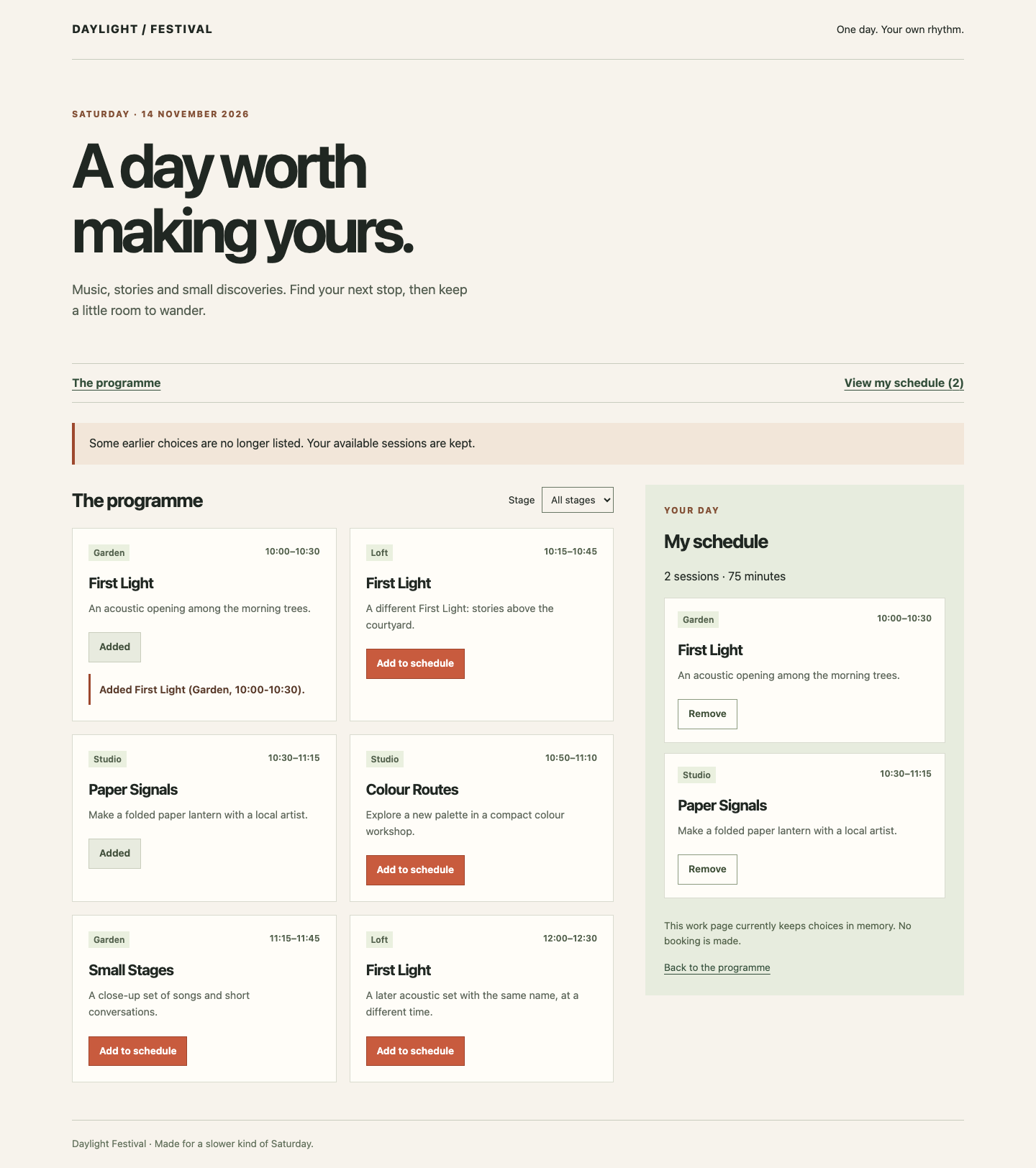
Return to Work and refresh. The prepared D11 remains a real 30-minute card. A visible notice explains that some earlier choices are no longer listed; it does not invent a stale title for RETIRED-07 or delete D11. The data source is still the public settings.initialIDs in this independent unit, not localStorage. Add Paper Signals again to make two choices totalling 75 minutes.
Set Stage to Garden. The programme now contains the Garden sessions, while View my schedule still contains Garden First Light and Studio Paper Signals, 2 sessions and 75 minutes. Set Stage back to All stages: Paper Signals is still Added. Remove it through My schedule and confirm only that ID leaves the list. The notice about the retired synthetic ID can remain; it contributes no card or minutes. On a normal refresh, this first unit returns to its prepared initial IDs because persistence is not implemented here.
Try Tab and Enter on the stage control, page-navigation links and available Add/Remove buttons. At a narrow width, View my schedule stays in the day navigation, and Add feedback appears beside the clicked card. Compare title, stage, time and description, not just the count. Keep a visible focus indicator and meaningful labels supplied by the prepared renderer. Run the final step check. You now have one consistent selection and a current-data view; the next independent lab adds time conflicts and browser restoration.
To match the reference below, return to the standalone Work page and refresh normally. This restores the independent initial Garden First Light choice and the retired-ID notice. Set Stage to All stages. If Paper Signals is not Added, choose its Add to schedule button. Then compare the two current cards and 75-minute summary with the separate unavailable-choice notice. The retired ID creates no card or minutes.
Summary
You built a React selection around stable IDs, resolved it against the current catalogue, and derived its cards, count and scheduled minutes. Same-title records stayed distinct, filtering preserved choices, and a retired synthetic ID received a clear explanation without losing valid sessions.
This unit intentionally keeps choices in memory and does not prevent overlapping sessions. The next lab starts independently with this selection behaviour prepared, then teaches conflict decisions and same-origin browser storage.