Introduction
V01 stored one vector for each help article. Real articles do not stay frozen: instructions change, titles are corrected and obsolete pages are retired. A search index must follow that lifecycle or it can return stale answers even when the source website is correct.
Cloudflare Vectorize provides three related write operations:
- insert adds a new vector ID and should not silently replace an existing one;
- upsert means “update or insert” and replaces the vector and metadata for that ID;
- delete by ID retires selected records without rebuilding the entire index.
You will seed three synthetic documents, upsert a revised password article, delete a retired billing article and prove that the unrelated upload article never changes. Each write returns an asynchronous mutation ID, so you will wait for the exact state instead of assuming that an accepted write is already readable.
This is the second Vectorize lab. If you entered directly, first complete Connect LabEx to Your Cloudflare Account, then complete V01 so index compatibility, document IDs and mutation visibility are familiar.
Vectorize is available on Workers Free. This lab stores at most three tiny 384-dimensional vectors, runs bounded reads and invokes no AI model, so Workers Paid and Workers AI Neurons are not required.
Setup installs Node.js 22.22.0 and project-local Wrangler 4.132.0 in /home/labex/project/document-lifecycle-index. It supplies independent read-only checks but does not authorize Wrangler, create an index, write vectors or change your Cloudflare account.
Authorize a Fresh Document-Lifecycle Index
In this step, you will authorize the new VM, record the intended account and create a unique local configuration for one disposable index.
Enter the prepared project and confirm the pinned CLI:
cd /home/labex/project/document-lifecycle-index
npx wrangler --version
Expect 4.132.0. Authorize the same limited account and Workers resource access used in V01:
npx wrangler login --device --browser=false --scopes account:read user:read workers:write
npx wrangler whoami --json
Confirm loggedIn: true, identify your learning account and generate a unique name:
RUN="labex-c08-v02-$(openssl rand -hex 6)"
printf '%s\n' "$RUN"
Replace YOUR_ACCOUNT_ID with that account's actual ID:
cat > wrangler.jsonc <<JSON
{
  "\$schema": "./node_modules/wrangler/config-schema.json",
  "name": "$RUN-tools",
  "account_id": "YOUR_ACCOUNT_ID",
  "compatibility_date": "2026-09-16",
  "vectorize": [
    { "binding": "DOCUMENTS", "index_name": "$RUN", "remote": true }
  ]
}
JSON
The new index is independent of V01. Reusing knowledge does not mean depending on an earlier lab's VM or cloud resource.
Seed the Current Document Set
In this step, you will create the index and insert the three records that represent the current help center before any edit or retirement.
Create the same 384-dimensional cosine contract used by the BGE Small embedding model:
npx wrangler vectorize create "$RUN" --dimensions=384 --metric=cosine --update-config=false
Create a reusable bounded waiter. Three matching reads protect the learner-visible result from a briefly stale replica:
cat > scripts/wait-for-vectorize.mjs <<'JS'
import { execFileSync } from "node:child_process";

const [indexName, mutationId, expectedCountText] = process.argv.slice(2);
const expectedCount = Number(expectedCountText);
const wrangler = "./node_modules/wrangler/bin/wrangler.js";
let consecutiveMatches = 0;

for (let attempt = 1; attempt <= 120; attempt += 1) {
  const output = execFileSync(process.execPath, [wrangler, "vectorize", "info", indexName, "--json"], { encoding: "utf8" });
  const info = JSON.parse(output);
  if (info.processedUpToMutation === mutationId && info.vectorCount === expectedCount) {
    consecutiveMatches += 1;
  } else {
    consecutiveMatches = 0;
  }
  if (consecutiveMatches === 3) {
    console.log(`mutation ${mutationId} is consistently readable with ${expectedCount} vectors`);
    console.log(JSON.stringify(info, null, 2));
    process.exit(0);
  }
  await new Promise((resolve) => setTimeout(resolve, 2000));
}
throw new Error(`mutation ${mutationId} was not readable within four minutes`);
JS
Generate three deterministic document vectors. The revision field makes a later replacement easy to recognize; the full metadata object represents what the search application would need after a source update.
cat > scripts/create-seed.mjs <<'JS'
import { writeFileSync } from "node:fs";

const DIMENSIONS = 384;
const documents = [
  { id: "password-reset", axis: 0, category: "account", title: "Reset your password" },
  { id: "upload-pdf", axis: 1, category: "files", title: "Upload a PDF" },
  { id: "billing-receipt", axis: 2, category: "billing", title: "Download a billing receipt" }
];

const rows = documents.map((document) => {
  const values = Array(DIMENSIONS).fill(0);
  values[document.axis] = 1;
  return {
    id: document.id,
    values,
    metadata: {
      category: document.category,
      published: true,
      title: document.title,
      revision: 1,
      model: "@cf/baai/bge-small-en-v1.5",
      pooling: "cls"
    }
  };
});

writeFileSync("vectors/seed.ndjson", rows.map(JSON.stringify).join("\n") + "\n");
console.log(`prepared ${rows.length} current documents`);
JS
node scripts/create-seed.mjs
Insert only new IDs, preserve the complete result and wait for its real mutation:
set -o pipefail
npx wrangler vectorize insert "$RUN" --file=vectors/seed.ndjson 2>&1 | tee .labex/seed-output.txt
Continue only when Wrangler reports three enqueued vectors and a mutation ID. An authentication or network error is inconclusive; fix it before waiting.
SEED_MUTATION_ID=$(sed -nE 's/.*Mutation changeset identifier: ([0-9a-f-]{36}).*/\1/p' .labex/seed-output.txt | tail -n 1)
if [ -z "$SEED_MUTATION_ID" ]; then
  printf '%s\n' 'No seed mutation ID was returned; fix the insert error before waiting.' >&2
else
  node scripts/wait-for-vectorize.mjs "$RUN" "$SEED_MUTATION_ID" 3
fi
npx wrangler vectorize list-vectors "$RUN" --count=10
The inventory should contain the three stable application IDs. insert is appropriate here because they are new; the next step intentionally replaces one existing ID.
Upsert a Revised Password Article
In this step, you will replace the vector and metadata for password-reset while keeping its stable ID.
An upsert inserts a missing ID or replaces an existing ID. Replacement is useful when one source document changes, but it also means you must send the complete desired metadata. Fields omitted from the new record should not be assumed to survive.
Build revision 2 with a different deterministic axis and updated title while retaining every still-valid metadata field:
cat > scripts/create-update.mjs <<'JS'
import { writeFileSync } from "node:fs";

const values = Array(384).fill(0);
values[3] = 1;
const updated = {
  id: "password-reset",
  values,
  metadata: {
    category: "account",
    published: true,
    title: "Reset an expired password",
    revision: 2,
    model: "@cf/baai/bge-small-en-v1.5",
    pooling: "cls"
  }
};

writeFileSync("vectors/password-update.ndjson", JSON.stringify(updated) + "\n");
console.log("prepared password-reset revision 2");
JS
node scripts/create-update.mjs
Submit the replacement and keep its exact mutation:
set -o pipefail
npx wrangler vectorize upsert "$RUN" --file=vectors/password-update.ndjson 2>&1 | tee .labex/upsert-output.txt
UPSERT_MUTATION_ID=$(sed -nE 's/.*Mutation changeset identifier: ([0-9a-f-]{36}).*/\1/p' .labex/upsert-output.txt | tail -n 1)
if [ -z "$UPSERT_MUTATION_ID" ]; then
  printf '%s\n' 'No upsert mutation ID was returned; fix the write error before waiting.' >&2
else
  node scripts/wait-for-vectorize.mjs "$RUN" "$UPSERT_MUTATION_ID" 3
fi
npx wrangler vectorize get-vectors "$RUN" --ids password-reset > .labex/password-after-upsert.txt
node - <<'JS'
const text = require("fs").readFileSync(".labex/password-after-upsert.txt", "utf8");
const [row] = JSON.parse(text.slice(text.indexOf("[")));
console.table([{ id: row.id, dimensions: row.values.length, changedAxis: row.values[3], title: row.metadata.title, revision: row.metadata.revision }]);
JS
Expect the same ID, 384 dimensions, axis 3 equal to 1, the revised title and revision 2. The total count remains three because upsert replaced one identity rather than adding a fourth document.
Retire One Document Without Rebuilding
In this step, you will delete the retired billing article by stable ID and prove that the updated password article and untouched upload article remain.
Deleting by ID is narrower than dropping an index: the index contract and every unrelated record stay in place. Submit only the retired ID:
set -o pipefail
npx wrangler vectorize delete-vectors "$RUN" --ids billing-receipt 2>&1 | tee .labex/delete-output.txt
Wait for the deletion mutation and a count of two:
DELETE_MUTATION_ID=$(sed -nE 's/.*Mutation changeset identifier: ([0-9a-f-]{36}).*/\1/p' .labex/delete-output.txt | tail -n 1)
if [ -z "$DELETE_MUTATION_ID" ]; then
  printf '%s\n' 'No delete mutation ID was returned; fix the write error before waiting.' >&2
else
  node scripts/wait-for-vectorize.mjs "$RUN" "$DELETE_MUTATION_ID" 2
fi
npx wrangler vectorize list-vectors "$RUN" --count=10
npx wrangler vectorize get-vectors "$RUN" --ids password-reset upload-pdf billing-receipt > .labex/documents-after-retirement.txt
node - <<'JS'
const text = require("fs").readFileSync(".labex/documents-after-retirement.txt", "utf8");
const rows = JSON.parse(text.slice(text.indexOf("[")));
console.table(rows.map((row) => ({ id: row.id, title: row.metadata.title, revision: row.metadata.revision })));
JS
Only password-reset revision 2 and upload-pdf revision 1 should remain. Absence of billing-receipt is meaningful because the same authenticated read also returned the two records that must survive.
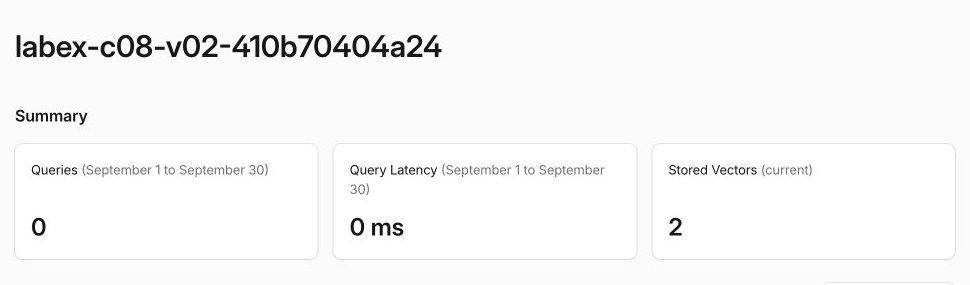
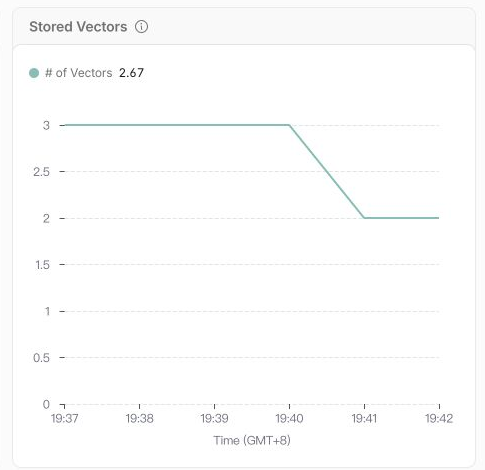
Open the selected account in the Cloudflare Dashboard and go to AI → Vectorize, then open the index named in $RUN. Confirm that the summary reports two stored vectors. In the Stored Vectors chart, connect the visible lifecycle to the commands: the count rises to three after the seed mutation and falls to two after the targeted deletion. The Dashboard does not reveal which ID was removed, so the Wrangler and independent API reads remain the authoritative identity evidence.
The summary gives you the current state at a glance: two documents are still searchable after retiring one record.
The chart turns the lifecycle into a picture. Its average can briefly show a decimal because the line covers several one-minute samples; the important part is the visible transition from three stored vectors to two.
Remove the Lifecycle Index and Log Out
In this step, you will remove the whole disposable index only after proving the targeted document lifecycle.
Deleting one vector in the previous step preserved the index. This final command deliberately removes the complete lab resource:
npx wrangler vectorize delete "$RUN" --force
npx wrangler vectorize list --json > .labex/indexes-after-cleanup.json
node -e '
  const rows = JSON.parse(require("fs").readFileSync(process.argv[1], "utf8"));
  if (rows.some((row) => row.name === process.argv[2])) throw new Error("lab index still exists");
  console.log("lab index is absent");
' .labex/indexes-after-cleanup.json "$RUN"
Complete the lab's cleanup check while the successful authenticated inventory is still available. Keep Wrangler authorized until that check passes, because logging out first would make an authentication error indistinguishable from successful deletion.
Then remove this VM's authorization and inspect the structured result:
npx wrangler logout
npx wrangler whoami --json
Expect loggedIn: false. The separate Dashboard browser session remains available to your learning account.
Summary
You started with three current document IDs, used upsert to replace the complete vector and metadata for one revised article, and used targeted deletion to retire one obsolete article. Exact mutation IDs and bounded consecutive reads distinguished accepted writes from readable state.
You also proved the two safety properties that matter in a real indexing pipeline: an update did not create a duplicate identity, and a retirement did not remove unrelated documents. Finally, you connected the two-record state to the Dashboard, deleted the disposable index, confirmed authenticated absence and logged out of the fresh VM.
V03 will generate a live query embedding with the same model contract and use the maintained index to retrieve similar help articles.