Introduction
An AI answer written for a person can vary in wording without causing a problem. Application code needs something stricter. A ticket-routing service, for example, needs named fields such as category and priority, with values from a known set. Structured output asks a model to return machine-readable data instead of free-form prose.
This lab uses JSON Mode with a JSON Schema. JSON is the data format. The schema is a contract that describes which fields are required, which value types are allowed and whether unexpected fields are forbidden. Asking a model to follow a schema improves its response shape, but it is not a trust boundary: model output is still external data and can be missing, malformed or incompatible with the application.
You will build POST /extract. The Worker sends one small synthetic support ticket to a Cloudflare-hosted Llama model and requests four fields: a category, a priority, a short summary and a follow-up decision. The same schema is then checked independently with Ajv before the Worker returns an accepted record. Deterministic fixtures will inject malformed model output so you can prove that invalid data follows an error path instead of entering the accepted response.
This is the third lab in the course. It assumes you know that a Cloudflare Worker handles HTTP requests and that the AI binding exposes Workers AI as env.AI. If you entered the course directly, first complete Connect LabEx to Your Cloudflare Account so you know how to use the VM terminal, authorize Wrangler, confirm your learning account and save its account ID.
The lab uses @cf/meta/llama-3.3-70b-instruct-fp8-fast, which supports JSON Mode, and keeps every prompt and result small. Workers Free accounts currently receive a shared daily allocation of 10,000 Neurons, so Workers Paid is not required while the account has free allocation remaining. Local inference still reaches Cloudflare and consumes that allocation. If the model or allocation is unavailable, stop instead of sending repeated requests.
Setup installs Node.js 22.22.0, project-local Wrangler 4.132.0 and Ajv 8.17.1 in /home/labex/project/ticket-fields. It supplies deterministic tests and independent checks. Setup does not log in, invoke a model, deploy a Worker or create a cloud resource. Keep this VM open until you delete the disposable Worker and verify logout.
Authorize the VM and Configure the Extraction Worker
In this step, you will authorize this fresh VM and configure one disposable Worker. A Dashboard login belongs to the browser; Wrangler in a new VM needs its own limited authorization before it can manage the learning account.
Enter the prepared project and confirm the pinned Wrangler version:
cd /home/labex/project/ticket-fields
npx wrangler --version
Expect 4.132.0. Request the same narrow permissions used by the earlier Workers AI labs. Wrangler 4.132.0 checks KV dependencies while deleting a Worker, so workers_kv:write prevents an unrelated cleanup error even though this lab creates no KV data.
npx wrangler login --device --browser=false --scopes account:read user:read workers_scripts:write workers_kv:write ai:write
Open the displayed link, enter the current device code, inspect the account and permissions, and authorize the learning account. Return to the terminal and inspect structured identity data:
npx wrangler whoami --json
Confirm loggedIn: true and read the intended account's name and id. Generate a unique disposable Worker name:
RUN="labex-c07-a03-$(openssl rand -hex 6)"
printf '%s\n' "$RUN"
Replace YOUR_ACCOUNT_ID with that account's actual ID:
cat > wrangler.jsonc <<JSON
{
  "\$schema": "./node_modules/wrangler/config-schema.json",
  "name": "$RUN",
  "account_id": "YOUR_ACCOUNT_ID",
  "main": "src/index.js",
  "compatibility_date": "2026-09-16",
  "workers_dev": true,
  "preview_urls": false,
  "observability": {
    "enabled": true,
    "head_sampling_rate": 1
  },
  "ai": {
    "binding": "AI",
    "remote": true
  }
}
JSON
The AI binding becomes env.AI. remote: true means the local Worker process still calls the real account-backed model. Observability saves the small lifecycle events you will inspect after deployment. No inference or deployment has happened yet.
Read the Structured-Output Contract
In this step, you will inspect the two layers that protect the application. JSON Mode sends a schema with the model request. Ajv checks the returned value against that schema inside the Worker. The first layer guides generation; the second decides whether the value is safe to accept.
Generate the Worker's environment types:
npx wrangler types
grep -A4 'interface __BaseEnv_Env' worker-configuration.d.ts
Look for AI: Ai. This is a binding supplied by the platform, not a model API key stored in source code.
The record will have four fields:
category: billing | account | upload | other
priority: low | medium | high
summary: nonempty text, at most 160 characters
needs_follow_up: true or false
In JSON Schema, type controls the kind of value, enum limits a value to a known list, required names fields that must exist, and additionalProperties: false rejects unexpected fields. That last rule matters because an invented field can otherwise pass through unnoticed. The schema describes structure, not whether the model's interpretation is objectively correct; a human or later business rule may still review the accepted fields.
Inspect the malformed fixtures supplied for the deterministic test:
grep -nE 'security|priority: 1|internal_note|not-an-object' test/worker.test.mjs
These fixtures cost no Neurons. They let the test reliably exercise cases that should never be produced on purpose by repeated live prompts.
Build the Validated Extraction Endpoint
In this step, you will implement the schema, the model request and the application-side validation. Only the branch that passes Ajv returns a record.
Create the Worker entrypoint:
cat > src/index.js <<'JS'
import Ajv from "ajv";

const MODEL = "@cf/meta/llama-3.3-70b-instruct-fp8-fast";
const MAX_TICKET = 1200;

export const TICKET_SCHEMA = {
  type: "object",
  properties: {
    category: { type: "string", enum: ["billing", "account", "upload", "other"] },
    priority: { type: "string", enum: ["low", "medium", "high"] },
    summary: { type: "string", minLength: 1, maxLength: 160 },
    needs_follow_up: { type: "boolean" }
  },
  required: ["category", "priority", "summary", "needs_follow_up"],
  additionalProperties: false
};

const ajv = new Ajv({ allErrors: true });
const isTicketRecord = ajv.compile(TICKET_SCHEMA);

function json(data, status = 200) {
  return Response.json(data, { status });
}

async function readTicket(request) {
  const contentType = request.headers.get("content-type") || "";
  if (!contentType.toLowerCase().includes("application/json")) {
    return { error: json({ error: "json_required" }, 415) };
  }

  const raw = await request.text();
  if (raw.length > 2048) {
    return { error: json({ error: "ticket_too_large" }, 413) };
  }

  let body;
  try {
    body = JSON.parse(raw);
  } catch {
    return { error: json({ error: "invalid_json" }, 400) };
  }

  const ticket = typeof body?.ticket === "string" ? body.ticket.trim() : "";
  if (!ticket) return { error: json({ error: "invalid_ticket" }, 400) };
  if (ticket.length > MAX_TICKET) {
    return { error: json({ error: "ticket_too_large" }, 413) };
  }
  return { ticket };
}

async function extractTicket(request, env) {
  const parsed = await readTicket(request);
  if (parsed.error) return parsed.error;

  const requestId = crypto.randomUUID();
  const details = { requestId, model: MODEL };

  let result;
  try {
    result = await env.AI.run(MODEL, {
      messages: [
        {
          role: "system",
          content: "Extract support-ticket fields. Use only evidence in the ticket. Keep the summary short and do not add fields."
        },
        { role: "user", content: parsed.ticket }
      ],
      response_format: {
        type: "json_schema",
        json_schema: TICKET_SCHEMA
      },
      max_tokens: 160,
      temperature: 0
    });
  } catch {
    console.error(JSON.stringify({ event: "ticket_extraction_failed", ...details }));
    return json({ error: "model_unavailable", requestId }, 502);
  }

  const candidate = result?.response;
  if (!isTicketRecord(candidate)) {
    console.error(JSON.stringify({ event: "ticket_output_rejected", ...details }));
    return json({ error: "invalid_model_output", requestId }, 502);
  }

  console.log(JSON.stringify({ event: "ticket_output_accepted", ...details }));
  return json({ record: candidate, requestId });
}

export default {
  async fetch(request, env) {
    const url = new URL(request.url);
    if (request.method === "GET" && url.pathname === "/health") {
      return json({ status: "ok" });
    }
    if (request.method === "POST" && url.pathname === "/extract") {
      return extractTicket(request, env);
    }
    return json({ error: "not_found" }, 404);
  }
};
JS
The Worker never logs the ticket or returned fields. Its request ID connects a client response to an accepted, rejected or failed lifecycle event without copying support content into observability data. Ajv error details also stay out of the client response because they can reveal internal validation design; clients receive the stable invalid_model_output contract.
Run the deterministic tests:
node --test test/worker.test.mjs
Expect five passing tests. One test injects seven malformed candidates through a fake AI binding and requires every response to omit record. Then bundle the real Worker without deploying it:
npx wrangler deploy --dry-run
The fixtures prove rejection behavior without relying on variable model output. The dry run proves the source, Ajv dependency and Worker configuration bundle together. The next step performs one real structured inference.
Exercise One Real Structured Result
In this step, you will run the Worker from the VM and make one real JSON Mode request. “Local” describes the request handler; the AI binding still uses the selected Cloudflare account and consumes part of its daily allocation.
Start Wrangler in the background and save its process ID:
npx wrangler dev --port 8787 > .labex/dev.log 2>&1 &
echo $! > .labex/dev.pid
Wait for the non-AI health route:
for attempt in $(seq 1 30); do
  if curl --silent --fail http://127.0.0.1:8787/health; then
    break
  fi
  sleep 1
done
Send one clear synthetic ticket:
curl --silent --show-error http://127.0.0.1:8787/extract \
  --header 'Content-Type: application/json' \
  --data '{"ticket":"Customer cannot upload a PDF and needs help before today’s deadline."}'
Expect a JSON response with record and requestId. The exact category, priority, summary wording and follow-up decision can vary. The important evidence is that the record contains exactly four fields and every value satisfies the schema.
Now prove that an invalid application request is rejected before the model is called:
curl --silent --show-error --write-out '\nHTTP %{http_code}\n' \
  http://127.0.0.1:8787/extract \
  --header 'Content-Type: application/json' \
  --data '{"ticket":""}'
Expect {"error":"invalid_ticket"} and HTTP 400. Input validation protects the model call; output validation protects the application record. They are separate boundaries.
Deploy and Inspect Accepted Output
In this step, you will deploy the same validated endpoint and connect its visible Dashboard state to the runtime result. First stop only the saved development process:
kill "$(cat .labex/dev.pid)"
wait "$(cat .labex/dev.pid)" 2>/dev/null || true
Deploy the Worker:
npx wrangler deploy
Save the exact workers.dev URL printed by Wrangler:
WORKER_URL="https://YOUR_WORKER_URL"
Send one bounded public request:
curl --silent --show-error "$WORKER_URL/extract" \
  --header 'Content-Type: application/json' \
  --data '{"ticket":"Customer cannot upload a PDF and needs help before today’s deadline."}'
Confirm that the public response again contains exactly the schema fields under record. A successful HTTP status alone is not enough; the independent check also validates every returned field and the deployed AI binding.
Open the Cloudflare Dashboard and go to Workers & Pages → Overview → your labex-c07-a03-... Worker. Inspect its binding and then open Observability → Logs. Search for ticket_output_accepted, expand the event and confirm its model, requestId and event name. The log deliberately excludes the ticket and extracted record.
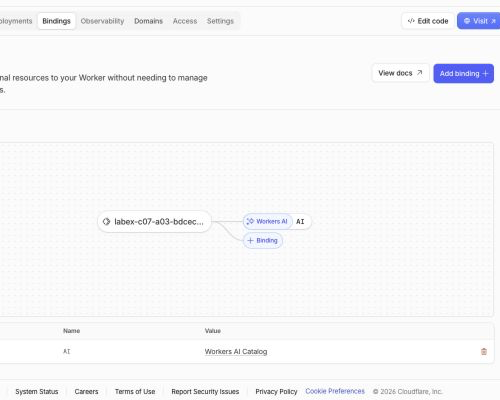
The binding view below is from one disposable debug run. The diagram and table both connect the name AI to Workers AI, which is the visible Dashboard counterpart of env.AI in the Worker. Your unique Worker name will differ.
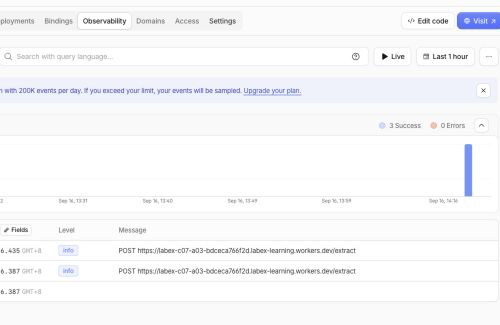
The same run recorded 3 Success and 0 Errors after the public request and independent checks. These totals are examples, not required counts. The important relationship is that the selected Worker handled the visible /extract requests successfully.
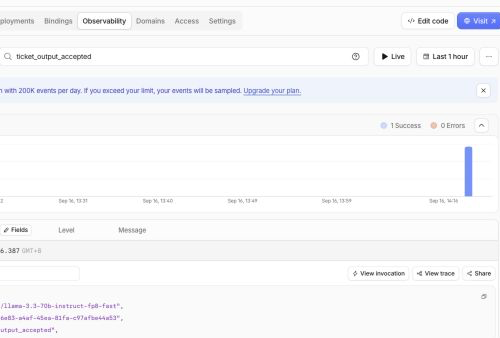
After filtering for ticket_output_accepted, the expanded application event shows the exact Llama model, a request ID and the accepted event name. It does not contain the synthetic ticket or extracted record. This confirms the privacy boundary without treating a log line as proof that schema validation passed; the runtime response and independent check provide that proof.
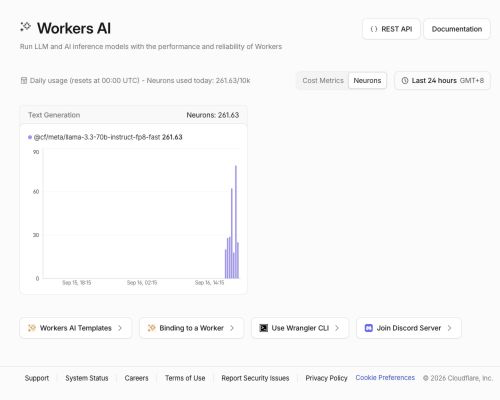
Then open Workers AI and inspect today's model usage. Find the Llama 3.3 model and confirm the bounded exercises remain within the 10,000-Neuron Workers Free allocation. Dashboard delivery can lag, so wait briefly instead of repeating inference merely to force a graph or log update.
The account in the example showed 261.63/10k Neurons for the Llama model. That total includes earlier course-production exercises on the same learning account, so it is not the cost of this lab alone and your value will differ. Remaining within the Free allocation—not matching the example number—is the checkpoint.
The Dashboard values belong to this disposable run. The teaching targets are the exact Worker identity, its AI binding, a privacy-bounded accepted event and Free-allocation usage. CLI, API and runtime checks remain authoritative if a Dashboard view is delayed.
Remove the Worker and Log Out
In this step, you will delete the disposable Worker and then remove this VM's authorization. Workers AI usage is account-level history, so deleting the Worker removes its endpoint but does not erase the usage record or change the account plan.
Delete the exact Worker named in wrangler.jsonc:
npx wrangler delete
Confirm only when Wrangler shows this lab's unique labex-c07-a03-... name. The command should end with Successfully deleted. Refresh Workers & Pages → Overview and confirm that exact name is absent.
While the VM is still authorized, run the independent management check:
python3 .labex/verify.py deleted
Only after it reports PASS: deleted, remove the VM's stored authorization:
npx wrangler logout
npx wrangler whoami --json
Require loggedIn: false. A missing local file, a closed browser tab or a network error would not prove cloud deletion or logout.
Summary
You built a Workers AI endpoint that requests structured ticket fields with JSON Mode and a JSON Schema. You learned why a requested shape is not the same as trusted data, used Ajv as an independent application boundary, and proved with malformed fixtures that invalid model output never becomes an accepted record. You exercised one real local and deployed result on Workers Free, connected the accepted event to Dashboard observability, removed the disposable Worker and logged the fresh VM out.