



Introduction
A festival schedule is useful only when a visitor can actually attend its chosen sessions. Daylight Festival has adjacent sessions that fit together and overlapping sessions on different stages that do not. You will make additions explain the real conflict, then remember only session IDs so an ordinary refresh restores the current programme's records.
You need the React and JavaScript prerequisites from the first lab and its current-record/derived-summary selection pattern. This unit starts independently with that selection behaviour prepared, so no previous VM, file or browser choices are needed. You will learn half-open intervals, checking every selection, JSON recovery, localStorage scope and the minimum useEffect/lazy-initializer lifecycle needed to avoid overwriting saved choices. Its 60 minutes are an author estimate including reading and ordinary mistakes. No backend, booking or cross-device persistence is involved.
Use Workspace at /home/labex/project/festival-schedule/work and Festival for the real standalone page links. Edit only src/App.jsx, src/conflicts.js and src/storage.js; src/selection.js is the completed prepared helper from the first lab. Preserve settings/catalogue, renderer/styles, entry point, Study, dependencies and service configuration. Study uses a separate storage key and never counts as your work. Website labels stay English.
Reject Actual Overlaps and Keep Adjacent Sessions
In this step, make each addition consider all existing choices and identify a real conflicting session.
In Festival, open Open Study schedule in a new page. Use its normal example first: add Garden First Light, 10:00–10:30 and Studio Paper Signals, 10:30–11:15. Choose View my schedule and read the two cards and 75 minutes. Then try Studio Colour Routes, 10:50–11:10. A message beside that candidate identifies Paper Signals; the two selected records and 75 minutes stay unchanged. The prepared renderer keeps the card message in view, including at narrow widths. This is the supplied example, not your implementation.
Close Study and return to the product's Festival entry. Open Open Work schedule in a new page and keep it open. The selection helpers are already prepared, but the starter Add function does not reject overlaps and choices are only in memory. Switch to Workspace to edit. Its starting directory is /home/labex/project/festival-schedule/work; use the cd, pwd and cat commands taught in the first lab if you need to confirm a path. Do not reinstall packages for a filename mistake.
Represent a session as a half-open interval [start, end). Its start is included and its end is free for the next session. All times are integer minutes on one stated local date. For example, 10:30 is 630. Garden First Light is [600, 630) and Paper Signals is [630, 675): equality at 630 is legal. Colour Routes [650, 670) overlaps Paper Signals but not the first selected session. Looking only at the first selection would be wrong.
The overlap condition is candidate.start < session.end && session.start < candidate.end. Both strict comparisons must hold; changing < to <= would incorrectly reject adjacency. find checks the selected records until it finds a matching conflict and returns that actual object, or undefined if none exists. It can return any real conflict when several exist; the error must identify one honestly.
Save the conflict helper using the quoted here-document editing method from the first lab. The final JS is alone, and > replaces the named file:
cat > src/conflicts.js <<'JS'
export function findConflict(candidate, selected) {
  return selected.find(session =>
    candidate.start < session.end && session.start < candidate.end
  );
}
JS
Now connect it before updating the ID state. The component below imports the helper you just wrote. It resolves the selected records from the entire current selection, not from the stage-filtered programme. A refusal sets feedback for the clicked candidate and returns without changing IDs or totals. Its message uses title, stage and time so two First Light sessions are not confused. Different clear wording is valid; the important relationship is the candidate and an actual selected conflict. The other state and derived helpers follow the previous lab.
cat > src/App.jsx <<'JS'
import React, {useState} from 'react';
import View, {clock} from '../../shared/View.jsx';
import {findConflict} from './conflicts.js';
import {catalog, settings} from './settings.js';
import {currentRecords, totalMinutes, visibleRecords, missingNotice} from './selection.js';

const describe = session => session.title + ' (' + session.stage + ', ' + clock(session.start) + '-' + clock(session.end) + ')';

export default function App() {
  const [selectedIDs, setSelectedIDs] = useState(settings.initialIDs);
  const [stage, setStage] = useState('all');
  const [feedback, setFeedback] = useState({sessionID: null, text: ''});
  const selected = currentRecords(selectedIDs, catalog);
  const visible = visibleRecords(catalog, stage);
  const minutes = totalMinutes(selected);

  function add(id) {
    const session = catalog.find(item => item.id === id);
    if (!session || selectedIDs.includes(id)) return;
    const conflict = findConflict(session, selected);
    if (conflict) {
      setFeedback({sessionID: id, text: 'Cannot add ' + describe(session) + '. It overlaps ' + describe(conflict) + '.'});
      return;
    }
    setSelectedIDs(ids => [...ids, id]);
    setFeedback({sessionID: id, text: 'Added ' + describe(session) + '.'});
  }

  function remove(id) {
    setSelectedIDs(ids => ids.filter(existing => existing !== id));
    setFeedback({sessionID: null, text: ''});
  }

  function changeStage(value) {
    setStage(value);
    setFeedback({sessionID: null, text: ''});
  }

  return <View settings={settings} visible={visible} selected={selected}
    count={selected.length} minutes={minutes} selectedIDs={selectedIDs}
    stage={stage} onStage={changeStage} onAdd={add} onRemove={remove}
    feedback={feedback} missingNotice={missingNotice(selectedIDs, catalog)} />;
}
JS
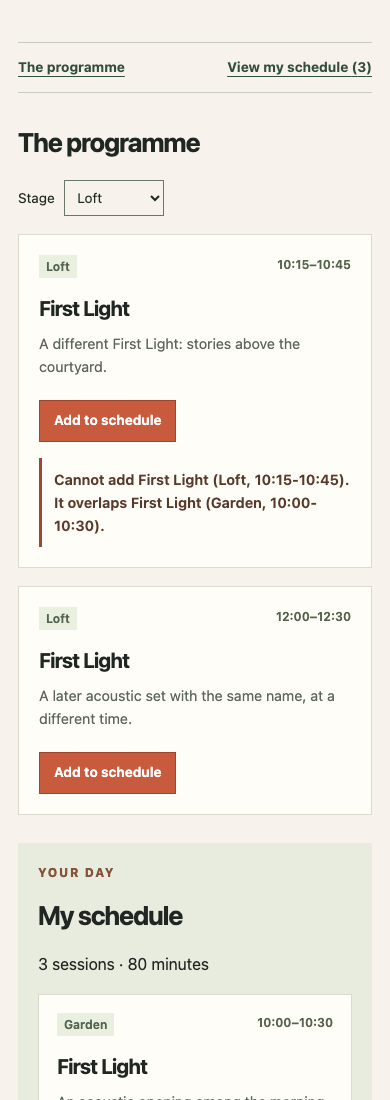
Return to Work and refresh normally. This unit's independent initialIDs is empty. Add Garden First Light and Paper Signals for 75 minutes. Try Colour Routes: Paper Signals is the second selected object, and the refusal must leave 75 minutes. Select Stage: Loft, then try First Light, 10:15–10:45. The real conflicting Garden First Light is now hidden from the programme by the filter, but it still exists in My schedule. The new refusal must identify that Garden session and keep the same two choices. A filter must not weaken the conflict rule.
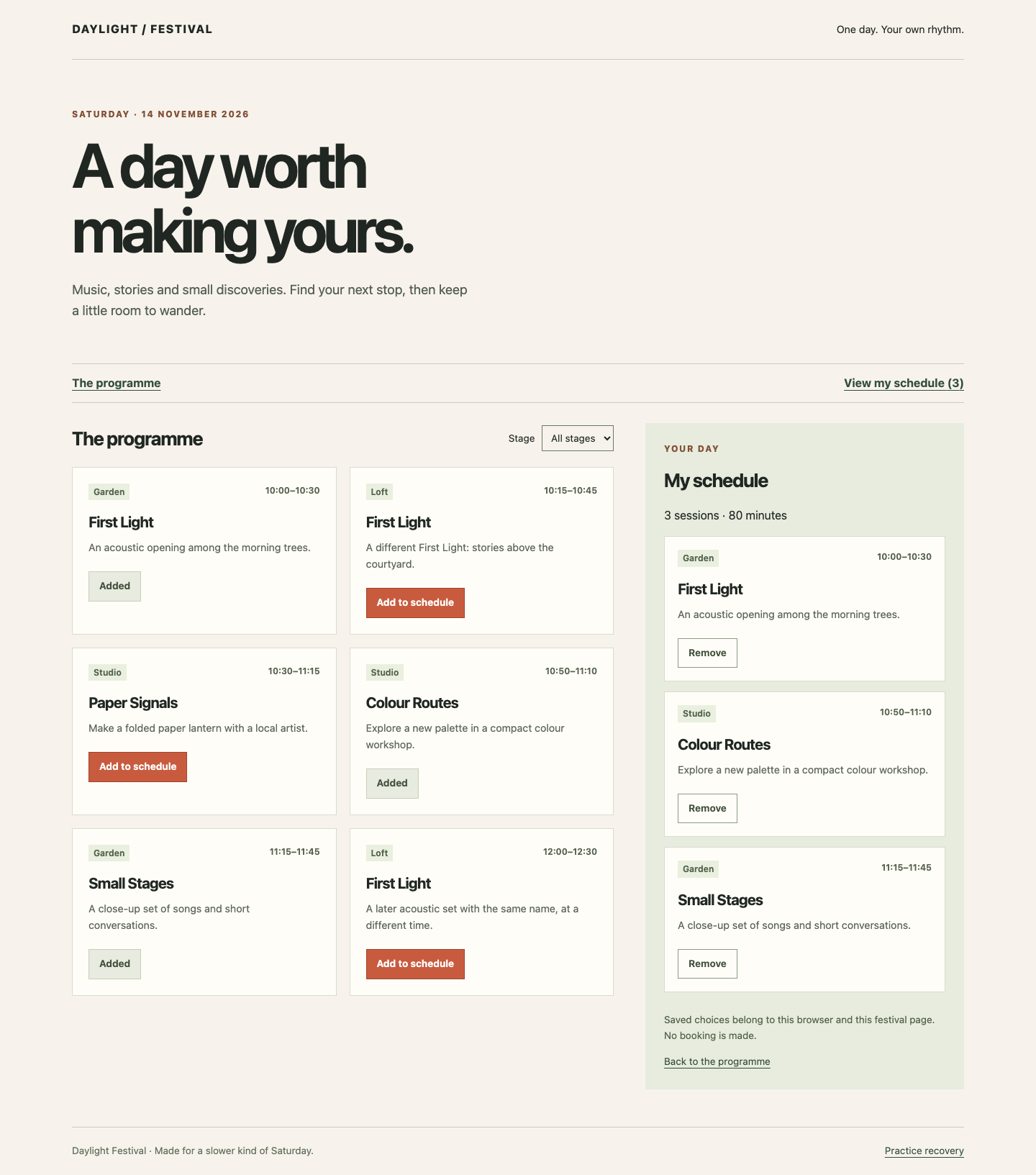
Return Stage to All stages. Add Garden Small Stages, 11:15–11:45: it is adjacent to Paper Signals, so the total becomes 105 minutes. Through View my schedule, remove Paper Signals. Garden First Light plus Small Stages total 60. Add Colour Routes, 10:50–11:10 again: it now fits, giving 80 minutes in the order First Light, Colour Routes, Small Stages. The similarly titled Loft First Light at 10:15 still conflicts with Garden First Light; do not use it as the recovered successful addition.
At a narrow width, the day navigation offers My schedule without a long search through the programme, and the refusal appears beside the clicked card. Use real Tab/Enter on a candidate and check that its feedback is readable without moving focus into a status region. If you made a code typo, inspect the saved src/conflicts.js and src/App.jsx, restore the complete relevant block and refresh. This step still keeps choices in memory; a refresh can reset them until Step 2. Run the conflict check.
Restore IDs Before Synchronizing Storage
In this step, restore a saved ID list before writing it, then recover from unusable or outdated saved data.
Start in Workspace. localStorage is browser storage for one origin: scheme, host and port. Paths on the same origin share its area, so use a course-and-unit-specific key, settings.storageKey, instead of a generic data key. Study has a different key. Do not call clear() or remove other keys. A URL from a new VM, a clean browser context, another browser or another device need not have these choices. Browser policy can deny storage. This is convenience for the same browser page, not a reservation, backup or promise of permanent retention.
Storage values are strings. JSON.stringify(ids) turns the ID array into a JSON string; JSON.parse(raw) reads it back. Store only IDs such as ["D11","D12"], not copies of titles and times that can become stale. Resolve restored IDs against the current catalogue, then derive the same cards/count/minutes as before. The stored array's order is not a display-order requirement: My schedule uses current start time and ID.
The public recovery rules are:
- A missing key uses this unit's prepared
settings.initialIDs. Here that array is empty. The separate challenge has its own explicitly supplied initial IDs. - Malformed JSON, a non-array value, or an array containing a non-string gives an empty usable schedule with a readable notice. An empty array is valid.
- Repeated string IDs do not duplicate cards. Missing catalogue IDs are omitted with a notice; compatible valid choices remain with their current details.
- For a saved list that itself contains conflicts, process it in saved order. Keep the first compatible choices and explain that overlapping saved choices were skipped. This is the same admission rule, not schedule optimization.
- If reading storage is denied, allow an in-memory visit with a notice. If writing fails, keep the current choices and say they could not be saved. Refresh restoration is not promised in that denied situation.
The helper below introduces a few JavaScript tools. try runs code that might throw; catch provides a readable recovery instead of letting the page crash. raw === null identifies a missing key. Array.isArray and typeof validate the public ID-list shape; throw new Error(...) sends an invalid shape to the same recovery path. for (const id of saved) visits IDs in order, continue skips one, and push appends to new local arrays. These temporary arrays are not React state. join(' ') combines the applicable notice sentences. Reading this helper does not write or remove storage.
cat > src/storage.js <<'JS'
import {catalog, settings} from './settings.js';
import {findConflict} from './conflicts.js';

export function readSaved() {
  let raw;
  try {
    raw = localStorage.getItem(settings.storageKey);
  } catch {
    return {ids: [], notice: 'Saved choices are unavailable. You can plan in memory for this visit.'};
  }
  try {
    const saved = raw === null ? settings.initialIDs : JSON.parse(raw);
    if (!Array.isArray(saved) || saved.some(id => typeof id !== 'string')) {
      throw new Error('Expected a list of session IDs');
    }
    const ids = [];
    const records = [];
    let missing = false;
    let conflicting = false;
    for (const id of saved) {
      if (ids.includes(id)) continue;
      const session = catalog.find(item => item.id === id);
      if (!session) {missing = true; continue;}
      if (findConflict(session, records)) {conflicting = true; continue;}
      ids.push(id);
      records.push(session);
    }
    const notices = [];
    if (missing) notices.push('Some saved sessions are no longer listed. Your available choices are kept.');
    if (conflicting) notices.push('Some saved choices overlapped. The earlier compatible choices are kept.');
    return {ids, notice: notices.join(' ')};
  } catch {
    return {ids: [], notice: 'Your saved list could not be read. Start a new schedule here.'};
  }
}

export function writeSaved(ids) {
  try {
    localStorage.setItem(settings.storageKey, JSON.stringify(ids));
    return true;
  } catch {
    return false;
  }
}
JS
Now restore the initial state safely. useState(() => readSaved()) passes a function as a lazy initializer: React calls it when initializing this component. It returns {ids, notice} without writing storage, changing another key or fetching data. Keep that snapshot in initial, initialize selected IDs from initial.ids, and retain its notice as feedback. Development StrictMode can call an initializer more than once to detect problems; a read-only initializer is safe to repeat. A different implementation with an explicit hydration gate is also valid, provided it does not write an empty list before restoration.
useEffect is imported from React and synchronizes with the external storage after a render commits. The dependency list [selectedIDs] asks React to rerun this synchronization when that array changes. Development StrictMode may run an extra effect cycle; writing the same ID list is idempotent: repeating it leaves the same saved result and creates no duplicate choice. Selection, sorting, counts and conflict decisions remain ordinary rendering/handler work, not effects. Starting empty, writing empty immediately, and only later loading IDs would erase a real saved schedule.
Replace the component. readSaved and writeSaved come from the helper you just saved; the other imports were used in Step 1. remembering tells the prepared view this version attempts browser persistence, while a failed write still produces the explicit memory-only notice.
cat > src/App.jsx <<'JS'
import React, {useState, useEffect} from 'react';
import View, {clock} from '../../shared/View.jsx';
import {readSaved, writeSaved} from './storage.js';
import {findConflict} from './conflicts.js';
import {catalog, settings} from './settings.js';
import {currentRecords, totalMinutes, visibleRecords, missingNotice} from './selection.js';

const describe = session => session.title + ' (' + session.stage + ', ' + clock(session.start) + '-' + clock(session.end) + ')';

export default function App() {
  const [initial] = useState(() => readSaved());
  const [selectedIDs, setSelectedIDs] = useState(initial.ids);
  const [stage, setStage] = useState('all');
  const [feedback, setFeedback] = useState({sessionID: null, text: initial.notice});
  const selected = currentRecords(selectedIDs, catalog);
  const visible = visibleRecords(catalog, stage);
  const minutes = totalMinutes(selected);

  useEffect(() => {
    if (!writeSaved(selectedIDs)) {
      setFeedback({sessionID: null, text: 'These choices work for this visit, but your browser could not save them.'});
    }
  }, [selectedIDs]);

  function add(id) {
    const session = catalog.find(item => item.id === id);
    if (!session || selectedIDs.includes(id)) return;
    const conflict = findConflict(session, selected);
    if (conflict) {
      setFeedback({sessionID: id, text: 'Cannot add ' + describe(session) + '. It overlaps ' + describe(conflict) + '.'});
      return;
    }
    setSelectedIDs(ids => [...ids, id]);
    setFeedback({sessionID: id, text: 'Added ' + describe(session) + '.'});
  }

  function remove(id) {
    setSelectedIDs(ids => ids.filter(existing => existing !== id));
    setFeedback({sessionID: null, text: ''});
  }

  function changeStage(value) {
    setStage(value);
    setFeedback({sessionID: null, text: ''});
  }

  return <View settings={settings} visible={visible} selected={selected}
    count={selected.length} minutes={minutes} selectedIDs={selectedIDs}
    stage={stage} onStage={changeStage} onAdd={add} onRemove={remove}
    feedback={feedback} missingNotice={missingNotice(selectedIDs, catalog)} remembering={true} />;
}
JS
Return to Work and refresh normally. The first refresh after this code change can be empty: Step 1 never saved its in-memory choices. Add Garden First Light and Paper Signals again, then refresh at exactly the same URL in the same browser page. Both current records and 75 minutes must return. Choosing a fresh independent browser context should start with this unit's initial selection instead; do not claim this private schedule is shared by a URL.
Next use the separate controlled training page. Choose Practice recovery in the footer; it replaces this Work page in the same tab. Read its warning: each exercise replaces only this unit's saved-choice key, so it will replace the current test choices. Choose Load unreadable JSON, then Return to Work. The normal component must show an empty usable schedule and a readable recovery notice. Add the Loft First Light at 12:00–12:30 and refresh normally: its current card and 30 minutes return. This proves recovery can be followed by ordinary use, not just an error label.
Return to Practice recovery and choose Load retired IDs, then Return to Work. Its visible preset contains D11, a retired ID and D12. The two available records remain, totalling 75 minutes, with an explanation of the omitted old choice. Once a clean list has replaced that old input, a later refresh need not repeat the same notice. Finally use Load conflicting IDs: its preset is D11, D13, D12. D13 overlaps the earlier D11, so the restored result keeps D11 and D12 with a notice, not all three or an empty schedule. The practice page is explicitly training, not an invisible reset in a customer flow.
Return to Work and confirm that Add, filtering and Remove still operate on these recovered current choices. Test the legitimate adjacent Small Stages and the Colour Routes refusal as in Step 1. If storage is blocked by a real browser policy, keep the explicit memory-only message, use the page for this visit and reopen in an allowed browser context if you need refresh persistence. Do not erase unrelated browser data to force success. Run the final check after these normal and recovery paths work.
After the removal and re-addition sequence, the restored First Light, Colour Routes and Small Stages cards total 80 minutes. Compare their current details and the Add states:
At a narrow width, the early Loft candidate's refusal identifies the already selected Garden session beside its button; the schedule navigation remains accessible above it.
Summary
You built a truthful attendance rule: every selected current record participates in half-open overlap checks, adjacency is legal, and removal can make a candidate fit. You then restored scoped ID-only browser data before synchronizing writes, preserving current-record relationships and recovering from unreadable, missing or conflicting saved choices.
Restoration is limited to the same browser origin and an existing course environment with storage allowed. The independent challenge changes programme data and relationships using these same mechanisms.