Introduction
In the earlier Workers AI embedding lab, text became an embedding: an ordered list of numbers that captures useful relationships between meanings. An embedding is not the original article and it is not a generated answer. It becomes useful for search only when an application can store it with a stable document ID and later find nearby vectors.
Cloudflare Vectorize is a vector database. Unlike a table designed around rows and columns, a vector index is designed to compare numeric vectors efficiently. Every index fixes two compatibility choices when it is created:
- dimensions — how many numbers every vector contains;
- distance metric — how Vectorize decides which vectors are nearest.
You will create a 384-dimensional index for Cloudflare-hosted @cf/baai/bge-small-en-v1.5 embeddings and choose cosine distance, the same direction-based comparison introduced in A04. You will add metadata indexes for category and published, insert three tiny synthetic help-article vectors, wait for the asynchronous mutation to become readable, and confirm that a three-dimensional vector is rejected.
This is the first lab in the Vectorize course. If you entered directly, first complete Connect LabEx to Your Cloudflare Account so you know how to use the LabEx VM terminal, authorize Wrangler, confirm your learning account and configure its account ID. Complete Workers AI A04 first if vectors, dimensions or cosine similarity are unfamiliar.
Vectorize is available on Workers Free. The current included allowance is far larger than this lab's three 384-dimensional vectors and read-only checks, so Workers Paid is not required. This lab does not invoke Workers AI and consumes no Neurons.
Setup installs Node.js 22.22.0 and project-local Wrangler 4.132.0 in /home/labex/project/document-vector-index. It also supplies independent read-only checks. Setup does not authorize Wrangler, create an index, write vectors or modify your Cloudflare account.
Authorize the VM and Name the Index
In this step, you will authorize the fresh VM, select the intended learning account and record a unique disposable index name.
A Cloudflare Dashboard login belongs to your browser. Wrangler in this fresh VM is a separate client, so it needs limited authorization before it can manage Vectorize resources.
Enter the prepared project and confirm the pinned CLI version:
cd /home/labex/project/document-vector-index
npx wrangler --version
Expect 4.132.0. Request account identity and Workers resource management. In this Wrangler version, the workers:write OAuth scope includes the Vectorize management operations used here; the lab does not request an AI scope because it performs no inference.
npx wrangler login --device --browser=false --scopes account:read user:read workers:write
Open the displayed link, enter the current code, inspect the account and permissions, and authorize your learning account. Then inspect structured identity data:
npx wrangler whoami --json
Confirm loggedIn: true and identify the intended learning account. Generate a unique disposable index name:
RUN="labex-c08-v01-$(openssl rand -hex 6)"
printf '%s\n' "$RUN"
Replace YOUR_ACCOUNT_ID with the actual ID for that account:
cat > wrangler.jsonc <<JSON
{
  "\$schema": "./node_modules/wrangler/config-schema.json",
  "name": "$RUN-tools",
  "account_id": "YOUR_ACCOUNT_ID",
  "compatibility_date": "2026-09-16",
  "vectorize": [
    { "binding": "DOCUMENTS", "index_name": "$RUN", "remote": true }
  ]
}
JSON
The binding records the relationship the next labs will use from Worker code: DOCUMENTS is the application-facing name, while index_name is the owned cloud resource. remote: true means a local Worker would connect to the real remote index rather than an isolated local simulation.
Create the Index and Its Filterable Fields
In this step, you will create the fixed vector contract and prepare two metadata fields for later filtering.
An index's dimensions and distance metric are fixed because every comparison must follow one numeric contract. BGE Small produces 384 numbers. Cosine distance compares vector direction, which suits the meaning-oriented embeddings from A04.
Create the V2 index:
npx wrangler vectorize create "$RUN" --dimensions=384 --metric=cosine --update-config=false
Vectors may also carry small metadata such as a document category. Storing metadata does not automatically make it filterable. A metadata index tells Vectorize which field it should prepare for filters. Create these fields before inserting vectors:
npx wrangler vectorize create-metadata-index "$RUN" --propertyName=category --type=string | tee .labex/category-index-output.txt
npx wrangler vectorize create-metadata-index "$RUN" --propertyName=published --type=boolean | tee .labex/published-index-output.txt
--update-config=false prevents Wrangler from offering to replace the binding you already wrote. Metadata-index creation is asynchronous. Each command enqueues a mutation, so a success message means Cloudflare accepted the change, not that every read already sees it.
Create a small reusable waiter. It runs only the read-only vectorize info command, compares the exact mutation ID and requires three consecutive matching reads before it trusts the result. That extra confirmation avoids presenting a briefly stale read replica as the final state. The waiter stops with an error after four minutes instead of waiting forever:
cat > scripts/wait-for-vectorize.mjs <<'JS'
import { execFileSync } from "node:child_process";

const [indexName, mutationId, expectedCountText] = process.argv.slice(2);
const expectedCount = Number(expectedCountText);
const wrangler = "./node_modules/wrangler/bin/wrangler.js";
let consecutiveMatches = 0;

for (let attempt = 1; attempt <= 120; attempt += 1) {
  const output = execFileSync(process.execPath, [wrangler, "vectorize", "info", indexName, "--json"], { encoding: "utf8" });
  const info = JSON.parse(output);
  if (info.processedUpToMutation === mutationId && info.vectorCount === expectedCount) {
    consecutiveMatches += 1;
  } else {
    consecutiveMatches = 0;
  }
  if (consecutiveMatches === 3) {
    console.log(`mutation ${mutationId} is consistently readable with ${expectedCount} vectors`);
    console.log(JSON.stringify(info, null, 2));
    process.exit(0);
  }
  await new Promise((resolve) => setTimeout(resolve, 2000));
}
throw new Error(`mutation ${mutationId} was not readable within four minutes`);
JS

METADATA_MUTATION_ID=$(sed -nE 's/.*Mutation changeset identifier: ([0-9a-f-]{36}).*/\1/p' .labex/published-index-output.txt | tail -n 1)
test -n "$METADATA_MUTATION_ID"
node scripts/wait-for-vectorize.mjs "$RUN" "$METADATA_MUTATION_ID" 0
npx wrangler vectorize get "$RUN"
npx wrangler vectorize list-metadata-index "$RUN"
The final tables should show 384 dimensions, cosine distance, category as String and published as Bool. Bool is the current API display name for the field created with --type=boolean. Waiting for the second metadata mutation keeps the next vector insert from sitting behind unfinished index preparation.
Build Identified Document Vectors
In this step, you will generate a small transparent vector fixture whose IDs and metadata can be checked independently.
A vector database does not replace the source document. Each vector needs a stable ID that your application can map back to real content. This lab uses three synthetic help-article IDs and records their category, publication state, embedding model and pooling choice as metadata.
Live embeddings will return in V03. Here, deterministic vectors make storage behavior repeatable and free: each document points along a different axis, followed by zeros until it reaches 384 positions.
Create the transparent fixture generator:
cat > scripts/create-vectors.mjs <<'JS'
import { writeFileSync } from "node:fs";

const DIMENSIONS = 384;
const MODEL = "@cf/baai/bge-small-en-v1.5";
const POOLING = "cls";
const documents = [
  { id: "password-reset", axis: 0, category: "account" },
  { id: "upload-pdf", axis: 1, category: "files" },
  { id: "billing-receipt", axis: 2, category: "billing" }
];

function unitVector(axis) {
  const values = Array(DIMENSIONS).fill(0);
  values[axis] = 1;
  return values;
}

const rows = documents.map((document) => ({
  id: document.id,
  values: unitVector(document.axis),
  metadata: {
    category: document.category,
    published: true,
    model: MODEL,
    pooling: POOLING
  }
}));

writeFileSync("vectors/documents.ndjson", rows.map(JSON.stringify).join("\n") + "\n");
console.log(`wrote ${rows.length} vectors with ${DIMENSIONS} dimensions each`);
JS
node scripts/create-vectors.mjs
NDJSON means newline-delimited JSON: one complete vector object per line, rather than one surrounding JSON array. Wrangler can stream this format in batches. Inspect the identities and shapes without printing all 1,152 numbers:
node - <<'JS'
const rows = require("fs").readFileSync("vectors/documents.ndjson", "utf8").trim().split("\n").map(JSON.parse);
console.table(rows.map(({ id, values, metadata }) => ({ id, dimensions: values.length, category: metadata.category, published: metadata.published })));
JS
All three rows should report 384 dimensions. The model and cls pooling metadata document compatibility; Vectorize does not infer or validate that semantic meaning on your behalf.
Insert the Vectors and Wait for Their Mutation
In this step, you will insert one batch and wait until its exact asynchronous mutation becomes visible to reads.
Vectorize writes are asynchronous. An insert first reaches a durable write-ahead log and returns a mutation ID. Background processing then makes that mutation visible to reads. This design keeps writes efficient, but it means “accepted” and “readable” are two different moments.
Insert the three-vector batch and preserve the complete result. pipefail keeps a Wrangler failure from being hidden by the successful tee command after it:
set -o pipefail
npx wrangler vectorize insert "$RUN" --file=vectors/documents.ndjson 2>&1 | tee .labex/insert-output.txt
Continue only after Wrangler says it enqueued three vectors and prints a mutation identifier. If the API instead returns an authentication or network error, that result is inconclusive: confirm npx wrangler whoami --json, then rerun this same insert block once. Do not start the waiter without a real mutation ID.
Extract the accepted mutation and wait only when it exists:
MUTATION_ID=$(sed -nE 's/.*Mutation changeset identifier: ([0-9a-f-]{36}).*/\1/p' .labex/insert-output.txt | tail -n 1)
if [ -z "$MUTATION_ID" ]; then
  printf '%s\n' 'No mutation ID was returned; fix the insert error before waiting.' >&2
else
  printf 'Waiting for mutation %s\n' "$MUTATION_ID"
  node scripts/wait-for-vectorize.mjs "$RUN" "$MUTATION_ID" 3
fi
The waiter's final JSON should show vectorCount 3 and the recorded mutation ID. Requiring three matching reads makes the learner-visible result resilient to short-lived replica lag. Bounded polling is safer than a fixed sleep: a fast mutation finishes promptly, while a slower healthy mutation gets time without generating duplicate writes.
Read the Documents and Test Compatibility
In this step, you will read the accepted records, observe an incompatible write being rejected and connect the CLI state to the Dashboard.
Read the stored records by their application IDs:
Save the complete records, then print a compact table rather than flooding the terminal with 1,152 numbers:
npx wrangler vectorize get-vectors "$RUN" --ids password-reset upload-pdf billing-receipt > .labex/stored-vectors.txt
node - <<'JS'
const text = require("fs").readFileSync(".labex/stored-vectors.txt", "utf8");
const rows = JSON.parse(text.slice(text.indexOf("[")));
console.table(rows.map(({ id, values, metadata }) => ({ id, dimensions: values.length, category: metadata.category, published: metadata.published })));
JS
Each summary row should retain its ID, 384-value shape and metadata. The raw file contains the complete values for independent checking. get-vectors reads known records; it is not a similarity search. Similarity queries arrive in V03.
Now create one intentionally incompatible record with only three values:
cat > vectors/incompatible.ndjson <<'NDJSON'
{"id":"wrong-dimensions","values":[1,0,0],"metadata":{"category":"account","published":true}}
NDJSON
if npx wrangler vectorize insert "$RUN" --file=vectors/incompatible.ndjson > .labex/incompatible.log 2>&1; then
  STATUS=0
else
  STATUS=$?
fi
printf '%s\n' "$STATUS" > .labex/incompatible-exit.txt
sed -n '/invalid vector/p' .labex/incompatible.log
test "$STATUS" -ne 0
The rejection protects the index contract: a three-position vector cannot be compared meaningfully with 384-position vectors. Confirm that the accepted records remain and the rejected ID does not appear:
npx wrangler vectorize info "$RUN"
npx wrangler vectorize list-vectors "$RUN" --count=10
npx wrangler vectorize get-vectors "$RUN" --ids wrong-dimensions
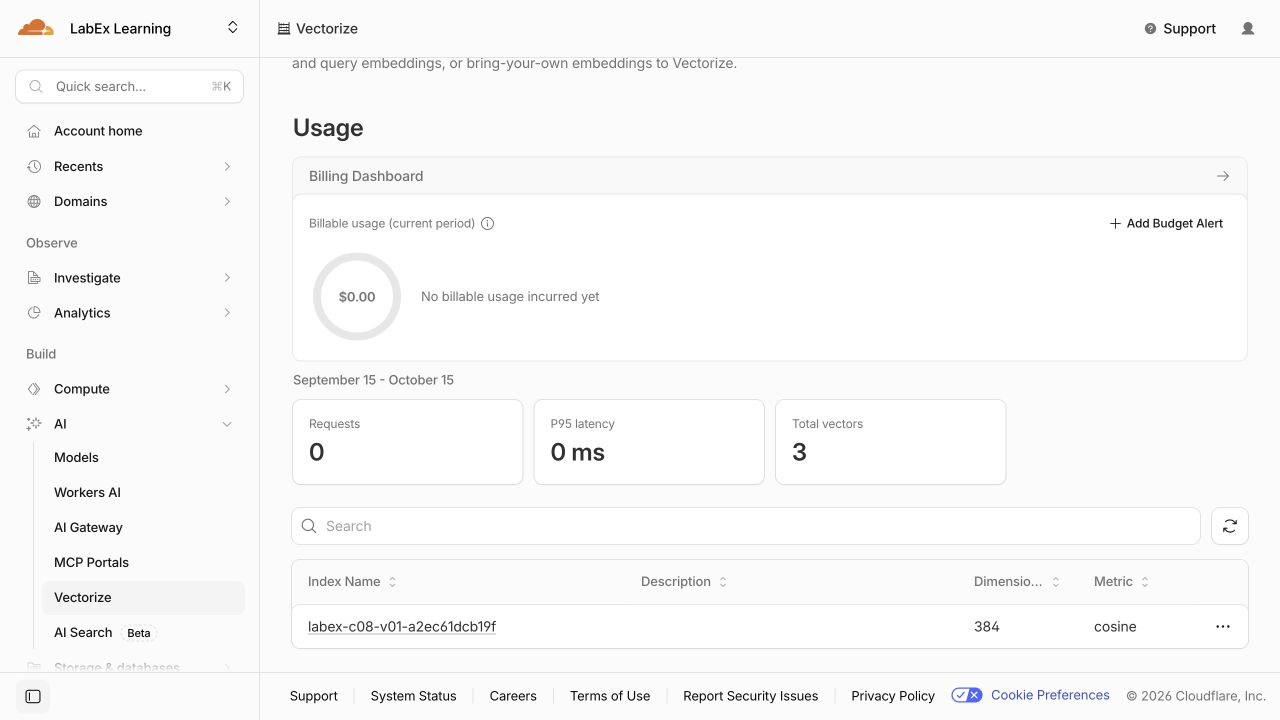
Open the Cloudflare Dashboard for the selected account and go to AI → Vectorize. The inventory connects the CLI name to the real index, shows 384 dimensions and cosine distance, and reports three total vectors with no billable usage in this small example.
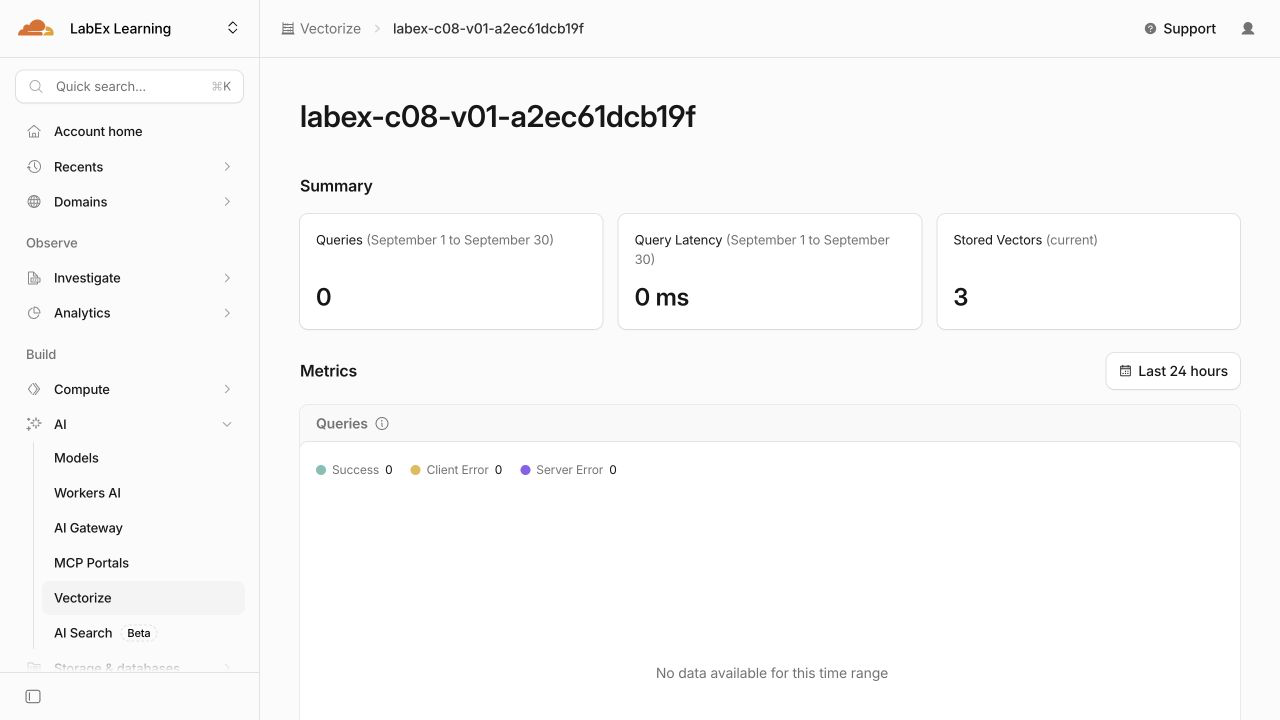
Open the index named in $RUN. Its summary shows three currently stored vectors. Queries remain zero because this first lab uses ID reads; similarity queries begin in V03.
Scroll to Stored Vectors. The graph makes asynchronous visibility concrete: the count stays at zero, then changes to three when the insertion mutation is processed.
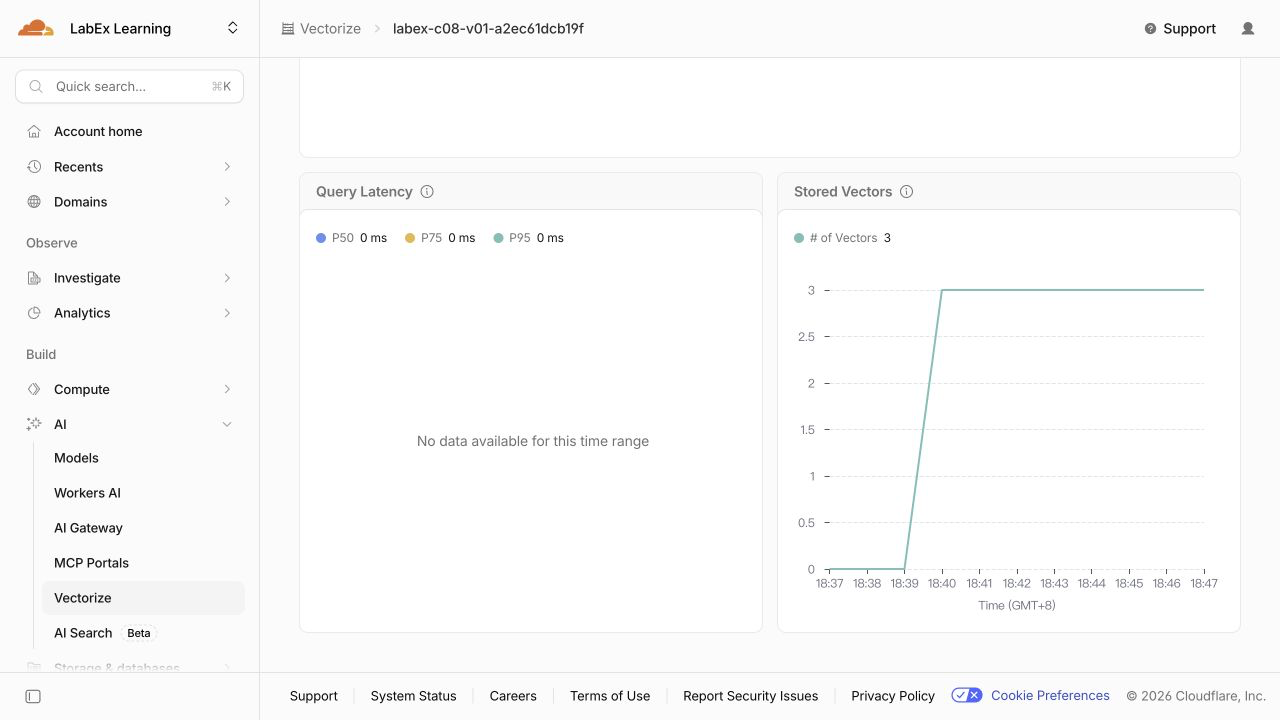
The current Dashboard does not list individual vector IDs or metadata-index definitions. Use the earlier Wrangler reads for password-reset, upload-pdf, billing-receipt, category and published; do not infer those details from a count-only chart. Dashboard pages help with orientation, while the independent checks use authoritative API reads.
The screenshots shown here after the lab's cloud acceptance are examples from one disposable run. Your random index name and timestamps will differ; match the configuration and owned IDs rather than copying example values.
Remove the Disposable Index and Log Out
In this step, you will delete the exact owned index, prove authenticated absence and then remove the VM's authorization.
The index, its metadata indexes and its vectors form one disposable resource. Delete the exact name saved in wrangler.jsonc while authorization is still available:
npx wrangler vectorize delete "$RUN" --force
Confirm its absence through an authenticated inventory read:
npx wrangler vectorize list --json > .labex/indexes-after-cleanup.json
node -e '
  const rows = JSON.parse(require("fs").readFileSync(process.argv[1], "utf8"));
  if (rows.some((row) => row.name === process.argv[2])) throw new Error("lab index still exists");
  console.log("lab index is absent");
' .labex/indexes-after-cleanup.json "$RUN"
This successful inventory matters: a network or authorization failure would not prove deletion. Run the cleanup assessment before revoking the VM's authorization:
bash verify6-1.sh
Finally remove the VM's Wrangler login and inspect the structured result:
npx wrangler logout
npx wrangler whoami --json
Expect loggedIn: false. Dashboard browser login is separate and remains available for your learning account.
Summary
You created a Vectorize V2 index with the same 384-dimensional contract as the selected embedding model, chose cosine distance, and prepared two metadata fields for later filters. You generated identified deterministic vectors, inserted them as NDJSON, distinguished an accepted asynchronous mutation from a processed mutation, and read the stored records back by ID.
You also proved that Vectorize rejects a vector with the wrong dimensions while preserving compatible records. Finally, you inspected the real resource in the Dashboard, deleted the exact disposable index, confirmed authenticated absence and removed the fresh VM's Wrangler authorization.
The next lab builds on this lifecycle with upsert and deletion so changed and retired documents do not leave an index stale.