Introduction
V03 turned questions into embeddings and retrieved nearby help articles. V04 kept those results inside a server-controlled customer and category boundary. Retrieval is useful on its own, but many support applications need one more step: turn the approved passages into a short natural-language answer.
This pattern is called retrieval-augmented generation, usually shortened to RAG. The application retrieves evidence first, builds a small context from only those records, and then asks a language model to answer from that context. Retrieval does not make a model automatically truthful. The application must still control which sources are eligible, limit how much text enters the prompt, preserve source identities and stop when no approved evidence exists.
You will build one disposable Worker with two Cloudflare bindings. DOCUMENTS searches a Vectorize index, while AI runs both the BGE Small embedding model and a Cloudflare-hosted Llama text-generation model. The Worker resolves returned vector IDs through a supplied in-code corpus; vector metadata is useful for search, but it is not treated as the canonical article body.
The endpoint will return an application-controlled sources array beside the generated answer. If retrieval finds nothing inside the selected namespace and category, it will return a fixed no_evidence response without calling the text-generation model. That explicit branch is safer than asking a model to improvise.
If you entered this course directly, first complete Connect LabEx to Your Cloudflare Account. V01–V04 are prerequisites: they introduce compatible indexes, asynchronous mutations, semantic retrieval and server-controlled scope.
This lab uses the Cloudflare-hosted @cf/meta/llama-3.3-70b-instruct-fp8-fast model because it has already been exercised on Workers Free in the preceding Workers AI course. DeepSeek V4 Flash is Cloudflare-hosted but currently requires paid access, so it is not a required learner dependency. The lab sends only bounded embedding and generation requests; Workers Paid is not required while the account's shared Workers AI free allocation remains available.
Setup installs Node.js 22.22.0 and project-local Wrangler 4.132.0 in /home/labex/project/grounded-answer. It supplies deterministic tests and independent read-only checks, but it does not authorize Wrangler, create an index, deploy a Worker, run inference or seed cloud data.
Authorize and Name the RAG Resources
In this step, you will authorize this fresh VM, confirm the learning account and define one paired Worker and Vectorize index before creating anything.
Change to the prepared project and inspect the pinned tools:
cd /home/labex/project/grounded-answer
node --version
npx wrangler --version
Expect Node.js v22.22.0 and Wrangler 4.132.0. The Dashboard login in your browser does not automatically authorize this VM, so use Wrangler's device flow with the permissions needed for account identity, the disposable Worker, Vectorize and Workers AI:
npx wrangler login --device --browser=false --scopes account:read user:read workers:write workers_scripts:write workers_kv:write ai:write
npx wrangler whoami --json
Open the displayed authorization link, confirm that the code matches and approve the intended LabEx Learning account. Do not send the code, password or token to anyone. In the JSON result, confirm loggedIn: true, then note the account name and ID.
Generate one random suffix. Both resource names share it so later cleanup can identify the exact pair:
RUN="labex-c08-v05-$(openssl rand -hex 6)"
INDEX="$RUN-docs"
printf 'Worker: %s\nIndex: %s\n' "$RUN" "$INDEX"
Create wrangler.jsonc. A here-document sends the block between JSON markers into the file; $RUN and $INDEX expand to this VM's unique names. Replace YOUR_ACCOUNT_ID with the ID shown by whoami:
cat > wrangler.jsonc <<JSON
{
  "\$schema": "./node_modules/wrangler/config-schema.json",
  "name": "$RUN",
  "main": "src/index.js",
  "compatibility_date": "2026-09-16",
  "compatibility_flags": ["nodejs_compat"],
  "account_id": "YOUR_ACCOUNT_ID",
  "workers_dev": true,
  "preview_urls": false,
  "observability": { "enabled": true },
  "ai": { "binding": "AI" },
  "vectorize": [
    { "binding": "DOCUMENTS", "index_name": "$INDEX", "remote": true }
  ]
}
JSON
AI is one binding even though the code will call two models through it. DOCUMENTS points to the paired index. The file names the intended resources but creates nothing yet.
Build the Retrieve-Then-Generate Worker
In this step, you will implement the complete RAG sequence and prove its decisions with deterministic in-memory bindings before using cloud quota.
The supplied CORPUS is the canonical ID-to-text map. Vectorize stores embeddings and searchable metadata; after a query, the Worker accepts only IDs that resolve through this map. It then includes at most two passages in the prompt. This prevents an unexpected index record from becoming model context merely because it scored highly.
Create the Worker source:
cat > src/index.js <<'JS'
export const EMBEDDING_MODEL = "@cf/baai/bge-small-en-v1.5";
export const ANSWER_MODEL = "@cf/meta/llama-3.3-70b-instruct-fp8-fast";
const DIMENSIONS = 384;
const POOLING = "cls";
const ALLOWED_CATEGORIES = new Set(["account", "billing", "files"]);

export const CORPUS = [
  {
    id: "password-reset",
    namespace: "customer-blue",
    category: "account",
    title: "Reset a password",
    url: "https://support.example.test/articles/password-reset",
    text: "If a password expires, open the sign-in page, choose Forgot password, and use the one-time reset link sent to the verified email address."
  },
  {
    id: "mfa-recovery",
    namespace: "customer-blue",
    category: "account",
    title: "Recover multi-factor access",
    url: "https://support.example.test/articles/mfa-recovery",
    text: "If the authenticator device is unavailable, enter a saved recovery code. Contact an administrator only after all recovery codes are exhausted."
  },
  {
    id: "billing-receipt",
    namespace: "customer-blue",
    category: "billing",
    title: "Download a billing receipt",
    url: "https://support.example.test/articles/billing-receipt",
    text: "Open Billing, select a completed payment, and choose Download receipt to save a PDF copy."
  }
];

const CORPUS_BY_ID = new Map(CORPUS.map((item) => [item.id, item]));

function json(value, status = 200) {
  return Response.json(value, { status });
}

export function resolveSession(value) {
  if (value === "blue-session") return { customer: "blue", namespace: "customer-blue" };
  throw new Error("session_invalid");
}

export function parseAnswerInput(value) {
  if (!value || typeof value !== "object" || Array.isArray(value)) throw new Error("invalid_json");
  for (const key of ["customer", "customerId", "namespace", "sources", "context"]) {
    if (Object.prototype.hasOwnProperty.call(value, key)) throw new Error("scope_override_not_allowed");
  }
  const question = typeof value.question === "string" ? value.question.trim() : "";
  const category = typeof value.category === "string" ? value.category.trim() : "";
  if (!question || question.length > 240) throw new Error("question_required");
  if (!ALLOWED_CATEGORIES.has(category)) throw new Error("category_invalid");
  return { question, category };
}

export function validateEmbeddingBatch(result, expectedCount) {
  const vectors = result?.data;
  if (!Array.isArray(vectors) || vectors.length !== expectedCount || result?.shape?.[1] !== DIMENSIONS) {
    throw new Error("incompatible embedding batch");
  }
  for (const vector of vectors) {
    if (!Array.isArray(vector) || vector.length !== DIMENSIONS || !vector.every(Number.isFinite)) {
      throw new Error("invalid embedding vector");
    }
  }
  return vectors;
}

async function embed(env, texts) {
  const result = await env.AI.run(EMBEDDING_MODEL, { text: texts, pooling: POOLING });
  return validateEmbeddingBatch(result, texts.length);
}

async function seed(env) {
  const vectors = await embed(env, CORPUS.map((item) => item.text));
  const records = CORPUS.map((item, index) => ({
    id: item.id,
    namespace: item.namespace,
    values: vectors[index],
    metadata: {
      category: item.category,
      title: item.title,
      model: EMBEDDING_MODEL,
      pooling: POOLING
    }
  }));
  const mutation = await env.DOCUMENTS.upsert(records);
  console.log(JSON.stringify({ event: "grounding_sources_seeded", count: records.length, mutationId: mutation.mutationId }));
  return json({ mutationId: mutation.mutationId, count: records.length, model: EMBEDDING_MODEL, dimensions: DIMENSIONS, pooling: POOLING }, 202);
}

function noEvidence(category, candidateCount) {
  console.log(JSON.stringify({ event: "grounded_no_evidence", category, candidateCount }));
  return json({
    mode: "no_evidence",
    generated: false,
    answer: "I don't have enough approved evidence to answer that question.",
    sources: []
  });
}

async function answer(request, env) {
  let scope;
  try {
    scope = resolveSession(request.headers.get("x-lab-session") ?? "");
  } catch {
    return json({ error: "session_invalid" }, 401);
  }

  let input;
  try {
    input = parseAnswerInput(await request.json());
  } catch (error) {
    return json({ error: error instanceof Error ? error.message : "invalid_json" }, 400);
  }

  const [queryVector] = await embed(env, [input.question]);
  const result = await env.DOCUMENTS.query(queryVector, {
    topK: 2,
    namespace: scope.namespace,
    filter: { category: input.category },
    returnMetadata: "all"
  });

  const sources = result.matches.flatMap((match) => {
    const article = CORPUS_BY_ID.get(match.id);
    if (!article || article.namespace !== scope.namespace || article.category !== input.category) return [];
    return [{
      id: article.id,
      title: article.title,
      url: article.url,
      text: article.text,
      score: match.score
    }];
  });

  if (sources.length === 0) return noEvidence(input.category, result.matches.length);

  const context = sources.map((source) =>
    "[source:" + source.id + "] " + source.title + "\n" + source.text
  ).join("\n\n");
  const generation = await env.AI.run(ANSWER_MODEL, {
    messages: [
      {
        role: "system",
        content: "Answer only from the supplied support context. Keep the answer under 80 words. Cite supporting source IDs in square brackets. If the context is insufficient, say you do not have enough approved evidence."
      },
      {
        role: "user",
        content: "Question: " + input.question + "\n\nApproved context:\n" + context
      }
    ],
    max_tokens: 160,
    temperature: 0
  });
  const generatedAnswer = typeof generation?.response === "string" ? generation.response.trim() : "";
  if (!generatedAnswer) return json({ error: "generation_failed" }, 502);

  const references = sources.map(({ id, title, url, score }) => ({ id, title, url, score }));
  console.log(JSON.stringify({
    event: "grounded_answer",
    customer: scope.customer,
    namespace: scope.namespace,
    category: input.category,
    sourceIds: references.map((source) => source.id),
    sourceCount: references.length
  }));
  return json({
    mode: "grounded",
    generated: true,
    model: ANSWER_MODEL,
    answer: generatedAnswer,
    sources: references
  });
}

export default {
  async fetch(request, env) {
    const url = new URL(request.url);
    if (request.method === "POST" && url.pathname === "/seed") return seed(env);
    if (request.method === "POST" && url.pathname === "/answer") return answer(request, env);
    return json({ error: "not_found" }, 404);
  }
};
JS
Notice the order in answer(): validate the server-owned scope, embed the question, retrieve at most two eligible matches, resolve each ID through CORPUS, build bounded context, then generate. The public response omits the full context text and vector values but retains resolvable source references.
Run the deterministic suite:
node --test test/worker.test.mjs
Expect seven passing tests. The fake bindings prove that unknown IDs and empty retrieval never reach text generation. Generate binding types and bundle the project without deploying:
npx wrangler types
npx wrangler deploy --dry-run --outdir /tmp/v05-dry-run
The generated types should include AI: Ai and DOCUMENTS: VectorizeIndex. A dry run proves that the files bundle together; it does not create cloud resources or run either model.
Create the Prepared Index and Deploy
In this step, you will create a compatible Vectorize index, prepare category for filtering and deploy the Worker after that preparation becomes stable.
Create the 384-dimensional cosine index used by BGE Small. --update-config=false prevents Wrangler from rewriting the explicit binding you already reviewed:
npx wrangler vectorize create "$INDEX" --dimensions=384 --metric=cosine --update-config=false
Create the string metadata index for category and save the returned mutation ID. set -o pipefail makes the pipeline fail if Wrangler fails, even though tee also writes a copy of the output:
set -o pipefail
npx wrangler vectorize create-metadata-index "$INDEX" \
  --propertyName=category \
  --type=string 2>&1 | tee .labex/category-index-output.txt
META_MUTATION=$(grep -Eo '[0-9a-fA-F]{8}-[0-9a-fA-F-]{27}' .labex/category-index-output.txt | tail -n 1)
if [ -z "$META_MUTATION" ]; then
  printf '%s\n' 'No metadata mutation ID was returned; fix the command before continuing.' >&2
else
  printf '%s\n' "$META_MUTATION" | tee .labex/category-mutation.txt
fi
An accepted mutation is queued work. Create a bounded read-only waiter that requires the exact mutation and vector count on three consecutive reads:
cat > scripts/wait-for-vectorize.mjs <<'JS'
import { execFileSync } from "node:child_process";
import { readFileSync } from "node:fs";

const [indexName, mutationFile, expectedText] = process.argv.slice(2);
const mutationId = readFileSync(mutationFile, "utf8").trim();
const expectedCount = Number(expectedText);
if (!/^[0-9a-f-]{36}$/i.test(mutationId)) throw new Error("mutation file has no UUID");
if (!Number.isInteger(expectedCount) || expectedCount < 0) throw new Error("expected count is invalid");
const wrangler = "./node_modules/wrangler/bin/wrangler.js";
let consecutiveMatches = 0;

for (let attempt = 1; attempt <= 120; attempt += 1) {
  const output = execFileSync(process.execPath, [wrangler, "vectorize", "info", indexName, "--json"], { encoding: "utf8" });
  const info = JSON.parse(output);
  if (String(info.processedUpToMutation) === mutationId && info.vectorCount === expectedCount) consecutiveMatches += 1;
  else consecutiveMatches = 0;
  if (consecutiveMatches === 3) {
    console.log("mutation " + mutationId + " is consistently readable with " + expectedCount + " vectors");
    console.log(JSON.stringify(info, null, 2));
    process.exit(0);
  }
  await new Promise((resolve) => setTimeout(resolve, 2000));
}
throw new Error("mutation " + mutationId + " was not stable within four minutes");
JS
node scripts/wait-for-vectorize.mjs "$INDEX" .labex/category-mutation.txt 0
The separate list view can lag behind processed mutation state, so wait briefly for its visible row too:
for attempt in {1..15}; do
  METADATA_INDEXES=$(npx wrangler vectorize list-metadata-index "$INDEX" 2>&1)
  if grep -Eq 'category.*String' <<<"$METADATA_INDEXES"; then
    break
  fi
  sleep 2
done
printf '%s\n' "$METADATA_INDEXES"
grep -Eq 'category.*String' <<<"$METADATA_INDEXES" || {
  printf '%s\n' 'The category metadata index is processed but not yet visible; rerun this read-only check.' >&2
  exit 1
}
Finally, deploy and save the public Worker URL:
set -o pipefail
npx wrangler deploy 2>&1 | tee .labex/deploy-output.txt
DEPLOY_URL=$(sed -nE 's#.*(https://[^[:space:]]+\.workers\.dev).*#\1#p' .labex/deploy-output.txt | tail -n 1)
if [ -z "$DEPLOY_URL" ]; then
  printf '%s\n' 'No workers.dev URL was returned; fix deployment before continuing.' >&2
else
  printf '%s\n' "$DEPLOY_URL" | tee .labex/deploy-url.txt
fi
The index is still empty. Deployment connects the bindings; it does not create embeddings or source records automatically.
Seed the Approved Source Corpus
In this step, you will create live embeddings for the three supplied articles and wait until every source ID is readable.
The source text stays in CORPUS; the vector records contain the compatible embedding plus small search metadata. This separation lets the application resolve an ID to an approved article body instead of trusting arbitrary text copied from vector metadata.
Call the fixed seed endpoint once:
DEPLOY_URL=$(cat .labex/deploy-url.txt)
curl --fail-with-body --silent --show-error \
  -X POST "$DEPLOY_URL/seed" \
  -H 'content-type: application/json' \
  --data '{}' | tee .labex/seed-response.json
node -e '
  const value = JSON.parse(require("fs").readFileSync(".labex/seed-response.json", "utf8"));
  if (!/^[0-9a-f-]{36}$/i.test(value.mutationId)) throw new Error("seed mutation is missing");
  require("fs").writeFileSync(".labex/seed-mutation.txt", value.mutationId + "\n");
  console.log("accepted " + value.count + " source vectors in mutation " + value.mutationId);
'
Expect three records, 384 dimensions, cls pooling and a mutation UUID. Wait for that exact state, then wait briefly for all three IDs in the separate inventory view:
node scripts/wait-for-vectorize.mjs "$INDEX" .labex/seed-mutation.txt 3
for attempt in {1..15}; do
  VECTOR_LIST=$(npx wrangler vectorize list-vectors "$INDEX" --count=10 2>&1)
  if grep -q 'password-reset' <<<"$VECTOR_LIST" &&
     grep -q 'mfa-recovery' <<<"$VECTOR_LIST" &&
     grep -q 'billing-receipt' <<<"$VECTOR_LIST"; then
    break
  fi
  sleep 2
done
printf '%s\n' "$VECTOR_LIST"
for id in password-reset mfa-recovery billing-receipt; do
  grep -q "$id" <<<"$VECTOR_LIST" || {
    printf 'The processed source %s is not visible in the list yet; rerun this read-only check.\n' "$id" >&2
    exit 1
  }
done
Each ID now connects search results back to one exact corpus entry. The index deliberately contains no files article, which will make the no-evidence branch observable without depending on a similarity threshold.
Compare Grounded and No-Evidence Answers
In this step, you will send one supported question and one question whose authorized category has no sources. The contrast makes the RAG control flow visible.
Ask how to reset an expired password inside the blue account scope:
curl --fail-with-body --silent --show-error \
  -X POST "$DEPLOY_URL/answer" \
  -H 'content-type: application/json' \
  -H 'x-lab-session: blue-session' \
  --data '{"question":"How do I reset my expired password?","category":"account"}' \
  | tee .labex/grounded-answer.json
Expect mode: grounded, generated: true, a nonempty answer and a sources array led by password-reset. Your model wording may differ. The stable evidence is that every returned ID, title and URL resolves through the supplied corpus and only approved account passages were placed in the prompt.
Now ask about file upload while keeping the same server-owned customer scope. files is an allowed category, but this corpus contains no eligible file record:
curl --fail-with-body --silent --show-error \
  -X POST "$DEPLOY_URL/answer" \
  -H 'content-type: application/json' \
  -H 'x-lab-session: blue-session' \
  --data '{"question":"How do I upload a PDF?","category":"files"}' \
  | tee .labex/no-evidence-answer.json
Expect mode: no_evidence, generated: false, the fixed message I don't have enough approved evidence to answer that question. and sources: []. The Worker still embedded the question to search, but it skipped text generation because there was no approved context.
Try one unsafe request that supplies its own namespace:
curl --silent --show-error \
  -o .labex/override-response.json \
  -w 'HTTP %{http_code}\n' \
  -X POST "$DEPLOY_URL/answer" \
  -H 'content-type: application/json' \
  -H 'x-lab-session: blue-session' \
  --data '{"question":"Help","category":"account","namespace":"customer-green"}'
cat .labex/override-response.json
Expect HTTP 400 and scope_override_not_allowed. RAG does not replace the authorization boundary learned in V04; retrieval must be safe before its text becomes model context.
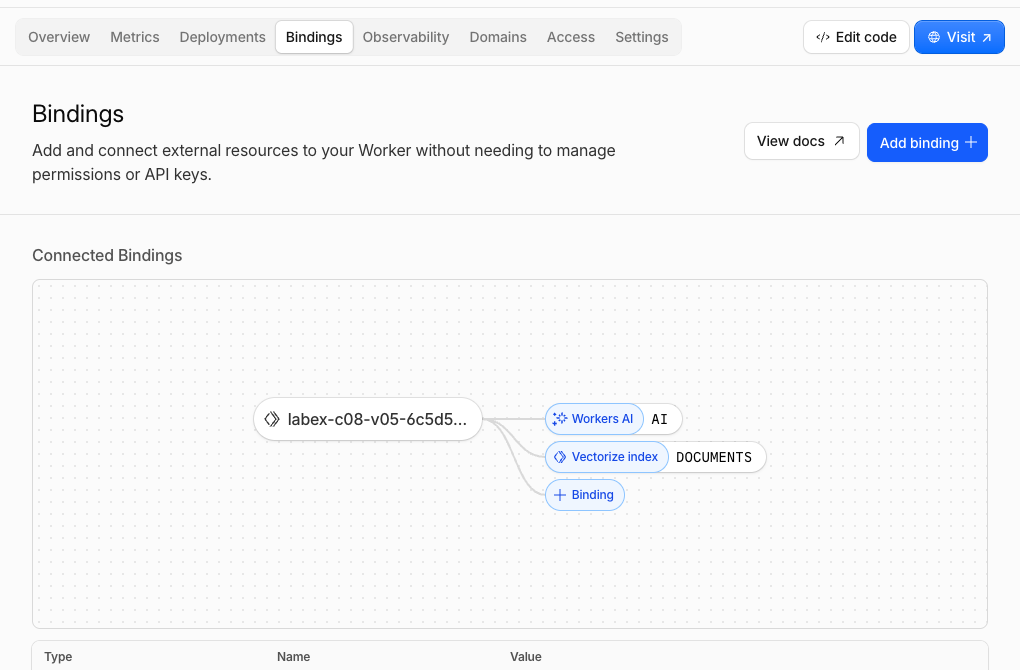
Open Workers & Pages → your labex-c08-v05-... Worker → Bindings. Confirm that AI points to Workers AI and DOCUMENTS points to the paired Vectorize index. This view connects the two service names in code to the real managed resources.
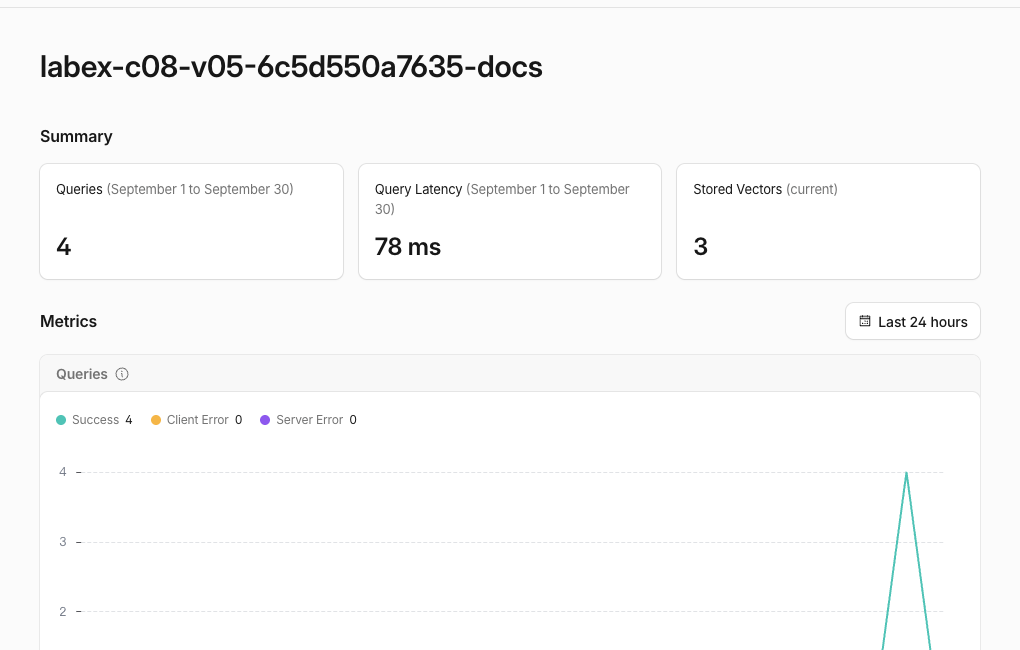
Then open AI → Vectorize → the matching -docs index. The current count should eventually show three vectors, and query activity should reflect the grounded and no-evidence searches. Dashboard metrics may lag, so the authenticated ID reads and endpoint responses remain authoritative.
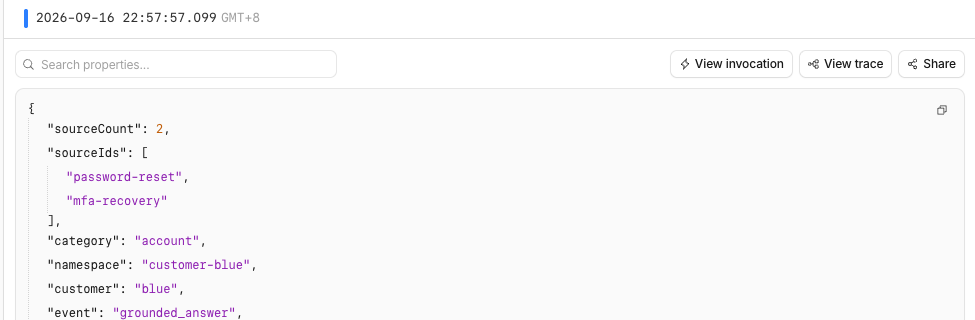
If Workers Logs are available, open Observability → Logs and inspect grounded_answer and grounded_no_evidence entries. The logs include category, source IDs and counts, but omit the question, answer, passage text, session label and vector values. This gives operators useful control-flow evidence without copying the prompt into logs.
Remove the Grounded-Answer Resources
In this step, you will delete the disposable Worker and Vectorize index, then prove their absence while Wrangler is still authorized.
Recover both exact names from wrangler.jsonc so cleanup does not depend on variables from an earlier terminal session:
RUN=$(node -p 'JSON.parse(require("fs").readFileSync("wrangler.jsonc", "utf8")).name')
INDEX=$(node -p 'JSON.parse(require("fs").readFileSync("wrangler.jsonc", "utf8")).vectorize.find((item) => item.binding === "DOCUMENTS").index_name')
printf 'Worker: %s\nIndex: %s\n' "$RUN" "$INDEX"
Confirm both values use your unique labex-c08-v05-... prefix. Delete the Worker first so no deployed code retains the binding, then delete only its paired index:
npx wrangler delete --name "$RUN" --force
npx wrangler vectorize delete "$INDEX" --force
Save a successful authenticated index inventory and check exact-name absence:
npx wrangler vectorize list --json > .labex/indexes-after-cleanup.json
node -e '
  const rows = JSON.parse(require("fs").readFileSync(process.argv[1], "utf8"));
  if (rows.some((row) => row.name === process.argv[2])) throw new Error("lab index still exists");
  console.log("lab index is absent");
' .labex/indexes-after-cleanup.json "$INDEX"
Complete this check before logout. A network or authorization error is inconclusive; the assessment independently requires successful account reads and exact-name absence.
Log Out of the Learning VM
In this step, you will remove this VM's temporary Wrangler authorization. The cloud resources are already absent and the authenticated cleanup check has passed:
npx wrangler logout
npx wrangler whoami --json
Expect loggedIn: false. The Cloudflare Dashboard browser session is separate and remains available to your learning account.
Summary
You built a small retrieval-augmented generation endpoint: server-controlled scope narrowed Vectorize search, returned IDs were resolved through an approved corpus, at most two passages became model context, and the application returned stable source references beside variable generated wording.
You also proved that an eligible empty search takes a fixed no-evidence branch without text generation, rejected client scope overrides before retrieval, inspected the Worker, Vectorize and privacy-bounded observability relationships, deleted both disposable resources while authorized and then logged out. The course challenge will ask you to repair a broken endpoint that violates the same scope boundary.