Introduction
Fieldnotes runs small workshops and garden walks. A published update accidentally paused Clay & Coffee registrations. A later, valid update added Sunset Walk. The team wants registration restored while keeping that newer event and all existing bookings.
You will first use a healthy workshop to see normal booking and ticket delivery. Then inspect the actual Git history, undo the older faulty change with a new corrective commit, publish it and test a real reservation. Rewinding the whole site would lose useful work.
You should understand basic terminal navigation, commits, branches and a simple log/diff; the previous team-merge course is recommended. The prepared Workspace and Event Desk tabs are the only entries needed. These are real Git repositories and an HTTP application on one training machine. The site reads shared main directly in this scene; no hosted deployment pipeline is being taught. All identities and events are synthetic. The 45-minute duration is an author estimate.
Try the Desk and Locate the Faulty Update
In this step, experience a normal booking, observe the broken workshop and identify which history entries represent the fault and the later work worth keeping.
Open the Event Desk tab. On the workshop list, find Postcard Studio and click its View workshop link. This healthy workshop shows Save your seat, the Full name field and Reserve a place. Enter Alex Morgan, or another example name, and click Reserve a place once.
The confirmation should say You're on the list. and show Postcard Studio, Studio Two and EUR 10.00. Click Download ticket. Use your browser's Downloads list to open the .txt file. It must contain the same workshop, name, meeting point and total. Its booking reference is generated for your actual reservation and will vary. This is the normal useful result the affected workshop should also provide.
Click All workshops in the page header. Open Clay & Coffee with its View workshop link. The expected initial problem is Registration is paused, with no reservation form. Existing bookings remain valid; do not remove them to repair a registration setting.
Use All workshops in the header again and open Sunset Walk. It must remain available with 15 Nov 2026, 16:00, East Gate and EUR 6.00. The later page is good work to keep, not part of the fault.
Switch to the Workspace tab. Start in the editor repository:
cd /home/labex/project/event-desk/editor
cd changes this terminal's directory. If you mistype a path, use pwd to print the current directory and ls to list its contents, then repeat the complete cd command above. Ordinary navigation errors do not require resetting the VM.
Set an author identity only in this repository. --local keeps the settings local; quotes keep a name containing spaces together. These are synthetic example values, and you may choose your own:
git config --local user.name "Event Editor"
git config --local user.email "events@example.com"
The app keeps bookings outside the editor repository. Its JSON file uses quoted field names followed by colons and values; names and workshop identifiers are text, while prices are stored as integer cents. .. means the parent directory, so the following read-only command prints the sibling booking file without leaving your editor directory:
cat ../bookings.json
Find the original Casey Lane and Sam Rivera records, plus your new Postcard Studio reservation. Keep these records unchanged. Git will correct a versioned event setting; it will not rewind the reservation collection.
Read the commit history. --no-pager prints directly instead of opening a scrolling viewer; --oneline gives one short line per commit; --decorate labels branch pointers and tags:
git --no-pager log --oneline --decorate
The newest entry is Add the Sunset Walk event, followed by Pause Clay and Coffee registrations and Open the Fieldnotes event desk. Exact commit IDs vary. The prepared tag incident-start is a fixed bookmark for the version you inherited. Unlike main, it will not move when you create a new commit. Keep that bookmark unchanged.
Read what the newest bookmarked commit changed. show displays a selected commit's message and patch:
git --no-pager show incident-start
It adds events/sunset-walk.json. That is the new event to preserve. The older pause, not this addition, is the change you need to undo. The checkpoint confirms your actual new reference booking and ticket, rather than treating an existing sample booking as your new result.
Add a Correction Without Losing Later Work
In this step, identify the faulty delta and reverse only that delta in a new commit after the inherited tip.
Stay in Workspace, in /home/labex/project/event-desk/editor. A revision expression can name an ancestor without checking it out or moving a branch. incident-start~1 means one parent before the fixed bookmark; incident-start~2 means two parents before it. Read the middle commit:
git --no-pager show incident-start~1
Its patch changes registration_open from true to false in events/clay-and-coffee.json. That boolean setting allows or pauses new registration. capacity is the workshop's positive seat limit; it should also remain usable. The unchanged price_cents value 1800 means EUR 18.00.
Read the original event snapshot. A colon joins a revision and a file path, so the following expression selects the file from two parents before the bookmark:
git --no-pager show incident-start~2:events/clay-and-coffee.json
The original has registration open with capacity 12. Restoring the entire site to that older version would also remove Sunset Walk. A revert instead computes the inverse of one chosen commit's change and records a new correction on the current branch. The original faulty commit remains in history, and later useful commits remain too.
Check the working state before the correction. --short gives a compact changed-file list; the prepared repository should have no output:
git status --short
Now revert the identified faulty commit. --no-edit accepts Git's generated corrective message and avoids opening an editor. The fixed bookmark keeps this target stable even after your branch advances:
git revert --no-edit incident-start~1
Expect a new commit beginning Revert "Pause Clay and Coffee registrations" and a one-file change. Your author identity and commit ID may differ.
Practice recognizing an already completed operation by running the same fixed-bookmark command once more. This repetition is expected to return a nonzero status with nothing to commit, working tree clean. Run it alone and continue afterward:
git revert --no-edit incident-start~1
In this prepared already-applied case there is no unfinished revert to resolve. Inspect the history and status rather than inventing an empty corrective commit:
git --no-pager log --oneline --decorate
git status --short
There should be exactly one new correction above the original Sunset Walk, pause and opening commits, and no working changes. The incident-start bookmark still names the inherited version. This also avoids confusing a moving HEAD with a fixed incident reference.
Review the exact correction. diff compares the two named snapshots. HEAD is your currently checked-out commit; -- separates revisions from the following file path:
git --no-pager diff incident-start HEAD -- events/clay-and-coffee.json
Expect only the inverse change, false to true. Check that the newer event has no difference from the inherited version:
git --no-pager diff incident-start HEAD -- events/sunset-walk.json
No output is expected for Sunset Walk. You have a focused local correction while keeping later work.
Switch to Event Desk, click All workshops in its header and open Clay & Coffee again. It still says Registration is paused. This is expected: your editor commit is local, while this site reads the shared repository. The next step publishes it. The checkpoint here assesses the local corrective commit and preserved files.
Publish and Test the Repaired Registration
In this step, deliver the correction to shared main, create a real booking in the restored workshop and check that the newer event and existing bookings remain intact.
Switch to Workspace, still in /home/labex/project/event-desk/editor. origin is the prepared remote name for /home/labex/project/event-desk/shared.git, a local bare repository holding shared history without an editable working copy. push origin main sends your local main to that destination:
git push origin main
Expect main -> main without rejection. Your new commit follows the inherited tip, so this normal push preserves every published commit. The scene has no background contributor. If experimenting produces a rejection, inspect the actual histories; a forced replacement that loses original work does not satisfy the task.
Review the delivered pointers:
git --no-pager log --oneline --decorate
Local main and origin/main now identify the new corrective commit. The original incident bookmark and all earlier messages remain below it.
Switch to Event Desk. Click All workshops in the page header, then open Clay & Coffee. It now shows Save your seat, Full name and Reserve a place. Check the unchanged date, meeting point and EUR 18.00 price before entering a name.
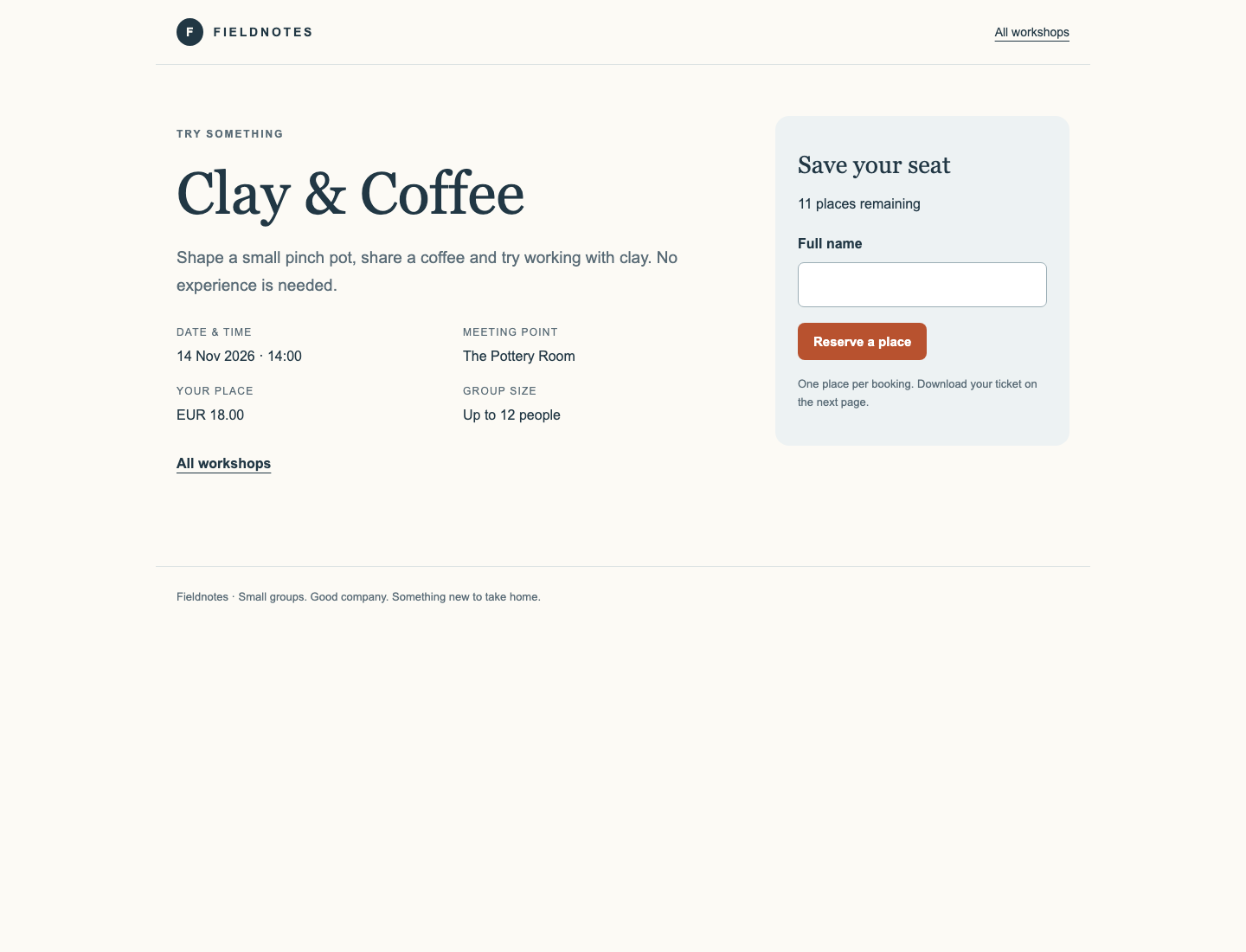
Look for the workshop title and the form on the right; on a narrow screen the form is below the event details. Remaining places reflect actual bookings, so the count can differ from the example.
Enter Jamie Chen, or another example full name, and click Reserve a place once. The confirmation should say You're on the list. with Clay & Coffee, 14 Nov 2026, 14:00, The Pottery Room, one place and EUR 18.00.
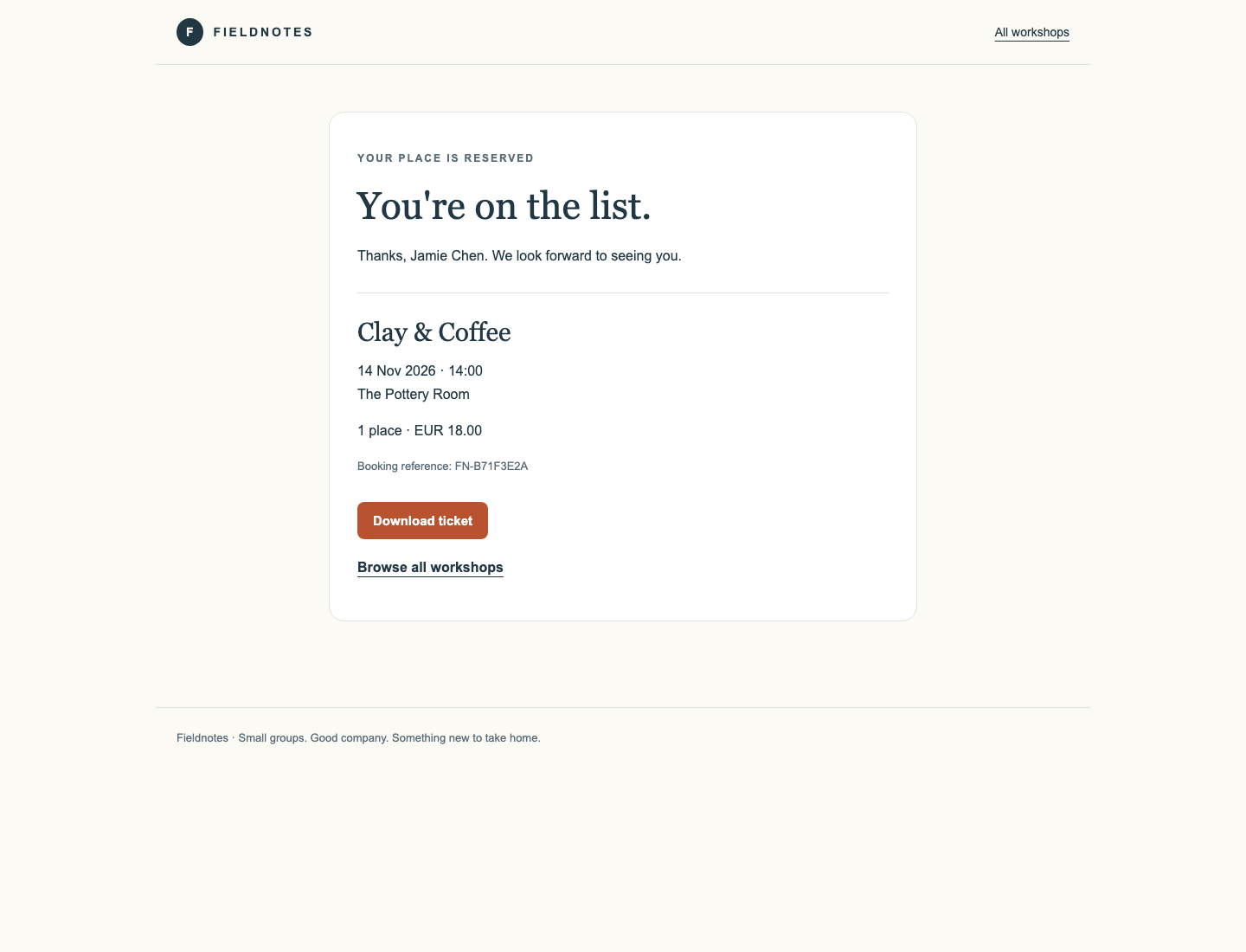
Click Download ticket, open the resulting .txt file from your browser's Downloads list and compare its booking reference, workshop, date, time, meeting point, name, places and total with the confirmation. The reference is generated for your reservation; it is not a value to copy from a screenshot.
Use All workshops in the header to reopen Sunset Walk. Its full page must still show 15 Nov 2026, 16:00, East Gate and EUR 6.00. Postcard Studio must also remain usable, subject to its real remaining capacity.
Switch to Workspace and read the booking collection again:
cat ../bookings.json
Both original records and your earlier Postcard Studio booking remain; the new Clay & Coffee booking has been added. You corrected the versioned event without rolling booking data backward.
Finish with the working-state check:
git status --short
No tracked changes should remain. Untracked personal notes are allowed if you created any; do not include extra tracked files in the site. The checkpoint checks actual history, shared publication, complete live pages, preserved records and the real ticket contents.
Summary
You used a normal booking to establish the expected business result, traced a registration fault to an older commit and added a focused correction with git revert. The newer event, original history and existing bookings stayed intact.
After a normal push, the shared site accepted a new reservation and delivered a real ticket with the correct event and price. The independent challenge changes the faulty setting and includes two later good commits, so inspect the inherited history before choosing the correction target.