Introduction
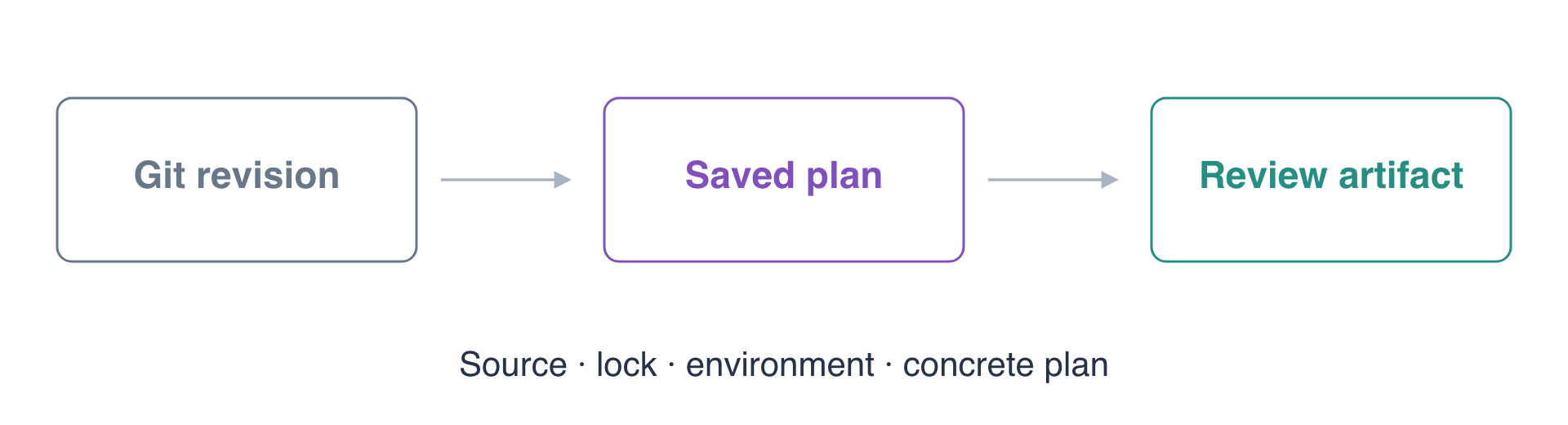
Your team wants to change a report store, but a reviewer needs to know exactly which configuration and environment a plan represents. A filename such as latest.tfplan does not establish that relationship.
You will commit a small report change, generate one concrete saved plan, and inspect its readable changes, JSON changes and context fingerprints. The supplied executor runs the quality gates you already practiced and exports the selected Git revision into a separate artifact directory. This lab stops before review approval or application.
You should understand Terraform state and environment isolation, module contracts, basic Git commits/diffs, and the previous delivery quality gates. Each lab starts independently; the two existing report stores here do not come from a previous lab.
Certification Relevance
| Certification | Exam task | Practice |
|---|---|---|
| DevOps Engineer – Professional (DOP-C02) | Task 1.3 | Foundational artifact-generation and traceability knowledge through a concrete local plan. No AWS artifact repository or build-service integration is claimed. |
Commit the Release Proposal
In this step, you will make a small configuration change and select its exact Git revision. A saved plan must describe a committed source snapshot, rather than whichever edits happen to be in the working directory later.
Enter the prepared repository and load its tools.
cd /home/labex/project/report-release
source environment.sh
Read the supplied interface, release inputs and quality stages.
cat variables.tf main.tf outputs.tf release.auto.tfvars.json pipeline.json
This module manages a bucket and report.txt in each environment. preview and review use separate state files and distinct existing buckets, delivery-release-preview and delivery-release-review. Both currently contain release one report. The separate delivery-release-neighbor/keep.txt is unrelated data to preserve.
release.auto.tfvars.json supplies the release label and report text. Terraform loads this variable file into the selected configuration. pipeline.json retains formatting, structural validation and plan-mode module tests; the supplied executor then generates the saved plan. Preserve the supplied module, provider, dependency lock, tests, environment script and executor. The release-input file is your configuration change in this lab.
Write the proposed release. JSON's \n escape represents a newline in the report; the quoted here-document preserves that escape when writing the file.
cat > release.auto.tfvars.json <<'EOF'
{
  "release": "release-two",
  "report": "release two report\n"
}
EOF
Inspect the change before recording it. git diff -- compares this file with the current committed version.
git diff -- release.auto.tfvars.json
The diff should replace only the release label and report content. Stage that specific file.
git add release.auto.tfvars.json
Create the source snapshot for this proposal.
git commit -m 'Propose release-two report'
Record its full commit identifier separately. git rev-parse HEAD resolves the current commit, and > writes the result to a file. This selection file is not part of the Terraform configuration and should remain untracked.
git rev-parse HEAD > selected-revision.txt
Read the selected revision and working-tree status.
cat selected-revision.txt
git status --short
Expect a full commit identifier and the untracked selection file. Recording the choice lets later commands use the same revision even if the repository advances. A valid explicitly selected older commit is allowed; the executor does not require every artifact to use the latest HEAD.
Generate and Inspect the Concrete Plan
In this step, you will turn the selected source into a reviewable artifact without applying it. A saved binary plan contains Terraform's proposed actions; readable and JSON views make those actions easier to inspect.
Generate a named artifact for preview. $(cat selected-revision.txt) substitutes the recorded commit identifier into the argument. --environment selects the target state and bucket; it is not inferred from the artifact's filename.
python3 delivery.py plan report-two --revision "$(cat selected-revision.txt)" --environment preview
The supplied workflow exports that Git snapshot, initializes its pinned provider with a read-only dependency lock, runs fmt/validate/test, and then invokes native Terraform planning with -out and -detailed-exitcode. Expect all quality gates to pass and a plan with two updates: the release tag and report content. There should be no additions or deletions.
The native plan returns 2 because changes exist. The enclosing delivery command returns 0 because it successfully produced the artifact. A Terraform error instead fails the job. Artifact names are unique: use a new name for a new generation rather than overwriting a vague latest plan.
Inspect the artifact through the supplied entry point.
python3 delivery.py inspect report-two
The output includes Terraform's readable plan and the recorded context. Confirm the target bucket is delivery-release-preview, the new release is release-two, and the report becomes release two report. The native plan summary should show 0 to add, 2 to change, 0 to destroy. ~ identifies an in-place update.
Read the manifest directly.
cat /home/labex/project/.delivery-release/artifacts/report-two/manifest.json
Check revision against selected-revision.txt and environment against preview. source_sha256 fingerprints the exported tracked source, lock_sha256 identifies its exact dependency lock, and plan_sha256 identifies the concrete binary plan. The readable and JSON views have their own fingerprints. These fields describe different parts of the artifact; a matching filename alone cannot replace them.
Compare the lock and plan fingerprints using sha256sum, which computes SHA-256 from actual file bytes.
sha256sum .terraform.lock.hcl /home/labex/project/.delivery-release/artifacts/report-two/release.tfplan
The two digests should match the corresponding manifest fields. The executor also keeps a process-persistent generation record and checks the actual binary plan against the independently selected source and environment. Editing a manifest to describe different bytes does not make those bytes a valid artifact.
Read the machine-readable actions. The prepared jq tool selects each resource change and prints its address and action list from the native Terraform JSON view.
jq '.resource_changes[] | {address, actions: .change.actions}' /home/labex/project/.delivery-release/artifacts/report-two/plan.json
Expect aws_s3_bucket.reports and aws_s3_object.report, both with update actions. This JSON is a machine-readable view of the saved plan; it does not itself apply anything. A real plan can contain report text and configuration input values, so handle it as a data-bearing artifact when sharing it for review.
Confirm the existing preview report has not changed.
aws s3 cp s3://delivery-release-preview/report.txt -
It must still say release one report, because generating a plan has not applied the proposed content. Check the other environment too.
aws s3 cp s3://delivery-release-review/report.txt -
Expect the same original report. Finally, read the unrelated neighbor.
aws s3 cp s3://delivery-release-neighbor/keep.txt -
Expect preserve release neighbor. You created a local artifact, not a deployed stack, so there is no new infrastructure to destroy. Preserve these existing stores, their state and the artifact for assessment. A later lab introduces the separate review and controlled-application steps.
Summary
You committed a release proposal, selected its exact Git revision, and generated a concrete saved plan after the quality gates passed. You inspected readable and machine-readable actions and compared source, dependency-lock, environment and plan fingerprints while actual report data and business state remained unchanged.
An artifact is a specific proposal, not an approval or an application. Its source context and actual bytes must remain consistent when a later workflow reviews and consumes it. See the official saved-plan documentation and JSON output reference for the native formats used here.