Introduction
Waymark publishes compact walking guides. The supported Harbour Loop edition still has a broken full-guide link. A newer Explorer design is in development, and your main working directory contains both staged work and an additional unstaged draft. A private note must also stay private.
You will first use a healthy quick-start download to establish a normal result. Then open the existing maintenance branch in a linked worktree beside your unfinished work, repair its small link setting and verify a useful old-edition download without changing the original draft.
Prerequisites are basic terminal navigation, commits, branches and simple log/diff reading. No website programming, hosted account or Git server is required. Use the prepared Workspace and Release Desk tabs. These are real Git worktrees and an HTTP preview on one training machine. The preview reads named branch commits, not uncommitted files; it is not a production deployment. Routes, identities and guide text are synthetic. The 35-minute duration is an author estimate.
Inspect the Release and Open Its Worktree
In this step, establish the normal download, observe the broken link and understand exactly which unfinished work must remain intact.
Open Release Desk. On the two-card overview, click Open supported release. The page should show Harbour Loop, Waymark Pocket Edition 1.0, 3.2 km and North Pier. This compact edition is still supported; its identity and guide content are not being replaced by Explorer.
Click Download quick start. Open quick-start.txt from your browser's Downloads list. It should identify Harbour Loop, tell you to meet at North Pier and mention water and comfortable shoes. This working download establishes the normal result.
Click Download full guide. Expect a 404 page saying Guide not found. The selected release has no file at that link; this differs from being unable to connect to the site. Click Back to release on the error page. You will inspect the versioned link and repair it later.
Click All releases on the supported page, then Open development preview. The page shows Waymark Explorer Edition 2.0, Harbour Loop, 3.2 km and North Pier, with the new edition identity and format. Those design changes are unapproved, not requirements for the supported edition. Use All releases to return.
Switch to Workspace and enter the original working directory:
cd /home/labex/project/release-desk/editor
cd changes only this terminal's directory. If a path is mistyped, use pwd to print where you are and ls to list that directory, then repeat the complete cd above. Ordinary navigation mistakes do not require resetting the VM.
Set an author identity only for this repository. --local avoids changing global settings; quotes keep a name containing spaces together. These synthetic values are examples you may replace. Repository-local configuration is shared by this repository's linked worktrees, unlike their separate indexes:
git config --local user.name "Guide Editor"
git config --local user.email "guides@example.com"
Inspect the state. --short prints a compact list; branch --show-current prints the checked-out branch:
git status --short
git branch --show-current
Expect MM preview.txt, ?? private-note.txt and branch main. In the two-column short status, the first M means a staged modification and the second M means a further working-file modification. ?? means an untracked file.
Read the two distinct changes. --no-pager prints directly rather than opening a scrolling viewer. --cached compares the index, Git's staging area, with the current commit. Without it, diff compares working files with the index. -- separates options from the following file path:
git --no-pager diff --cached -- preview.txt
git --no-pager diff -- preview.txt
The staged addition is Plan: add dusk photographs.. The extra unstaged addition is Draft: try the violet cover.. Both versions must survive separately; committing, discarding or flattening them is not the maintenance task.
Read the private note without modifying it. cat prints the file:
cat private-note.txt
Keep Do not publish supplier prices. as an untracked note. A clean-looking status achieved by removing this work is not success. Next, give maintenance its own directory and index.
Open a Separate Maintenance Worktree
In this step, open the existing supported branch beside the unfinished main work. You will also recognize a harmless refusal when a branch is already in use.
Stay in Workspace, in /home/labex/project/release-desk/editor. List local branches:
git --no-pager branch
main is current and release/1.0 already exists. A linked worktree is another working directory attached to the same repository. It shares commits and branch references, while keeping its own checked-out branch, HEAD and index. Creating one does not stash or discard the main directory's draft.
First observe a protected case. The following command is expected to fail with main is already checked out and a nonzero status. Run it alone. .. means the parent directory, so the requested directory would be beside editor:
git worktree add ../busy-preview main
Git refuses to open the already checked-out branch a second time. Do not add a force option. Inspect the existing entry:
git worktree list
It identifies editor on main. No corrective reset is needed. Now open the separate, existing maintenance branch explicitly:
git worktree add ../supported-v1 release/1.0
Here ../supported-v1 is the new working directory and release/1.0 is the existing branch to open. Omitting the branch could create a new branch from the wrong starting point, so keep both arguments.
List the two real worktrees and enter the maintenance one:
git worktree list
cd ../supported-v1
git branch --show-current
git status --short
Expect release/1.0 and no changed-file output. This clean index is separate from main's unfinished work. A linked worktree's .git entry is normally a small file pointing to shared repository metadata; it is not an independent clone.
Read its supported identity and download setting:
cat release.txt
cat full-guide.path
ls downloads
The identity remains Pocket Edition 1.0. The link setting is /downloads/harbour-guid-v1.txt, but the actual full-guide file is harbour-guide-v1.txt: the link is missing an e. Keep the ordinary files, formatting and all unrelated content. The checkpoint assesses the native linked relationship and preservation of main, not simply the existence of a folder.
Repair the Link and Keep the Draft
In this step, correct one versioned link, record a maintenance commit, test the complete old guide and confirm that the original staged and unstaged work remains separate.
Stay in Workspace, in /home/labex/project/release-desk/supported-v1. The setting file contains one absolute website path and a newline. printf prints a value using a format: %s means text and \n adds the newline. The single quotes preserve that format. > replaces only the named file with the printed value. Use it only for this small setting file:
printf '%s\n' '/downloads/harbour-guide-v1.txt' > full-guide.path
Review the one-line correction before staging it:
git --no-pager diff -- full-guide.path
Expect only harbour-guid-v1.txt changing to harbour-guide-v1.txt. Stage that file and inspect the staged patch:
git add full-guide.path
git --no-pager diff --cached -- full-guide.path
add writes this worktree's file into this worktree's index. It does not stage main's draft. Record the correction; -m supplies a meaningful message directly, with quotes retaining its spaces:
git commit -m "Repair the supported Harbour guide link"
Review the maintenance history. --oneline shows a short line per commit and --decorate shows branch/tag labels:
git --no-pager log --oneline --decorate
git status --short
There should be one correction directly above the original supported commit, no Explorer redesign commits, and a clean maintenance worktree. The prepared supported-start tag marks the original maintenance tip; keep it unchanged. A commit moves this supported branch, which is what its local preview reads. No remote push or hosted deployment is part of this scene.
Switch to Release Desk. Click Release Desk in the header to return to the overview, then Open supported release. Check Pocket Edition 1.0, Harbour Loop, 3.2 km and North Pier.
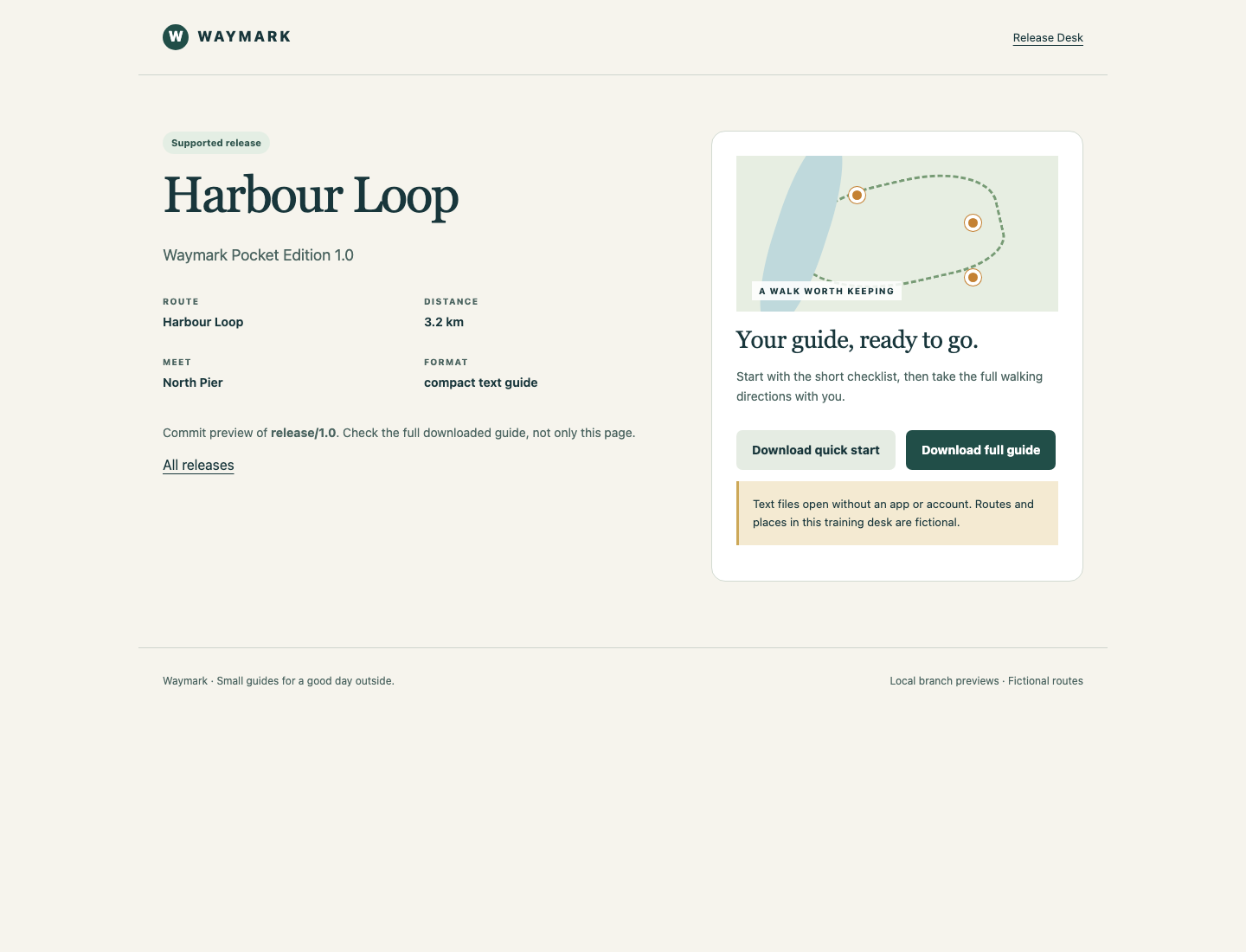
Look for Pocket Edition 1.0 on the left and the two download links on the right; on a narrow screen the download panel is below the release details.
Click Download full guide, and open the actual harbour-guide-v1.txt download from the browser's Downloads list. It must include the North Pier start, all three numbered directions through Clock Steps, the old boathouse and Anchor Square, the 3.2 km distance, and the final path/litter reminder. A 200 response or a filename alone would not establish complete content.
Click Download quick start again and confirm the original short checklist still works. From All releases, open the development preview and confirm Explorer Edition 2.0 is unchanged. Return with All releases.
Switch to Workspace and go back to the original directory:
cd /home/labex/project/release-desk/editor
git branch --show-current
git status --short
git --no-pager diff --cached -- preview.txt
git --no-pager diff -- preview.txt
cat private-note.txt
Expect main, the original MM preview.txt and ?? private-note.txt, the same staged photo-plan sentence, the same separate unstaged violet-cover sentence, and the unchanged private note. The checkpoint checks the corrected branch and real downloads together with these preserved facts. Leave the linked worktree available; removing it is not part of the deliverable.
Summary
You opened an existing maintenance branch in a real linked worktree, recognized the protected branch-in-use refusal and repaired one supported download without disturbing the original staged and unstaged work. The old edition, both useful downloads and the private note remained intact.
The next independently initialized guided lab reuses an existing isolated fix from development instead of editing it again. It adds cherry-pick while keeping the same branch and draft-preservation decisions.