Introduction
DAYLIGHT CAFE is correcting the price of its flat white. The price update and a matching takeaway download are already drafted. An unfinished seasonal announcement is mixed into the same menu file, and private tasting notes must stay out of the public commit.
You will choose exactly what goes into one Git commit while preserving the rest of the work. You need basic terminal navigation and simple text-file familiarity. Git's working tree, staging area and commit snapshots are explained here; no website programming or GitHub account is required.
Use Workspace for commands, Working Copy to see the files being edited, and Committed Menu to see the exact files stored in the current commit. The two pages read real content and never fill in missing files. The café, illustration and menu are original training material. Interface labels and runtime output stay English.
Read the Two Menu Versions
In this step, you will compare the public menu with the prepared working files, then set a repository-local author identity.
Open Committed Menu. The flat white costs EUR 3.80, and the seasonal board says the drinks are being planned. Use Download takeaway menu to open the actual text download. It also lists EUR 3.80.
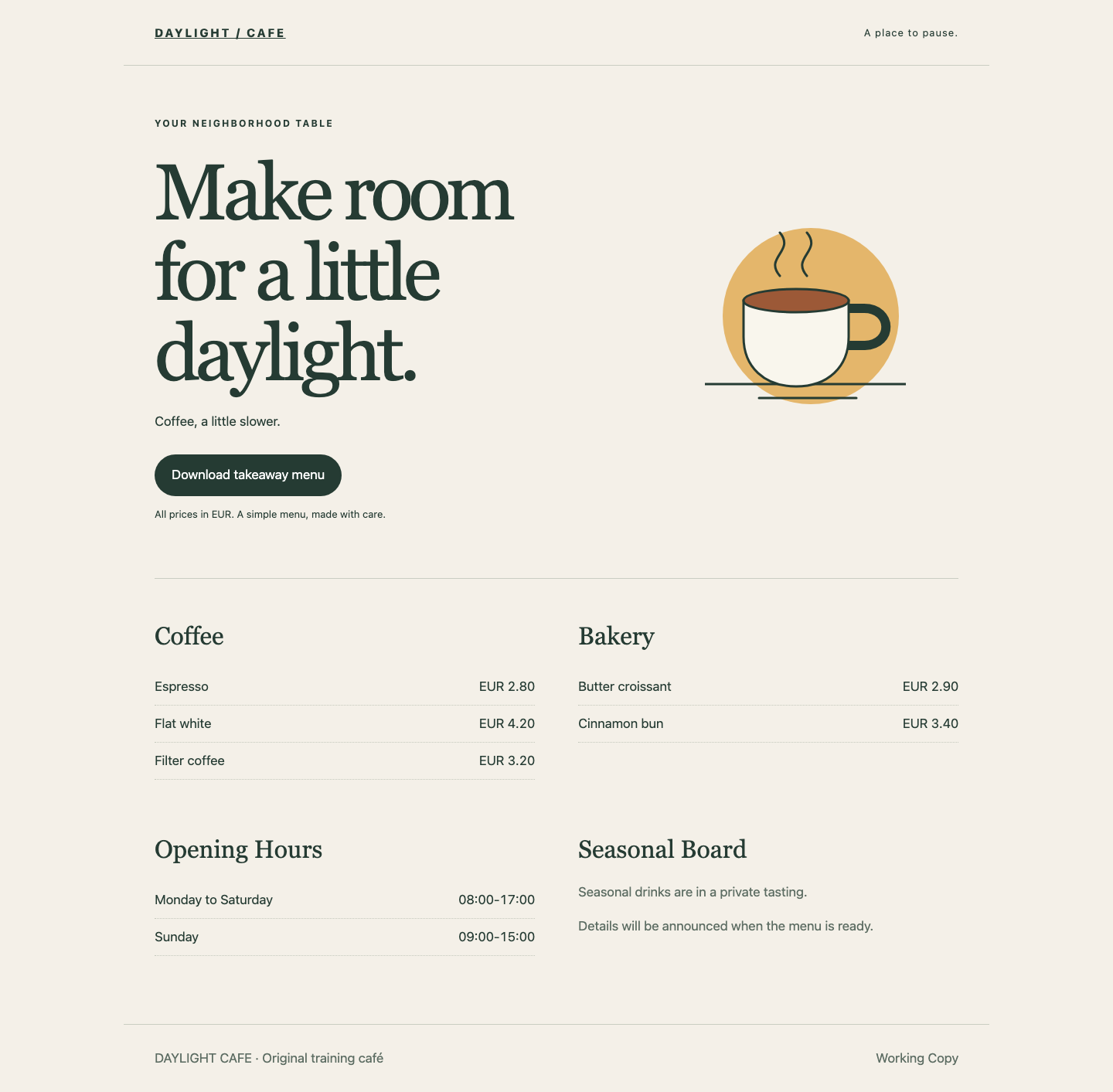
Switch to Working Copy. The flat white now costs EUR 4.20, but the seasonal board also contains a private-tasting announcement. Only the price correction is approved. Both public menu files must agree on EUR 4.20; the seasonal draft and tasting-notes.txt must remain on your machine, outside the commit.
The Working Copy keeps the unfinished seasonal announcement visible:
Switch to Workspace. It opens in /home/labex/project/daylight-menu, the prepared Git repository. Use pwd to print your current directory:
pwd
If you navigated elsewhere, return with the complete path:
cd /home/labex/project/daylight-menu
A repository stores a project's snapshots and history. The working tree is the set of files you can edit. git status --short summarizes how those files differ from the last commit and from the staging area. --short requests a compact display:
git status --short
You should see modified menu.txt and menu-download.txt, plus ?? tasting-notes.txt. ?? means the notes are untracked: Git has not added them to a snapshot. A modified file is not automatically included in a commit.
Git records an author name and email in each commit. git config --local saves a setting only inside this repository. The quotes keep the name's two words together. Use this fictional training identity:
git config --local user.name "Alex Morgan"
git config --local user.email "alex@example.test"
Read the values back:
git config --local user.name
git config --local user.email
Expect Alex Morgan and alex@example.test. No global Git identity or external account is changed. All later commands in this lab belong in this same repository.
Stage Only the Approved Price Hunk
In this step, you will put the approved price correction into the staging area without including the seasonal draft.
Stay in Workspace. A commit is a stored snapshot. HEAD names the current commit. The staging area, also called the index, holds the exact snapshot that the next commit will record. Staging copies selected content into the index; it does not delete other working changes.
--no-pager is a Git option that prints output directly instead of opening an interactive viewer. Use it for the comparisons below. If an earlier Git command has already opened a viewer displaying (END), press q to return to the shell; do not type the next command into that viewer.
git --no-pager diff compares the working tree with the index. The -- separator says that the following argument is a filename rather than a Git option:
git --no-pager diff -- menu.txt
Look for two groups of changes, called hunks. A line starting with - is the previous content; one starting with + is the proposed content. The first hunk changes the flat white price from 3.80 to 4.20. The second changes the seasonal announcement. The @@ line identifies each hunk's location, not menu content.
git add --patch asks which hunks to copy into the index. It changes the staged snapshot, while leaving the complete working file alone:
git add --patch menu.txt
At the flat white price hunk, type y and press Enter to stage it. At the seasonal-board hunk, type n and press Enter to leave it unstaged. Read the displayed text before each answer; y means yes and n means no.
Now inspect the actual staged difference. --cached selects the comparison between HEAD and the index:
git --no-pager diff --cached -- menu.txt
Only the price correction should appear. Compare it with what is still unstaged:
git --no-pager diff -- menu.txt
Only the seasonal announcement should appear here. Nothing has been committed yet.
If you selected the wrong hunk, use git restore --staged to restore this file's index entry from HEAD. --staged targets the index only, so the price correction and draft remain in the working file:
git restore --staged menu.txt
Then repeat git add --patch menu.txt, choose the price hunk, and inspect both differences again. This recovery is safe before the commit because it does not discard your working files.
Include the Matching Takeaway Download
In this step, you will make the next commit self-contained by adding the matching download and reviewing every staged file.
Stay in Workspace. The café offers both a page and a takeaway menu. Publishing only one correction would leave two different prices. cat prints a small text file:
cat menu-download.txt
It already contains Flat white: EUR 4.20. This file contains only the approved correction, so stage the whole file:
git add menu-download.txt
The plain git add command stages that named file. Avoid staging the whole directory: it also contains private notes and the unfinished announcement.
--name-only lists the paths in a difference without their content. Review the staged paths:
git --no-pager diff --cached --name-only
The list must contain only menu-download.txt and menu.txt. Then review their complete staged difference:
git --no-pager diff --cached
Both public versions should agree on 4.20. The seasonal announcement and tasting notes must not appear.
To read a complete staged file rather than a difference, use git --no-pager show with :menu.txt. The leading colon selects the index entry:
git --no-pager show :menu.txt
The staged menu combines EUR 4.20 with the original seasonal text, Seasonal drinks are being planned. This combination proves that the index can differ from the working tree.
If you accidentally staged the private notes, unstage them without deleting the file:
git restore --staged tasting-notes.txt
Run that recovery only when the notes were staged; otherwise Git may correctly report that the untracked path is unknown. Inspect git --no-pager diff --cached again before continuing. A misspelled filename changes nothing: use git status --short to find the real name and repeat the intended command.
Commit and Read the Actual Public Result
In this step, you will record one focused commit and prove that the unfinished work remains available afterward.
Stay in Workspace. git commit records the complete index as a new snapshot. -m supplies its short explanatory message; the quotes keep that message together:
git commit -m "Correct the flat white price"
Git reports a new commit and two changed files. Its hash varies. The message describes the work, but the snapshot's actual content is what matters.
git --no-pager show can read a file directly from a commit. HEAD:menu.txt means the file named menu.txt stored in the current commit:
git --no-pager show HEAD:menu.txt
git --no-pager show HEAD:menu-download.txt
Both show the approved 4.20 price. The committed seasonal announcement still says the drinks are being planned.
Check the remaining work:
git status --short
Expect M menu.txt and ?? tasting-notes.txt. The two status columns distinguish staged changes on the left from unstaged working changes on the right. The M in the second column means the seasonal draft remains unstaged. The notes are still untracked. An empty status would be wrong for this task: it would mean the required unfinished work had disappeared or entered a commit.
Read the remaining difference and the notes:
git --no-pager diff -- menu.txt
cat tasting-notes.txt
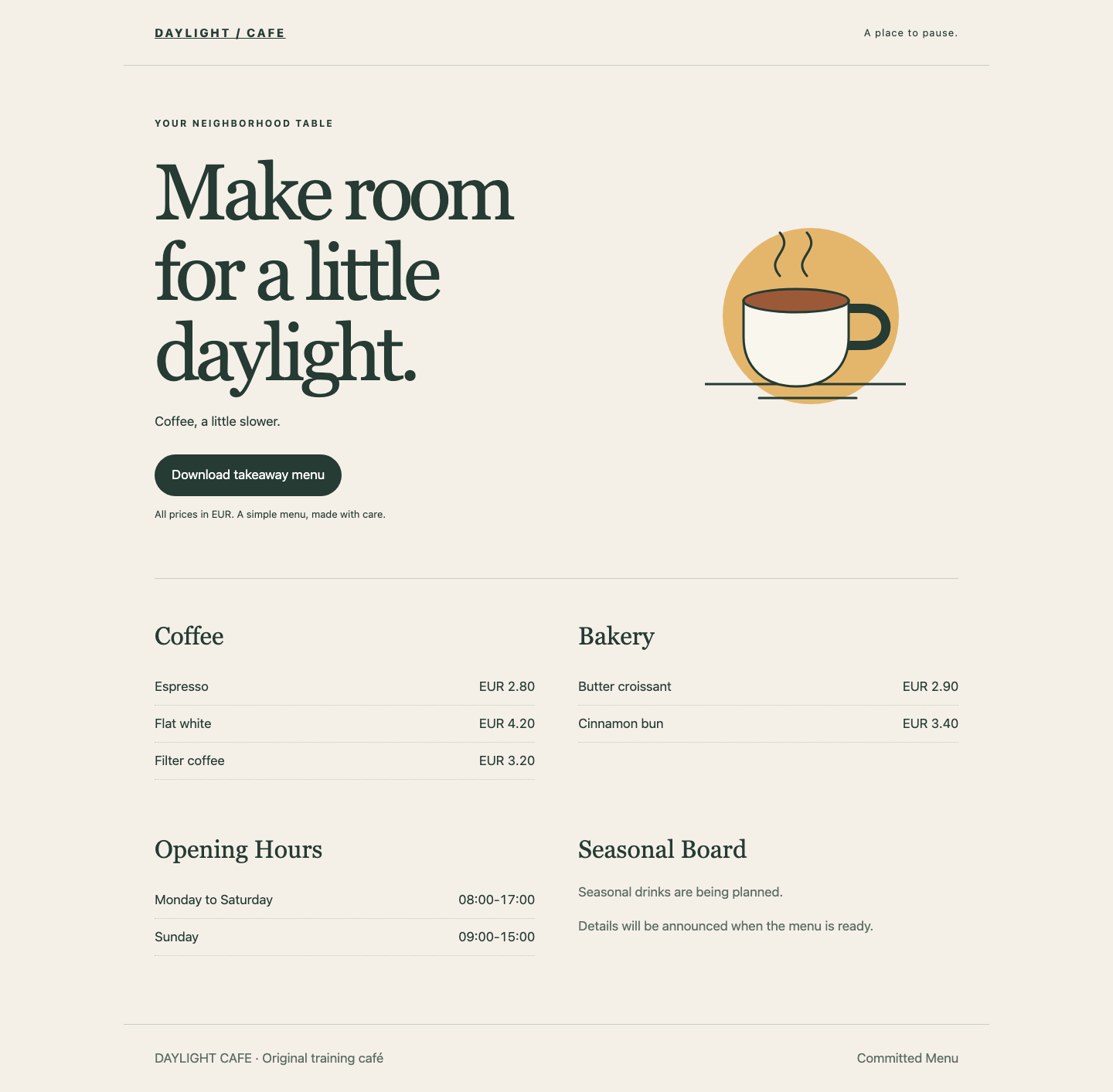
Switch to Committed Menu and refresh the page. Confirm the flat white costs EUR 4.20 and the seasonal board retains its original public text. Download the takeaway menu again and confirm the same price in the real file. Switch to Working Copy: the private-tasting draft is still visible there.
The committed menu shows the approved price and the original public seasonal announcement:
You now have one complete public correction while the unrelated work remains intact. No push is needed; this project teaches local commit boundaries. Remote collaboration belongs to a separate project.
Summary
You separated working files from the index and a commit, selected one hunk, included a matching download, and verified the actual committed menu. The seasonal draft and private notes remained outside the commit. A useful commit contains the complete intended change, not every file that happens to be modified.