Introduction
A break has a time limit. Your music library contains complete recordings with a preference score, a duration in seconds and a stable track ID. You will make a reusable C++ program that considers tracks in a public order, keeps each recording that fits, and saves an actual playlist you can play.
You need basic terminal navigation and C++ strings, classes, vector, file streams and exceptions. We will introduce the const references, comparison function and relative paths used here. The parser, original synthetic audio and browser player are prepared. You will write the selection and export functions, not an audio converter or an optimal packing algorithm.
Use the Terminal Tab for commands and the Player Tab for listening. Both use this one environment. Edit only selection.cpp and export.cpp; create playlists directly in outputs/. Keep the catalog, supplied framework and original outputs/audio/ files unchanged. These original synthetic compositions contain no outside samples.
Fit Complete Tracks into a Break
In this step, you will hear a normal example, then use a remaining-time counter to choose complete recordings. Start in Player. Select example-120.m3u8, click Load playlist, then Play 1. The list contains Morning Light (50 seconds) and Window Seat (70 seconds). Use the audio controls to pause or move the playback position. Select example-90.m3u8, load it and play its only track. The shorter break keeps the complete first recording; it does not cut the second one.
Switch to Terminal. If stray characters or an unfinished command appear at the prompt, press Ctrl+C to cancel that input. cd changes directory. This absolute path also recovers from an ordinary wrong-directory error:
cd /home/labex/project/short-break
cat displays a text file. sample.tsv is a two-track catalog; TSV means tab-separated values. Its columns are ID, title, whole seconds, preference and audio path. A higher preference is considered first. An ID identifies a recording; titles can repeat.
cat sample.tsv
playlist.hpp declares the Track object and the two function interfaces. Each Track groups the five fields. A vector<Track> holds several objects in order. Read the short definition:
cat playlist.hpp
Build the supplied starter. g++ compiles C++; -std=c++17 selects C++17, -Wall -Wextra request useful warnings, and -o playlist names the executable. The three .cpp files are compiled together. A warning about the starter's unused budget is expected.
g++ -std=c++17 -Wall -Wextra main.cpp selection.cpp export.cpp -o playlist
./playlist runs the executable in this directory. Its arguments are catalog, budget in whole seconds from 1 through 86400 inclusive, and output path. The prepared parser uses that same bound for catalog durations and preference values; you do not need to implement that parser. Run the incomplete starter on the 90-second sample:
./playlist sample.tsv 90 outputs/sample-90.m3u8
It prints both recordings and Total: 120s / 90s. That is the bug you will fix. The starter's output file is only a title list, so loading it in Player currently reports a missing #EXTM3U header. That is an expected format failure, separate from a missing audio file. Step 3 will teach the export format.
Now give chooseTracks a remaining budget. Passing tracks by value makes a local copy; later sorting will not change the catalog. const auto& track reads each existing object without copying or modifying it. push_back appends a selected object. <= includes a track that fits exactly. After adding it, -= subtracts its duration. A track that does not fit is skipped, and the loop continues.
Replace the short file with the complete function below. > replaces this source file. The here-document <<'CPP' sends all lines up to the final CPP to cat; the quoted delimiter preserves C++ characters literally. Paste the whole block, including the final delimiter on its own line.
cat > selection.cpp <<'CPP'
#include "playlist.hpp"
#include <algorithm>
std::vector<Track> chooseTracks(std::vector<Track> tracks, int budget) {
    std::vector<Track> selected;
    for (const auto& track : tracks) {
        if (track.seconds <= budget) {
            selected.push_back(track);
            budget -= track.seconds;
        }
    }
    return selected;
}
CPP
Rebuild after a source edit, then rerun the same sample:
g++ -std=c++17 -Wall -Wextra main.cpp selection.cpp export.cpp -o playlist
./playlist sample.tsv 90 outputs/sample-90.m3u8
Now only t01 | Morning Light | 50s appears, with Total: 50s / 90s. Forty seconds remain; the 70-second recording cannot fit. This version respects input order. Next, you will make order independent of the catalog's row arrangement.
If a compile error names a line, reopen selection.cpp in the editor or repeat the complete replacement block, then rebuild. Running an old executable after a failed build does not test your edit.
Apply a Predictable Preference Order
In this step, you will sort the whole library before choosing tracks. Begin in Terminal, in /home/labex/project/short-break. Inspect the full catalog:
cat catalog.tsv
The rows are deliberately shuffled. Consider preference from largest to smallest, then track ID alphabetically from smallest to largest when scores tie. Thus t02 comes before t03, even though it is longer. These are simple preference decisions, not a search for the greatest possible total duration.
For a 90-second budget, t01 uses 50 seconds. Both t02 (95) and t03 (70) do not fit the remaining 40. Continue to t04 (30), which leaves 10. t05 (20) does not fit. The result is t01, t04, totaling 80 seconds. Stopping at the first oversized track would lose a valid later choice.
std::sort uses the half-open range from begin() to end(). The comparison returns true when a must precede b. [] introduces a small anonymous function, called a lambda; its two const Track& arguments read the compared objects. The != test chooses the primary comparison, and the final return breaks a tie by ID. Replace selection.cpp with the complete version:
cat > selection.cpp <<'CPP'
#include "playlist.hpp"
#include <algorithm>
std::vector<Track> chooseTracks(std::vector<Track> tracks, int budget) {
    std::sort(tracks.begin(), tracks.end(),
        [](const Track& a, const Track& b) {
            if (a.preference != b.preference)
                return a.preference > b.preference;
            return a.id < b.id;
        });
    std::vector<Track> selected;
    for (const auto& track : tracks) {
        if (track.seconds <= budget) {
            selected.push_back(track);
            budget -= track.seconds;
        }
    }
    return selected;
}
CPP
Rebuild and run both budgets:
g++ -std=c++17 -Wall -Wextra main.cpp selection.cpp export.cpp -o playlist
./playlist catalog.tsv 90 outputs/break-90.m3u8
./playlist catalog.tsv 120 outputs/break-120.m3u8
The 90-second result is t01, t04, totaling 80. The 120-second result is t01, t03, totaling exactly 120: t02 is skipped, then the 70-second track fits the remaining 70. Both choices use whole recordings. Output is still a title list until the next step.
Export a Playlist You Can Play
In this step, you will save the chosen objects as UTF-8 extended M3U. Begin in Terminal. This .m3u8 file is a text playlist, not audio itself. The first line is #EXTM3U. Each selected track then has a #EXTINF:seconds,title metadata line followed by its audio path.
A relative path is resolved from the playlist's directory, not the catalog's directory or the process's current directory. Save generated playlists directly in outputs/; the originals live in outputs/audio/. Therefore an entry such as audio/Morning Light.wav reaches the recording beside that playlist. Keep that folder relationship when downloading or sharing files. Spaces and Unicode are supported; keep the supplied paths, with no newline, leading #, absolute path, parent traversal or extra playlist directives.
std::ofstream opens an output file. << writes text or numbers; \n writes a newline. This function receives the selected vector and output name through const references, so it does not copy or change them. File failures throw an exception that the prepared main program reports. The input parser validates a positive integer budget, the catalog and all referenced audio before this function opens an output, preserving existing output on those input failures.
Replace export.cpp:
cat > export.cpp <<'CPP'
#include "playlist.hpp"
#include <fstream>
#include <stdexcept>
void writePlaylist(const std::vector<Track>& tracks, const std::string& output) {
    std::ofstream file(output);
    if (!file) throw std::runtime_error("Cannot write playlist.");
    file << "#EXTM3U\n";
    for (const auto& track : tracks) {
        file << "#EXTINF:" << track.seconds << ',' << track.title << '\n';
        file << track.path << '\n';
    }
    if (!file) throw std::runtime_error("Playlist write failed.");
}
CPP
Rebuild and recreate both lists with the updated exporter:
g++ -std=c++17 -Wall -Wextra main.cpp selection.cpp export.cpp -o playlist
./playlist catalog.tsv 90 outputs/break-90.m3u8
./playlist catalog.tsv 120 outputs/break-120.m3u8
Inspect the saved 90-second file:
cat outputs/break-90.m3u8
The saved UTF-8 file contains:
#EXTM3U
#EXTINF:50,Morning Light
audio/Morning Light.wav
#EXTINF:30,夜の散歩
audio/夜の散歩.wav
The Japanese title and filename remain UTF-8 text. In some terminal sessions, the display shows placeholders for these characters even though the saved bytes are intact. Do not rename the originals to fix a display issue; Player shows the original title and path. The duration lines describe the whole original files; changing a number here would not shorten the audio.
Switch to Player. Click Refresh files, select break-90.m3u8 and click Load playlist. The result should show two tracks and 80 seconds declared. Click Play 1, move the audio position, pause, then Play 2 to hear the second recording. The browser reads your saved M3U8 and exactly those audio paths. A missing source produces Cannot play, not a replacement track. Use Download playlist and Download current track to save the actual files; the playlist alone does not contain the audio.
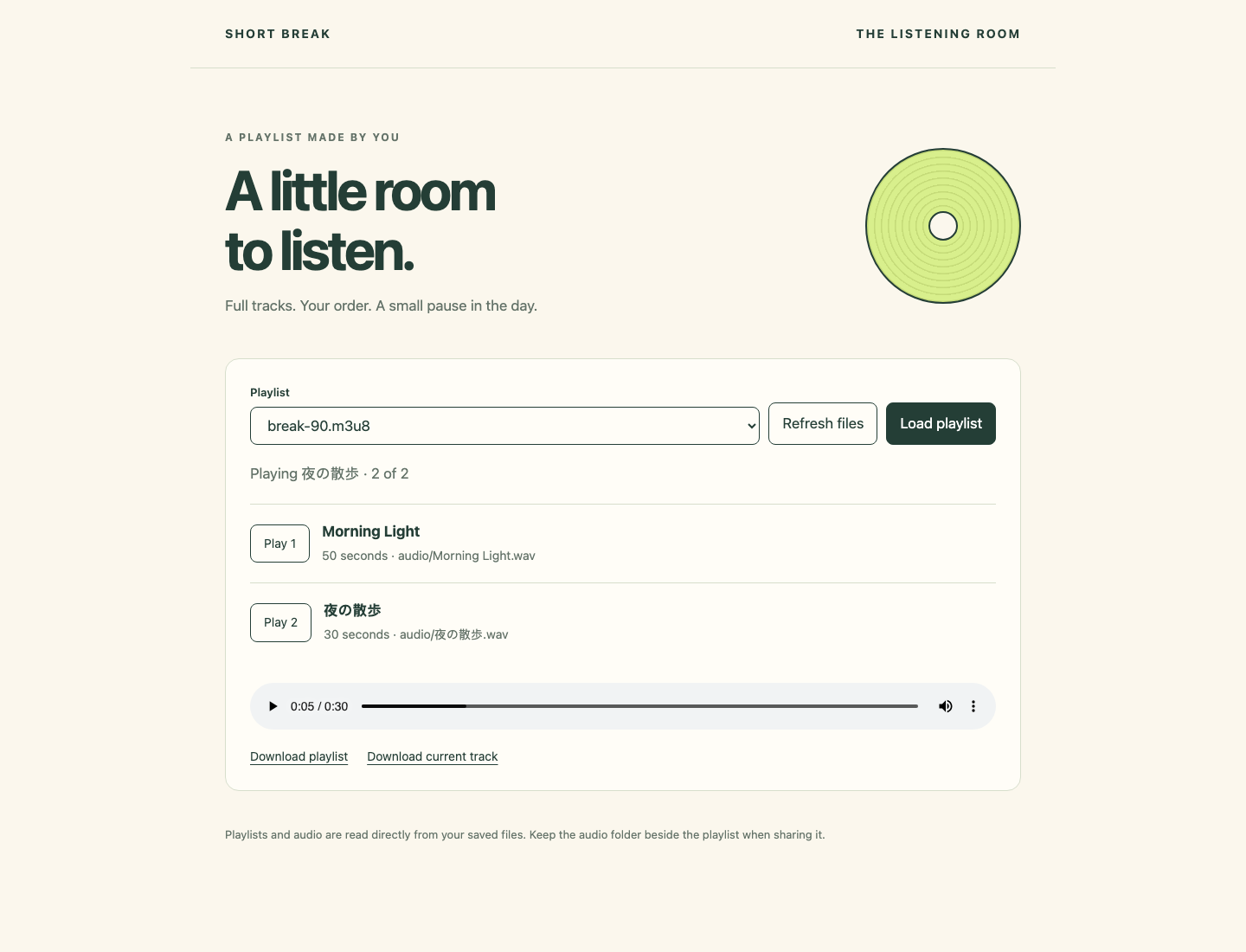
Look at the two rows and their durations, then the audio controls below them. Switch back to Terminal after checking playback.
Reuse the Program and Read a Rejection
In this step, you will distinguish a valid short result from invalid input. Begin in Terminal. A positive budget smaller than every track is valid: no full recording fits. Generate a one-second list:
./playlist catalog.tsv 1 outputs/tiny.m3u8
It reports Total: 0s / 1s. The file contains only #EXTM3U. Loading it in Player should show zero tracks. This is a correct empty result, not a connection or parsing failure.
A budget such as 90s is invalid because the CLI expects digits in whole seconds. The next command intentionally exits with status 1; it must not replace your existing 90-second playlist. echo $? immediately displays the preceding command's exit status (0 means success). Run these as two consecutive commands:
./playlist catalog.tsv 90s outputs/break-90.m3u8
echo $?
The error says that budget and durations must be positive integer seconds, followed by status 1. Do not reset the environment: remove the suffix and use 90 when retrying. If an input path is mistyped, the error Cannot open catalog points to the catalog argument. Recover with the absolute cd from Step 1 and the real name catalog.tsv. Missing audio means a catalog path does not reach a file; preserve the prepared originals and check the path before trying again.
Confirm the existing good file still contains both proper metadata/path pairs:
cat outputs/break-90.m3u8
You can now use the same program for different positive budgets, always writing directly in outputs/. It orders by preference and ID, skips oversized choices and never trims a recording. Physical speaker output and every possible third-party player's behavior are outside this exercise; the provided browser decodes these real WAV files.
Summary
You used C++ objects and a vector to order recordings, select complete tracks within a remaining budget and write UTF-8 M3U8 files. You played the actual output, understood relative paths and distinguished a valid empty playlist from invalid input. The next challenge changes the library while keeping these rules.