Introduction
A useful notification can contain two different tones separated by a short pause. You will compose that pattern from small C functions, then make the beginning and end of each tone gradual with a linear fade. Your result will be a real WAV that you can inspect, play and download.
Complete Turn a Loop into a Tone first, or be comfortable with its sine sampling loop, 16 kHz mono PCM, integer conversion, compilation and output redirection. This environment is independent: its writer, caller and browser are prepared again, and it needs no files or processes from the earlier lab. The 50-minute duration is an author estimate, including reading and ordinary errors.
Put Three Segments in Order
In this step, you will compose a working two-tone pattern before adding fades. Start in Terminal. Use the absolute path to recover from a mistaken working directory:
cd /home/labex/project/sound-studio
Our first cue has a 440 Hz tone for 300 milliseconds, zero-valued silence for 150 milliseconds, then a 660 Hz tone for 400 milliseconds. The order is part of the result. At 16,000 samples per second, those segments contain 4,800, 2,400 and 6,400 samples: 13,600 in total, or 0.850 seconds.
A pause must contain actual zeros. Omitting the pause's writes would make the WAV shorter, and changing a duration field in the header would not add the missing samples. The provided main.c writes one header for the whole cue, then calls write_cue. Your functions append only PCM samples to that same data stream. Do not write a new header for each segment.
Read the function declarations and starter:
cat cue.h cue.c
write_tone contains the plain sine loop from the previous lab. Its additional fade_ms parameter will control the fade in Step 2. For this first version, (void)fade_ms explicitly marks that parameter as unused so the compiler does not warn about it; it does not generate any samples. The two other functions are incomplete. Replace those empty operations by real composition and silence.
Every call to write_tone has its own local i, starting at zero. Its time seconds = (double)i / rate and sine angle therefore restart for that segment. A 660 Hz second tone gets its own local clock rather than accidentally using the first tone's index. The silence loop also starts at zero and calls wav_sample(0) once per sample.
As before, sin takes radians, one cycle is 2 * pi, and its result lies between -1 and 1. Multiplying by amplitude before (int) converts it to a bounded integer sample. The provided pcm.c packs those integers as signed 16-bit mono PCM; it never supplies a missing tone or pause. Keep main.c, cue.h, pcm.c, pcm.h, inspect_wav.py and audio.py unchanged. Only cue.c needs implementation.
Write this complete first version. The quoted here-document preserves the C text until the final C line; > replaces only cue.c.
cat > cue.c <<'C'
#include <math.h>
#include "cue.h"
#include "pcm.h"

void write_tone(int frequency, int milliseconds, int fade_ms, int amplitude) {
    const int rate = 16000;
    const double pi = 3.14159265358979323846;
    int count = rate * milliseconds / 1000;
    (void)fade_ms;
    for (int i = 0; i < count; i++) {
        double seconds = (double)i / rate;
        double phase = 2.0 * pi * frequency * seconds;
        wav_sample((int)(amplitude * sin(phase)));
    }
}
void write_silence(int milliseconds) {
    int count = 16000 * milliseconds / 1000;
    for (int i = 0; i < count; i++) {
        wav_sample(0);
    }
}
void write_cue(int first_frequency, int first_ms, int gap_ms,
               int second_frequency, int second_ms, int fade_ms, int amplitude) {
    write_tone(first_frequency, first_ms, fade_ms, amplitude);
    write_silence(gap_ms);
    write_tone(second_frequency, second_ms, fade_ms, amplitude);
}
C
Compile with the provided caller and writer. C11, warning flags, the output name and the final mathematics library option have the same roles as in the first guided lab. A successful build should print no warning or error.
gcc -std=c11 -Wall -Wextra main.c cue.c pcm.c -lm -o cue
The executable takes seven arguments in this order:
| Argument | Unit and inclusive range |
|---|---|
| First frequency | Whole Hz, 200–1200 |
| First tone length | Whole milliseconds, 100–1000 |
| Pause length | Whole milliseconds, 50–500 |
| Second frequency | Whole Hz, 200–1200 |
| Second tone length | Whole milliseconds, 100–1000 |
| Fade length at each end | Whole milliseconds, 5–50 |
| Amplitude before fading | Integer sample units, 1000–12000 |
All parameters are parsed before any header bytes are written. The first version passes but deliberately ignores the fade argument; Step 2 will implement it. Generate the normal pattern with a requested 20 ms fade and amplitude 10,000, retaining this initial unfaded result separately:
./cue 440 300 150 660 400 20 10000 > outputs/plain-cue.wav
python3 inspect_wav.py outputs/plain-cue.wav
Look for Frames: 13600, Duration: 0.850 s and Peak: 10000. A complete header alone does not prove those samples have the correct tone order or silence; the check also analyzes the real data.
Switch to Sound Studio. Click Refresh files, choose plain-cue.wav and click Load sound. Confirm that the selection and Ready to play message identify that file. Play it, pause, and use Playback position to move through it. With Tab, focus the position slider and use Home, End and the arrow keys. The first sound should be lower than the second, with a clear pause between them. A sharp onset or ending is still expected in this unfaded version. Use Download WAV to save the actual file.
Return to Terminal. Keep plain-cue.wav, cue.c and the current cue executable. The first-step check accepts either this complete plain implementation or the later complete faded implementation, so advancing to Step 2 does not invalidate an earlier recheck. Your delivered executable and rebuilt source must implement the same permitted behavior across the recipes; a stale plain executable paired with faded source is insufficient. The saved plain-cue.wav always remains the unfaded comparison. Later checks strictly require fades.
The check requires the saved file, tests the delivered executable and rebuilds your unchanged source in a disposable directory with other supported parameters. It does not create missing work. When a compilation fails, fix the reported line or repeat the full source block and rebuild before rerunning; an older executable does not contain your edit.
Fade Both Ends of Each Tone
In this step, you will scale the sine samples with a gradually changing gain. Begin in Terminal, in /home/labex/project/sound-studio.
Gain is a multiplier: 0.0 makes a sample silent, 0.5 halves its amplitude and 1.0 leaves it unchanged. A linear fade changes gain by the same amount per sample. At our rate, 20 milliseconds is 16000 * 20 / 1000 = 320 fade samples. During the first ramp, the gains at local indices 0, 80, 160, 240 and 320 are 0, 0.25, 0.5, 0.75 and 1.
The fade must be local to each tone. Begin at zero again for the second tone; do not stretch one fade across the entire cue. For a tone with count samples, the last index is count - 1. Therefore count - 1 - i measures how many sample positions remain before that end. Dividing that distance by fade gives the descending ramp, reaching exactly zero at the final sample.
Use decimal division: (double)i / fade preserves fractions. Integer division would turn almost the entire first ramp into zeros. The range limits guarantee a positive fade length and room for both ramps: even a shortest 100 ms tone with the longest 50 ms fade is valid. That case has no full-volume plateau; the two discrete ramps meet near the middle. Amplitude is a ceiling before fading, not a promise that every segment must contain a sample exactly at that peak.
Replace cue.c with the full faded version. The order and silence functions stay the same. Only the tone samples acquire a gain. The two if statements select the starting and ending ramps; positions between them retain gain 1. The gain multiplies the sine value before conversion to an integer.
cat > cue.c <<'C'
#include <math.h>
#include "cue.h"
#include "pcm.h"

void write_tone(int frequency, int milliseconds, int fade_ms, int amplitude) {
    const int rate = 16000;
    const double pi = 3.14159265358979323846;
    int count = rate * milliseconds / 1000;
    int fade = rate * fade_ms / 1000;
    for (int i = 0; i < count; i++) {
        double gain = 1.0;
        if (i < fade) {
            gain = (double)i / fade;
        }
        if (count - 1 - i < fade) {
            gain = (double)(count - 1 - i) / fade;
        }
        double seconds = (double)i / rate;
        double phase = 2.0 * pi * frequency * seconds;
        wav_sample((int)(amplitude * gain * sin(phase)));
    }
}
void write_silence(int milliseconds) {
    int count = 16000 * milliseconds / 1000;
    for (int i = 0; i < count; i++) {
        wav_sample(0);
    }
}
void write_cue(int first_frequency, int first_ms, int gap_ms,
               int second_frequency, int second_ms, int fade_ms, int amplitude) {
    write_tone(first_frequency, first_ms, fade_ms, amplitude);
    write_silence(gap_ms);
    write_tone(second_frequency, second_ms, fade_ms, amplitude);
}
C
Rebuild and save the faded version to a new filename, preserving plain-cue.wav for comparison:
gcc -std=c11 -Wall -Wextra main.c cue.c pcm.c -lm -o cue
./cue 440 300 150 660 400 20 10000 > outputs/cue.wav
python3 inspect_wav.py outputs/cue.wav
The result still has 13,600 frames and lasts 0.850 seconds. Fading changes sample values, not the segment lengths. The pause is still exactly 2,400 zero samples. For this recipe, the first tone occupies indices 0–4,799, the pause 4,800–7,199 and the second tone 7,200–13,599. The two tone functions still use their own local index starting at zero, independently of those whole-file positions.
Switch to Sound Studio, refresh, load cue.wav and play it. Compare it with plain-cue.wav: the order, pitch and pause are the same, while the faded tones begin and end gradually. Use Pause, the position slider and Download WAV on the new result. The player reads this saved WAV directly; it cannot add a missing pause or fade.
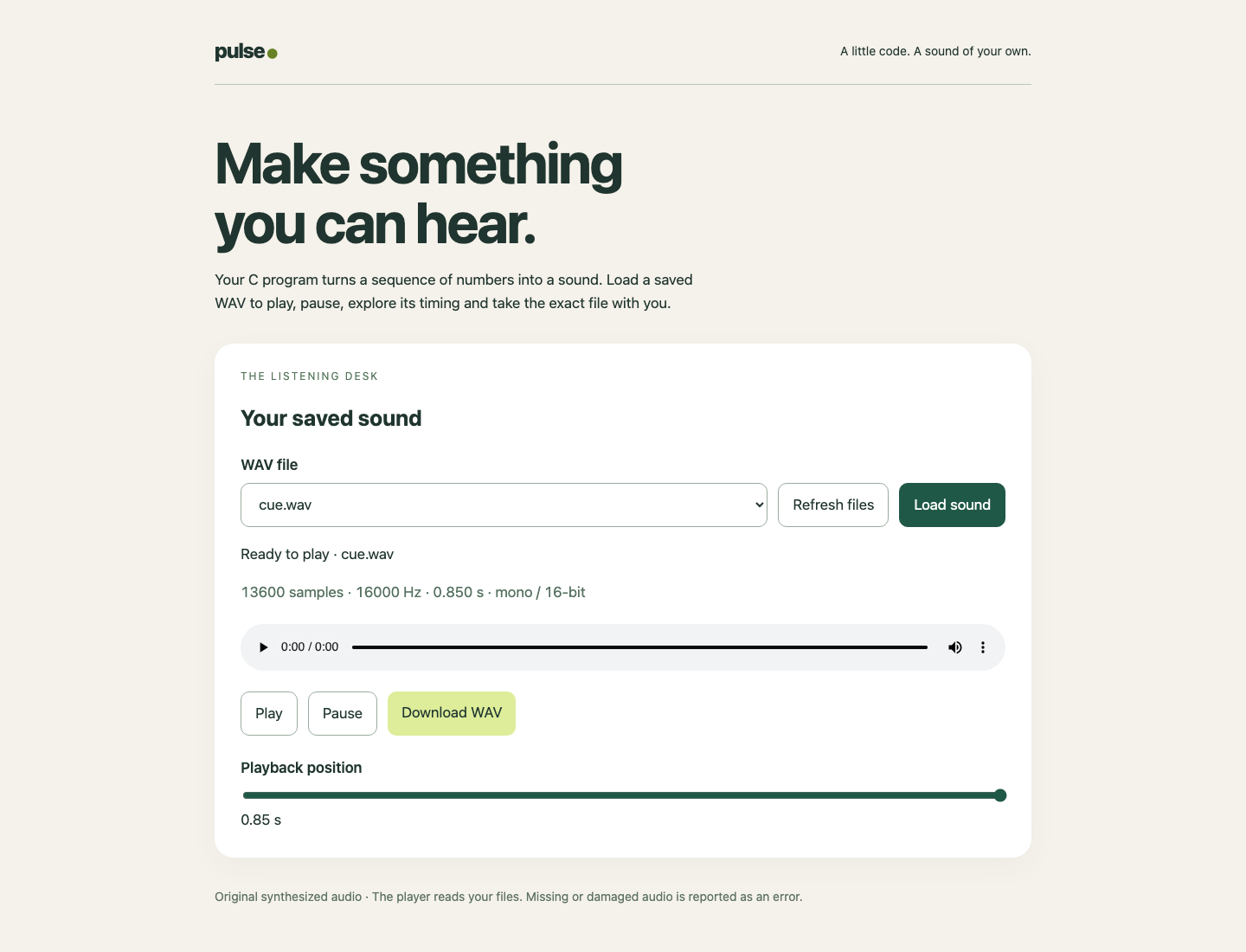
The selection and Ready message both identify cue.wav. Its 13,600 samples at 16,000 Hz last 0.850 seconds; Download WAV saves those actual bytes.
Keep the faded cue.c, the rebuilt cue executable and both saved files. Checks now require the current program to generate faded cues; the older plain file remains a comparison artifact and does not have to be regenerated by the faded program.
As in the first guided lab, mathematical and rounding equivalents are allowed. For each tone, the checker fits the requested sine carrier with the expected linear gain. Fitted amplitude may differ by at most 2% of the requested amplitude plus 2 sample units; RMS residual, an average-sized sample error, may be at most 0.5% of amplitude plus 2 units. Peaks may exceed the requested amplitude by at most 2 units, and each faded tone's first and last samples must be zero within 2 units. These tolerances allow integer rounding and equivalent discrete ramp expressions, including division by fade - 1 when the same endpoints and overall envelope meet the limits. The exact frame count, segment order and zero-valued pause still apply. There is no separate permission to change the requested frequency. You do not need to implement the fitting calculation.
Keep Timing Correct at the Edges
In this step, you will reuse the same program where there is no plateau and where tone durations contain a fractional number of cycles. Begin in Terminal.
Try the shortest supported tones with the longest fade. A 100 ms segment contains 1,600 samples; a 50 ms ramp contains 800. Both ramps fit, with no plateau. This is valid input, not an error to reject.
./cue 200 100 50 1200 100 50 1000 > outputs/edge-cue.wav
python3 inspect_wav.py outputs/edge-cue.wav
Look for 4,000 frames and 0.250 seconds: 1,600 for each tone plus an 800-sample pause. The peak can be below 1,000 because the ramps and the sampled sine peaks do not necessarily align. The amplitude bound still holds.
Now use 733 Hz for 101 ms, a 51 ms pause and 997 Hz for 103 ms, with 7 ms fades:
./cue 733 101 51 997 103 7 7373 > outputs/odd-cue.wav
python3 inspect_wav.py outputs/odd-cue.wav
Expect 4,080 frames and 0.255 seconds. The first tone contains 1,616 samples, the pause 816 and the second 1,648. Frequency times duration need not be a whole number of cycles. Counting samples defines the duration, and the local fade makes each tone return to zero at its end. Do not trim an older recording or relabel its header to imitate the new recipe.
Switch to Sound Studio, refresh and play edge-cue.wav and odd-cue.wav. Check their different durations, then use the actual controls to pause and seek. Tab shows keyboard focus; Enter activates Play; Home, End and arrows operate Playback position. Download odd-cue.wav. Browser playback and numerical checks provide evidence about the files; they do not verify a physical speaker or general audio-production quality.
Return to Terminal. The next trial intentionally requests an invalid 51 ms fade. Use a new disposable output path. As before, shell redirection opens that file before validation, so a refusal may leave it empty; it does not preserve an old file at that same path.
./cue 440 300 150 660 400 51 10000 > outputs/rejected-fade.wav
Read the original native status immediately, with no command between the trial and this read:
echo $?
Expect the published range explanation and status 2. The invalid argument is the fade, not the 150 ms pause. Switch to Sound Studio, refresh, select rejected-fade.wav and click Load sound. It reports Cannot load sound with no playable resource or download; a .wav extension cannot repair an empty file. Return to Terminal and remove only that disposable output:
rm -- outputs/rejected-fade.wav
Recover using a supported fade and a new output name:
./cue 440 300 150 660 400 20 10000 > outputs/recovered-cue.wav
python3 inspect_wav.py outputs/recovered-cue.wav
Again expect 13,600 frames and 0.850 seconds. If a relative path is mistyped, use the absolute cd from Step 1 and the correct filename. A compiler error means edit and rebuild; a parameter refusal means correct that argument; Cannot load sound concerns the saved file's presence or format. None requires resetting the environment.
Keep cue.c, the working cue executable and all five successful WAVs. The final check reads those actual files and tests the delivered executable and unmodified source in disposable fixtures, including the published endpoints and non-round recipe. Scoring does not overwrite your outputs, rebuild your live executable, repair a missing file or synthesize a replacement. You have made a reusable three-segment sound generator rather than one hard-coded recording.
Summary
You composed a WAV from two independent tone calls and a real zero-sample pause. You applied a linear gain at both ends of each tone, kept exact integer sample boundaries and reused the program for short, long-fade and non-round recipes. Your source, executable and five actual files preserve both the initial comparison and the completed faded behavior.