



Introduction
Temporary exports and permanent records need different retention decisions. Configure an exports-only lifecycle rule, read back its scope and age thresholds, and distinguish saved configuration from future scheduled actions.
Complete Organize Documents with Keys and Metadata first for prefixes, properties, downloads, and scoped deletion. The CLI connection, bucket, export, and permanent record are prepared in this fresh VM. Use Terminal and the AWS View above Terminal. You will check stored configuration rather than wait for future age-based actions.
Certification Relevance
| Certification | Exam task | Practice |
|---|---|---|
| Cloud Practitioner (CLF-C02) | Task 3.6 | S3 storage classes and scoped lifecycle configuration. |
| Solutions Architect – Associate (SAA-C03) | Task 4.1 | S3 storage classes and scoped lifecycle configuration. |
| Developer – Associate (DVA-C02) | Task 1.3 | S3 storage classes and scoped lifecycle configuration. |
| CloudOps Engineer – Associate (SOA-C03) | Task 1.3 | S3 storage classes and scoped lifecycle configuration. |
| Security – Specialty (SCS-C03) | Task 5.2 | Foundational practice: S3 storage classes and scoped lifecycle configuration. |
| Data Engineer – Associate (DEA-C01) | Task 2.3 | Foundational practice: S3 storage classes and scoped lifecycle configuration. |
Lab Overview
Inspect Temporary and Permanent Data
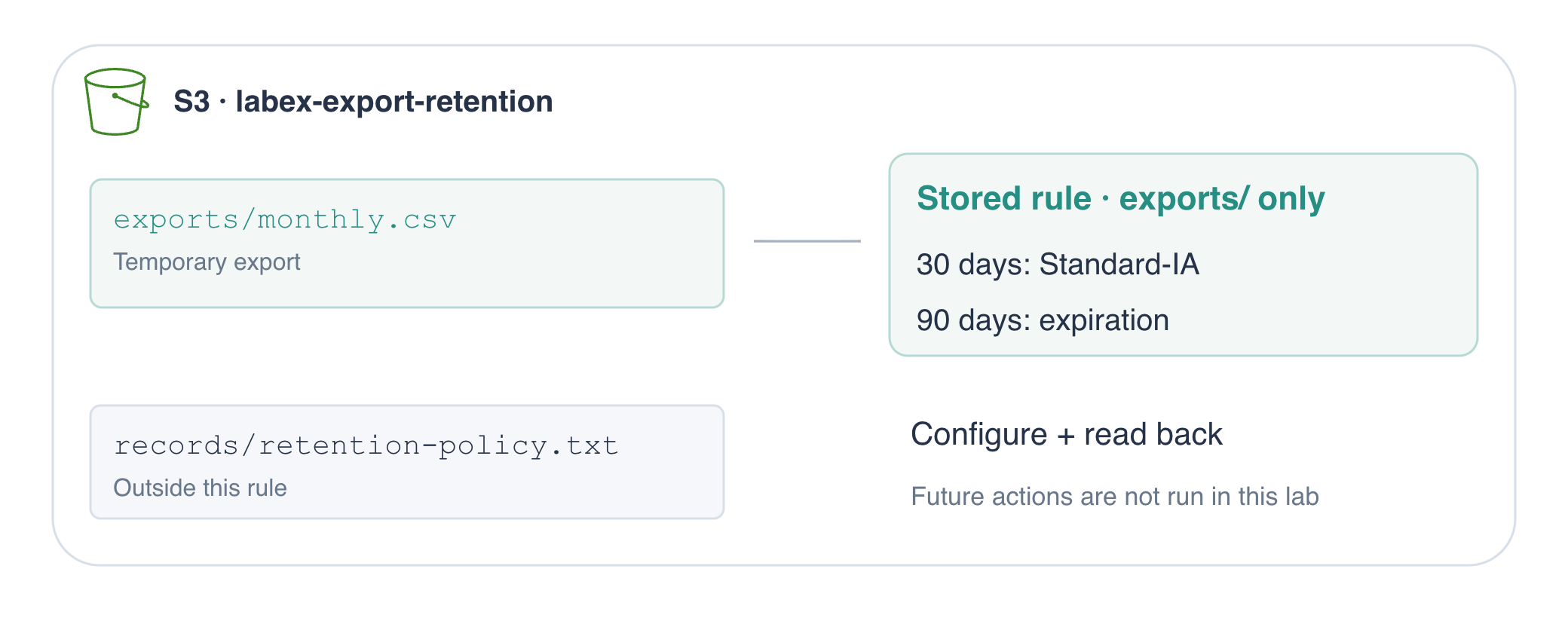
In this step, you will identify the policy's intended scope and inspect the permanent record that must be excluded.
A lifecycle rule specifies which objects to manage and what to do as they age. A transition changes storage class; expiration removes eligible stored objects. Neither action changes a local file. Start by identifying which stored keys belong in this rule.
Enter the workspace with cd, which changes directory:
cd /home/labex/project
List the prepared bucket recursively so you see complete object keys, including prefixes:
aws s3 ls s3://labex-export-retention/ --recursive
There are two keys: exports/monthly.csv and records/retention-policy.txt. The export is larger than 128 KB; the permanent record is a small text file. A prefix is the beginning of an object key, not a real directory. A rule filtered to exports/ matches the export but excludes records/retention-policy.txt.
Download the permanent record with cp, then inspect its bytes with cat:
aws s3 cp s3://labex-export-retention/records/retention-policy.txt permanent-record.txt
cat permanent-record.txt
Permanent record: retain until approved removal.
In AWS View, expand records/retention-policy.txt to see the same stored text. You will compare this record after configuring the rule. A lifecycle policy should not accidentally expire unrelated data simply because it shares a bucket.
Write and Apply a Scoped Lifecycle Rule
In this step, you will store one lifecycle rule describing the team's retention requirements.
S3 Standard is the default class for frequently accessed data. S3 Standard-IA (infrequent access) keeps immediate retrieval but charges for retrieval and has a thirty-day minimum storage duration. Here exports become infrequently accessed after thirty days and are retained until day ninety, so they spend sixty days in Standard-IA. Objects smaller than 128 KB are not transitioned by the default lifecycle behavior; the prepared export is larger than that threshold. These are selection considerations, not a promise of particular savings.
Expiration at ninety days is appropriate for disposable exports, not permanent records. This bucket has versioning off; expiration can permanently remove eligible objects. In a versioned bucket, current-version expiration and noncurrent-version deletion have different effects and need separately considered actions.
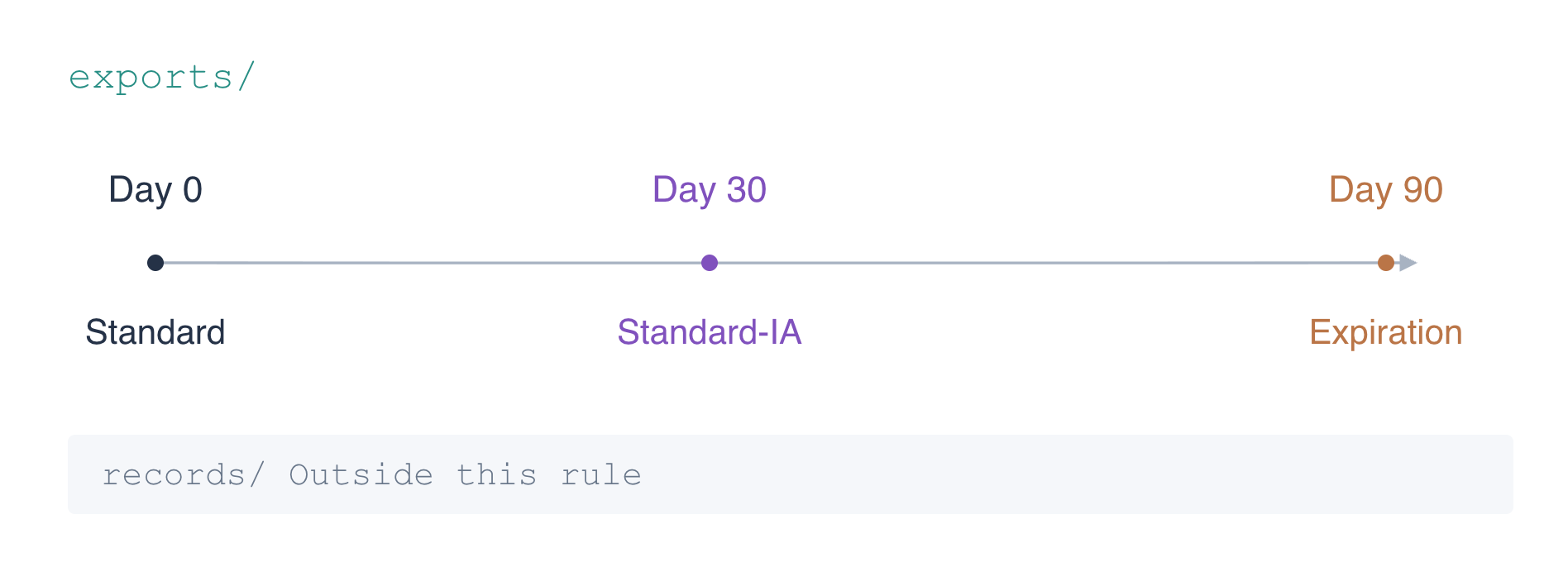
JSON describes the configuration using objects ({}), arrays ([]), quoted field names, strings, and numeric day values. The Rules array holds the complete bucket policy. ID names the rule, Status enables it, and Filter.Prefix restricts its scope. Transitions and Expiration specify the two actions.
The shell's cat > lifecycle.json <<'JSON' writes the following lines to a file until the closing JSON. This is a here-document; the quoted delimiter keeps the contents literal. Copy the complete block, including its final delimiter:
cat > lifecycle.json <<'JSON'
{
  "Rules": [
    {
      "ID": "temporary-export-retention",
      "Status": "Enabled",
      "Filter": {"Prefix": "exports/"},
      "Transitions": [{"Days": 30, "StorageClass": "STANDARD_IA"}],
      "Expiration": {"Days": 90}
    }
  ]
}
JSON
Review the file before applying it:
cat lifecycle.json
Confirm the prefix is exports/, with its trailing slash. An empty prefix would target all objects in the bucket, including the permanent record.
aws s3api exposes individual S3 API operations. put-bucket-lifecycle-configuration writes the configuration; --bucket chooses the bucket, and file://lifecycle.json makes the CLI read its JSON argument from your local file. This operation replaces the bucket's entire lifecycle configuration; when updating an existing configuration, include any rules you intend to keep. This exercise starts without one:
aws s3api put-bucket-lifecycle-configuration \
  --bucket labex-export-retention \
  --lifecycle-configuration file://lifecycle.json
A successful command prints no response body. Next, inspect what the service actually stored instead of relying on your local file alone.
Review the Stored Policy and Unaffected Record
In this step, you will read back the policy from S3 and confirm that both new data and the excluded permanent record are still accessible.
Retrieve the bucket's lifecycle configuration:
aws s3api get-bucket-lifecycle-configuration --bucket labex-export-retention
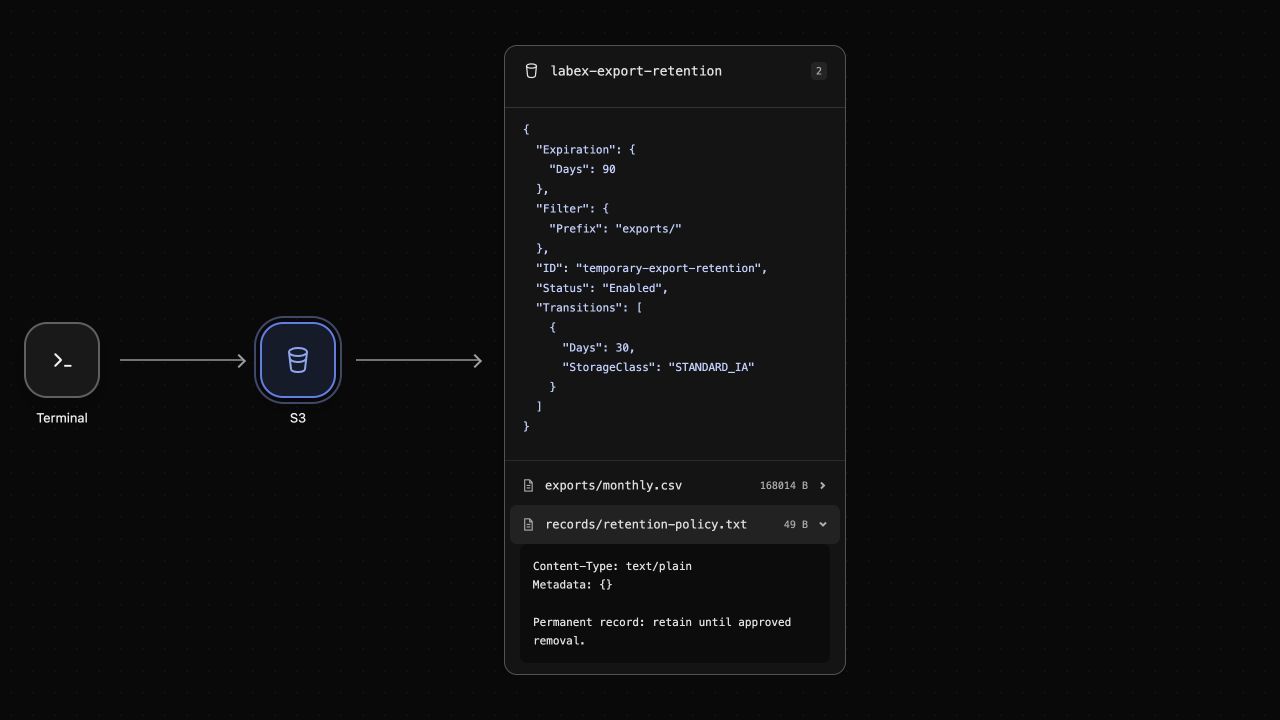
The response's Rules array contains one Enabled rule: prefix exports/, transition to STANDARD_IA at thirty days, and expiration at ninety days. The service may include additional response fields; compare the rule's fields with the requirement. This response is authoritative configuration evidence, while a local JSON file alone does not show that a rule was applied.
AWS View shows the same stored rule above the objects. It does not display a completed transition or deletion: those thresholds are in the future.
head-object reads an object's properties without downloading its body. Inspect the newly created export:
aws s3api head-object --bucket labex-export-retention --key exports/monthly.csv
Its ContentLength is larger than 131072 bytes. It remains in Standard today; the StorageClass field may be omitted for that default class. The rule does not immediately rewrite a new object's storage class merely because you enabled it. Scheduled processing is asynchronous after eligibility, not a stopwatch countdown from when this command ran.
Download the excluded permanent record again:
aws s3 cp s3://labex-export-retention/records/retention-policy.txt permanent-record-after.txt
cmp compares files byte for byte. && prints a message only if the comparison succeeds:
cmp permanent-record.txt permanent-record-after.txt && echo 'Permanent record unchanged'
The message confirms its contents remain intact. Both keys still appear in the bucket:
aws s3 ls s3://labex-export-retention/ --recursive
The stored prefix establishes that the permanent record is outside this rule. Its continued presence today also confirms you did not accidentally delete or overwrite it while configuring the policy; it does not alone prove future scheduler behavior.
Remove the Policy and Exercise Resources
In this step, you will remove the stored policy and then delete the lab-owned objects and bucket without waiting for future expiration.
Removing a lifecycle configuration stops that policy from governing the bucket; it does not itself remove its objects. Delete the policy with the individual API operation:
aws s3api delete-bucket-lifecycle --bucket labex-export-retention
Check that it is no longer configured:
aws s3api get-bucket-lifecycle-configuration --bucket labex-export-retention
This command is expected to fail with NoSuchLifecycleConfiguration. The bucket still exists, but its lifecycle policy does not. AWS View removes the rule summary and retains both objects.
The permanent record was excluded from automatic expiry. You will now deliberately remove it as part of cleaning this disposable exercise, using its exact key. Remove the temporary export first:
aws s3 rm s3://labex-export-retention/exports/monthly.csv
aws s3 rm s3://labex-export-retention/records/retention-policy.txt
Confirm the successful list contains no object rows:
aws s3 ls s3://labex-export-retention/ --recursive
Remove the empty bucket with rb, then confirm storage still responds:
aws s3 rb s3://labex-export-retention
aws s3 ls
The remove_bucket message names this exercise's bucket; the final list has no buckets, and AWS View shows No buckets. Your local policy and record copies remain for review. You configured a future retention policy and explicitly cleaned up the practice resources; those are separate operations.
Summary
You translated temporary-data requirements into a narrowly scoped S3 lifecycle rule, selected a storage class with access and minimum-duration considerations, and configured expiration. You read the rule back from S3 and confirmed the permanent record remained outside its prefix and unchanged.
Configuration evidence is different from future scheduled execution. You finished by removing the policy and explicitly deleting the lab-owned storage resources, without waiting for age-based actions.
For further reading, see the AWS reference on S3 lifecycle transitions, expiration, and cost considerations.


