



Introduction
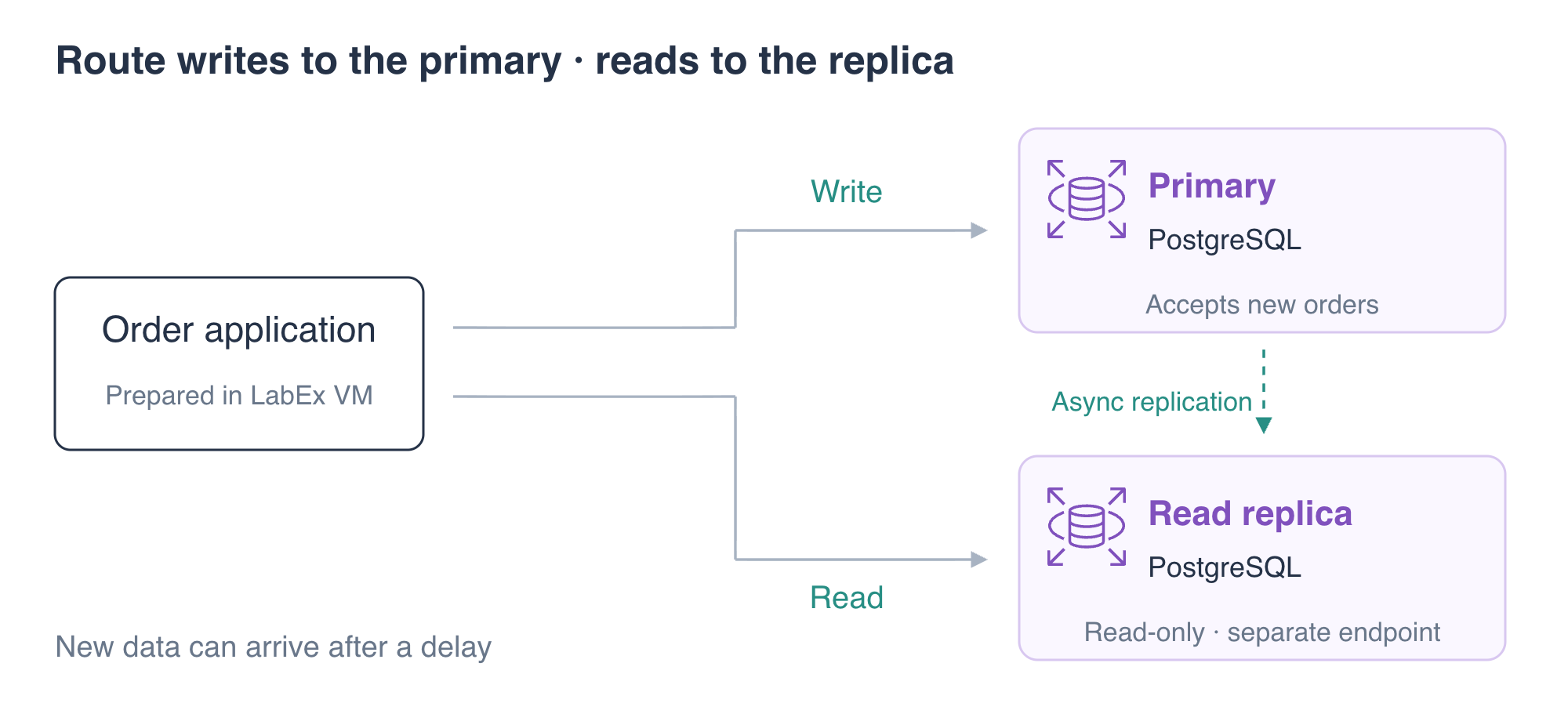
The order application currently sends reads and writes to one primary database. You will create a PostgreSQL read replica, direct the application's queries to it and prove that new primary writes become readable on the replica while the replica rejects writes.
This is an optional extension after the database connection, SQL and recovery labs. The environment starts independently with a primary and three sample orders. You will remove the replica and primary at the end.
Certification Relevance
| Certification | Exam task | Practice |
|---|---|---|
| Cloud Practitioner (CLF-C02) | Task 3.4 | Recognize a relational database read-replica use case. |
| Solutions Architect – Associate (SAA-C03) | Task 3.3 | Configure read replicas for an application's read access pattern. |
Lab Overview
Create and Inspect a Read Replica
In this step, you will create a second PostgreSQL instance that receives changes from the primary.
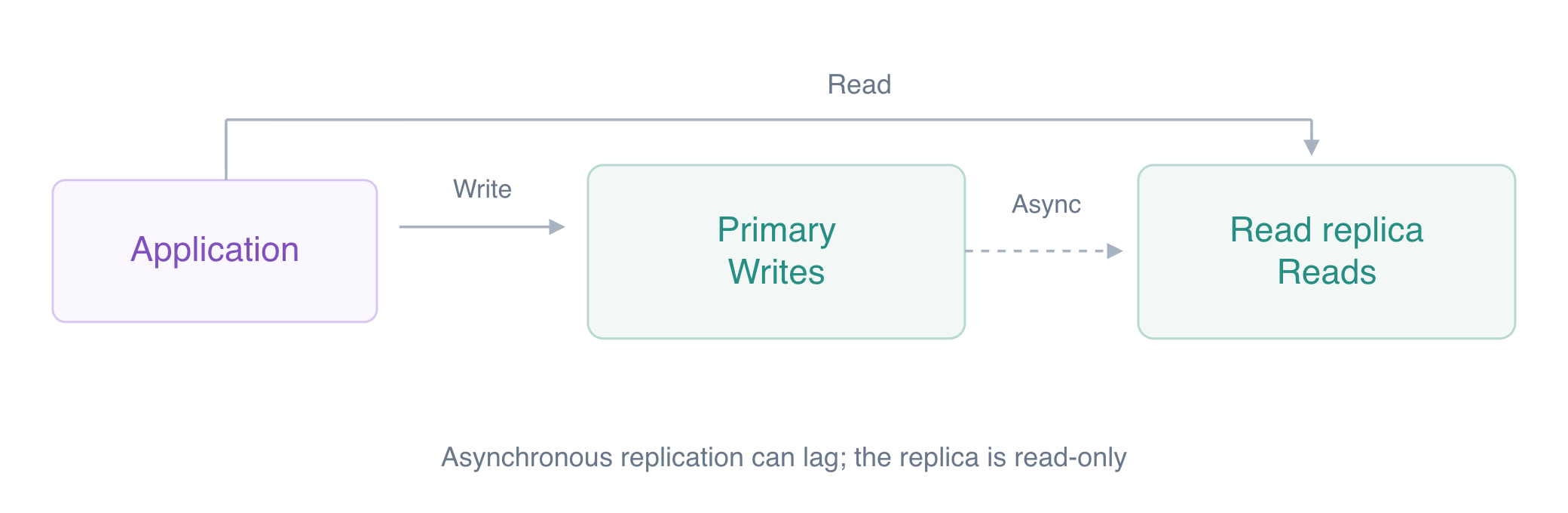
A read replica serves queries from copied data. PostgreSQL sends changes from the primary through its write-ahead log, or WAL. The standby replays these changes; the replica is a separate database engine, and replication can lag behind a newly committed write.
A read replica and a Multi-AZ standby have different purposes. A read replica provides a read endpoint for application queries. A standby in a standard Multi-AZ DB instance deployment supports availability and failover and does not serve application reads. This lab implements a read replica; it does not perform Multi-AZ failover.
Load the prepared connection settings:
cd /home/labex/project
source database.env
Inspect the source:
aws rds \
  describe-db-instances \
  --db-instance-identifier orders-db \
  --query 'DBInstances[0].{Identifier:DBInstanceIdentifier,Status:DBInstanceStatus,BackupRetention:BackupRetentionPeriod,Endpoint:Endpoint}'
RDS requires a nonzero backup retention period on a read-replica source. This unit supplies a primary configured with retention 1. You will use its prepared source configuration; this exercise does not test automatic backup scheduling.
Create the replica:
aws rds \
  create-db-instance-read-replica \
  --db-instance-identifier orders-reader \
  --source-db-instance-identifier orders-db \
  --db-instance-class db.t3.micro \
  --no-publicly-accessible \
  --query 'DBInstance.{Identifier:DBInstanceIdentifier,Source:ReadReplicaSourceDBInstanceIdentifier,Status:DBInstanceStatus,Endpoint:Endpoint}'
aws rds \
  wait db-instance-available \
  --db-instance-identifier orders-reader
Inspect both resources:
aws rds \
  describe-db-instances \
  --query 'DBInstances[].{Identifier:DBInstanceIdentifier,Source:ReadReplicaSourceDBInstanceIdentifier,Endpoint:Endpoint.Address}' \
  --output table
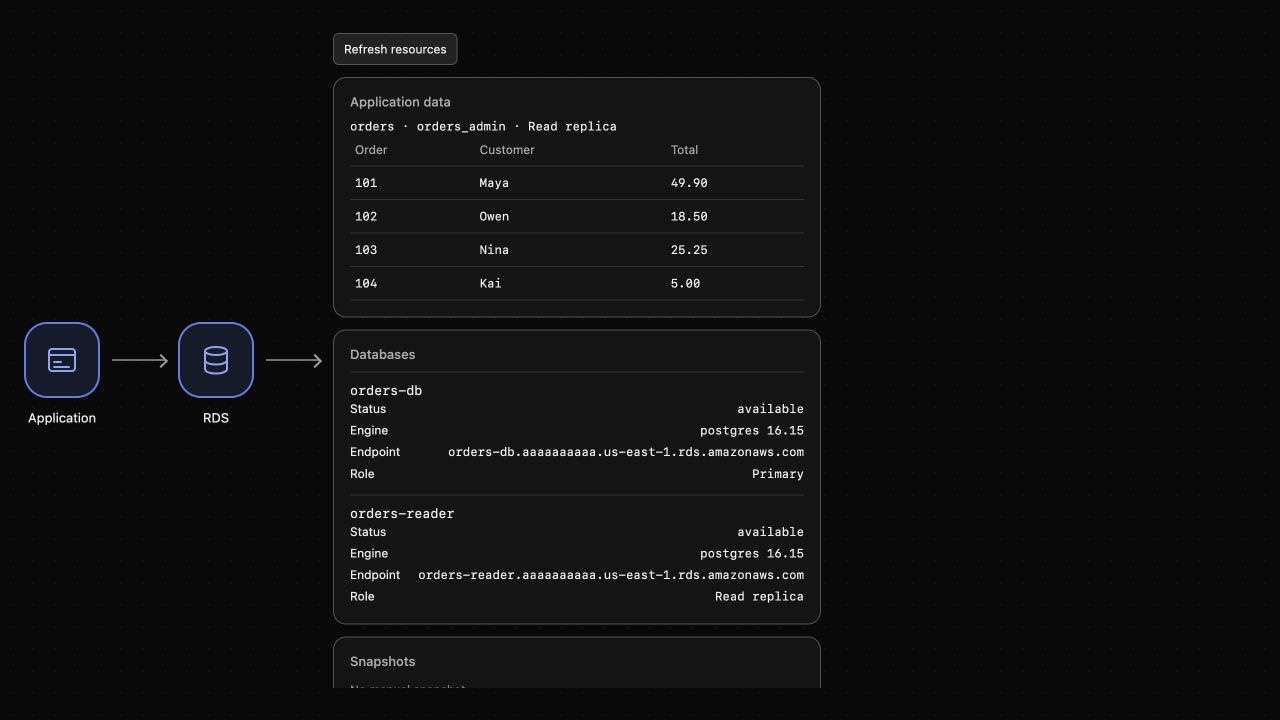
Expect a separate endpoint for orders-reader and a source relationship to orders-db. AWS View should list the primary and read replica.
Query the actual replica engine:
psql \
  "service=orders-reader" \
  --command 'SELECT current_database(), pg_is_in_recovery();'
Expect database orders and pg_is_in_recovery equal to t (true). PostgreSQL is running in standby recovery mode, rather than merely having an RDS resource labeled as a replica.
Separate Application Read and Write Endpoints
In this step, you will keep writes on the primary and send application queries to the replica.
Inspect the application configuration:
cat app-config.json
Both host fields currently name the primary. Capture the replica endpoint:
READER_ENDPOINT=$(aws rds \
  describe-db-instances \
  --db-instance-identifier orders-reader \
  --query 'DBInstances[0].Endpoint.Address' \
  --output text)
echo "$READER_ENDPOINT"
Change only read_host:
jq \
  --arg host "$READER_ENDPOINT" \
  '.read_host = $host' \
  app-config.json > app-config.new
mv app-config.new app-config.json
Read through the application:
curl \
  --silent \
  --show-error \
  --fail \
  http://127.0.0.1:8080/application/orders | jq
Expect the original three orders and read_only: true. The response is produced by the application's actual SQL connection to the standby. AWS View should identify its application data source as a read replica.
The replica uses the database identities copied from the source. Endpoint selection decides which instance a connection reaches; database authentication and SQL permissions still apply.
Observe Replication and Reject Replica Writes
In this step, you will save a new order through the primary and read it from the replica.
The RDS source relationship identifies the replica resource, and recovery mode identifies a standby engine. Neither alone proves that a later order has arrived. Compare order 104 on both engines and inspect the application response; the rejected insert of 105 then checks the write boundary independently.
Add an order through the application. The application's POST handler uses write_host, which still points at the primary:
curl \
  --silent \
  --show-error \
  --fail \
  --request POST \
  --header 'Content-Type: application/json' \
  --data '{"order_id":104,"customer":"Kai","total":"5.00"}' \
  http://127.0.0.1:8080/application/orders
Expect saved: true. Query the source and replica independently:
psql \
  "service=orders-db" \
  --command 'SELECT order_id, customer, total FROM orders WHERE order_id = 104;'
psql \
  "service=orders-reader" \
  --command 'SELECT order_id, customer, total FROM orders WHERE order_id = 104;'
Expect Kai's 5.00 order on both. If the first replica query has no row yet, repeat the same query after a moment: asynchronous replication allows a delay. A read replica is useful for read-heavy work, but a just-written value may require reading the primary when immediate consistency is necessary.
Read the application list again:
curl \
  --silent \
  --show-error \
  --fail \
  http://127.0.0.1:8080/application/orders | jq
Expect four orders and read_only: true.
Try an actual insert on the replica:
psql \
  "service=orders-reader" \
  --set=ON_ERROR_STOP=1 \
  --command "INSERT INTO orders (order_id, customer, total) VALUES (105, 'Lena', 9.00);"
Expect an error stating that an INSERT cannot run in a read-only transaction. The replica's recovery mode rejects the write even for the database master identity. Confirm that the attempted order does not exist on either engine:
psql \
  "service=orders-db" \
  --command 'SELECT count(*) FROM orders WHERE order_id = 105;'
psql \
  "service=orders-reader" \
  --command 'SELECT count(*) FROM orders WHERE order_id = 105;'
Expect 0 from each. Writes belong on the primary; queries can use the replica when their consistency requirements allow it.
Remove the Replica and Primary
In this step, you will remove the two exercise database instances.
Delete the replica first, then the source:
aws rds \
  delete-db-instance \
  --db-instance-identifier orders-reader \
  --skip-final-snapshot \
  --query 'DBInstance.DBInstanceIdentifier'
aws rds \
  wait db-instance-deleted \
  --db-instance-identifier orders-reader
aws rds \
  delete-db-instance \
  --db-instance-identifier orders-db \
  --skip-final-snapshot \
  --query 'DBInstance.DBInstanceIdentifier'
aws rds \
  wait db-instance-deleted \
  --db-instance-identifier orders-db
aws rds \
  describe-db-instances \
  --query 'DBInstances[].DBInstanceIdentifier'
Expect [], and no database in AWS View. Preserve the prepared application and network resources.
Summary
You created a PostgreSQL read replica and verified actual standby recovery mode. You separated the application's read and write endpoints, observed a new primary write reach the replica and confirmed that direct replica writes were rejected. Finally, you removed the replica and primary.
A read replica supports read access patterns; it has different behavior and purpose from the standby in a standard Multi-AZ DB instance deployment. The final challenge applies the database connection and diagnosis skills you have learned.
For further reading, see the AWS reference on Read replicas and asynchronous replication.


