Introduction
An order service needs to accept a job now and process it later. You will create a queue, receive a job, run a supplied worker and confirm the stored order before acknowledging the message.
Complete Read and Write DynamoDB from Lambda and its guided prerequisites first. This independent VM supplies a worker, its scoped role, an empty orders table and reference data; no queue or job is prepared.
Certification Relevance
This lab provides hands-on practice for the following exam topics.
- Cloud Practitioner (CLF-C02) · Task 3.8: SQS message delivery, processing, and acknowledgment.
- Solutions Architect – Associate (SAA-C03) · Task 2.1: SQS message delivery, processing, and acknowledgment.
- Developer – Associate (DVA-C02) · Task 1.1: SQS message delivery, processing, and acknowledgment.
- DevOps Engineer – Professional (DOP-C02) · Task 5.1: Foundational practice: SQS message delivery, processing, and acknowledgment.
- Solutions Architect – Professional (SAP-C02) · Task 2.4: Foundational practice: SQS message delivery, processing, and acknowledgment.
Create an Independent Job Queue
In this step, create an empty queue and inspect the supplied worker before any job is sent.
Use AWS View beside Terminal to compare current queues, worker outcomes and stored orders. Preserve the unrelated reference data.
Amazon Simple Queue Service (SQS) stores jobs as messages for a consumer. A producer sends jobs and a consumer processes them. A queue separates their timing: the producer does not have to wait for the consumer to finish. A Standard queue may deliver a message more than once; receiving and acknowledging are separate operations.
Start in the prepared workspace:
cd /home/labex/project
Inspect the supplied worker and empty orders table. The worker calculates 250 cents per item plus a 100-cent fee. Its execution role can write only the orders table; the reference table is unrelated data to preserve.
aws lambda get-function-configuration --function-name labex-q01-worker --query '{Name:FunctionName,Role:Role,Runtime:Runtime}'
aws dynamodb scan --table-name labex-q01-orders --query Items
Expect an empty item list. Create your own queue. --query QueueUrl --output text selects its address as plain text; $(...) stores that output in the shell variable QUEUE_URL for later commands.
QUEUE_URL=$(aws sqs create-queue --queue-name labex-q01-jobs --attributes VisibilityTimeout=300 --query QueueUrl --output text)
The visibility timeout gives a consumer 300 seconds before a received message can become available again. It is temporary concealment, not deletion. We will explore expiration and redelivery in the next lab.
Inspect the queue's identity and current counts:
aws sqs get-queue-attributes --queue-url "$QUEUE_URL" --attribute-names QueueArn VisibilityTimeout ApproximateNumberOfMessages ApproximateNumberOfMessagesNotVisible
Expect VisibilityTimeout to be 300, and both message counts to be 0. Counts are approximate operational signals, not a guarantee of business completion. In AWS View, your queue appears with zero available and zero in-flight jobs; the supplied Lambda has no executions and the orders table is still empty.
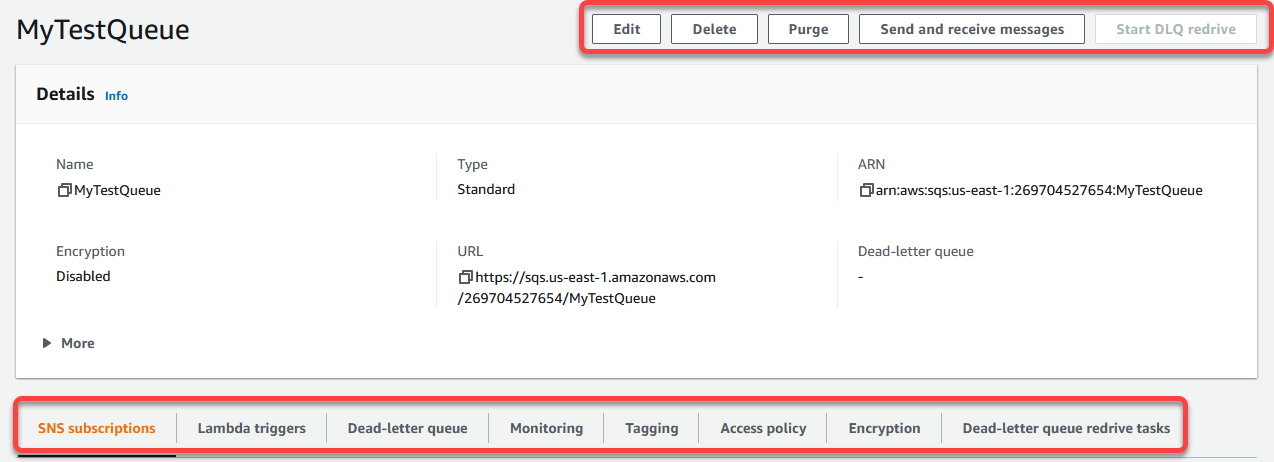
The official Console shows the same queue name, type, URL and ARN you inspect with the CLI. These are example values; continue with your own QUEUE_URL. Use AWS View to observe this lab’s resources.
Source: AWS SQS.
Send and Receive an Order Job
In this step, send a job and receive it to observe the difference between available and in-flight messages.
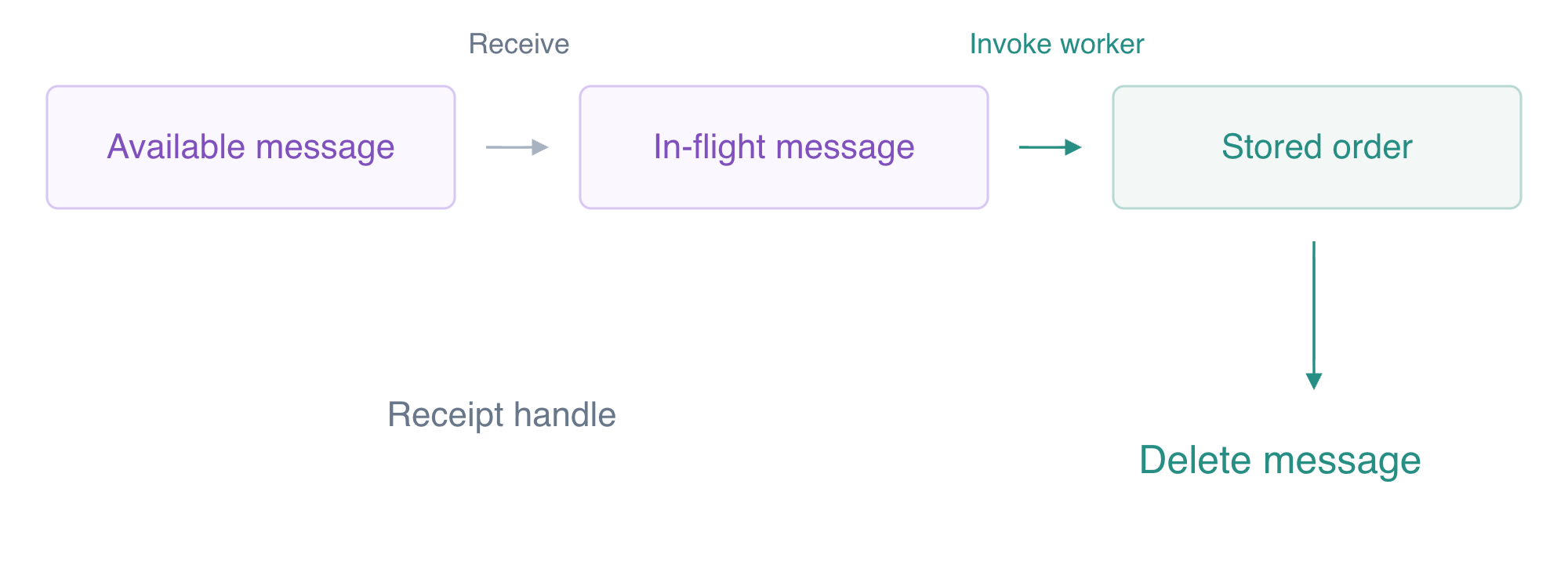
Receive, process, then acknowledge: delete the queue message only after confirming the stored order, using the current receipt handle.
A message body is application data. SQS holds the JSON as text; your consumer must interpret it. Send one small synthetic order job:
aws sqs send-message --queue-url "$QUEUE_URL" --message-body '{"id":"queue-order","quantity":2}'
The response includes a MessageId and MD5OfMessageBody. The message ID identifies the message; the MD5 summarizes the body bytes. This acknowledges queue acceptance, not a completed order. AWS View now shows one available job, while the orders table remains empty.
Receive one message and save the response. > redirects output into received.json instead of displaying it. --wait-time-seconds 5 allows a short long-poll wait if no job is immediately available.
aws sqs receive-message --queue-url "$QUEUE_URL" --max-number-of-messages 1 --wait-time-seconds 5 --message-system-attribute-names ApproximateReceiveCount --output json > received.json
Read the safe application body and receive count with jq, which selects fields from JSON:
jq '.Messages[0] | {MessageId,Body,Attributes}' received.json
Expect a body containing queue-order and quantity 2, with receive count 1 on the first receive. The complete response also contains a receipt handle: a value for this particular delivery attempt. You will use the latest handle when acknowledging this message.
aws sqs get-queue-attributes --queue-url "$QUEUE_URL" --attribute-names ApproximateNumberOfMessages ApproximateNumberOfMessagesNotVisible
Expect 0 available and 1 not visible. In AWS View, the job is in flight, but there is still no order. Receiving it has not processed it or deleted it. Continue to the next step within 300 seconds. If you spend longer reading, receive it again into the same file to obtain its latest receipt handle before processing and deleting it.
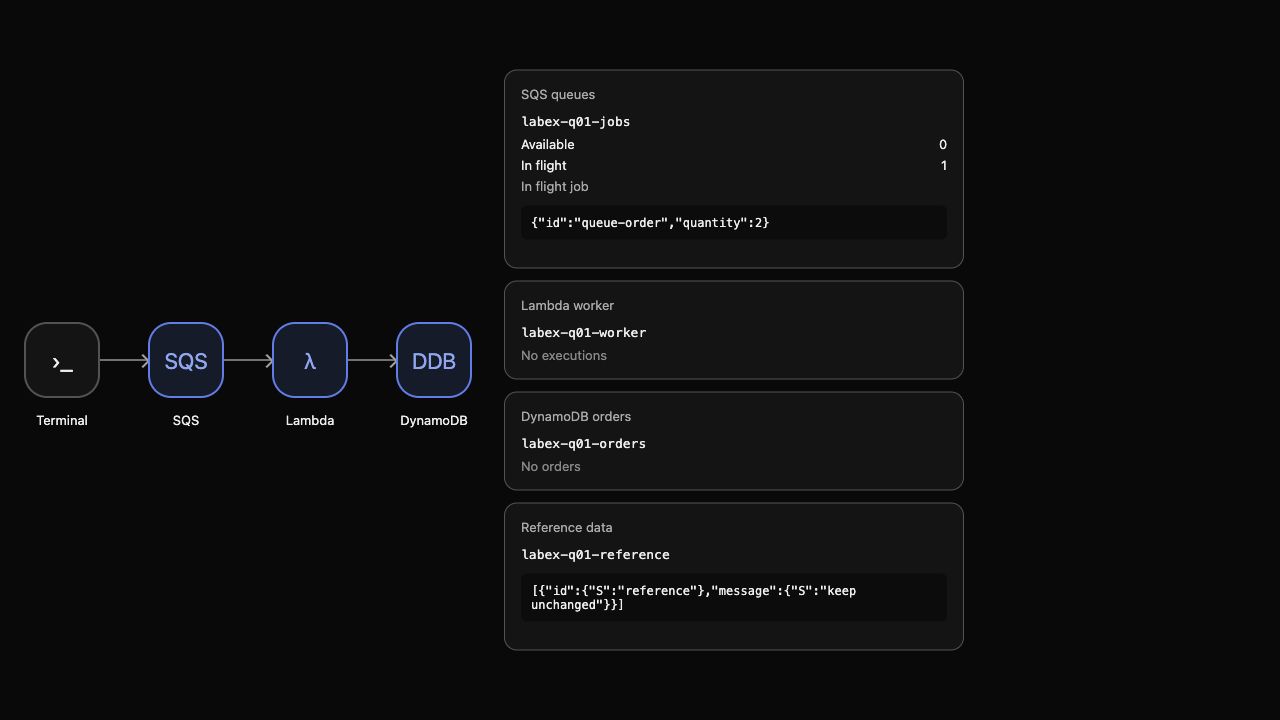
This actual example shows delivery before processing. Message IDs differ in your workspace.
Process the Job Before Acknowledging It
In this step, process the received body, verify the persisted order and then acknowledge the message.
Use the body you actually received as the worker's input. fromjson converts the JSON string inside the SQS response into a JSON object; redirection writes that object to job.json.
jq '.Messages[0].Body | fromjson' received.json > job.json
The supplied Lambda accepts this order object. As in the Lambda course, fileb://job.json sends the file bytes, and the final filename receives the function's response. Invoke the worker:
aws lambda invoke --function-name labex-q01-worker --payload fileb://job.json worker-response.json
A successful Invoke API status alone does not establish successful processing. Inspect the response body:
cat worker-response.json
Expect processed: true, quantity 2 and total_cents: 600. Then read the stored item, rather than relying only on the function's returned message:
aws dynamodb get-item --table-name labex-q01-orders --key '{"id":{"S":"queue-order"}}' --consistent-read --query Item
Expect queue-order, quantity 2 and total 600. AWS View shows the actual worker input/result and the same persisted order. The job remains in flight until you acknowledge it. If either the worker response or stored item is wrong, keep the message for diagnosis instead of deleting it.
After confirming the order, select the current receipt handle as plain text and delete that delivery from the queue:
RECEIPT_HANDLE=$(jq -r '.Messages[0].ReceiptHandle' received.json)
aws sqs delete-message --queue-url "$QUEUE_URL" --receipt-handle "$RECEIPT_HANDLE"
Successful deletion normally prints nothing. Read the counts again:
aws sqs get-queue-attributes --queue-url "$QUEUE_URL" --attribute-names ApproximateNumberOfMessages ApproximateNumberOfMessagesNotVisible
Both counts should be 0. AWS View shows an empty queue and one stored order. You have separated queue acceptance, temporary delivery, business processing and acknowledgment. A Standard queue can still redeliver messages in real applications; this sequence is not an end-to-end exactly-once guarantee. Later units teach a durable duplicate guard.
Clean Up Only Your Queue and Results
In this step, remove your queue, result and logs while preserving the supplied resources.
Remove the queue and the order you created, while preserving the supplied worker, table structures and reference data. Queue deletion discards any remaining jobs, so first confirm the previous step completed successfully.
aws sqs delete-queue --queue-url "$QUEUE_URL"
aws dynamodb delete-item --table-name labex-q01-orders --key '{"id":{"S":"queue-order"}}'
The worker's execution created a CloudWatch Logs group. Delete this lab's execution logs as part of cleanup:
aws logs delete-log-group --log-group-name /aws/lambda/labex-q01-worker
Check the resource state with successful service queries:
aws sqs list-queues
aws dynamodb scan --table-name labex-q01-orders --query Items
aws dynamodb scan --table-name labex-q01-reference --query Items
No queue URLs should remain, the orders item list should be empty, and the reference item must still say keep unchanged. AWS View shows no queues, orders or execution logs, with the supplied worker and reference still present. An authentication or network error is not evidence of successful deletion.
Remove the ordinary response files after checking the resources:
rm -f received.json job.json worker-response.json
Use the step check before ending your environment.
Summary
You created an SQS Standard queue, sent and received a JSON order job, verified actual Lambda processing and the persisted DynamoDB item, and acknowledged the message with its receipt handle. You distinguished acceptance, in-flight delivery and business completion, then removed your queue, order and execution logs while preserving the supplied resources.