Introduction
Your content endpoint works, but customers should read it over an encrypted connection that verifies the server's identity. Associate a supplied ACM certificate with a CloudFront alternate domain name, require HTTPS, and test the actual page plus certificate trust and name checks.
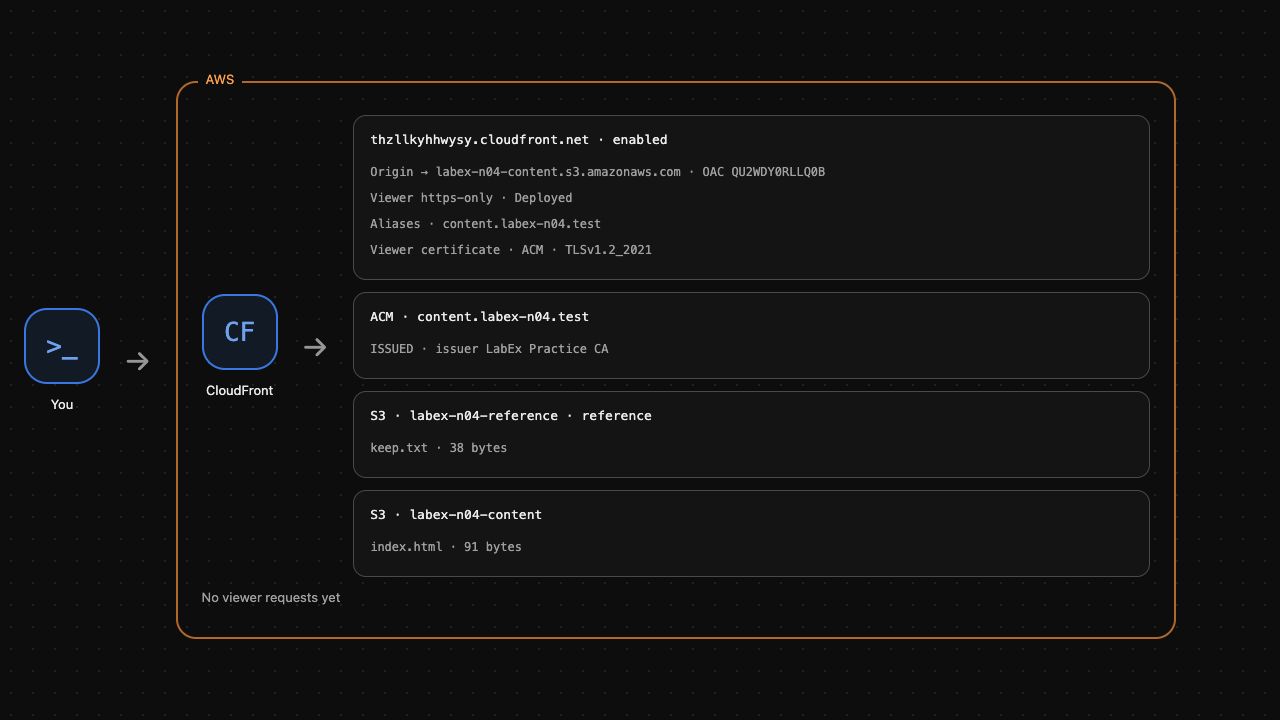
Complete the private S3 delivery lab first. This independent VM supplies a new private-origin connection, an imported practice certificate for content.labex-n04.test, and the public trust anchor practice-ca.pem. The certificate is not yet associated with the distribution. Use AWS View above to observe certificate and distribution state, and Terminal below for commands. A personal AWS account or purchased domain is unnecessary.
The practice certificate is signed by a supplied private certificate authority. You will trust its public CA file for an individual command; you will not change the VM's system trust store. A public CloudFront website needs a publicly trusted certificate. This lab practices association and real TLS checks, without public domain registration or certificate issuance.
Certification Relevance
| Certification | Exam task | Practice |
|---|---|---|
| Cloud Practitioner (CLF-C02) | Task 2.2 | Identify encryption in transit through HTTPS and distinguish it from a private-origin access policy. |
| Solutions Architect – Associate (SAA-C03) | Task 1.3 | Associate an ACM certificate and verify TLS certificate trust, hostname matching and encrypted content access. |
Lab Overview
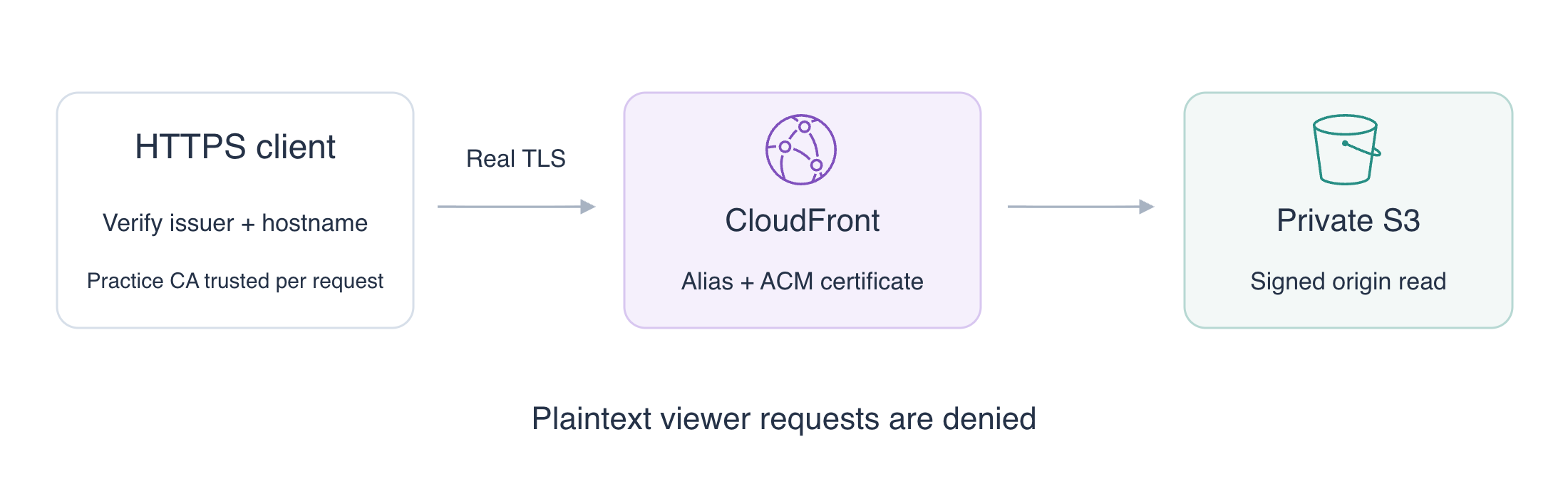
Associate the Certificate and Require HTTPS
In this step, connect the supplied certificate and alternate name to the distribution and require encrypted viewer requests.
TLS encrypts a network connection and lets a client verify the server's identity. A server certificate contains names and a public key, signed by a certificate authority (CA). ACM, AWS Certificate Manager, manages certificates used by AWS services. Having a certificate in ACM does not automatically attach it to a distribution.
Identify your prepared resources. $(...) stores command output in shell variables; --query selects the matching resource and --output text makes its ID usable as an argument. Keep this Terminal open:
cd /home/labex/project
HOST_NAME=content.labex-n04.test
DIST_ID=$(aws cloudfront list-distributions \
  --query "DistributionList.Items[?Comment=='labex-n04:private-content'].Id | [0]" \
  --output text)
CERT_ARN=$(aws acm list-certificates \
  --query "CertificateSummaryList[?DomainName=='content.labex-n04.test'].CertificateArn | [0]" \
  --output text)
aws acm describe-certificate \
  --certificate-arn "$CERT_ARN" \
  --query 'Certificate.{Name:DomainName,Names:SubjectAlternativeNames,Status:Status}'
Expect ISSUED and the practice name in Names. The certificate ARN identifies its account and Region. CloudFront viewer certificates in ACM must be in us-east-1; the supplied ARN uses that Region. A certificate must cover the alternate domain name you attach.
Read the current distribution configuration and its ETag, the version token required for an update. > saves output to a file:
aws cloudfront get-distribution-config \
  --id "$DIST_ID" \
  --query DistributionConfig > current-config.json
ETAG=$(aws cloudfront get-distribution-config \
  --id "$DIST_ID" \
  --query ETag \
  --output text)
An alternate domain name, or alias, lets the distribution recognize your content name. SNI, Server Name Indication, sends that name during TLS setup so the server can select the certificate. The viewer protocol policy controls HTTP versus HTTPS requests; it is separate from the S3 origin permission.
jq edits JSON while preserving the other origin and distribution settings. --arg supplies the captured values as JSON strings. The | operators in the quoted jq expression apply three changes in sequence: the alias, the custom certificate settings, and https-only viewer access. The selected security policy requires TLS 1.2 or later:
jq --arg host "$HOST_NAME" --arg cert "$CERT_ARN"   '.Aliases = {Quantity: 1, Items: [$host]} |
   .ViewerCertificate = {CloudFrontDefaultCertificate: false,
     ACMCertificateArn: $cert, SSLSupportMethod: "sni-only",
     MinimumProtocolVersion: "TLSv1.2_2021"} |
   .DefaultCacheBehavior.ViewerProtocolPolicy = "https-only"'   current-config.json > https-config.json
aws cloudfront update-distribution \
  --id "$DIST_ID" \
  --if-match "$ETAG" \
  --distribution-config file://https-config.json
aws cloudfront wait distribution-deployed \
  --id "$DIST_ID"
Inspect the stored settings before testing the connection:
aws cloudfront get-distribution-config \
  --id "$DIST_ID" \
  --query 'DistributionConfig.{Names:Aliases.Items,Certificate:ViewerCertificate.ACMCertificateArn,Protocol:DefaultCacheBehavior.ViewerProtocolPolicy}'
Expect the exact practice name, your certificate ARN and https-only. AWS View shows the alias and associated ACM certificate. The native configuration is ready; the next step proves an actual encrypted request. Run the association check.
Verify Encrypted Content and Certificate Checks
In this step, read the page over trusted HTTPS, observe denied plaintext access, and distinguish certificate trust from hostname matching.
curl --cacert practice-ca.pem trusts the supplied public CA only for this command. --resolve connects the exact practice name and port to this VM while retaining that name for SNI and certificate verification. It does not register a public domain or modify system DNS. The prepared HTTPS viewer endpoint uses port 8443:
curl --fail --include --noproxy '*' --cacert practice-ca.pem --resolve "${HOST_NAME}:8443:127.0.0.1" "https://${HOST_NAME}:8443/index.html"
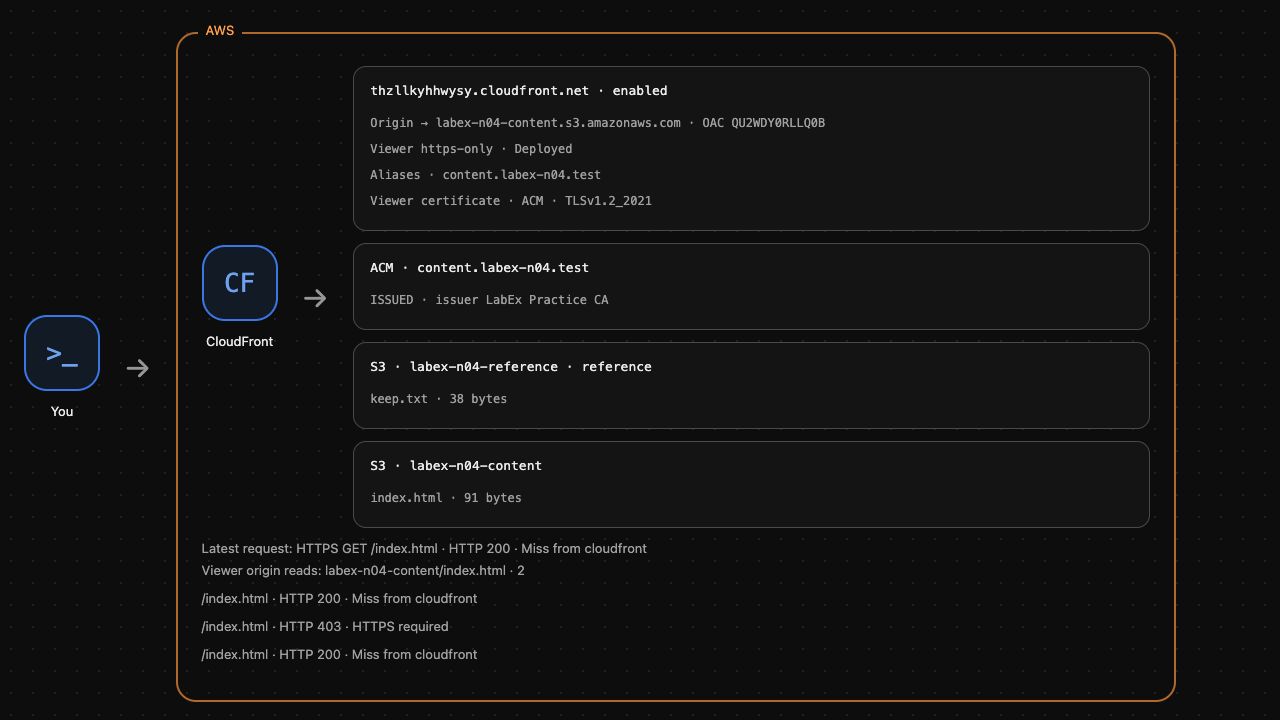
Expect HTTP 200 and Release one. The client established a real TLS connection, verified the certificate's trusted issuer and name, and received the actual S3 page. This success proves more than a stored certificate ARN.
Test the plaintext viewer endpoint and anonymous direct origin:
curl --noproxy '*' --output /dev/null   --resolve "${HOST_NAME}:8082:127.0.0.1"   --write-out 'Plaintext viewer: HTTP %{http_code}\n'   "http://${HOST_NAME}:8082/index.html"
curl --noproxy '*' --output /dev/null   --write-out 'Anonymous origin: HTTP %{http_code}\n'   http://127.0.0.1:5000/labex-n04-content/index.html
Both must return HTTP 403. Requiring viewer HTTPS does not make the S3 bucket public; these are separate protections.
Now omit the practice CA file to test trust. This command is intentionally expected to fail:
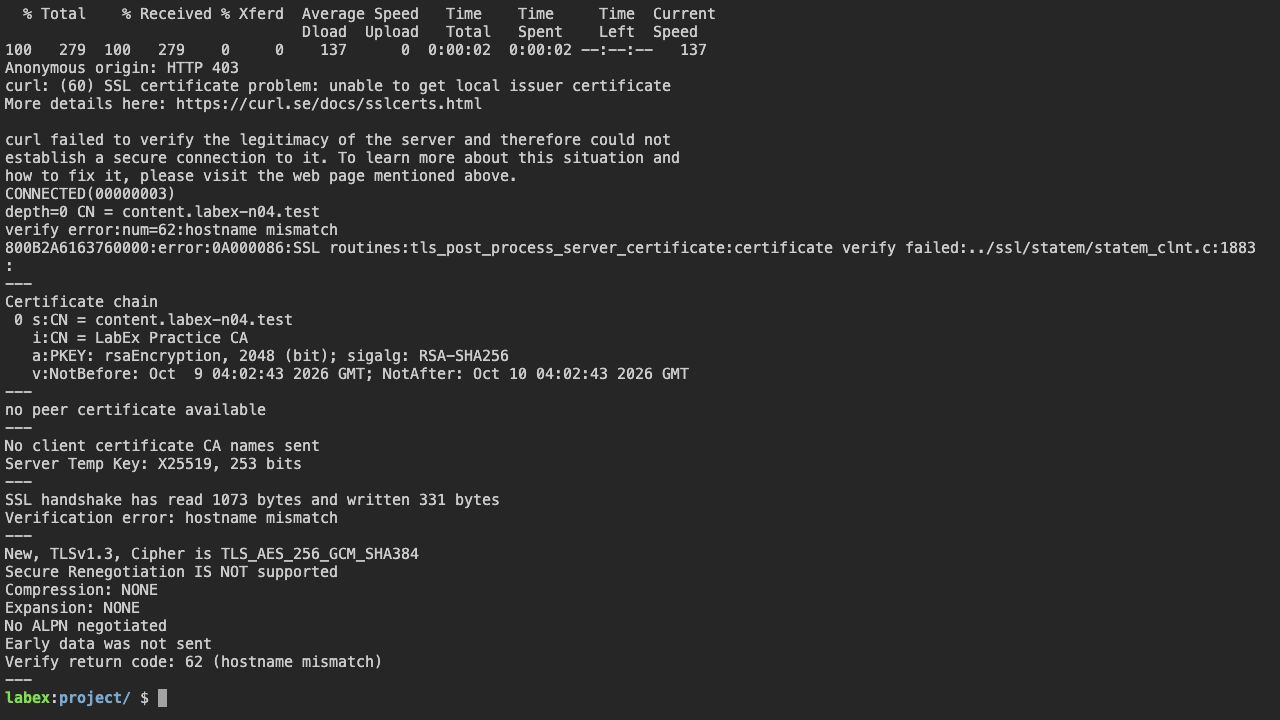
curl --fail --noproxy '*' --resolve "${HOST_NAME}:8443:127.0.0.1" "https://${HOST_NAME}:8443/index.html"
Expect a certificate verification error, typically curl error 60: the default trust store does not trust this private practice CA. Continue after this expected failure. The working request chose the correct trust anchor; disabling certificate verification would remove the protection you are practicing.
openssl s_client can separate the SNI selection name from the name to verify. Send the correct SNI name, trust the practice CA, but ask it to verify a deliberately wrong hostname. -verify_return_error stops on verification failure and < /dev/null avoids interactive input:
openssl s_client -connect 127.0.0.1:8443 -servername "$HOST_NAME" -CAfile practice-ca.pem -verify_hostname wrong.labex-n04.test -verify_return_error < /dev/null
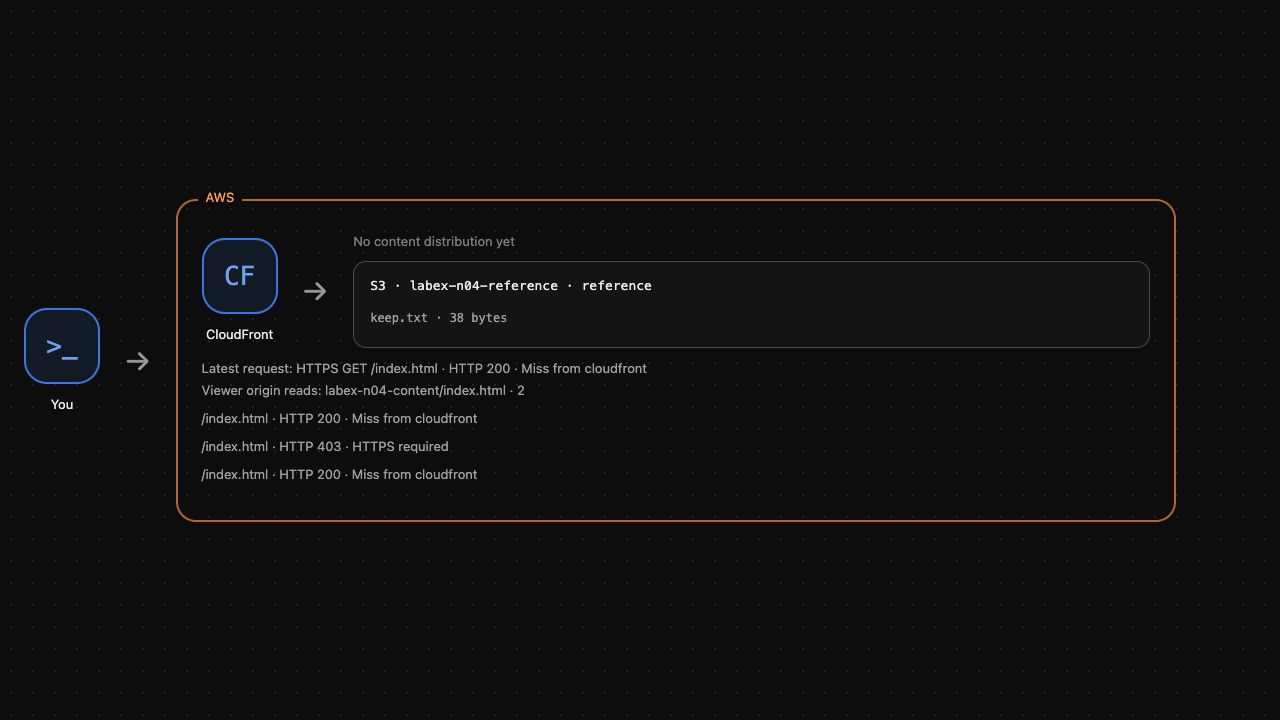
Expect hostname mismatch and an unsuccessful verification. Trusting the issuer is not enough: the certificate must also cover the requested identity. AWS View retains the real encrypted request result and plaintext rejection. Run the HTTPS outcome check.
Remove Only Your Delivery Resources
In this step, disable and remove your distribution before removing its OAC, S3 content and the supplied unit certificate. Keep the reference bucket unchanged.
CloudFront uses an ETag as the version token for configuration changes. Fetch the current configuration and its ETag rather than guessing a token. First capture the exact OAC connected to your origin:
OAC_ID=$(aws cloudfront get-distribution-config \
  --id "$DIST_ID" \
  --query 'DistributionConfig.Origins.Items[0].OriginAccessControlId' \
  --output text)
Save the configuration and capture its ETag:
aws cloudfront get-distribution-config \
  --id "$DIST_ID" \
  --query DistributionConfig \
  --output json > distribution-current.json
DIST_ETAG=$(aws cloudfront get-distribution-config \
  --id "$DIST_ID" \
  --query ETag \
  --output text)
In this lab's current configuration, the distribution's Enabled property is the only true property with that name. The following standard sed substitution produces a disabled copy while retaining the origin settings:
sed 's/"Enabled": true/"Enabled": false/' distribution-current.json > distribution-disabled.json
aws cloudfront update-distribution \
  --id "$DIST_ID" \
  --if-match "$DIST_ETAG" \
  --distribution-config file://distribution-disabled.json
Wait for deployment of the disabled configuration. On AWS, configuration propagation can take time; the exercise does not measure global deployment latency:
aws cloudfront wait distribution-deployed \
  --id "$DIST_ID"
The update changes the ETag. Read the latest token before deleting the disabled distribution:
DIST_ETAG=$(aws cloudfront get-distribution-config \
  --id "$DIST_ID" \
  --query ETag \
  --output text)
aws cloudfront delete-distribution \
  --id "$DIST_ID" \
  --if-match "$DIST_ETAG"
Remove the OAC with its own ETag. The distribution ID and OAC ID refer to different resources:
OAC_ETAG=$(aws cloudfront get-origin-access-control \
  --id "$OAC_ID" \
  --query ETag \
  --output text)
aws cloudfront delete-origin-access-control \
  --id "$OAC_ID" \
  --if-match "$OAC_ETAG"
Remove only this lab’s content object and bucket:
aws s3api delete-object \
  --bucket labex-n04-content \
  --key index.html
aws s3api delete-bucket \
  --bucket labex-n04-content
aws s3api list-buckets \
  --query 'Buckets[].Name'
After the distribution is removed, delete only the supplied unit certificate using the ARN you selected earlier. This removes the ACM resource; the public practice CA file can remain as an unrelated local fixture:
aws acm delete-certificate \
  --certificate-arn "$CERT_ARN"
aws acm list-certificates \
  --query 'CertificateSummaryList[].CertificateArn'
Expect no unit certificate. Expect the reference bucket to remain and the content bucket to be absent. AWS View should show no content distribution and only the reference object. Run the cleanup check. An unsuccessful API request does not prove that a resource was deleted.
Summary
You associated an ACM certificate and alternate domain name with CloudFront, required HTTPS, and read actual content over a verified TLS connection. You distinguished trusted issuer, matching hostname, viewer encryption and private-origin access. Plaintext requests were denied, while untrusted-issuer and wrong-name checks failed. You removed only your delivery resources and unit certificate, preserving the unrelated reference.