



Introduction
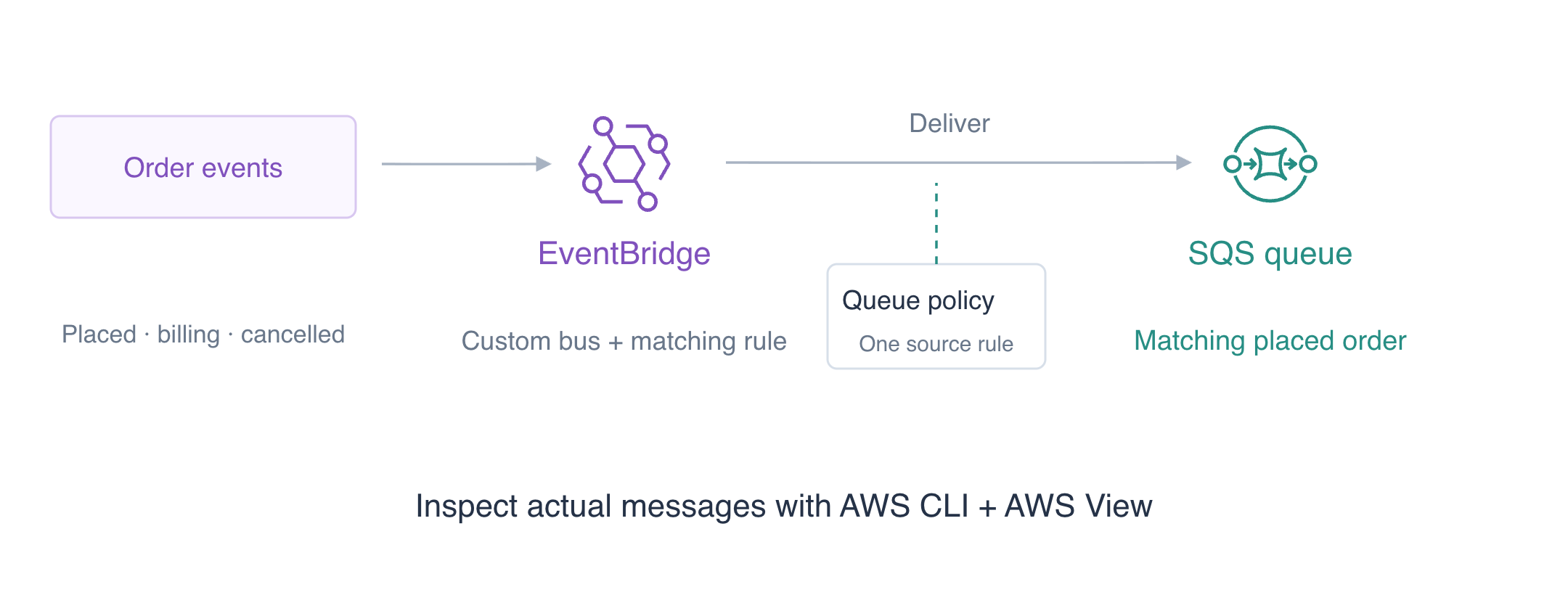
Fulfillment needs newly placed orders, while billing and cancellation events belong elsewhere. You will route matching events to a queue and verify which messages actually arrive.
EventBridge matches incoming events and routes them to SQS, a queue that holds messages. CLI access is already configured; no personal AWS account or access keys are needed.
Complete Send and Consume Jobs with SQS and Protect a Bucket with a Resource Policy first. This independent VM supplies its own CLI access and reference data; earlier queues and credentials are not reused.
Certification Relevance
| Certification | Exam task | Practice |
|---|---|---|
| Cloud Practitioner (CLF-C02) | Task 3.8 | EventBridge event matching, targets, and delivery authorization. |
| Solutions Architect – Associate (SAA-C03) | Task 2.1 | EventBridge event matching, targets, and delivery authorization. |
| Developer – Associate (DVA-C02) | Task 1.1 | EventBridge event matching, targets, and delivery authorization. |
| CloudOps Engineer – Associate (SOA-C03) | Task 1.2 | EventBridge event matching, targets, and delivery authorization. |
| DevOps Engineer – Professional (DOP-C02) | Task 4.3 | Foundational practice: EventBridge event matching, targets, and delivery authorization. |
| Data Engineer – Associate (DEA-C01) | Task 3.1 | Foundational practice: EventBridge event matching, targets, and delivery authorization. |
Lab Overview
Prepare a Bus and Destination Queue
In this step, create the independent places where events enter and matching work waits for a consumer.
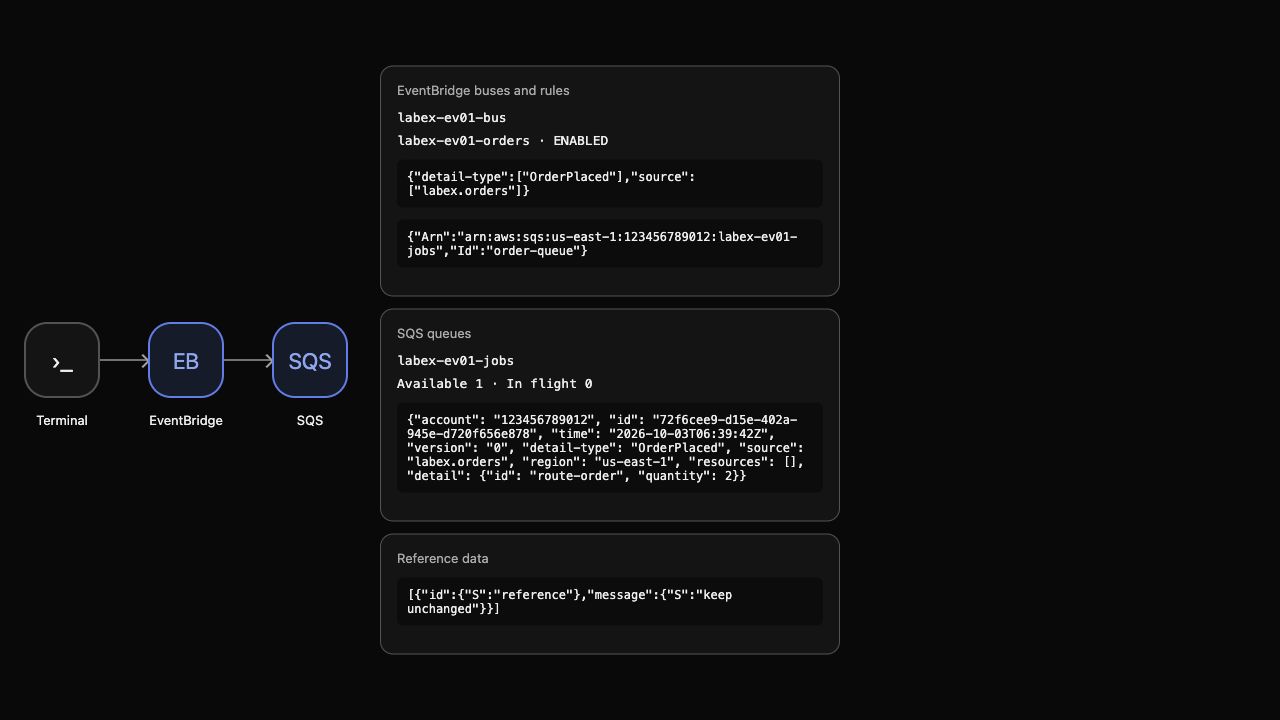
Use AWS View above Terminal to compare the CLI queries with this lab’s actual resources and results. Preserve the supplied reference data.
Amazon EventBridge routes events describing things that happened. A bus receives events, a rule matches fields, and a target receives matching events. A custom bus separates this application's events from the default bus. An SQS queue holds deliveries until a consumer processes them. Start in the project directory. Shell assignments save identifiers returned by the CLI; --query selects the needed field and --output text makes it usable by the next command.
cd /home/labex/project
BUS_NAME=labex-ev01-bus
Set RULE_NAME for the following operations:
RULE_NAME=labex-ev01-orders
Create the owned event bus:
aws events create-event-bus --name "$BUS_NAME"
Save the returned value in QUEUE_URL:
QUEUE_URL=$(aws sqs create-queue \
  --queue-name labex-ev01-jobs \
  --query QueueUrl \
  --output text)
echo "$QUEUE_URL"
Save the returned value in QUEUE_ARN:
QUEUE_ARN=$(aws sqs get-queue-attributes \
  --queue-url "$QUEUE_URL" \
  --attribute-names QueueArn \
  --query Attributes.QueueArn \
  --output text)
echo "$QUEUE_ARN"
The bus response contains its ARN, and QUEUE_URL identifies the queue for message operations. The queue ARN identifies it in a target or permission policy. These identifiers serve different purposes.
Inspect both empty resources:
aws events list-rules --event-bus-name "$BUS_NAME"
Inspect the attributes of queue $QUEUE_URL:
aws sqs get-queue-attributes \
  --queue-url "$QUEUE_URL" \
  --attribute-names ApproximateNumberOfMessages ApproximateNumberOfMessagesNotVisible
There are no rules yet, and the queue has no available or in-flight messages. AWS View shows your custom bus and empty queue. Run the preparation check.
Match Orders and Authorize One Rule
In this step, connect a matching rule to the queue and authorize only that rule's deliveries.
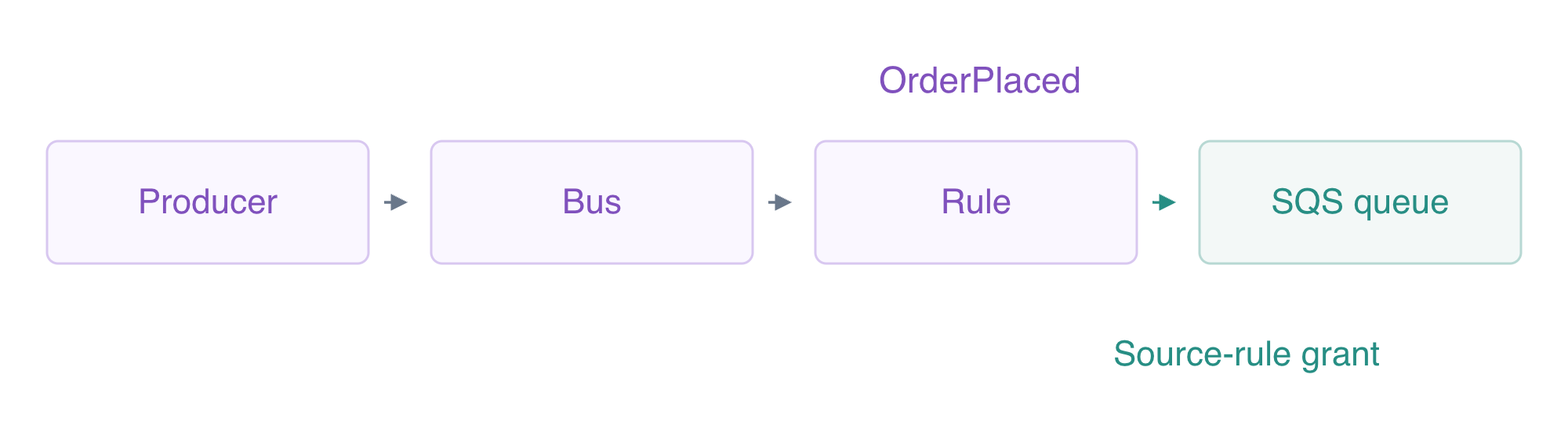
An event pattern is a filter over event fields. source names the producer, while detail-type names the event category. Each array below lists accepted values. A here-document writes the literal JSON between JSON markers; quoting the marker prevents shell expansion. file:// tells the CLI to read that file.
The two pattern fields must both match: an order producer alone does not select a cancellation, and the OrderPlaced type alone does not select a billing event. The event’s source is routing data; the queue policy’s aws:SourceArn identifies the rule authorized to deliver it.
cat > order-pattern.json <<'JSON'
{"source":["labex.orders"],"detail-type":["OrderPlaced"]}
JSON
Save the returned value in RULE_ARN:
RULE_ARN=$(aws events put-rule \
  --name "$RULE_NAME" \
  --event-bus-name "$BUS_NAME" \
  --event-pattern file://order-pattern.json \
  --state ENABLED \
  --query RuleArn \
  --output text)
echo "$RULE_ARN"
The rule is enabled, but a match alone does not authorize delivery. The queue's resource policy must allow the EventBridge service to send, scoped by aws:SourceArn to this rule. Write an ordinary JSON policy; the shell inserts your queue and rule ARNs.
cat > queue-policy.json <<EOF
{
  "Version": "2012-10-17",
  "Statement": [
    {
      "Effect": "Allow",
      "Principal": {
        "Service": "events.amazonaws.com"
      },
      "Action": "sqs:SendMessage",
      "Resource": "$QUEUE_ARN",
      "Condition": {
        "ArnEquals": {
          "aws:SourceArn": "$RULE_ARN"
        }
      }
    }
  ]
}
EOF
Write the configuration to queue-attributes.json:
jq -n --rawfile policy queue-policy.json '{Policy:$policy}' > queue-attributes.json
Apply the attributes to queue $QUEUE_URL:
aws sqs set-queue-attributes \
  --queue-url "$QUEUE_URL" \
  --attributes file://queue-attributes.json
The attributes API stores the policy as a JSON string, so --rawfile reads that document into the Policy attribute. The grant covers one queue and one originating rule.
A target is the rule's destination. Its ID lets you update or remove that connection later:
cat > targets.json <<EOF
[
  {
    "Id": "order-queue",
    "Arn": "$QUEUE_ARN"
  }
]
EOF
Apply the event rule’s delivery targets:
aws events put-targets \
  --rule "$RULE_NAME" \
  --event-bus-name "$BUS_NAME" \
  --targets file://targets.json
Inspect the event rule’s selection pattern:
aws events describe-rule --name "$RULE_NAME" --event-bus-name "$BUS_NAME"
Inspect the event rule’s delivery targets:
aws events list-targets-by-rule --rule "$RULE_NAME" --event-bus-name "$BUS_NAME"
FailedEntryCount is zero for the target configuration, the described rule has the intended pattern, and the target ARN equals your queue. AWS View now shows the rule and its queue destination. There is still no event to deliver. Run the connection check.
Prove Matching and Delivery Boundaries
In this step, publish matching and unrelated events, then test a source-permission failure without adding a new queue message.
An EventBridge event has routing fields and a detail payload. The PutEvents API accepts Detail as a JSON-encoded string. Write three readable entries: one placed order, one billing event and one cancellation. jq converts each Detail object into the string required by the API.
cat > event-inputs.json <<EOF
[
  {
    "EventBusName": "$BUS_NAME",
    "Source": "labex.orders",
    "DetailType": "OrderPlaced",
    "Detail": {
      "id": "route-order",
      "quantity": 2
    }
  },
  {
    "EventBusName": "$BUS_NAME",
    "Source": "labex.billing",
    "DetailType": "OrderPlaced",
    "Detail": {
      "id": "billing-event",
      "quantity": 9
    }
  },
  {
    "EventBusName": "$BUS_NAME",
    "Source": "labex.orders",
    "DetailType": "OrderCancelled",
    "Detail": {
      "id": "cancelled-event",
      "quantity": 1
    }
  }
]
EOF
Write the configuration to events.json:
jq 'map(.Detail |= tojson)' event-inputs.json > events.json
Publish the supplied event batch:
aws events put-events --entries file://events.json
Inspect the attributes of queue $QUEUE_URL:
aws sqs get-queue-attributes \
  --queue-url "$QUEUE_URL" \
  --attribute-names ApproximateNumberOfMessages ApproximateNumberOfMessagesNotVisible
The publish response reports zero failed entries and an event ID for each accepted entry. Only route-order matches both fields, so the queue contains one available message. AWS View shows its full event envelope: source, detail type, account, region and detail.
Read the actual consumer-visible body. Receiving normally hides a message for its visibility timeout; --visibility-timeout 0 makes this inspection visible again immediately. The query prints only its ID and body, keeping the receipt handle out of the display. This inspection does not complete business processing or acknowledge the message.
fromjson makes each JSON body readable while retaining its SQS message ID. It changes only the displayed output.
aws sqs receive-message \
  --queue-url "$QUEUE_URL" \
  --max-number-of-messages 10 \
  --visibility-timeout 0 \
  --output json | jq '[.Messages[] | {MessageId, Body: (.Body | fromjson)}]'
The body has detail.id equal to route-order and detail.quantity equal to 2. The billing and cancellation entries did not reach this queue.
Now point the queue policy at a different source ARN while keeping the rule and target enabled:
jq --arg wrong "${RULE_ARN}-other" '.Statement[0].Condition.ArnEquals["aws:SourceArn"]=$wrong' queue-policy.json > wrong-source-policy.json
Write the configuration to wrong-source-attributes.json:
jq -n --rawfile policy wrong-source-policy.json '{Policy:$policy}' > wrong-source-attributes.json
Apply the attributes to queue $QUEUE_URL:
aws sqs set-queue-attributes \
  --queue-url "$QUEUE_URL" \
  --attributes file://wrong-source-attributes.json
Write the supplied definition to event-inputs.json:
cat > event-inputs.json <<EOF
[
  {
    "EventBusName": "$BUS_NAME",
    "Source": "labex.orders",
    "DetailType": "OrderPlaced",
    "Detail": {
      "id": "denied-order",
      "quantity": 4
    }
  }
]
EOF
Write the configuration to denied-event.json:
jq 'map(.Detail |= tojson)' event-inputs.json > denied-event.json
Publish the supplied event batch:
aws events put-events --entries file://denied-event.json
Inspect the attributes of queue $QUEUE_URL:
aws sqs get-queue-attributes \
  --queue-url "$QUEUE_URL" \
  --attribute-names ApproximateNumberOfMessages ApproximateNumberOfMessagesNotVisible
EventBridge accepts this event, but the rule lacks the required queue grant. The original message remains the only queued event; denied-order is absent. Distinguish event acceptance from target delivery when diagnosing a pipeline. This exercise does not examine delivery retries.
Restore the intended grant and inspect again:
aws sqs set-queue-attributes \
  --queue-url "$QUEUE_URL" \
  --attributes file://queue-attributes.json
Read the delivered messages from queue $QUEUE_URL:
aws sqs receive-message \
  --queue-url "$QUEUE_URL" \
  --max-number-of-messages 10 \
  --visibility-timeout 0 \
  --output json | jq '[.Messages[] | {MessageId, Body: (.Body | fromjson)}]'
Only the original route-order is present. The corrected policy authorizes subsequent deliveries; this lab does not depend on an earlier denied event being retried. Run the routing check.
Remove the Event Pipeline
In this step, remove your target, rule, custom bus and disposable queue while preserving unrelated resources.
Remove the target before deleting its rule. Then delete the custom bus and queue. Queue deletion discards the synthetic event retained for routing inspection; no business result was claimed for it.
aws events remove-targets \
  --rule "$RULE_NAME" \
  --event-bus-name "$BUS_NAME" \
  --ids order-queue
Delete only the owned event rule:
aws events delete-rule --name "$RULE_NAME" --event-bus-name "$BUS_NAME"
Delete only the owned event bus:
aws events delete-event-bus --name "$BUS_NAME"
Delete the owned queue $QUEUE_URL:
aws sqs delete-queue --queue-url "$QUEUE_URL"
Successful read-only queries establish what remains:
aws events list-event-buses
Inspect the remaining event rules:
aws events list-rules --event-bus-name default
Inspect the remaining SQS queues:
aws sqs list-queues
Inspect the unrelated reference record:
aws dynamodb scan --table-name labex-ev01-reference --query Items
Only the default bus remains, its rule list is empty, queue URLs are absent, and the reference item says keep unchanged. Authentication or network errors do not establish deletion. AWS View shows the empty custom-resource lists and preserved reference.
Remove the ordinary files you created:
rm -f event-inputs.json order-pattern.json queue-policy.json queue-attributes.json targets.json events.json wrong-source-policy.json wrong-source-attributes.json denied-event.json
Run the cleanup check before ending the VM.
Summary
You created a custom EventBridge bus, matched order-placement events and connected a queue target with an exact source-rule grant. Actual queue bodies showed which events reached the consumer, and the denied-source test separated event acceptance from delivery. You removed owned resources while preserving the default bus and reference data.
The next unit transforms an event envelope into the smaller payload a queue consumer needs.
For further reading, see the AWS reference on Event patterns and matching fields; Target resource policies and delivery permissions.


