



Introduction
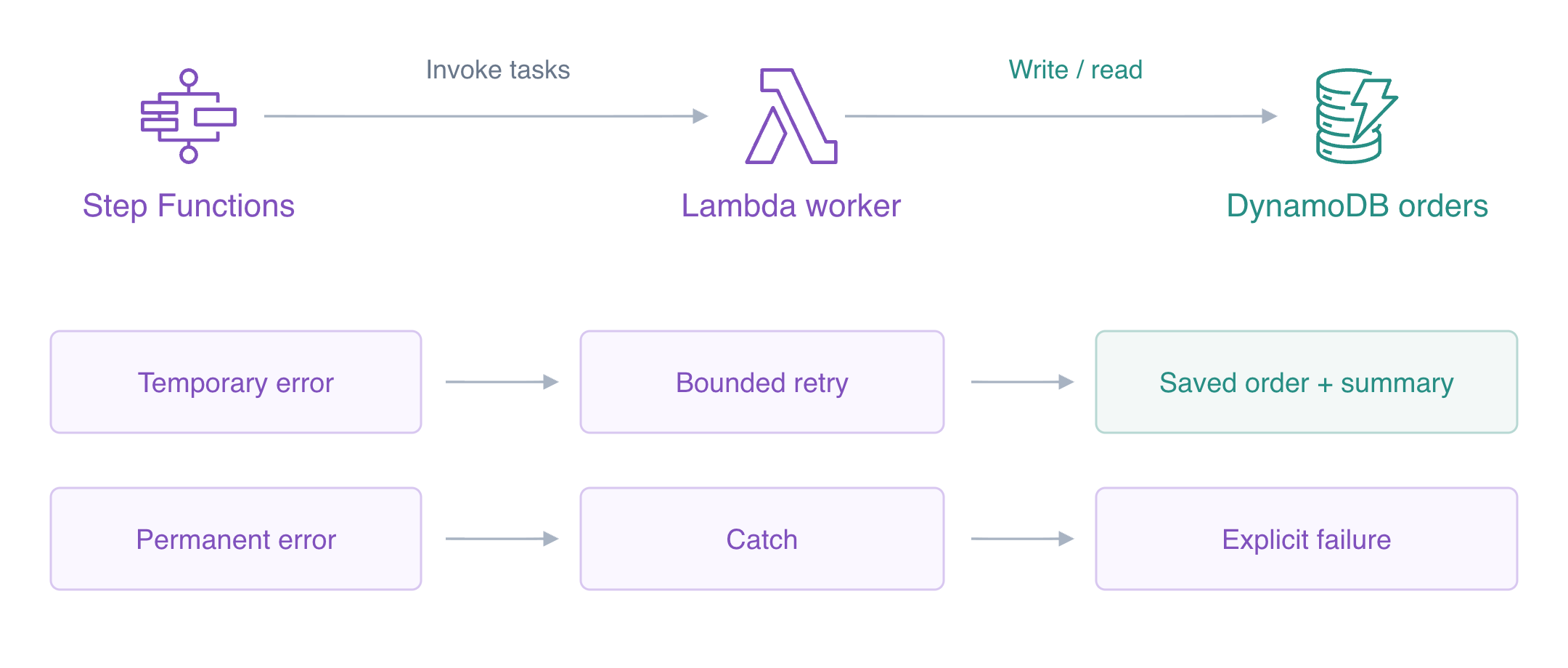
A temporary dependency failure may recover, while an invalid order should remain failed. You will configure selective retries and a permanent failure path, then observe actual attempts and stored results.
Step Functions coordinates Lambda tasks; the supplied worker stores orders in DynamoDB and reads their summaries. CLI access is already configured; no personal AWS account or access keys are needed.
Complete Build a Multi Step Order Workflow first. This fresh VM supplies its own worker and empty tables; earlier machines, roles and executions are not reused.
Certification Relevance
| Certification | Exam task | Practice |
|---|---|---|
| Solutions Architect – Associate (SAA-C03) | Task 2.1 | Workflow error handling, bounded retries, and failure outcomes. |
| Developer – Associate (DVA-C02) | Task 1.1 | Workflow error handling, bounded retries, and failure outcomes. |
| DevOps Engineer – Professional (DOP-C02) | Task 5.1 | Foundational practice: Workflow error handling, bounded retries, and failure outcomes. |
| Solutions Architect – Professional (SAP-C02) | Task 2.4 | Foundational practice: Workflow error handling, bounded retries, and failure outcomes. |
Lab Overview
Authorize the Workflow to Invoke Its Worker
In this step, inspect the supplied business worker and create a separate execution role for Step Functions.
Use AWS View above Terminal to compare the CLI queries with this lab’s actual resources and results. Preserve the supplied reference data.
This fresh VM supplies a worker function and independent order/diagnostic/reference tables. There is no state machine or workflow role yet. The worker accepts an order, writes its quantity and total, and can later read its summary. For synthetic fault testing, mode flaky raises TransientOrderError on the first attempt before any business write; mode permanent raises InvalidOrder before writing. Diagnostic attempts are separate from business orders. Its Lambda execution role already authorizes those unrelated table operations.
Start in the project directory. Shell assignments save returned identifiers; --query selects a response field and --output text produces a reusable string.
cd /home/labex/project
WORKER_NAME=labex-ev04-worker
Save the returned value in WORKER_ARN:
WORKER_ARN=$(aws lambda get-function-configuration \
  --function-name labex-ev04-worker \
  --query FunctionArn \
  --output text)
echo "$WORKER_ARN"
Inspect the function’s role and environment configuration:
aws lambda get-function-configuration \
  --function-name labex-ev04-worker \
  --query '{Name:FunctionName,Role:Role,Runtime:Runtime,Timeout:Timeout}'
Inspect the remaining state machines:
aws stepfunctions list-state-machines
The worker uses Python3.12 and its own Lambda role; the machine list is empty. Step Functions needs its own execution role. A trust policy permits the Step Functions service to assume that role; a permissions policy permits the resulting session to invoke exactly this worker. A quoted here-document writes literal JSON, and file:// reads it into the request.
cat > workflow-trust.json <<'JSON'
{
  "Version": "2012-10-17",
  "Statement": [
    {
      "Effect": "Allow",
      "Principal": {
        "Service": "states.amazonaws.com"
      },
      "Action": "sts:AssumeRole"
    }
  ]
}
JSON
Save the returned value in ROLE_ARN:
ROLE_ARN=$(aws iam create-role \
  --role-name labex-ev04-workflow-role \
  --assume-role-policy-document file://workflow-trust.json \
  --query Role.Arn \
  --output text)
echo "$ROLE_ARN"
Write an ordinary permissions document. The shell inserts $WORKER_ARN, limiting this grant to the supplied worker.
cat > workflow-invoke.json <<EOF
{
  "Version": "2012-10-17",
  "Statement": [
    {
      "Effect": "Allow",
      "Action": "lambda:InvokeFunction",
      "Resource": "$WORKER_ARN"
    }
  ]
}
EOF
Apply the application role’s permission policy:
aws iam put-role-policy \
  --role-name labex-ev04-workflow-role \
  --policy-name InvokeWorker \
  --policy-document file://workflow-invoke.json
Inspect the application role’s permission policy:
aws iam get-role-policy --role-name labex-ev04-workflow-role --policy-name InvokeWorker
The policy has one exact function ARN. Step Functions does not receive the worker's DynamoDB permissions: the worker performs those calls using its separate Lambda role. Run the authorization check.
Configure Bounded Retry and a Permanent Failure Path
In this step, build an actual two-task workflow with selective recovery behavior.
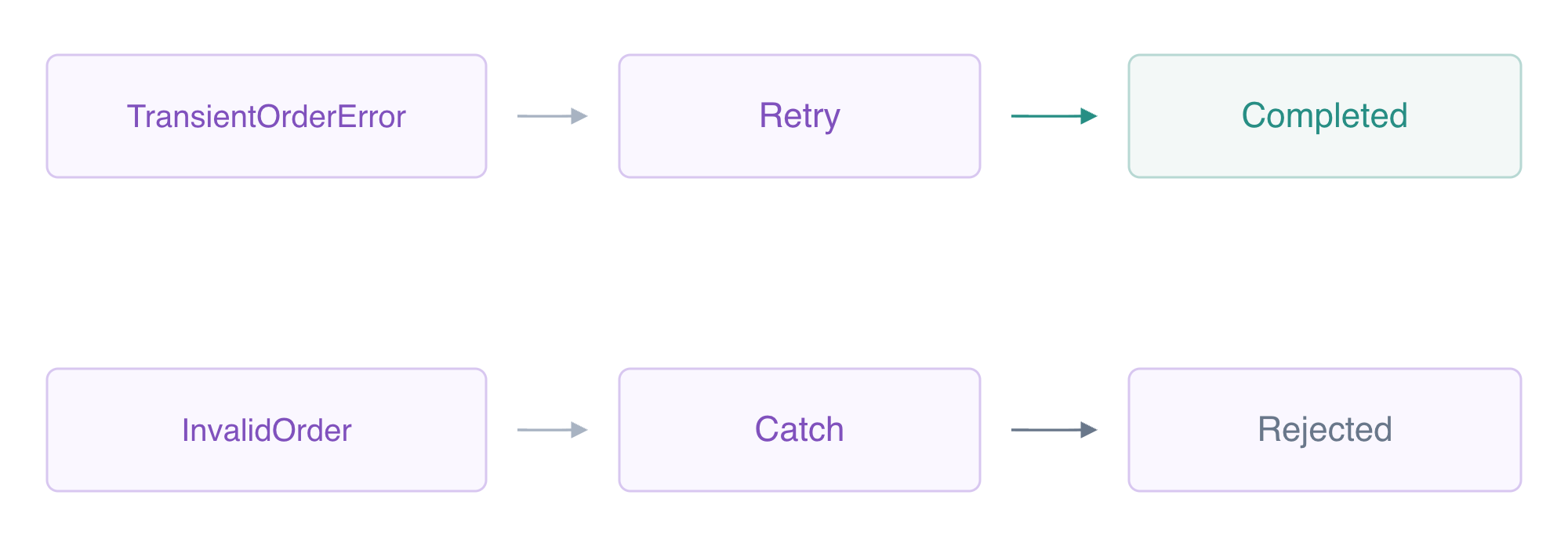
ASL Retry lists which task errors can be retried. ErrorEquals must match the function's error type. IntervalSeconds:1 starts with a one-second delay; BackoffRate:2 multiplies the next delay. MaxAttempts:2 permits up to two retries after the initial attempt. This retry only handles TransientOrderError, not every possible failure.
Catch selects another state for an error that the task has not recovered. ResultPath records the error under failure; Next reaches an explicit Fail state. Handling an error does not mean the business job succeeded. A permanent InvalidOrder ends FAILED with OrderRejected rather than pretending to complete an order.
A quoted here-document writes literal JSON. The existing Choice rejects nonpositive quantity; the two Tasks store and then read the summary. Payload.$ passes current input, ResultSelector keeps the actual function payload, ResultPath preserves it under saved, and OutputPath returns the real summary.
cat > workflow-template.json <<'JSON'
{
  "StartAt": "CheckQuantity",
  "States": {
    "CheckQuantity": {
      "Type": "Choice",
      "Choices": [
        {
          "Variable": "$.quantity",
          "NumericGreaterThan": 0,
          "Next": "StoreOrder"
        }
      ],
      "Default": "Rejected"
    },
    "StoreOrder": {
      "Type": "Task",
      "Resource": "arn:aws:states:::lambda:invoke",
      "Parameters": {
        "FunctionName": "WORKER_NAME",
        "Payload.$": "$"
      },
      "ResultSelector": {
        "result.$": "$.Payload"
      },
      "ResultPath": "$.saved",
      "Retry": [
        {
          "ErrorEquals": [
            "TransientOrderError"
          ],
          "IntervalSeconds": 1,
          "BackoffRate": 2,
          "MaxAttempts": 2
        }
      ],
      "Catch": [
        {
          "ErrorEquals": [
            "InvalidOrder"
          ],
          "Next": "Rejected",
          "ResultPath": "$.failure"
        }
      ],
      "Next": "ReadSummary"
    },
    "ReadSummary": {
      "Type": "Task",
      "Resource": "arn:aws:states:::lambda:invoke",
      "Parameters": {
        "FunctionName": "WORKER_NAME",
        "Payload": {
          "stage": "summary",
          "id.$": "$.saved.result.id"
        }
      },
      "OutputPath": "$.Payload",
      "End": true
    },
    "Rejected": {
      "Type": "Fail",
      "Error": "OrderRejected",
      "Cause": "Order could not be completed"
    }
  }
}
JSON
Write the configuration to workflow.json:
jq --arg worker "$WORKER_NAME" '.States.StoreOrder.Parameters.FunctionName=$worker | .States.ReadSummary.Parameters.FunctionName=$worker' workflow-template.json > workflow.json
Save the returned value in MACHINE_ARN:
MACHINE_ARN=$(aws stepfunctions create-state-machine \
  --name labex-ev04-orders \
  --type STANDARD \
  --role-arn "$ROLE_ARN" \
  --definition file://workflow.json \
  --query stateMachineArn \
  --output text)
echo "$MACHINE_ARN"
Inspect the state machine definition and role:
aws stepfunctions describe-state-machine \
  --state-machine-arn "$MACHINE_ARN" \
  --query '{Name:name,Definition:definition}'
The definition contains the selective retry and catch blocks. AWS View shows the same configuration; there are no executions or business orders yet. Run the recovery-definition check.
Observe Real Retry, Catch and Permission Outcomes
In this step, run a temporary failure, a permanent failure and a denied invocation.
The worker's first flaky attempt updates a diagnostic attempt counter and raises before writing an order. Its next attempt can succeed. A bounded shell loop reads execution status every two seconds until it stops running; $(...) captures output and break exits the loop. If the execution remains RUNNING after the loop, inspect it before proceeding.
Use the error type to choose a remedy: a transient worker error may justify another attempt, a permanent order error needs an explicit failed outcome, and an invocation denial needs the scoped grant restored. History and the order/attempt tables reveal whether the worker ran and whether it wrote anything.
RETRY_ARN=$(aws stepfunctions start-execution \
  --state-machine-arn "$MACHINE_ARN" \
  --name retry-order \
  --input '{"id":"retry-order","quantity":2,"mode":"flaky"}' \
  --query executionArn \
  --output text)
echo "$RETRY_ARN"
Poll this execution until it leaves RUNNING:
for attempt in $(seq 1 60); do
  STATUS=$(aws stepfunctions describe-execution \
    --execution-arn "$RETRY_ARN" \
    --query status \
    --output text)
  if test "$STATUS" != RUNNING; then break; fi
  sleep 2
done
Inspect the execution’s status, output and error details:
aws stepfunctions describe-execution \
  --execution-arn "$RETRY_ARN" \
  --query '{Status:status,Output:output}'
Inspect the actual workflow execution history:
aws stepfunctions get-execution-history \
  --execution-arn "$RETRY_ARN" \
  --query 'events[?type==`TaskFailed` || type==`TaskSucceeded`].{Type:type,Error:taskFailedEventDetails.error}'
Inspect the actual stored database item:
aws dynamodb get-item \
  --table-name labex-ev04-orders \
  --key '{"id":{"S":"retry-order"}}' \
  --query Item
Inspect the actual stored database item:
aws dynamodb get-item \
  --table-name labex-ev04-attempts \
  --key '{"id":{"S":"retry-order"}}' \
  --query Item
The final status is SUCCEEDED with completed summary2/600. History has one TransientOrderError TaskFailed followed by two TaskSucceeded events: successful storage and summary reading. The native order has quantity2/total600, and diagnostic attempts equal2. A retry attempt and a business write are different counts.
Now use the worker's permanent failure mode:
PERMANENT_ARN=$(aws stepfunctions start-execution \
  --state-machine-arn "$MACHINE_ARN" \
  --name permanent-order \
  --input '{"id":"permanent-order","quantity":2,"mode":"permanent"}' \
  --query executionArn \
  --output text)
echo "$PERMANENT_ARN"
Poll this execution until it leaves RUNNING:
for attempt in $(seq 1 30); do
  STATUS=$(aws stepfunctions describe-execution \
    --execution-arn "$PERMANENT_ARN" \
    --query status \
    --output text)
  if test "$STATUS" != RUNNING; then break; fi
  sleep 2
done
Inspect the execution’s status, output and error details:
aws stepfunctions describe-execution \
  --execution-arn "$PERMANENT_ARN" \
  --query '{Status:status,Error:error}'
Inspect the actual workflow execution history:
aws stepfunctions get-execution-history \
  --execution-arn "$PERMANENT_ARN" \
  --query 'events[?type==`TaskFailed` || type==`FailStateEntered`].{Type:type,Error:taskFailedEventDetails.error,State:stateEnteredEventDetails.name}'
Inspect the actual stored database item:
aws dynamodb get-item \
  --table-name labex-ev04-orders \
  --key '{"id":{"S":"permanent-order"}}' \
  --query Item
One actual worker call fails InvalidOrder; Catch reaches Rejected and the execution finishes FAILED with OrderRejected. The transient retry does not match this permanent error. There is no permanent-order business item.
Finally remove only the workflow's invocation grant. Your operator can start executions, but the workflow role cannot invoke the worker:
aws iam delete-role-policy --role-name labex-ev04-workflow-role --policy-name InvokeWorker
Save the returned value in DENIED_ARN:
DENIED_ARN=$(aws stepfunctions start-execution \
  --state-machine-arn "$MACHINE_ARN" \
  --name denied-order \
  --input '{"id":"denied-order","quantity":2,"mode":"flaky"}' \
  --query executionArn \
  --output text)
echo "$DENIED_ARN"
Poll this execution until it leaves RUNNING:
for attempt in $(seq 1 30); do
  STATUS=$(aws stepfunctions describe-execution \
    --execution-arn "$DENIED_ARN" \
    --query status \
    --output text)
  if test "$STATUS" != RUNNING; then break; fi
  sleep 2
done
Inspect the execution’s status, output and error details:
aws stepfunctions describe-execution \
  --execution-arn "$DENIED_ARN" \
  --query '{Status:status,Error:error}'
Inspect the actual stored database item:
aws dynamodb get-item \
  --table-name labex-ev04-orders \
  --key '{"id":{"S":"denied-order"}}' \
  --query Item
Apply the application role’s permission policy:
aws iam put-role-policy \
  --role-name labex-ev04-workflow-role \
  --policy-name InvokeWorker \
  --policy-document file://workflow-invoke.json
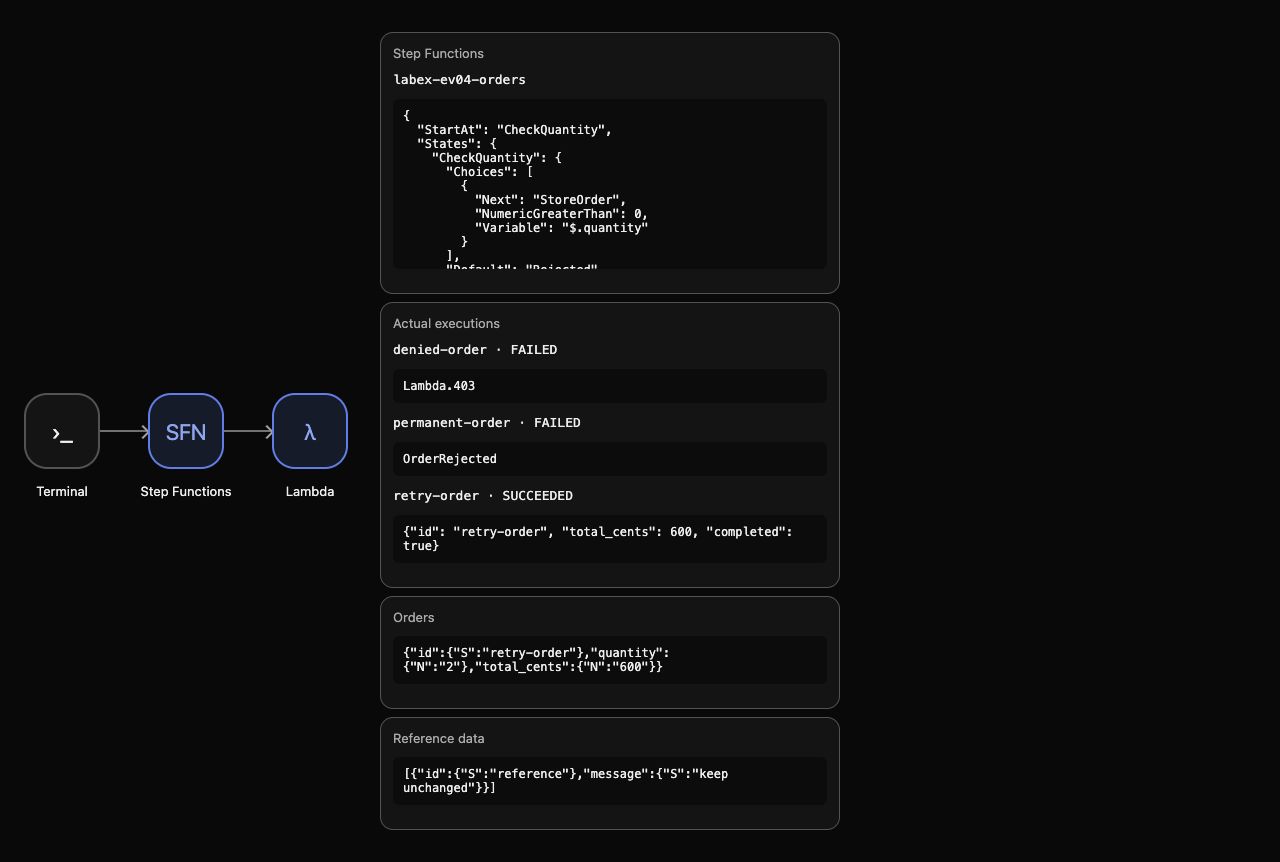
This access-denied execution fails without invoking the worker or creating diagnostic/business data. Retrying the specified application error does not repair missing authorization. The intended grant is restored. AWS View shows the successful retry summary and two failures beside the single order.
Run the actual recovery check.
Remove Workflow Resources and Synthetic Results
In this step, delete your completed machine, workflow role, order and logs while preserving supplied fixtures.
All three executions have finished. Deleting the machine removes it from the active machine list. Remove the owned role policy before deleting the role, then remove the synthetic order and worker log group created by your execution.
aws stepfunctions delete-state-machine --state-machine-arn "$MACHINE_ARN"
Delete only the application role’s permission policy:
aws iam delete-role-policy --role-name labex-ev04-workflow-role --policy-name InvokeWorker
Delete only the owned workflow execution role:
aws iam delete-role --role-name labex-ev04-workflow-role
Delete only the actual stored database item:
aws dynamodb delete-item --table-name labex-ev04-orders --key '{"id":{"S":"retry-order"}}'
Delete only the actual stored database item:
aws dynamodb delete-item \
  --table-name labex-ev04-attempts \
  --key '{"id":{"S":"retry-order"}}'
Delete only the named application log group:
aws logs delete-log-group --log-group-name /aws/lambda/labex-ev04-worker
Read successful inventories to prove what remains:
aws stepfunctions list-state-machines
Inspect the remaining IAM roles:
aws iam list-roles --query 'Roles[].RoleName'
Inspect the actual stored orders:
aws dynamodb scan --table-name labex-ev04-orders --query Items
Inspect the remaining log groups:
aws logs describe-log-groups --query logGroups
Inspect the unrelated reference record:
aws dynamodb scan --table-name labex-ev04-reference --query Items
There are no active machines, orders or log groups. Only the supplied worker role remains, and the reference item is unchanged. Keep the supplied worker and tables: their setup ownership differs from your created workflow/resources. Network or authentication errors never prove deletion.
Remove the ordinary files created in this lab:
rm -f workflow-trust.json workflow-invoke.json workflow-template.json workflow.json
AWS View shows empty machines/executions/orders and preserved reference. Run the cleanup check before ending the VM.
Summary
You configured bounded retries for a specific temporary failure and Catch to an explicit permanent failure. Native history and actual orders distinguished attempts from business writes; permission denial created no worker or business effect. You removed owned workflow resources and results while preserving supplied fixtures.
The next unit handles a failure that happens after the business write, when retrying could repeat its effect.
For further reading, see the AWS reference on Retry, backoff, and Catch error handling.


