



Introduction
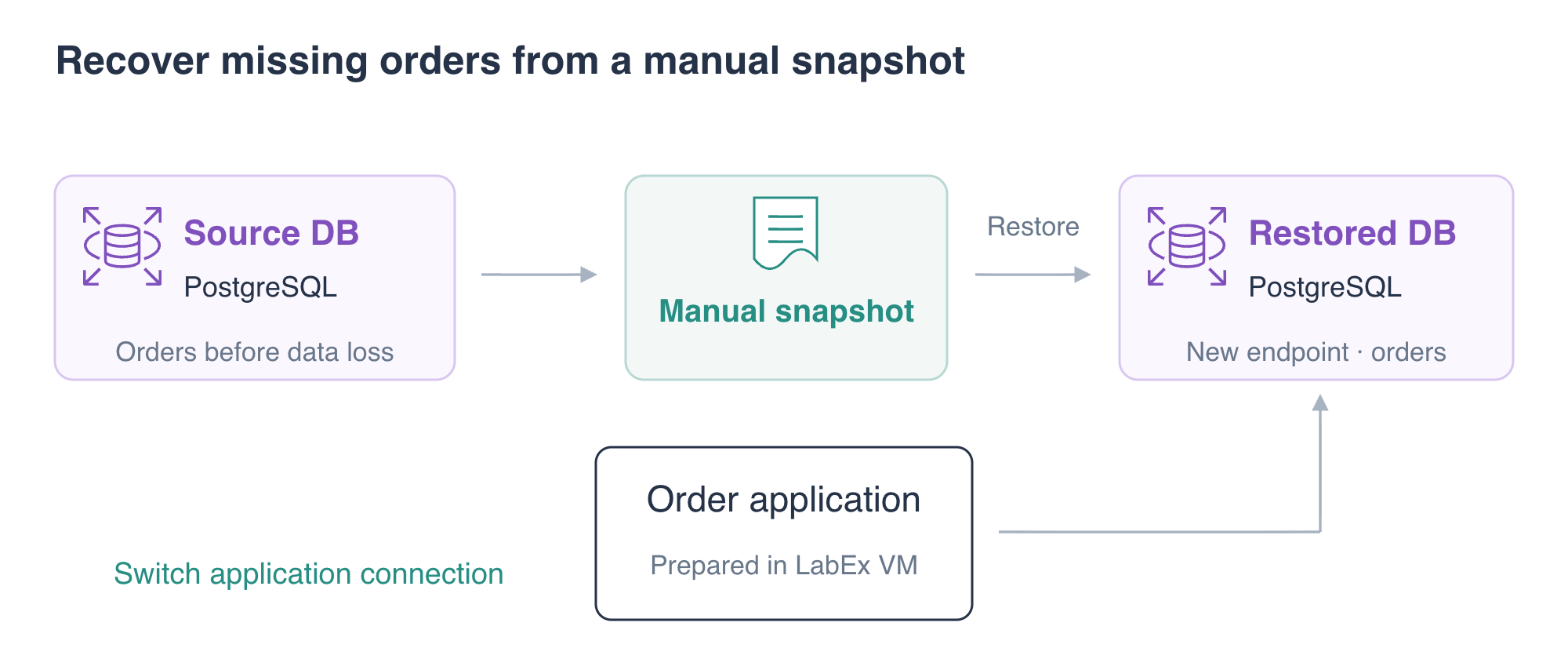
An accidental data change can leave an order application running with missing business records. You will create a manual RDS snapshot, make a controlled deletion and recover the missing order by restoring a new database instance and switching the application's endpoint.
Complete the preceding database and SQL labs first. This independent environment supplies a primary database with three sample orders and a connected application. You will remove the two exercise instances and the snapshot after proving recovery.
Certification Relevance
| Certification | Exam task | Practice |
|---|---|---|
| Cloud Practitioner (CLF-C02) | Task 3.4 | Understand managed relational databases and their recovery options. |
| Solutions Architect – Associate (SAA-C03) | Task 2.2 | Practice database backup and recovery for an application. |
Lab Overview
Capture a Manual Database Snapshot
In this step, you will save the current database data before changing it.
A DB snapshot is a recovery copy of an RDS database instance. A manual snapshot is created explicitly and remains a separate resource until it is deleted. This lab uses one manual snapshot; it does not configure automatic backup retention or point-in-time recovery.
Load the prepared connection settings and inspect the application data:
cd /home/labex/project
source database.env
curl \
  --silent \
  --show-error \
  --fail \
  http://127.0.0.1:8080/application/orders | jq
Expect orders 101, 102 and 103. Order 101 belongs to Maya and has total 49.90.
Capture the database:
aws rds \
  create-db-snapshot \
  --db-instance-identifier orders-db \
  --db-snapshot-identifier orders-before-delete \
  --query 'DBSnapshot.{Snapshot:DBSnapshotIdentifier,Source:DBInstanceIdentifier,Status:Status}'
aws rds \
  wait db-snapshot-available \
  --db-snapshot-identifier orders-before-delete
aws rds \
  describe-db-snapshots \
  --db-snapshot-identifier orders-before-delete \
  --query 'DBSnapshots[].{Snapshot:DBSnapshotIdentifier,Type:SnapshotType,Source:DBInstanceIdentifier,Status:Status}'
Expect a manual snapshot of orders-db with status available. AWS View should show the new snapshot alongside the primary database. Wait for the snapshot to finish before making the next change.
Observe a Controlled Data Loss
In this step, you will remove exactly one sample order and observe the application's resulting data.
The following deletion is intentional for this exercise. The WHERE clause limits it to order 101:
psql \
  "service=orders-db" \
  --set=ON_ERROR_STOP=1 \
  --command 'DELETE FROM orders WHERE order_id = 101;'
Read the remaining rows:
psql \
  "service=orders-db" \
  --command 'SELECT order_id, customer, total FROM orders ORDER BY order_id;'
Expect only orders 102 and 103. Request the application list:
curl \
  --silent \
  --show-error \
  --fail \
  http://127.0.0.1:8080/application/orders | jq
The application still connects and responds, but Maya's order is missing. A healthy connection does not prove that business data is complete. The snapshot made before this deletion contains the recovery copy you need.
Restore a New Instance and Switch the Application
In this step, you will recover the snapshot into a new instance and prove that the application reads its restored data.
An available restored instance is ready for connection checks, but its status does not establish which order records were recovered. The SQL comparisons below establish that the restored engine contains all three captured orders while the source still has two. The final application request then establishes that customers read the recovered copy.
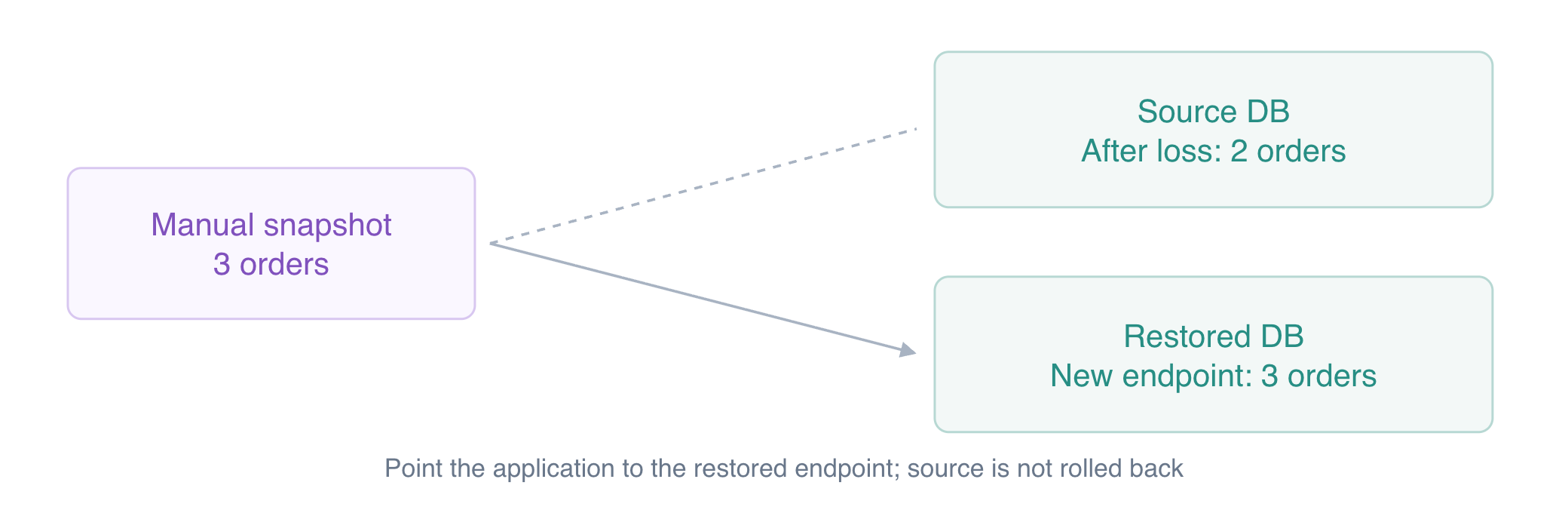
A snapshot restore creates a new RDS instance. It does not rewind the existing instance in place. Use a distinct identifier and explicitly select the prepared subnet group and security group:
aws rds \
  restore-db-instance-from-db-snapshot \
  --db-instance-identifier orders-restored \
  --db-snapshot-identifier orders-before-delete \
  --db-instance-class db.t3.micro \
  --db-subnet-group-name orders-subnets \
  --vpc-security-group-ids "$DB_SECURITY_GROUP_ID" \
  --no-publicly-accessible \
  --query 'DBInstance.{Identifier:DBInstanceIdentifier,Status:DBInstanceStatus,Endpoint:Endpoint}'
aws rds \
  wait db-instance-available \
  --db-instance-identifier orders-restored
Query the new engine using its prepared connection entry:
psql \
  "service=orders-restored" \
  --command 'SELECT order_id, customer, total FROM orders ORDER BY order_id;'
Expect all three original orders. Check the source independently:
psql \
  "service=orders-db" \
  --command 'SELECT order_id, customer, total FROM orders ORDER BY order_id;'
It should still contain only 102 and 103. You now have two independent instances: the changed source and a recovered database.
Capture the recovered endpoint and update both application host fields:
RESTORED_ENDPOINT=$(aws rds \
  describe-db-instances \
  --db-instance-identifier orders-restored \
  --query 'DBInstances[0].Endpoint.Address' \
  --output text)
echo "$RESTORED_ENDPOINT"
jq \
  --arg host "$RESTORED_ENDPOINT" \
  '.read_host = $host | .write_host = $host' \
  app-config.json > app-config.new
mv app-config.new app-config.json
Test the application:
curl \
  --silent \
  --show-error \
  --fail \
  http://127.0.0.1:8080/application/orders | jq
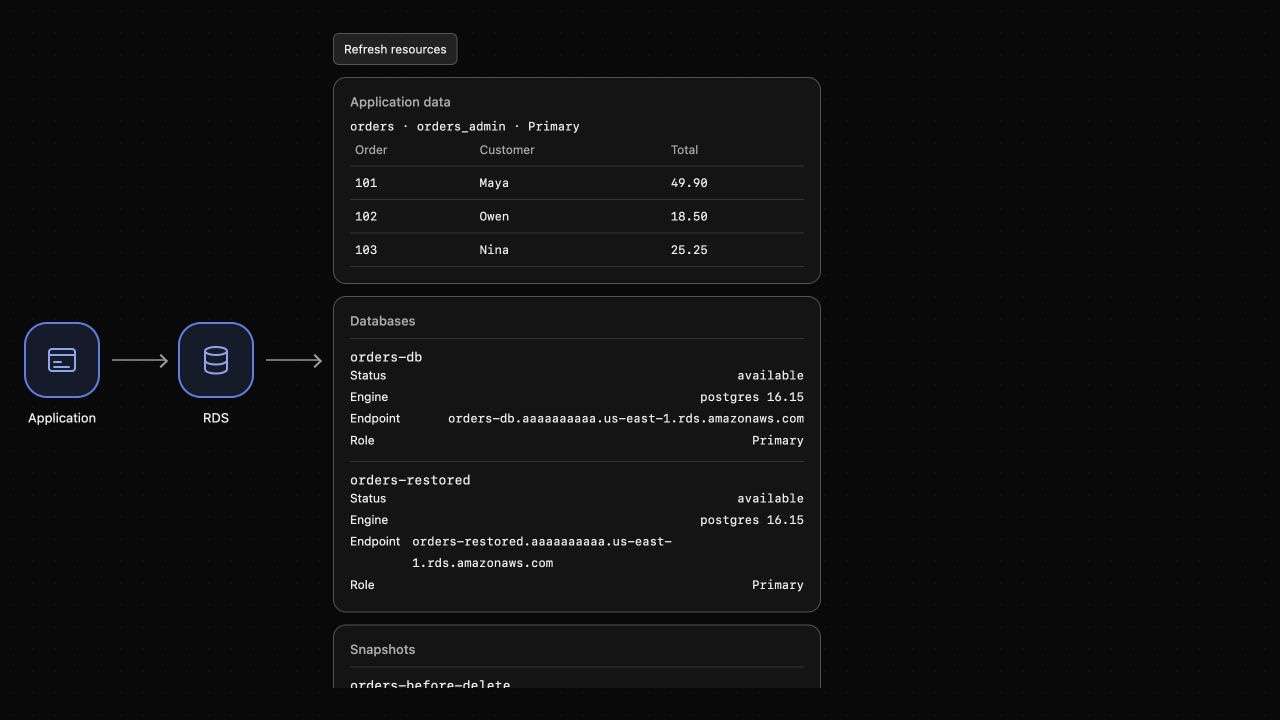
Expect orders 101, 102 and 103 again. AWS View should list both instances and display the recovered order data. Recovery is complete when the application uses the restored endpoint and its expected records are available, rather than merely when an instance is created.
A snapshot contains data captured before the deletion. Changes made after that backup are not automatically present in the restored instance. Backup timing and application cutover decisions matter for recovery planning.
Remove Both Instances and the Manual Snapshot
In this step, you will remove each recovery resource you used.
Delete the recovered instance and the original exercise instance:
aws rds \
  delete-db-instance \
  --db-instance-identifier orders-restored \
  --skip-final-snapshot \
  --query 'DBInstance.DBInstanceIdentifier'
aws rds \
  delete-db-instance \
  --db-instance-identifier orders-db \
  --skip-final-snapshot \
  --query 'DBInstance.DBInstanceIdentifier'
aws rds \
  wait db-instance-deleted \
  --db-instance-identifier orders-restored
aws rds \
  wait db-instance-deleted \
  --db-instance-identifier orders-db
A manual snapshot is separate from the instances and must also be deleted:
aws rds \
  delete-db-snapshot \
  --db-snapshot-identifier orders-before-delete \
  --query 'DBSnapshot.DBSnapshotIdentifier'
Inspect both inventories:
aws rds \
  describe-db-instances \
  --query 'DBInstances[].DBInstanceIdentifier'
aws rds \
  describe-db-snapshots \
  --snapshot-type manual \
  --query 'DBSnapshots[].DBSnapshotIdentifier'
Expect [] for both. AWS View should show no database or manual snapshot. Preserve the prepared application and network.
Summary
You captured a manual database snapshot, observed a controlled deletion and restored the saved data into a new instance. Switching the application's endpoint recovered the missing order while the source remained unchanged. You then deleted both instances and the separate manual snapshot.
The next lab separates application reads from writes using a PostgreSQL read replica.
For further reading, see the AWS reference on Restoring a snapshot to a new database instance.


