



Introduction
The shop now stores sales by month. September is already cataloged; October's new file is available locally. Upload that file to its monthly S3 prefix, register its Glue partition, and query both the new month and the combined dataset with Athena.
Complete Query S3 Data with Athena first. This independent environment supplies a partitioned sales table, September data and its registered partition, new local CSV data and a configured AWS identity. You do not need a personal AWS account or any earlier VM's resources. Use Terminal for ordinary S3, Glue and Athena commands, and AWS View to compare files, registered partition locations and actual query results.
Certification Relevance
| Certification | Exam task | Practice |
|---|---|---|
| Cloud Practitioner (CLF-C02) | Task 3.7 | Explain how Glue catalog metadata makes partitioned S3 data available for Athena analytics. |
Add the New Monthly File
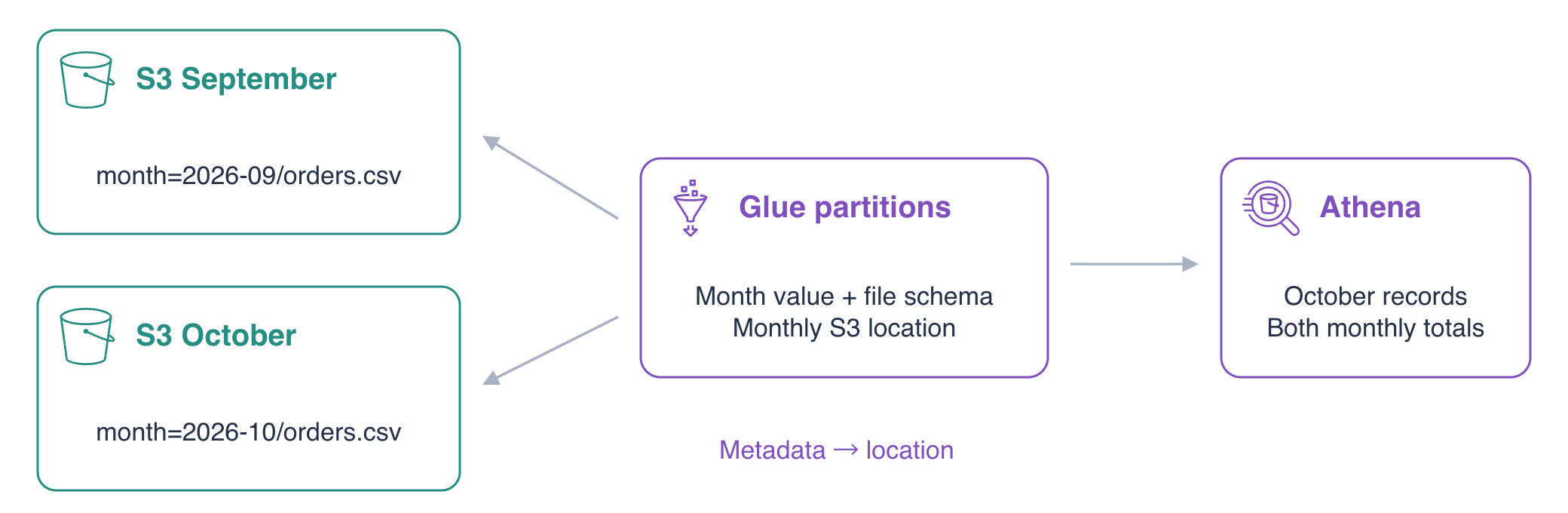
In this step, upload October without changing September. A partition groups table data by a key, such as month. The S3 prefix sales/month=2026-09/ holds September files, and sales/month=2026-10/ will hold October files. The key=value naming pattern makes the grouping visible; uploading a file does not automatically register a catalog partition.
Enter the project directory and check the current identity:
cd /home/labex/project
aws sts \
  get-caller-identity
The ARN ends in labex-an03-operator. Read and display this environment's resource names. jq -r extracts JSON text and $(...) saves it in a shell variable:
INPUT_BUCKET=$(jq -r .input_bucket resources.json)
echo "$INPUT_BUCKET"
DATABASE=$(jq -r .database resources.json)
echo "$DATABASE"
SALES_LOCATION=$(jq -r .input_location resources.json)
echo "$SALES_LOCATION"
RESULT_LOCATION=$(jq -r .output_location resources.json)
echo "$RESULT_LOCATION"
List the prepared objects under the sales prefix. --recursive includes objects in nested prefixes:
aws s3 \
  ls "s3://$INPUT_BUCKET/sales/" \
  --recursive
You should see sales/month=2026-09/orders.csv. September's three amounts are 1000, 2000 and 500 cents, totaling 3500. Leave that file and the unrelated reference/notes.txt unchanged.
Inspect the supplied October file:
cat october.csv
It contains O01/east/700, O02/west/900 and O03/east/400. These are three new orders totaling 2000 cents, with the same three CSV columns as September.
Upload it to its own monthly prefix:
aws s3 \
  cp october.csv "s3://$INPUT_BUCKET/sales/month=2026-10/orders.csv"
Read the actual S3 object back:
aws s3 \
  cp "s3://$INPUT_BUCKET/sales/month=2026-10/orders.csv" -
The trailing - prints the stored object. AWS View now lists both monthly files under S3, while Glue still lists only September's partition. This separates file arrival from catalog registration.
Register October in the Catalog
In this step, show why file arrival is insufficient and add the missing metadata. A partition definition pairs a key value with its S3 location and file schema. The table declares month as a string partition key. The CSV contains only order_id, region and total_cents; the query's month value comes from the partition definition.
Inspect the table's partition key:
aws glue \
  get-table \
  --database-name "$DATABASE" \
  --name sales \
  --query 'Table.PartitionKeys'
It is month with type string. Query October before adding its partition. COUNT(*) counts matching records. Write the SQL file using a quoted heredoc delimiter so its contents are preserved:
cat > october-before.sql <<'EOF'
SELECT COUNT(*) AS orders
FROM sales
WHERE month = '2026-10';
EOF
Submit the query with the prepared database and result prefix, then display its execution ID:
BEFORE_QUERY_ID=$(aws athena \
  start-query-execution \
  --query-string file://october-before.sql \
  --query-execution-context "Database=$DATABASE" \
  --result-configuration "OutputLocation=$RESULT_LOCATION" \
  --query QueryExecutionId \
  --output text)
echo "$BEFORE_QUERY_ID"
Inspect the execution. As in the previous lab, repeat this status command for QUEUED or RUNNING and continue only at SUCCEEDED; inspect Reason for a failure:
aws athena \
  get-query-execution \
  --query-execution-id "$BEFORE_QUERY_ID" \
  --query 'QueryExecution.{State:Status.State,Reason:Status.StateChangeReason}'
Read the result:
aws athena \
  get-query-results \
  --query-execution-id "$BEFORE_QUERY_ID" \
  --query 'ResultSet.Rows[*].Data[*].VarCharValue' \
  --output table
The count is 0, even though the S3 file exists. For this cataloged partitioned table, Athena reads registered partition locations. The file's directory name alone does not create that metadata.
Reuse the table's existing storage descriptor so October has the same columns and CSV format. Redirecting output with > writes its JSON to a file:
aws glue \
  get-table \
  --database-name "$DATABASE" \
  --name sales \
  --query 'Table.StorageDescriptor' \
  --output json > storage-descriptor.json
Build a normal partition JSON file. jq --arg passes the actual location as a string; .Location = $location replaces the table-wide location with October's prefix. Values supplies the value for the table's single partition key:
jq --arg location "${SALES_LOCATION}month=2026-10/" \
  '{Values:["2026-10"],StorageDescriptor:(. | .Location = $location)}' \
  storage-descriptor.json > october-partition.json
Inspect the definition before creating it:
cat october-partition.json
Confirm Values contains 2026-10, the columns match the CSV, and Location ends in /sales/month=2026-10/. The ${SALES_LOCATION} braces keep the shell variable's name separate from the appended prefix.
Register the partition. The file:// syntax makes the CLI read your JSON definition:
aws glue \
  create-partition \
  --database-name "$DATABASE" \
  --table-name sales \
  --partition-input file://october-partition.json
List both registered partitions:
aws glue \
  get-partitions \
  --database-name "$DATABASE" \
  --table-name sales \
  --query 'Partitions[*].{Month:Values[0],Location:StorageDescriptor.Location}'
September and October now each point to their own S3 prefix. AWS View shows both mappings. Registration changed metadata; it did not copy or rewrite either CSV file.
Query the New Month and Both Monthly Totals
In this step, prove that October is queryable and September remains correct. A WHERE condition on the partition key selects the requested month. Here you will verify the returned records; this small exercise does not measure scan charges or production query speed.
Write a query for October's actual orders:
cat > october-sales.sql <<'EOF'
SELECT order_id, total_cents
FROM sales
WHERE month = '2026-10'
ORDER BY order_id;
EOF
Submit it as a new execution. The earlier zero-count result is an output of an earlier query; registering a partition does not rewrite that existing result:
OCTOBER_QUERY_ID=$(aws athena \
  start-query-execution \
  --query-string file://october-sales.sql \
  --query-execution-context "Database=$DATABASE" \
  --result-configuration "OutputLocation=$RESULT_LOCATION" \
  --query QueryExecutionId \
  --output text)
echo "$OCTOBER_QUERY_ID"
Check its state before retrieving the records:
aws athena \
  get-query-execution \
  --query-execution-id "$OCTOBER_QUERY_ID" \
  --query 'QueryExecution.{State:Status.State,Reason:Status.StateChangeReason}'
Read the rows:
aws athena \
  get-query-results \
  --query-execution-id "$OCTOBER_QUERY_ID" \
  --query 'ResultSet.Rows[*].Data[*].VarCharValue' \
  --output table
After the header, the result contains O01/700, O02/900 and O03/400. The same file that was invisible before registration now contributes three records.
Write a summary for both months. SUM adds the cents and COUNT(*) counts the orders within each GROUP BY month group:
cat > monthly-summary.sql <<'EOF'
SELECT month, SUM(total_cents) AS revenue_cents, COUNT(*) AS orders
FROM sales
GROUP BY month
ORDER BY month;
EOF
Submit and display its separate execution ID:
MONTHLY_QUERY_ID=$(aws athena \
  start-query-execution \
  --query-string file://monthly-summary.sql \
  --query-execution-context "Database=$DATABASE" \
  --result-configuration "OutputLocation=$RESULT_LOCATION" \
  --query QueryExecutionId \
  --output text)
echo "$MONTHLY_QUERY_ID"
Confirm it succeeded:
aws athena \
  get-query-execution \
  --query-execution-id "$MONTHLY_QUERY_ID" \
  --query 'QueryExecution.{State:Status.State,Reason:Status.StateChangeReason}'
Read the grouped result:
aws athena \
  get-query-results \
  --query-execution-id "$MONTHLY_QUERY_ID" \
  --query 'ResultSet.Rows[*].Data[*].VarCharValue' \
  --output table
September has 3500 cents and 3 orders; October has 2000 cents and 3 orders. October was added without changing September's total or count. In AWS View, compare the two Glue partition locations with the monthly query's SQL and actual rows.
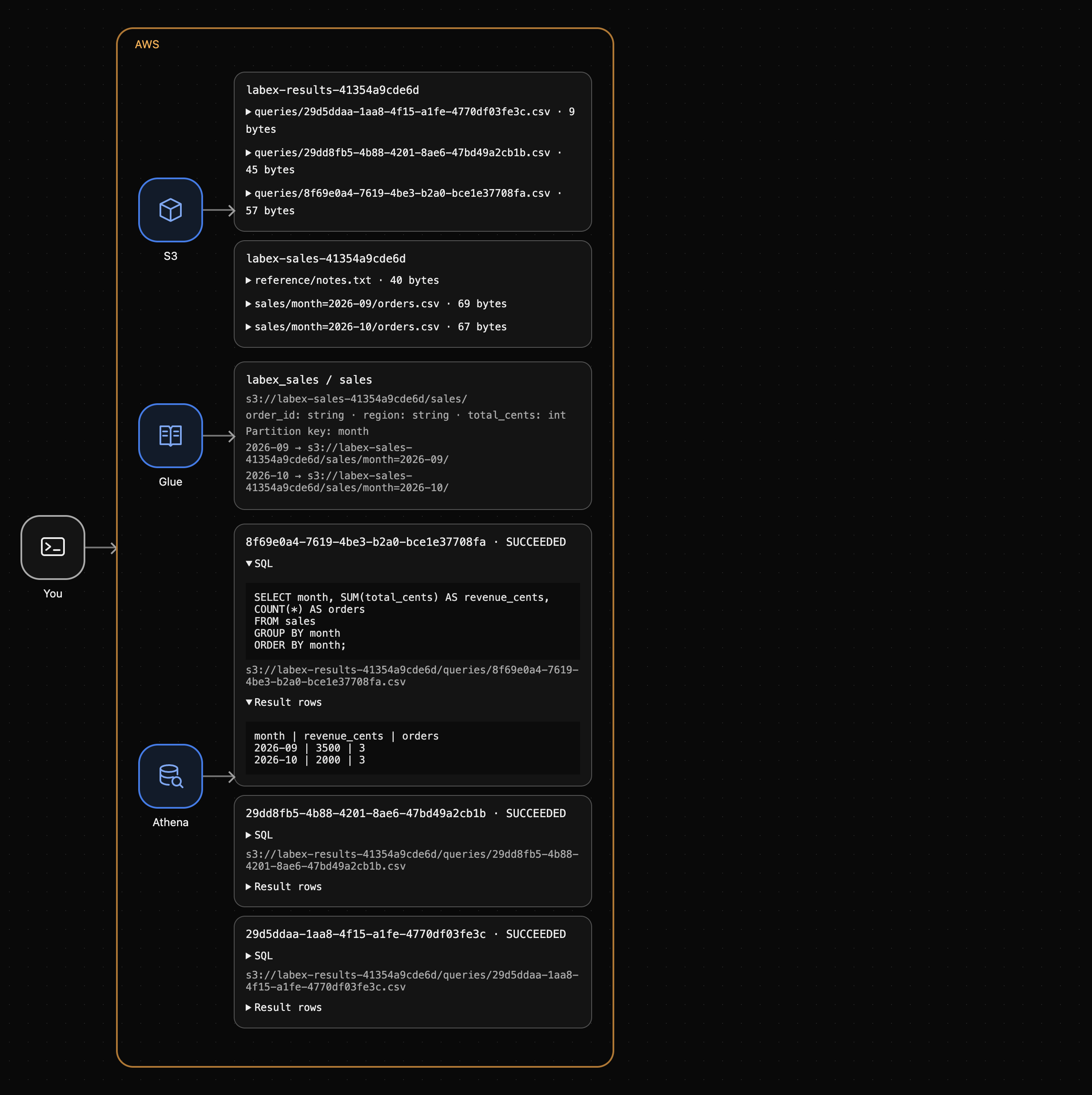
The earlier zero-count output still exists as a separate result of the earlier catalog state.
Summary
You added a monthly CSV file to S3, observed that an unregistered partition contributed no query rows, registered its Glue location/schema, and verified October's records plus both monthly totals. Files and catalog metadata are separate: a new S3 prefix needs the appropriate partition registration before this table can query its records. The next lab turns these actual computed results into a reusable sales summary file.
For further reading, see the AWS reference on Partition keys, locations, and registration.


