Introduction
An application needs to read a private export stored in S3. You will encrypt new uploads with a customer key, grant the reader access, and test how object permission and key permission affect real downloads.
Complete Store and Retrieve Files in S3, Encrypt and Decrypt a Private Export with KMS and their IAM prerequisites first. This fresh VM supplies a synthetic export, reader role session and independent reference resources.
Certification Relevance
This lab provides hands-on practice for the following exam topics.
- Cloud Practitioner (CLF-C02) · Task 2.2: S3 encryption at rest and separate object/key permissions.
- Solutions Architect – Associate (SAA-C03) · Task 1.3: S3 encryption at rest and separate object/key permissions.
- Developer – Associate (DVA-C02) · Task 2.2: S3 encryption at rest and separate object/key permissions.
- CloudOps Engineer – Associate (SOA-C03) · Task 4.2: S3 encryption at rest and separate object/key permissions.
- Security – Specialty (SCS-C03) · Task 5.2: Foundational practice: S3 encryption at rest and separate object/key permissions.
- Data Engineer – Associate (DEA-C01) · Task 4.3: Foundational practice: S3 encryption at rest and separate object/key permissions.
- DevOps Engineer – Professional (DOP-C02) · Task 6.2: Foundational practice: S3 encryption at rest and separate object/key permissions.
- Solutions Architect – Professional (SAP-C02) · Task 2.3: Foundational practice: S3 encryption at rest and separate object/key permissions.
Prepare Encrypted Object Storage
In this step, you will create a customer KMS key and configure a new bucket to use it by default. A bucket holds objects; each object has a key such as exports/private-export.json. Server-side encryption with KMS (SSE-KMS) lets S3 encrypt stored objects with your chosen key. Default encryption applies to new uploads without requiring every client to repeat encryption options.
Use the supplied synthetic private-export.json; the export-reader role session starts without object or key access. Preserve the reference bucket, object and key. Open AWS View beside Terminal to compare key/bucket state, reader grants and safe byte comparisons.
Start in the project directory and confirm the supplied operator identity. cd changes directory; the caller query returns an identity ARN without exposing credentials.
cd /home/labex/project
aws sts get-caller-identity --query Arn --output text
Expect the labex-sec02-operator user. Create a symmetric customer key and a readable alias. --query selects the ARN, --output text removes JSON quoting, and $(...) saves the result in a shell variable.
KEY_ARN=$(aws kms create-key \
  --description labex-sec02-owned-export \
  --query KeyMetadata.Arn \
  --output text)
aws kms create-alias \
  --alias-name alias/labex-sec02-private-export \
  --target-key-id "$KEY_ARN"
Use a disposable bucket name with a timestamp suffix to avoid name collisions. The labex-sec02-owned- prefix distinguishes your bucket from the supplied reference. This unit uses us-east-1, so bucket creation does not need a location constraint.
BUCKET="labex-sec02-owned-$(date +%s)"
aws s3api create-bucket \
  --bucket "$BUCKET" \
  --region us-east-1 \
  --query Location \
  --output text
Configure SSE-KMS with the exact key ARN. A S3 Bucket Key can reduce repeated KMS requests; it stays off here so each object uses its own KMS encryption context. Write the default rule as an ordinary JSON file. The here-document expands $KEY_ARN; file:// loads the saved configuration.
cat > bucket-encryption.json <<EOF
{
  "Rules": [
    {
      "ApplyServerSideEncryptionByDefault": {
        "SSEAlgorithm": "aws:kms",
        "KMSMasterKeyID": "$KEY_ARN"
      },
      "BucketKeyEnabled": false
    }
  ]
}
EOF

aws s3api put-bucket-encryption --bucket "$BUCKET" \
  --server-side-encryption-configuration file://bucket-encryption.json
aws s3api get-bucket-encryption \
  --bucket "$BUCKET" \
  --query ServerSideEncryptionConfiguration
Expect aws:kms, your key ARN and BucketKeyEnabled: false. Keep KEY_ARN and BUCKET in this Terminal for subsequent commands. In AWS View, the owned key is enabled and the bucket has no objects yet.
Give a Reader Both Required Permissions
In this step, you will upload the export and let a role recover its original bytes. Uploading requires kms:GenerateDataKey on the chosen key. SSE-KMS uses a data key to encrypt object bytes. KMS protects that data key; S3 stores the encrypted object and wrapped data key, then requests decryption when an authorized reader downloads the object. Key material does not need to appear in the CLI output.
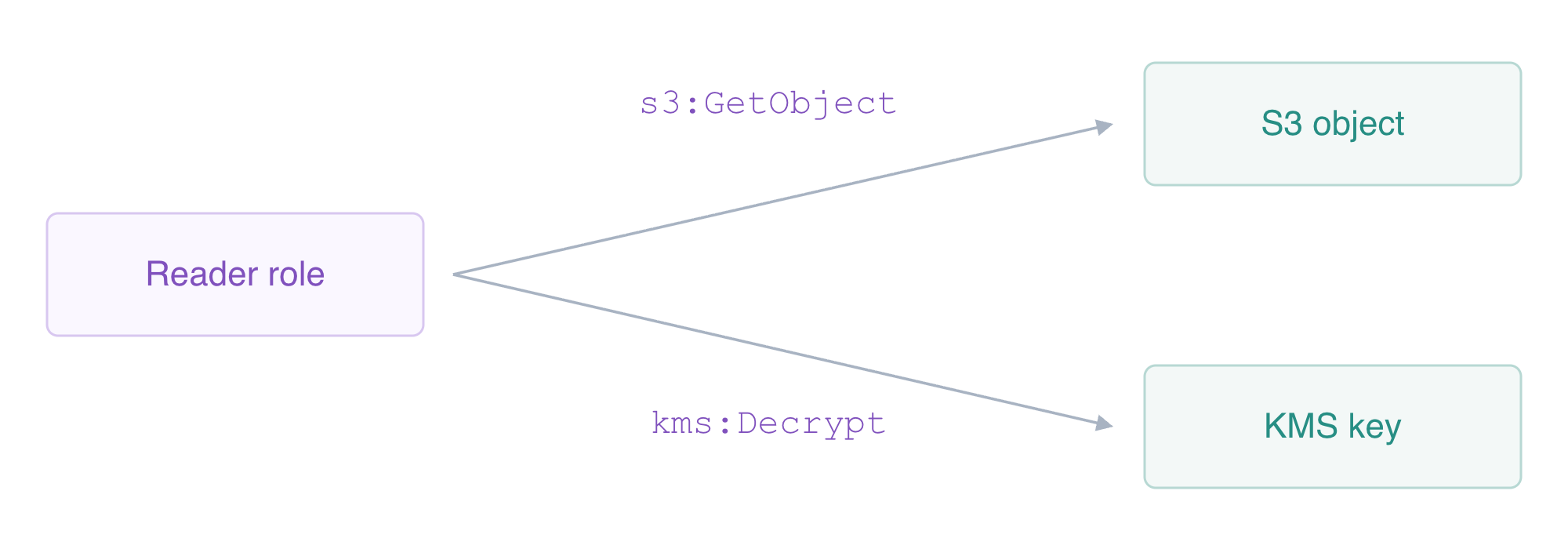
Reading this SSE-KMS object requires both object access and key decryption permission.
Upload the supplied file with s3api put-object. The bucket default supplies encryption settings; --body private-export.json reads the named local file as object bytes. Use this single-part API for the small export.
aws s3api put-object \
  --bucket "$BUCKET" \
  --key exports/private-export.json \
  --body private-export.json \
  --query '{Encryption:ServerSideEncryption,Key:SSEKMSKeyId,BucketKey:BucketKeyEnabled}'
aws s3api head-object \
  --bucket "$BUCKET" \
  --key exports/private-export.json \
  --query '{Encryption:ServerSideEncryption,Key:SSEKMSKeyId,Bytes:ContentLength}'
Expect aws:kms, the owned key ARN and the original file size. Metadata alone does not show whether a reader can decrypt. First grant only object access. An object ARN includes the bucket and object key; it is different from a bucket ARN. The following here-document writes a policy file and expands $BUCKET inside it.
cat > read-object.json <<EOF
{
  "Version": "2012-10-17",
  "Statement": [
    {
      "Effect": "Allow",
      "Action": "s3:GetObject",
      "Resource": "arn:aws:s3:::$BUCKET/exports/private-export.json"
    }
  ]
}
EOF
aws iam put-role-policy \
  --role-name labex-sec02-export-reader \
  --policy-name ReadExportObject \
  --policy-document file://read-object.json
Select the prepared reader session with --profile export-reader. This attempt must fail with AccessDenied: the role can read this object, but it has no KMS decryption grant yet.
aws \
  --profile export-reader s3api get-object \
  --bucket "$BUCKET" \
  --key exports/private-export.json reader-export.json
Give that role only kms:Decrypt on the exact key. It does not need key management or kms:GenerateDataKey for downloading.
cat > decrypt-key.json <<EOF
{
  "Version": "2012-10-17",
  "Statement": [
    {
      "Effect": "Allow",
      "Action": "kms:Decrypt",
      "Resource": "$KEY_ARN"
    }
  ]
}
EOF
aws iam put-role-policy \
  --role-name labex-sec02-export-reader \
  --policy-name DecryptExportKey \
  --policy-document file://decrypt-key.json
aws \
  --profile export-reader s3api get-object \
  --bucket "$BUCKET" \
  --key exports/private-export.json reader-export.json \
  --query '{Encryption:ServerSideEncryption,Key:SSEKMSKeyId}'
chmod 600 reader-export.json
cmp private-export.json reader-export.json
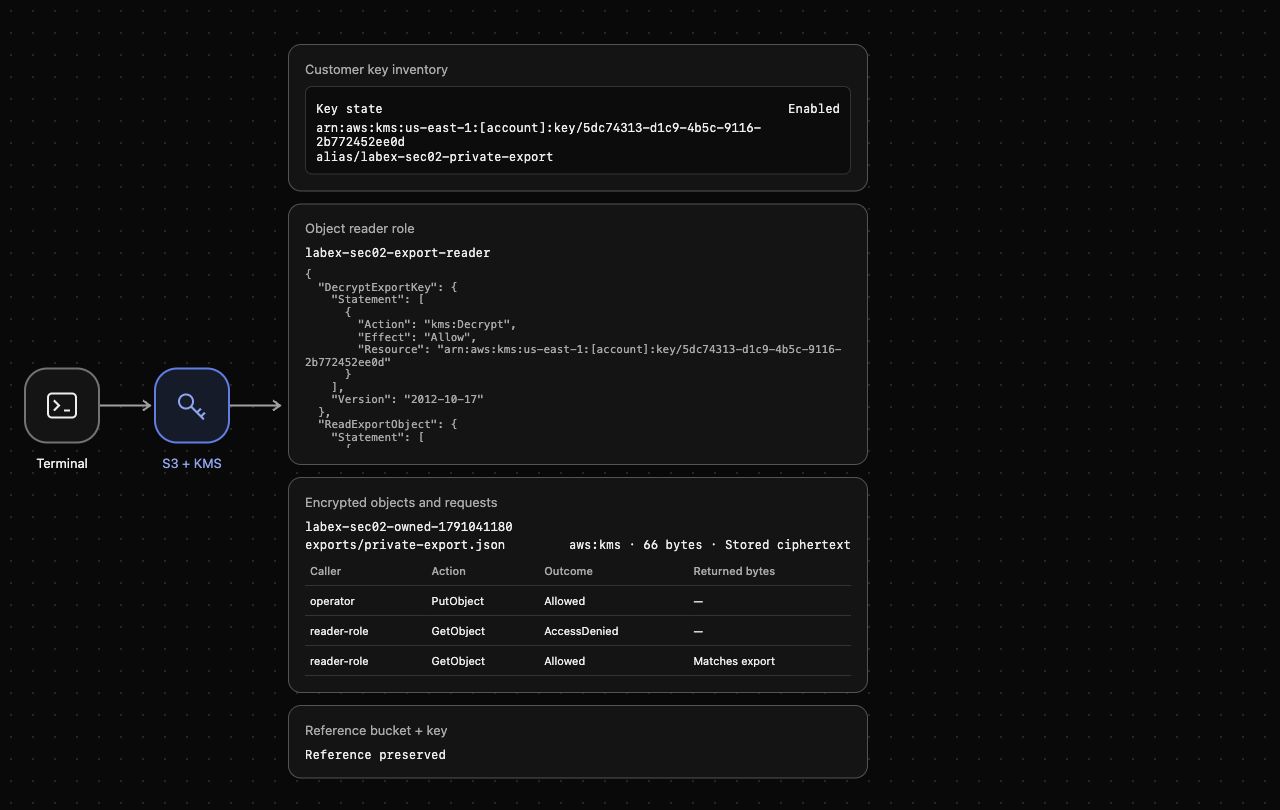
cmp prints nothing and returns success when the byte contents match. AWS View should now show stored ciphertext and a reader GetObject whose returned bytes match the supplied export. These are separate observations: encrypted storage protects bytes at rest, while scoped permissions govern retrieval.
Diagnose Permission and Key-State Failures
In this step, you will distinguish a missing decryption grant from a disabled key. Keep the object permission in place so only one condition changes at a time.
Remove the reader's key grant, then retry the same object download. The role still has s3:GetObject, but the request must fail with AccessDenied.
aws iam delete-role-policy \
  --role-name labex-sec02-export-reader \
  --policy-name DecryptExportKey
aws \
  --profile export-reader s3api get-object \
  --bucket "$BUCKET" \
  --key exports/private-export.json reader-export.json
Inspect the remaining object policy. It should still name just this export object.
aws iam get-role-policy \
  --role-name labex-sec02-export-reader \
  --policy-name ReadExportObject \
  --query PolicyDocument
Restore the exact key grant and disable your key. A disabled key still exists but cannot perform cryptographic operations. Do not change the unrelated reference key.
aws iam put-role-policy \
  --role-name labex-sec02-export-reader \
  --policy-name DecryptExportKey \
  --policy-document file://decrypt-key.json
aws kms disable-key --key-id "$KEY_ARN"
aws \
  --profile export-reader s3api get-object \
  --bucket "$BUCKET" \
  --key exports/private-export.json reader-export.json
Expect a disabled-key failure. Having an IAM permission cannot make a disabled key usable. Confirm its native state, then enable it and fetch the object again.
aws kms describe-key --key-id "$KEY_ARN" --query KeyMetadata.KeyState --output text
aws kms enable-key --key-id "$KEY_ARN"
aws \
  --profile export-reader s3api get-object \
  --bucket "$BUCKET" \
  --key exports/private-export.json reader-export.json \
  --query ServerSideEncryption \
  --output text
chmod 600 reader-export.json
cmp private-export.json reader-export.json
Expect aws:kms and a successful comparison. AWS View keeps the failed requests and the successful recovery together, while the reference bucket and key remain usable. 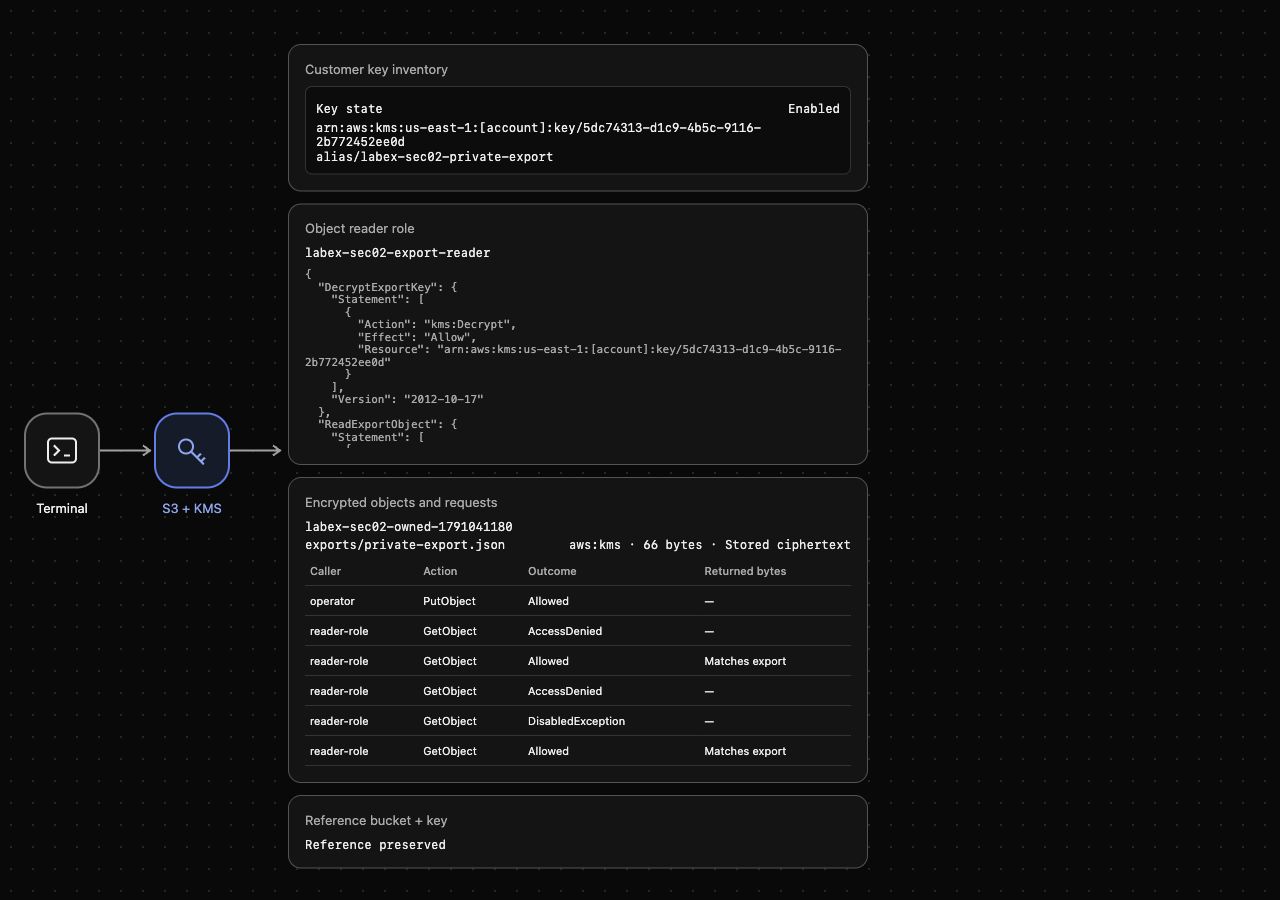
A failed download may leave an older local file, so its presence alone does not prove the request succeeded; the signed read and comparison establish recovery.
Remove Owned Resources and Schedule Key Deletion
In this step, you will clean up the exact export resources. Finish the earlier functional checks first. An S3 bucket must be empty before deletion; a customer KMS key uses a deletion waiting period rather than disappearing immediately.
Delete only your named export, then its bucket. List the inventory successfully and confirm that your $BUCKET is absent while labex-sec02-reference remains.
aws s3api delete-object --bucket "$BUCKET" --key exports/private-export.json
aws s3api delete-bucket --bucket "$BUCKET"
aws s3api list-buckets --query 'Buckets[].Name'
Remove the two permissions you added and the owned alias. The supplied reader role is a session fixture; do not delete it or the unrelated reference resources.
aws iam delete-role-policy \
  --role-name labex-sec02-export-reader \
  --policy-name ReadExportObject
aws iam delete-role-policy \
  --role-name labex-sec02-export-reader \
  --policy-name DecryptExportKey
aws iam list-role-policies --role-name labex-sec02-export-reader --query PolicyNames
aws kms delete-alias --alias-name alias/labex-sec02-private-export
Schedule your key's deletion with the minimum seven-day period, then read its native state. Scheduling makes it unusable immediately, but does not prove it has already been deleted.
aws kms schedule-key-deletion \
  --key-id "$KEY_ARN" \
  --pending-window-in-days 7 \
  --query DeletionDate \
  --output text
aws kms describe-key --key-id "$KEY_ARN" --query KeyMetadata.KeyState --output text
aws kms describe-key \
  --key-id alias/labex-sec02-reference \
  --query KeyMetadata.KeyState \
  --output text
Expect PendingDeletion for your key and Enabled for the reference. Remove the named local files; these commands leave unrelated project files alone.
rm -f private-export.json reader-export.json read-object.json decrypt-key.json bucket-encryption.json
Run this step's verification before removing the disposable CLI profiles. Successful native inventory queries, not authentication errors, establish cleanup.
rm -f /home/labex/.aws/credentials /home/labex/.aws/config
unset KEY_ARN BUCKET
Summary
You configured SSE-KMS as a bucket default, uploaded an encrypted export and recovered the original bytes with a role scoped to one object and one key. Revoking kms:Decrypt and disabling the key each prevented reading without changing the object grant. You restored access, deleted only owned S3 resources and scheduled the owned KMS key for deletion while preserving the reference bucket and key.