



Introduction
The order API must require sign-in for reads and writes while keeping health public. You will attach token checks to both order routes, test accepted and rejected requests, and confirm rejected calls leave business data unchanged.
Complete Add Application Sign In with Cognito and Build and Validate an Order API first. This fresh environment supplies a working public backend and synthetic identity fixtures; earlier resources and tokens are not reused.
Certification Relevance
| Certification | Exam task | Practice |
|---|---|---|
| Solutions Architect – Associate (SAA-C03) | Task 1.2 | Token-based API authorization and access-boundary testing. |
| Developer – Associate (DVA-C02) | Task 2.1 | Token-based API authorization and access-boundary testing. |
| Security – Specialty (SCS-C03) | Task 4.1 | Foundational practice: Token-based API authorization and access-boundary testing. |
Lab Overview
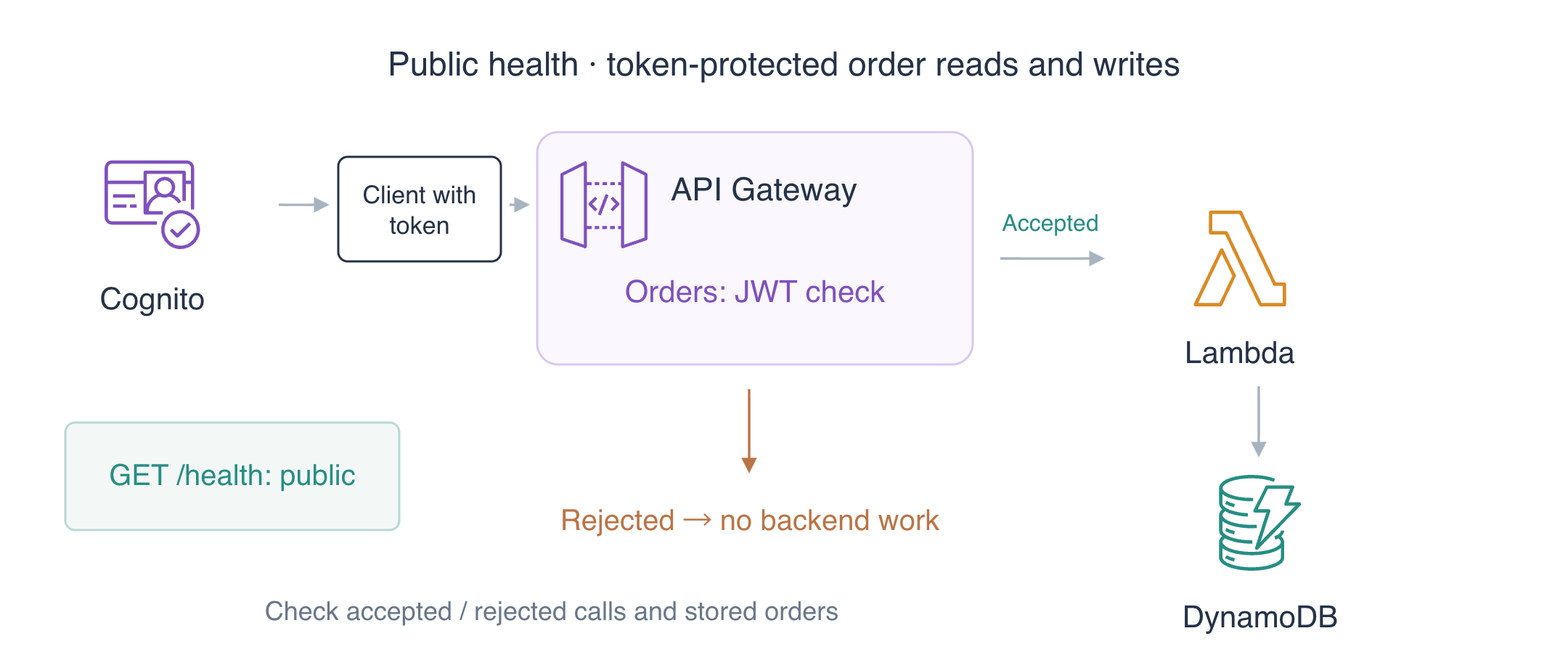
Inspect the Public Routes and Sign In
In this step, you will establish the current public route state and obtain a real access token for the intended app client.
Enter the workspace and keep newly created token files private:
cd /home/labex/project
umask 077
Look at AWS View above Terminal to compare API requests, function executions and stored orders. Gateway request logs and Lambda execution logs are separate: a rejected token should stop before the function runs.
Read the safe fixture inventory. It identifies the intended pool/client, a different client, a different issuer and the unrelated reference pool:
cat scenario.json
Use jq -r to select the main IDs, storing the output with $(...) command substitution:
POOL_ID=$(jq -r '.main.pool' scenario.json)
echo "$POOL_ID"
CLIENT_ID=$(jq -r '.main.client' scenario.json)
echo "$CLIENT_ID"
Find the prepared HTTP API by name and record its generated ID for cleanup:
API_ID=$(aws apigatewayv2 get-apis \
  --query "Items[?Name=='labex-a05'].ApiId | [0]" \
  --output text)
echo "$API_ID"
printf '%s\n' "$API_ID" > api-id.txt
Inspect the route authorization types:
aws apigatewayv2 get-routes \
  --api-id "$API_ID" \
  --query 'Items[].{Route:RouteKey,Authorization:AuthorizationType}'
All three routes initially use NONE. The user directory alone has not protected the API. Build its workspace address:
API_URL="http://127.0.0.1:8081/api/$API_ID"
echo "$API_URL"
curl -i "$API_URL/health"
Expect HTTP 200 and healthy: true, with an actual health execution in AWS View and no orders.
Sign in the prepared synthetic user through the intended public client, storing the real response privately:
aws cognito-idp initiate-auth \
  --client-id "$CLIENT_ID" \
  --auth-flow USER_PASSWORD_AUTH \
  --auth-parameters file://sign-in.json \
  --query AuthenticationResult \
  --output json > tokens.json
Extract the access and ID tokens without printing them:
jq -r '.AccessToken' tokens.json > access-token.txt
jq -r '.IdToken' tokens.json > id-token.txt
Use only the access token to read the live application username:
aws cognito-idp get-user \
  --access-token "$(cat access-token.txt)" \
  --query Username \
  --output text
Expect labex-demo. AWS View shows the prepared confirmed user and client. The independent check validates the actual issued token and live identity; it does not authenticate again for you.
Require the Authorizer on Both Order Routes
In this step, you will configure the intended issuer/audience and apply the same JWT authorizer to private reads and writes.
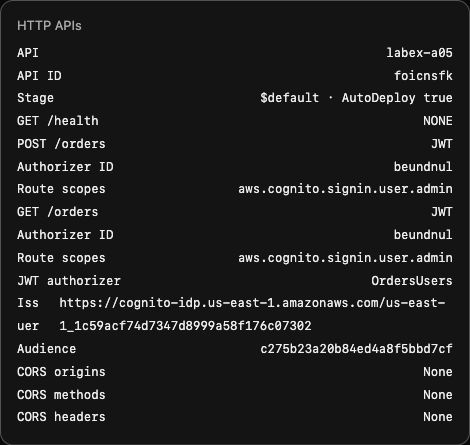
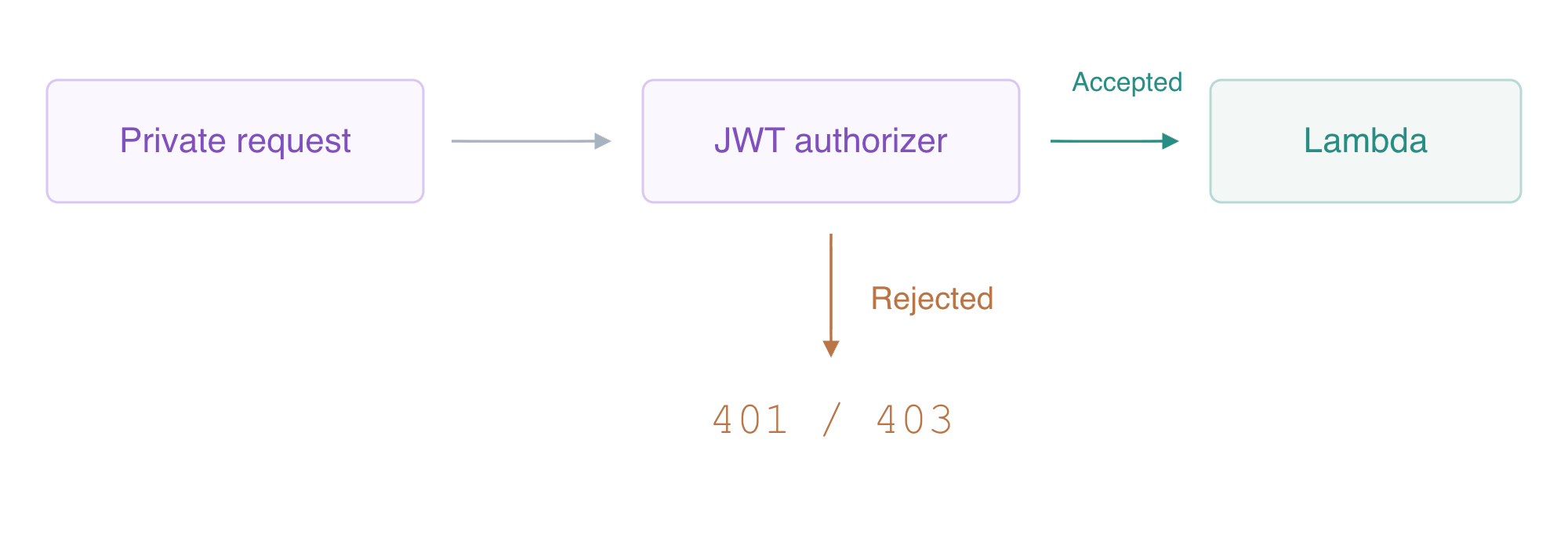
A JWT authorizer checks a signed token before API Gateway invokes a protected route. The issuer is the signed Cognito pool identity. The audience is the intended app client: API Gateway validates aud when present, otherwise client_id. Build the issuer from the actual pool ID:
ISSUER="https://cognito-idp.us-east-1.amazonaws.com/$POOL_ID"
echo "$ISSUER"
Use an unquoted here-document marker so the shell expands the two IDs into a normal configuration file:
cat > jwt-config.json <<JSON
{
  "Issuer": "$ISSUER",
  "Audience": ["$CLIENT_ID"]
}
JSON
Create a JWT authorizer. Single quotes preserve the literal $request.header.Authorization identity source instead of expanding it as a shell variable:
AUTH_ID=$(aws apigatewayv2 create-authorizer \
  --api-id "$API_ID" \
  --name OrdersUsers \
  --authorizer-type JWT \
  --identity-source '$request.header.Authorization' \
  --jwt-configuration file://jwt-config.json \
  --query AuthorizerId \
  --output text)
echo "$AUTH_ID"
Find each order route's generated ID:
READ_ROUTE_ID=$(aws apigatewayv2 get-routes \
  --api-id "$API_ID" \
  --query "Items[?RouteKey=='GET /orders'].RouteId | [0]" \
  --output text)
echo "$READ_ROUTE_ID"
WRITE_ROUTE_ID=$(aws apigatewayv2 get-routes \
  --api-id "$API_ID" \
  --query "Items[?RouteKey=='POST /orders'].RouteId | [0]" \
  --output text)
echo "$WRITE_ROUTE_ID"
API Gateway does not universally distinguish access tokens from ID tokens. These native Cognito password-flow access tokens carry aws.cognito.signin.user.admin; requiring that scope rejects the ID token, which lacks it. The scope names Cognito user self-service access, not AWS administration or order ownership. This exercise does not create a custom business scope.
Require JWT plus that scope on the read route:
aws apigatewayv2 update-route \
  --api-id "$API_ID" \
  --route-id "$READ_ROUTE_ID" \
  --authorization-type JWT \
  --authorizer-id "$AUTH_ID" \
  --authorization-scopes aws.cognito.signin.user.admin \
  --query '{Route:RouteKey,Authorization:AuthorizationType,Scopes:AuthorizationScopes}'
Apply the same requirement to the write route:
aws apigatewayv2 update-route \
  --api-id "$API_ID" \
  --route-id "$WRITE_ROUTE_ID" \
  --authorization-type JWT \
  --authorizer-id "$AUTH_ID" \
  --authorization-scopes aws.cognito.signin.user.admin \
  --query '{Route:RouteKey,Authorization:AuthorizationType,Scopes:AuthorizationScopes}'
The prepared $default stage uses AutoDeploy, so the route changes apply automatically. Read all route types again:
aws apigatewayv2 get-routes \
  --api-id "$API_ID" \
  --query 'Items[].{Route:RouteKey,Authorization:AuthorizationType}'
Expect JWT on both order routes and NONE on GET /health. In AWS View, compare the actual issuer, intended audience, route authorizer IDs and required scope. Merely creating an authorizer without attaching it to each private route does not protect those routes.
Test Accepted and Rejected Requests
In this step, you will prove actual business access for the intended user and rejection before Lambda for absent or unsuitable tokens.
A bearer token authenticates whoever presents it. Read it from the private transport file inside the Authorization header. Keep using curl -i to show only response headers/body; do not use verbose request-header logging. Send a valid order with quantity 4:
curl -i -X POST "$API_URL/orders" -H "Authorization: Bearer $(cat access-token.txt)" -H 'Content-Type: application/json' --data '{"id":"signed-order","quantity":4}'
Expect HTTP 201 and total 1100 (4 × 250 + 100). Retrieve the same stored order with the access token:
curl -i "$API_URL/orders?id=signed-order" -H "Authorization: Bearer $(cat access-token.txt)"
Expect HTTP 200 with the same ID, quantity and computed total. Inspect the native item independently:
aws dynamodb get-item \
  --table-name labex-a05-orders \
  --key '{"id":{"S":"signed-order"}}' \
  --consistent-read \
  --query Item
Now repeat the read without a token:
curl -i "$API_URL/orders?id=signed-order"
Expect HTTP 401 Unauthorized, with no private record in the response. Test an anonymous write too:
curl -i -X POST "$API_URL/orders" -H 'Content-Type: application/json' --data '{"id":"reject-missing","quantity":9}'
It must also return 401 and create no item. Both private reads and writes require authorization.
The supplied bad-signature fixture has one altered signature byte. It cannot be trusted even if its visible claim data looks plausible:
curl -i -X POST "$API_URL/orders" -H "Authorization: Bearer $(cat bad-signature-token.txt)" -H 'Content-Type: application/json' --data '{"id":"reject-signature","quantity":9}'
Expect 401. A genuinely issued token for another app client is also unsuitable for this API. Read that safe client ID, sign in through it and privately extract its access token:
WRONG_CLIENT_ID=$(jq -r '.wrong_client' scenario.json)
echo "$WRONG_CLIENT_ID"
aws cognito-idp initiate-auth \
  --client-id "$WRONG_CLIENT_ID" \
  --auth-flow USER_PASSWORD_AUTH \
  --auth-parameters file://sign-in.json \
  --query AuthenticationResult \
  --output json > wrong-client.json
jq -r '.AccessToken' wrong-client.json > wrong-client-token.txt
curl -i -X POST "$API_URL/orders" -H "Authorization: Bearer $(cat wrong-client-token.txt)" -H 'Content-Type: application/json' --data '{"id":"reject-client","quantity":9}'
Expect 401: a valid signature alone does not match the configured audience. Next use the prepared different Cognito issuer, which has its own synthetic user and public client:
OTHER_POOL_ID=$(jq -r '.other.pool' scenario.json)
echo "$OTHER_POOL_ID"
OTHER_CLIENT_ID=$(jq -r '.other.client' scenario.json)
echo "$OTHER_CLIENT_ID"
aws cognito-idp initiate-auth \
  --client-id "$OTHER_CLIENT_ID" \
  --auth-flow USER_PASSWORD_AUTH \
  --auth-parameters file://sign-in.json \
  --query AuthenticationResult \
  --output json > wrong-issuer.json
jq -r '.AccessToken' wrong-issuer.json > wrong-issuer-token.txt
curl -i -X POST "$API_URL/orders" -H "Authorization: Bearer $(cat wrong-issuer-token.txt)" -H 'Content-Type: application/json' --data '{"id":"reject-issuer","quantity":9}'
Expect 401 because the signed issuer differs from the expected pool. The supplied expired fixture is signed with an exp already in the past; it tests the time rule without waiting for a live session to expire:
curl -i -X POST "$API_URL/orders" -H "Authorization: Bearer $(cat expired-token.txt)" -H 'Content-Type: application/json' --data '{"id":"reject-expired","quantity":9}'
Expect 401. An ID token is signed for this client but lacks the route's required access-token scope:
curl -i -X POST "$API_URL/orders" -H "Authorization: Bearer $(cat id-token.txt)" -H 'Content-Type: application/json' --data '{"id":"reject-id-token","quantity":9}'
Expect 403 for insufficient scope. Signature, issuer, audience and token lifetime are necessary but do not supply missing permissions.
Check that health remains public and only the valid business write was stored:
curl -i "$API_URL/health"
aws dynamodb scan --table-name labex-a05-orders --query Items
Expect health 200 and exactly signed-order with total 1100. In AWS View, compare actual API requests with CloudWatch Logs: rejected authorization has a 401/403 gateway outcome and no matching function execution. Successful private requests have actual Lambda events and responses, with credential headers excluded. These runtime/API results and native data, not screenshots or local success markers, are the assessment evidence.
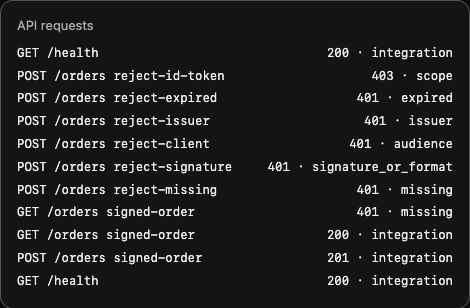
The function execution list and native table independently confirm that rejected requests made no business write.
The order-validation lab’s 400 responses came from the handler after execution. Here the 401/403 responses come from the gateway before execution. A denied response and an unchanged item count support different parts of the conclusion: access was refused, and the refused write had no business effect.
Remove Protected Routes and Owned Resources
In this step, you will remove the owned API, identity fixtures and data, preserving only unrelated references.
Your inventory consists of this API and its authorizer, function/log group, gateway request log group, orders table, OrdersData role policy, main pool (two clients and one user), other-issuer pool (one client and one user), and private input/response files. The reference pool, table, reference logs and FunctionLogs role policy are unrelated and must remain.
Delete the API, including its authorizer, routes, integration and stage:
aws apigatewayv2 delete-api --api-id "$API_ID"
aws lambda delete-function --function-name labex-a05-orders-api
aws logs delete-log-group --log-group-name /aws/lambda/labex-a05-orders-api
aws logs delete-log-group --log-group-name /aws/apigateway/labex-a05
aws dynamodb delete-table \
  --table-name labex-a05-orders \
  --query TableDescription.TableName \
  --output text
aws iam delete-role-policy --role-name labex-a05-execution --policy-name OrdersData
Remove the synthetic users and each owned app client, then their pools:
aws cognito-idp admin-delete-user --user-pool-id "$POOL_ID" --username labex-demo
aws cognito-idp delete-user-pool-client --user-pool-id "$POOL_ID" --client-id "$CLIENT_ID"
aws cognito-idp delete-user-pool-client \
  --user-pool-id "$POOL_ID" \
  --client-id "$WRONG_CLIENT_ID"
aws cognito-idp delete-user-pool --user-pool-id "$POOL_ID"
aws cognito-idp admin-delete-user --user-pool-id "$OTHER_POOL_ID" --username labex-demo
aws cognito-idp delete-user-pool-client \
  --user-pool-id "$OTHER_POOL_ID" \
  --client-id "$OTHER_CLIENT_ID"
aws cognito-idp delete-user-pool --user-pool-id "$OTHER_POOL_ID"
Query inventories successfully to prove absence; network/authentication errors are not cleanup evidence:
aws apigatewayv2 get-apis --query 'Items[].Name'
aws lambda list-functions --query 'Functions[].FunctionName'
aws cognito-idp list-user-pools --max-results 60 --query 'UserPools[].Name'
aws dynamodb list-tables --query TableNames
Expect empty API/function lists, only labex-a05-reference in the pool and table lists, and preserved reference data/logs in AWS View. Remove only the listed private files:
rm -f tokens.json access-token.txt id-token.txt wrong-client.json wrong-client-token.txt wrong-issuer.json wrong-issuer-token.txt expired-token.txt future-iat-token.txt future-nbf-token.txt bad-signature-token.txt sign-in.json
Deleting local files alone is not general server-side JWT revocation. The owned synthetic users/clients/pools and API were deleted as well. Reference fixtures, final credential revocation and VM shutdown remain for author cleanup after these read-only resource checks.
Summary
You configured a Cognito JWT authorizer and required it on private reads and writes while preserving public health. You exercised real accepted requests and missing, altered, wrong-client, wrong-issuer, expired and ID-token rejections. You correlated actual gateway outcomes with native Lambda executions and stored data, then removed owned API/identity/data resources and private files while preserving references. JWT authorization did not implement per-order ownership.
For further reading, see the AWS reference on JWT authorizer checks and route scopes.


