Introduction
A web application must block an internal export path while keeping health available. You will attach a path rule, test whether requests reach the backend, and update the rule before cleanup.
Complete Get Started with AWS on LabEx and Give a Report Reader Least Privilege first. This fresh VM supplies an application and independent REST API stage; earlier API or networking resources are not needed.
Certification Relevance
This lab provides hands-on practice for the following exam topics.
- Cloud Practitioner (CLF-C02) · Task 2.4: WAF web ACL association and request-filtering rules.
- Solutions Architect – Associate (SAA-C03) · Task 1.2: WAF web ACL association and request-filtering rules.
- Security – Specialty (SCS-C03) · Task 3.1: Foundational practice: WAF web ACL association and request-filtering rules.
- Solutions Architect – Professional (SAP-C02) · Task 2.3: Foundational practice: WAF web ACL association and request-filtering rules.
Create a Regional Web ACL
In this step, you will define an AWS WAF request rule inside a web access control list (Web ACL). WAF inspects requests before they reach the application. The supplied REST API has a named stage that can be associated with a Regional Web ACL; this entry differs from the HTTP API used in the API/Cognito course.
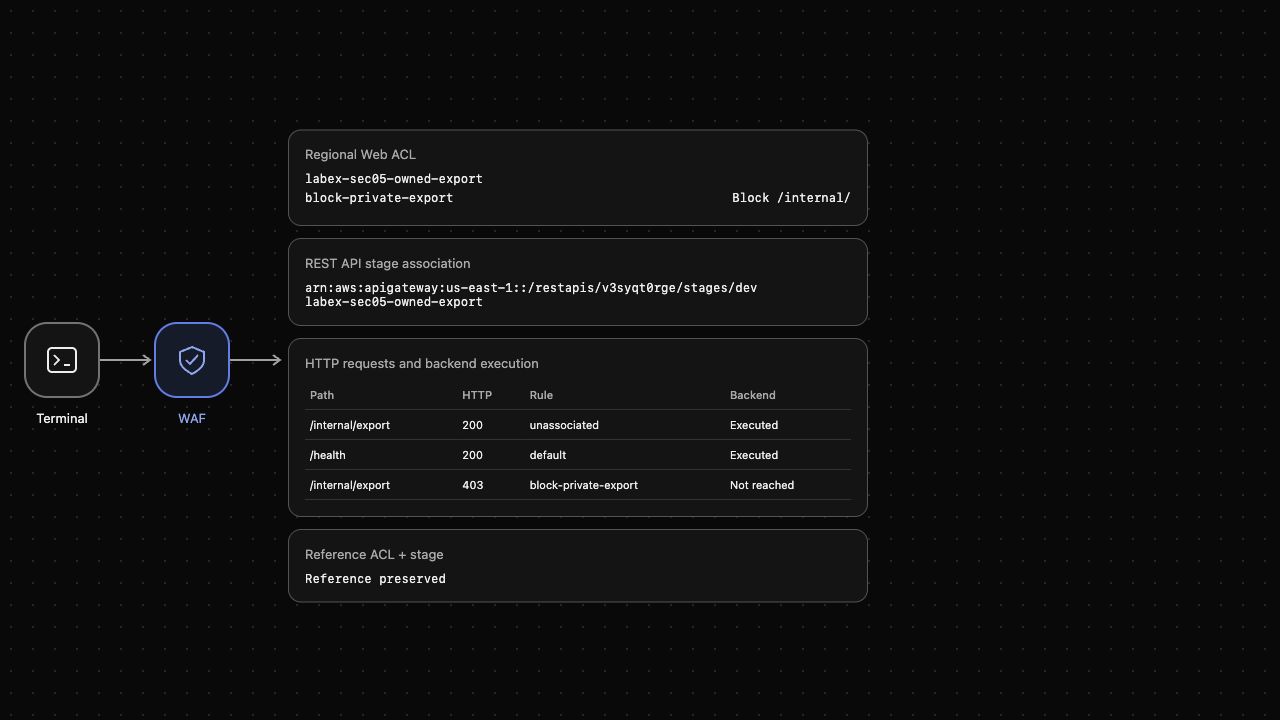
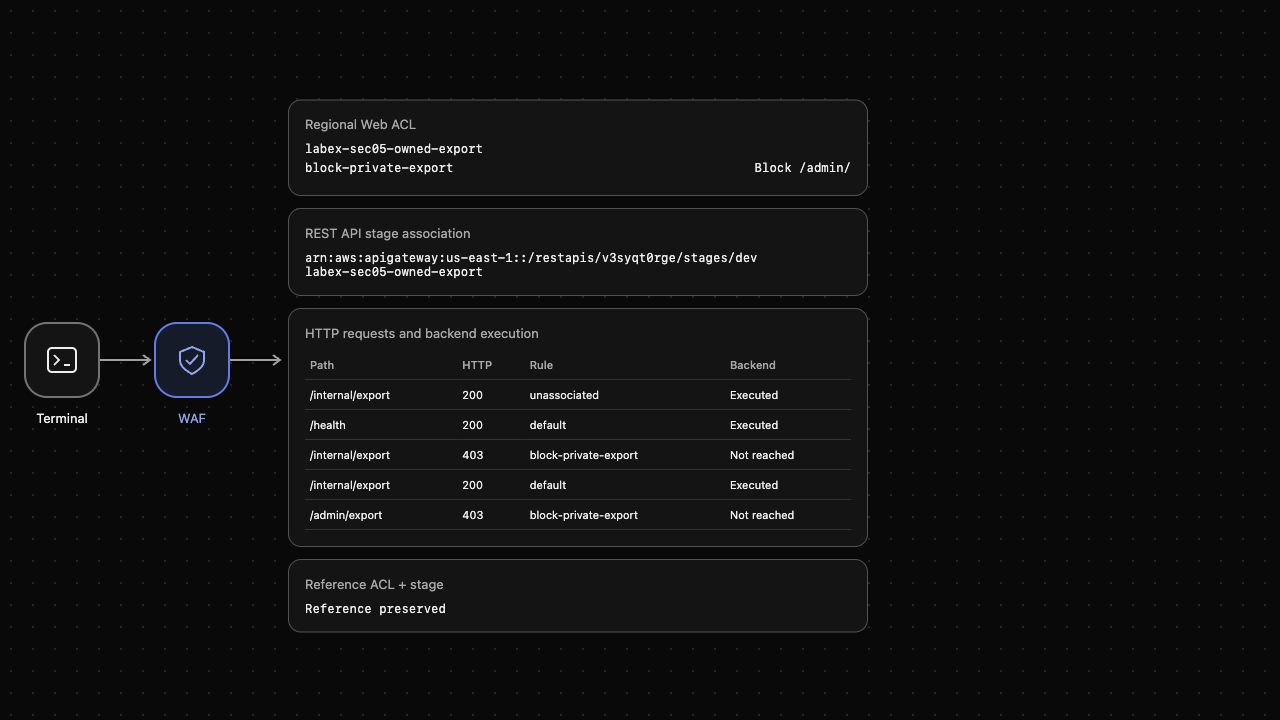
Open AWS View beside Terminal to compare rules, the stage association and whether each request reaches the backend. Preserve the unrelated reference Web ACL and stage.
A rule combines a match condition with an action. A default action applies when no rule matches. We will block /internal/ and allow other paths.
Enter the project directory and confirm the prepared operator identity. The supplied stage-arn.txt contains the application stage ARN, not a credential. Command substitution stores that value for association later.
cd /home/labex/project
aws sts get-caller-identity --query Arn --output text
STAGE_ARN=$(cat stage-arn.txt)
Expect labex-sec05-operator. Before any Web ACL is associated, the synthetic internal export reaches the backend. curl makes an actual HTTP request; -sS removes progress output while keeping connection errors, and -w prints the response status.
curl -sS -w '\nHTTP %{http_code}\n' http://127.0.0.1:8090/internal/export
Expect HTTP 200 and a synthetic backend response. Write a rule file with a quoted here-document: lines between <<'EOF' and EOF become the JSON file exactly as written. UriPath selects the path, STARTS_WITH matches the prefix, and NONE avoids transforming it. Lower numeric priorities run first; this ACL has one rule at priority zero. Visibility settings disable optional samples and metrics for this focused exercise. Save the same settings in visibility.json for the ACL itself and its later update.
cat > rules-internal.json <<'EOF'
[{
  "Name": "block-private-export",
  "Priority": 0,
  "Action": {"Block": {}},
  "Statement": {"ByteMatchStatement": {
    "SearchString": "/internal/",
    "FieldToMatch": {"UriPath": {}},
    "PositionalConstraint": "STARTS_WITH",
    "TextTransformations": [{"Priority": 0, "Type": "NONE"}]
  }},
  "VisibilityConfig": {"SampledRequestsEnabled": false, "CloudWatchMetricsEnabled": false, "MetricName": "labex-sec05-owned-export"}
}]
EOF
Create the Regional ACL with default Allow. --cli-binary-format raw-in-base64-out tells AWS CLI v2 to interpret SearchString as literal input bytes instead of expecting a base64 string. file:// loads the rule document; --query selects only the resulting ACL ID.
cat > visibility.json <<'EOF'
{
  "SampledRequestsEnabled": false,
  "CloudWatchMetricsEnabled": false,
  "MetricName": "labex-sec05-owned-export"
}
EOF

ACL_ID=$(aws wafv2 create-web-acl \
  --name labex-sec05-owned-export \
  --scope REGIONAL \
  --default-action Allow={} \
  --visibility-config file://visibility.json \
  --rules file://rules-internal.json \
  --cli-binary-format raw-in-base64-out \
  --query Summary.Id \
  --output text)
ACL_ARN=$(aws wafv2 get-web-acl \
  --name labex-sec05-owned-export \
  --scope REGIONAL \
  --id "$ACL_ID" \
  --query WebACL.ARN \
  --output text)
aws wafv2 get-web-acl \
  --name labex-sec05-owned-export \
  --scope REGIONAL \
  --id "$ACL_ID" \
  --query 'WebACL.{Name:Name,Default:DefaultAction,Rules:Rules[].Name}'
Expect the owned ACL, default Allow and block-private-export. Creating a policy does not attach it to an endpoint. AWS View should still show no target association.
Associate the ACL and Test Actual Requests
In this step, you will connect your policy to the supplied REST API stage and compare a public request with a matching export request. A stage identifies a deployed API environment; the association applies the ACL to requests at that stage.
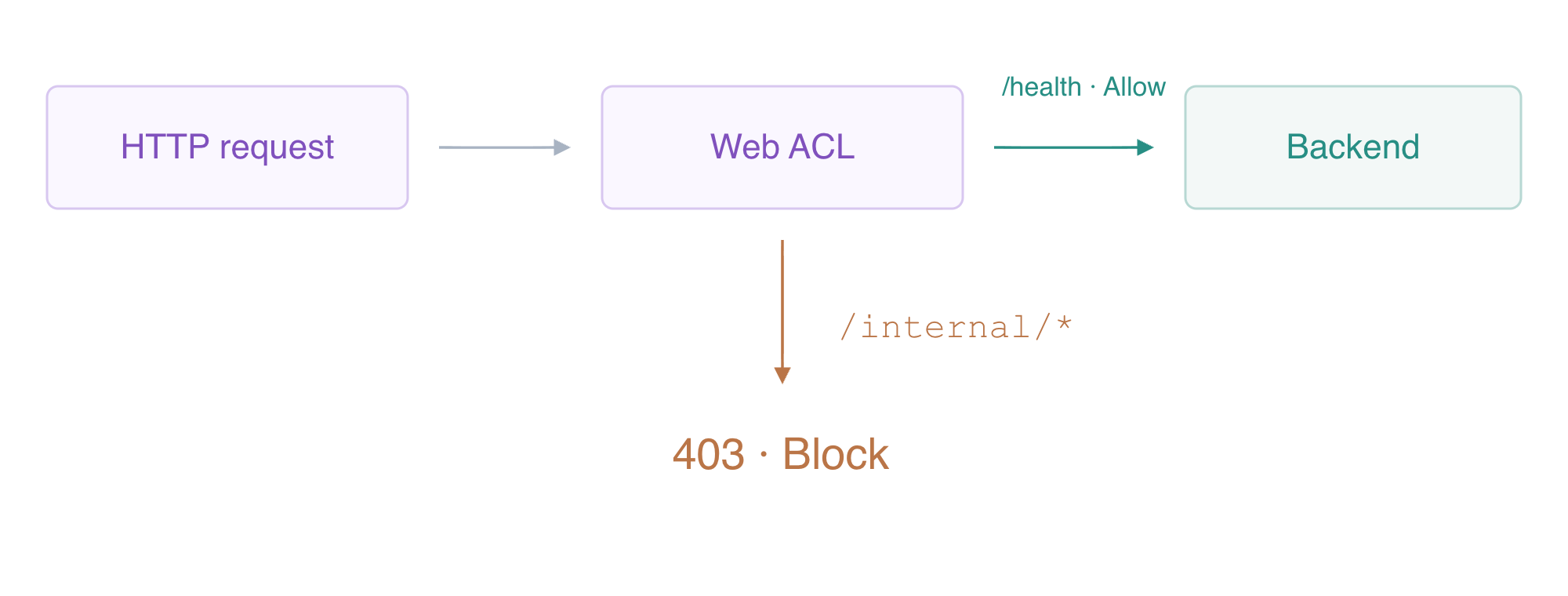
The associated Web ACL rejects the internal path before it reaches the backend.
Associate only your ACL with the supplied target ARN. The unrelated reference stage already has its own reference ACL; do not replace it.
aws wafv2 associate-web-acl --web-acl-arn "$ACL_ARN" --resource-arn "$STAGE_ARN"
aws wafv2 get-web-acl-for-resource \
  --resource-arn "$STAGE_ARN" \
  --query WebACL.Name \
  --output text
Expect labex-sec05-owned-export. Test the public health path, which does not match /internal/, and then the internal export path.
curl -sS -w '\nHTTP %{http_code}\n' http://127.0.0.1:8090/health
curl -sS -w '\nHTTP %{http_code}\n' http://127.0.0.1:8090/internal/export
Expect HTTP 200 for health and HTTP 403 with block-private-export for the export. A Block decision returns before the backend executes. AWS View must show Executed for the health request and Not reached for the blocked request. A native association alone is insufficient; these actual HTTP outcomes prove enforcement.
Update the Rule and Observe Live Behavior
In this step, you will move protection to the admin prefix and show the changed behavior without restarting the application. A Web ACL update replaces the rule list. Its lock token protects against overwriting a concurrent change; obtain it from the current native configuration just before updating and keep it in a variable.
Create the new rule document by replacing the URI prefix in the earlier file. sed transforms the text and > writes the new file while preserving the original rule document.
sed 's|/internal/|/admin/|' rules-internal.json > rules-admin.json
LOCK_TOKEN=$(aws wafv2 get-web-acl \
  --name labex-sec05-owned-export \
  --scope REGIONAL \
  --id "$ACL_ID" \
  --query LockToken \
  --output text)
aws wafv2 update-web-acl \
  --name labex-sec05-owned-export \
  --scope REGIONAL \
  --id "$ACL_ID" \
  --lock-token "$LOCK_TOKEN" \
  --default-action Allow={} \
  --visibility-config file://visibility.json \
  --rules file://rules-admin.json \
  --cli-binary-format raw-in-base64-out \
  --query NextLockToken \
  --output text
The returned lock token identifies the new ACL revision; it is not an authentication credential. Now the former internal prefix should pass the default Allow action, while the admin export should be blocked.
curl -sS -w '\nHTTP %{http_code}\n' http://127.0.0.1:8090/internal/export
curl -sS -w '\nHTTP %{http_code}\n' http://127.0.0.1:8090/admin/export
Expect HTTP 200 followed by HTTP 403. AWS View should show the new /admin/ prefix, the earlier blocked internal request, and the current allowed internal/blocked admin pair. Requests use the current native rule; restarting the VM or application is unnecessary. Unsupported policy types fail closed in this focused environment, so use only the statement taught here.
Detach and Delete Only the Owned ACL
In this step, you will remove your policy and confirm ordinary application routing returns. Finish the earlier functional checks first. Disassociation removes enforcement from this stage; deleting the ACL then removes the owned policy resource.
Detach your Web ACL from the target stage and inspect the association with a successful native query. Expect an empty association rather than treating an authentication error as deletion evidence.
aws wafv2 disassociate-web-acl --resource-arn "$STAGE_ARN"
aws wafv2 get-web-acl-for-resource --resource-arn "$STAGE_ARN" --query WebACL
The previously blocked admin export should now reach the supplied backend again.
curl -sS -w '\nHTTP %{http_code}\n' http://127.0.0.1:8090/admin/export
Expect HTTP 200. Get a current lock token, delete only the owned ACL, and successfully list remaining ACLs. The owned name must be absent and labex-sec05-reference must remain.
LOCK_TOKEN=$(aws wafv2 get-web-acl \
  --name labex-sec05-owned-export \
  --scope REGIONAL \
  --id "$ACL_ID" \
  --query LockToken \
  --output text)
aws wafv2 delete-web-acl \
  --name labex-sec05-owned-export \
  --scope REGIONAL \
  --id "$ACL_ID" \
  --lock-token "$LOCK_TOKEN"
aws wafv2 list-web-acls --scope REGIONAL --query 'WebACLs[].Name'
Keep both supplied API stages and the reference ACL intact. Remove the local rule and visibility documents, then run this step's verification before removing the disposable CLI profile.
rm -f rules-internal.json rules-admin.json visibility.json
rm -f /home/labex/.aws/credentials /home/labex/.aws/config
unset STAGE_ARN ACL_ID ACL_ARN LOCK_TOKEN
Summary
You created a Regional Web ACL, associated it with a REST API stage, and tested actual HTTP allow/block behavior. A matching request stopped before the backend, while health requests continued. Updating the URI prefix changed live routing; disassociation restored the endpoint. You deleted only the owned ACL and preserved the supplied stages and reference policy.