Introduction
Repeated jobs for the same order must preserve the completed business result. You will add an atomic write guard to a supplied consumer, test repeated and independent orders, and confirm successful acknowledgment.
Complete Isolate Failed Jobs with a Dead Letter Queue, Prevent Duplicate Orders with Conditional Writes and Configure and Diagnose a Lambda Function first. This independent VM supplies the starter worker, role and empty orders table.
Certification Relevance
This lab provides hands-on practice for the following exam topics.
- Solutions Architect – Associate (SAA-C03) · Task 2.1: Idempotent consumers and protection of business results.
- Developer – Associate (DVA-C02) · Task 1.1: Idempotent consumers and protection of business results.
- DevOps Engineer – Professional (DOP-C02) · Task 5.1: Foundational practice: Idempotent consumers and protection of business results.
- Solutions Architect – Professional (SAP-C02) · Task 2.4: Foundational practice: Idempotent consumers and protection of business results.
Connect an Empty Queue to the Worker
In this step, create a queue and connect the supplied consumer before sending business jobs.
Use AWS View beside Terminal to compare current queues, worker outcomes and stored orders. Preserve the unrelated reference data.
cd /home/labex/project
Create the Standard queue. Command substitution, $(...), saves the returned queue URL for later operations:
QUEUE_URL=$(aws sqs create-queue --queue-name labex-q05-jobs --attributes VisibilityTimeout=30 --query QueueUrl --output text)
Select its ARN and create a size-one event-source mapping:
QUEUE_ARN=$(aws sqs get-queue-attributes --queue-url "$QUEUE_URL" --attribute-names QueueArn --query Attributes.QueueArn --output text)
MAPPING_ID=$(aws lambda create-event-source-mapping --function-name labex-q05-worker --event-source-arn "$QUEUE_ARN" --batch-size 1 --enabled --query UUID --output text)
Inspect the connection:
aws lambda get-event-source-mapping --uuid "$MAPPING_ID" --query '{Source:EventSourceArn,Function:FunctionArn,Batch:BatchSize,State:State}'
Expect the labex-q05-jobs source, labex-q05-worker, batch size 1 and state Enabled. The supplied role can poll/delete only this queue and write only the orders table, plus execution logs. AWS View shows an empty queue, no order and no write decisions. Do not send a job until you deploy the guard in the next step.
Deploy an Atomic Business-Key Guard
In this step, replace the worker's unconditional write and prove the first guarded job succeeds.
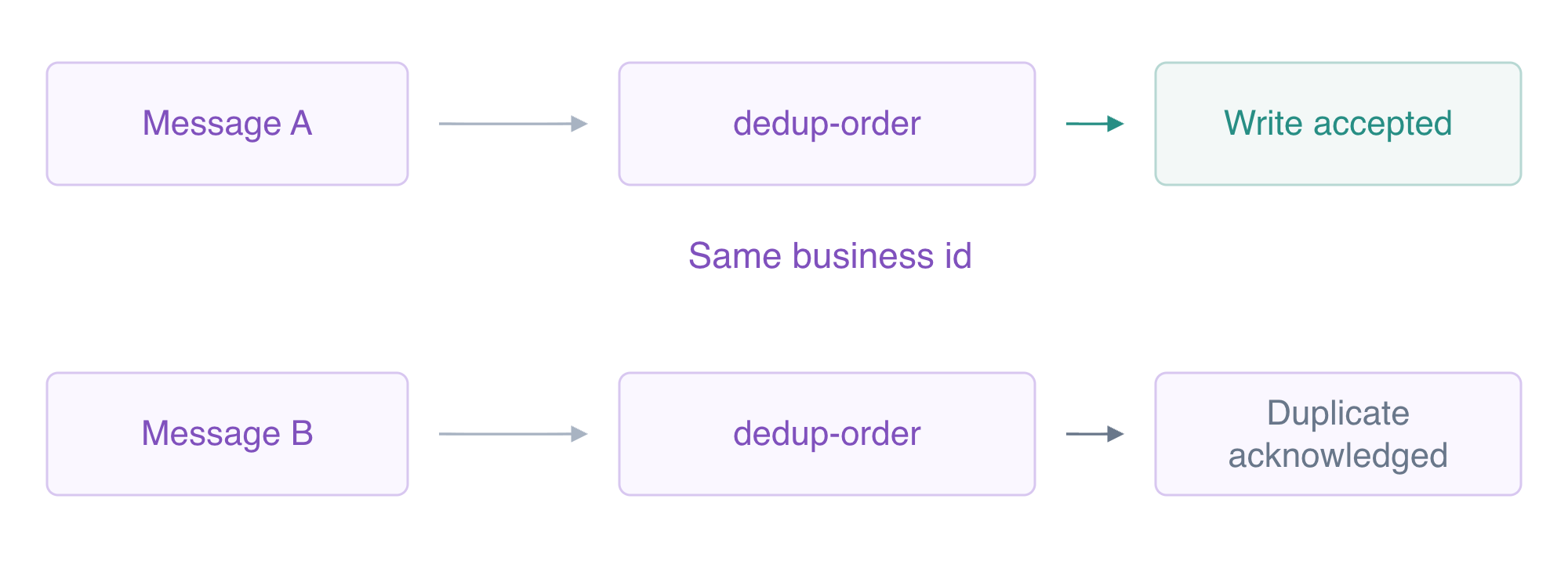
Distinct queue messages can carry the same business id. The worker acknowledges a matching duplicate without writing the order again.
An idempotent consumer preserves the same business result when repeated work arrives. DynamoDB evaluates ConditionExpression='attribute_not_exists(id)' in the same write operation as PutItem. This avoids a separate read-then-write race. The business id is the key; using SQS messageId would allow a producer's newly sent copy of the same order to write again.
On a failed condition, ReturnValuesOnConditionCheckFailure='ALL_OLD' returns the existing item. The code catches only ConditionalCheckFailedException and compares that item to the requested item. Identical details are a completed duplicate; conflicting details or another error still fail rather than being silently acknowledged.
Write the complete worker below. cat > app.py replaces the file, and the here-document supplies its contents through the PY terminator. Quoting 'PY' prevents shell expansion inside Python code:
cat > app.py <<'PY'
import json
import os
import boto3
from botocore.exceptions import ClientError


def handler(event, context):
    print('EVENT '+json.dumps(event,sort_keys=True))
    if set(event)!={'Records'} or len(event['Records'])!=1:
        raise ValueError('Expected one SQS record')
    job=json.loads(event['Records'][0]['body'])
    print('JOB '+json.dumps(job,sort_keys=True))
    if set(job)!={'id','quantity'} or not isinstance(job['id'],str):
        raise ValueError('Use an id and quantity')
    quantity=job['quantity']
    if isinstance(quantity,bool) or not isinstance(quantity,int) or not 1<=quantity<=10:
        raise ValueError('Quantity must be an integer from 1 to 10')
    database=boto3.client('dynamodb',endpoint_url='http://127.0.0.1:5000',region_name='us-east-1')
    item={'id':{'S':job['id']},'quantity':{'N':str(quantity)},'total_cents':{'N':str(quantity*250+100)}}
    try:
        database.put_item(TableName=os.environ['TABLE_NAME'],Item=item,
                          ConditionExpression='attribute_not_exists(id)',
                          ReturnValuesOnConditionCheckFailure='ALL_OLD')
        result={'id':job['id'],'quantity':quantity,'processed':True,'duplicate':False}
    except ClientError as error:
        if error.response['Error']['Code']!='ConditionalCheckFailedException':
            raise
        if error.response.get('Item')!=item:
            raise ValueError('Order ID already exists with different details') from error
        result={'id':job['id'],'quantity':quantity,'processed':False,'duplicate':True}
    print('RESULT '+json.dumps(result,sort_keys=True))
    return result
PY
The event parsing and quantity checks are supplied context. The key change is the single conditional put_item, its narrowly handled failure and the processed/duplicate result. A duplicate returns successfully so the consumer can acknowledge its SQS copy after the business result has already been preserved.
Package app.py at the ZIP root. The existing function's handler is app.handler, so the module filename matters:
zip -q function.zip app.py
Upload the binary ZIP with fileb://:
aws lambda update-function-code --function-name labex-q05-worker --zip-file fileb://function.zip --query CodeSha256 --output text
The returned hash identifies deployed code; actual processing will prove its behavior. Send the first order:
aws sqs send-message --queue-url "$QUEUE_URL" --message-body '{"id":"dedup-order","quantity":4}'
Watch AWS View until the queue is empty, the worker reports processed: true and the order appears. Then read it:
aws dynamodb get-item --table-name labex-q05-orders --key '{"id":{"S":"dedup-order"}}' --consistent-read --query Item
Expect quantity 4 and total 1100. The write decision shows the condition, Accepted, no previous item and this stored item afterward. A configured condition or uploaded file alone cannot prove successful work.
Consume Repeated Jobs Without Repeating the Write
In this step, send two new copies of the same business order and prove another order still completes independently.
Send the same business payload twice. Each SendMessage response has a new SQS message ID, but the order key remains dedup-order:
aws sqs send-message --queue-url "$QUEUE_URL" --message-body '{"id":"dedup-order","quantity":4}'
aws sqs send-message --queue-url "$QUEUE_URL" --message-body '{"id":"dedup-order","quantity":4}'
Send an independent business key:
aws sqs send-message --queue-url "$QUEUE_URL" --message-body '{"id":"other-order","quantity":1}'
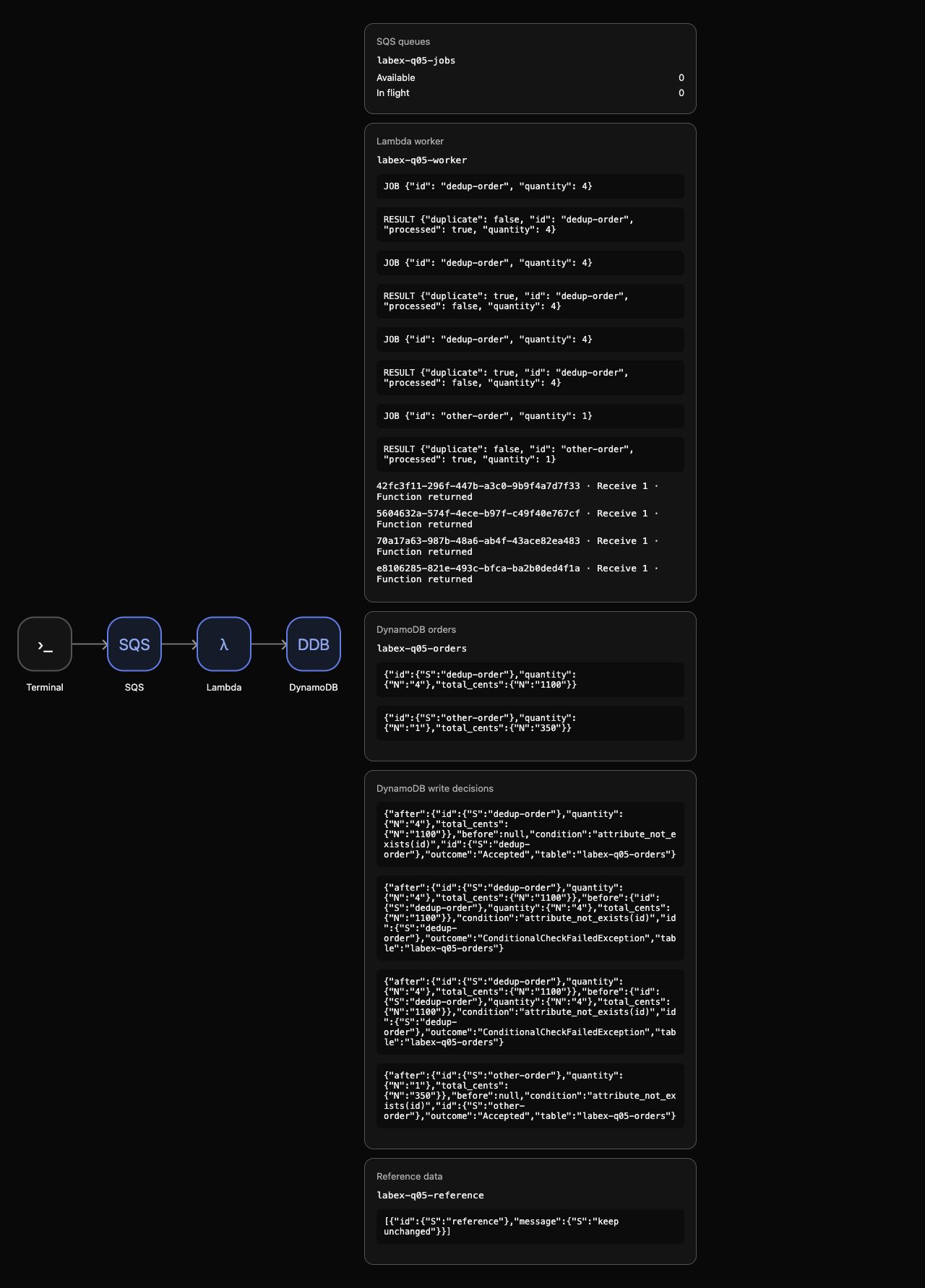
Watch AWS View until four actual executions have returned and the queue is empty. The two repeat executions report processed: false, duplicate: true. DynamoDB rejects both conditional writes with ConditionalCheckFailedException; each before/after item is unchanged. The first order and other-order each have one accepted write. The consumer acknowledges the repeat copies rather than retrying work that already completed.
Read the business results:
aws dynamodb scan --table-name labex-q05-orders --query Items
Expect exactly dedup-order/4/1100 and other-order/1/350; item order may differ. Inspect the actual worker results. A log event can contain multiple lines; this pipeline sends native JSON output to jq -r, splits each event into lines and selects only RESULT lines, leaving receipt handles out of the displayed results:
aws logs filter-log-events --log-group-name /aws/lambda/labex-q05-worker --filter-pattern '"RESULT"' --output json | jq -r '.events[].message | split("\n")[] | select(startswith("RESULT "))'
Check acknowledgment:
aws sqs get-queue-attributes --queue-url "$QUEUE_URL" --attribute-names ApproximateNumberOfMessages ApproximateNumberOfMessagesNotVisible
Both counts are zero. There were four actual message deliveries and function executions, two accepted business writes and two native conditional rejections. Counting table items alone would not reveal unconditional overwrites; use the actual decisions and corresponding consumer results too.
The guard protects one business item. It does not make the DynamoDB write and SQS acknowledgment a single atomic operation. The order record is the durable duplicate guard. Removing it allows the same key to create an item again, so retention and business-key design are part of a real system's policy. These synthetic repeats demonstrate safe same-business work; they do not establish a production concurrency or end-to-end exactly-once guarantee.
Remove the Consumer Connection and Business Results
In this step, remove the owned connection and resources after confirming duplicate handling.
Stop your event-source mapping before deleting its source queue:
aws lambda delete-event-source-mapping --uuid "$MAPPING_ID" --query UUID --output text
aws sqs delete-queue --queue-url "$QUEUE_URL"
Remove both synthetic business items and this lab's execution logs:
aws dynamodb delete-item --table-name labex-q05-orders --key '{"id":{"S":"dedup-order"}}'
aws dynamodb delete-item --table-name labex-q05-orders --key '{"id":{"S":"other-order"}}'
aws logs delete-log-group --log-group-name /aws/lambda/labex-q05-worker
Confirm absence and preserve unrelated reference data:
aws lambda list-event-source-mappings --function-name labex-q05-worker --query EventSourceMappings
aws sqs list-queues
aws dynamodb scan --table-name labex-q05-orders --query Items
aws dynamodb scan --table-name labex-q05-reference --query Items
Mappings and orders are empty, no queue URLs remain, and the reference item still says keep unchanged. Supplied function and table structures remain for the environment. A network or authentication error cannot prove deletion. AWS View retains historical write decisions while showing the empty current resources.
Remove your ordinary code/archive files:
rm -f app.py function.zip
Run the cleanup check before ending the environment.
Summary
You deployed an atomic DynamoDB business-key condition in an actual queue consumer. The first order completed; two separately sent copies were consumed and acknowledged after native conditional rejection preserved the original item. A different key still produced its own result. Actual writes, worker results and empty queue state proved the outcome before scoped cleanup.
The challenge applies bounded failure isolation, and the serverless project then combines DLQ recovery with this business-key guard.