



Introduction
A worker saves an order but fails before its result reaches the workflow. You will protect that write so a retry or repeated execution preserves the original order, while a different order can still succeed.
Step Functions coordinates Lambda tasks; the supplied worker stores orders in DynamoDB and reads their summaries. CLI access is already configured; no personal AWS account or access keys are needed.
Complete Retry a Failed Step and Handle Permanent Errors, Prevent Duplicate Orders with Conditional Writes, and Configure and Diagnose a Lambda Function first. This independent VM supplies an unprotected worker; you add the guard.
Certification Relevance
| Certification | Exam task | Practice |
|---|---|---|
| Solutions Architect – Associate (SAA-C03) | Task 2.1 | Repeat-safe workflows and preservation of stored results. |
| Developer – Associate (DVA-C02) | Task 1.1 | Repeat-safe workflows and preservation of stored results. |
| DevOps Engineer – Professional (DOP-C02) | Task 5.1 | Foundational practice: Repeat-safe workflows and preservation of stored results. |
| Solutions Architect – Professional (SAP-C02) | Task 2.4 | Foundational practice: Repeat-safe workflows and preservation of stored results. |
Lab Overview
Guard the Business Write with a Stable Key
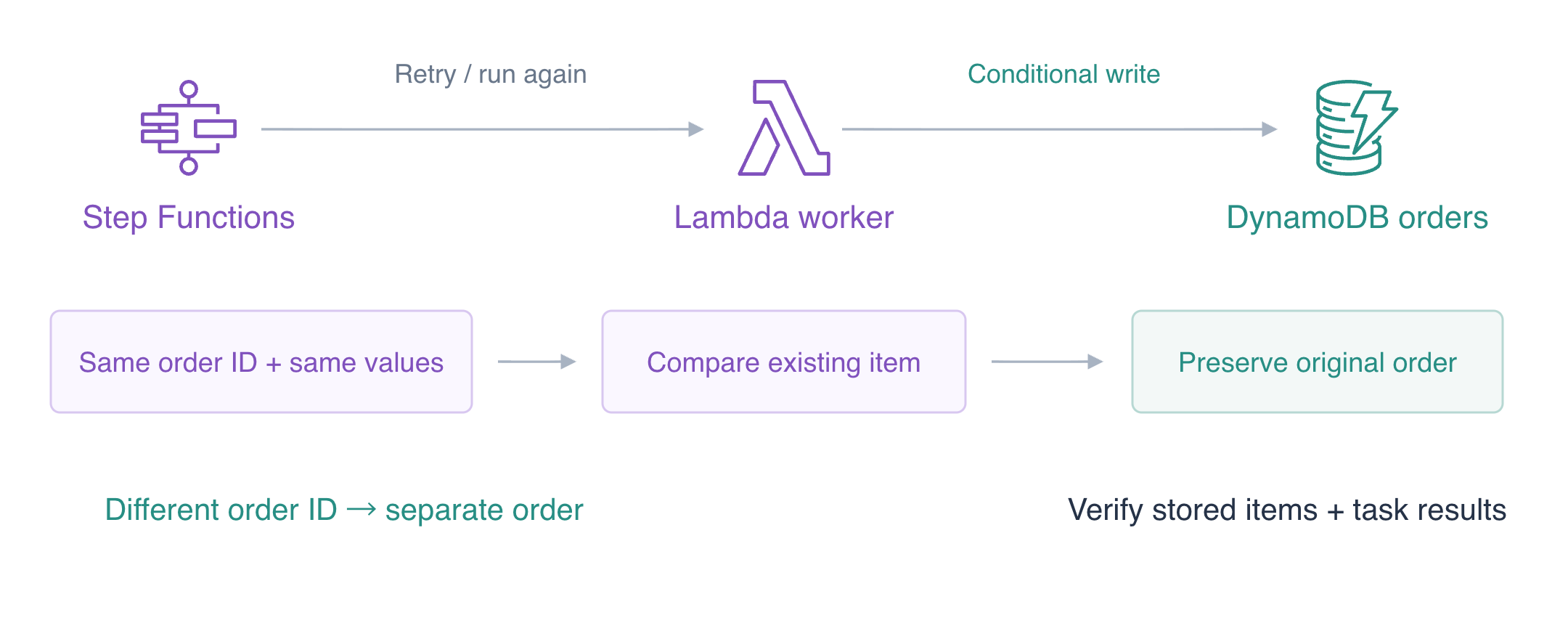
In this step, deploy a worker that treats a repeated identical order as an already completed write.
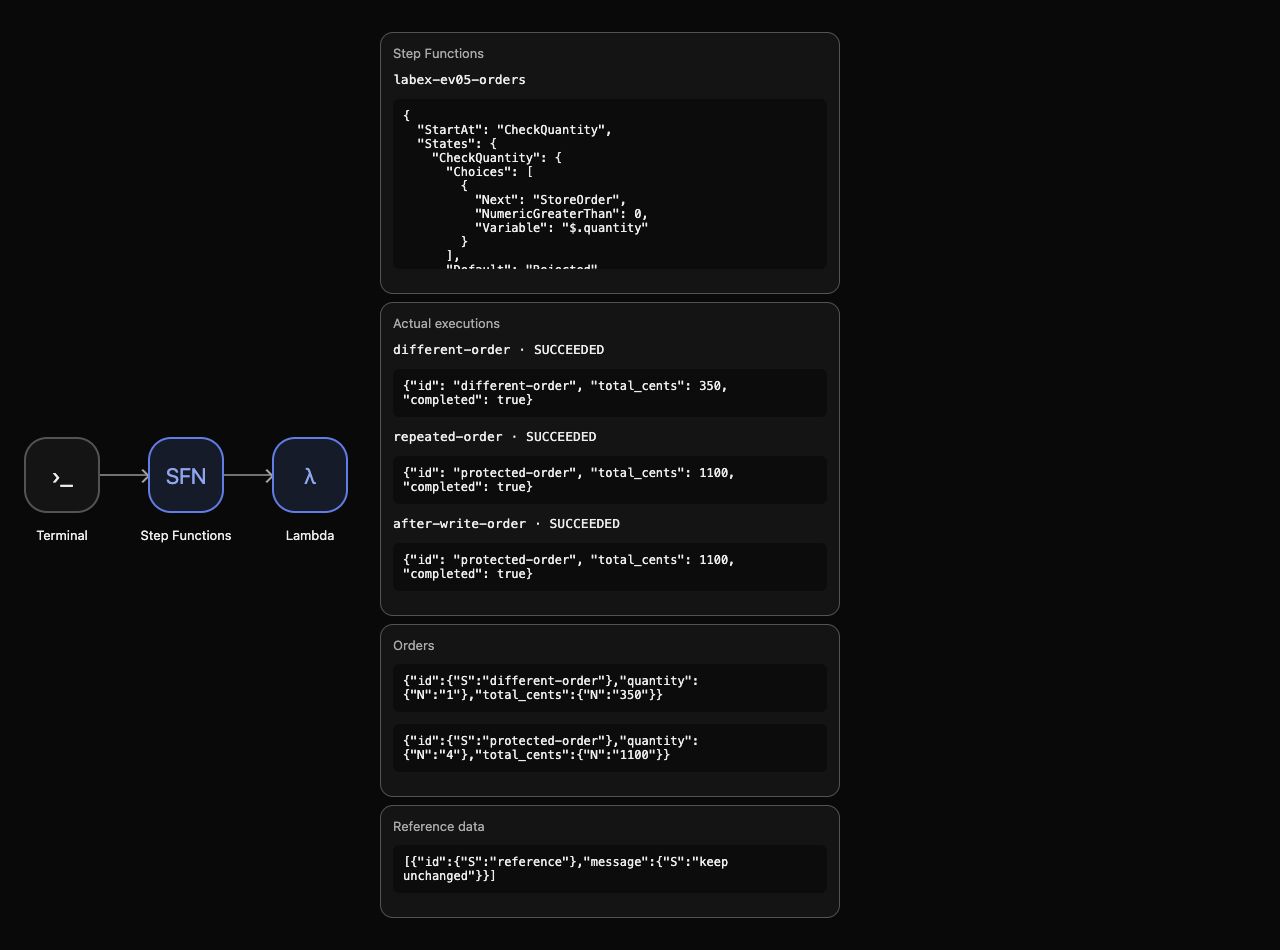
Use AWS View above Terminal to compare the CLI queries with this lab’s actual resources and results. Preserve the supplied reference data.
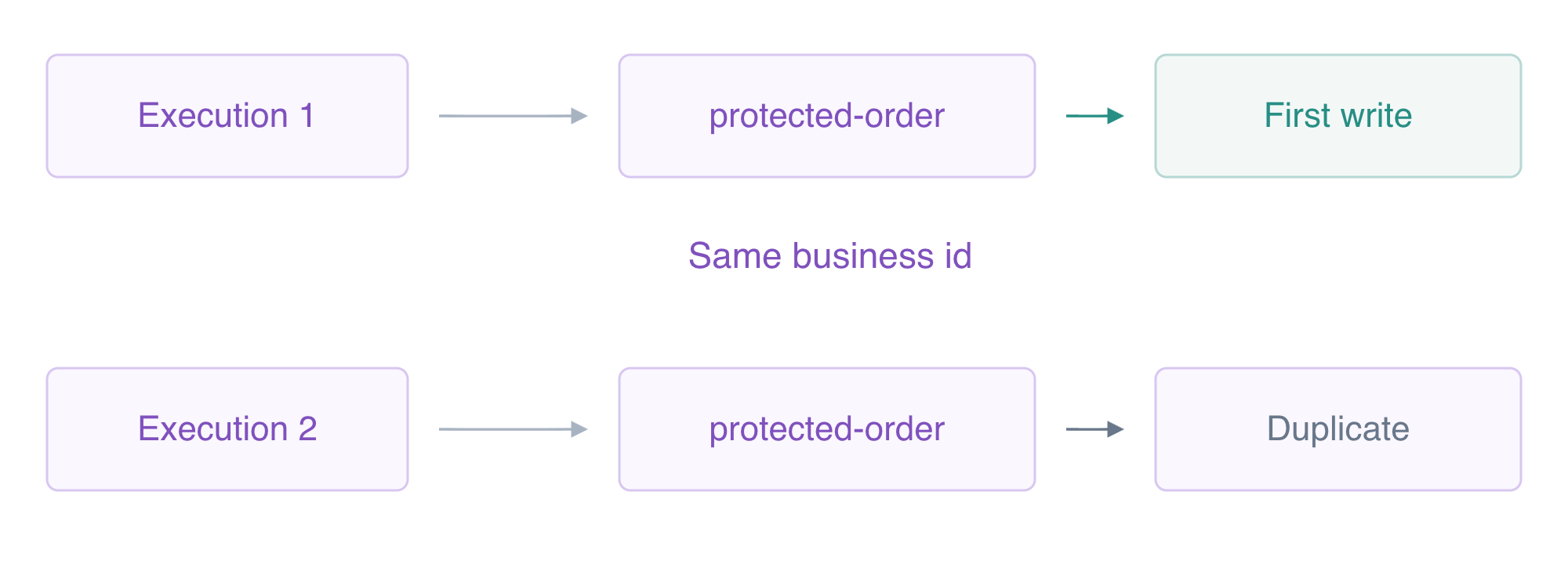
The order ID is a business key: it identifies the intended order even when task attempts or workflow execution names differ. attribute_not_exists(id) permits the first PutItem only. DynamoDB evaluates that condition atomically. ReturnValuesOnConditionCheckFailure:ALL_OLD supplies the existing item when a retry loses the condition race. Return a duplicate result only if that existing item equals the intended order; conflicting content must still fail rather than silently replace an order.
The supplied starter has an unconditional write. Replace it with the complete guarded handler below. It uses the configured SDK environment, not personal credentials. Diagnostic attempts track actual invocations separately from business writes. In the synthetic after-write mode, the first attempt raises after the native write, creating the uncertainty a retry must handle. Summary mode reads the actual saved item.
A quoted here-document writes the literal Python file. The existing Lambda handler remains app.handler.
The guard belongs at the business write because an execution name cannot protect an order shared by several executions. Treat only an identical existing item as completed work. Reusing the same order ID with different content is a conflict to report, rather than permission to overwrite it.
cd /home/labex/project
cat > app.py <<'PYTHON'
import json
import os
import boto3
from botocore.exceptions import ClientError

class TransientOrderError(Exception):
    pass
class InvalidOrder(Exception):
    pass

def handler(event, context):
    print('WORKFLOW '+json.dumps(event,sort_keys=True))
    db=boto3.client('dynamodb')
    if event.get('stage')=='summary':
        item=db.get_item(
            TableName=os.environ['ORDERS_TABLE'],
            Key={'id':{'S':event['id']}},
        )['Item']
        result={'id':event['id'],'total_cents':int(item['total_cents']['N']),'completed':True}
        print('RESULT '+json.dumps(result,sort_keys=True))
        return result
    if event.get('mode')=='permanent':
        raise InvalidOrder('Order cannot be completed')
    quantity=event['quantity']
    if isinstance(quantity,bool) or not isinstance(quantity,int) or not 1<=quantity<=10:
        raise InvalidOrder('Invalid quantity')
    attempt=db.update_item(
        TableName=os.environ['ATTEMPTS_TABLE'],
        Key={'id':{'S':event['id']}},
        UpdateExpression='ADD attempts :one',
        ExpressionAttributeValues={':one':{'N':'1'}},
        ReturnValues='UPDATED_NEW',
    )['Attributes']['attempts']['N']
    if event.get('mode')=='flaky' and attempt=='1':
        raise TransientOrderError('Dependency temporarily unavailable')
    item={'id':{'S':event['id']},'quantity':{'N':str(quantity)},'total_cents':{'N':str(quantity*250+100)}}
    duplicate=False
    try:
        db.put_item(
            TableName=os.environ['ORDERS_TABLE'],
            Item=item,
            ConditionExpression='attribute_not_exists(id)',
            ReturnValuesOnConditionCheckFailure='ALL_OLD',
        )
    except ClientError as error:
        if (
            error.response['Error']['Code']!='ConditionalCheckFailedException'
            or error.response.get('Item')!=item
        ):
            raise
        duplicate=True
    if event.get('mode')=='after-write' and attempt=='1':
        raise TransientOrderError('Result delivery failed after the write')
    result={'id':event['id'],'quantity':quantity,'total_cents':quantity*250+100,'duplicate':duplicate}
    print('RESULT '+json.dumps(result,sort_keys=True))
    return result
PYTHON
The try performs the native conditional write. Only a real ConditionalCheckFailedException with an identical old item is treated as a duplicate; other SDK errors are re-raised. The transient exception happens after that write decision, so the workflow will actually retry work whose business item already exists.
Package the file using zip -j, which omits directory paths, and update the supplied worker with --zip-file fileb:// for binary archive bytes. The response's CodeSha256 identifies the deployed archive. Deployment alone is not proof of duplicate protection; the runtime step will test it.
zip -j function.zip app.py
Apply the new function code package:
aws lambda update-function-code \
  --function-name labex-ev05-worker \
  --zip-file fileb://function.zip \
  --query CodeSha256 \
  --output text
Run the deployment check before creating executions.
Connect a Scoped Workflow with Bounded Retry
In this step, create an independent workflow role and machine that can retry the worker's post-write failure.
Step Functions needs states service trust and a separate exact-function InvokeFunction grant. The worker retains its own DynamoDB permissions; the workflow role only invokes it. Shell assignments save returned identifiers. --query and --output text select reusable values, file:// reads the literal trust JSON, and the shell inserts the worker ARN into the permissions document.
cd /home/labex/project
WORKER_NAME=labex-ev05-worker
Save the returned value in WORKER_ARN:
WORKER_ARN=$(aws lambda get-function-configuration \
  --function-name labex-ev05-worker \
  --query FunctionArn \
  --output text)
echo "$WORKER_ARN"
Inspect the function’s role and environment configuration:
aws lambda get-function-configuration \
  --function-name labex-ev05-worker \
  --query '{Name:FunctionName,Role:Role,Runtime:Runtime,Timeout:Timeout}'
Inspect the remaining state machines:
aws stepfunctions list-state-machines
cat > workflow-trust.json <<'JSON'
{
  "Version": "2012-10-17",
  "Statement": [
    {
      "Effect": "Allow",
      "Principal": {
        "Service": "states.amazonaws.com"
      },
      "Action": "sts:AssumeRole"
    }
  ]
}
JSON
Save the returned value in ROLE_ARN:
ROLE_ARN=$(aws iam create-role \
  --role-name labex-ev05-workflow-role \
  --assume-role-policy-document file://workflow-trust.json \
  --query Role.Arn \
  --output text)
echo "$ROLE_ARN"
cat > workflow-invoke.json <<EOF
{
  "Version": "2012-10-17",
  "Statement": [
    {
      "Effect": "Allow",
      "Action": "lambda:InvokeFunction",
      "Resource": "$WORKER_ARN"
    }
  ]
}
EOF
Apply the application role’s permission policy:
aws iam put-role-policy \
  --role-name labex-ev05-workflow-role \
  --policy-name InvokeWorker \
  --policy-document file://workflow-invoke.json
Inspect the application role’s permission policy:
aws iam get-role-policy --role-name labex-ev05-workflow-role --policy-name InvokeWorker
The empty machine list confirms no earlier VM workflow is reused. The grant uses the function ARN, while each Task uses its ordinary function name. Retry handles only TransientOrderError with a one-second interval, doubled backoff and at most two retries after the first attempt; Catch routes InvalidOrder to an explicit Fail. ResultSelector keeps actual Payload, ResultPath preserves it under saved, and OutputPath returns the actual summary.
A quoted here-document writes literal ASL. jq --arg replaces the worker placeholders before machine creation.
cat > workflow-template.json <<'JSON'
{
  "StartAt": "CheckQuantity",
  "States": {
    "CheckQuantity": {
      "Type": "Choice",
      "Choices": [
        {
          "Variable": "$.quantity",
          "NumericGreaterThan": 0,
          "Next": "StoreOrder"
        }
      ],
      "Default": "Rejected"
    },
    "StoreOrder": {
      "Type": "Task",
      "Resource": "arn:aws:states:::lambda:invoke",
      "Parameters": {
        "FunctionName": "WORKER_NAME",
        "Payload.$": "$"
      },
      "ResultSelector": {
        "result.$": "$.Payload"
      },
      "ResultPath": "$.saved",
      "Retry": [
        {
          "ErrorEquals": [
            "TransientOrderError"
          ],
          "IntervalSeconds": 1,
          "BackoffRate": 2,
          "MaxAttempts": 2
        }
      ],
      "Catch": [
        {
          "ErrorEquals": [
            "InvalidOrder"
          ],
          "Next": "Rejected",
          "ResultPath": "$.failure"
        }
      ],
      "Next": "ReadSummary"
    },
    "ReadSummary": {
      "Type": "Task",
      "Resource": "arn:aws:states:::lambda:invoke",
      "Parameters": {
        "FunctionName": "WORKER_NAME",
        "Payload": {
          "stage": "summary",
          "id.$": "$.saved.result.id"
        }
      },
      "OutputPath": "$.Payload",
      "End": true
    },
    "Rejected": {
      "Type": "Fail",
      "Error": "OrderRejected",
      "Cause": "Order could not be completed"
    }
  }
}
JSON
Write the configuration to workflow.json:
jq --arg worker "$WORKER_NAME" '.States.StoreOrder.Parameters.FunctionName=$worker | .States.ReadSummary.Parameters.FunctionName=$worker' workflow-template.json > workflow.json
Save the returned value in MACHINE_ARN:
MACHINE_ARN=$(aws stepfunctions create-state-machine \
  --name labex-ev05-orders \
  --type STANDARD \
  --role-arn "$ROLE_ARN" \
  --definition file://workflow.json \
  --query stateMachineArn \
  --output text)
echo "$MACHINE_ARN"
Inspect the state machine definition and role:
aws stepfunctions describe-state-machine \
  --state-machine-arn "$MACHINE_ARN" \
  --query '{Name:name,Definition:definition}'
The native definition lists the selective Retry/Catch and two actual tasks. AWS View shows the machine with no executions or orders yet. Run the workflow configuration check.
Prove One Business Write Across Retry and Reexecution
In this step, run a post-write failure, repeat the same order and create a different order.
Execution names identify workflow runs; order IDs identify business effects. The first run uses after-write mode. A bounded loop reads status until it stops RUNNING; $(...) captures output and break exits the loop. Inspect the execution if it is still RUNNING after the loop.
FIRST_ARN=$(aws stepfunctions start-execution \
  --state-machine-arn "$MACHINE_ARN" \
  --name after-write-order \
  --input '{"id":"protected-order","quantity":4,"mode":"after-write"}' \
  --query executionArn \
  --output text)
echo "$FIRST_ARN"
Poll this execution until it leaves RUNNING:
for attempt in $(seq 1 60); do
  STATUS=$(aws stepfunctions describe-execution \
    --execution-arn "$FIRST_ARN" \
    --query status \
    --output text)
  if test "$STATUS" != RUNNING; then break; fi
  sleep 2
done
Inspect the execution’s status, output and error details:
aws stepfunctions describe-execution \
  --execution-arn "$FIRST_ARN" \
  --query '{Status:status,Output:output}'
Inspect the actual workflow execution history:
aws stepfunctions get-execution-history \
  --execution-arn "$FIRST_ARN" \
  --query 'events[?type==`TaskFailed` || type==`TaskSucceeded`].{Type:type,Error:taskFailedEventDetails.error,Output:taskSucceededEventDetails.output}'
Inspect the actual stored database item:
aws dynamodb get-item \
  --table-name labex-ev05-orders \
  --key '{"id":{"S":"protected-order"}}' \
  --query Item
The first TaskFailed is TransientOrderError after the actual write. The successful retry returns duplicate:true; the summary completes with total1100. The one protected-order item has quantity4/total1100. Task retry succeeded without a second accepted PutItem for that business key.
Start a new execution name with the same order ID and values:
REPEAT_ARN=$(aws stepfunctions start-execution \
  --state-machine-arn "$MACHINE_ARN" \
  --name repeated-order \
  --input '{"id":"protected-order","quantity":4,"mode":"after-write"}' \
  --query executionArn \
  --output text)
echo "$REPEAT_ARN"
Poll this execution until it leaves RUNNING:
for attempt in $(seq 1 60); do
  STATUS=$(aws stepfunctions describe-execution \
    --execution-arn "$REPEAT_ARN" \
    --query status \
    --output text)
  if test "$STATUS" != RUNNING; then break; fi
  sleep 2
done
Inspect the execution’s status, output and error details:
aws stepfunctions describe-execution \
  --execution-arn "$REPEAT_ARN" \
  --query '{Status:status,Output:output}'
Inspect the actual workflow execution history:
aws stepfunctions get-execution-history \
  --execution-arn "$REPEAT_ARN" \
  --query 'events[?type==`TaskSucceeded`].taskSucceededEventDetails.output'
This new run also returns a duplicate storage result and reads the original1100 summary. A new execution name does not make the order a new business request. Actual condition failures preserve the original item rather than overwrite it.
Use a different order ID to prove the guard does not reject unrelated work:
NEW_ARN=$(aws stepfunctions start-execution \
  --state-machine-arn "$MACHINE_ARN" \
  --name different-order \
  --input '{"id":"different-order","quantity":1,"mode":"normal"}' \
  --query executionArn \
  --output text)
echo "$NEW_ARN"
Poll this execution until it leaves RUNNING:
for attempt in $(seq 1 60); do
  STATUS=$(aws stepfunctions describe-execution \
    --execution-arn "$NEW_ARN" \
    --query status \
    --output text)
  if test "$STATUS" != RUNNING; then break; fi
  sleep 2
done
Inspect the execution’s status, output and error details:
aws stepfunctions describe-execution \
  --execution-arn "$NEW_ARN" \
  --query '{Status:status,Output:output}'
Inspect the actual stored orders:
aws dynamodb scan --table-name labex-ev05-orders --query Items
Inspect the actual execution log messages:
aws logs filter-log-events \
  --log-group-name /aws/lambda/labex-ev05-worker \
  --query 'events[].message'
The different order succeeds1/350. There are two business items, although seven actual worker calls occurred across storage attempts and summary reads. Logs and native task results show duplicate decisions for the original key. AWS View shows three successful summaries and both preserved orders.
 This is an idempotent write for the tested identical request, not a promise that tasks run exactly once.
Run the business protection check.
Remove Workflow Resources and Synthetic Results
In this step, delete your completed machine, workflow role, order and logs while preserving supplied fixtures.
All three executions have finished. Deleting the machine removes it from the active machine list. Remove the owned role policy before deleting the role, then remove the synthetic order and worker log group created by your execution.
aws stepfunctions delete-state-machine --state-machine-arn "$MACHINE_ARN"
Delete only the application role’s permission policy:
aws iam delete-role-policy --role-name labex-ev05-workflow-role --policy-name InvokeWorker
Delete only the owned workflow execution role:
aws iam delete-role --role-name labex-ev05-workflow-role
Delete only the actual stored database item:
aws dynamodb delete-item \
  --table-name labex-ev05-orders \
  --key '{"id":{"S":"protected-order"}}'
Delete only the actual stored database item:
aws dynamodb delete-item \
  --table-name labex-ev05-attempts \
  --key '{"id":{"S":"protected-order"}}'
Delete only the actual stored database item:
aws dynamodb delete-item \
  --table-name labex-ev05-orders \
  --key '{"id":{"S":"different-order"}}'
Delete only the actual stored database item:
aws dynamodb delete-item \
  --table-name labex-ev05-attempts \
  --key '{"id":{"S":"different-order"}}'
Delete only the named application log group:
aws logs delete-log-group --log-group-name /aws/lambda/labex-ev05-worker
Read successful inventories to prove what remains:
aws stepfunctions list-state-machines
Inspect the remaining IAM roles:
aws iam list-roles --query 'Roles[].RoleName'
Inspect the actual stored orders:
aws dynamodb scan --table-name labex-ev05-orders --query Items
Inspect the remaining log groups:
aws logs describe-log-groups --query logGroups
Inspect the unrelated reference record:
aws dynamodb scan --table-name labex-ev05-reference --query Items
There are no active machines, orders or log groups. Only the supplied worker role remains, and the reference item is unchanged. Keep the supplied worker and tables: their setup ownership differs from your created workflow/resources. Network or authentication errors never prove deletion.
Remove the ordinary files created in this lab:
rm -f app.py function.zip workflow-trust.json workflow-invoke.json workflow-template.json workflow.json
AWS View shows empty machines/executions/orders and preserved reference. Run the cleanup check before ending the VM.
Summary
You guarded native business writes with a stable order key, treated only identical conditional conflicts as duplicates and tested an actual failure after the first write. Retry and a new workflow execution preserved the original order; a different business key created its own result. You verified histories and native data before removing owned workflow resources and synthetic results.
For further reading, see the AWS reference on DynamoDB conditional writes and overwrite protection; Retry, backoff, and Catch error handling.


