



Introduction
An invalid order job fails whenever the worker processes it. You will limit its attempts, retain it in a separate queue for investigation and confirm that healthy orders still complete.
Complete Handle Visibility Timeout and Redelivery and its guided prerequisites first. This independent VM supplies a worker and empty orders table; queues, messages and the consumer connection are your work.
Certification Relevance
| Certification | Exam task | Practice |
|---|---|---|
| Solutions Architect – Associate (SAA-C03) | Task 2.1 | Bounded message processing and failed-work isolation. |
| Developer – Associate (DVA-C02) | Task 1.1 | Bounded message processing and failed-work isolation. |
| DevOps Engineer – Professional (DOP-C02) | Task 5.1 | Foundational practice: Bounded message processing and failed-work isolation. |
| Solutions Architect – Professional (SAP-C02) | Task 2.4 | Foundational practice: Bounded message processing and failed-work isolation. |
Lab Overview
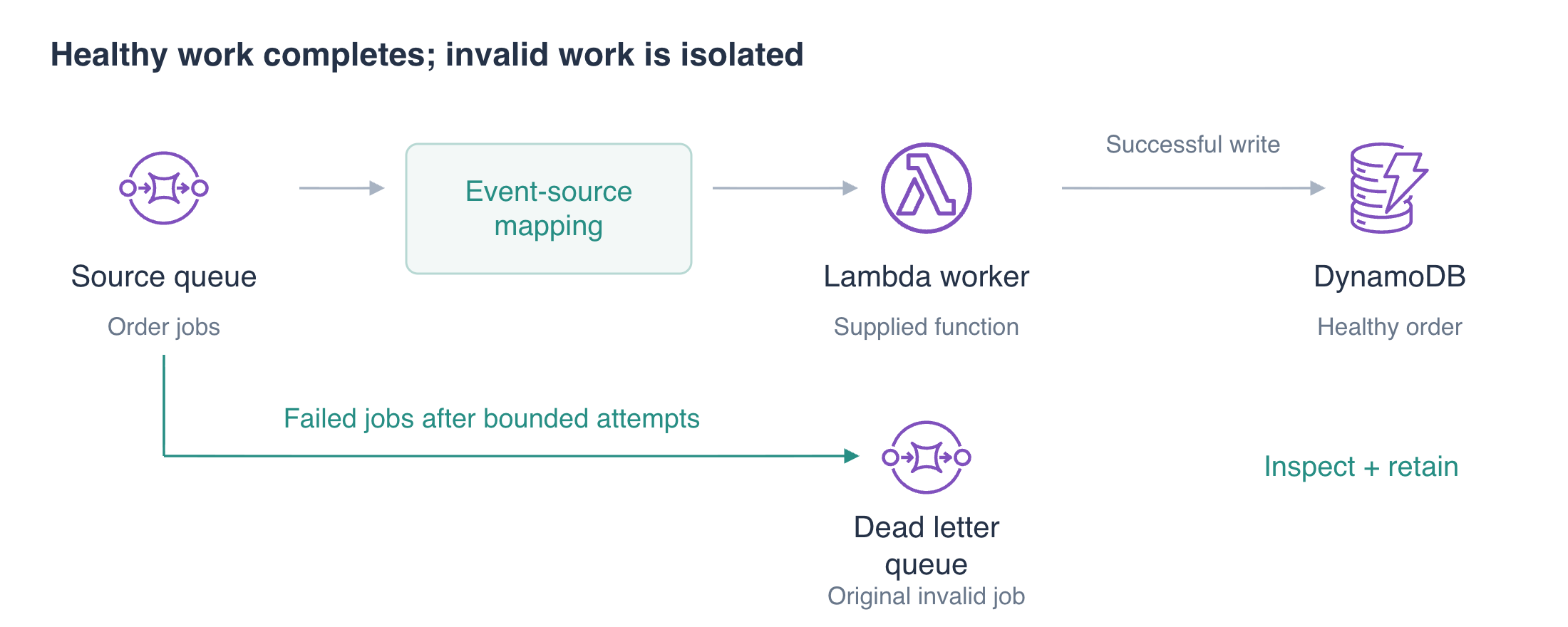
Connect a Source Queue to a Dead Letter Queue
In this step, create two empty Standard queues and configure bounded redrive on the source queue.
A dead letter queue (DLQ) retains jobs that exceed a source queue’s receive limit. Use AWS View above Terminal to compare both queues, actual attempts and stored orders; preserve reference data.
cd /home/labex/project
Create the destination for failed jobs and save its queue address:
DEAD_URL=$(aws sqs create-queue \
  --queue-name labex-q03-dead \
  --query QueueUrl \
  --output text)
echo "$DEAD_URL"
The redrive policy references the destination's ARN, its service resource identifier, rather than its queue URL. Select that ARN:
DEAD_ARN=$(aws sqs get-queue-attributes \
  --queue-url "$DEAD_URL" \
  --attribute-names QueueArn \
  --query Attributes.QueueArn \
  --output text)
echo "$DEAD_ARN"
Write a small JSON policy. The shell inserts your destination ARN into $DEAD_ARN; maxReceiveCount allows two delivery attempts before further receiving moves the message to the DLQ.
cat > redrive-policy.json <<EOF
{
  "deadLetterTargetArn": "$DEAD_ARN",
  "maxReceiveCount": 2
}
EOF
SQS queue attributes represent the redrive policy as a JSON string inside another JSON document. --rawfile reads the policy file as that string; > writes the attributes file.
jq -n --rawfile policy redrive-policy.json '{VisibilityTimeout:"30",RedrivePolicy:$policy}' > queue-attributes.json
Create the source queue with those attributes:
QUEUE_URL=$(aws sqs create-queue \
  --queue-name labex-q03-jobs \
  --attributes file://queue-attributes.json \
  --query QueueUrl \
  --output text)
echo "$QUEUE_URL"
aws sqs get-queue-attributes \
  --queue-url "$QUEUE_URL" \
  --attribute-names QueueArn VisibilityTimeout RedrivePolicy
Expect visibility timeout 30, a policy pointing to labex-q03-dead and receive limit 2. Save the source ARN for the consumer connection:
QUEUE_ARN=$(aws sqs get-queue-attributes \
  --queue-url "$QUEUE_URL" \
  --attribute-names QueueArn \
  --query Attributes.QueueArn \
  --output text)
echo "$QUEUE_ARN"
AWS View shows both empty queues, no worker execution and no order. A redrive policy does not itself process messages; receiving must happen through a consumer.
Connect the Consumer and Prove Healthy Processing
In this step, connect a Lambda event-source mapping and verify actual processing of a valid job.
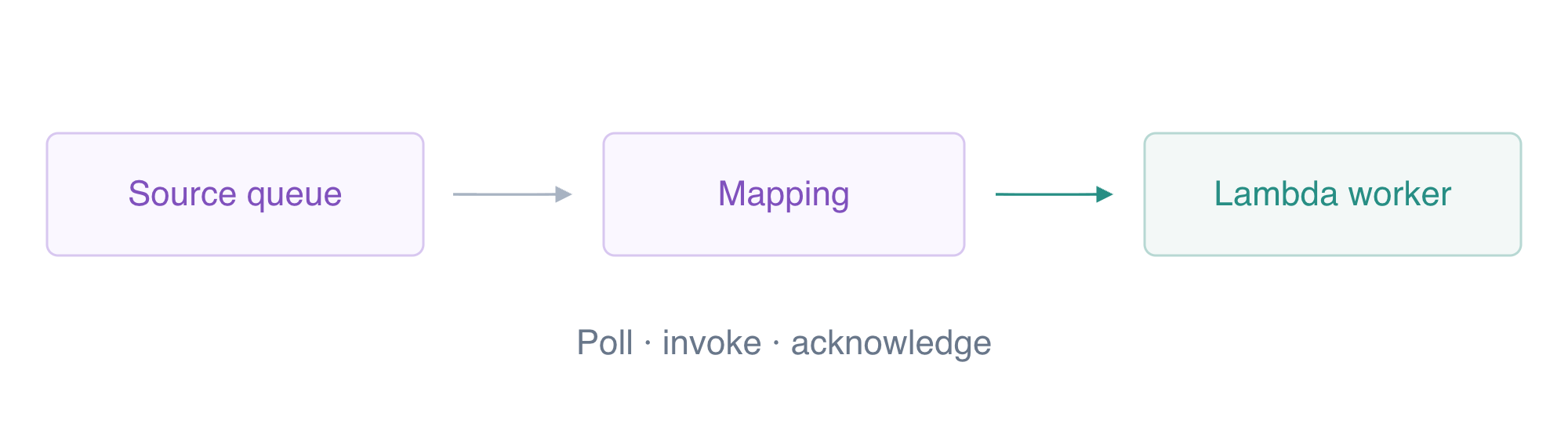
The mapping polls the queue and invokes the worker; successful processing allows it to acknowledge the message.
An event-source mapping connects the source queue to a Lambda consumer. It polls messages, passes them as an SQS Records event and deletes successfully handled messages. The supplied execution role has only the source queue's receive/delete permissions, orders-table writes and logging permissions. The worker rejects quantities outside 1–10. Its code and permissions are fixtures; your task is the queue connection and failure isolation.
Create a mapping with batch size one so each attempt has one job to inspect:
MAPPING_ID=$(aws lambda create-event-source-mapping \
  --function-name labex-q03-worker \
  --event-source-arn "$QUEUE_ARN" \
  --batch-size 1 \
  --enabled \
  --query UUID \
  --output text)
echo "$MAPPING_ID"
Read the connection:
aws lambda get-event-source-mapping \
  --uuid "$MAPPING_ID" \
  --query '{Source:EventSourceArn,Function:FunctionArn,Batch:BatchSize,State:State}'
Expect the source ARN for labex-q03-jobs, function labex-q03-worker, batch size 1 and state Enabled. Mapping existence is configuration evidence; an actual stored order will prove processing.
Send a healthy job:
aws sqs send-message \
  --queue-url "$QUEUE_URL" \
  --message-body '{"id":"good-order","quantity":2}'
Watch AWS View until the worker returns a result and the orders table shows good-order. Processing is asynchronous; allow a short interval for the consumer rather than manually receiving this message. Then read the order:
aws dynamodb get-item \
  --table-name labex-q03-orders \
  --key '{"id":{"S":"good-order"}}' \
  --consistent-read \
  --query Item
Expect quantity 2 and total 600. Check both queues:
aws sqs get-queue-attributes \
  --queue-url "$QUEUE_URL" \
  --attribute-names ApproximateNumberOfMessages ApproximateNumberOfMessagesNotVisible
aws sqs get-queue-attributes \
  --queue-url "$DEAD_URL" \
  --attribute-names ApproximateNumberOfMessages
Both queues should be empty: the worker completed the business write and the consumer acknowledged the successful job. A healthy message does not belong in the DLQ.
Observe Bounded Retries and Failure Isolation
In this step, send an invalid job and observe actual failed processing attempts before native redrive places it in the DLQ.
Retries can help when a dependency is temporarily unavailable, but waiting cannot make quantity zero valid. A receive limit prevents this job from consuming attempts indefinitely and retains its original body for diagnosis. The DLQ is an investigation destination; healthy processing, failure isolation and later recovery are separate outcomes.
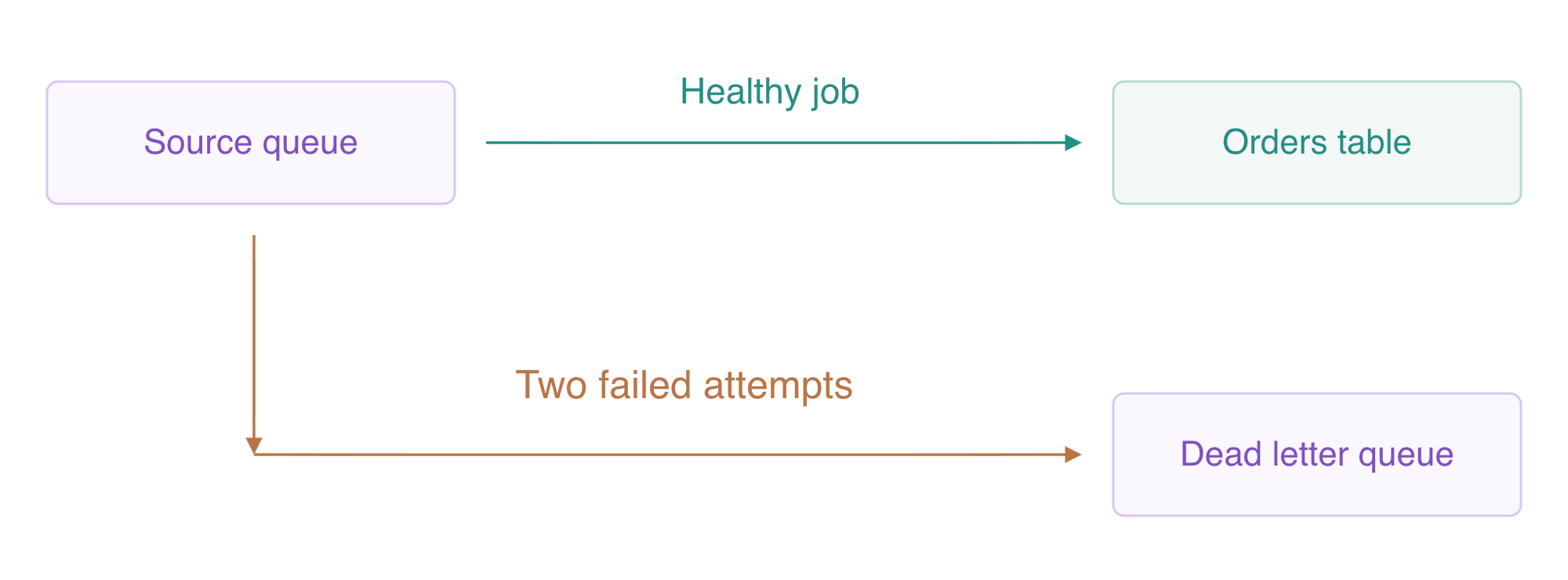
With this lab’s receive limit of two, a later receive moves the failed job to the DLQ instead of invoking the worker a third time.
A poison message repeatedly fails because of its data or handling logic. Send a synthetic invalid quantity of zero:
aws sqs send-message \
  --queue-url "$QUEUE_URL" \
  --message-body '{"id":"poison-order","quantity":0}'
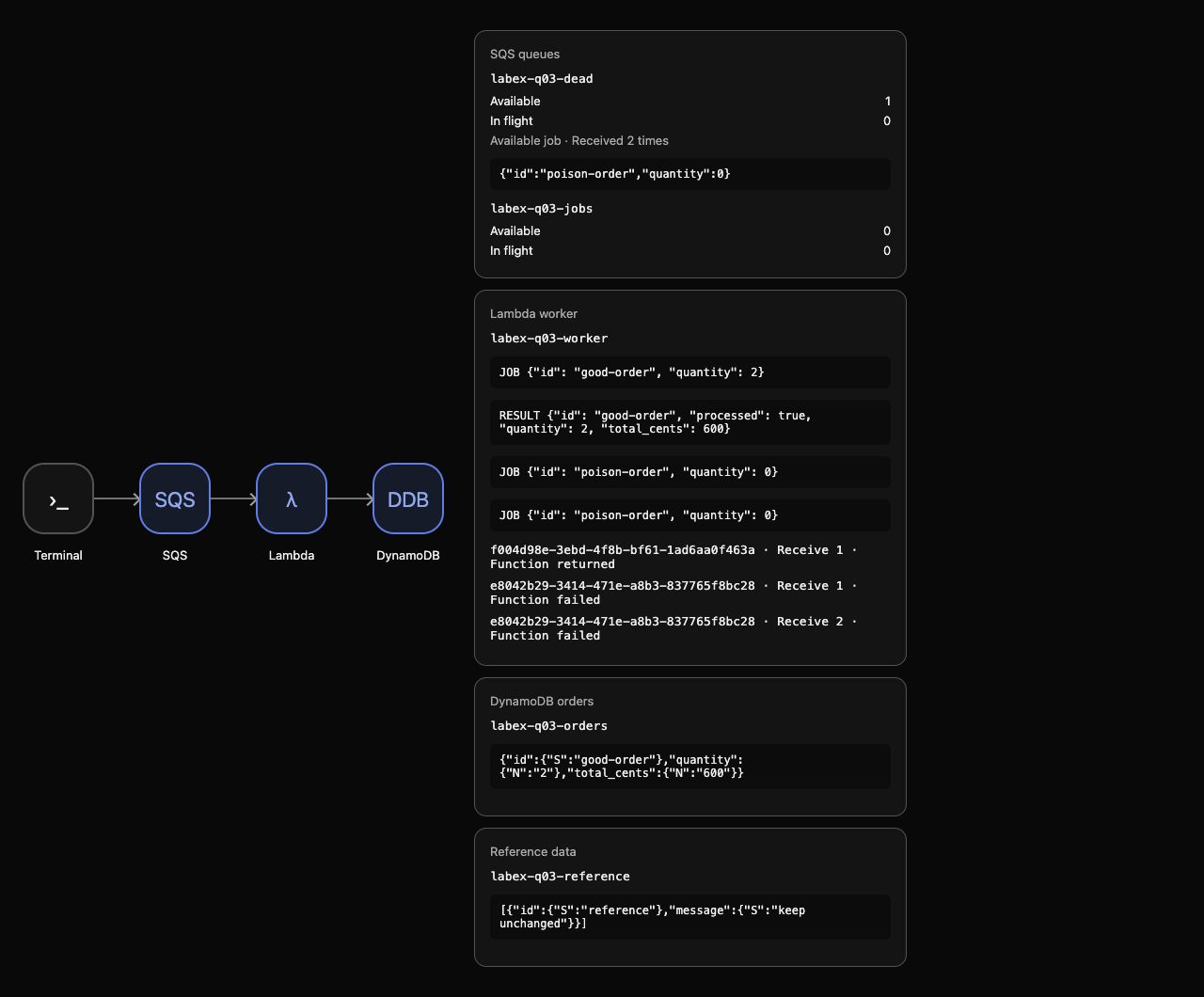
AWS View shows the worker's failed attempt. The message stays in flight until its visibility expires, then the consumer can receive it again. Watch the attempts and queue counts until the DLQ has one available job. With this 30-second window and two attempts, allow roughly a minute plus processing time. Do not manually receive or delete the job while the consumer is running; that would change receive counts and the experiment.
The two failed attempts have the same message ID and receive counts 1 and 2. No stored order appears for poison-order. After the receive limit is reached, a subsequent native receive moves the message out of the source queue instead of invoking the function a third time.
Confirm queue state through the CLI:
aws sqs get-queue-attributes \
  --queue-url "$QUEUE_URL" \
  --attribute-names ApproximateNumberOfMessages ApproximateNumberOfMessagesNotVisible
aws sqs get-queue-attributes \
  --queue-url "$DEAD_URL" \
  --attribute-names ApproximateNumberOfMessages ApproximateNumberOfMessagesNotVisible
Expect the source to have zero available and zero in-flight jobs, with one available job in the DLQ. AWS View displays its original body. Inspect actual worker logs for the invalid quantity and failure:
aws logs filter-log-events \
  --log-group-name /aws/lambda/labex-q03-worker \
  --query 'events[].message'
Read all order items:
aws dynamodb scan --table-name labex-q03-orders --query Items
Only good-order/2/600 remains. The failure was isolated without discarding its message or writing an invalid order. Moving to a DLQ is not a repair or a successful business outcome; recovering and deduplicating jobs comes in later units and the project challenge.
Remove the Connection and Owned Resources
In this step, stop your consumer connection before deleting the queues and results.
Remove the event-source mapping first:
aws lambda delete-event-source-mapping --uuid "$MAPPING_ID" --query UUID --output text
Delete both disposable queues. This also discards the synthetic poison job retained in the DLQ:
aws sqs delete-queue --queue-url "$QUEUE_URL"
aws sqs delete-queue --queue-url "$DEAD_URL"
Remove the healthy order and this lab's execution logs:
aws dynamodb delete-item --table-name labex-q03-orders --key '{"id":{"S":"good-order"}}'
aws logs delete-log-group --log-group-name /aws/lambda/labex-q03-worker
Check absence and reference preservation with successful API responses:
aws lambda list-event-source-mappings \
  --function-name labex-q03-worker \
  --query EventSourceMappings
aws sqs list-queues
aws dynamodb scan --table-name labex-q03-orders --query Items
aws dynamodb scan --table-name labex-q03-reference --query Items
Mapping and order lists are empty, no queue URLs remain, and the reference item still says keep unchanged. The supplied worker and table structures remain. AWS View shows the same resource state. Authentication or network failure cannot prove deletion.
Remove ordinary local policy files:
rm -f redrive-policy.json queue-attributes.json
Run the cleanup check before ending the environment.
Summary
You connected an SQS source queue to a DLQ with a bounded receive limit, attached a Lambda consumer and verified a healthy stored order. You observed an invalid job fail twice and move to the DLQ without a business write, then removed your mapping, queues, result and logs while preserving supplied resources.
For further reading, see the AWS reference on Dead letter queues and receive-limit policies; Lambda queue polling, acknowledgment, and repeated processing.


