Introduction
A delivery application runs in a private subnet and needs to contact an external service without receiving a public address. You will create a public NAT gateway, add its outbound route, and use actual HTTP requests to observe source-address translation and the boundary against unsolicited inbound connections.
Complete Control Application Access with Security Groups first. This fresh environment supplies its own application, public and private subnets, public Internet route and security rules. The CLI is already configured. Preserve these resources and the unrelated reference network; create and later delete only your NAT gateway, its Elastic IP address and the private default route.
Certification Relevance
This lab provides hands-on practice for the following exam topics.
- Cloud Practitioner (CLF-C02) · Task 3.5: The roles of subnets and gateways in a VPC.
- Solutions Architect – Associate (SAA-C03) · Task 1.2: Basic public/private subnet segmentation using route tables and a NAT gateway.
- CloudOps Engineer – Associate (SOA-C03) · Tasks 5.1 and 5.3: Configuring a NAT gateway and diagnosing a missing private-subnet route.
- Advanced Networking – Specialty (ANS-C01) · Task 3.1: Foundational practice maintaining a static VPC route and checking its connectivity effect.
Inspect the Private Application and Allocate a NAT Address
In this step, you will inspect the supplied network, observe its missing outbound path, and allocate an address for your future NAT gateway.
Use Terminal for the CLI commands and open AWS View beside it. The view reads the same resource state. The application is at private IPv4 address 10.20.2.10 in private-subnet, not in public-subnet.
cd /home/labex/project
Select the application VPC by its Name tag. --filters limits results, --query selects the ID, and $(...) saves it in a shell variable:
VPC_ID=$(aws ec2 describe-vpcs \
  --filters Name=tag:Name,Values=application-network \
  --query 'Vpcs[0].VpcId' \
  --output text)
Select the public subnet in that VPC. This is where the NAT gateway will have an Internet path:
PUBLIC_SUBNET_ID=$(aws ec2 describe-subnets \
  --filters "Name=vpc-id,Values=$VPC_ID" Name=tag:Name,Values=public-subnet \
  --query 'Subnets[0].SubnetId' \
  --output text)
Select the private subnet's existing route table. You will change this table's default route, while keeping its existing subnet association:
PRIVATE_RT_ID=$(aws ec2 describe-route-tables \
  --filters "Name=vpc-id,Values=$VPC_ID" Name=tag:Name,Values=private-routes \
  --query 'RouteTables[0].RouteTableId' \
  --output text)
Inspect both supplied route tables. The projection after []. selects readable fields for each table:
aws ec2 describe-route-tables \
  --filters "Name=vpc-id,Values=$VPC_ID" \
  --query 'RouteTables[].{Name:Tags[?Key==`Name`].Value|[0],Routes:Routes,Associations:Associations}' \
  --output json
Both named tables have the VPC's local route. An unnamed main table can also appear; leave it unchanged. The named tables have explicit subnet associations, so you will use the selected private-routes table. The public table also routes 0.0.0.0/0 to an Internet gateway; the private table has no default route. A private subnet has no direct Internet-gateway route. A public NAT gateway lets applications in a private subnet initiate IPv4 connections using the gateway's public address. It belongs in the public subnet, whose own Internet route is already supplied.
In AWS View, click Request outbound service. The private application's HTTP request returns Connection failed: it has no route to the external service at 198.51.100.20:9000. Click Request private application from outside; this unsolicited HTTP request to 10.20.2.10:80 also fails. The application keeps its private address.
An Elastic IP address is an allocated public IPv4 address. Allocate one in the VPC domain and tag it so you can identify your practice resource. The quoted --tag-specifications value is one argument describing the resource type and its tags:
ALLOCATION_ID=$(aws ec2 allocate-address \
  --domain vpc \
  --tag-specifications 'ResourceType=elastic-ip,Tags=[{Key=Name,Value=parcel-nat-address},{Key=Project,Value=parcel}]' \
  --query 'AllocationId' \
  --output text)
Read the allocated address:
aws ec2 describe-addresses \
  --allocation-ids "$ALLOCATION_ID" \
  --query 'Addresses[].{Allocation:AllocationId,PublicIP:PublicIp,Domain:Domain}' \
  --output table
The result has an allocation ID, a public IPv4 address and domain vpc. Record the displayed public address for the later traffic comparison. It belongs to the future NAT gateway; do not associate it with the application. Keep this Terminal open so your saved IDs remain available.
Create a Public NAT Gateway
In this step, you will place a NAT gateway in the public subnet and confirm that gateway creation alone does not route the private application.
The NAT gateway needs two existing resources: the public subnet and the allocated Elastic IP. --subnet-id selects its placement, --allocation-id selects its public address, and --connectivity-type public selects a gateway for Internet-bound traffic. The natgateway resource type applies ownership tags. Save its generated ID:
NAT_ID=$(aws ec2 create-nat-gateway \
  --subnet-id "$PUBLIC_SUBNET_ID" \
  --allocation-id "$ALLOCATION_ID" \
  --connectivity-type public \
  --tag-specifications 'ResourceType=natgateway,Tags=[{Key=Name,Value=parcel-nat},{Key=Project,Value=parcel}]' \
  --query 'NatGateway.NatGatewayId' \
  --output text)
Creation can return before a gateway is ready. A CLI waiter repeatedly reads its state until the named condition is met. Wait for available before adding a route:
aws ec2 wait nat-gateway-available --nat-gateway-ids "$NAT_ID"
A successful waiter returns with no output. Read the gateway's state, subnet and address association:
aws ec2 describe-nat-gateways \
  --nat-gateway-ids "$NAT_ID" \
  --query 'NatGateways[].{ID:NatGatewayId,State:State,Subnet:SubnetId,Addresses:NatGatewayAddresses}' \
  --output json
State is available, Subnet matches your public subnet, and NatGatewayAddresses contains your allocation ID and public address. Its PrivateIp is inside the public subnet range 10.20.1.0/24; this is the NAT gateway interface's private address, separate from its Elastic IP and the application's address. The NAT gateway is a separate resource; the private application has not acquired that address.
AWS View now shows the NAT gateway. Click Request outbound service again. It still fails because the private route table has no default route. Creating the gateway supplies a possible next hop; it does not automatically select that next hop for the private subnet. The public table's existing Internet-gateway route remains unchanged.
Route Private Outbound Traffic Through NAT
In this step, you will add the private default route and compare the application's private address with the source address observed by the external service.
A route selects a next hop for a destination range. 0.0.0.0/0 matches IPv4 destinations that do not match a more-specific route. --nat-gateway-id selects your NAT gateway rather than the Internet gateway. Add this route only to the saved private route table:
aws ec2 create-route \
  --route-table-id "$PRIVATE_RT_ID" \
  --destination-cidr-block 0.0.0.0/0 \
  --nat-gateway-id "$NAT_ID"
The response indicates successful creation. Read the private table's routes:
aws ec2 describe-route-tables \
  --route-table-ids "$PRIVATE_RT_ID" \
  --query 'RouteTables[].Routes' \
  --output json
The local route remains. The new default route has your NatGatewayId and state active. The packet path is now private application → NAT gateway in the public subnet → Internet gateway → external service.
After AWS View shows the private default route, click Request outbound service. It returns Success. Its response body is the source IPv4 address actually observed by the external HTTP service. Compare it with your allocated public address:
aws ec2 describe-addresses \
  --allocation-ids "$ALLOCATION_ID" \
  --query 'Addresses[0].PublicIp' \
  --output text
The two addresses match. Network address translation (NAT) replaces the application's private source address with the gateway's public address and tracks the connection so the response can return to its initiator. The application's own address remains 10.20.2.10.
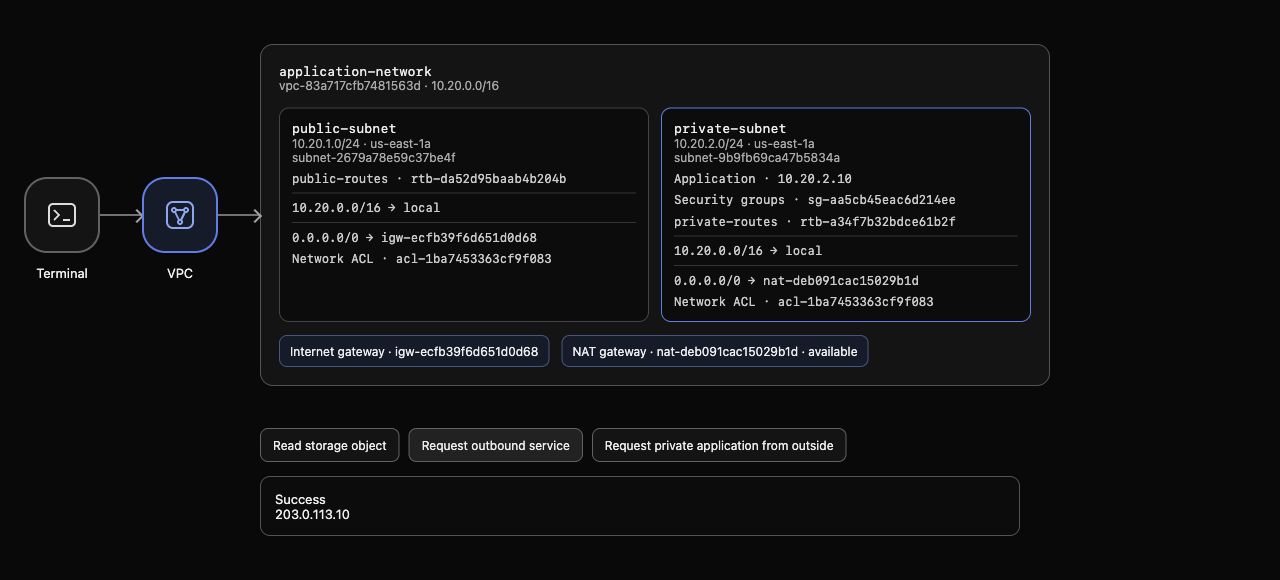
Example AWS View: the application remains at 10.20.2.10, the private default route selects the available NAT gateway, and the HTTP response body reports the allocated public address. Generated resource IDs and addresses can differ.
Click Request private application from outside. It still returns Connection failed. Outbound connectivity and its return traffic do not create a public inbound path to the private application. A NAT gateway does not accept an unsolicited Internet connection for that application.
Diagnose and Restore a Missing Private Route
In this step, you will remove one route, observe the resulting failure, and restore connectivity without recreating the NAT gateway.
A gateway can be available while its client has no usable route. Delete only the private default route, leaving the NAT gateway and public Internet route intact:
aws ec2 delete-route --route-table-id "$PRIVATE_RT_ID" --destination-cidr-block 0.0.0.0/0
Successful deletion has no output. Inspect the private table:
aws ec2 describe-route-tables \
  --route-table-ids "$PRIVATE_RT_ID" \
  --query 'RouteTables[].Routes' \
  --output json
Only the local VPC route remains. AWS View still shows the available NAT gateway but no private default route. Click Request outbound service; a new request now fails. An earlier success is historical evidence, not the result of this new request.
Restore the same route to the same gateway:
aws ec2 create-route \
  --route-table-id "$PRIVATE_RT_ID" \
  --destination-cidr-block 0.0.0.0/0 \
  --nat-gateway-id "$NAT_ID"
Read the routes again:
aws ec2 describe-route-tables \
  --route-table-ids "$PRIVATE_RT_ID" \
  --query 'RouteTables[].Routes' \
  --output json
The active default route returns. In AWS View, send a new Request outbound service; it succeeds and reports the same NAT public address. Request private application from outside still fails. These observations distinguish an available gateway from a complete client routing path.
Delete the Practice NAT Path and Release Its Address
In this step, you will remove your route and NAT gateway, release its public address, and prove that the supplied private network remains intact.
Delete the private default route before removing its next hop. Otherwise the table can retain a route to a deleted gateway:
aws ec2 delete-route --route-table-id "$PRIVATE_RT_ID" --destination-cidr-block 0.0.0.0/0
Successful deletion has no output. Delete only your NAT gateway:
aws ec2 delete-nat-gateway --nat-gateway-id "$NAT_ID"
The response identifies the requested gateway. Use the deletion waiter before releasing its address:
aws ec2 wait nat-gateway-deleted --nat-gateway-ids "$NAT_ID"
A successful waiter returns without output. Deleting a NAT gateway removes its network interface and disassociates its Elastic IP, but does not release the allocation. Read the address before releasing it:
aws ec2 describe-addresses \
  --allocation-ids "$ALLOCATION_ID" \
  --query 'Addresses[].{Allocation:AllocationId,PublicIP:PublicIp,Association:AssociationId}' \
  --output json
The allocation and public address remain, while Association is null: the address is allocated but no longer attached. Now release that separate resource:
aws ec2 release-address --allocation-id "$ALLOCATION_ID"
A successful release has no output. Read the full gateway inventory rather than relying on removable tags:
aws ec2 describe-nat-gateways \
  --query 'NatGateways[].{ID:NatGatewayId,State:State,Subnet:SubnetId}' \
  --output table
Your gateway may remain listed with state deleted; there must be no active practice gateway. A retained deletion record does not mean the gateway can forward traffic. Check the complete address inventory:
aws ec2 describe-addresses \
  --query 'Addresses[].{Allocation:AllocationId,PublicIP:PublicIp}' \
  --output table
The practice allocation is absent. Now read the private routes:
aws ec2 describe-route-tables \
  --route-table-ids "$PRIVATE_RT_ID" \
  --query 'RouteTables[].Routes' \
  --output json
The local VPC route remains and the default route is absent. The supplied application, subnets, security rules, public Internet gateway and reference network remain. A failed inventory query does not prove deletion.
In AWS View, click Request outbound service; it fails again because you deliberately removed its NAT path. Request private application from outside remains blocked. These results match the initial private-network baseline.
Run this step's completion check.
Summary
You allocated a public address, placed a NAT gateway in the public subnet, and routed a private application's outbound requests through it. The external service observed the translated NAT address, while unsolicited inbound requests to the private application stayed blocked. Removing and restoring the private default route demonstrated why gateway availability alone does not establish connectivity.
You then removed your route and NAT gateway, released the address and verified the preserved private-network baseline.