



Introduction
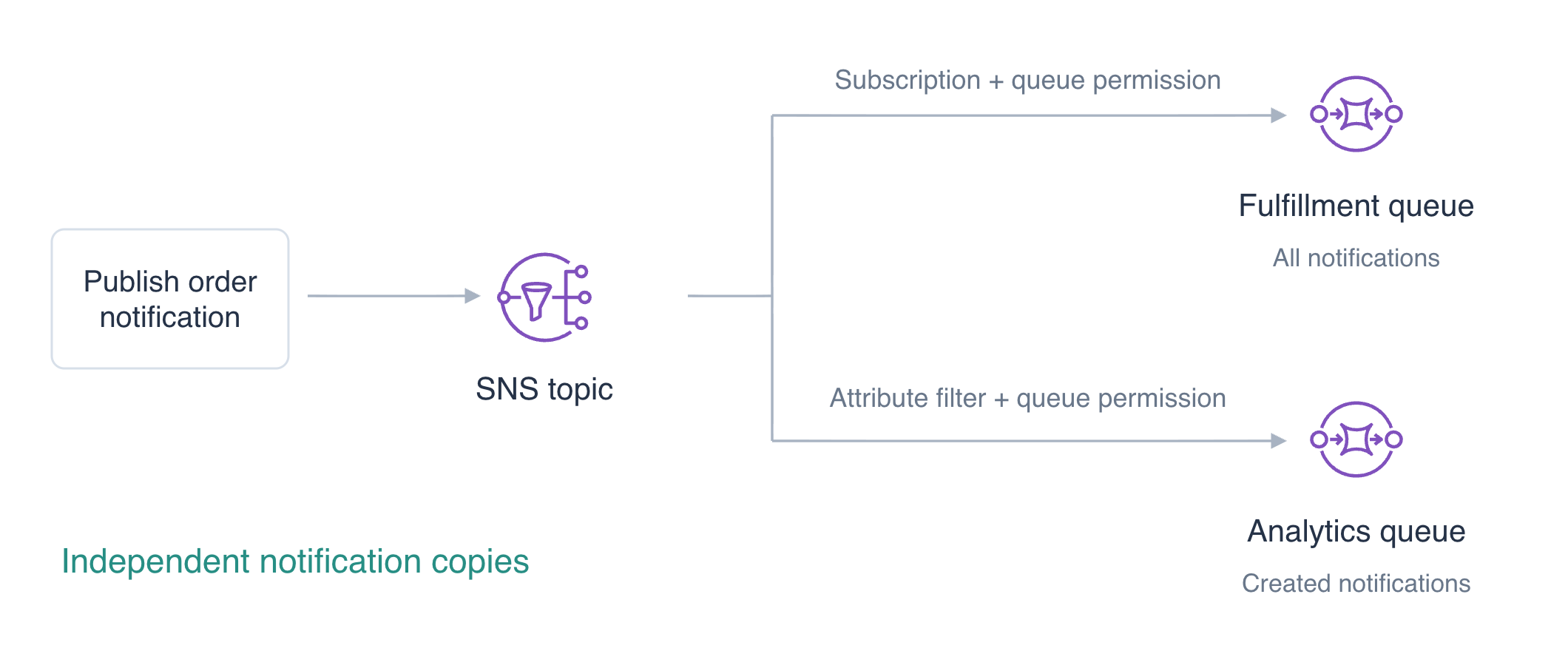
Fulfillment needs every order notification, while analytics needs only new orders. You will publish once to two queues, configure their delivery permissions and filter analytics notifications.
Complete Send and Consume Jobs with SQS and Protect a Bucket with a Resource Policy first. This independent VM supplies a configured CLI and unrelated reference data. The queues are notification destinations; this unit does not need a Lambda consumer.
Certification Relevance
| Certification | Exam task | Practice |
|---|---|---|
| Cloud Practitioner (CLF-C02) | Task 3.8 | SNS fanout, subscription filters, and delivery permissions. |
| Solutions Architect – Associate (SAA-C03) | Task 2.1 | SNS fanout, subscription filters, and delivery permissions. |
| Developer – Associate (DVA-C02) | Task 1.1 | SNS fanout, subscription filters, and delivery permissions. |
| DevOps Engineer – Professional (DOP-C02) | Task 5.1 | Foundational practice: SNS fanout, subscription filters, and delivery permissions. |
| Solutions Architect – Professional (SAP-C02) | Task 2.4 | Foundational practice: SNS fanout, subscription filters, and delivery permissions. |
Lab Overview
Create the Topic and Grant Queue Delivery
In this step, create a topic and two empty queues with permission for only that topic to deliver.
Amazon Simple Notification Service (SNS) distributes one publication through topic subscriptions. Use AWS View above Terminal to compare topic connections, queue bodies and filters; preserve reference data.
cd /home/labex/project
Create the producer's SNS topic. Command substitution, $(...), saves the returned ARN in a shell variable for the following commands:
TOPIC_ARN=$(aws sns create-topic --name labex-q04-orders --query TopicArn --output text)
echo "$TOPIC_ARN"
Create independent destinations and save their queue URLs:
FULFILLMENT_URL=$(aws sqs create-queue \
  --queue-name labex-q04-fulfillment \
  --query QueueUrl \
  --output text)
echo "$FULFILLMENT_URL"
Save the returned value in ANALYTICS_URL:
ANALYTICS_URL=$(aws sqs create-queue \
  --queue-name labex-q04-analytics \
  --query QueueUrl \
  --output text)
echo "$ANALYTICS_URL"
Subscriptions use queue ARNs as destinations. Select both identifiers:
FULFILLMENT_ARN=$(aws sqs get-queue-attributes \
  --queue-url "$FULFILLMENT_URL" \
  --attribute-names QueueArn \
  --query Attributes.QueueArn \
  --output text)
echo "$FULFILLMENT_ARN"
Save the returned value in ANALYTICS_ARN:
ANALYTICS_ARN=$(aws sqs get-queue-attributes \
  --queue-url "$ANALYTICS_URL" \
  --attribute-names QueueArn \
  --query Attributes.QueueArn \
  --output text)
echo "$ANALYTICS_ARN"
A queue policy grants the SNS service sqs:SendMessage to this exact queue, with aws:SourceArn limited to your topic. Subscription configuration alone does not grant delivery permission. Write one ordinary JSON policy per queue; the shell inserts the ARN variables:
cat > fulfillment-policy.json <<EOF
{
  "Version": "2012-10-17",
  "Statement": [{
    "Effect": "Allow",
    "Principal": {"Service": "sns.amazonaws.com"},
    "Action": "sqs:SendMessage",
    "Resource": "$FULFILLMENT_ARN",
    "Condition": {"ArnEquals": {"aws:SourceArn": "$TOPIC_ARN"}}
  }]
}
EOF
Write the configuration to analytics-policy.json:
cat > analytics-policy.json <<EOF
{
  "Version": "2012-10-17",
  "Statement": [{
    "Effect": "Allow",
    "Principal": {"Service": "sns.amazonaws.com"},
    "Action": "sqs:SendMessage",
    "Resource": "$ANALYTICS_ARN",
    "Condition": {"ArnEquals": {"aws:SourceArn": "$TOPIC_ARN"}}
  }]
}
EOF
The SQS Policy attribute holds a JSON string. --rawfile reads a policy file into that string, then the CLI sets the ordinary attributes file:
jq -n --rawfile policy fulfillment-policy.json '{Policy:$policy}' > fulfillment-attributes.json
Encode the policy as queue attributes in analytics-attributes.json:
jq -n --rawfile policy analytics-policy.json '{Policy:$policy}' > analytics-attributes.json
Apply the attributes to queue $FULFILLMENT_URL:
aws sqs set-queue-attributes \
  --queue-url "$FULFILLMENT_URL" \
  --attributes file://fulfillment-attributes.json
Apply the attributes to queue $ANALYTICS_URL:
aws sqs set-queue-attributes \
  --queue-url "$ANALYTICS_URL" \
  --attributes file://analytics-attributes.json
Read the configured permissions:
aws sqs get-queue-attributes \
  --queue-url "$FULFILLMENT_URL" \
  --attribute-names QueueArn Policy
Inspect the attributes of queue $ANALYTICS_URL:
aws sqs get-queue-attributes \
  --queue-url "$ANALYTICS_URL" \
  --attribute-names QueueArn Policy
Both policies name their own queue and the same order topic. AWS View shows one topic, two empty queues and no subscriptions yet.
Subscribe Both Queues and Filter Analytics
In this step, connect each queue to the topic and choose which notifications analytics receives.
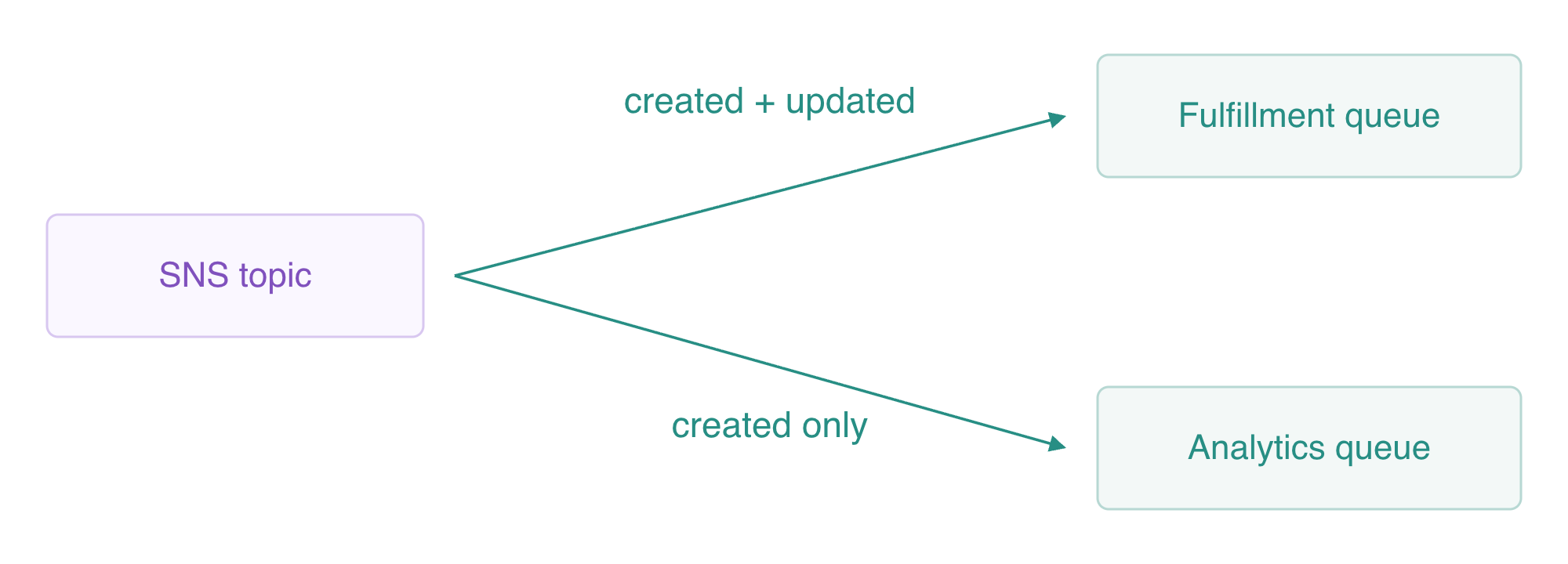
The analytics subscription selects the message attribute kind=created; each queue receives its own copy.
A subscription connects a protocol and endpoint to an SNS topic. For sqs, the endpoint is the queue ARN. Save the subscription ARNs so you can configure and later remove each connection:
FULFILLMENT_SUB=$(aws sns subscribe \
  --topic-arn "$TOPIC_ARN" \
  --protocol sqs \
  --notification-endpoint "$FULFILLMENT_ARN" \
  --query SubscriptionArn \
  --output text)
echo "$FULFILLMENT_SUB"
Save the returned value in ANALYTICS_SUB:
ANALYTICS_SUB=$(aws sns subscribe \
  --topic-arn "$TOPIC_ARN" \
  --protocol sqs \
  --notification-endpoint "$ANALYTICS_ARN" \
  --query SubscriptionArn \
  --output text)
echo "$ANALYTICS_SUB"
A filter policy selects notifications for one subscription. The default filter scope is message attributes. Analytics accepts only a String attribute kind with value created; fulfillment has no filter:
aws sns set-subscription-attributes \
  --subscription-arn "$ANALYTICS_SUB" \
  --attribute-name FilterPolicy \
  --attribute-value '{"kind":["created"]}'
Inspect both subscriptions and analytics attributes:
aws sns list-subscriptions-by-topic --topic-arn "$TOPIC_ARN"
Inspect the subscription’s filter and delivery settings:
aws sns get-subscription-attributes --subscription-arn "$ANALYTICS_SUB"
Expect two SQS endpoints and the analytics filter. Raw message delivery is off by default, so queue bodies will contain an SNS notification envelope with the topic, message ID, original message string and attributes. The queues remain empty until publishing.
Prove Fanout, Filtering and the Delivery Boundary
In this step, publish two notifications and inspect actual independent deliveries.
Follow three separate boundaries: SNS accepts a publication, the subscription filter and queue policy decide which copies reach each queue, and a consumer later processes those copies. This lab proves the first two boundaries. A filtered-out notification is intentional selection; a wrong-source permission failure is a delivery problem, even if both leave a destination without a new message.
Publish a created event. The JSON message is the business payload; the separate String attribute is what this subscription filter evaluates:
aws sns publish \
  --topic-arn "$TOPIC_ARN" \
  --message '{"id":"fanout-order","kind":"created"}' \
  --message-attributes '{"kind":{"DataType":"String","StringValue":"created"}}'
Publish an updated event with the same order ID:
aws sns publish \
  --topic-arn "$TOPIC_ARN" \
  --message '{"id":"fanout-order","kind":"updated"}' \
  --message-attributes '{"kind":{"DataType":"String","StringValue":"updated"}}'
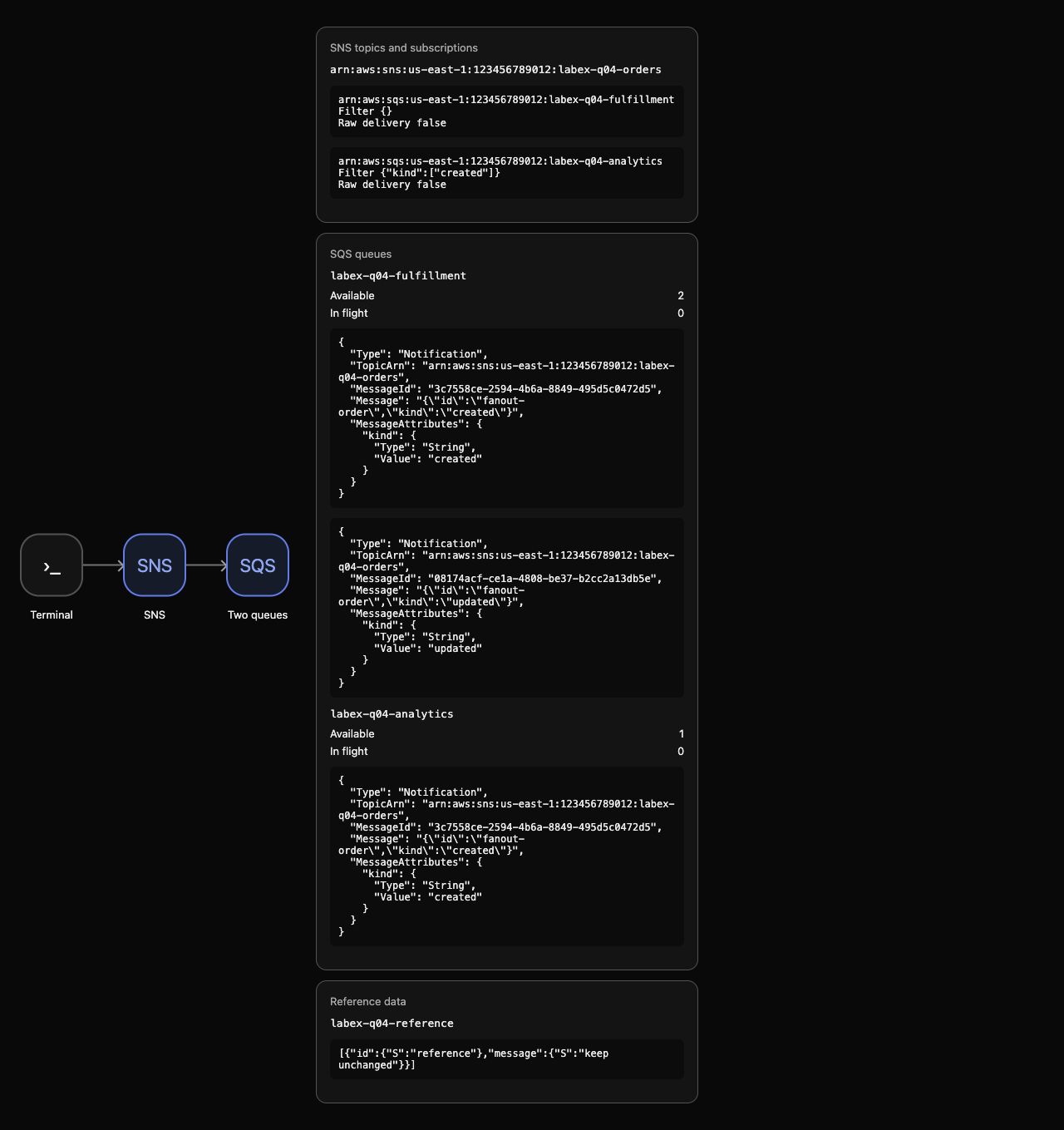
Watch AWS View: fulfillment has two notifications, analytics only the created notification. Check the counts:
aws sqs get-queue-attributes \
  --queue-url "$FULFILLMENT_URL" \
  --attribute-names ApproximateNumberOfMessages ApproximateNumberOfMessagesNotVisible
Inspect the attributes of queue $ANALYTICS_URL:
aws sqs get-queue-attributes \
  --queue-url "$ANALYTICS_URL" \
  --attribute-names ApproximateNumberOfMessages ApproximateNumberOfMessagesNotVisible
Receive for inspection with visibility zero. This immediately releases these synthetic messages for later cleanup instead of holding them in flight. The example proves independent copies, not processing or acknowledgment. fromjson reads each envelope string, and the final field selection shows the notification fields used here:
aws sqs receive-message \
  --queue-url "$FULFILLMENT_URL" \
  --max-number-of-messages 10 \
  --visibility-timeout 0 \
  --output json | jq '[.Messages[].Body | fromjson | {Type, TopicArn, MessageId, Message, MessageAttributes}]'
Read the delivered messages from queue $ANALYTICS_URL:
aws sqs receive-message \
  --queue-url "$ANALYTICS_URL" \
  --max-number-of-messages 10 \
  --visibility-timeout 0 \
  --output json | jq '[.Messages[].Body | fromjson | {Type, TopicArn, MessageId, Message, MessageAttributes}]'
The body is an SNS envelope: Type is Notification, TopicArn is your topic, and Message contains the original JSON string. The created notification has the same SNS MessageId in both queues; each queue holds its own SQS message. Fulfillment also holds the updated event, which analytics filtered out. Independent consumers can acknowledge their copies separately.
Now test why topic permission matters. Temporarily set fulfillment's aws:SourceArn to an unrelated synthetic topic ARN:
jq --arg wrong 'arn:aws:sns:us-east-1:123456789012:labex-q04-unrelated' '.Statement[0].Condition.ArnEquals["aws:SourceArn"]=$wrong' fulfillment-policy.json > wrong-source-policy.json
Encode the policy as queue attributes in wrong-source-attributes.json:
jq -n --rawfile policy wrong-source-policy.json '{Policy:$policy}' > wrong-source-attributes.json
Apply the attributes to queue $FULFILLMENT_URL:
aws sqs set-queue-attributes \
  --queue-url "$FULFILLMENT_URL" \
  --attributes file://wrong-source-attributes.json
Publish an updated notification for another synthetic order. SNS accepts the publish, but fulfillment is no longer authorized for this topic; analytics filters the updated attribute:
aws sns publish \
  --topic-arn "$TOPIC_ARN" \
  --message '{"id":"blocked-order","kind":"updated"}' \
  --message-attributes '{"kind":{"DataType":"String","StringValue":"updated"}}'
Check that queue counts remain two and one, with no blocked-order envelope in AWS View:
aws sqs get-queue-attributes \
  --queue-url "$FULFILLMENT_URL" \
  --attribute-names ApproximateNumberOfMessages
Inspect the attributes of queue $ANALYTICS_URL:
aws sqs get-queue-attributes \
  --queue-url "$ANALYTICS_URL" \
  --attribute-names ApproximateNumberOfMessages
A successful publish response proves SNS accepted the notification; destination delivery needs its own evidence. Restore the exact original policy before the step check:
aws sqs set-queue-attributes \
  --queue-url "$FULFILLMENT_URL" \
  --attributes file://fulfillment-attributes.json
This workspace tests immediate same-account queue delivery and String attribute filters. Production SNS filter changes can take up to 15 minutes to propagate and failed deliveries have service retry behavior; this short permission experiment is not a production retry model.
Remove Connections and Disposable Notifications
In this step, remove both subscriptions, the topic and the queues while preserving unrelated reference data.
Unsubscribe both endpoints first:
aws sns unsubscribe --subscription-arn "$FULFILLMENT_SUB"
Remove subscription $ANALYTICS_SUB:
aws sns unsubscribe --subscription-arn "$ANALYTICS_SUB"
Delete the topic and queues. Queue deletion discards the synthetic notifications; no business processing was claimed for them:
aws sns delete-topic --topic-arn "$TOPIC_ARN"
Delete the owned queue $FULFILLMENT_URL:
aws sqs delete-queue --queue-url "$FULFILLMENT_URL"
Delete the owned queue $ANALYTICS_URL:
aws sqs delete-queue --queue-url "$ANALYTICS_URL"
Prove cleanup using successful native queries:
aws sns list-topics
Inspect the remaining subscriptions:
aws sns list-subscriptions
Inspect the remaining SQS queues:
aws sqs list-queues
Inspect the unrelated reference record:
aws dynamodb scan --table-name labex-q04-reference --query Items
Topic and subscription lists are empty, queue URLs are absent, and the reference item still says keep unchanged. Authentication or network failures do not prove deletion. AWS View shows the same empty resources.
Remove your ordinary configuration files:
rm -f fulfillment-policy.json analytics-policy.json fulfillment-attributes.json analytics-attributes.json wrong-source-policy.json wrong-source-attributes.json
Run the cleanup check before ending the environment.
Summary
You connected one SNS topic to two independent SQS queues, limited delivery to an exact topic source, and filtered analytics using a message attribute. Actual notification envelopes proved the shared published event and separate queue copies. You also distinguished SNS accepting a publish from delivery reaching its destinations, then removed your resources while preserving reference data.
Queue consumers still need to handle repeated delivery. The next unit applies an atomic DynamoDB condition to prevent repeated jobs from producing duplicate business effects.
For further reading, see the AWS reference on SNS-to-SQS subscriptions and scoped delivery permission.


