



Introduction
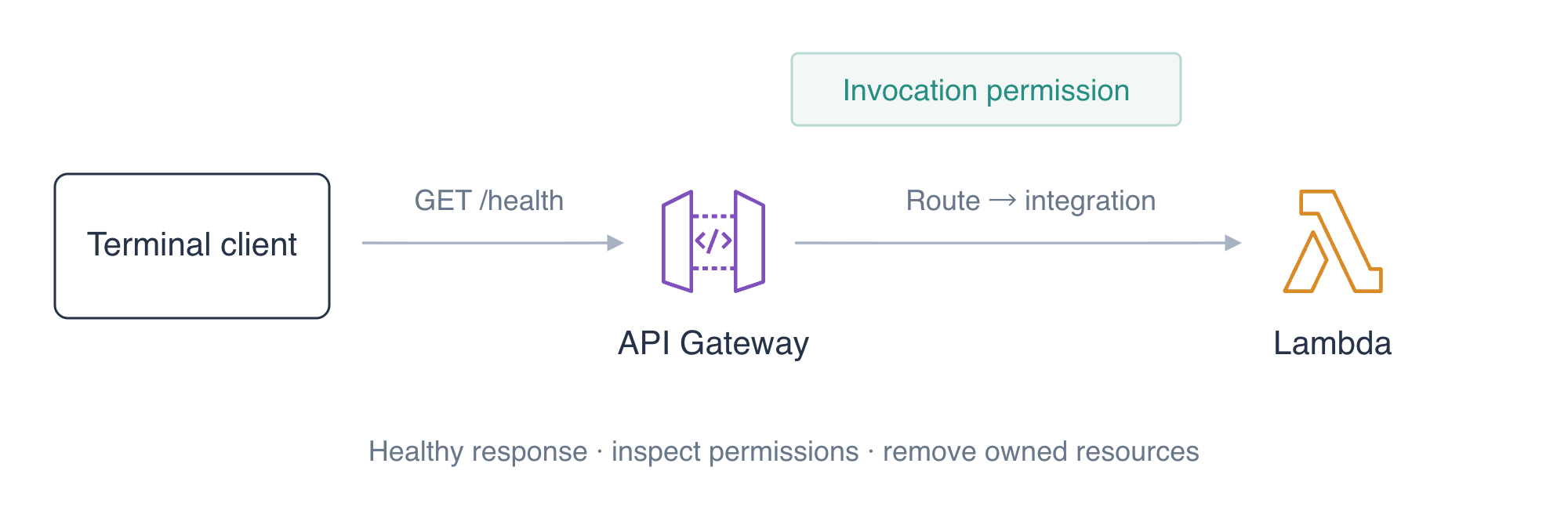
A status page needs an HTTP endpoint that reports whether an application is healthy. You will connect a supplied Lambda handler to an HTTP API, send requests, diagnose its invocation permission and remove your resources.
Complete Run a Lambda Function with a JSON Event and Configure and Diagnose a Lambda Function, including their role and log prerequisites. This fresh environment supplies the handler and execution role.
Certification Relevance
| Certification | Exam task | Practice |
|---|---|---|
| Solutions Architect – Associate (SAA-C03) | Task 2.1 | HTTP API routes, Lambda integration, and invocation permissions. |
| Developer – Associate (DVA-C02) | Task 1.1, Task 1.2 | HTTP API routes, Lambda integration, and invocation permissions. |
| DevOps Engineer – Professional (DOP-C02) | Task 3.2 | Foundational practice: HTTP API routes, Lambda integration, and invocation permissions. |
Lab Overview
Deploy the Health Function
In this step, you will package the supplied health handler and deploy a function that can respond to an HTTP event.
Enter the prepared workspace:
cd /home/labex/project
Look at AWS View above Terminal to follow the same function, API and log state as your commands. Initially only unrelated reference logs exist; preserve them.
Read the supplied application before packaging it:
cat app.py
The handler receives an event, logs that input and returns a proxy response with statusCode, headers and a JSON string in body. HTTP payload format 2.0 puts URL query parameters in queryStringParameters. The optional name parameter changes the greeting. RELEASE_LABEL is an environment setting returned alongside it.
Use zip to place app.py at the root of the deployment archive:
zip health.zip app.py
Read the prepared role ARN into a shell variable. --query selects one response field and --output text makes it usable by the next command:
ROLE_ARN=$(aws iam get-role \
  --role-name labex-a01-execution \
  --query 'Role.Arn' \
  --output text)
echo "$ROLE_ARN"
Deploy app.handler using Python 3.12 and the prepared execution role. fileb:// uploads the Zip bytes. The JSON Variables map uses the same format as the Lambda configuration lab. Its string value marks the first release:
aws lambda create-function \
  --function-name labex-a01-health \
  --runtime python3.12 \
  --role "$ROLE_ARN" \
  --handler app.handler \
  --timeout 5 \
  --environment '{"Variables":{"RELEASE_LABEL":"initial"}}' \
  --zip-file fileb://health.zip \
  --query '{Name:FunctionName,Handler:Handler,Runtime:Runtime}'
The response should identify labex-a01-health, app.handler and python3.12. Look at AWS View above Terminal and inspect the Function card. A deployed function alone does not yet provide an HTTP route; the HTTP APIs card remains empty.
Connect the HTTP Route and Send a Request
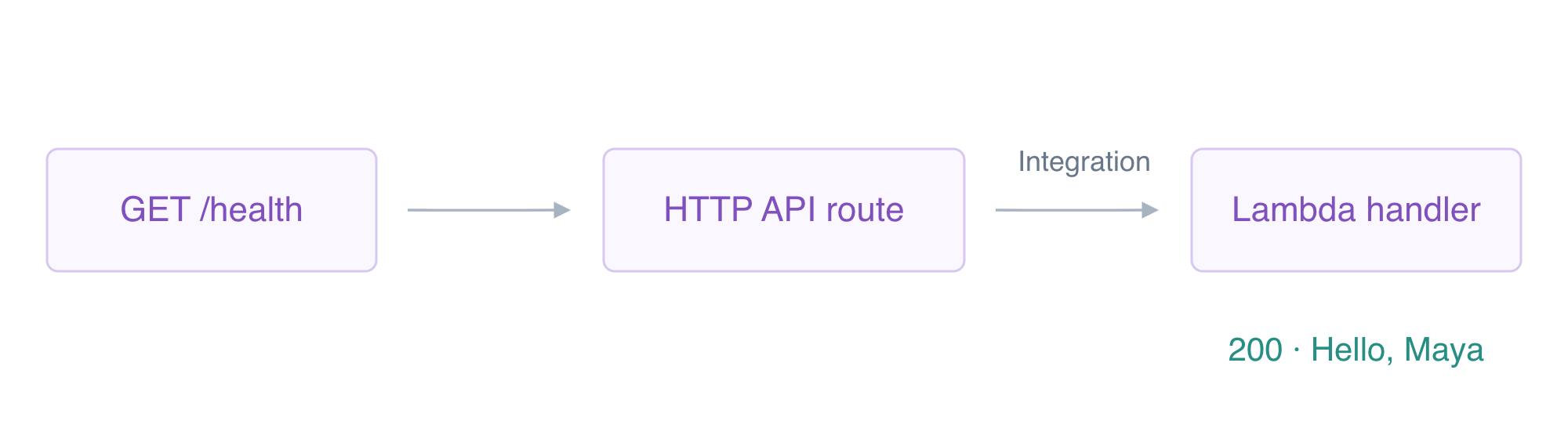
In this step, you will connect an HTTP request to your deployed function. Amazon API Gateway provides the HTTP entry. A route selects a backend integration for a method and path, such as GET /health.
Create an HTTP API and save its generated ID in a shell variable. Command substitution, $(...), captures the selected API ID instead of displaying it:
API_ID=$(aws apigatewayv2 create-api \
  --name labex-a01 \
  --protocol-type HTTP \
  --query ApiId \
  --output text)
echo "$API_ID"
Record that ID for your resource inventory. Redirection, >, writes the value to a file:
printf '%s\n' "$API_ID" > api-id.txt
A stage is the API's deployment entry. The $default stage has no stage-name URL segment. --auto-deploy applies changes automatically. Single quotes preserve the literal dollar sign:
aws apigatewayv2 create-stage \
  --api-id "$API_ID" \
  --stage-name '$default' \
  --auto-deploy \
  --query '{Stage:StageName,AutoDeploy:AutoDeploy}'
Read the deployed function ARN, then create an AWS_PROXY integration. Lambda integrations use POST to invoke the backend, even though the incoming client route below uses GET. Payload format 2.0 matches the supplied handler:
FUNCTION_ARN=$(aws lambda get-function-configuration \
  --function-name labex-a01-health \
  --query FunctionArn \
  --output text)
echo "$FUNCTION_ARN"
INTEGRATION_ID=$(aws apigatewayv2 create-integration \
  --api-id "$API_ID" \
  --integration-type AWS_PROXY \
  --integration-method POST \
  --integration-uri "$FUNCTION_ARN" \
  --payload-format-version 2.0 \
  --query IntegrationId \
  --output text)
echo "$INTEGRATION_ID"
A route key combines the client HTTP method with the path. Its target points to the integration you just created:
aws apigatewayv2 create-route \
  --api-id "$API_ID" \
  --route-key 'GET /health' \
  --target "integrations/$INTEGRATION_ID" \
  --authorization-type NONE \
  --query '{Route:RouteKey,Authorization:AuthorizationType}'
This public health route uses NONE; application sign-in is introduced later. The execution role controls what function code can do, whereas the function's resource policy controls who can invoke it. API Gateway still needs a precise invocation grant.
Read the selected account ID and build the source ARN for this API's default-stage GET /health route. The escaped dollar sign keeps $default literal inside the expanded string:
ACCOUNT_ID=$(aws sts get-caller-identity --query Account --output text)
echo "$ACCOUNT_ID"
SOURCE_ARN="arn:aws:execute-api:us-east-1:$ACCOUNT_ID:$API_ID/\$default/GET/health"
echo "$SOURCE_ARN"
Grant only this API route permission to invoke the function:
aws lambda add-permission \
  --function-name labex-a01-health \
  --statement-id ApiHealth \
  --action lambda:InvokeFunction \
  --principal apigateway.amazonaws.com \
  --source-account "$ACCOUNT_ID" \
  --source-arn "$SOURCE_ARN" \
  --query Statement \
  --output text
For HTTP requests in this workspace, use the prepared API address with your generated API ID. This is the workspace's API entry, not an AWS public hostname:
API_URL="http://127.0.0.1:8081/api/$API_ID"
echo "$API_URL"
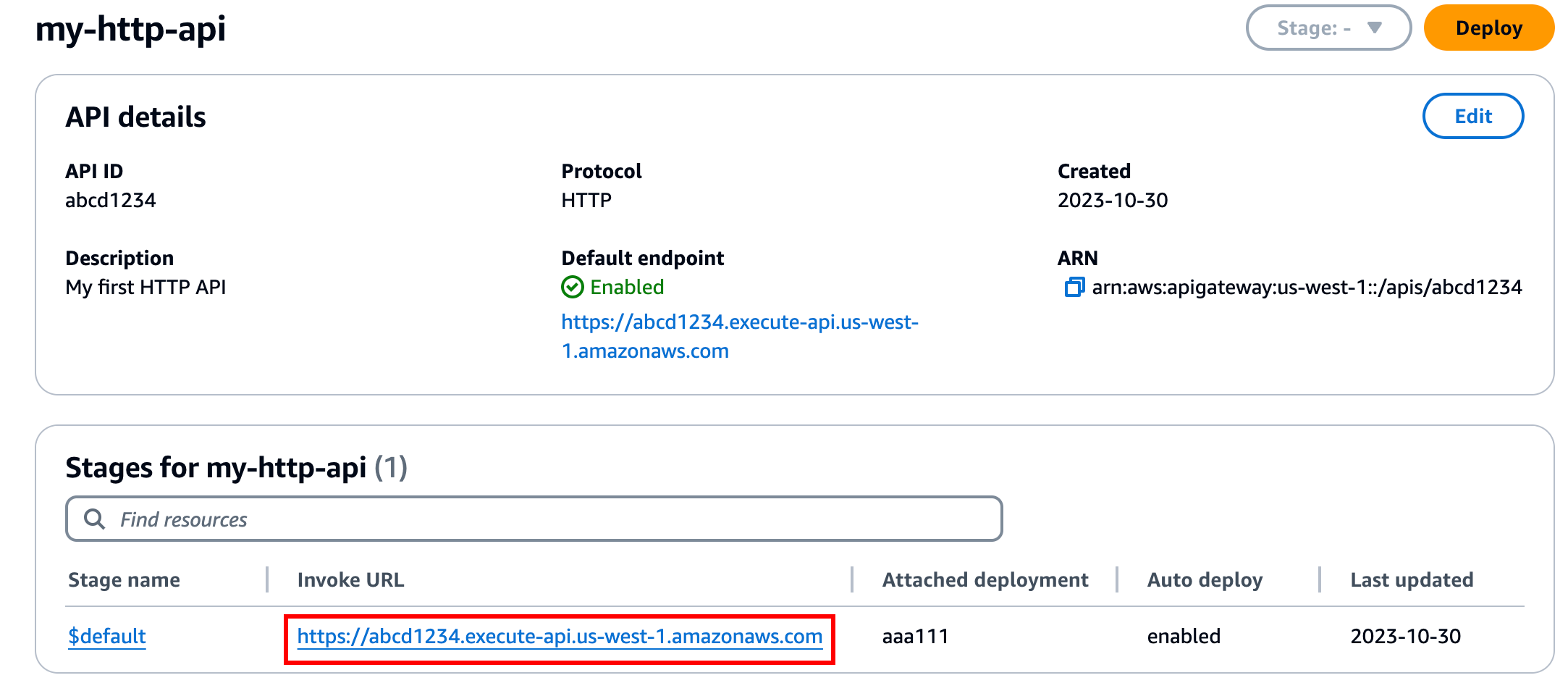
The official Console shows the same API ID, $default stage and Auto deploy setting. Its Invoke URL is an AWS endpoint; continue with your workspace API_URL above for this lab.
curl -i shows both HTTP headers and the response body. The URL query parameter becomes part of the actual Lambda event:
curl -i "$API_URL/health?name=Maya"
Expect HTTP 200 and this JSON body:
{"healthy": true, "message": "Hello, Maya", "release": "initial"}
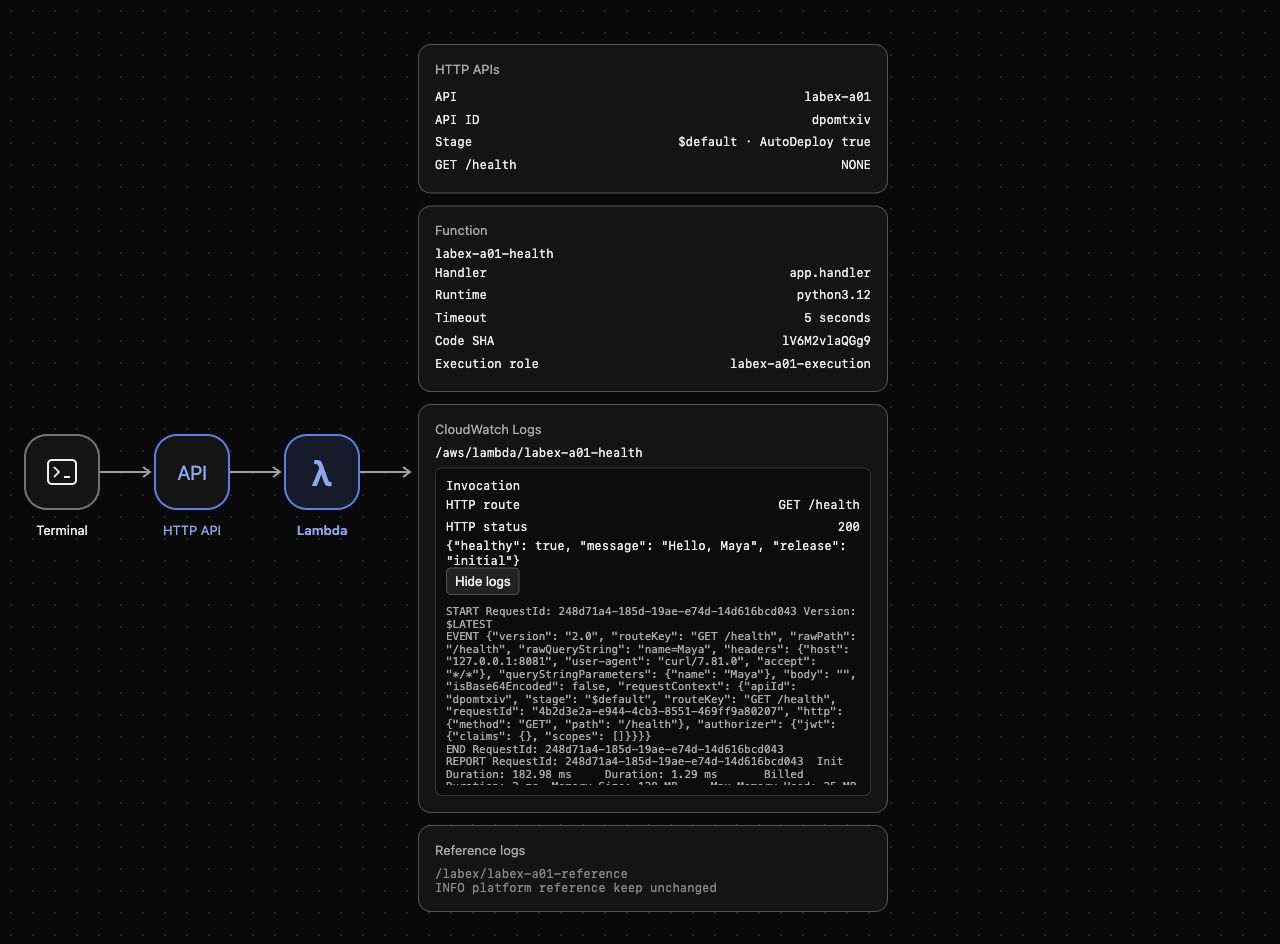
Look at AWS View above Terminal. The HTTP APIs card should show GET /health, NONE and $default · AutoDeploy true. The CloudWatch Logs card should show the actual route, status and response. Click Show logs and find queryStringParameters with name: Maya. This manual observation connects the HTTP request to the deployed function's input; verification checks the remote configuration and actual execution.
Diagnose Invocation Permission and Publish a New Release
In this step, you will observe a broken invocation boundary, restore the precise grant and test a changed function setting.
Remove the statement by its ID. This leaves the API, integration and execution role in place:
aws lambda remove-permission --function-name labex-a01-health --statement-id ApiHealth
Send another request while the grant is absent:
curl -i "$API_URL/health?name=Noah"
Expect HTTP 502 with Invocation permission denied. API deployment and route configuration do not themselves grant Lambda invocation permission. In AWS View, the existing successful invocation remains; this rejected request has not run the handler. Manually compare the logs before and after the request. The automatic check does not infer a historical rejection from the final restored policy.
Restore the same account- and route-scoped grant:
aws lambda add-permission \
  --function-name labex-a01-health \
  --statement-id ApiHealth \
  --action lambda:InvokeFunction \
  --principal apigateway.amazonaws.com \
  --source-account "$ACCOUNT_ID" \
  --source-arn "$SOURCE_ARN" \
  --query Statement \
  --output text
Change the function environment to mark the ready release. The handler reads this setting when it runs:
aws lambda update-function-configuration \
  --function-name labex-a01-health \
  --environment '{"Variables":{"RELEASE_LABEL":"ready"}}' \
  --query 'Environment.Variables'
The route still points to the same function. Send a request using a different query value:
curl -i "$API_URL/health?name=Noah"
Expect HTTP 200 and a response computed from both the new query and environment:
{"healthy": true, "message": "Hello, Noah", "release": "ready"}
In AWS View, inspect the latest response and expand its logs. Confirm the input says Noah and the body says ready. The earlier Maya response should remain available. These different results demonstrate that the integration runs the deployed function rather than returning a single fixed health message.
The failed request isolates the inbound invocation grant: the route and backend still exist, but the handler does not run. Restore that grant rather than broadening the execution role, whose purpose is the function’s outbound access.
Delete Your API and Function
In this step, you will remove the resources you created and prove that unrelated reference logs remain.
Your inventory consists of the API ID in api-id.txt, labex-a01-health and /aws/lambda/labex-a01-health. The API owns its route, integration and default stage. Delete the API first so it cannot receive further requests:
aws apigatewayv2 delete-api --api-id "$API_ID"
Remove the function and its owned invocation policy:
aws lambda delete-function --function-name labex-a01-health
Lambda log groups have their own lifecycle. Delete only this function's group:
aws logs delete-log-group --log-group-name /aws/lambda/labex-a01-health
Read the native inventories successfully; request errors do not prove deletion:
aws apigatewayv2 get-apis --query 'Items[].Name'
aws lambda list-functions --query 'Functions[].FunctionName'
Both lists should be empty. Read the remaining log groups:
aws logs describe-log-groups --query 'logGroups[].logGroupName'
Only /labex/labex-a01-reference should remain. Preserve it and the prepared execution role. In AWS View, confirm that the API, Function and invocation cards are empty while Reference logs still shows INFO platform reference keep unchanged.
Summary
You deployed a Python health handler, connected an HTTP API route through a payload 2.0 integration and enabled its default stage. You scoped the API's Lambda invocation grant, diagnosed its removal and observed different responses from actual query values and function settings. Finally, you removed your API, function and log group while preserving unrelated resources.


