Introduction
A private export needs encryption before storage. You will encrypt a small synthetic file, let one reader recover its original bytes, diagnose failed decryption and schedule cleanup of your key.
Complete Get Started with AWS on LabEx, Give a Report Reader Least Privilege and Use Temporary Credentials with an IAM Role first. This fresh VM supplies its own file, reader role session and reference key.
Certification Relevance
This lab provides hands-on practice for the following exam topics.
- Cloud Practitioner (CLF-C02) · Task 2.2: KMS encryption, decryption permissions, and key states.
- Solutions Architect – Associate (SAA-C03) · Task 1.3: KMS encryption, decryption permissions, and key states.
- Developer – Associate (DVA-C02) · Task 2.2: KMS encryption, decryption permissions, and key states.
- CloudOps Engineer – Associate (SOA-C03) · Task 4.2: KMS encryption, decryption permissions, and key states.
- Security – Specialty (SCS-C03) · Task 5.3: Foundational practice: KMS encryption, decryption permissions, and key states.
- Data Engineer – Associate (DEA-C01) · Task 4.3: Foundational practice: KMS encryption, decryption permissions, and key states.
- DevOps Engineer – Professional (DOP-C02) · Task 6.2: Foundational practice: KMS encryption, decryption permissions, and key states.
- Solutions Architect – Professional (SAP-C02) · Task 2.3: Foundational practice: KMS encryption, decryption permissions, and key states.
Encrypt the Private Export
In this step, you will create an AWS Key Management Service (KMS) key and turn the supplied export into ciphertext. Use the supplied synthetic private-export.json instead of personal data. The export-reader profile uses a temporary session for the prepared reader role, initially without KMS permission. Preserve alias/labex-sec01-reference.
Open AWS View beside Terminal to compare key state, reader grants and cryptographic request outcomes. Its byte hashes let you compare results without displaying private data.
A symmetric key uses the same protected key material for encryption and decryption; KMS keeps that key material inside the service. An alias gives a key a readable name without replacing its unique key ARN.
Start in the supplied project directory. cd changes your current directory; the caller query confirms the prepared operator identity without printing credentials.
cd /home/labex/project
aws sts get-caller-identity --query Arn --output text
Expect the labex-sec01-operator user ARN. Create your own key. --query selects one field from the response, --output text removes JSON quoting, and $(...) stores that result in a shell variable for later commands.
KEY_ARN=$(aws kms create-key --description labex-sec01-owned-export --query KeyMetadata.Arn --output text)
aws kms create-alias --alias-name alias/labex-sec01-private-export --target-key-id "$KEY_ARN"
aws kms describe-key --key-id "$KEY_ARN" --query 'KeyMetadata.[KeyState,KeySpec]' --output text
Expect Enabled and SYMMETRIC_DEFAULT. Do not use or modify the reference key.
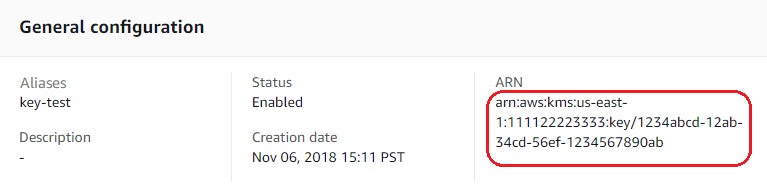
Official Console reference: alias, Enabled status and ARN correspond to the key identity and state you just queried. These are AWS example values; keep using your own KEY_ARN in Terminal.
Source: AWS KMS.
An encryption context is a set of nonsecret labels bound to the ciphertext. Decryption must supply the same labels. Here Purpose=private-export identifies this export's intended use. Context values are not a place for passwords or personal data.
KMS Encrypt handles small plaintexts; this prepared export is well below the 4 KiB limit. fileb:// reads the input as binary bytes. The CLI represents the returned ciphertext as base64; base64 --decode converts it back to a binary file. The pipe sends output to the next command, and > writes the result to the named file.
aws kms encrypt --key-id "$KEY_ARN" --plaintext fileb://private-export.json --encryption-context Purpose=private-export --query CiphertextBlob --output text | base64 --decode > private-export.kms
Compare byte hashes with sha256sum. Different hashes show the ciphertext differs from the original data; this alone is not permission evidence.
sha256sum private-export.json private-export.kms
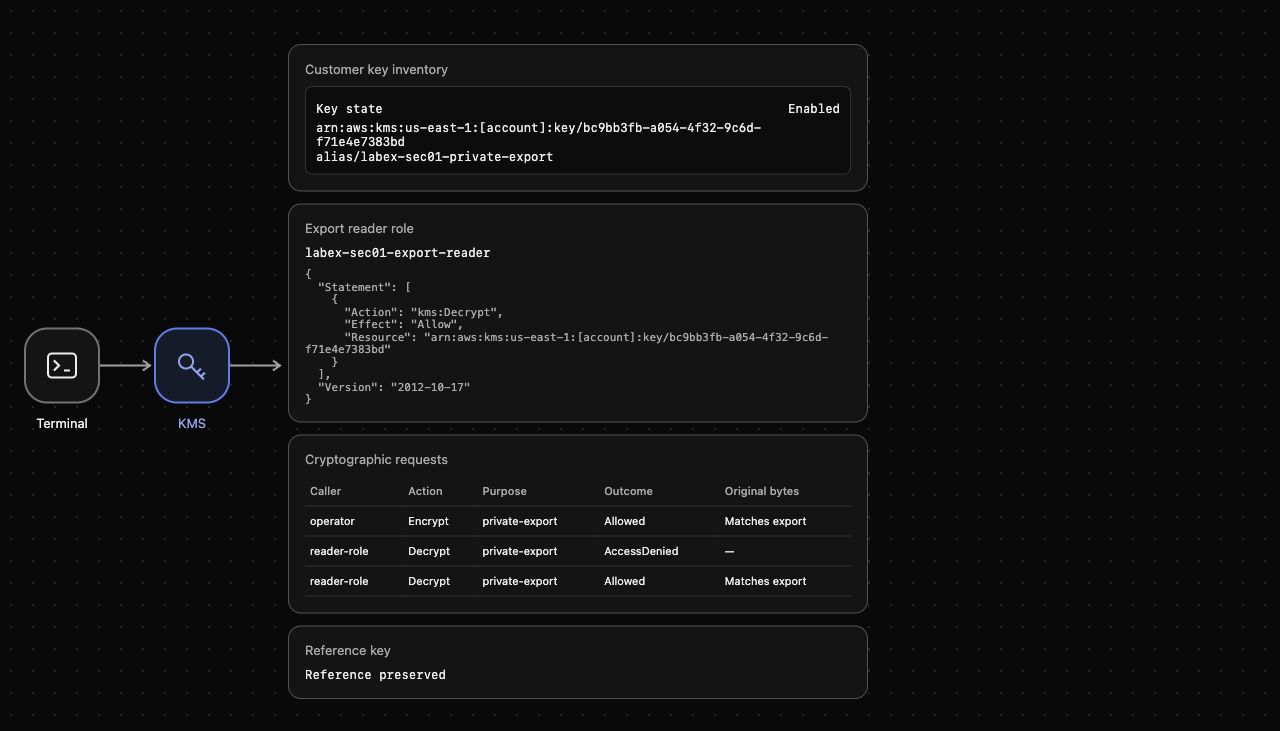
Open AWS View. Customer key inventory should show your enabled key, while Cryptographic requests shows an allowed operator Encrypt request whose input matches the export.
Grant One Reader Role Access
In this step, you will let the application reader decrypt only with your export key. An IAM role permission specifies both an action and the resource it applies to. kms:Decrypt permits recovery of bytes; it does not grant encryption or key administration.
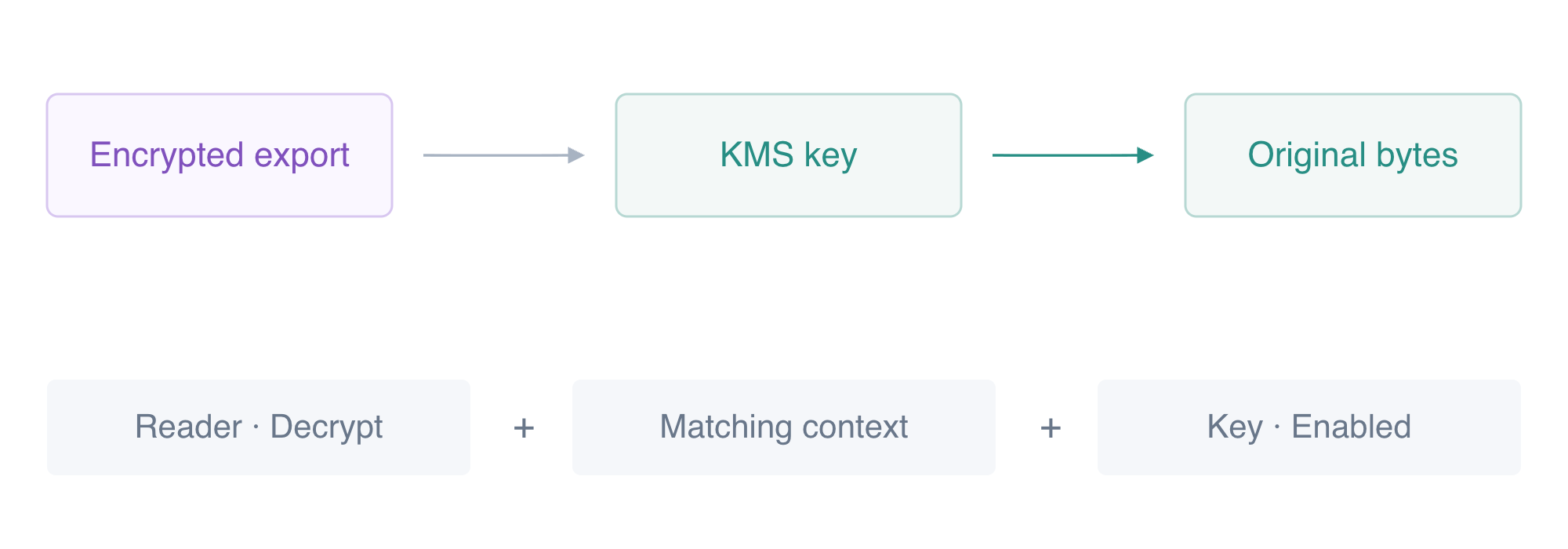
The reader needs the correct context, a Decrypt grant and an enabled key to recover the export.
First try the reader profile before adding a grant. --profile export-reader selects the prepared temporary role session instead of the operator. The command must fail with an access-denied response and must not return plaintext.
aws kms decrypt --profile export-reader --key-id "$KEY_ARN" --ciphertext-blob fileb://private-export.kms --encryption-context Purpose=private-export --query KeyId --output text
Create a policy document. The here-document writes the lines between <<EOF and EOF to read-export.json; the shell expands $KEY_ARN to the exact key ARN. This grant uses neither a wildcard action nor a wildcard resource.
cat > read-export.json <<EOF
{
  "Version": "2012-10-17",
  "Statement": [{"Effect": "Allow", "Action": "kms:Decrypt", "Resource": "$KEY_ARN"}]
}
EOF
Attach that inline policy to the reader role. An inline policy belongs to this role and can be removed independently during cleanup. The supplied key uses its standard same-account key policy, which allows IAM permissions to authorize this role.
aws iam put-role-policy --role-name labex-sec01-export-reader --policy-name ReadPrivateExport --policy-document file://read-export.json
Now recover the encrypted bytes with the reader session. The command selects the base64 plaintext field, decodes it, and writes the restored export without displaying its contents.
aws kms decrypt --profile export-reader --key-id "$KEY_ARN" --ciphertext-blob fileb://private-export.kms --encryption-context Purpose=private-export --query Plaintext --output text | base64 --decode > restored-export.json
cmp compares the actual file bytes. With &&, the message prints only when that comparison succeeds.
cmp private-export.json restored-export.json && echo "Original export bytes recovered"
Expect Original export bytes recovered. AWS View should show the exact-key reader policy and an allowed reader-role Decrypt whose recovered bytes match the export. Keep this role limited to Decrypt on your key.
Diagnose Three Decryption Failures
In this step, you will distinguish context, permission and key-state failures. Keep the same ciphertext throughout so each result has a clear cause. Failed commands below intentionally select only a key identifier, never plaintext.
First change only the context value. Even a permitted reader cannot decrypt ciphertext with an incorrect context.
aws kms decrypt --profile export-reader --key-id "$KEY_ARN" --ciphertext-blob fileb://private-export.kms --encryption-context Purpose=wrong-context --query KeyId --output text
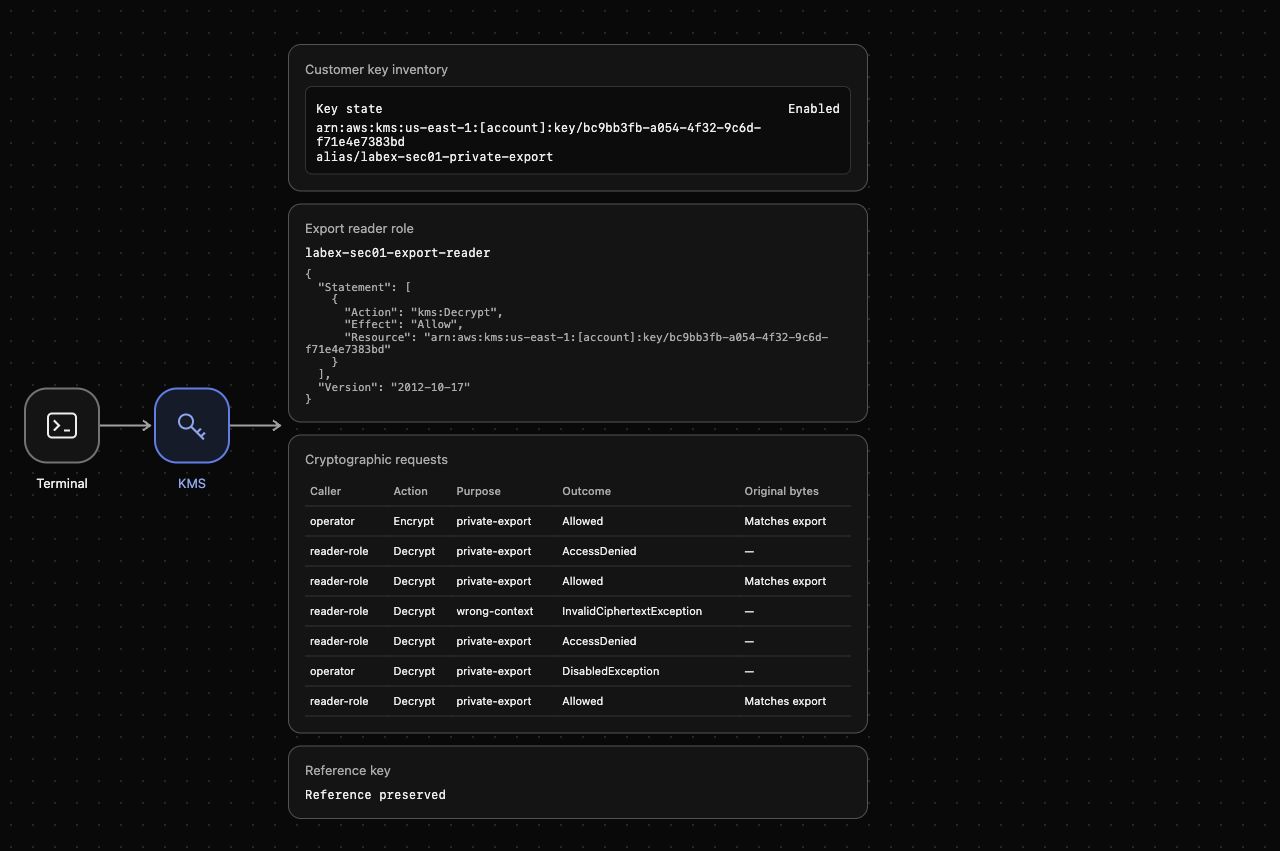
Expect InvalidCiphertextException. The key and role grant still exist, but the context does not match the context used for Encrypt.
Next remove the role's grant and repeat the correct-context request. Removing an inline policy changes authorization without modifying the key or ciphertext.
aws iam delete-role-policy --role-name labex-sec01-export-reader --policy-name ReadPrivateExport
aws kms decrypt --profile export-reader --key-id "$KEY_ARN" --ciphertext-blob fileb://private-export.kms --encryption-context Purpose=private-export --query KeyId --output text
Expect an access-denied response. Restore the narrow grant before the next test.
aws iam put-role-policy --role-name labex-sec01-export-reader --policy-name ReadPrivateExport --policy-document file://read-export.json
Finally disable the key. A disabled key remains in the inventory but cannot perform cryptographic operations. Use the operator profile, which has permission, to isolate the key-state failure.
aws kms disable-key --key-id "$KEY_ARN"
aws kms decrypt --key-id "$KEY_ARN" --ciphertext-blob fileb://private-export.kms --encryption-context Purpose=private-export --query KeyId --output text
Expect DisabledException. Enable the key and repeat the successful reader recovery to confirm normal behavior returns.
aws kms enable-key --key-id "$KEY_ARN"
aws kms decrypt --profile export-reader --key-id "$KEY_ARN" --ciphertext-blob fileb://private-export.kms --encryption-context Purpose=private-export --query Plaintext --output text | base64 --decode > restored-export.json
cmp private-export.json restored-export.json && echo "Reader access restored"
Inspect AWS View's Cryptographic requests table. Compare the caller, context and outcome of the denied requests. A role grant cannot repair a context mismatch or a disabled key.
Retire the Owned Key Safely
In this step, you will remove the reader grant and alias, then schedule deletion of only your export key. KMS key deletion has a waiting period: PendingDeletion is the expected immediate state, not proof that a key has already disappeared. During that period the key cannot decrypt.
Confirm the ARN still belongs to your owned export key before scheduling deletion.
aws kms describe-key --key-id "$KEY_ARN" --query 'KeyMetadata.[Description,KeyState]' --output text
Expect labex-sec01-owned-export and Enabled. Remove only the role grant you added and the alias you created.
aws iam delete-role-policy --role-name labex-sec01-export-reader --policy-name ReadPrivateExport
aws kms delete-alias --alias-name alias/labex-sec01-private-export
Schedule the key's deletion with the minimum seven-day waiting period.
aws kms schedule-key-deletion --key-id "$KEY_ARN" --pending-window-in-days 7 --query DeletionDate --output text
The command returns the scheduled deletion date. Confirm the actual key state with a separate read and preserve the unrelated reference key.
aws kms describe-key --key-id "$KEY_ARN" --query KeyMetadata.KeyState --output text
aws kms describe-key --key-id alias/labex-sec01-reference --query KeyMetadata.KeyState --output text
Expect PendingDeletion for your key and Enabled for the reference. AWS View should show no reader grant and Reference preserved. Use rm -f to remove only the named local export artifacts; it tolerates a missing file without deleting other project files.
rm -f private-export.json private-export.kms restored-export.json read-export.json
Run this step's verification while the operator profile is still available. After it passes, remove this VM's disposable CLI profiles and unset the key variable. This removes local session credentials; it does not cancel the scheduled cloud-key deletion.
rm -f /home/labex/.aws/credentials /home/labex/.aws/config
unset KEY_ARN
Summary
You encrypted actual export bytes with a customer KMS key and a nonsecret context, granted one reader role Decrypt on the exact key, and recovered the original bytes. Incorrect context, a removed grant and a disabled key caused distinct failures. You then retired the owned key through its deletion waiting period while preserving the unrelated reference.