Introduction
A public delivery application has an Internet route, a public address and an HTTP security-group grant, but client A cannot read it. Its subnet network ACL allows the request destination port while blocking the client's return port. You will diagnose and repair that path, observe rule priority, then restore the supplied initial configuration.
Complete Connect Privately to S3 with a VPC Endpoint first. This fresh environment supplies its own application, public and private subnets, public route, address, security group and custom ACL. The CLI is configured. Preserve those resources and the reference network. Modify only the custom ACL rule taught here and remove your temporary deny rule during cleanup. The final baseline intentionally reproduces the initial fault; it does not remove the supplied application.
Certification Relevance
This lab provides foundational practice for the following exam topics.
- Cloud Practitioner (CLF-C02) · Task 3.5: Basic VPC security-group and network ACL roles.
- Solutions Architect – Associate (SAA-C03) · Task 1.2: Basic subnet security controls and application access conditions.
- CloudOps Engineer – Associate (SOA-C03) · Task 5.3: Diagnosing application connectivity through ACL rules and response ports.
- Advanced Networking – Specialty (ANS-C01) · Task 3.1: Foundational practice maintaining ordered subnet rules and checking the real return path.
Inspect the Application's Subnet Boundary
In this step, you will locate the application and compare its route, security group and network ACL before changing anything.
Use Terminal and open AWS View beside it. The public application's private address is 10.20.1.10. Client A is 198.51.100.10; client B is 198.51.100.20. The supplied security group grants only client A TCP port 80. Port 8081 has no service grant.
cd /home/labex/project
Select the VPC by its Name tag. Filters select resources, the query selects an ID, and $(...) saves it for later commands:
VPC_ID=$(aws ec2 describe-vpcs \
  --filters Name=tag:Name,Values=application-network \
  --query 'Vpcs[0].VpcId' \
  --output text)
Save the public application subnet and its supplied interface:
SUBNET_ID=$(aws ec2 describe-subnets \
  --filters "Name=vpc-id,Values=$VPC_ID" Name=tag:Name,Values=public-subnet \
  --query 'Subnets[0].SubnetId' \
  --output text)
ENI_ID=$(aws ec2 describe-network-interfaces \
  --filters "Name=subnet-id,Values=$SUBNET_ID" \
  --query 'NetworkInterfaces[0].NetworkInterfaceId' \
  --output text)
Read the private address, public-address association and attached group:
aws ec2 describe-network-interfaces \
  --network-interface-ids "$ENI_ID" \
  --query 'NetworkInterfaces[].{Private:PrivateIpAddress,Public:Association.PublicIp,Groups:Groups}' \
  --output json
Read the table associated with this subnet:
aws ec2 describe-route-tables \
  --filters "Name=association.subnet-id,Values=$SUBNET_ID" \
  --query 'RouteTables[].{Routes:Routes,Associations:Associations}' \
  --output json
The public address is associated, and an active 0.0.0.0/0 route targets an Internet gateway. Save and read the supplied security group:
GROUP_ID=$(aws ec2 describe-security-groups \
  --filters "Name=vpc-id,Values=$VPC_ID" Name=group-name,Values=supplied-application \
  --query 'SecurityGroups[0].GroupId' \
  --output text)
aws ec2 describe-security-groups \
  --group-ids "$GROUP_ID" \
  --query 'SecurityGroups[].{Inbound:IpPermissions,Outbound:IpPermissionsEgress}' \
  --output json
Its inbound grant is TCP 80 from 198.51.100.10/32, with the supplied default outbound grant. Preserve these rules.
A network ACL controls traffic crossing a subnet boundary. Each subnet has one ACL; an ACL can serve multiple subnets. Unlike a stateful security group, an ACL is stateless: permitting a request does not automatically permit its response. Select the ACL associated with the application subnet:
ACL_ID=$(aws ec2 describe-network-acls \
  --filters "Name=association.subnet-id,Values=$SUBNET_ID" \
  --query 'NetworkAcls[0].NetworkAclId' \
  --output text)
Read its identity, associations and separate inbound/outbound entries:
aws ec2 describe-network-acls \
  --network-acl-ids "$ACL_ID" \
  --query 'NetworkAcls[].{ID:NetworkAclId,Default:IsDefault,Associations:Associations,Entries:Entries}' \
  --output json
This is the custom application-acl, not the default ACL. Its rule 100 allows client A TCP destination port 80 in each direction. Egress: false means inbound; true means outbound. Protocol 6 is TCP. Unmatched traffic reaches the final deny rule, shown as * in AWS View and 32767 in CLI output.
In AWS View, click Request application · client A: it returns Connection failed despite the public route and security-group grant. Request application · client B and Request port 8081 also fail. Keep this Terminal open to preserve the saved IDs.
Repair the Client's Return-Port Rule
In this step, you will replace the incorrect outbound port match while preserving the narrow client address.
An HTTP request travels from a client-chosen ephemeral port to server port 80. The response travels from server port 80 to that client port. Network ACL port ranges match the packet's destination port in each direction. An outbound destination-port-80 rule does not admit this response.
Ephemeral ranges depend on the initiating client. For this exercise, allow the common client range 1024–65535 only toward client A 198.51.100.10/32. Do not treat that range as one universal operating-system default. Replace existing outbound rule 100; --egress selects the outbound direction and --port-range specifies its destination range:
aws ec2 replace-network-acl-entry \
  --network-acl-id "$ACL_ID" \
  --rule-number 100 \
  --protocol 6 \
  --rule-action allow \
  --egress \
  --cidr-block 198.51.100.10/32 \
  --port-range From=1024,To=65535
A successful replacement produces no output. Read the entries:
aws ec2 describe-network-acls \
  --network-acl-ids "$ACL_ID" \
  --query 'NetworkAcls[].Entries' \
  --output json
Inbound rule 100 remains TCP 80 from client A. Outbound rule 100 now allows destination ports 1024–65535 toward the same client. The default denies and subnet association remain unchanged.
In AWS View, click Request application · client A again. The new request succeeds with Application online, source 198.51.100.10 and destination port 80. Request application · client B and Request port 8081 still fail. Both the request and response can now cross the ACL; the repair did not broaden the inbound security group or subnet ACL to other clients.
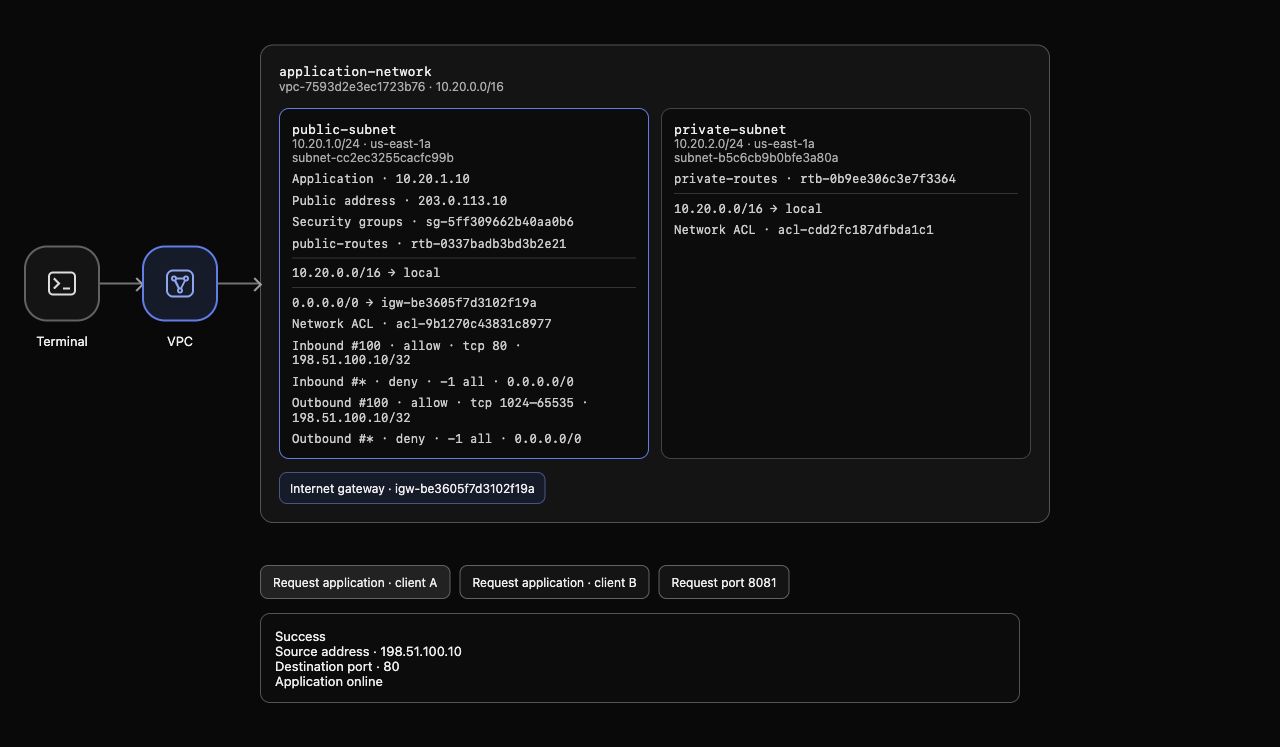
Example: inbound rule 100 allows TCP 80 from client A; outbound rule 100 allows the response destination ports 1024–65535 toward that same client. The final default deny appears in both directions, and the actual request returns Application online. Resource IDs can differ in your environment.
Observe a Lower-Numbered Deny Rule
In this step, you will deliberately insert a matching deny ahead of the inbound allow to see how rule order changes access.
Network ACL rules are evaluated from the lowest number upward within each direction. The first matching rule decides the result; later rules are not considered. Add temporary inbound rule 90 denying client A TCP 80. --ingress explicitly selects inbound; creating rule 90 does not overwrite rule 100:
aws ec2 create-network-acl-entry \
  --network-acl-id "$ACL_ID" \
  --rule-number 90 \
  --protocol 6 \
  --rule-action deny \
  --ingress \
  --cidr-block 198.51.100.10/32 \
  --port-range From=80,To=80
Read the entries:
aws ec2 describe-network-acls \
  --network-acl-ids "$ACL_ID" \
  --query 'NetworkAcls[].Entries' \
  --output json
Inbound deny 90 matches before inbound allow 100. Outbound 100 still permits client return ports, and the security group still permits HTTP from client A. Neither overrides the earlier ACL denial.
After AWS View displays inbound rule 90, click Request application · client A. The new request fails. Client B and port 8081 remain blocked too. A previous successful response is historical; request again after changing rules. Keep rule 90 for this step's check, then remove it in the next step.
Remove the Temporary Deny and Recheck Access
In this step, you will remove only the earlier deny and verify the repaired return path still works.
Delete inbound rule 90. The direction matters because inbound and outbound rule numbers are separate:
aws ec2 delete-network-acl-entry --network-acl-id "$ACL_ID" --rule-number 90 --ingress
Read the entries again:
aws ec2 describe-network-acls \
  --network-acl-ids "$ACL_ID" \
  --query 'NetworkAcls[].Entries' \
  --output json
Rule 90 is absent. Inbound 100 allows client A TCP 80, outbound 100 allows the client's return ports, and unmatched traffic is still denied. Keep the ACL associated with its original subnet and preserve the security group, public route and address.
In AWS View, a new Request application · client A succeeds with Application online. Request application · client B and Request port 8081 still fail. The stateful security group permits replies to an admitted request, but the stateless subnet ACL still needs both directions; removing its earlier deny restores this independent boundary.
Restore the Supplied Initial ACL Configuration
In this step, you will undo your return-port edit and confirm no temporary deny remains, leaving the provided resources intact.
Restore outbound rule 100 to the supplied destination-port-80 setting. This cleanup intentionally restores the initial fault; it is not the recommended rule for a working HTTP response path:
aws ec2 replace-network-acl-entry \
  --network-acl-id "$ACL_ID" \
  --rule-number 100 \
  --protocol 6 \
  --rule-action allow \
  --egress \
  --cidr-block 198.51.100.10/32 \
  --port-range From=80,To=80
Read the full ACL inventory for this VPC, including associations. Do not use removable tags as the only cleanup evidence:
aws ec2 describe-network-acls \
  --filters "Name=vpc-id,Values=$VPC_ID" \
  --query 'NetworkAcls[].{ID:NetworkAclId,Default:IsDefault,Associations:Associations,Entries:Entries}' \
  --output json
Your temporary rule 90 must be absent. The supplied custom ACL still belongs to the public application subnet. Both of its rule-100 entries match client A TCP destination port 80, with the final denies intact. The private subnet retains its default ACL. Do not delete or replace the supplied ACL, subnets, application, group, gateway or public address.
Read the original security group to confirm its rules were preserved:
aws ec2 describe-security-groups \
  --group-ids "$GROUP_ID" \
  --query 'SecurityGroups[].{Inbound:IpPermissions,Outbound:IpPermissionsEgress}' \
  --output json
In AWS View, a new Request application · client A fails again because its return port is no longer allowed. Client B and port 8081 remain blocked. A failed API or unavailable application network is not cleanup evidence; the authenticated inventory must succeed, and the actual configured path must produce these results.
Run this step's completion check.
Summary
You located a public application's subnet ACL and diagnosed a missing response-port range. Replacing the outbound rule restored actual HTTP for client A while other sources and ports stayed blocked. A lower-numbered inbound deny then demonstrated first-match rule ordering; removing it restored access.
You preserved the supplied security group, routes, addresses and subnet associations, removed the temporary deny, and restored the original ACL baseline.