Introduction
A release is stored correctly in S3, but the distribution can still serve an earlier cached copy. Control the cache lifetime, observe reuse and expiration, then publish an update by invalidating only its viewer path. Keep a second object cached and the origin private.
Complete the private S3 content delivery lab first. This independent VM supplies a new private bucket, OAC, distribution and matching bucket policy; it does not reuse any previous VM. Caching is initially disabled, no viewer request has been made, and no invalidation exists. Prepared page files let you focus on cache behavior. Use AWS View above for actual state and Terminal below for commands. A personal AWS account or public domain is unnecessary.
Certification Relevance
| Certification | Exam task | Practice |
|---|---|---|
| Solutions Architect – Associate (SAA-C03) | Task 3.4 | Practice CloudFront edge content delivery and the effect of cache lifetime on origin reads. |
Lab Overview
Observe Cache Reuse and Expiration
In this step, configure a short cache lifetime and distinguish a hit from a request that reads the origin again.
A cache retains a copy for later requests. TTL is its freshness lifetime in seconds. The object's Cache-Control: max-age supplies a lifetime; distribution minimum and maximum TTL bound it, while default TTL applies when the origin supplies no lifetime. This exercise uses these ordinary distribution settings instead of creating a separate cache policy.
Identify the supplied distribution. --query selects the distribution with this lab's comment, and $(...) stores its ID or domain in a shell variable. Keep this Terminal open. Inspect the unrelated reference bucket without changing it:
cd /home/labex/project
DIST_ID=$(aws cloudfront list-distributions \
  --query "DistributionList.Items[?Comment=='labex-n03:private-content'].Id | [0]" \
  --output text)
DIST_DOMAIN=$(aws cloudfront get-distribution \
  --id "$DIST_ID" \
  --query Distribution.DomainName \
  --output text)
aws s3api list-buckets \
  --query 'Buckets[].Name'
Read the current configuration and its ETag, the version required for a safe update. > writes command output to a file. sed changes only the two zero-valued TTL properties in this prepared configuration; minimum TTL remains zero. The new maximum permits the longer lifetimes used later:
aws cloudfront get-distribution-config \
  --id "$DIST_ID" \
  --query DistributionConfig > current-config.json
ETAG=$(aws cloudfront get-distribution-config \
  --id "$DIST_ID" \
  --query ETag \
  --output text)
sed -e 's/"DefaultTTL": 0/"DefaultTTL": 6/'   -e 's/"MaxTTL": 0/"MaxTTL": 3600/'   current-config.json > cached-config.json
aws cloudfront update-distribution \
  --id "$DIST_ID" \
  --if-match "$ETAG" \
  --distribution-config file://cached-config.json
aws cloudfront wait distribution-deployed \
  --id "$DIST_ID"
Set a six-second object lifetime while uploading the supplied first release. This retains the text/html content type:
aws s3api put-object \
  --bucket labex-n03-content \
  --key index.html \
  --body index.html \
  --content-type text/html \
  --cache-control 'max-age=6'
curl --include shows the headers and body. --resolve selects this VM's viewer endpoint for the actual distribution name without changing system DNS. Run both requests together so the second occurs before the six-second lifetime ends:
curl --fail --include --noproxy '*'   --resolve "${DIST_DOMAIN}:8082:127.0.0.1"   "http://${DIST_DOMAIN}:8082/index.html"
curl --fail --include --noproxy '*'   --resolve "${DIST_DOMAIN}:8082:127.0.0.1"   "http://${DIST_DOMAIN}:8082/index.html"
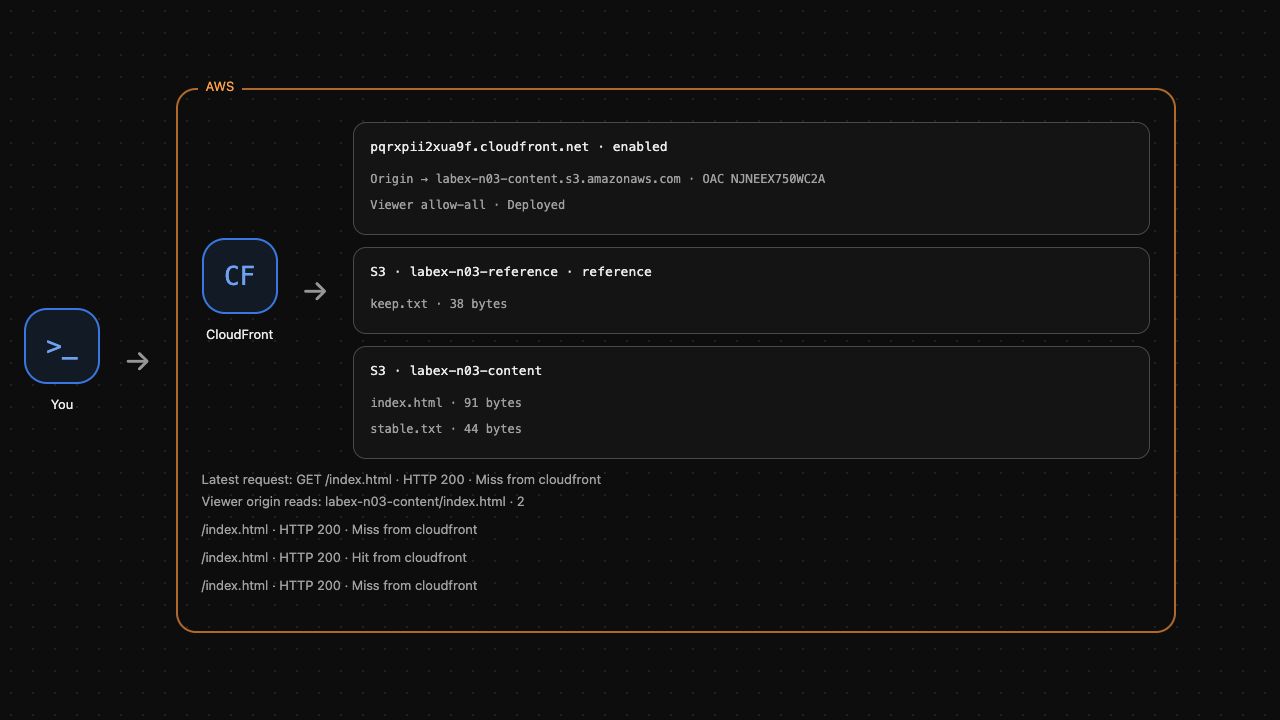
The first request shows X-Cache: Miss from cloudfront; the second shows Hit from cloudfront. Both return Release one. A hit reuses the stored bytes without another origin read. Age shows the cached copy's age; immediate requests can both show zero seconds.
sleep 7 lets the six-second copy expire. Then request it again:
sleep 7
curl --fail --include --noproxy '*'   --resolve "${DIST_DOMAIN}:8082:127.0.0.1"   "http://${DIST_DOMAIN}:8082/index.html"
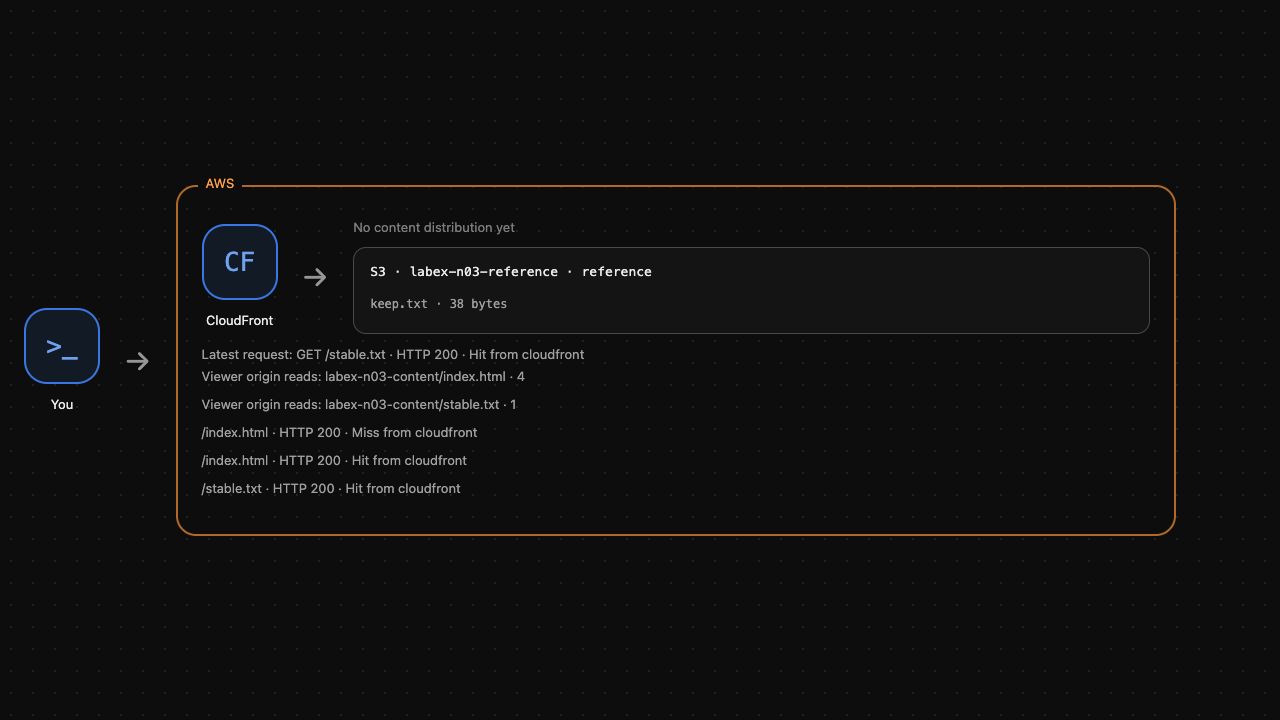
Expect another miss with the same page. Expiration makes the next request consult the origin; it does not delete the S3 object. AWS View shows actual request results and origin-read counts. Run the cache-lifetime check before continuing.
Observe an Update Behind a Cached Copy
In this step, upload a new release and observe why an existing cache copy can still return the old content.
Use a longer lifetime to make the stale-content observation easy to follow. Re-upload the first release with max-age=900. Upload the separate stable.txt object with max-age=3600. The distribution maximum of 3600 allows both values:
aws s3api put-object \
  --bucket labex-n03-content \
  --key index.html \
  --body index.html \
  --content-type text/html \
  --cache-control 'max-age=900'
aws s3api put-object \
  --bucket labex-n03-content \
  --key stable.txt \
  --body stable.txt \
  --content-type text/plain \
  --cache-control 'max-age=3600'
Changing the origin's metadata does not retroactively change a cached response. Wait for the previous six-second copy to expire, then warm both object paths:
sleep 7
curl --fail --include --noproxy '*'   --resolve "${DIST_DOMAIN}:8082:127.0.0.1"   "http://${DIST_DOMAIN}:8082/index.html"
curl --fail --include --noproxy '*'   --resolve "${DIST_DOMAIN}:8082:127.0.0.1"   "http://${DIST_DOMAIN}:8082/stable.txt"
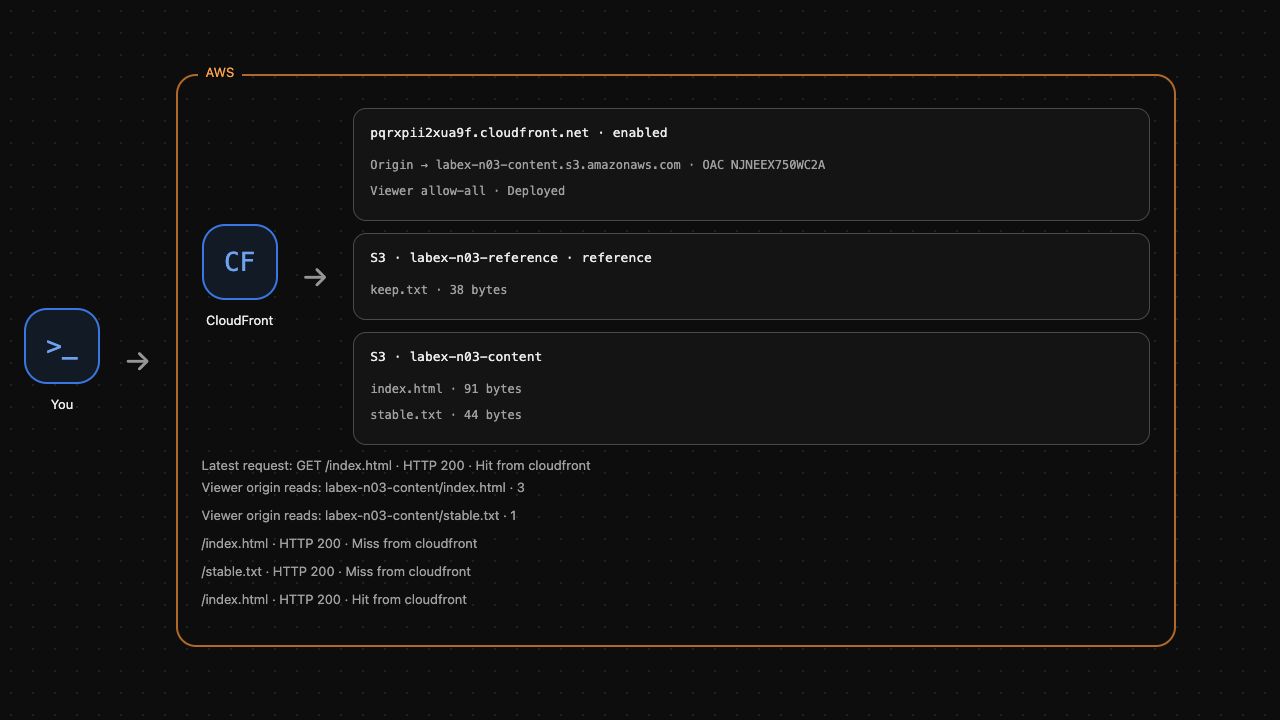
Both requests miss and read their current origin objects. The page now carries Cache-Control: max-age=900. Keep moving through the next two steps within that fifteen-minute lifetime.
The supplied release-two.html contains the changed page. Upload it under the same object key, preserving the content type and lifetime. Read the object through the authenticated S3 CLI into origin-release.html, then inspect its actual bytes:
cat release-two.html
aws s3api put-object \
  --bucket labex-n03-content \
  --key index.html \
  --body release-two.html \
  --content-type text/html \
  --cache-control 'max-age=900'
aws s3api get-object \
  --bucket labex-n03-content \
  --key index.html origin-release.html
cat origin-release.html
The origin contains Release two. Request the viewer's same path:
curl --fail --include --noproxy '*' --resolve "${DIST_DOMAIN}:8082:127.0.0.1" "http://${DIST_DOMAIN}:8082/index.html"
Expect a hit containing Release one. The upload succeeded, but the retained viewer copy is still fresh under its own TTL. This is different from an origin permission failure. Run the stale-copy check.
Invalidate Only the Updated Page
In this step, make the new release visible before its cached copy expires, without clearing the separate object.
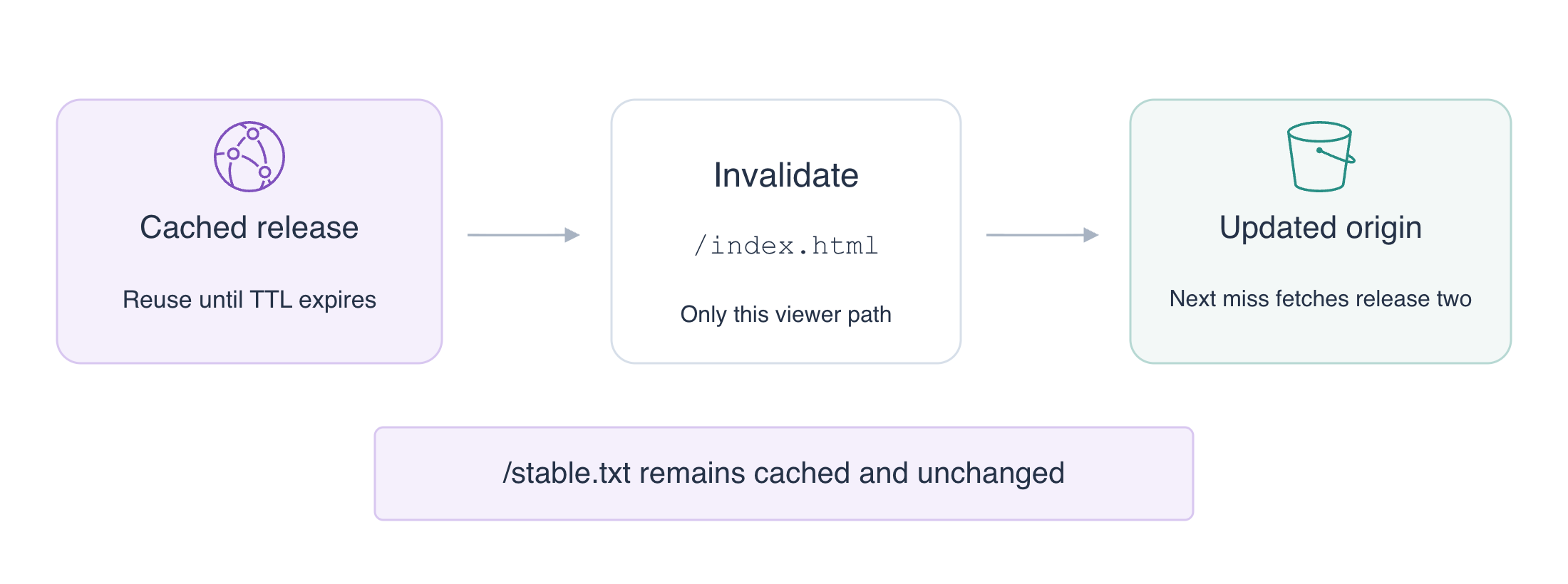
An invalidation removes matching objects from the distribution's cache. Its path is a viewer path beginning with /, not a bucket name or local file path. Use exactly /index.html; /* would unnecessarily invalidate the separate object too.
Create the request. The CLI's --paths shortcut supplies the invalidation batch, and the query stores its generated ID:
INVALIDATION_ID=$(aws cloudfront create-invalidation \
  --distribution-id "$DIST_ID" \
  --paths '/index.html' \
  --query Invalidation.Id \
  --output text)
aws cloudfront wait invalidation-completed \
  --distribution-id "$DIST_ID" \
  --id "$INVALIDATION_ID"
aws cloudfront get-invalidation \
  --distribution-id "$DIST_ID" \
  --id "$INVALIDATION_ID" \
  --query 'Invalidation.{Status:Status,Paths:InvalidationBatch.Paths.Items}'
Confirm Completed and /index.html. A completed request alone does not prove that viewers get the intended bytes. Request the page twice to prove the new content and its subsequent reuse:
curl --fail --include --noproxy '*'   --resolve "${DIST_DOMAIN}:8082:127.0.0.1"   "http://${DIST_DOMAIN}:8082/index.html"
curl --fail --include --noproxy '*'   --resolve "${DIST_DOMAIN}:8082:127.0.0.1"   "http://${DIST_DOMAIN}:8082/index.html"
Expect Release two on a miss, then the same new page on a hit. The first request retrieves the current origin bytes; the second reuses that new copy.
Request the separate object and repeat the anonymous direct-origin test:
curl --fail --include --noproxy '*'   --resolve "${DIST_DOMAIN}:8082:127.0.0.1"   "http://${DIST_DOMAIN}:8082/stable.txt"
curl --noproxy '*' --output /dev/null   --write-out 'Anonymous origin: HTTP %{http_code}\n'   http://127.0.0.1:5000/labex-n03-content/index.html
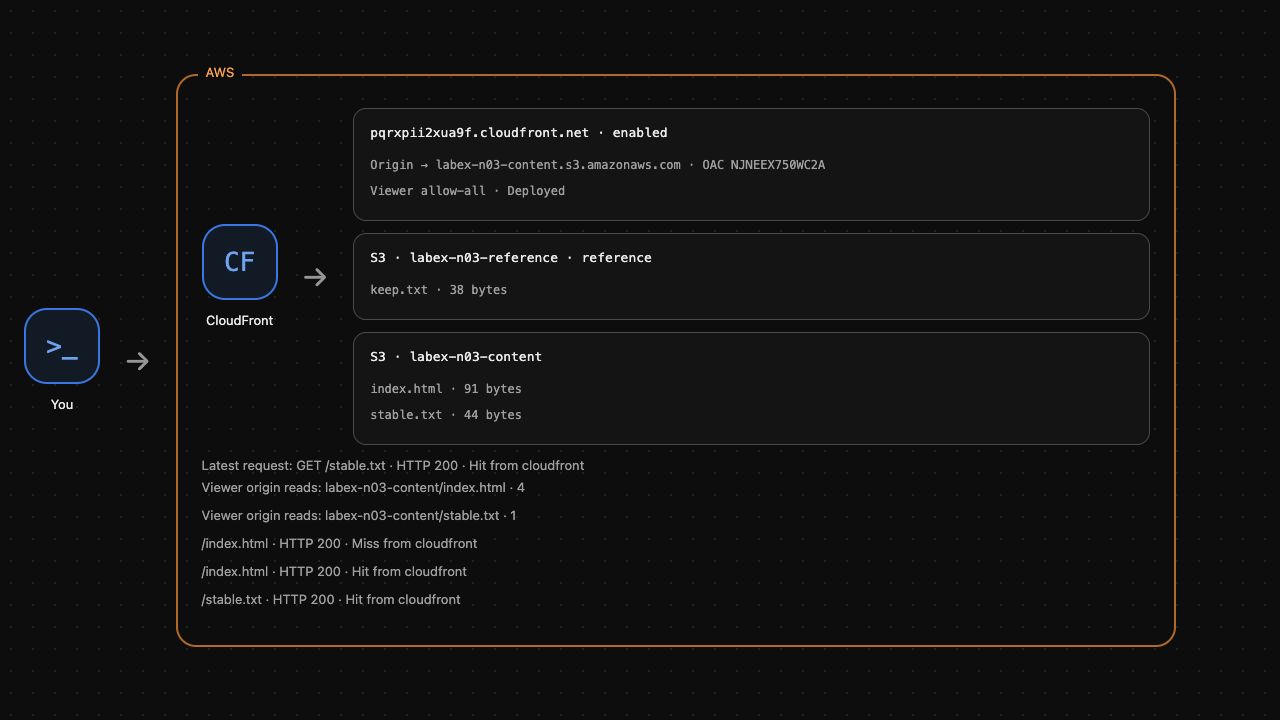
stable.txt must remain a hit with its original content and no additional origin read. Anonymous S3 access must remain HTTP 403. Invalidation changes cache state, not origin permissions. Run the targeted-update check.
Remove Only Your Delivery Resources
In this step, disable and remove your distribution before removing its OAC and S3 content. Keep the reference bucket unchanged.
CloudFront uses an ETag as the version token for configuration changes. Fetch the current configuration and its ETag rather than guessing a token.
First read the OAC ID from your distribution before removing it. This shell variable keeps the exact control selected for cleanup:
OAC_ID=$(aws cloudfront get-distribution-config \
  --id "$DIST_ID" \
  --query 'DistributionConfig.Origins.Items[0].OriginAccessControlId' \
  --output text)
Now save the current configuration and capture its ETag:
aws cloudfront get-distribution-config \
  --id "$DIST_ID" \
  --query DistributionConfig \
  --output json > distribution-current.json
DIST_ETAG=$(aws cloudfront get-distribution-config \
  --id "$DIST_ID" \
  --query ETag \
  --output text)
In this lab's current configuration, the distribution's Enabled property is the only true property with that name. The following standard sed substitution produces a disabled copy while retaining the origin settings:
sed 's/"Enabled": true/"Enabled": false/' distribution-current.json > distribution-disabled.json
aws cloudfront update-distribution \
  --id "$DIST_ID" \
  --if-match "$DIST_ETAG" \
  --distribution-config file://distribution-disabled.json
Wait for deployment of the disabled configuration. On AWS, configuration propagation can take time; the exercise does not measure global deployment latency:
aws cloudfront wait distribution-deployed \
  --id "$DIST_ID"
The update changes the ETag. Read the latest token before deleting the disabled distribution:
DIST_ETAG=$(aws cloudfront get-distribution-config \
  --id "$DIST_ID" \
  --query ETag \
  --output text)
aws cloudfront delete-distribution \
  --id "$DIST_ID" \
  --if-match "$DIST_ETAG"
Remove the OAC with its own ETag. The distribution ID and OAC ID refer to different resources:
OAC_ETAG=$(aws cloudfront get-origin-access-control \
  --id "$OAC_ID" \
  --query ETag \
  --output text)
aws cloudfront delete-origin-access-control \
  --id "$OAC_ID" \
  --if-match "$OAC_ETAG"
Remove only the two objects and bucket belonging to this lab:
aws s3api delete-object \
  --bucket labex-n03-content \
  --key index.html
aws s3api delete-object \
  --bucket labex-n03-content \
  --key stable.txt
aws s3api delete-bucket \
  --bucket labex-n03-content
aws s3api list-buckets \
  --query 'Buckets[].Name'
Expect the reference bucket to remain and the content bucket to be absent. AWS View should show no content distribution and only the reference object. Run the cleanup check. An unsuccessful API request does not prove that a resource was deleted.
Summary
You set distribution TTL bounds and object Cache-Control, observed a cache hit without another origin read, and let a short copy expire. You proved that uploading a new origin version does not replace a still-fresh viewer copy. An exact-path invalidation fetched the new page while leaving a separate object cached and the origin private. You then removed only your content resources. For frequent releases, versioned object names are another way to select new content; this lab practiced updating an existing path.