Introduction
A delivery application's public path already works, but its supplied access rule permits HTTP from any IPv4 source. You will give the application a separate security group that allows only its intended client and port. Actual requests will show how source restrictions, port restrictions and stateful replies affect access.
Complete Connect a Public Subnet to the Internet first. This fresh environment supplies its own network, public address, routes and application; it does not reuse your earlier VM. The CLI is already configured. Preserve the supplied resources and the unrelated reference network. Only your new security group is a practice resource to delete.
Certification Relevance
This lab provides hands-on practice for the following exam topics.
- Cloud Practitioner (CLF-C02) · Task 3.5: Security group access controls in a VPC.
- Solutions Architect – Associate (SAA-C03) · Task 1.2: Basic application security controls for network sources, ports and protocols.
- CloudOps Engineer – Associate (SOA-C03) · Tasks 5.1 and 5.3: Basic security group configuration and checking its effect on connectivity.
- Security – Specialty (SCS-C03) · Task 3.3: Foundational practice permitting and preventing required traffic with security groups.
Attach an Empty Practice Security Group
In this step, you will inspect the working application and replace its broad access group with your own empty group.
Use Terminal for commands and click AWS View beside it. The view reads the same resource state as the CLI. It shows application-network, its public and private subnets, and an application at private address 10.20.1.10. Its public address and Internet gateway route are already supplied; leave them unchanged.
cd /home/labex/project
Select the VPC by its Name tag. --filters limits server results, --query selects the ID, and $(...) saves it in a shell variable:
VPC_ID=$(aws ec2 describe-vpcs \
  --filters Name=tag:Name,Values=application-network \
  --query 'Vpcs[0].VpcId' \
  --output text)
Select the supplied application interface inside that VPC:
ENI_ID=$(aws ec2 describe-network-interfaces \
  --filters "Name=vpc-id,Values=$VPC_ID" Name=tag:Name,Values=application-interface \
  --query 'NetworkInterfaces[0].NetworkInterfaceId' \
  --output text)
A security group controls allowed traffic at an associated resource's network interface. Inbound rules allow traffic arriving at the application; outbound rules allow traffic it initiates. Save the ID of the single supplied group so you can restore it during cleanup. [0] selects the first item in this one-group list:
SUPPLIED_GROUP_ID=$(aws ec2 describe-network-interfaces \
  --network-interface-ids "$ENI_ID" \
  --query 'NetworkInterfaces[0].Groups[0].GroupId' \
  --output text)
Read its rules without changing them:
aws ec2 describe-security-groups \
  --group-ids "$SUPPLIED_GROUP_ID" \
  --query 'SecurityGroups[].{ID:GroupId,Inbound:IpPermissions,Outbound:IpPermissionsEgress}' \
  --output json
The supplied group allows inbound TCP port 80 from 0.0.0.0/0, meaning any IPv4 source, and allows all outbound traffic. HTTP uses requests and responses; a port identifies the receiving service. This application serves HTTP on TCP ports 80 and 8081, but the supplied rule permits only port 80.
In AWS View, click Request application · client A, then Request application · client B. Both return Success and Application online on port 80. Client A uses 198.51.100.10; client B uses 198.51.100.20. Click Request port 8081; this client A request fails because that port is not permitted.
Create a separate group in the same VPC. --group-name sets its name, --description explains its purpose, and the quoted tag specification adds ownership tags as one argument. Capture the new ID:
GROUP_ID=$(aws ec2 create-security-group \
  --group-name parcel-web \
  --description "Parcel HTTP access" \
  --vpc-id "$VPC_ID" \
  --tag-specifications 'ResourceType=security-group,Tags=[{Key=Name,Value=parcel-web},{Key=Project,Value=parcel}]' \
  --query 'GroupId' \
  --output text)
A new group has no inbound grants and allows all outbound traffic. Security groups contain allow rules, not explicit deny rules. Traffic without a matching allow rule is blocked.
--groups replaces the interface's group list. Associate only your new group; keeping the broad group alongside it would combine their permissions and still allow both clients:
aws ec2 modify-network-interface-attribute \
  --network-interface-id "$ENI_ID" \
  --groups "$GROUP_ID"
A successful change has no output. Confirm the interface now has only your group:
aws ec2 describe-network-interfaces \
  --network-interface-ids "$ENI_ID" \
  --query 'NetworkInterfaces[].{ID:NetworkInterfaceId,Groups:Groups}' \
  --output json
AWS View now shows parcel-web and Inbound · none. Send new requests from clients A and B; both become Connection failed. The public address and route remain, but the empty group permits no inbound request. Keep this Terminal open to retain the saved IDs.
Allow Only the Intended HTTP Client
In this step, you will grant client A access to port 80 and verify that the other source and port remain blocked.
An inbound rule specifies a protocol, a port range and a source. --protocol tcp selects TCP, --port 80 selects this one port, and --cidr 198.51.100.10/32 selects only client A's IPv4 address. A /32 contains one IPv4 address; it is narrower than 0.0.0.0/0.
Add the rule to your group, not the supplied group:
aws ec2 authorize-security-group-ingress \
  --group-id "$GROUP_ID" \
  --protocol tcp \
  --port 80 \
  --cidr 198.51.100.10/32
The response indicates success and may include the new rule ID. Read the complete inbound rules:
aws ec2 describe-security-groups \
  --group-ids "$GROUP_ID" \
  --query 'SecurityGroups[].IpPermissions' \
  --output json
There is one TCP rule with FromPort and ToPort both 80, and source 198.51.100.10/32. AWS View shows the same inbound source and port.
Click Request application · client A. The result is Success, source 198.51.100.10, destination port 80, and body Application online. This is an actual response from the supplied application.
Now click Request application · client B and Request port 8081. Both return Connection failed. The first request has the wrong source; the second uses client A but the wrong port. A public address and route provide a path, while the security group decides which traffic may use it.
Test and Remove a Temporary Port Grant
In this step, you will demonstrate that a second listening port becomes reachable only when its own rule exists, then remove that temporary grant.
The supplied application also serves HTTP on port 8081. Keep the same permitted source and add one temporary rule for that port:
aws ec2 authorize-security-group-ingress \
  --group-id "$GROUP_ID" \
  --protocol tcp \
  --port 8081 \
  --cidr 198.51.100.10/32
Read the rules again:
aws ec2 describe-security-groups \
  --group-ids "$GROUP_ID" \
  --query 'SecurityGroups[].IpPermissions' \
  --output json
There are now two TCP rules: ports 80 and 8081, each restricted to client A. AWS View shows both. Click Request port 8081. The result changes to Success, with destination port 8081 and body Application online. This confirms that the second service is running; the earlier failure was an access-rule restriction.
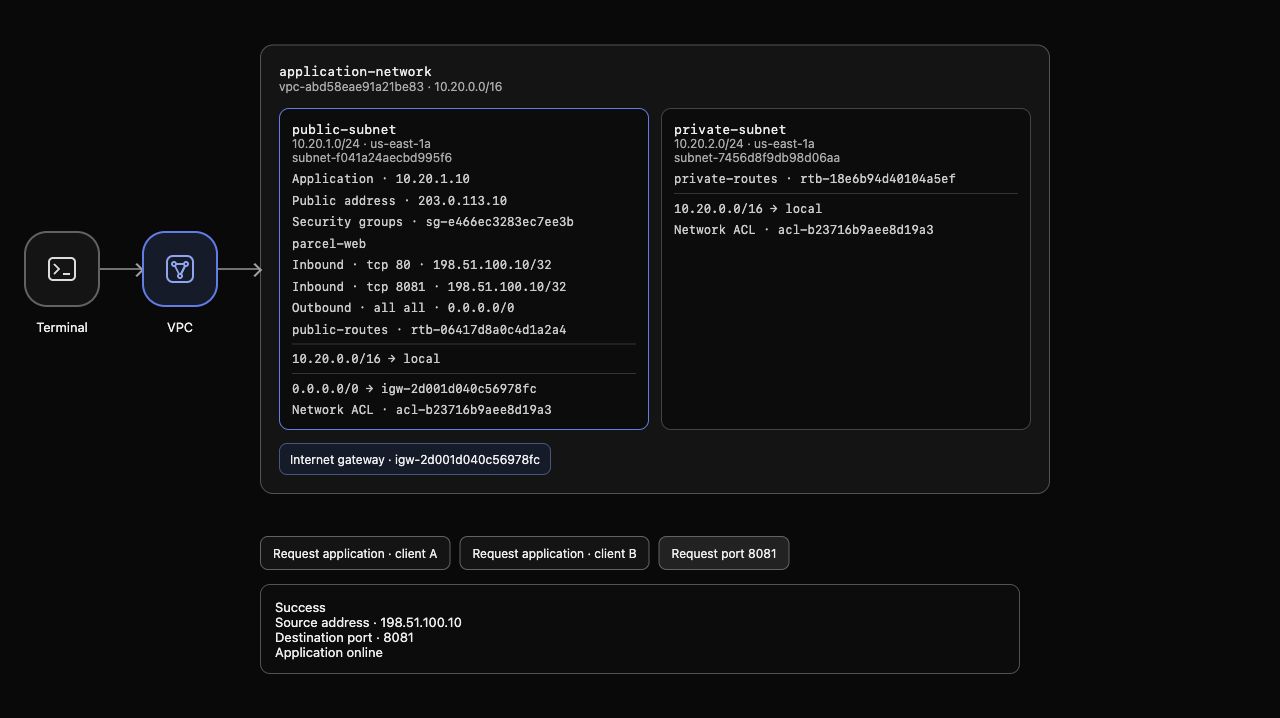
Example AWS View: both narrow inbound rules are present, and client A receives the application response on port 8081. Generated resource IDs differ in your environment.
The exercise requires only port 80. Revoking a rule removes its allow grant. Specify the same protocol, port and source to remove only the temporary rule:
aws ec2 revoke-security-group-ingress \
  --group-id "$GROUP_ID" \
  --protocol tcp \
  --port 8081 \
  --cidr 198.51.100.10/32
The response indicates success. Query the resulting rules:
aws ec2 describe-security-groups \
  --group-ids "$GROUP_ID" \
  --query 'SecurityGroups[].IpPermissions' \
  --output json
Only client A's port 80 rule remains. After AWS View removes the 8081 rule, click Request port 8081 again; it now fails. Client A port 80 still succeeds, and client B port 80 still fails. You changed one port grant rather than replacing the application or its route.
Observe Stateful HTTP Replies
In this step, you will remove your group's default outbound rule and confirm that responses to allowed inbound HTTP still work.
Security groups are stateful: a response to an allowed inbound request can leave the application even when no outbound rule permits a new connection. An outbound rule governs traffic the application initiates; it is not required to allow this HTTP response.
Read your current outbound permissions:
aws ec2 describe-security-groups \
  --group-ids "$GROUP_ID" \
  --query 'SecurityGroups[].IpPermissionsEgress' \
  --output json
The new group has the default all-traffic destination 0.0.0.0/0. In the next command, --ip-permissions accepts a JSON list of rule specifications as one quoted argument. IpProtocol value -1 means all protocols, and IpRanges identifies destinations for an outbound rule. Remove that exact default rule:
aws ec2 revoke-security-group-egress \
  --group-id "$GROUP_ID" \
  --ip-permissions '[{"IpProtocol":"-1","IpRanges":[{"CidrIp":"0.0.0.0/0"}]}]'
The response indicates success. Read both directions:
aws ec2 describe-security-groups \
  --group-ids "$GROUP_ID" \
  --query 'SecurityGroups[].{Inbound:IpPermissions,Outbound:IpPermissionsEgress}' \
  --output json
Inbound still allows only client A on port 80; outbound is empty. AWS View shows Outbound · none. Click Request application · client A again. Success and Application online still return: the reply belongs to the permitted inbound connection.
Recheck Request application · client B and Request port 8081. Both still fail. Stateful replies do not grant new inbound access to another source or port. This test establishes response behavior; it does not test a new outbound connection initiated by the application.
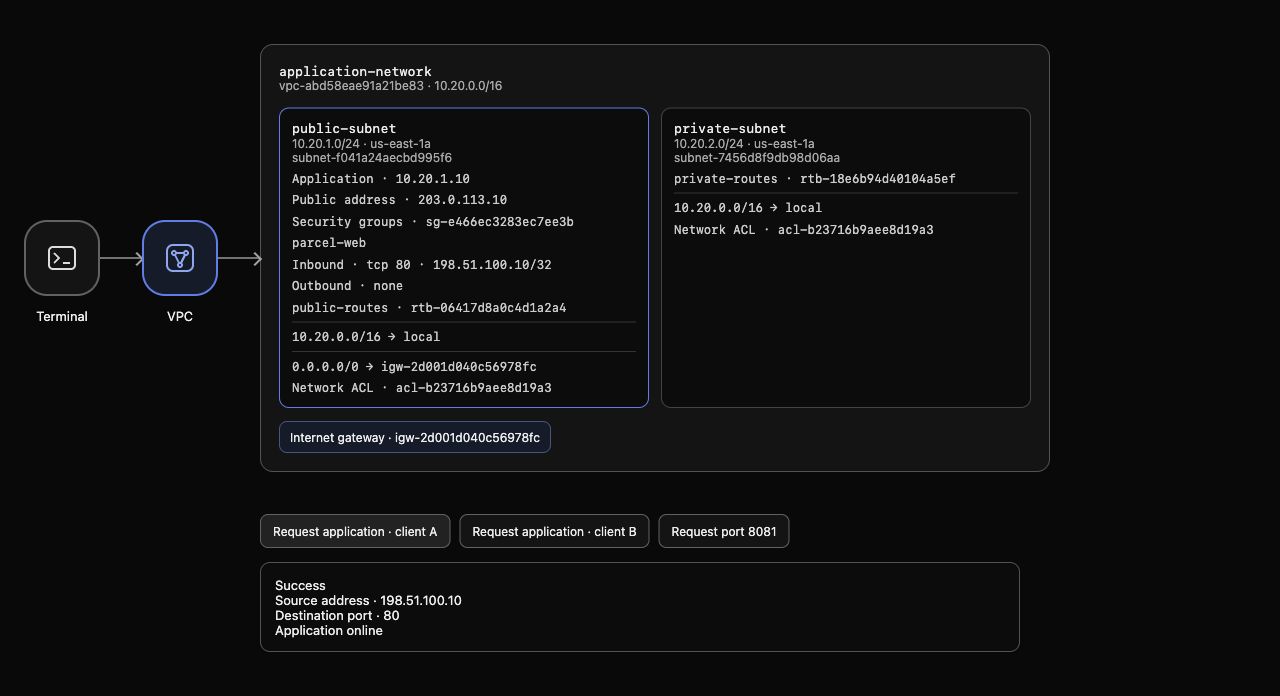
Example AWS View: inbound permits only client A on port 80, outbound is empty, and the actual HTTP response still succeeds. Generated resource IDs differ in your environment.
Restore the Supplied Group and Delete Yours
In this step, you will restore the original application attachment and delete only your practice security group.
A group associated with a network interface cannot be deleted. First replace your group with the saved supplied group; do not delete or edit the supplied group:
aws ec2 modify-network-interface-attribute \
  --network-interface-id "$ENI_ID" \
  --groups "$SUPPLIED_GROUP_ID"
Confirm the association:
aws ec2 describe-network-interfaces \
  --network-interface-ids "$ENI_ID" \
  --query 'NetworkInterfaces[].{ID:NetworkInterfaceId,Groups:Groups}' \
  --output json
Only the original supplied-application group is attached. Now delete your unused group:
aws ec2 delete-security-group --group-id "$GROUP_ID"
Successful deletion produces no output. Query the complete group inventory so absence is established independently of removable tags:
aws ec2 describe-security-groups \
  --query 'SecurityGroups[].{ID:GroupId,Name:GroupName,VPC:VpcId}' \
  --output table
parcel-web is absent. The supplied and default groups remain, as do the VPCs, subnets, application interface, public address and routes. An inventory-query failure does not prove deletion.
AWS View shows supplied-application again. Click the client A and client B request buttons; both port 80 requests return Success, matching the original baseline. Request port 8081 fails, because the unchanged supplied group permits only port 80.
Run this step's completion check.
Summary
You created and attached a separate security group, allowed only client A on TCP port 80, tested and revoked a temporary second-port grant, and confirmed stateful HTTP replies without outbound grants. Actual requests distinguished permitted and blocked traffic. Finally, you restored the supplied group and deleted only your own practice group.
Continue with Give a Private Subnet Outbound Access to build a private application's outbound path without allowing unsolicited external access.