Introduction
A private delivery application reads a manifest from S3. It currently uses a NAT route, but needs a service-specific path that works without general Internet access. You will create an S3 gateway endpoint, compare actual application requests, diagnose the wrong route-table association, and restore the supplied network after the exercise.
Complete Give a Private Subnet Outbound Access first. This fresh environment supplies its own application, S3 object, public and private subnets, NAT gateway and security rules. The CLI is configured. Preserve the supplied resources and reference network; create and later delete only your endpoint, and restore the private NAT default route you temporarily remove.
Certification Relevance
This lab provides foundational practice for the following exam topics.
- Cloud Practitioner (CLF-C02) · Task 3.5: The roles of VPC gateways and private connectivity.
- Solutions Architect – Associate (SAA-C03) · Task 1.2: Basic private application access using an AWS service endpoint and route tables.
- CloudOps Engineer – Associate (SOA-C03) · Tasks 5.1 and 5.3: Configuring a VPC endpoint and diagnosing its route-table association.
- Advanced Networking – Specialty (ANS-C01) · Task 3.1: Foundational practice maintaining service routes and verifying private connectivity.
Create an S3 Gateway Endpoint for the Private Application
In this step, you will inspect the current NAT path, identify the S3 service range and create your endpoint in the private route table.
Use Terminal for commands and open AWS View beside it. The application keeps private address 10.20.2.10. Its supplied S3 bucket is parcel-delivery-storage, containing message.txt with text Parcel manifest ready.
cd /home/labex/project
Select the application VPC by its Name tag. Filters select resources, a query selects the ID, and $(...) stores it for later commands:
VPC_ID=$(aws ec2 describe-vpcs \
  --filters Name=tag:Name,Values=application-network \
  --query 'Vpcs[0].VpcId' \
  --output text)
Save the private and public route-table IDs in this VPC. These tables already have their correct subnet associations:
PRIVATE_RT_ID=$(aws ec2 describe-route-tables \
  --filters "Name=vpc-id,Values=$VPC_ID" Name=tag:Name,Values=private-routes \
  --query 'RouteTables[0].RouteTableId' \
  --output text)
PUBLIC_RT_ID=$(aws ec2 describe-route-tables \
  --filters "Name=vpc-id,Values=$VPC_ID" Name=tag:Name,Values=public-routes \
  --query 'RouteTables[0].RouteTableId' \
  --output text)
Read both tables and their subnet associations:
aws ec2 describe-route-tables \
  --route-table-ids "$PRIVATE_RT_ID" "$PUBLIC_RT_ID" \
  --query 'RouteTables[].{ID:RouteTableId,Routes:Routes,Associations:Associations}' \
  --output json
The private default route 0.0.0.0/0 selects the supplied NAT gateway. The public default route selects the Internet gateway. Both tables retain their VPC local route. Save the supplied NAT ID so you can restore the initial route during cleanup:
NAT_ID=$(aws ec2 describe-nat-gateways \
  --filter "Name=vpc-id,Values=$VPC_ID" Name=state,Values=available \
  --query 'NatGateways[0].NatGatewayId' \
  --output text)
Read its address for comparison with actual requests:
aws ec2 describe-nat-gateways \
  --nat-gateway-ids "$NAT_ID" \
  --query 'NatGateways[].{State:State,Addresses:NatGatewayAddresses}' \
  --output json
In AWS View, click Read storage object. It returns Success and the supplied manifest text. Its Source address is the NAT public address, not 10.20.2.10. Click Request outbound service; it also succeeds and reports that NAT address. This is the baseline you will restore later.
An AWS-managed prefix list groups a service's network ranges for the selected Region. An S3 gateway endpoint adds a route to that list in the route tables you associate; it does not assign a public address to the application or provide general Internet access. Select the S3 list and inspect its IPv4 ranges:
PREFIX_ID=$(aws ec2 describe-prefix-lists \
  --filters Name=prefix-list-name,Values=com.amazonaws.us-east-1.s3 \
  --query 'PrefixLists[0].PrefixListId' \
  --output text)
aws ec2 get-managed-prefix-list-entries \
  --prefix-list-id "$PREFIX_ID" \
  --query 'Entries[].Cidr' \
  --output json
Create a gateway endpoint for the Region's S3 service and associate only the private route table. --vpc-endpoint-type Gateway selects the route-based type, --service-name selects S3 in us-east-1, and --route-table-ids chooses the table used by your application. Tag the new endpoint so you can identify your practice resource:
ENDPOINT_ID=$(aws ec2 create-vpc-endpoint \
  --vpc-id "$VPC_ID" \
  --vpc-endpoint-type Gateway \
  --service-name com.amazonaws.us-east-1.s3 \
  --route-table-ids "$PRIVATE_RT_ID" \
  --tag-specifications 'ResourceType=vpc-endpoint,Tags=[{Key=Name,Value=parcel-s3-endpoint},{Key=Project,Value=parcel}]' \
  --query 'VpcEndpoint.VpcEndpointId' \
  --output text)
Read its state and association:
aws ec2 describe-vpc-endpoints \
  --vpc-endpoint-ids "$ENDPOINT_ID" \
  --query 'VpcEndpoints[].{ID:VpcEndpointId,State:State,Type:VpcEndpointType,Service:ServiceName,Tables:RouteTableIds}' \
  --output json
Wait until State is available before continuing. If it is not yet ready, wait a few seconds and repeat the same query. Type is Gateway, the service is S3 and the only associated table is your private table. Keep this Terminal open to preserve the saved IDs.
In AWS View, click Read storage object again. The manifest remains unchanged, but Source address now shows the application's private address 10.20.2.10. The S3 prefix route is more specific than the NAT default, so S3 takes the endpoint while ordinary outbound traffic still takes NAT.
Keep S3 Access Without a NAT Default Route
In this step, you will remove general outbound routing and prove that the service-specific endpoint still reads S3.
Delete only the private table's NAT default route. Preserve the NAT gateway itself, its address, the public route and the endpoint:
aws ec2 delete-route --route-table-id "$PRIVATE_RT_ID" --destination-cidr-block 0.0.0.0/0
A successful deletion produces no output. Read the private routes:
aws ec2 describe-route-tables \
  --route-table-ids "$PRIVATE_RT_ID" \
  --query 'RouteTables[].Routes' \
  --output json
The VPC local route and the S3 DestinationPrefixListId route remain; the default route is absent. The service route's GatewayId is your endpoint ID, and its state is active. Endpoint routes are managed through endpoint associations: do not try to remove or edit that route with ordinary route commands.
In AWS View, click Read storage object. A new request still succeeds with Parcel manifest ready and source 10.20.2.10. Then click Request outbound service; this new request fails because 198.51.100.20:9000 is not in the S3 prefix list and has no default route. Request private application from outside also fails. The endpoint gives private S3 connectivity, without a public application address or a route for unrelated Internet destinations.
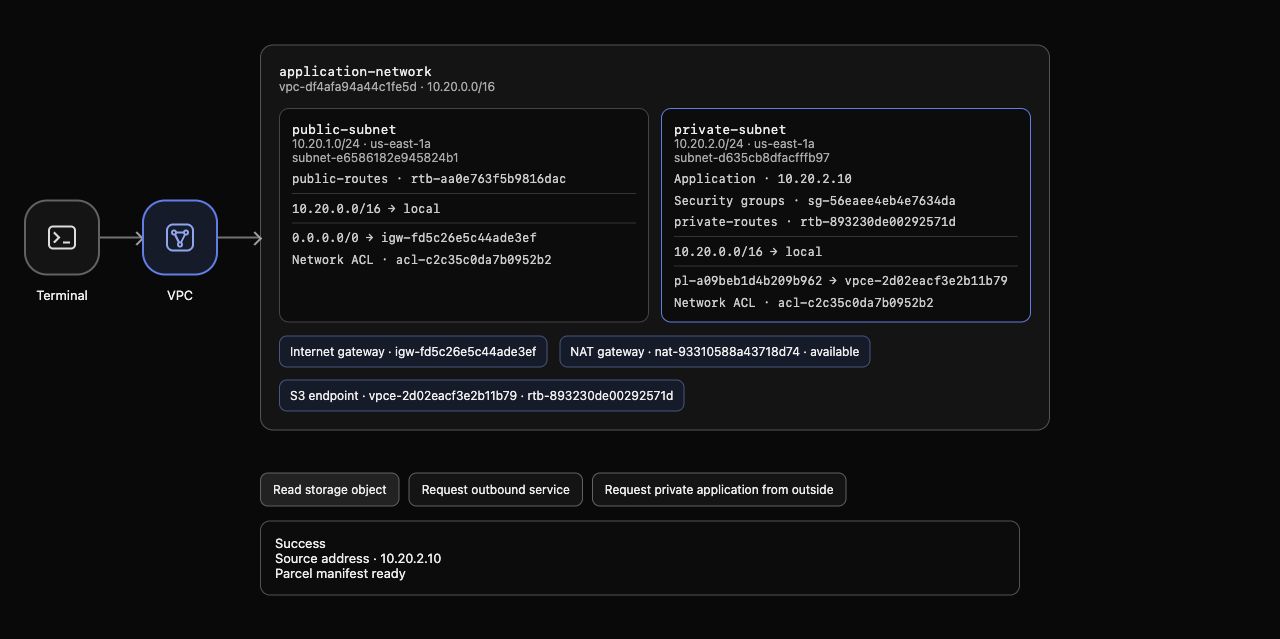
Example AWS View: the private table has its local route and S3 prefix-list route, with no 0.0.0.0/0 route. The actual storage response contains the original manifest and source 10.20.2.10. The supplied NAT gateway remains available but is not on this S3 path. Generated IDs and addresses can differ.
Observe an Endpoint Associated with the Wrong Route Table
In this step, you will deliberately move the endpoint association away from the application's table and observe why an available endpoint can still be unreachable.
An endpoint's route-table associations and a subnet's route-table association are different relationships. You will change the endpoint's tables, not which table belongs to either subnet. Move the endpoint to the public table:
aws ec2 modify-vpc-endpoint \
  --vpc-endpoint-id "$ENDPOINT_ID" \
  --add-route-table-ids "$PUBLIC_RT_ID" \
  --remove-route-table-ids "$PRIVATE_RT_ID"
The response reports Return: true. Read the endpoint:
aws ec2 describe-vpc-endpoints \
  --vpc-endpoint-ids "$ENDPOINT_ID" \
  --query 'VpcEndpoints[].{State:State,Tables:RouteTableIds}' \
  --output json
It is still available, but only the public table is listed. Read both tables:
aws ec2 describe-route-tables \
  --route-table-ids "$PRIVATE_RT_ID" "$PUBLIC_RT_ID" \
  --query 'RouteTables[].{ID:RouteTableId,Routes:Routes,Associations:Associations}' \
  --output json
The automatic S3 prefix route moved to the public table. The private table has only its local route, because you already removed its NAT default. Both original subnet associations remain intact. Sharing a VPC does not make an endpoint route available to every subnet.
After AWS View shows this change, click Read storage object. This new request returns Connection failed and Storage unavailable; the application's table has no S3 path. Request outbound service also fails. A previous successful read is historical, not proof that this new path works. Leave this fault in place for the step's check; the next step restores the correct association.
Restore the Private Service Route
In this step, you will repair the endpoint association without recreating the endpoint, adding a public address or restoring the NAT default route.
Move the same endpoint back to the private table and remove the public association:
aws ec2 modify-vpc-endpoint \
  --vpc-endpoint-id "$ENDPOINT_ID" \
  --add-route-table-ids "$PRIVATE_RT_ID" \
  --remove-route-table-ids "$PUBLIC_RT_ID"
Read its association:
aws ec2 describe-vpc-endpoints \
  --vpc-endpoint-ids "$ENDPOINT_ID" \
  --query 'VpcEndpoints[].{State:State,Tables:RouteTableIds}' \
  --output json
Only the private route table is listed. Inspect both tables again:
aws ec2 describe-route-tables \
  --route-table-ids "$PRIVATE_RT_ID" "$PUBLIC_RT_ID" \
  --query 'RouteTables[].{ID:RouteTableId,Routes:Routes}' \
  --output json
The private S3 prefix route returns automatically, and the public S3 endpoint route disappears. The public Internet route stays in place. There is still no private default route.
In AWS View, send a new Read storage object request. It succeeds with the original manifest and private source 10.20.2.10. Request outbound service still fails; restoring an S3 endpoint does not restore general Internet connectivity. Request private application from outside also remains blocked. The repair reconnects this application's service path while preserving its private address and the supplied security rules.
Remove the Endpoint and Restore the Supplied NAT Baseline
In this step, you will remove your practice endpoint, confirm its automatic routes disappear and restore the private default route to the supplied NAT gateway.
Delete only your endpoint:
aws ec2 delete-vpc-endpoints --vpc-endpoint-ids "$ENDPOINT_ID"
The response's Unsuccessful list must be empty. Check the full endpoint inventory, rather than filtering by removable tags:
aws ec2 describe-vpc-endpoints \
  --query 'VpcEndpoints[].{ID:VpcEndpointId,State:State,Tables:RouteTableIds}' \
  --output json
Your endpoint may remain listed with state deleted; there must be no active practice endpoint. A deletion record cannot route traffic. If its state is still deleting, wait a few seconds and repeat the same inventory query before continuing. Read both route tables:
aws ec2 describe-route-tables \
  --route-table-ids "$PRIVATE_RT_ID" "$PUBLIC_RT_ID" \
  --query 'RouteTables[].{ID:RouteTableId,Routes:Routes}' \
  --output json
Neither table has the S3 prefix route. Endpoint deletion removes these managed routes. In AWS View, click Read storage object; it fails while the private table has only a local route. This observation confirms that you have not silently retained an alternative service path.
Restore the original private default route to the saved supplied NAT ID. Do not delete the supplied NAT, its address, the application or its S3 data:
aws ec2 create-route \
  --route-table-id "$PRIVATE_RT_ID" \
  --destination-cidr-block 0.0.0.0/0 \
  --nat-gateway-id "$NAT_ID"
Read the restored routes:
aws ec2 describe-route-tables \
  --route-table-ids "$PRIVATE_RT_ID" \
  --query 'RouteTables[].Routes' \
  --output json
The local route and active NAT default route match the initial private table. A failed inventory request does not prove deletion; the authenticated endpoint inventory must succeed and show the endpoint absent or deleted, with its managed routes removed.
In AWS View, click Read storage object again. It returns the original manifest through NAT, so Source address is the supplied NAT public address. Request outbound service succeeds with the same public address, and Request private application from outside remains blocked. The supplied VPC, subnets, NAT resources, security rules, S3 object and reference network are preserved.
Run this step's completion check.
Summary
You created an S3 gateway endpoint in the private application's route table and observed a real storage read keeping its private source address. Removing the NAT default route left S3 reachable but blocked unrelated outbound traffic. Moving the endpoint association to the public table broke private S3 access; restoring the private association repaired it without changing the application or its security rules.
You then deleted the endpoint, checked its automatic routes were absent and restored the supplied NAT baseline.