Introduction
A delivery application is ready inside a VPC, but its public service cannot yet receive an external request. You will build the missing path: an Internet gateway attached to the VPC, a default route in the application's subnet route table, and a public address associated with the application's network interface.
Complete Create a VPC with Application Subnets first. This fresh environment supplies its own VPC, subnets, application and access rules; it does not reuse your earlier VM. The CLI is already configured. Keep the unrelated reference network and all supplied application resources intact.
Certification Relevance
This lab provides hands-on practice for the following exam topics.
- Cloud Practitioner (CLF-C02) · Task 3.5: VPC gateway components and their purpose.
- Solutions Architect – Associate (SAA-C03) · Task 3.4: Basic public-subnet routing and addressing conditions.
- CloudOps Engineer – Associate (SOA-C03) · Tasks 5.1 and 5.3: Basic Internet gateway and route configuration, and diagnosing a missing VPC route.
- Advanced Networking – Specialty (ANS-C01) · Task 2.2: Foundational practice configuring routing in a single-VPC connectivity design.
Attach an Internet Gateway
In this step, you will inspect the supplied application network and attach an Internet gateway to its VPC.
Use Terminal for commands and click AWS View beside it. The view reads the same resource state as the CLI. The application-network VPC contains public-subnet and private-subnet; the supplied application uses private address 10.20.1.10 in public-subnet.
cd /home/labex/project
Select the application VPC by its Name tag. --filters limits the server's results; --query chooses the ID. $(...) captures that ID in a shell variable for the remaining steps:
VPC_ID=$(aws ec2 describe-vpcs \
  --filters Name=tag:Name,Values=application-network \
  --query 'Vpcs[0].VpcId' \
  --output text)
Read the selected network and its subnets:
aws ec2 describe-subnets \
  --filters "Name=vpc-id,Values=$VPC_ID" \
  --query 'Subnets[].{CIDR:CidrBlock,ID:SubnetId}' \
  --output table
The ranges are 10.20.1.0/24 and 10.20.2.0/24. The separate 10.99.0.0/16 reference network is unrelated; leave it intact.
HTTP is the request/response protocol used by this application's endpoint. A port identifies the receiving service; this application listens on TCP port 80. In AWS View, click Request application · client A. This sends an external request from the supplied client 198.51.100.10. The result is Connection failed with No public address. The application exists, but its public path is incomplete.
An Internet gateway (IGW) connects a VPC's public routing path to the Internet. Creating it and attaching it are separate operations. Tag the new gateway so you can identify your practice resource; the quoted tag specification is one argument:
IGW_ID=$(aws ec2 create-internet-gateway \
  --tag-specifications 'ResourceType=internet-gateway,Tags=[{Key=Name,Value=parcel-internet},{Key=Project,Value=parcel}]' \
  --query 'InternetGateway.InternetGatewayId' \
  --output text)
Attach only that gateway to the selected application VPC:
aws ec2 attach-internet-gateway --internet-gateway-id "$IGW_ID" --vpc-id "$VPC_ID"
A successful attachment has no command output. Query the relationship instead:
aws ec2 describe-internet-gateways \
  --internet-gateway-ids "$IGW_ID" \
  --query 'InternetGateways[].{ID:InternetGatewayId,Attachments:Attachments}' \
  --output json
The attachment names your VPC and has state available. AWS View now shows that Internet gateway beneath the VPC. Attachment alone does not provide a subnet route or a public application address. Keep this Terminal open to retain the saved IDs.
Add the Public Subnet Default Route
In this step, you will direct the public subnet's Internet traffic to the attached gateway.
A route table maps destination ranges to targets. Each subnet uses its associated table, or the VPC's main table if it has no explicit association. Here setup supplied separate associated tables: public-routes and private-routes. Choose public-routes inside your application VPC:
PUBLIC_ROUTE_TABLE_ID=$(aws ec2 describe-route-tables \
  --filters "Name=vpc-id,Values=$VPC_ID" Name=tag:Name,Values=public-routes \
  --query 'RouteTables[0].RouteTableId' \
  --output text)
Read both its routes and associations:
aws ec2 describe-route-tables \
  --route-table-ids "$PUBLIC_ROUTE_TABLE_ID" \
  --query 'RouteTables[].{ID:RouteTableId,Routes:Routes,Associations:Associations}' \
  --output json
The association identifies public-subnet; the existing 10.20.0.0/16 route has target local, which keeps VPC traffic within the VPC. Do not delete that local route or change private-routes.
A default route, 0.0.0.0/0, covers IPv4 destinations not matched by a more specific route. --gateway-id sets the Internet gateway as its target:
aws ec2 create-route \
  --route-table-id "$PUBLIC_ROUTE_TABLE_ID" \
  --destination-cidr-block 0.0.0.0/0 \
  --gateway-id "$IGW_ID"
The response contains Return: true. Query the table again:
aws ec2 describe-route-tables \
  --route-table-ids "$PUBLIC_ROUTE_TABLE_ID" \
  --query 'RouteTables[].Routes[].{Destination:DestinationCidrBlock,Target:GatewayId,State:State}' \
  --output table
The default route targets your igw-... and is active; the local route remains. AWS View shows 0.0.0.0/0 under public-routes, pointing to the same gateway. Click Request application · client A again. It still fails with No public address. The subnet now has a public route, but the application needs its own public IPv4 address.
Associate a Public Address and Test HTTP
In this step, you will associate an Elastic IP with the supplied application and send a successful external request.
An Elastic IP is a public IPv4 address allocated to your account that can be associated with a supported resource. Its allocation ID identifies the reserved address; its association ID identifies the link to a resource. You will remove both the link and the allocation during cleanup.
A network interface (ENI) provides an application's network attachment and private IP. This lab supplies the application interface; you do not need to create an instance or configure its operating system. Select it by VPC and name:
ENI_ID=$(aws ec2 describe-network-interfaces \
  --filters "Name=vpc-id,Values=$VPC_ID" Name=tag:Name,Values=application-interface \
  --query 'NetworkInterfaces[0].NetworkInterfaceId' \
  --output text)
Allocate an address for use in a VPC and save its allocation ID:
ALLOCATION_ID=$(aws ec2 allocate-address \
  --domain vpc \
  --query 'AllocationId' \
  --output text)
Associate it with the application's interface and save the association ID:
ASSOCIATION_ID=$(aws ec2 associate-address \
  --allocation-id "$ALLOCATION_ID" \
  --network-interface-id "$ENI_ID" \
  --query 'AssociationId' \
  --output text)
Read the resulting interface state:
aws ec2 describe-network-interfaces \
  --network-interface-ids "$ENI_ID" \
  --query 'NetworkInterfaces[].{ID:NetworkInterfaceId,PrivateIP:PrivateIpAddress,PublicIP:Association.PublicIp}' \
  --output table
The private address is still 10.20.1.10; the public field now contains an address. In AWS View, the application card shows that public address together with the gateway route. Click Request application · client A.
The result is Success, source address 198.51.100.10, destination port 80, and body Application online. This is an HTTP response from the supplied application. A configured resource list alone would not establish that the request works.
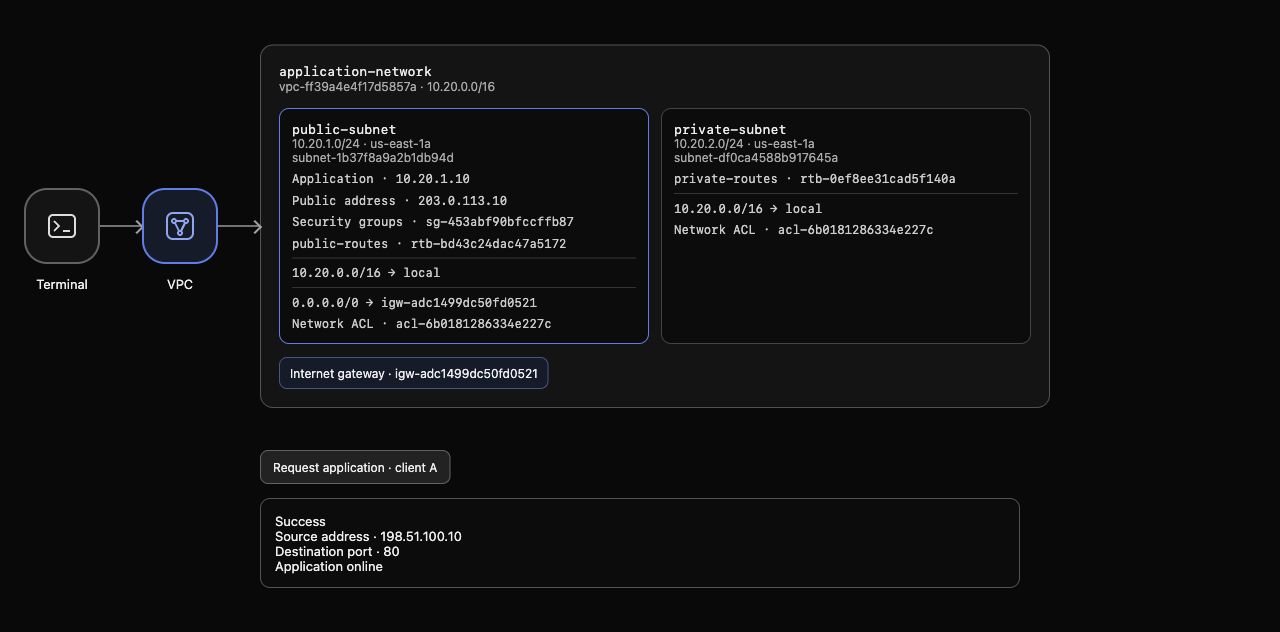
Example result: the public subnet shows both the gateway route and the application address; the request returns Application online. IDs and allocated addresses vary.
The prepared access rules permit this client and port. The following lab will teach how to control those rules; leave them unchanged here.
Observe and Restore a Broken Route
In this step, you will remove one route, observe a failed request, and restore the working path.
A public address does not replace routing. Remove only the default route you created; keep the supplied local route:
aws ec2 delete-route \
  --route-table-id "$PUBLIC_ROUTE_TABLE_ID" \
  --destination-cidr-block 0.0.0.0/0
Confirm the public address is still associated:
aws ec2 describe-addresses \
  --allocation-ids "$ALLOCATION_ID" \
  --query 'Addresses[].{PublicIP:PublicIp,Interface:NetworkInterfaceId}' \
  --output table
In AWS View, public-routes now has only the local route. An older response may be labeled Previous request; it does not describe the changed configuration. Click Request application · client A to send a new request. The result becomes Connection failed, even though the public address remains.
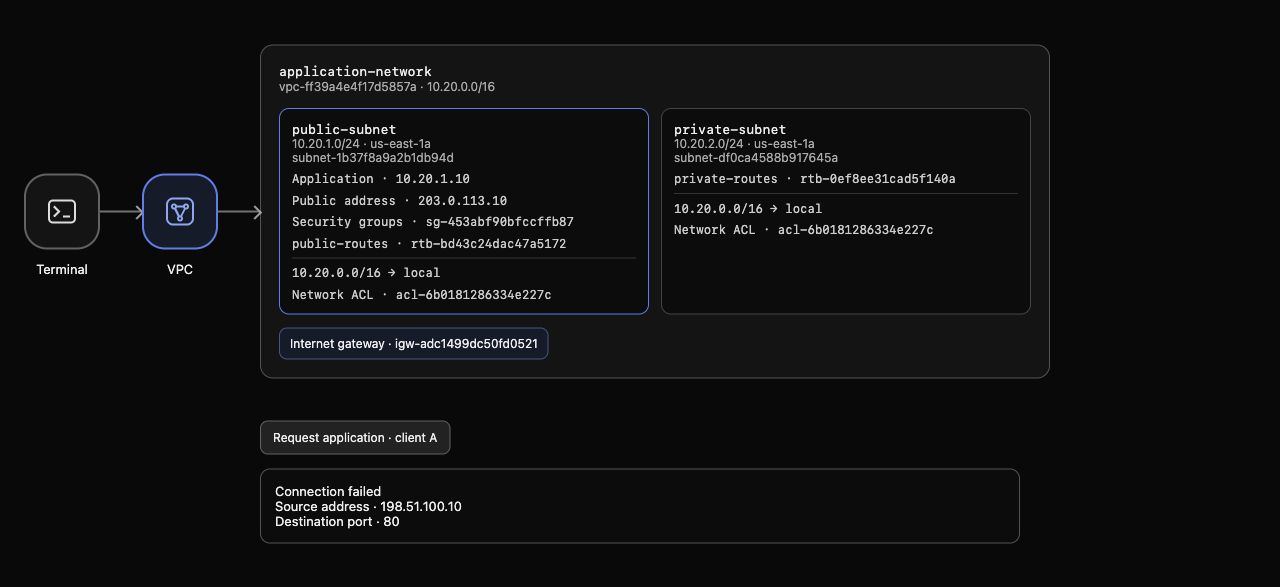
Example diagnosis: the application still has a public address, public-routes has only its local route, and the new request fails.
Restore the route to the same attached gateway:
aws ec2 create-route \
  --route-table-id "$PUBLIC_ROUTE_TABLE_ID" \
  --destination-cidr-block 0.0.0.0/0 \
  --gateway-id "$IGW_ID"
The response contains Return: true. After the route reappears in AWS View, click Request application · client A again. Success and Application online return. You have isolated routing as the changed condition rather than changing several settings at once.
Remove Your Public Path
In this step, you will remove only the address, route and gateway you created, preserving the supplied application and reference networks.
Resources have dependencies. First unlink the address from the interface:
aws ec2 disassociate-address --association-id "$ASSOCIATION_ID"
Then release the allocation; disassociation alone leaves an allocated resource:
aws ec2 release-address --allocation-id "$ALLOCATION_ID"
Remove your default route before detaching its gateway:
aws ec2 delete-route \
  --route-table-id "$PUBLIC_ROUTE_TABLE_ID" \
  --destination-cidr-block 0.0.0.0/0
aws ec2 detach-internet-gateway --internet-gateway-id "$IGW_ID" --vpc-id "$VPC_ID"
Finally delete the detached gateway:
aws ec2 delete-internet-gateway --internet-gateway-id "$IGW_ID"
These successful removal commands produce no output. Query complete inventories to establish absence, rather than relying on tags:
aws ec2 describe-addresses --query 'Addresses' --output json
aws ec2 describe-internet-gateways --query 'InternetGateways' --output json
Both return [] in this fresh environment. Recheck the supplied subnet's routes:
aws ec2 describe-route-tables \
  --route-table-ids "$PUBLIC_ROUTE_TABLE_ID" \
  --query 'RouteTables[].Routes[].{Destination:DestinationCidrBlock,Target:GatewayId}' \
  --output table
Only the local route remains. The supplied VPC, subnets and application interface still exist. AWS View no longer shows your gateway or public address. Click Request application · client A once more; the removed public path cannot serve the request. A failed inventory query does not prove resource cleanup.
Run this step's completion check.
Summary
You attached an Internet gateway, added a default route in the application's associated subnet table, and associated an Elastic IP. You tested actual HTTP access, demonstrated that removing the route breaks the request despite the public address, restored it, and removed only your practice resources.
Continue with Control Application Access with Security Groups to limit which external requests can reach the application.