Introduction
Juniper & Oat needs the same approved drink prices at two cafés, without losing each branch’s identity, hours or local special. You will use one Ansible template and playbook to update two real SSH-managed targets, then repair a deliberate menu drift.
You need basic terminal navigation and prior practice reading a small Ansible inventory and playbook. Host variables, JSON rendering, safe preview and the difference between managed and local content are explained as you use them. The prepared toolchain and websites let you focus on automation rather than installation.
Separate Shared Prices from Branch Details
In this step, you will identify what both cafés share and what must stay different, then declare the approved data for one reusable template.
Juniper & Oat has two neighbourhood cafés. Both use the same everyday drinks and prices; each has its own opening hours, special and local notice. Your job is to update the shared menu without replacing those local details. The prepared web1 and web2 hosts are two SSH-managed containers sharing the training VM's kernel, not separate VMs. The Controller runs Ansible; each target runs its own real menu service.
Open Menu Preview, select First branch, and read its menu, hours and local special. Use your browser's Back button to return to the branch list, then select Second branch. Both show an old flat white price; Park Café also shows incorrect hours. The local special and notice on each page are already correct. Visit opens the same branch's visitor information; Download menu downloads its current real CSV. These are page links, not LabEx Tabs.
Switch to the Controller Tab. The terminal starts in the project directory; this explicit command also gets you back there after a directory mistake:
cd /home/labex/project
The inventory names web1 and web2 point to distinct prepared SSH targets. View the inventory and the approved branch inputs with cat, which reads files without changing them:
cat inventory.ini
cat host_vars/web1.yml host_vars/web2.yml
Harbor Café should open 07:00–16:00; Park Café should open 08:00–18:00. The host_vars directory supplies variables for its matching inventory host. Keep these inputs and the prepared SSH settings unchanged. Their difference is intentional, not an error to remove.
The approved shared menu is supplied as scenario data. Read it before authoring the variables:
cat approved-menu.json
It lists Espresso at 3.20, Flat white at 4.20, and Tea at 3.00. A price is stored as a quoted string so its two decimal places survive formatting. menu_items will be a YAML list of name/price objects shared by both hosts.
The prepared group_vars and templates directories are empty. A file named group_vars/all.yml supplies variables to every inventory host. The next here-document writes a complete file: > replaces that exact destination, and the quoted YAML delimiter keeps the shell from expanding its contents. The closing delimiter must appear alone at the start of a line. If you mistype the contents, rerun the complete block; this replaces only your variable file.
cat > group_vars/all.yml <<'YAML'
menu_items:
  - name: Espresso
    price: "3.20"
  - name: Flat white
    price: "4.20"
  - name: Tea
    price: "3.00"
YAML
A Jinja template inserts resolved values into a managed file. Double braces evaluate an expression; the pipe applies a filter. Here, to_nice_json serializes the entire object as valid readable JSON, including non-ASCII characters. It avoids manually quoting every inserted value. This is the same template for both branches: branch_name and opening_hours come from their respective host inputs, while menu_items is shared.
cat > templates/menu.json.j2 <<'JINJA'
{{ {'branch': branch_name, 'hours': opening_hours, 'items': menu_items} | to_nice_json }}
JINJA
Read both authored sources to catch a missing quote, wrong indentation or delimiter before running Ansible:
cat group_vars/all.yml templates/menu.json.j2
The website has not changed yet. You have declared the intended data, not applied it. In the next step, Ansible will render this source in each host's variable context.
Apply One Playbook to Both Cafés
In this step, you will preview and deploy the same declaration to both real SSH targets, then use their actual menus and downloads.
Stay in Controller at /home/labex/project. A play selects its hosts; tasks declare managed state. become: true requests the prepared target's authorized privilege escalation so the files can be owned by root. This does not change the LabEx login account. The file module declares the directory; the template module renders the shared source and replaces only menu.json. Explicit ownership and quoted permissions keep directory traversal and public menu reading predictable: 0755 for the directory, 0644 for the menu.
The local files local-special.txt, local-notice.txt and private staff-notes.txt are outside your managed menu declaration. Do not replace the directory's contents or modify these files. Keep their bytes, root ownership and original permissions: 0644 for the special/notice and 0600 for the private notes. The service reads menu.json on each request, so no artificial restart or handler is needed for a data-only menu update.
Write a complete playbook. YAML list items use -, and spaces nest each module's arguments. Paths under src refer to controller sources; dest is on each managed target.
cat > menus.yml <<'YAML'
- name: Keep both branch menus current
  hosts: all
  gather_facts: false
  become: true
  tasks:
    - name: Keep the menu directory available
      ansible.builtin.file:
        path: /srv/branch-menu
        state: directory
        owner: root
        group: root
        mode: "0755"

    - name: Render the shared menu with each branch's inputs
      ansible.builtin.template:
        src: templates/menu.json.j2
        dest: /srv/branch-menu/menu.json
        owner: root
        group: root
        mode: "0644"
YAML
First use --syntax-check to validate the playbook's syntax without applying it:
ansible-playbook menus.yml --syntax-check
If it reports a YAML error, read the named file and line. Compare indentation with the complete block above, rewrite that block, then repeat the syntax check. Ansible syntax errors do not require resetting the VM.
--check predicts supported module changes; --diff displays the proposed before/after content. It is useful for these non-secret menu files, but a preview is not a live business test. Run both options together:
ansible-playbook menus.yml --check --diff
Both hosts should predict a menu change. The diff should correct the prices and Park Café's hours while keeping branch identities distinct. No target files have changed. Switch to Menu Preview, open or refresh the branches and confirm the old values are still visible. Switch back to Controller to apply the same declaration without the preview options:
ansible-playbook menus.yml
Each host's recap should show no unreachable or failed tasks. Their exact changed counts can differ because one host needed a different set of corrections. Read the actual managed data with an ad hoc command: all selects both inventory hosts, -m names the module, and -a passes its arguments. The command module runs cat on each target, not on the controller.
ansible all -m ansible.builtin.command -a 'cat /srv/branch-menu/menu.json'
Both should contain the approved everyday drinks and prices. Harbor Café and Park Café must keep their distinct names and opening hours.
Now switch to Menu Preview and refresh each branch. Read all three prices, the branch name, hours, special and local notice. Open Visit and return using Menu. Select Download menu and open the CSV: it must contain this branch's three approved items, with its own branch name on each row. Seeing only a successful homepage is not enough.
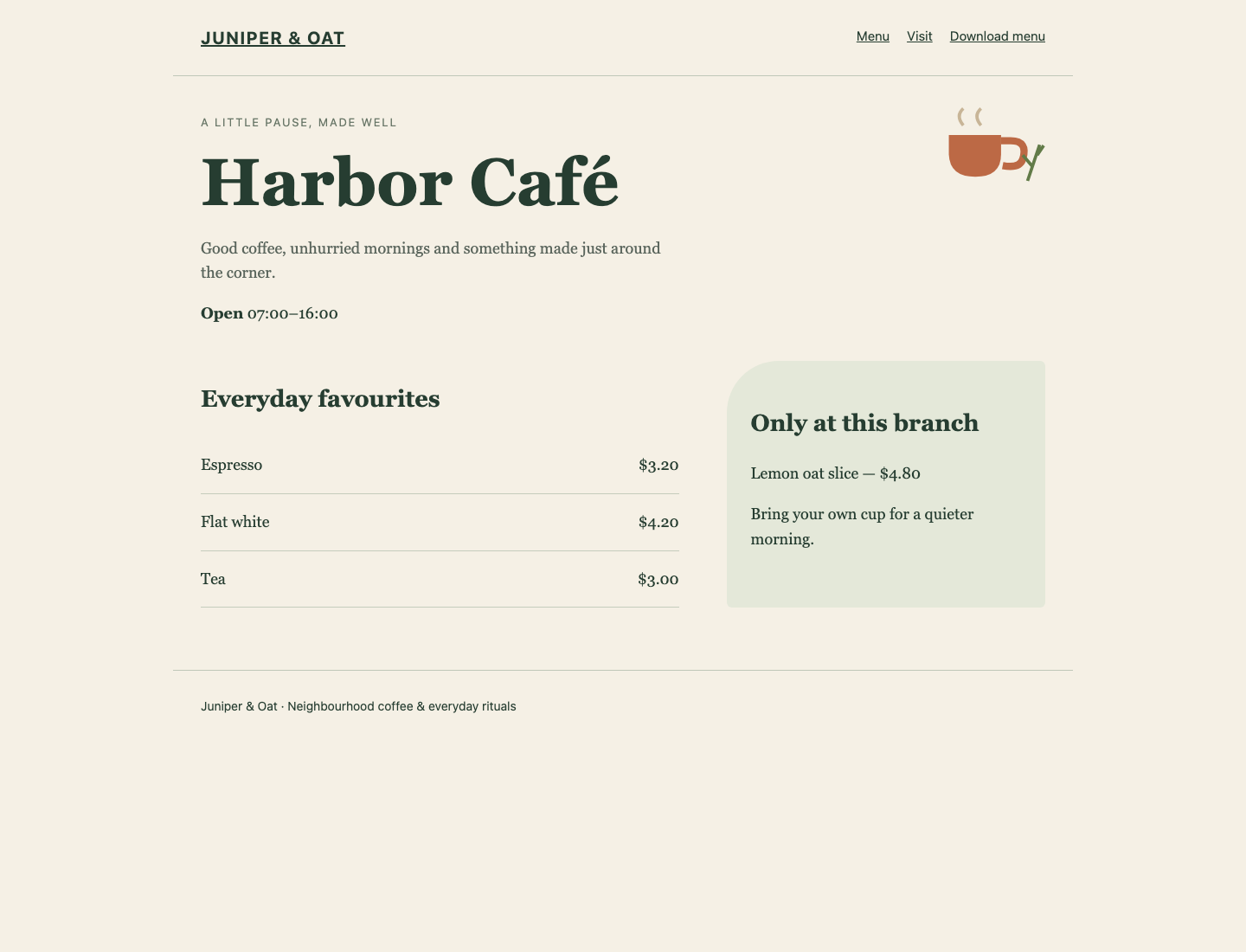
Compare the shared prices on the left with the local special on the right. Park Café keeps its own hours and special while using the same approved drink list.
If the browser shows a missing/invalid-menu error, return to Controller, read the command output and compare your JSON template with step 1. Correct your controller source and rerun the playbook. If a target is unreachable, read inventory.ini and compare it with the original output; do not disable SSH trust checking or change platform accounts.
Return to Controller. An unchanged repeat should have no pending changes:
ansible-playbook menus.yml
Look for both recap rows:
web1 ... changed=0 ... unreachable=0 ... failed=0 ...
web2 ... changed=0 ... unreachable=0 ... failed=0 ...
This is idempotent configuration: the desired files already match, so Ansible does not rewrite them. It does not mean ordinary requests or service logs stop happening.
Repair Drift Without Erasing Local Content
In this step, you will deliberately damage one managed menu value and use the unchanged controller source to restore it while leaving local content intact.
Stay in Controller. Configuration drift means actual managed state no longer matches its declared intent. Different approved branch hours are not drift. A manually changed shared price is.
The following is an intentional, scoped fault on web1 only. -b requests become for this ad hoc task. Copy's content replaces exactly the named menu JSON, not its directory. It uses the correct shape but an unapproved Espresso price of 0.01. This temporary file is deliberately wrong; do not copy its price into group_vars.
ansible web1 -b -m ansible.builtin.copy -a 'dest=/srv/branch-menu/menu.json content={"branch":"Harbor Café","hours":"07:00–16:00","items":[{"name":"Espresso","price":"0.01"},{"name":"Flat white","price":"4.20"},{"name":"Tea","price":"3.00"}]} owner=root group=root mode=0644'
Switch to Menu Preview, refresh First branch, and see the wrong Espresso price. The second branch and both local specials should be unaffected. This is a real target-file change, not a simulated red status light.
Switch back to Controller. Do not edit the original sources. Preview the existing desired state:
ansible-playbook menus.yml --check --diff
Only web1 should predict a change. Web2 already matches its approved state. Apply the same playbook to restore the managed menu:
ansible-playbook menus.yml
Switch to Menu Preview and refresh both branches. Espresso should again cost 3.20. Both local specials, notices, hours and menu downloads must still be correct. Your automation owns one configuration file; it does not own every local file in the directory.
Return to Controller and make one final repeat:
ansible-playbook menus.yml
Both recaps should again show changed=0, unreachable=0 and failed=0. A successful repair comes from reusable intent in controller data and a shared template, not from manually fixing the target once. The same template should also remain usable when an approved shared item changes in the future.
Summary
You separated shared prices, branch inputs and local content; previewed and applied one template to two SSH targets; used actual pages and CSV downloads; and repaired real configuration drift without erasing legitimate branch differences. Your unchanged repeat confirmed that the declared menus had converged.