Introduction
Nightjar Print Studio accepts workshop registrations and prepares downloadable entry tickets. A registration can wait safely while a worker is stopped, but the current worker confirms delivery too early. Later, retrying completed work can produce duplicate tickets.
You need basic terminal use and the ability to read a small Python function, indentation, and a dictionary lookup. A short bridge below reviews those constructs and introduces SQL and transactions. RabbitMQ, Python, the SQLite database and the complete website are prepared; you edit only handler.py. No installation, outside account, payment or email is needed.
Use Nightjar for the real registration and ticket pages and Workstation for commands. Each unit starts independently. The website and exact interface labels remain English. This is a single-machine worker-interruption exercise, not a claim of high availability or exactly-once delivery.
Follow a Registration into a Ticket
In this step, begin in Nightjar and see what the business normally does before changing its worker.
Open Explore the evening, read the workshop details, then follow Plan your visit. Return with The evening. In Guest name, enter Normal guest and select Register for the evening. The new registration page has an ID, such as R-0002, and says Your ticket is being prepared. Saving a registration is not the same as issuing its ticket. Your registrations also contains Mina Patel's existing ticket; preserve it.
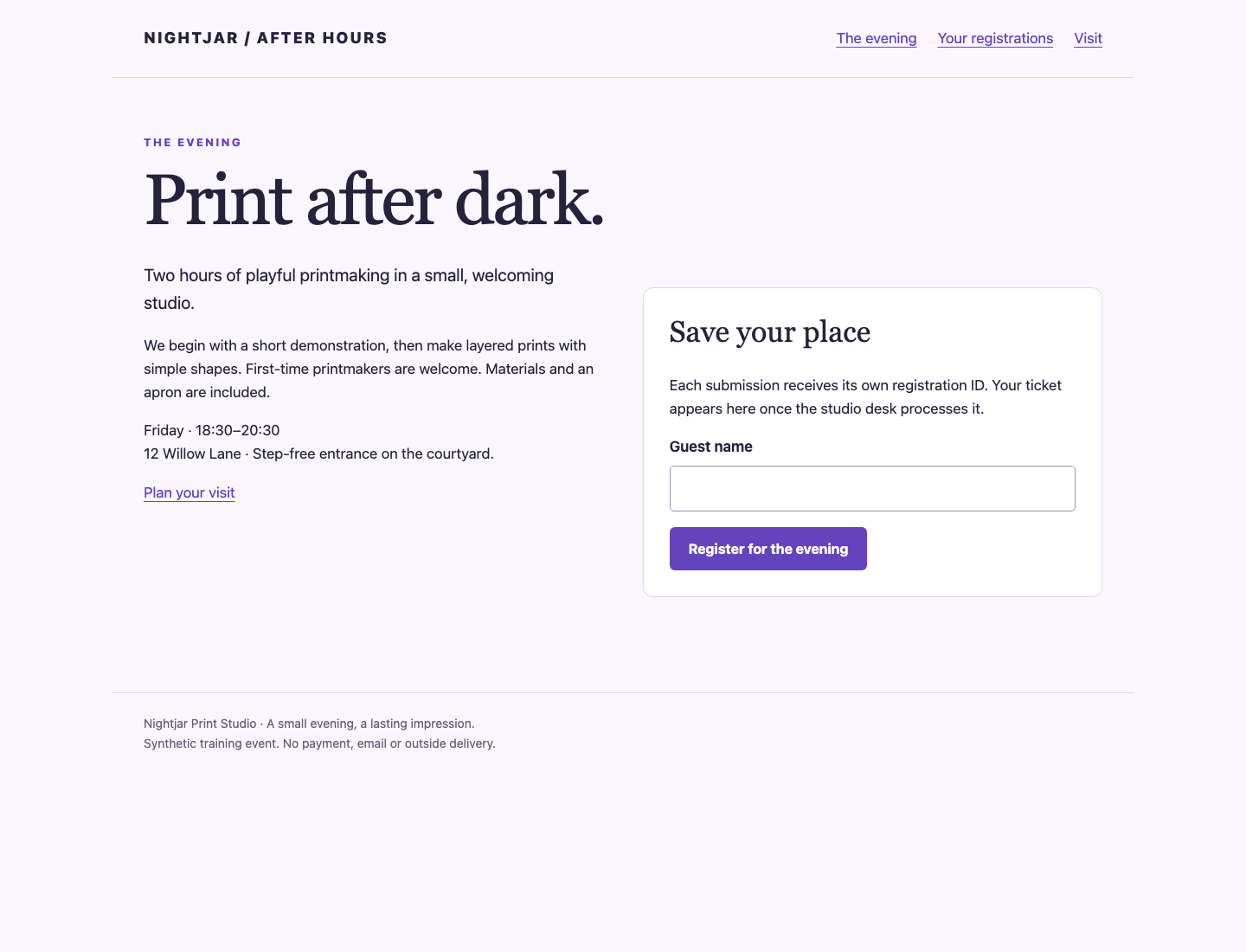
The Guest name form belongs to the workshop page; the registration status and ticket are separate pages.
Switch to Workstation. pwd prints your working directory; cat displays a text file. The directory should be /home/labex/project/ticket-desk:
pwd
cat handler.py
A queue stores messages awaiting work. RabbitMQ is the real queue broker; a worker receives a message containing the registration ID and guest name, writes the ticket, and acknowledges the delivery. An acknowledgement tells RabbitMQ it may remove that delivery. It does not itself create a ticket.
In Python, def handle(...) defines a function, and its indented lines form its body. The prepared worker calls it for each message. job is a dictionary: job['id'] and job['name'] look up its values. ch.basic_ack(delivery.delivery_tag) acknowledges this delivery on its receiving channel. checkpoint is a supplied teaching pause: normally it does nothing; a matching --pause option waits for Enter or Ctrl+C. It does not fake work or broker events.
The database contains tables, collections of rows. db.execute(...) runs SQL. INSERT INTO tickets... adds a ticket row. Each ? is filled by a value in the following tuple, so names are data rather than SQL commands. Python's with db: commits its database writes when its indented block completes normally, or rolls them back if an exception escapes. A commit makes those writes persistent. This existing code acknowledges before doing that work; you will repair that order next.
python3 worker.py runs the prepared worker once. It receives one ready message, calls your handler and exits. Run it now without interruption:
python3 worker.py
Expect Received R-0002 redelivered=False and Handler returned.. IDs may differ if you registered extra guests. redelivered comes from RabbitMQ, not the ticket database. A normal run creates a real ticket despite the unsafe order.
Return to Nightjar, open Your registrations, select Normal guest, then Open ticket. Select Download ticket and read the text file: it contains the same registration ID and name. Follow Back to registration. Mina Patel's ticket must still open. This is the customer path your repair must preserve.
If the worker says No ready registrations, check the registration list before retrying: a prior run may already have processed it. A spelling mistake can be corrected by registering the required name again; all IDs remain separate. Do not edit the database to force a result.
Acknowledge Only Completed Work
In this step, begin in Workstation. You will move the acknowledgement after the transaction, then interrupt an uncompleted job and see RabbitMQ return it.
If a worker acknowledges first and then fails, RabbitMQ has no outstanding delivery to retry. Placing the acknowledgement after commit leaves the delivery unacknowledged until its ticket exists. This protects against worker interruption; it does not combine RabbitMQ and SQLite into one transaction.
Replace only handler.py using the block below. cat > handler.py replaces the file; <<'PYTHON' starts a literal here-document. Paste the entire block, including its final PYTHON on a line by itself. Keep four-space indentation. The transaction is unchanged; only the acknowledgement moves after it:
cat > handler.py <<'PYTHON'
from common import checkpoint

def handle(ch, delivery, job, db, pause):
    checkpoint(pause, 'before-write')
    with db:
        db.execute('INSERT INTO tickets(registration_id,name) VALUES (?,?)',
                   (job['id'], job['name']))
    checkpoint(pause, 'after-commit')
    ch.basic_ack(delivery.delivery_tag)
PYTHON
Switch to Nightjar, open The evening, register Retry guest, and leave its registration page open. Return to Workstation. The option --pause before-write stops at the checkpoint immediately before any database write:
python3 worker.py --pause before-write
Wait for Paused before-write. Then press Ctrl+C in the terminal. This intentional interruption exits with status 130. Immediately print the previous command's exit status with $?:
echo $?
Expect 130. Switch to Nightjar and refresh Retry guest's registration: there is still no ticket. Return to Workstation and rerun the worker without the pause:
python3 worker.py
Now expect redelivered=True. RabbitMQ actually returned the unacknowledged delivery when the previous connection closed. Refresh the registration in Nightjar, open its ticket and download it. The recovered ticket belongs to the same registration ID.
If no pause appears, check the option spelling and cat handler.py. If you accidentally pressed Enter, the worker completed normally; register another Retry guest and repeat the interruption. If you already acknowledged a job using old code and interrupted it, python3 desk.py status lists its ID and python3 desk.py retry R-0003 requests another delivery for that existing registration; substitute the actual ID. Retry is an explicit learner recovery action, never a grading action. Do not retry completed tickets until you have added deduplication in the next step.
Make the Database Result Safe to Repeat
In this step, begin in Workstation. A second failure window remains: SQLite can commit the ticket, then the worker can stop before acknowledging RabbitMQ. Retrying that delivery would create another ticket with the current code.
Idempotency here means that processing the same registration ID again leaves one business result. Names cannot identify registrations: two people called Same name still need separate tickets. The prepared completed table has a primary key id, which prevents two rows with the same ID.
INSERT OR IGNORE attempts to add that ID. Its rowcount is 1 for a new row, or 0 when the ID already exists. (job['id'],) is a one-value tuple; the comma matters. if added: runs its indented ticket insert only for a new ID. Both writes must stay inside the same with db: block. Otherwise a crash could save the completion key without saving the ticket, permanently skipping a valid registration.
Replace the function with this complete small implementation. The inside-transaction checkpoint is deliberately between the two writes so you can observe rollback:
cat > handler.py <<'PYTHON'
from common import checkpoint

def handle(ch, delivery, job, db, pause):
    checkpoint(pause, 'before-write')
    with db:
        added = db.execute('INSERT OR IGNORE INTO completed VALUES (?)',
                           (job['id'],)).rowcount
        checkpoint(pause, 'inside-transaction')
        if added:
            db.execute('INSERT INTO tickets(registration_id,name) VALUES (?,?)',
                       (job['id'], job['name']))
    checkpoint(pause, 'after-commit')
    ch.basic_ack(delivery.delivery_tag)
PYTHON
In Nightjar, register Same name twice. They receive separate IDs, normally R-0004 and R-0005. Return to Workstation and stop the first one inside its transaction:
python3 worker.py --pause inside-transaction
At Paused inside-transaction., press Ctrl+C. In Nightjar, refresh that registration: no ticket exists. The completion key must not survive either. In Workstation, the next run retries that same ID, this time pausing after its commit:
python3 worker.py --pause after-commit
At Paused after-commit., open its registration in Nightjar: one ticket already exists. Return to Workstation and press Ctrl+C. Then process that unacknowledged delivery again:
python3 worker.py
Expect redelivered=True, but refresh the registration in Nightjar: it must still have exactly one ticket. The duplicate completion insert returned 0, so the handler skipped a second ticket and still acknowledged the delivery.
Return to Workstation. --drain repeats the same one-message operation until no ready messages remain:
python3 worker.py --drain
The second Same name registration now gets its own ticket. desk.py status reads the actual rows:
python3 desk.py status
To test an explicit duplicate delivery, use the first Same name ID from that output. With the normal sequence it is R-0004; substitute yours if it differs:
python3 desk.py retry R-0004
python3 worker.py --drain
Return to Nightjar. Both Same name IDs have one downloadable ticket each, and Mina Patel, Normal guest and Retry guest remain. There must be no waiting registrations. No ready registrations alone would not prove this: lost jobs can also leave an empty queue.
If Python reports an indentation or syntax error, recopy the function and retry; unacknowledged work returns to RabbitMQ. Keep both writes together. Do not delete existing tickets or completion keys to make a broken approach appear correct. If you accidentally processed a completed ID with the earlier code, fix handler.py first. The prepared repair action provides a local recovery without resetting other guests. Use python3 desk.py status to find the affected ID. For example, if Normal guest is R-0002, preview:
python3 desk.py repair R-0002
It lists the earliest original ticket to keep, extra ticket numbers to remove, and the completion record for this ID only. No change happens yet. --apply explicitly applies that plan in one database transaction:
python3 desk.py repair R-0002 --apply
Substitute the affected ID. The helper refuses unknown IDs, IDs without a ticket, or tickets whose names do not match their registration. It preserves the earliest ticket number and contents, other registrations and their tickets. It records the repaired ID as completed so the fixed handler can safely skip it. It never consumes or acknowledges queue messages. Open the retained ticket in Nightjar, then use python3 worker.py --drain to process remaining deliveries with the repaired handler. Repair cannot make unsafe handler code pass the isolated checks.
The checks read your live customer results and run your unchanged handler against a separate RabbitMQ broker and disposable databases. They test interruption, actual redelivery and rollback without consuming, acknowledging or repairing your live jobs. These are safe repeated database effects, not an exactly-once delivery guarantee; external email or payment side effects need their own design.
Summary
You recovered queued ticket work, distinguished delivery from business completion, and preserved separate registrations with matching names. Acknowledging after commit permits retry; a completion key and ticket write in one transaction make that retry safe for this database result. This does not guarantee exactly-once delivery or cover external email, payments, broker failure, or every production failure mode.