Introduction
A short film lost its two-second opening title, but its captions still use the original timeline. The first green scene now starts at 2 seconds while its caption starts at 4 seconds. The visible scene cards reveal the timing; you do not need to guess by listening.
You will represent caption times as integer milliseconds and implement a Rust transformation that moves every cue, including complete Unicode and multiline text. Then you will load the actual exported file as a browser video track. The next lab concentrates on the protected output-writing boundary and ordinary failure recovery. The films and captions are original synthetic course fixtures, not recordings of real events.
You should already understand Rust structs, enums, vectors, Result, strings, file operations, and basic tests and loops. Completing the existing Rust CLI course is useful but optional; this lab provides argument parsing and requires no clap knowledge. The author estimates 45 minutes including reading and ordinary corrections; this is not a measured beginner completion time.
See the Alignment and Model Milliseconds
In this step, you will watch a known-good caption sample, inspect its relationship to the original timeline, and implement the numeric time conversion.
Open the Preview tab. The prepared player initially selects data/edited.webm and data/reference.vtt. The reference is an already working example, not your submitted output. Click Load actual files, then Play on the video. You should see a green scene card and the two-line caption beginning Café 林地 🌿. Pause the video. In Time (seconds), enter 2.5 and click Go to time to inspect that scene directly. This control seeks the real video; the caption is displayed by its actual subtitle track.
The edited film has removed a 2000 ms title. The first original cue is 4000–7000 ms; the aligned cue must be 2000–5000 ms. Applying -2000 to both endpoints moves it earlier without changing its duration. Positive offsets move captions later. The blue scene at 4.5 seconds will later show an intentional overlap, and the amber scene at 60.5 seconds will exercise a minute boundary. These observation points are public; there is no audio puzzle.
Switch to Terminal. The project is /home/labex/project/subtitle-sync. The prepared environment includes Rust 1.99.1. Add Cargo's directory to this shell's command search path and select an available UTF-8 locale for this session:
export PATH=/home/labex/.cargo/bin:$PATH
export LANG=C.UTF-8 LC_ALL=C.UTF-8
$PATH keeps the existing search directories. These exports last for this terminal session and do not edit shell startup files; repeat them in any new terminal. Terminal glyph rendering may still show placeholders for some Unicode characters. The saved bytes and real browser captions are the reliable text checks here.
Enter the project. All later commands use this directory; repeat the command if you lose your place:
cd /home/labex/project/subtitle-sync
The prepared project separates responsibilities. src/cues.rs defines Cue, validates our controlled WebVTT format, extracts numeric time fields, and formats output. src/main.rs parses commands and displays success or recoverable errors. src/export.rs reads the actual requested input and creates a new output after the complete transformation. The next lab teaches that file boundary. You will edit only src/time.rs, retaining the public function names and signatures. Keep all other source files, Cargo.toml, rust-toolchain.toml, and every original file under data/ unchanged. Equivalent internal implementations are allowed. Unchanged prepared files retain their bytes, permissions, owner/group and modification time; ordinary reads may update access time, which is not part of this requirement.
A cue has a start time, an end time, and one or more text lines. Its diagnostic line records the original timing line; it is not part of the caption text. The provided struct is:
pub struct Cue {
    pub start: i64,
    pub end: i64,
    pub text: String,
    pub line: usize,
}
i64 is a signed 64-bit integer. We store whole milliseconds so crossing a minute means integer arithmetic rather than editing punctuation in a timestamp. The start and end are nonnegative, the end is later than the start, and the parser validates those relationships. String owns the complete text; its Unicode characters do not all occupy one byte.
Inspect the real original captions with cat, which reads without changing a file:
cat data/original.vtt
WEBVTT

00:00:04.000 --> 00:00:07.000
Café 林地 🌿
Second line intact

00:00:06.000 --> 00:00:09.000
Overlap stays

00:01:01.750 --> 00:01:04.250
Across a minute
This course supports a deliberately small plain-text WebVTT subset:
- The first line is exactly
WEBVTT, followed by an empty line. Header metadata and a byte-order mark are unsupported by this course. - Each timing line has
HH:MM:SS.mmm --> HH:MM:SS.mmm, with exactly one space on each side of the arrow. All digits are ASCII. Hours have at least two decimal digits, minutes and seconds exactly two in 00–59, and milliseconds exactly three. Every complete timestamp must fit a nonnegative i64 millisecond value. - Cue starts are nondecreasing in file order; equal starts and overlapping intervals are legal. The end must exceed the start. The program preserves file order.
- Each cue has at least one nonempty logical payload line. Unicode, tabs, leading/trailing spaces, and multiple text lines are preserved. Even a payload made only of spaces or tabs is allowed, although it can look blank. A truly empty line ends a cue; it cannot represent an internal blank payload line. Text after that boundary must begin another valid cue, not an orphan continuation.
- LF and CRLF line endings, an optional final newline, and multiple empty cue separators are allowed on input. The prepared output format uses LF, two hour digits for 0–99 hours (only the necessary additional digits for larger hours), one empty line after the header and one after every cue, including the last cue. It normalizes timestamp spelling and separator counts; payload logical text is unchanged. Bare carriage returns are unsupported.
- Cue IDs, settings, NOTE, STYLE, REGION, markup, character references, and payload characters
<,>or&are unsupported. Other control characters except tabs, including NUL, are unsupported too. Unsupported content is rejected rather than silently removed.
These restrictions describe this course's format, not the entire WebVTT standard. The prepared parser enforces framing and text rules. It does not perform your missing millisecond conversion. Its time_fields helper checks the timestamp's spelling and field ranges and returns [hours, minutes, seconds, milliseconds] as four nonnegative i64 values. Your milliseconds function receives those validated fields, not arbitrary negative numbers or out-of-range minutes. It must still reject overflow when combining them.
The first implementation converts each field with its unit scale. The array scales holds milliseconds per hour, minute, second, and millisecond. The range 0..4 includes 0 through 3; the matching array positions pair each field with its scale. Underscores make large numeric literals easier to read. 0_i64 explicitly chooses the accumulator's type.
checked_mul and checked_add return Some(value) when the result fits or None on integer overflow. ok_or converts that Option into Result with an owned error message. ? continues with the successful value or returns the error immediately. Overflow is ordinary rejected input, not a panic or wrapped time.
Before coding, predict the total for 00:01:01.750: how much comes from each nonzero field? Write the expected integer, then use the run below to test your prediction.
Read the actual starter first:
cat src/time.rs
use crate::Cue imports the prepared type from this library. Keep it in place. There are three functions; edit only milliseconds now. Its opening { is on the signature line and its matching closing } is just before shift_one. The two shift functions must retain their unfinished bodies in this phase.
Before editing, make a checkpoint of only the allowed source. mktemp -d creates a unique directory by replacing the six X characters; it refuses an existing name. $() captures that path into a variable for this shell session. Quotes keep the path together, and && copies only after directory creation succeeds. cp -p copies the file while retaining its permissions and modification time. This is a source checkpoint, not a backup of any output caption. Print the variable and keep the actual name; do not guess the suffix.
rs01_before_milliseconds=$(mktemp -d .edit-before-milliseconds.XXXXXX) && cp -p src/time.rs "$rs01_before_milliseconds/time.rs"
printf '%s\n' "$rs01_before_milliseconds"
printf prints this directory name, followed by a newline. Open the existing source with nano; -c displays the cursor position:
nano -c src/time.rs
Press Ctrl+W, type pub fn milliseconds, then press Enter to search. Arrow keys move within the file. In this signature, remove the leading underscore from _parts so the body can use parts; keep [i64; 4] and the return type unchanged. Replace only this function's Err(...) line with your conversion logic, inside its existing braces. Do not remove the next function.
Build the four scales in the same order as the validated fields. Start a mutable i64 total at zero. For each index in 0..4, checked-multiply that field by its scale, then checked-add the piece to the total. Convert either overflow into an error with ok_or(String::from("time integer overflow"))?. For example, the first part of the loop computes a single contribution:
let piece = parts[i]
    .checked_mul(scales[i])
    .ok_or(String::from("time integer overflow"))?;
Use let scales = [3_600_000, 60_000, 1_000, 1]; and let mut total = 0_i64; before that loop. The addition follows the same checked pattern using total.checked_add(piece). After the loop, return Ok(total) as the final expression without a semicolon. Leave both remaining stubs untouched.
Press Ctrl+O to write, Enter to confirm the existing filename, then Ctrl+X to exit. If nano asks about saving on exit, answer Y, then confirm the filename. Read what you saved before running it:
cat src/time.rs
Run a single conversion. cargo run compiles and starts the prepared program, --quiet suppresses Cargo progress, and -- passes the following arguments to the program. Its time command uses your conversion:
cargo run --quiet -- time 00:01:01.750
00:01:01.750 = 61750 ms
Sixty seconds plus one second plus 750 milliseconds gives 61750. Now inspect all original cue values; inspect reads the actual named file and calls the parser:
cargo run --quiet -- inspect data/original.vtt
Cue 1: 4000 --> 7000 ms
Café 林地 🌿
Second line intact
Cue 2: 6000 --> 9000 ms
Overlap stays
Cue 3: 61750 --> 64250 ms
Across a minute
All three records and both first-cue text lines remain. Compare the conversion with your prediction.
If you have not saved an accidental edit, press Ctrl+X, then N at the save question to leave the file unchanged. For a saved mistake, read Cargo's named file and line, reopen this source and correct that local expression. Alternatively restore your own checkpoint. The milliseconds checkpoint contains the state before this phase; restoring it means you must redo this phase and any later functions.
If you opened a new Terminal, its variables and working directory do not carry over. Repeat the visible environment and directory commands first:
export PATH=/home/labex/.cargo/bin:$PATH
export LANG=C.UTF-8 LC_ALL=C.UTF-8
cd /home/labex/project/subtitle-sync
The following recovery commands are conditional: use them only when undoing a saved mistake. ls -d lists directory names themselves; * matches their generated suffixes. If no checkpoint exists, read that error and repair the source instead of inventing a path.
ls -d .edit-before-milliseconds.*
read waits for one line and stores it in a session variable. Run it, then type or paste one actual complete directory name printed above and press Enter. Do not type an example suffix or the dollar sign:
read rs01_restore
Confirm that the file is the expected earlier source before restoring it:
cat "$rs01_restore/time.rs"
cp -p "$rs01_restore/time.rs" src/time.rs
Then reopen nano, redo the missing implementation and rerun the failed command. Do not rerun setup or change protected input files. A code fix does not replace an existing output VTT or the file already loaded into a browser Blob; preserve the old result before regenerating its required path, then select that actual output and click Load actual files again.
Shift the Whole Caption Collection
In this step, you will move one typed cue, apply that operation to every cue, and watch the actual saved output. Continue in Terminal, in /home/labex/project/subtitle-sync.
shift_one borrows a parser-validated cue with &Cue; it must return a new cue without changing the original. Add the signed offset independently to both endpoints with checked_add, then reject negative results. Do not convert negative values to unsigned integers, take their absolute value, or clip them to zero. Those shortcuts change the requested timing.
The returned struct keeps the new times, clones the complete owned text, and copies its diagnostic line. .clone() preserves the whole String, including Unicode and every text line. The short struct fields start, end receive variables with matching names. || means either negative endpoint is enough to reject the shift.
Before editing, make a checkpoint of only the allowed source. mktemp -d creates a unique directory by replacing the six X characters; it refuses an existing name. $() captures that path into a variable for this shell session. Quotes keep the path together, and && copies only after directory creation succeeds. cp -p copies the file while retaining its permissions and modification time. This is a source checkpoint, not a backup of any output caption. Print the variable and keep the actual name; do not guess the suffix.
rs01_before_one_cue=$(mktemp -d .edit-before-one-cue.XXXXXX) && cp -p src/time.rs "$rs01_before_one_cue/time.rs"
printf '%s\n' "$rs01_before_one_cue"
printf prints this directory name, followed by a newline. Open the existing source with nano; -c displays the cursor position:
nano -c src/time.rs
Search with Ctrl+W for pub fn shift_one, then Enter. Its body ends at the top-level closing } just before pub fn shift_all, not an inner if brace. Keep milliseconds unchanged. Remove the leading underscores from _cue and _delta, retaining the types and return signature. Implement only this one function now; leave shift_all unfinished.
Use a local start from cue.start.checked_add(delta) and an end from the corresponding cue.end operation. Give each overflow its own String error through ok_or(...)?. Check both new values with if start < 0 || end < 0; return an error from that branch. Otherwise construct Ok(Cue { start, end, text: cue.text.clone(), line: cue.line }). This preserves the original cue while returning its shifted copy. Save with Ctrl+O, Enter, then exit with Ctrl+X.
Predict the prepared single cue before running it: 4000–7000 ms, -2000, text A green scene:
cargo run --quiet -- cue -2000
2000 --> 5000 ms | A green scene
This proves one cue, not the whole film. The following deliberate attempt still returns nonzero because shift_all is unfinished. It must not print a creation success or create the named file:
cargo run --quiet -- shift data/original.vtt output/unfinished-collection.vtt -2000
ls lists a named path. Here it too should return nonzero because no partial output should exist:
ls output/unfinished-collection.vtt
Now build the collection operation without replacing either completed function. A borrowed slice &[Cue] exposes the input records; Vec<Cue> owns the new result. Vec::new creates an empty vector and push appends one complete cue. iter().enumerate() visits each borrowed cue with a zero-based index. map_err transforms an error message; its closure |error| ... receives the prior error, and format! constructs a String with a one-based cue position and original diagnostic line.
Before editing, make a checkpoint of only the allowed source. mktemp -d creates a unique directory by replacing the six X characters; it refuses an existing name. $() captures that path into a variable for this shell session. Quotes keep the path together, and && copies only after directory creation succeeds. cp -p copies the file while retaining its permissions and modification time. This is a source checkpoint, not a backup of any output caption. Print the variable and keep the actual name; do not guess the suffix.
rs01_before_all_cues=$(mktemp -d .edit-before-all-cues.XXXXXX) && cp -p src/time.rs "$rs01_before_all_cues/time.rs"
printf '%s\n' "$rs01_before_all_cues"
printf prints this directory name, followed by a newline. Open the existing source with nano; -c displays the cursor position:
nano -c src/time.rs
Search for pub fn shift_all. This is the last function in the file; its body ends at the final top-level matching }. Inner for and if blocks have their own closing braces; do not mistake one for the function boundary. Remove the underscores from _cues and _delta. Replace only its unfinished Err(...) body. Start let mut shifted = Vec::new();, loop through for (index, cue) in cues.iter().enumerate(), and call the function you just completed. Add context to failures:
let next = shift_one(cue, delta)
    .map_err(|error| format!("cue {} at line {}: {error}", index + 1, cue.line))?;
Append next inside the loop with shifted.push(next);. Return Ok(shifted) after the loop. The ? must return an error rather than skip a bad cue or keep a successful prefix. Save, confirm the filename, and exit nano. Your earlier milliseconds and shift_one logic stays in place.
cat src/time.rs
Repeat the single-cue regression with the now complete module:
cargo run --quiet -- cue -2000
Now use the shift command with the actual input path, a new output path, and the signed millisecond offset:
cargo run --quiet -- shift data/original.vtt output/aligned.vtt -2000
Created output/aligned.vtt with 3 cues (offset -2000 ms)
The prepared file boundary reads, parses and shifts the entire collection before creating a new file. Observe its refusal by deliberately repeating the same command. This next command should return nonzero and name the existing output:
cargo run --quiet -- shift data/original.vtt output/aligned.vtt -2000
An existing file could be a correct earlier run or an incorrect result from an earlier edit. Fixing code does not rewrite it. Preserve that work before retrying the required output path. The following command creates a fresh backup directory and moves the existing file into it:
mktemp -d creates a new directory, replacing the six X characters with a unique suffix; it does not reuse an existing backup directory. $() captures its printed path into the session variable rs01_backup_dir. The quoted variable keeps that path together. && runs mv only if directory creation succeeds; mv moves the existing file to the newly created empty directory. Thus an older backup is not overwritten. If directory creation fails, the move is skipped and the original output stays where it was; read the error before retrying. If you are recovering from an earlier failed first command, use this same backup operation once an existing output is present.
rs01_backup_dir=$(mktemp -d output/aligned-backup.XXXXXX) &&
mv output/aligned.vtt "$rs01_backup_dir/aligned.vtt"
Now generate the required path again with your current code:
cargo run --quiet -- shift data/original.vtt output/aligned.vtt -2000
It should create three cues. The old result remains available inside the unique backup directory. The next lab teaches and implements the protected write boundary itself.
Inspect the actual saved file:
cat output/aligned.vtt
WEBVTT

00:00:02.000 --> 00:00:05.000
Café 林地 🌿
Second line intact

00:00:04.000 --> 00:00:07.000
Overlap stays

00:00:59.750 --> 00:01:02.250
Across a minute
The first two cues still overlap. The third crossed from 1 minute into the preceding minute, and every complete text line survived. The program moved the whole collection; a correct first cue alone is insufficient.
Switch to Preview. Keep Video as data/edited.webm, change Caption file to output/aligned.vtt, and click Load actual files. The selected filename in the loaded status must identify your output. The preview reads this file's actual bytes; it does not recreate captions or fall back to the sample.
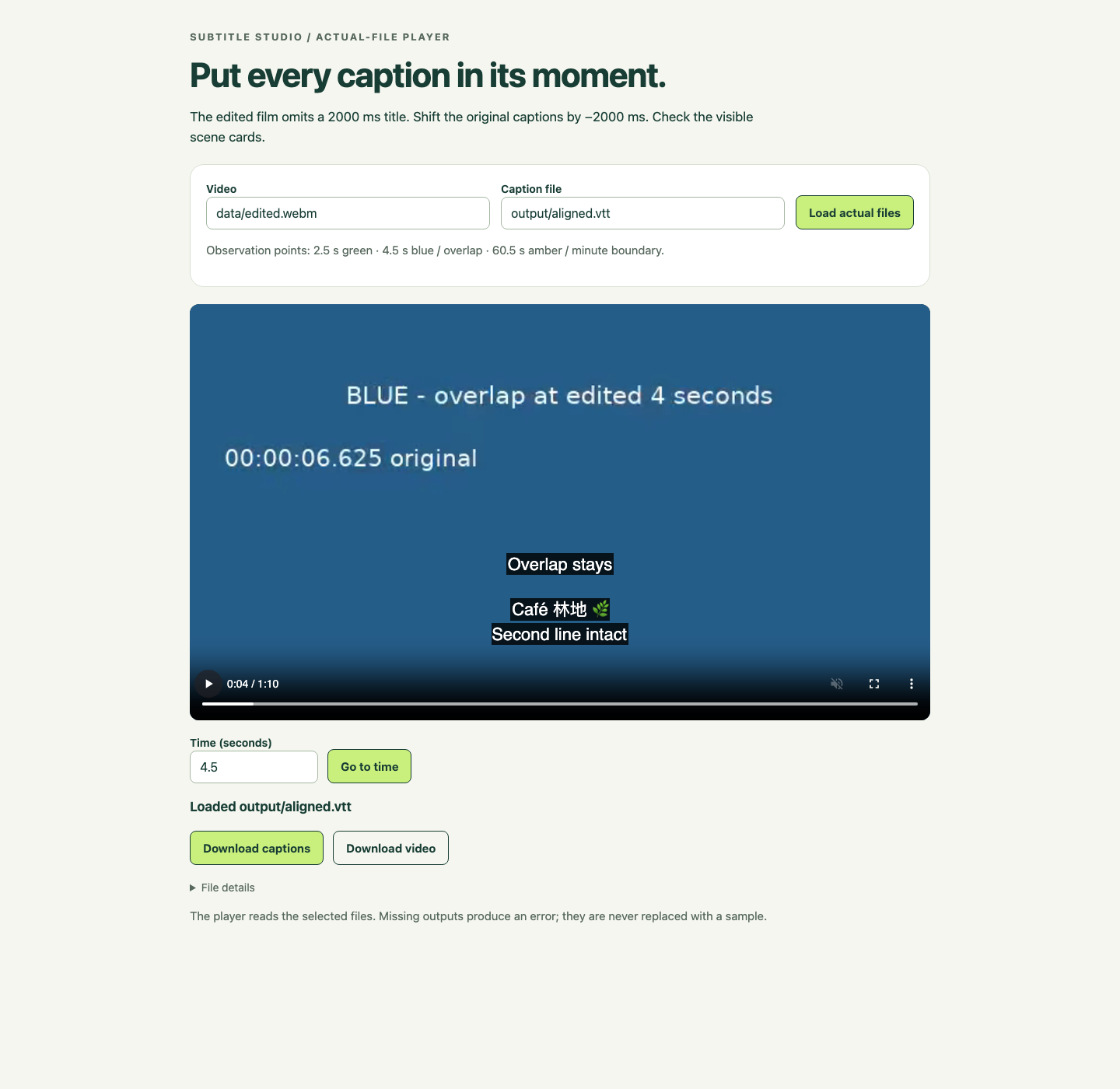
Enter 2.5 in Time (seconds) and click Go to time: the green scene and the two-line Unicode caption should coincide. Then inspect 4.5: the blue scene should show both the first cue and Overlap stays. At 60.5, the amber scene should show Across a minute. A browser can order equal-start active cues differently from file order; all their complete texts must remain present. Click Play to confirm actual playback, then pause. Download captions saves the loaded output file, and Download video saves the loaded film; neither button transforms the content.
The example below shows the actual saved file on the blue scene. Look for both the complete two-line Unicode cue and the separate overlapping cue, plus the loaded output filename.
Return to Terminal. For an intentional wrong-path error, use the nonexistent singular filename:
cargo run --quiet -- inspect data/caption.vtt
This should return nonzero and name the missing path. A missing file differs from a malformed cue inside an existing file. Recover by naming your real output:
cargo run --quiet -- inspect output/aligned.vtt
You should again see all three shifted cues and their complete text. Preserve the raw captions and video; changing them would hide the transformation's effect.
If you have not saved an accidental edit, press Ctrl+X, then N at the save question to leave the file unchanged. For a saved mistake, read Cargo's named file and line, reopen this source and correct that local expression. Alternatively restore your own checkpoint. The one-cue checkpoint contains the state before this phase; restoring it means you must redo this phase and any later functions.
If you opened a new Terminal, its variables and working directory do not carry over. Repeat the visible environment and directory commands first:
export PATH=/home/labex/.cargo/bin:$PATH
export LANG=C.UTF-8 LC_ALL=C.UTF-8
cd /home/labex/project/subtitle-sync
The following recovery commands are conditional: use them only when undoing a saved mistake. ls -d lists directory names themselves; * matches their generated suffixes. If no checkpoint exists, read that error and repair the source instead of inventing a path.
ls -d .edit-before-one-cue.*
read waits for one line and stores it in a session variable. Run it, then type or paste one actual complete directory name printed above and press Enter. Do not type an example suffix or the dollar sign:
read rs01_restore
Confirm that the file is the expected earlier source before restoring it:
cat "$rs01_restore/time.rs"
cp -p "$rs01_restore/time.rs" src/time.rs
Then reopen nano, redo the missing implementation and rerun the failed command. Do not rerun setup or change protected input files. A code fix does not replace an existing output VTT or the file already loaded into a browser Blob; preserve the old result before regenerating its required path, then select that actual output and click Load actual files again.
The .edit-before-one-cue.* checkpoint has only milliseconds completed. For a mistake confined to collection, use the same confirmation procedure with .edit-before-all-cues.*: that checkpoint also retains the completed single-cue function. Neither is a full final implementation.
Optional complete time.rs comparison and recovery reference
Try the function edits and inspect their results before opening this reference. It shows one complete implementation, not a required command sequence. Equivalent algorithms are allowed under the public contract. Compare the affected function rather than replacing already completed work unnecessarily.
use crate::Cue;

pub fn milliseconds(parts: [i64; 4]) -> Result<i64, String> {
    let scales = [3_600_000, 60_000, 1_000, 1];
    let mut total = 0_i64;
    for i in 0..4 {
        let piece = parts[i]
            .checked_mul(scales[i])
            .ok_or(String::from("time integer overflow"))?;
        total = total
            .checked_add(piece)
            .ok_or(String::from("time integer overflow"))?;
    }
    Ok(total)
}

pub fn shift_one(cue: &Cue, delta: i64) -> Result<Cue, String> {
    let start = cue.start
        .checked_add(delta)
        .ok_or(String::from("start integer overflow"))?;
    let end = cue.end
        .checked_add(delta)
        .ok_or(String::from("end integer overflow"))?;
    if start < 0 || end < 0 {
        return Err(String::from("shift would produce negative time"));
    }
    Ok(Cue { start, end, text: cue.text.clone(), line: cue.line })
}

pub fn shift_all(cues: &[Cue], delta: i64) -> Result<Vec<Cue>, String> {
    let mut shifted = Vec::new();
    for (index, cue) in cues.iter().enumerate() {
        let next = shift_one(cue, delta)
            .map_err(|error| format!("cue {} at line {}: {error}", index + 1, cue.line))?;
        shifted.push(next);
    }
    Ok(shifted)
}
Summary
You converted validated time fields into checked integer milliseconds, shifted one cue and a complete collection, and preserved text, order, duration and legitimate overlap. You then loaded the actual new file as a video subtitle track, inspected the published visual alignment points, and recovered from a wrong input path. The next lab teaches the file boundary that rejects bad input and existing output paths before changing a result file.