Introduction
A community dinner needs an invitation for every guest. You will turn a CSV guest list, JSON event details and a prepared HTML design into a new batch of personal invitation files. Two guests with the same name must still receive separate files, and names such as Zoë, "Z" & <Friends> must appear as text.
You need Python strings, dictionaries, loops and functions, plus basic terminal use. This lab explains file reads, CSV records, templates, HTML text escaping and new output directories. The CLI and page design are provided; your work is the field mapping, complete validation and per-guest generation. You will not build CSS, send email or make PDFs. Estimated time: 55–75 minutes, including reading and ordinary mistakes.
Open Your First Invitation
In this step, you will generate one normal invitation and connect the page to its input fields. Begin in WebIDE, open Terminal → New Terminal, and wait for the labex shell prompt. In a narrow window, Terminal may be inside More (...). All commands go in this terminal. The prepared workspace is independent of earlier labs.
cd changes the current directory. An absolute path starts at /; relative paths are resolved from the current directory. If a later command cannot find a file after you move elsewhere, return here with the same command:
cd /home/labex/project/invitations
cat prints a text file. Read the event details:
cat event.json
JSON uses braces for objects and double quotes for string keys and values. These four event values become the invitation's title, date, time and venue. The ready-to-run one.py example already maps them and a single guest into the supplied design. python3 runs a Python file. Generate the example into the new batches/first directory:
python3 one.py
Expected output:
Created batch: batches/first
Switch from the WebIDE platform tab to Web 8080. Setup has already started the invitation browser; you do not need Go Live. Refresh the preview and find first/g001.html. Click Open invitation, which opens the actual HTML file in a new browser tab. Read Maya Patel, The Long Table, the time and venue. Close that browser tab to return to Web 8080. Download HTML saves the same file for use outside the lab.
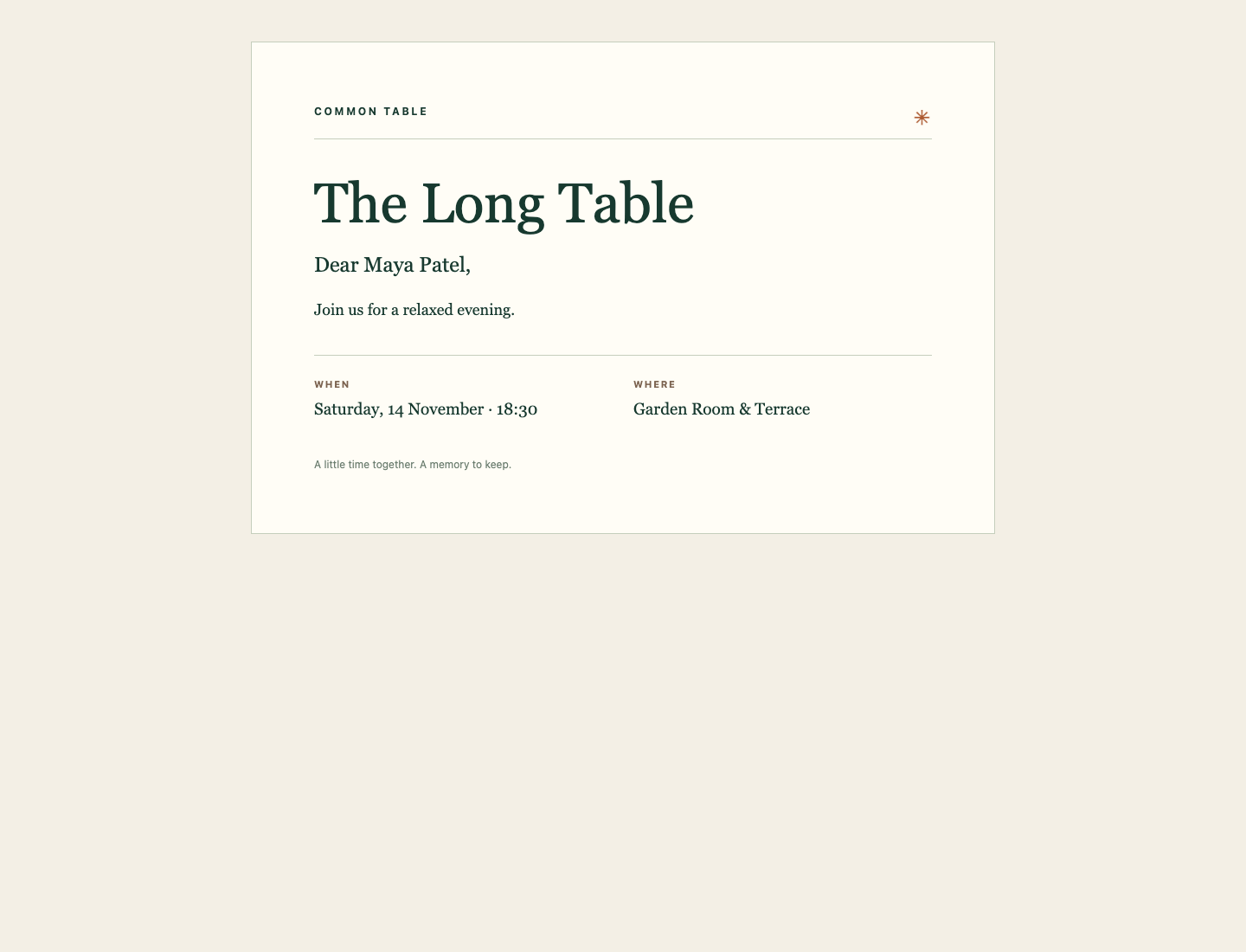
The greeting identifies the guest; the two lower sections show the event time and venue.
The preview reads only files that actually exist in batches. It does not generate missing invitations. The earlier batches/archive is retained as old work. Your final program will create new batches, keeping these files and all inputs intact. Return to WebIDE for the next step.
Map CSV Records to HTML Text
In this step, you will make the reusable renderer put each guest value into the right text slot. Return to the same WebIDE terminal and workspace; relative paths below begin in /home/labex/project/invitations.
Read records rather than splitting commas
CSV is a table format. Its first row contains field names. A comma separates fields unless it occurs inside a quoted field; a quote inside a quoted field is doubled. Therefore, split(",") cannot correctly read every row. Read the supplied list:
cat guests.csv
There are two Alex Chen records with different guest_id values. The last guest’s name includes a comma, quotes, & and angle brackets. These are legal name characters. A stable ID identifies a person; the display name does not.
The prepared generate.py reads these records. Read it before changing the renderer:
cat generate.py
with ... as source opens a file and closes it after the indented block. encoding="utf-8" preserves Unicode characters. newline="" lets the CSV reader handle record boundaries itself. csv.DictReader(source) uses the header to make one dictionary per record; list(...) reads the records into a list. For example, guest["name"] is one complete name, including a comma if it belongs to that name. json.loads(...) converts event JSON text into a dictionary. These readers and the CLI are already implemented.
Keep CSV quoting and HTML escaping separate
An HTML page uses <...> for tags and &...; for character references. CSV quotes protect the table structure; they do not stop a name such as <Friends> from being interpreted as HTML. html.escape(value, quote=True) converts special characters to references that a browser displays as the original text. Here every supplied value goes into an HTML text slot. This is not a recipe for inserting arbitrary JavaScript, CSS or URLs.
Template uses $name, $title and the other $field placeholders in invitation.html. substitute(mapping) replaces each placeholder with its corresponding dictionary value and refuses a missing mapping. The template's six body markers, data-field="name", message, title, date, time and venue, identify the semantic text slots. Keep one of each, containing the corresponding text. Keep the supplied input template unchanged. Equivalent tag choices, layout and entity spellings in generated output are accepted; a name in the page's <title> alone does not fill its body slot.
Create the renderer below. cat > rendering.py writes a new file, replacing that file's previous contents. The quoted here-document marker <<'PYCODE' treats everything through the closing PYCODE as literal text; the closing marker must be on its own line. This replaces only your renderer, leaving input files unchanged.
The dictionary maps guest and event fields explicitly. values.items() produces key/value pairs. The dictionary comprehension {key: ... for key, value in values.items()} escapes each value while keeping its key. from html import escape imports the standard-library function.
cat > rendering.py <<'PYCODE'
from html import escape


def render_guest(guest, event, template):
    values = {"name": guest["name"], "message": guest["message"],
              "title": event["title"], "date": event["date"],
              "time": event["time"], "venue": event["venue"]}
    return template.substitute({key: escape(value, quote=True)
                                for key, value in values.items()})
PYCODE
The function returns HTML text; it does not create files. Local helpers may be top-level .py files beside generate.py; package subdirectories are outside this exercise’s scope. Escaping happens once, before substitution, so an ampersand appears as & in the browser rather than as a visible &. You have now separated the invitation's design from its personalized text.
Validate Everyone Before Creating a Batch
In this step, you will generate one file per ID while protecting earlier work. Continue in the same WebIDE terminal.
The original batch.py uses names as filenames and permits an existing directory. Two people named Alex Chen can overwrite one another. Read that small function:
cat batch.py
Your contract is a new batch directory containing <guest_id>.html for every row. IDs use only lowercase ASCII letters, digits and hyphens. Names and messages remain unrestricted UTF-8 text. Required guest fields are guest_id, name, message; event fields are title, date, time, venue. An empty or whitespace-only required value, a duplicate ID or an existing output directory must be refused with a useful error. Keep the CSV, both event files, template and batches/archive unchanged.
Separate preparation from writing
Validate every record and render every page first. Only after that succeeds should you create the output directory and write files. Otherwise, a bad final record could leave a misleading partial batch. This protects against the input errors taught here; it is not a transaction guarantee against disk failure or sudden power loss.
isinstance(value, str) checks that a value is text. event.get(field) returns None when a key is absent, letting you report a useful error. strip() tests whether text contains anything beyond whitespace without changing the text you later render. raise ValueError(...) reports an invalid input; the prepared CLI catches it, prints Cannot generate invitations: ... and exits unsuccessfully.
A set() stores IDs already seen. in tests membership; seen.add(...) remembers an ID. all(...) checks that every character passes the stated allowed-character rule. pages.append((guest_id, page)) stores an ID/page pair. Finally, for guest_id, page in pages unpacks those pairs.
Path(output) represents the requested directory. mkdir() creates it and refuses an existing path because we do not pass exist_ok=True. The / operator joins paths. An f-string such as f"{guest_id}.html" inserts the ID into a filename. write_text(..., encoding="utf-8") writes the complete HTML text as UTF-8.
Replace only batch.py with the following core implementation:
cat > batch.py <<'PYCODE'
from pathlib import Path
from rendering import render_guest


def write_batch(guests, event, template, output):
    for field in ("title", "date", "time", "venue"):
        if not isinstance(event.get(field), str) or not event[field].strip():
            raise ValueError(f"Missing event field: {field}")
    if not guests:
        raise ValueError("The guest list is empty")
    seen = set()
    pages = []
    for guest in guests:
        for field in ("guest_id", "name", "message"):
            if not isinstance(guest.get(field), str) or not guest[field].strip():
                raise ValueError(f"Missing guest field: {field}")
        guest_id = guest["guest_id"]
        if not all(character in "abcdefghijklmnopqrstuvwxyz0123456789-" for character in guest_id):
            raise ValueError("Guest IDs must use lowercase letters, digits, or hyphens")
        if guest_id in seen:
            raise ValueError(f"Duplicate guest ID: {guest_id}")
        seen.add(guest_id)
        pages.append((guest_id, render_guest(guest, event, template)))
    output = Path(output)
    output.mkdir()  ## An existing batch is always refused.
    for guest_id, page in pages:
        (output / f"{guest_id}.html").write_text(page, encoding="utf-8")
PYCODE
from rendering import render_guest uses your local renderer. The first loop checks event fields, the next loop validates guests and prepares pages, and the last loop writes the completed batch. No file is created until the validation and rendering loops finish.
The CLI takes four positional paths, in order: guest CSV, event JSON, template HTML and a new output directory. Run it with the complete guest list:
python3 generate.py guests.csv event.json invitation.html batches/evening
Expected output:
Created batch: batches/evening
ls lists directory members:
ls batches/evening
You should find g101.html, g102.html and g103.html. The two Alex invitations now have independent IDs. The completed files preserve each person's own message; the third invitation preserves its comma, quotes, Unicode and literal angle brackets.
Reuse the Generator and Keep Earlier Work
In this step, you will use the same program for another event and practice ordinary error recovery. Begin in the same WebIDE terminal. Each command below is separate, so an expected failure does not prevent you from continuing.
First deliberately repeat the completed output path. This is expected to fail: mkdir() refuses an existing batch. The message begins Cannot generate invitations: and includes an existing-file error. The previous batch must remain unchanged.
python3 generate.py guests.csv event.json invitation.html batches/evening
Read the prepared duplicate-ID example. The second guest has the first guest's ID:
cat invalid-duplicate.csv
Try to create a new batch from it. This is another expected failure, reporting Duplicate guest ID: g101 before any directory is created:
python3 generate.py invalid-duplicate.csv event.json invitation.html batches/rejected-duplicate
The missing-message example also fails intentionally with Missing guest field: message. Even though earlier records are valid, no partial batch should appear:
python3 generate.py invalid-missing.csv event.json invitation.html batches/rejected-missing
A misspelled input path is different: the operating system cannot open the file. The next command intentionally uses guest.csv, which does not exist. Read the error; do not reset the environment:
python3 generate.py guest.csv daytime.json invitation.html batches/daytime
Recover by using the actual guests.csv path. Read the second event, then generate a new batch with the same program and guest list:
cat daytime.json
python3 generate.py guests.csv daytime.json invitation.html batches/daytime
Expected output:
Created batch: batches/daytime
Switch to Web 8080 and refresh. Open evening/g101.html and evening/g102.html in turn. They share a name but retain their different messages. Open evening/g103.html: the comma, quotes, ë, ampersand and <Friends> must all appear as literal text. Open daytime/g103.html and read its new title, time and venue. Close each invitation's browser tab to return to the list. Use Download HTML for the daytime invitation and open the downloaded file: its personalized text should match the preview.
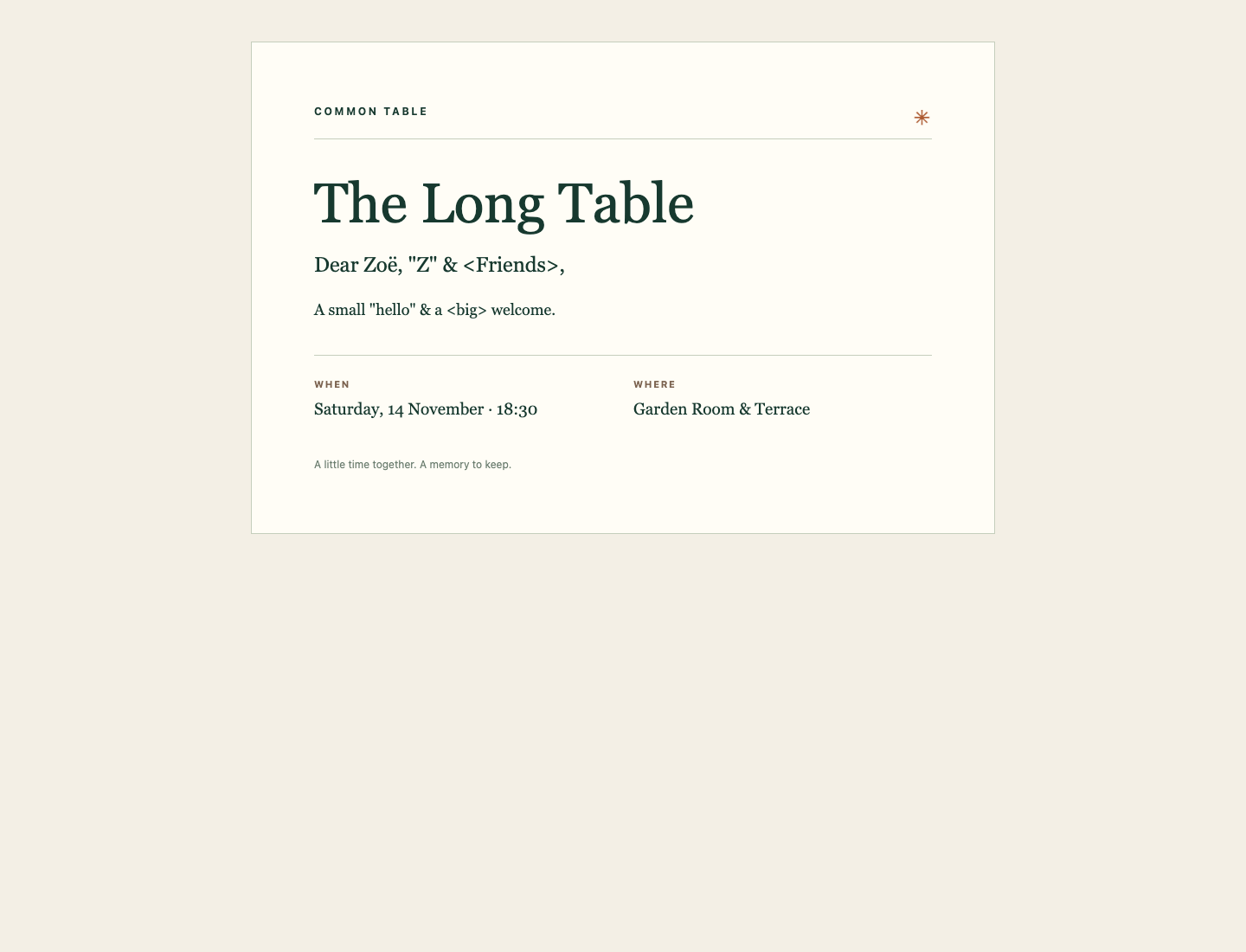
The name keeps its comma, quotes and angle brackets. They are visible text in the greeting.
The two event batches are independent. The CSV, event files and template remain unchanged, and the old archive is still present. Invalid input, an existing batch and a missing input path have distinct explanations; each can be corrected without destroying earlier invitations.
Summary
You generated real, downloadable HTML invitations from CSV records and JSON event details. You separated stable IDs from display names, mapped fields into template text slots, preserved Unicode and special characters with UTF-8 and HTML escaping, and validated an entire batch before writing. The generator can now create new event batches while preserving its inputs and earlier work.