Introduction
A three-card preview is useful for browsing, but an editor needs every matching record. Complete the same local demonstration API client so it follows continuation tokens, preserves identity across pages and publishes a CSV only after the entire batch succeeds. An empty or short page may still have more pages.
This unit starts independently with the request and selection functions from the first guided lab. You need that lab or equivalent HTTP/JSON/CSV knowledge. In WebIDE, use Terminal → New Terminal; use Web 8080 for the source, your saved exports and the public Demo controls. Edit only client.py and storage.py; use the standard library and helper functions defined inside those files, not additional helper modules/resources. Deliver CSVs as actual ordinary workspace files, not symbolic links. Keep catalog.py, /opt/commonlight, synthetic artwork and fictional source records unchanged. Author-estimated reading/practice time: 55 minutes; no beginner timing claim.
Follow the Protocol Until It Ends
In this step, collect every page, including an empty page and a short data page, while keeping each ID once. In the WebIDE terminal, enter the independently prepared workspace:
cd /home/labex/project
The request function already handles JSON, encoded cursor values and a three-second blocking-operation timeout. Inspect the prepared rules using cat:
cat client.py
The current collect returns only one page. A page_size of 3 means at most three records, not that every page must contain three. Predict this small sequence: first three records, then no records but another cursor, then one record with another cursor. The empty page adds nothing, but it does not establish completion. Run the sequence using only returned cursors:
python3 - <<'PY'
import client
url = 'http://127.0.0.1:8080/api/harbor'
first = client.request_page(url, 3)
second = client.request_page(url, 3, first['next_cursor'])
third = client.request_page(url, 3, second['next_cursor'])
print('Page 1 items:', len(first['items']))
print('Page 2 items:', len(second['items']))
print('Page 2 finished:', second['next_cursor'] is None)
print('Page 3 items:', len(third['items']))
print('Page 3 finished:', third['next_cursor'] is None)
PY
Page 1 items: 3
Page 2 items: 0
Page 2 finished: False
Page 3 items: 1
Page 3 finished: False
Only next_cursor is None ends a successful batch. Do not stop because items is empty, a page is short, or a guessed number of pages has passed.
Across pages, the same photo ID can occur again with identical values. A dictionary keyed by photo_id keeps the relationship between identity and all its fields. setdefault(key, value) inserts a value only when the key is absent. This retains one copy; a repeated title is not a duplicate ID. Conflicting revisions are outside this demonstration contract. Both distinct IDs called Blue hour must remain.
A set records unique values. set() creates the empty set, cursor in seen_cursors asks whether a token is already present, and seen_cursors.add(cursor) records a new token. This set records the continuation tokens already seen. After checking for the legitimate null ending, reject a repeated token instead of looping forever or treating a cycle as complete. raise ValueError stops collection before the command can save an incomplete result. Normal prepared catalogs are finite; there is no fixed page-count cutoff and no automatic retry or resume.
Replace client.py with the complete module below. As before, > replaces this file and the quoted here-document keeps the contents literal. The request and filter are unchanged; collect is the new part.
cat > client.py <<'PY'
"""The request and selection functions are completed in the first guided lab."""
import json
from urllib.parse import urlencode
from urllib.request import urlopen

def request_page(endpoint, page_size, cursor=None):
    params = {'page_size': page_size}
    if cursor is not None:
        params['cursor'] = cursor
    with urlopen(endpoint + '?' + urlencode(params), timeout=3) as response:
        return json.load(response)

def select_photos(photos, category, orientation):
    return [photo for photo in photos
            if photo['category'] == category and photo['orientation'] == orientation]
def collect(endpoint, page_size):
    photos = {}
    cursor = None
    seen_cursors = set()
    while True:
        page = request_page(endpoint, page_size, cursor)
        for photo in page['items']:
            photos.setdefault(photo['photo_id'], photo)
        cursor = page['next_cursor']
        if cursor is None:
            return list(photos.values())
        if cursor in seen_cursors:
            raise ValueError('Repeated cursor; catalog did not complete')
        seen_cursors.add(cursor)
PY
Run a complete collection. Omit --first-page; that flag deliberately produces only a sample.
python3 catalog.py 'http://127.0.0.1:8080/api/harbor' street landscape 3 catalog.csv
Saved 5 photos to catalog.csv
Inspect the stored identities rather than trusting a count:
python3 - <<'PY'
import csv
with open('catalog.csv', encoding='utf-8', newline='') as stream:
    for photo in csv.DictReader(stream):
        print(photo['photo_id'], '|', photo['title'])
PY
p01 | Morning, market
p02 | Blue hour
p04 | The "quiet" lane
p08 | Blue hour
p09 | Last tram — 帰り道
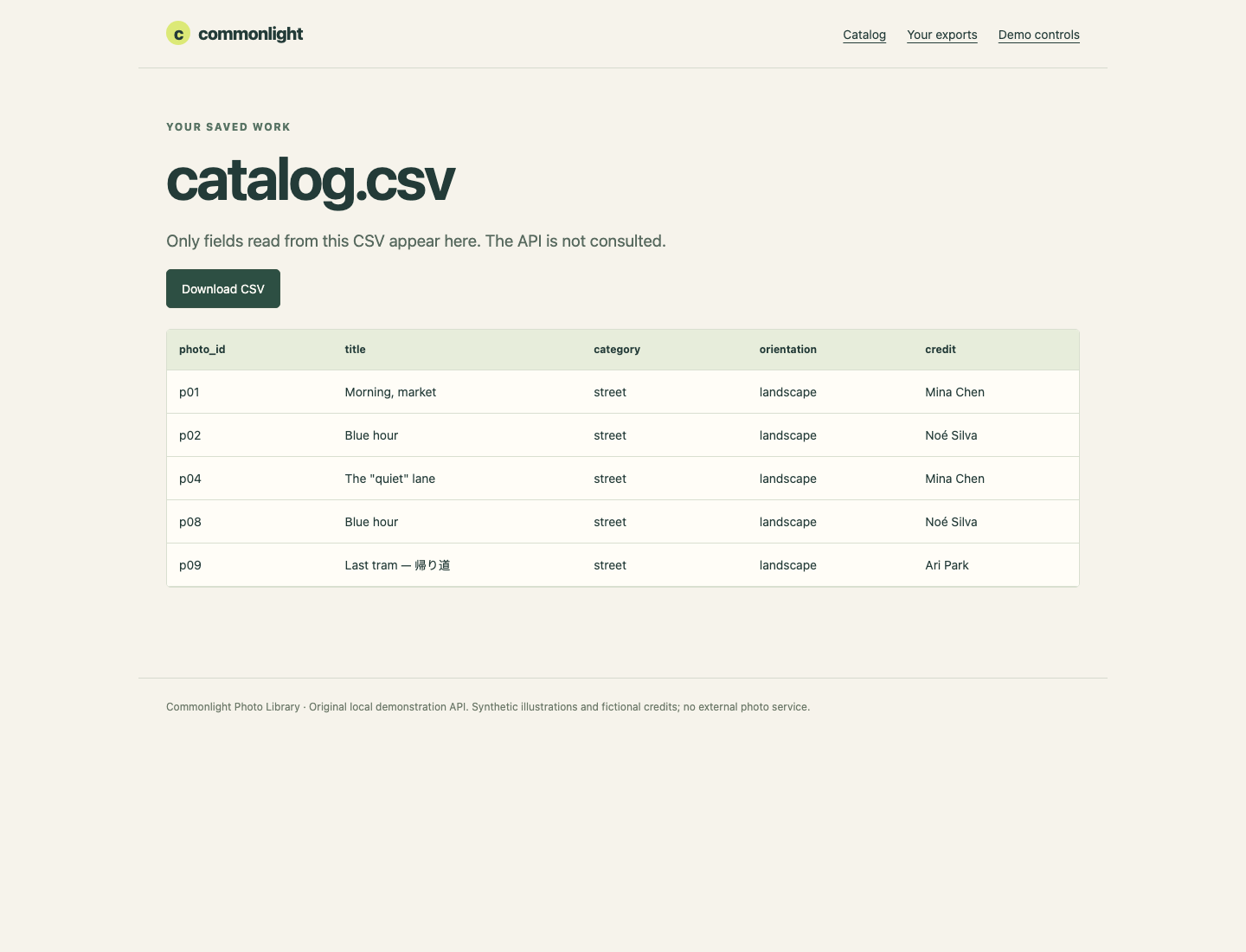
The final-page record p09 is present, p02 occurs once, and p08 retains the same title with a different ID. In Web 8080 → Your exports → catalog.csv, inspect these same values. This table reads your CSV only; an incomplete file would remain incomplete there. Return to WebIDE for the self-check. If you used a wrong filename or directory, use pwd, ls and the earlier cd to recover before retrying.
Publish Only a Complete Export
In this step, protect the last good export when a later request, protocol cycle or file write fails. Collection already finishes before saving starts. The writer also needs a complete-success boundary: opening the final path with w can truncate a good file before the new write succeeds.
Path(output) turns the supplied filename string into a path object. Its .parent is the containing directory and .name is the final filename. NamedTemporaryFile creates a new, unique filename rather than borrowing a predictable neighbor such as catalog.csv.tmp. dir=output.parent keeps it in the destination directory, so replacement stays on the same filesystem. delete=False keeps the file after closing for replacement; stream.name gives its allocated filename, which we store as a Path. The finally block runs after success or an exception. Its exists() check asks whether that temporary path remains; unlink() removes only that newly allocated file if it still exists. After successful replacement the temporary path has disappeared, so nothing is removed. An exception still propagates to the command interface and produces a nonzero exit. Path.replace publishes the finished file after the with block closes it. A successful POSIX replacement is atomic, but this is not a power-loss durability promise, a multi-file transaction or concurrent-writer coordination. An existing unrelated .tmp file is never ours to overwrite or remove.
In the WebIDE terminal, replace storage.py. The five CSV fields must each appear exactly once in the header; valid quoting, row order and column order may vary in equivalent implementations.
cat > storage.py <<'PY'
import csv
import tempfile
from pathlib import Path

FIELDS = ['photo_id', 'title', 'category', 'orientation', 'credit']

def save_csv(output, photos):
    output = Path(output)
    temporary = None
    try:
        with tempfile.NamedTemporaryFile(
            mode='w', encoding='utf-8', newline='',
            dir=output.parent, prefix='.' + output.name + '.',
            suffix='.tmp', delete=False
        ) as stream:
            temporary = Path(stream.name)
            writer = csv.DictWriter(stream, fieldnames=FIELDS)
            writer.writeheader()
            writer.writerows(photos)
        temporary.replace(output)
    finally:
        if temporary is not None and temporary.exists():
            temporary.unlink()
PY
Run a normal batch once before simulating trouble. sha256sum prints a content fingerprint and its filename. Record this fingerprint mentally or keep the terminal output visible; the next failed batch must leave it unchanged. A failed write must also leave the last complete file intact; verification tests this in an isolated fixture without changing your workspace.
python3 catalog.py 'http://127.0.0.1:8080/api/harbor' street landscape 3 catalog.csv
sha256sum catalog.csv
Switch to Web 8080. Choose Demo controls, then Enable middle-page failure. Confirm Middle-page failure ON.
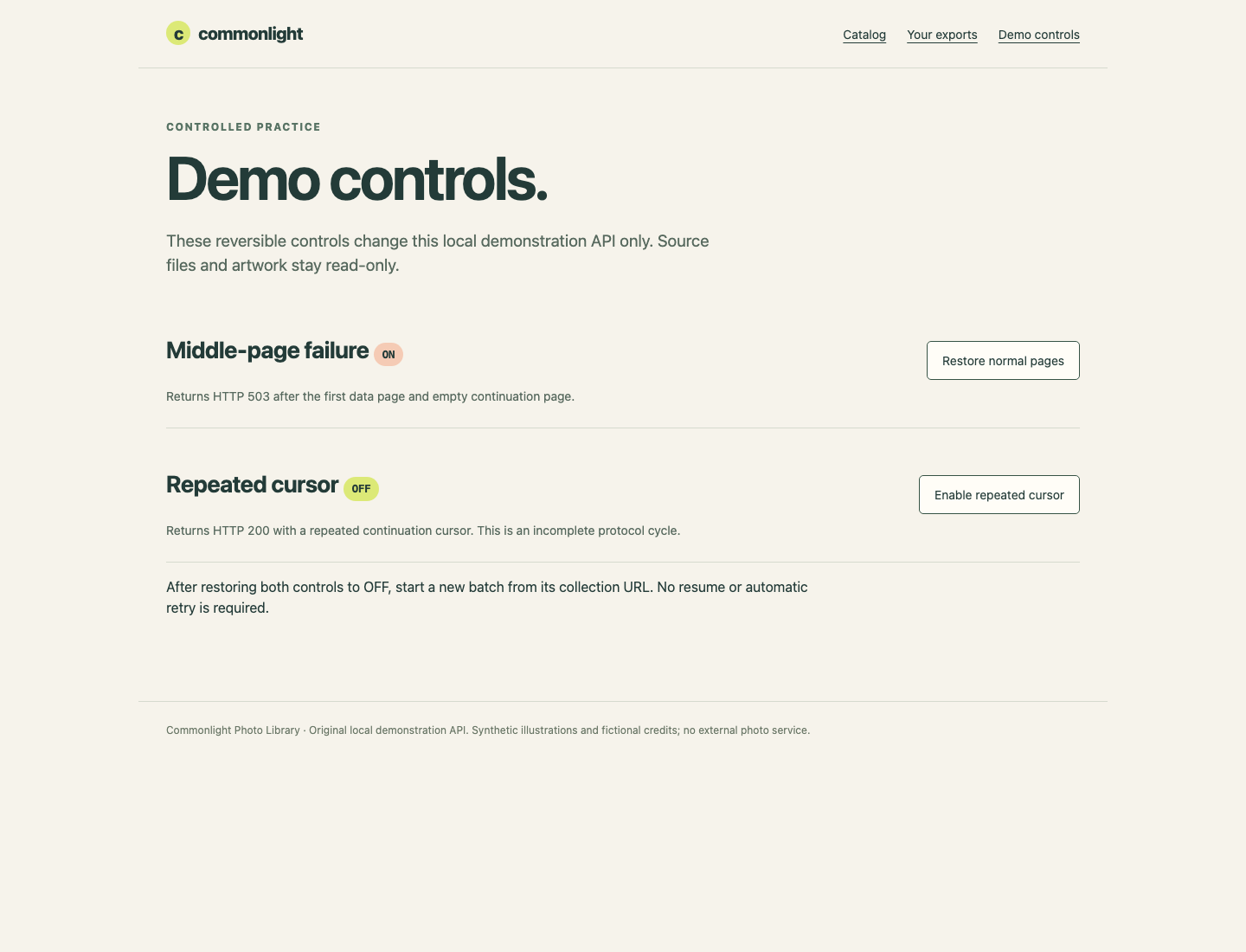
Use the control card matching the failure you enabled. This is an explicitly allowed, reversible change to the demonstration API's memory; source files stay read-only. Return to WebIDE and run this intentional failure. $? is captured immediately by printf:
python3 catalog.py 'http://127.0.0.1:8080/api/harbor' street landscape 3 catalog.csv
printf 'Exit status: %s\n' "$?"
sha256sum catalog.csv
HTTP request refused: 503. No complete export published.
Exit status: 1
...
HTTP 503 here means the demo API rejected a middle-page request. It is neither a connection failure nor a successful empty result. The fingerprint must equal the previous value, and the old five-row export remains viewable. A nonzero exit by itself is not enough if a program has already damaged the file.
In Web 8080 → Demo controls, choose Restore normal pages for the middle-page failure and confirm it is OFF. Return to WebIDE and start a new finite batch from the collection URL; do not reuse an old cursor:
python3 catalog.py 'http://127.0.0.1:8080/api/harbor' street landscape 3 catalog.csv
Next, switch to Web 8080 → Demo controls and choose Enable repeated cursor. Confirm Repeated cursor ON and the failure control OFF. Return to WebIDE:
python3 catalog.py 'http://127.0.0.1:8080/api/harbor' street landscape 3 catalog.csv
printf 'Exit status: %s\n' "$?"
Export failed: Repeated cursor; catalog did not complete
Exit status: 1
These responses have HTTP 200, but their repeated cursor is a protocol error, not completion. Your set guard prevents an endless loop and publication. In Web 8080 → Demo controls, choose Restore normal pages within the Repeated cursor card, then confirm OFF; both controls must now be OFF. Return to WebIDE and rerun the successful command, then try a legal filter with no matches using a new output name:
python3 catalog.py 'http://127.0.0.1:8080/api/harbor' street landscape 3 catalog.csv
python3 catalog.py 'http://127.0.0.1:8080/api/harbor' missing landscape 2 empty.csv
Saved 5 photos to catalog.csv
Saved 0 photos to empty.csv
The second result is successful and header-only; it is different from the two errors above. In Web 8080 → Your exports, open empty.csv to see its five headers and no data rows, then open catalog.csv and choose Download CSV. The real saved five-record file is your deliverable. Return to WebIDE for the self-check. Keep the program and prepared source files; verification reads your actual result and runs unchanged copies in isolated real HTTP fixtures, including different URLs, filters, sizes and write failures.
Summary
You followed opaque continuation tokens to the explicit null ending, kept distinct identities despite duplicate titles, and rejected a protocol cycle. You published a completed UTF-8 CSV through a unique temporary file and preserved the previous good result after failures. The same program can accept another supplied collection and selection.