Introduction
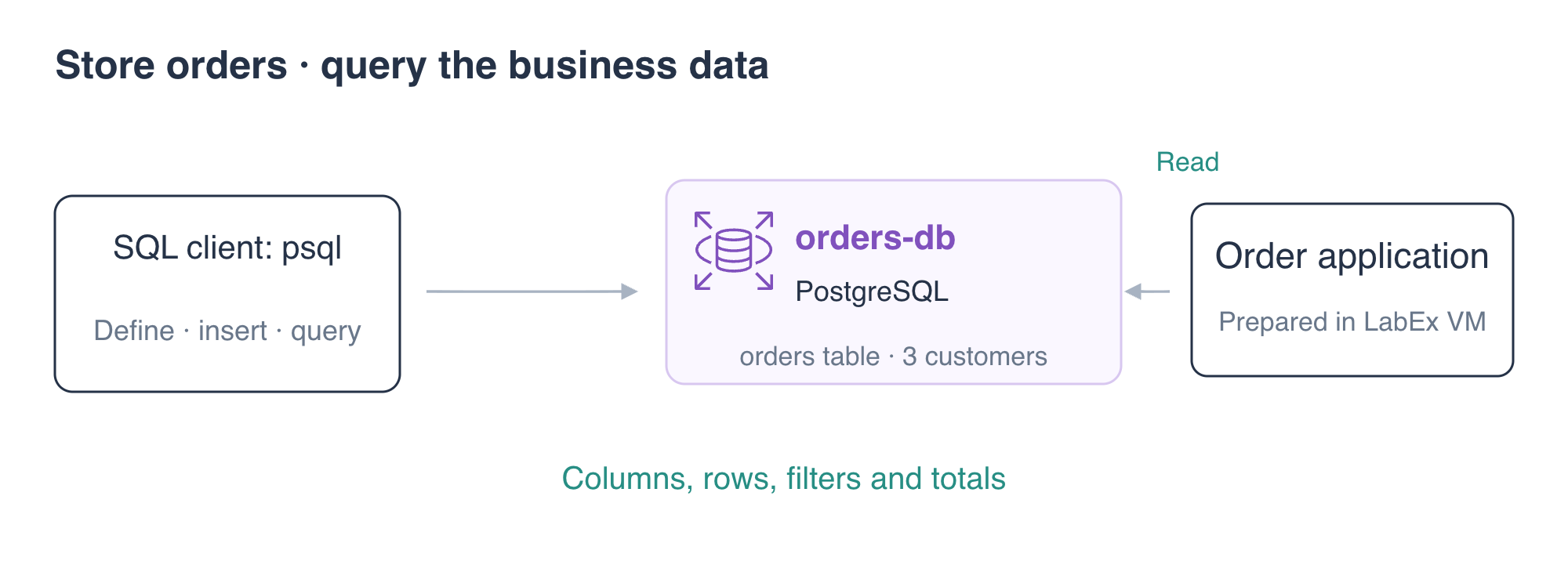
The order application has a database connection but no order table. You will define a small schema, store three customer orders and query the data that the application reads.
Complete the preceding database-connection lab first. This lab starts independently with a supplied PostgreSQL instance, application and configured AWS CLI. You will remove the exercise database after testing the results.
Certification Relevance
| Certification | Exam task | Practice |
|---|---|---|
| Cloud Practitioner (CLF-C02) | Task 3.4 | Recognize a relational database use case for structured application data. |
| Solutions Architect – Associate (SAA-C03) | Task 3.3 | Understand relational engines and application data access patterns. |
Lab Overview
Define the Order Table
In this step, you will create a schema that gives each order a unique identifier, customer name and total.
The application needs a reliable place to store an order ID, customer and amount. One table and three sample orders are enough to follow that data from SQL into the application. Focus on the column rules and returned values; joins and a larger schema are unnecessary for this goal. ON_ERROR_STOP=1 makes psql stop if a statement fails, so later statements do not continue after an earlier error.
A table stores rows with defined columns. SQL is the language used to define and query those rows. The RDS API manages the database instance; SQL operates on data inside the PostgreSQL engine.
Load the prepared SQL connection settings and inspect the supplied instance:
cd /home/labex/project
source database.env
aws rds \
  describe-db-instances \
  --db-instance-identifier orders-db \
  --query 'DBInstances[0].{Database:DBName,Endpoint:Endpoint,Status:DBInstanceStatus}'
The instance is available and contains database orders. Its psql connection is prepared as service=orders-db.
Create the table using a heredoc. The text between the two SQL lines is passed to psql as SQL statements:
psql \
  "service=orders-db" \
  --set=ON_ERROR_STOP=1 <<'SQL'
CREATE TABLE orders (
  order_id integer PRIMARY KEY,
  customer text NOT NULL,
  total numeric(8,2) NOT NULL CHECK (total > 0)
);
SQL
The primary key prevents two rows from sharing an order ID. NOT NULL requires a value. numeric(8,2) stores a decimal with two fractional digits, and CHECK rejects a nonpositive total. These constraints make invalid data fail at the database boundary.
Inspect the table:
psql \
  "service=orders-db" \
  --command '\d orders'
Expect the three columns, a primary key and the positive-total check. The table has no rows yet.
Store Three Customer Orders
In this step, you will insert a small data set and immediately read it back.
INSERT writes rows. Naming the columns makes the relationship between each value and its column explicit:
psql \
  "service=orders-db" \
  --set=ON_ERROR_STOP=1 <<'SQL'
INSERT INTO orders (order_id, customer, total)
VALUES
  (101, 'Maya', 49.90),
  (102, 'Owen', 18.50),
  (103, 'Nina', 25.25);

SELECT order_id, customer, total
FROM orders
ORDER BY order_id;
SQL
Expect three rows with the values above. SELECT reads stored data; ORDER BY makes the display predictable. Without an ordering clause, a database does not promise a particular row order.
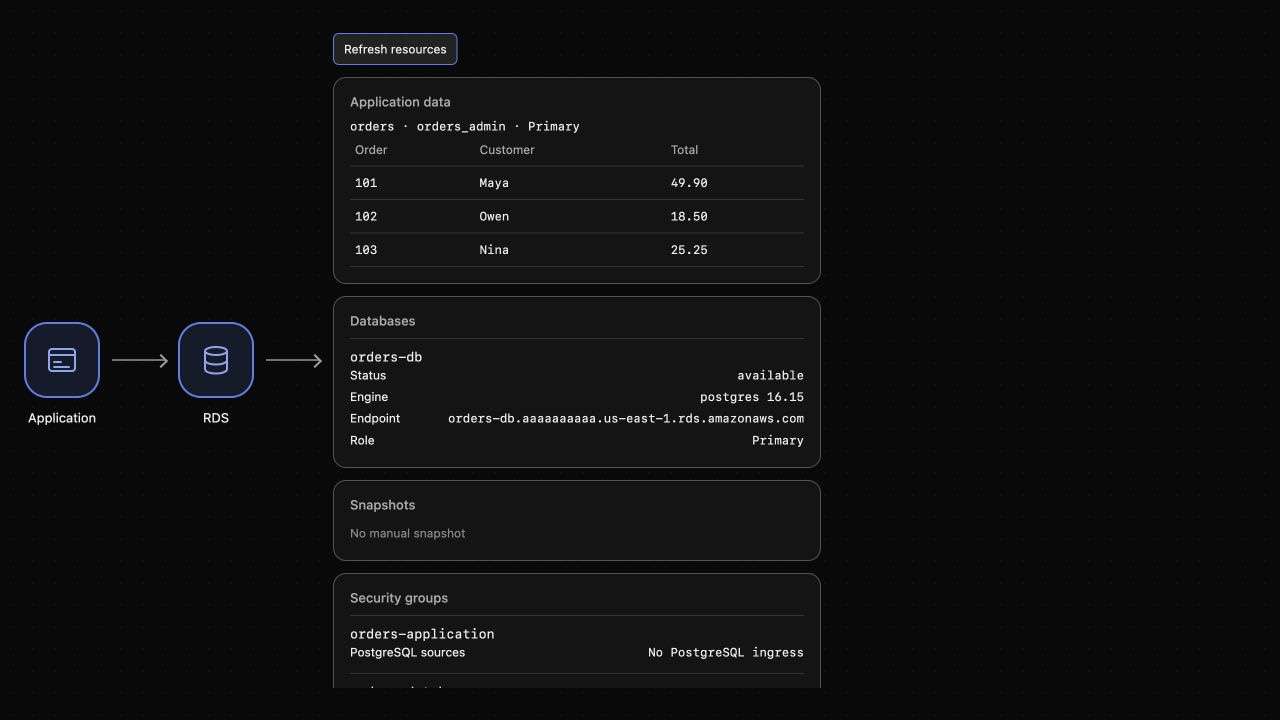
AWS View should now display these same three orders. The application reads PostgreSQL when it receives a request, so adding the table and rows turns an unavailable order list into useful application data.
Query Orders and Check the Application
In this step, you will answer a business question and compare the SQL data with the application's response.
The team wants orders worth at least 25.00. WHERE filters rows before they appear in the result:
psql \
  "service=orders-db" \
  --command 'SELECT order_id, customer, total FROM orders WHERE total >= 25.00 ORDER BY order_id;'
Expect orders 101 and 103. The filter does not delete order 102; it only selects which rows to return.
An aggregate combines values across rows. Count all orders and calculate their combined total:
psql \
  "service=orders-db" \
  --command 'SELECT count(*) AS order_count, sum(total) AS order_total FROM orders;'
Expect 3 orders and a total of 93.65.
Request the application's order list:
curl \
  --silent \
  --show-error \
  --fail \
  http://127.0.0.1:8080/application/orders | jq
Expect all three orders, database orders, user orders_admin and read_only: false. SQL and the application are reading the same stored data. The application returns the full list; the earlier SQL query applied your requested filter.
The database master user is useful for creating this schema. The next lab gives the application a narrower database identity so routine access does not require administrative privileges.
Remove the Exercise Database
In this step, you will remove this lab's database and its order data.
The supplied instance belongs to this exercise. You do not need to retain its sample orders or a final snapshot:
aws rds \
  delete-db-instance \
  --db-instance-identifier orders-db \
  --skip-final-snapshot \
  --query 'DBInstance.DBInstanceIdentifier'
aws rds \
  wait db-instance-deleted \
  --db-instance-identifier orders-db
aws rds \
  describe-db-instances \
  --query 'DBInstances[].DBInstanceIdentifier'
Expect []. Deleting the instance removes the database containing the table; it is broader than DELETE, which removes selected rows inside an existing table. Leave the prepared application and network resources in place.
Summary
You defined an order schema with constraints, inserted three records and used SQL filters and aggregates to answer data questions. The application read the same rows from PostgreSQL. You then removed the exercise database while preserving the supplied application and network.
The next lab restricts both network access and the application's database privileges.
For further reading, see the AWS reference on Connecting SQL clients to RDS PostgreSQL. For SQL details, see the PostgreSQL SQL tutorial.