Introduction
Aster Supply is serving its normal catalogue while a winter update is blocked. Its namespace has enough requested CPU for ordinary operation, but not for the extra Pod requested during a rolling update. You will choose a rollout budget that fits the fixed allocation, keep the reference shop running, and deliver the updated catalogue.
You should already know basic terminal paths, simple YAML, Pods, Deployments, Services and labels. This lab explains CPU request units, ResourceQuota and the update-budget calculation. The real single-node cluster, application, health checks and catalogue data are prepared; no cluster installation, image build or application programming is required. Estimated time includes reading and ordinary errors; it is an author estimate.
Fit the Update to the Fixed Budget
In this step, you will finish Aster Supply's winter catalogue update without increasing its CPU allocation or stopping the reference shop.
The Shop Tab shows a working catalogue. Open Stoneware tray, note its price, and use Back to collection to return. The current Everyday essentials collection has three products; the requested The winter edit adds Amber cup and changes prices. Open the Reference Tab: Fern Stationery is a separate, protected service that must keep its existing catalogue. Keep its Deployment, Service and original Pod unchanged. Then switch to the Workspace Tab.
The prepared cluster is real, single-node Kubernetes. A namespace groups this course's resources. A ResourceQuota limits the total resources admitted in that namespace. Here it tracks only CPU requests: CPU reserved for scheduling, not a spending allowance or a cap on measured CPU use. 1000m means one CPU core; 40m means 0.04 of a core. Memory is prepared and is not this task's quota bottleneck.
First read the quota. --context=labex-v135 selects the prepared cluster, -n shop-quota selects this course's namespace, and describe displays an object's details:
kubectl --context=labex-v135 -n shop-quota describe resourcequota shop-budget
Expect requests.cpu with Used 140m and Hard 140m. This is reserved CPU, not current utilisation. The original shop is still available, but its attempted update needs another Pod. An available replica has passed its readiness check and the prepared three-second minimum ready period; merely creating a Pod does not make it available. Read the Deployment and its ReplicaSets. A ReplicaSet maintains Pods for one Deployment template; rs is its short resource name:
kubectl --context=labex-v135 -n shop-quota get deployments,rs,pods
There are three available shop replicas and one reference replica. The new shop ReplicaSet cannot create its Pod. Describe both shop ReplicaSets; -l app=shop selects their label:
kubectl --context=labex-v135 -n shop-quota describe rs -l app=shop
Find FailedCreate or ReplicaFailure with exceeded quota: shop-budget, requested: requests.cpu=40m, used: requests.cpu=140m, and limited: requests.cpu=140m. This is an admission rejection: that new Pod was not created. It differs from an existing Pending Pod that a scheduler cannot place. Do not change the quota or remove the reference workload.
The approved new catalogue and candidate manifest are already provided. Enter the workspace explicitly. pwd prints your current directory; ls lists its entries:
cd /home/labex/project/shop-update
pwd
ls
You should see approved, starter, and tools. cat prints the approved catalogue:
cat approved/catalogue.json
Read the entire candidate with sed -n '1,180p': -n suppresses ordinary output and p prints lines 1 through 180. The quoted range is one argument:
sed -n '1,180p' starter/shop.yaml
The shop needs three replicas, each requesting 40m. The protected reference requests 20m. Only spec.strategy.rollingUpdate may change; the supplied new application template, replicas, resources, selectors and health checks must remain intact.
| Budget item | Requested CPU |
|---|---|
| Three shop replicas | 3 × 40m = 120m |
| Protected reference | 20m |
| Steady state | 140m |
| One extra shop Pod during update | 180m total: exceeds 140m |
A rolling update balances two values. maxSurge permits extra Pods above the desired replica count. maxUnavailable permits some desired replicas to be unavailable. The requirement here is at least two available shop replicas during the observed update. With three desired replicas, one may be temporarily unavailable, but no extra Pod fits. Choose maxSurge: 0 and maxUnavailable: 1. Both values cannot be zero. Recreate, deleting the Deployment, reducing requests, scaling down the desired count or increasing the quota are outside this task.
Create an editable release directory and copy the provided candidate. mkdir creates a directory; cp copies the file. The provided originals are read-only. chmod u+w adds write permission for your user on the copy:
mkdir release
cp starter/shop.yaml release/shop.yaml
chmod u+w release/shop.yaml
If release already exists from an earlier attempt, keep it and continue with the copy you are editing. For a path typo, use the pwd, ls, and absolute cd commands above before repeating the failed command; a missing path does not require resetting the VM.
sed -i edits a file in place. Each s/old/new/ expression replaces the shown text. The single quotes keep spaces and punctuation together. Change only the two rollout values in your copy:
sed -i 's/maxSurge: 1/maxSurge: 0/' release/shop.yaml
sed -i 's/maxUnavailable: 0/maxUnavailable: 1/' release/shop.yaml
Read the beginning of the saved manifest before applying it:
sed -n '1,35p' release/shop.yaml
Expect replicas: 3, type: "RollingUpdate", maxSurge: 0, and maxUnavailable: 1. apply -f reconciles this file with the existing Deployment; it keeps the Deployment's identity. rollout status waits for the new replicas, with a finite --timeout:
kubectl --context=labex-v135 apply -f release/shop.yaml
kubectl --context=labex-v135 -n shop-quota rollout status deployment/shop --timeout=180s
Expect deployment "shop" successfully rolled out. The controller can remove one old replica, admit a new one, wait for it to become available, and continue. Terminating Pods can remain in quota accounting briefly, so a temporary additional FailedCreate event can recover naturally; it is not a reason to change the quota. The rollout budget is not an absolute bound on all terminating processes or an uptime guarantee.
If an incorrect edit prevents completion, inspect the saved file and fix the two strategy values. To recover an unsuccessful attempt or an observation-window failure, reapply the original approved baseline and wait before retrying your corrected release:
kubectl --context=labex-v135 apply -f approved/shop.yaml
kubectl --context=labex-v135 -n shop-quota rollout status deployment/shop --timeout=180s
The supplied status tool's --wait-baseline option waits for a recent healthy old-catalogue observation before a new attempt. It only reads recorded facts:
./tools/update-status --wait-baseline
kubectl --context=labex-v135 apply -f release/shop.yaml
kubectl --context=labex-v135 -n shop-quota rollout status deployment/shop --timeout=180s
These recovery commands are only needed for an unsuccessful attempt. Keep the supplied baseline unchanged. The read-only observer retains attempts and distinguishes a new complete baseline-to-update attempt; recovery does not erase previous evidence.
Finally, read the actual workload and quota again:
kubectl --context=labex-v135 -n shop-quota get deployments
kubectl --context=labex-v135 -n shop-quota describe resourcequota shop-budget
Both Deployments should be available: shop 3/3 and reference 1/1. Once old Pods terminate, quota use returns to 140m with the same hard value. The next step checks the catalogue people actually receive.
Deliver the Updated Catalogue
In this step, you will inspect the new customer experience and keep a real catalogue download alongside the saved release manifest.
Start in Workspace at /home/labex/project/shop-update. The provided tools/update-status command summarises actual API and HTTP samples recorded by a read-only observer. The leading ./ runs a program relative to the current directory:
./tools/update-status
It reports the required floor, sample count, minimum sampled available replicas and latest update state. Expect a minimum of at least two and three updated/available replicas at completion. The observer samples roughly every half second plus API time, checks the original quota/reference and records failures. Leave this supplied observer running. It does not prove what happened between samples, guarantee production uptime, or repair the cluster. A check that immediately follows rollout completion may need a brief wait for two completed samples. If an attempt broke the required floor or had a long observation gap, use the baseline recovery taught in the previous step before a corrected attempt.
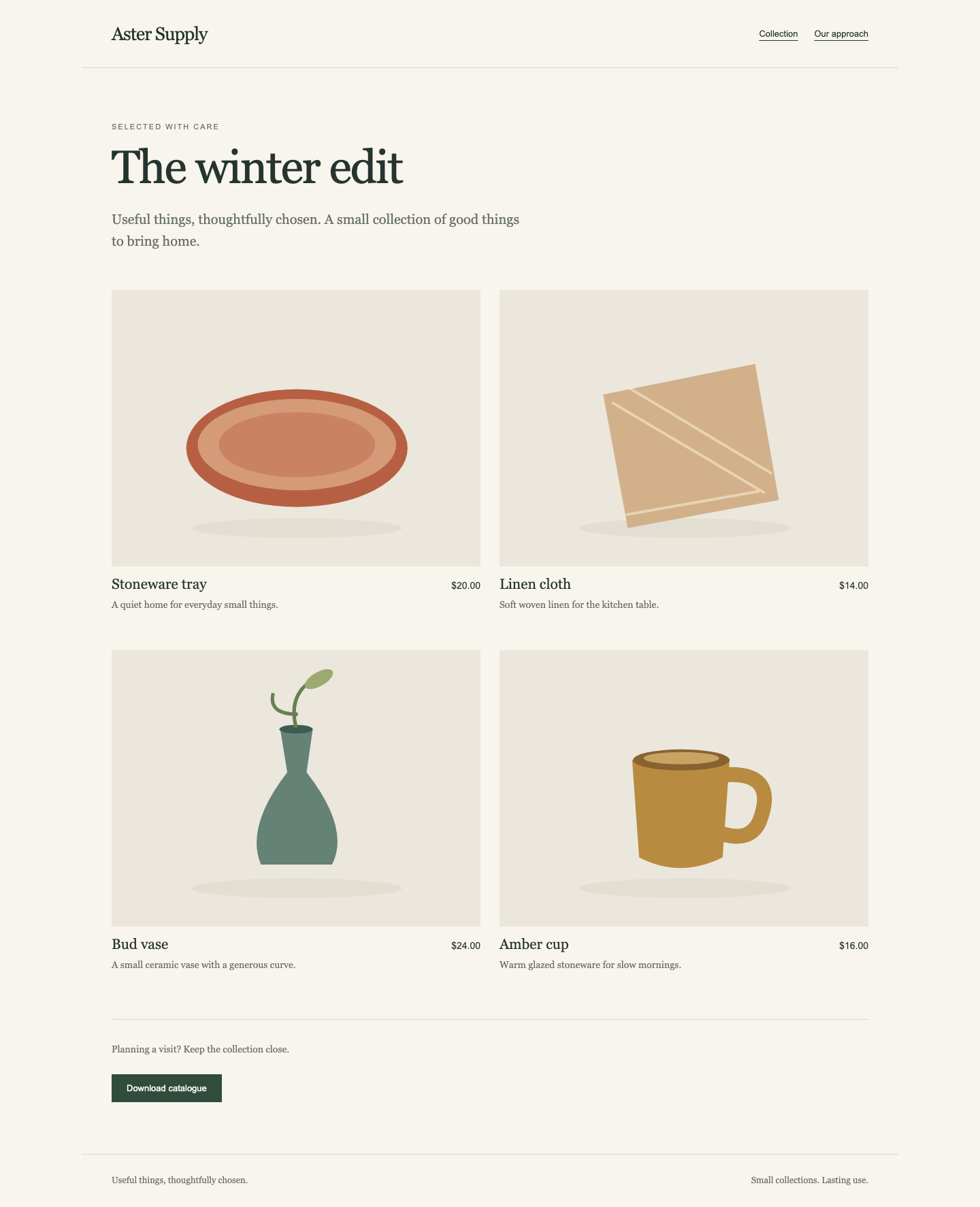
Switch to Shop and reload the page. Expect The winter edit, four products, Stoneware tray $20.00, Linen cloth $14.00, Bud vase $24.00, and Amber cup $16.00. Open Amber cup and confirm its price and Available in store status, then return with Back to collection. This is a catalogue, with no online checkout.
The completed collection has four real product cards. Compare the collection heading and prices with this running example:
Use Download catalogue. Open the browser's downloaded catalogue.csv; its four rows should agree with the collection, names, prices in cents and availability shown on the site. The browser download and terminal workspace are different locations. Next save the same real Service download in the workspace for handover.
Switch back to Workspace. curl fetches a URL. --fail reports HTTP errors, --silent --show-error hides the progress meter while retaining errors, and --output writes the response bytes to the named file. 127.0.0.1:8081 is the prepared local entry that forwards to the original shop Service:
curl --fail --silent --show-error http://127.0.0.1:8081/catalogue.csv --output catalogue.csv
cat catalogue.csv
Expect:
id,name,price_cents,available,collection
stone-tray,Stoneware tray,2000,true,The winter edit
linen-cloth,Linen cloth,1400,true,The winter edit
bud-vase,Bud vase,2400,true,The winter edit
amber-cup,Amber cup,1600,true,The winter edit
A connection error means the local entry could not be reached; an HTTP error is a response from a server. Return to the taught workload and rollout commands to inspect the current state; do not substitute a static file or change the prepared forwarding service. If a download is incomplete or accidentally overwritten, repeat the same curl command after the correct catalogue is available.
Open Reference again and reload. Fern Stationery must still show Desk essentials, Field notebook $9.00, and Clay pencil cup $14.00. Open a product and return to confirm its real links still work.
Your handover is release/shop.yaml plus the actual catalogue.csv, backed by the complete new release, unchanged quota, original reference service and a valid observed update attempt. Preserve the supplied originals, application, Services and read-only observer.
Summary
You connected a real ReplicaSet quota rejection to a rolling update's temporary resource needs, calculated a suitable surge/unavailability budget and completed the new catalogue without expanding the allocation. You also kept the protected reference service and delivered an actual CSV alongside a reusable release manifest.
CPU requests describe resource accounting, not measured utilisation or a performance promise. Native finite observations support this course's availability check; they do not establish uninterrupted production uptime. In another namespace, recalculate both the spare allocation and the minimum available replicas before choosing the strategy.