Introduction
Orchard Market needs a small status board for its stall and delivery applications. The board program is ready, but its current Kubernetes identity cannot read their Deployments. Give the board its own identity and just the permissions needed to display real desired replicas, available replicas and template images. Keep the staff namespace, Secrets and workload changes outside its access.
Your result is a usable board and CSV download, plus four saved manifests that describe its identity, two namespace grants and workload identity selection. The board makes real HTTPS requests to the prepared cluster. It has no static successful data to substitute when access fails.
You should already know basic terminal paths, simple YAML, namespaces, Pods, Deployments, Services and labels. This lab explains ServiceAccounts, Roles, RoleBindings and the provided client before using them. A real single-node Kubernetes cluster, the board, synthetic application data and diagnostic tool are prepared. You do not install the cluster, build an image, program the client or copy tokens. The duration is an author estimate including reading and ordinary mistakes, not a measured beginner completion time.
Create a Dedicated Board Identity
In this step, you will read the board's actual starting identity and save a dedicated ServiceAccount without granting it application access yet.
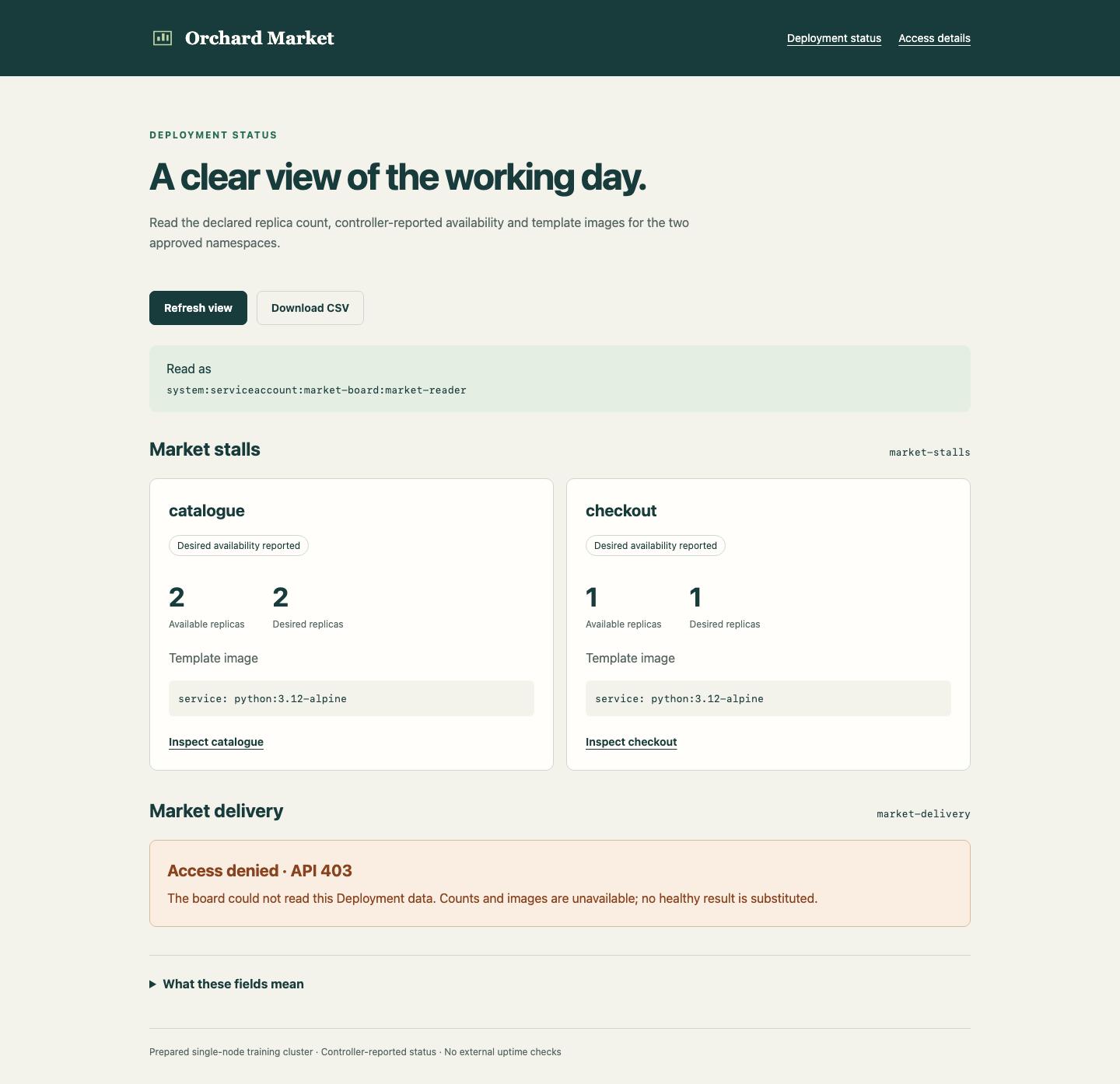
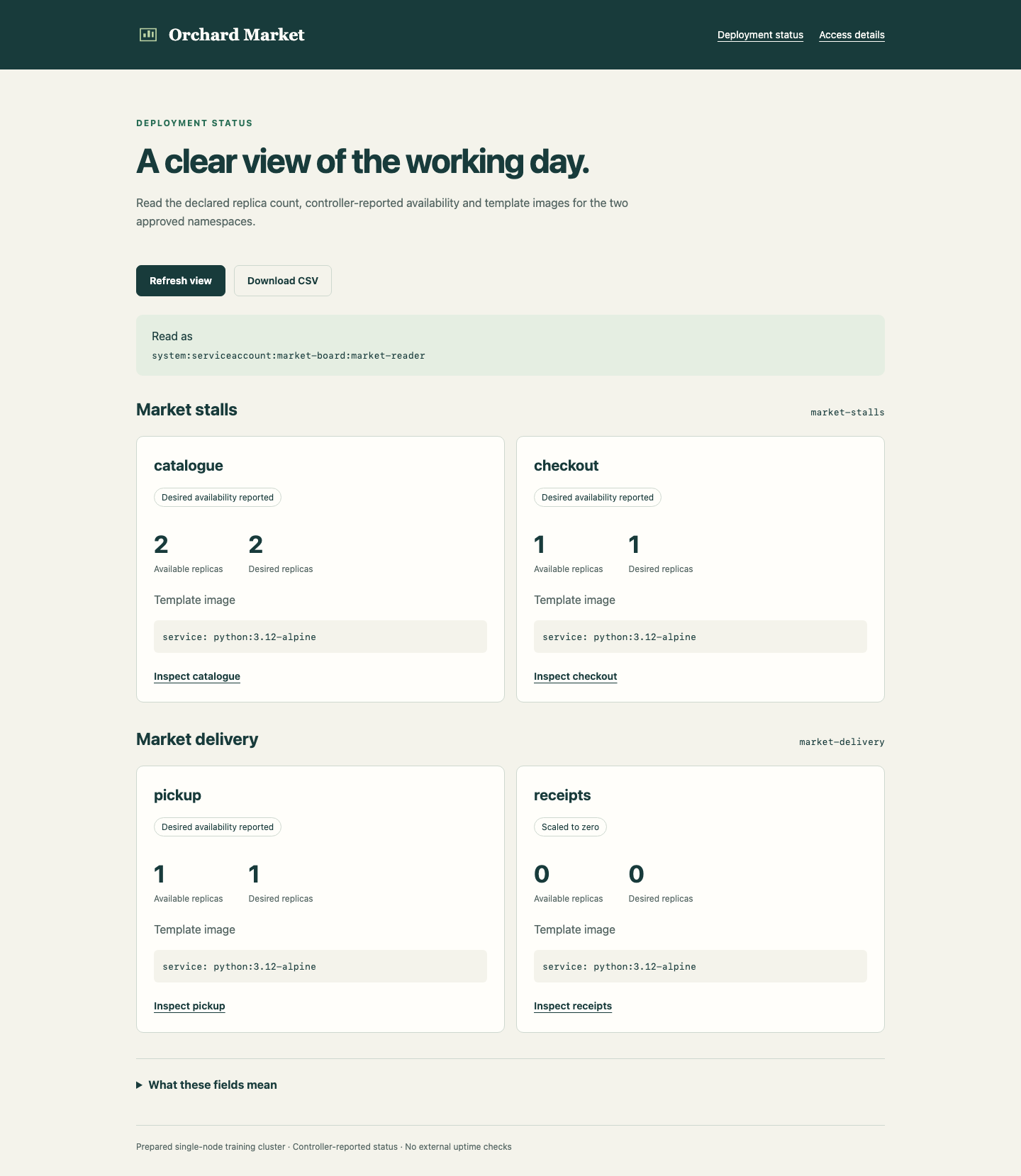
Start in the Board Tab. Orchard Market should show A clear view of the working day., the Market stalls and Market delivery groups, and Access denied · API 403 for both groups. This is the expected initial problem. The complete result will show catalogue with 2 desired and 2 available replicas, checkout with 1 and 1, pickup with 1 and 1, and receipts with 0 and 0. All four use the prepared python:3.12-alpine template image. The receipt archive is intentionally scaled to zero.
The three main fields answer different questions. Desired replicas is the declared number in a Deployment. Available replicas is the controller's count after readiness and its minimum ready time. Template image is the image requested by the Deployment template; during an update it does not prove that every existing Pod already uses that image. Expand What these fields mean, read it, and collapse it again. These are controller observations, not customer website uptime checks.
Choose Access details. The Read as value comes from the API, and initially ends in market-board:default. The table states the intended permission scope; it does not claim that access has already been granted. Use Back to status board, then switch to Workspace.
The terminal starts in /home/labex/project/status-board. pwd prints your working directory, ls lists its entries, and cd with an absolute path returns here if you changed directories:
pwd
ls
cd /home/labex/project/status-board
Expect scope.json, starter and tools. cat displays the prepared scope file. It uses JSON (JavaScript Object Notation), a text format of named values and lists, to record the actual namespaces, identity and application names:
cat scope.json
The board runs in market-board, while its approved application data lives in market-stalls and market-delivery. market-office is excluded. --context=labex-v135 selects the prepared cluster; -n selects a namespace. The Workspace's existing operator credentials can inspect and configure these course objects. They are not the board's credentials. Inspect the actual target Deployments as that operator:
kubectl --context=labex-v135 get deployments -n market-stalls
kubectl --context=labex-v135 get deployments -n market-delivery
Read the names and the desired/available results, including the zero-desired receipt archive. The underlying objects exist even though the board cannot read them. Success from this operator terminal does not prove access for a process inside the board Pod.
A ServiceAccount is a namespaced Kubernetes API identity for a workload, not a Linux user or a browser visitor. The prepared board Deployment initially selects the default ServiceAccount. describe presents the object's configuration in readable sections:
kubectl --context=labex-v135 describe deployment status-board -n market-board
Look in its Pod template for the selected ServiceAccount. A Pod receives a projected credential for that account. The prepared client reads it internally and validates the API server's certificate using the supplied certificate authority; it never prints the credential or uses your operator kubeconfig. You configure the identity and permissions rather than implementing credential handling.
The provided ./tools/board-test runs that client inside the current board Pod. The leading ./ means the tool is in this working directory. Its first argument selects a taught diagnostic operation. identity asks the API how it authenticated this actual credential:
./tools/board-test identity
Expect username to be system:serviceaccount:market-board:default, with the current pod_uid. The http_status value 201 means the API answered this self-identity review. The review is not a persisted cluster object, does not change permissions and does not create a Deployment. No token is displayed. A ready board process and a confirmed identity can still lack access to application data.
Create your release directory. mkdir -p creates it if needed and preserves an existing directory. In the next command, > redirects output into your editable file. The quoted YAML marker keeps the text literal until the final marker on its own line. Repeating the command overwrites only that release file:
mkdir -p release
cat > release/identity.yaml <<'YAML'
apiVersion: v1
kind: ServiceAccount
metadata:
  name: market-reader
  namespace: market-board
YAML
Read your file, then apply it. apply -f reads the named manifest and creates or updates its object:
cat release/identity.yaml
kubectl --context=labex-v135 apply -f release/identity.yaml
kubectl --context=labex-v135 get serviceaccount market-reader -n market-board
The dedicated identity now exists. A long-lived token Secret is not automatically required: Kubernetes projects a bound credential into a Pod when that Pod uses the identity. Creating this ServiceAccount alone neither grants Deployment access nor changes the identity of the running board. Keep the original default account unchanged.
If a path is mistyped, use the already shown pwd, ls and absolute cd, then repeat the failed operation. For a YAML error, read your editable file, compare indentation with the complete example, rewrite it and apply again. Keep scope.json, the starter, tools, original namespaces, applications and data unchanged. You will edit only the stated release manifests and their named identity/RBAC objects, plus the board Deployment's selected ServiceAccount.
Connect the First Namespace
In this step, you will grant two read operations in the stall namespace, then make a new board Pod actually use the dedicated identity.
Start in Workspace, in /home/labex/project/status-board. Kubernetes RBAC means role-based access control. A Role defines permissions within one namespace. A RoleBinding connects that namespace's Role to an identity. Matching names alone do not make this connection.
The board needs list to read a Deployment collection and get to open an individual Deployment. Deployments belong to the apps API group; the rule uses apps, without /v1. watch would request a change stream, which this board does not use. No write verbs or Secret access are needed. Keep both read verbs available for all Deployments in each approved namespace. Omit resourceNames, the optional rule field that restricts permission to named resources. The binding's roleRef.apiGroup identifies the RBAC API, rbac.authorization.k8s.io; it differs from the apps group containing the Deployments allowed by the Role.
Save a Role and its binding in one manifest. The --- separator starts a second YAML document. The binding's metadata.namespace is where permission applies, while subjects.namespace is where the ServiceAccount exists. Here those are deliberately different:
cat > release/first-access.yaml <<'YAML'
apiVersion: rbac.authorization.k8s.io/v1
kind: Role
metadata:
  name: deployment-reader
  namespace: market-stalls
rules:
- apiGroups: [apps]
  resources: [deployments]
  verbs: [get, list]
---
apiVersion: rbac.authorization.k8s.io/v1
kind: RoleBinding
metadata:
  name: board-reader
  namespace: market-stalls
subjects:
- kind: ServiceAccount
  name: market-reader
  namespace: market-board
roleRef:
  apiGroup: rbac.authorization.k8s.io
  kind: Role
  name: deployment-reader
YAML
Read and apply both objects, then inspect the interpreted connection:
cat release/first-access.yaml
kubectl --context=labex-v135 apply -f release/first-access.yaml
kubectl --context=labex-v135 describe role deployment-reader -n market-stalls
kubectl --context=labex-v135 describe rolebinding board-reader -n market-stalls
Expect only get and list for Deployments. Follow roleRef to the Role in market-stalls, and the subject to market-reader in market-board. The binding does not create a second ServiceAccount in the target namespace.
The running board still uses default. The list operation of the diagnostic tool requests the actual Deployment collection using that Pod's current credential. A forbidden read returns http_status: 403 and a nonzero command exit status; this is expected before you switch the workload identity:
./tools/board-test list market-stalls
The new permission belongs to market-reader, not to default. Do not fix this by granting access to the default account. Select the dedicated account in a saved copy of the prepared board Deployment.
Read the complete starter first. It contains the existing image, mounted source, health check, replica count and other settings to preserve:
cat starter/board.yaml
kubectl set serviceaccount changes the selected identity. --local transforms this input file without applying it to the cluster. -f names the input, -o yaml writes a YAML manifest to standard output, and the already learned > saves it as your editable release file:
kubectl --context=labex-v135 set serviceaccount --local -f starter/board.yaml market-reader -o yaml > release/board.yaml
Read the result and confirm spec.template.spec.serviceAccountName is market-reader. Keep all other application settings:
cat release/board.yaml
kubectl --context=labex-v135 apply -f release/board.yaml
An existing Pod cannot have its ServiceAccount changed in place. Updating the Deployment's Pod template creates a new Pod. rollout status waits for the new workload; --timeout=120s bounds the wait:
kubectl --context=labex-v135 rollout status deployment/status-board -n market-board --timeout=120s
kubectl --context=labex-v135 get pods -n market-board
Expect one ready current board Pod. Replacing this board Pod is necessary; the target application Pods are not changed. Read its actual authenticated identity again:
./tools/board-test identity
Expect system:serviceaccount:market-board:market-reader and a different pod_uid from the original default-identity Pod. This confirms the process credential, rather than merely evaluating an impersonated identity.
Deployment collection and detail results also include generation, the version of the Deployment's desired state, and observed_generation, the version last processed by its controller. The detail page labels them Deployment generation and Observed generation. A controller can briefly lag behind a desired change. These fields do not count customer requests or establish website availability.
Read the stall collection and an individual Deployment. get takes the namespace followed by the Deployment name:
./tools/board-test list market-stalls
./tools/board-test get market-stalls catalogue
Expect http_status: 200, both original stall Deployments in the collection, and catalogue with 2 desired and 2 available replicas in the individual result. The uid identifies the original object; the template image remains python:3.12-alpine. A namespace Role does not extend to the delivery namespace:
./tools/board-test list market-delivery
Expect API 403 and a nonzero command status for this last command. Switch to Board, use Refresh view, open Inspect catalogue and read its desired/available counts and Template image. Use Back to status board. The stall cards should work while the delivery group still shows Access denied · API 403. This partial result is useful evidence of the namespace boundary.
If Read as still shows the previous identity just after a rollout, use Refresh view again. To confirm the current Pod, switch to Workspace, repeat ./tools/board-test identity, then return to Board and refresh. Service routing may need a short moment to catch up with the rollout; do not grant the old identity access to conceal the transition.
Compare the actual reader, successful stall cards and still-denied delivery group in this running example:
If the rollout times out, return to Workspace and inspect the same Deployment and Pods with the already shown describe and get commands. If a read is denied unexpectedly, compare the Role, RoleBinding subject namespace and selected workload identity. Correct only your release file, apply it and repeat the appropriate rollout or request. Do not copy operator credentials, change the application or restart the VM.
A RoleBinding's roleRef is immutable. If an earlier typo created this course's new board-reader binding with the wrong Role reference, Kubernetes will refuse to change that reference in place. After inspecting it and correcting release/first-access.yaml, recreate only your own named binding, then apply the corrected saved file:
kubectl --context=labex-v135 delete rolebinding board-reader -n market-stalls
kubectl --context=labex-v135 apply -f release/first-access.yaml
These are conditional recovery commands, not a required deletion on the normal successful path. Do not delete default or platform bindings, and do not delete the original board Deployment or target workloads.
Extend the Board Without Widening Its Job
In this step, you will give the same identity the same two read operations in the delivery namespace, then verify useful output and protected boundaries.
Start in Workspace, in /home/labex/project/status-board. A second namespace needs its own Role and RoleBinding. Reuse the Role name there, but keep the subject in market-board; the identity has not moved:
cat > release/second-access.yaml <<'YAML'
apiVersion: rbac.authorization.k8s.io/v1
kind: Role
metadata:
  name: deployment-reader
  namespace: market-delivery
rules:
- apiGroups: [apps]
  resources: [deployments]
  verbs: [get, list]
---
apiVersion: rbac.authorization.k8s.io/v1
kind: RoleBinding
metadata:
  name: board-reader
  namespace: market-delivery
subjects:
- kind: ServiceAccount
  name: market-reader
  namespace: market-board
roleRef:
  apiGroup: rbac.authorization.k8s.io
  kind: Role
  name: deployment-reader
YAML
cat release/second-access.yaml
kubectl --context=labex-v135 apply -f release/second-access.yaml
kubectl --context=labex-v135 describe rolebinding board-reader -n market-delivery
The binding grants this target Role to the existing board identity. No additional board rollout is needed because the current Pod already uses that identity. RBAC grants add together; changing file order does not introduce a deny rule or remove an unrelated grant.
Read both approved collections and a delivery detail through the actual board credential:
./tools/board-test list market-stalls
./tools/board-test list market-delivery
./tools/board-test get market-delivery pickup
Expect API 200 with the original objects and images. The delivery collection includes pickup with 1 desired/1 available and receipts with 0/0. The zero-desired Deployment remains a real object even though it has no running Pods. Preserve this declared setting.
Now check excluded data. A Kubernetes Secret stores named data values. The prepared staff-note is a synthetic fixture; the board has no reason to read it. The operator can confirm that this object exists without displaying its values:
kubectl --context=labex-v135 get secret staff-note -n market-stalls
The board's own credential must still receive API 403 for the third namespace and this Secret. Both following commands are expected to finish with nonzero status:
./tools/board-test list market-office
./tools/board-test secret market-stalls staff-note
A missing object, connection failure or a screenshot of an error is not equivalent to this actual authorization refusal. The same client successfully reads the approved targets, while the existing excluded objects remain intact. Its projected credential file does not grant it access to the Secret API.
The tool's permission operation asks the API whether this actual credential may perform an action. It does not perform that action. The arguments are the namespace, verb and, when relevant, Deployment name. The non-persisted review returns http_status: 201 with allowed: false for each prohibited operation; the tool returns nonzero status for that denial:
./tools/board-test permission market-stalls patch catalogue
./tools/board-test permission market-delivery delete pickup
./tools/board-test permission market-stalls create
The board needs only get and list; no watch stream or workload mutation is authorized. Keep the default identity and original platform RBAC unchanged. Do not add a ClusterRole, ClusterRoleBinding, wildcard, extra subject or another resource grant.
Switch to Board and use Refresh view. Both groups now show their original Deployments. Open Inspect pickup, read its counts and image, then use Back to status board. Read the receipts card: Scaled to zero, 0 available, 0 desired. This is not an empty substitute for a failed request.
Compare the actual reader, all four Deployment cards and the visible zero-desired archive in this completed example:
Choose Download CSV and open the real downloaded orchard-market-deployments.csv. It has four data rows, one for each original Deployment, including the receipt archive. Match namespace, Deployment name, desired/available values, template image and API status to the page. This is a fresh API export, not a saved successful sample. Browser downloads and the terminal workspace are separate locations; you are not asked to copy the download into the workspace.
Choose Access details, confirm the actual Read as value and both intended namespace scopes, then use Back to status board. Keep every original target Deployment, Pod/container identity, source, image, data and namespace label. Preserve the original board Deployment and Service; only its selected ServiceAccount changes. The reusable release contains identity.yaml, first-access.yaml, second-access.yaml and board.yaml, matching the actual identity and live permissions.
If the second namespace remains denied, return to Workspace, inspect its binding with the shown describe command, compare the subject namespace and Role reference, correct your saved file and apply it again. For an immutable wrong roleRef, use the same narrowly scoped recovery taught previously, now only for your new delivery binding:
kubectl --context=labex-v135 delete rolebinding board-reader -n market-delivery
kubectl --context=labex-v135 apply -f release/second-access.yaml
Run these only for that specific recovery. If excluded access unexpectedly succeeds, inspect your two saved Roles and their bindings, remove the unintended permission within those objects and apply again. A broad grant is not overridden by another narrower Role. Do not edit platform permissions or the application to conceal a mistake. Path and YAML errors use the previously taught recovery, without resetting the VM.
The finished tool reads controller-reported Deployment state in this prepared single-node cluster. It does not authenticate board visitors, read Pod logs or metrics, or prove production uptime. Its readiness endpoint only confirms that the board process can serve; actual API results establish whether application data is accessible.
Summary
You gave a real in-cluster consumer its own ServiceAccount, connected a namespace-scoped Role and RoleBinding, and made a new Pod actually use that identity. You then extended the same reading job to a second approved namespace without granting access to excluded data or workload changes.
The usable board, current CSV and saved manifests connect identity, permissions and actual API output. Desired replicas, controller-reported availability and template images remain distinct observations. An API refusal stays unavailable, while an intentional zero-desired Deployment stays visible as a real object.