Introduction
Meadow Supply has a small catalogue and a working basket quote. Its public page asks the Shop API for availability. API means Application Programming Interface: here, it is the application's request interface between the customer page and the internal stock service. That API reads stock for the page. At present, the customer process and a separate visitor can also read stock directly, including shelf details that the public catalogue does not need.
Keep the normal customer journey working while restricting stock connections to the approved API role in the approved namespace. Your reusable result is a saved NetworkPolicy and the matching live boundary, backed by real requests rather than a green diagram.
You should already know basic terminal paths, simple YAML, namespaces, Pods, Deployments, Services and labels. This lab explains the policy fields, provided diagnostic command and request outcomes before using them. A real single-node Kubernetes cluster with Calico, the application and synthetic data are prepared. No cluster installation, image build or application programming is required. The time is an author estimate including reading and ordinary mistakes. These are training quotes: no order, reservation or payment is made.
Keep Stock on the Approved Path
In this step, you will allow the Shop API to reach stock while preventing customer and visitor processes from bypassing it.
Start in the Shop Tab. Meadow Supply should show Good things for everyday and three products. Open Glass water bottle, note its $18.00 price and Available · 6 in stock, then choose Try a basket quote with Quantity set to 1. The result should say Ready for collection, show $18.00, and explicitly say that nothing has been reserved, ordered or paid for. Use Back to product, then Back to collection.
The real request path is:
Customer page → Shop API → Stock service
The customer page runs in its own Pod. Opening the site does not make your browser a cluster Pod; requests to stock come from the prepared application processes. The API reads stock over a new network connection and combines it with approved catalogue prices. It has no static stock fallback. A separate Reference Tab shows Meadow Dispatch pickup notes. Open it, read P-104 and P-108, then switch to Workspace. This separate service must continue working.
The terminal starts in /home/labex/project/stock-policy. pwd prints the current directory; ls lists its entries. Use the absolute cd command if you need to return here:
pwd
ls
cd /home/labex/project/stock-policy
Expect scope.json, starter and tools. cat prints the prepared scope file. It uses JSON (JavaScript Object Notation), a text format of named values and lists. It lists actual resource names and request targets, rather than an invented topology state:
cat scope.json
--context=labex-v135 selects the prepared real cluster. --show-labels displays object labels. A namespace groups objects but does not, by itself, block their network connections. Read the namespace identities:
kubectl --context=labex-v135 get namespaces meadow-shop meadow-stock meadow-visitors --show-labels
Each has a built-in kubernetes.io/metadata.name label equal to its name. -n selects a namespace. Read the Pods and their labels:
kubectl --context=labex-v135 -n meadow-shop get pods --show-labels
kubectl --context=labex-v135 -n meadow-stock get pods --show-labels
kubectl --context=labex-v135 -n meadow-visitors get pods --show-labels
The customer process has role=customer, the API has role=shop-api, and stock has role=inventory. The separate dispatch service has role=dispatch. The visitor is in meadow-visitors but deliberately has the same role=shop-api label as the real API. A role label alone therefore does not identify an approved namespace.
Read the Services. A Service selects the prepared Pods and provides a stable address. A port identifies an application’s listening endpoint. TCP (Transmission Control Protocol) provides the connection used by these web requests; the stock process listens on TCP port 8080:
kubectl --context=labex-v135 -n meadow-stock get services
The provided ./tools/network-test runs a real request from an existing application identity using kubectl exec. The leading ./ means the tool is in the current directory. Its first argument chooses customer, api, visitor, stock or reference; the next chooses http, dns or dns-tcp; the last is the target. It never changes policies or repairs the application. http requests use HTTP (Hypertext Transfer Protocol), the request-and-response protocol for these web/API endpoints. The full name stock.meadow-stock.svc.cluster.local identifies the stock Service in its namespace through cluster DNS (Domain Name System), which resolves Service names to addresses.
First establish the current connection and content. Both requests are expected to succeed before isolation:
./tools/network-test api http http://stock.meadow-stock.svc.cluster.local:8080/stock.json
./tools/network-test customer http http://stock.meadow-stock.svc.cluster.local:8080/stock.json
Expect HTTP_REPLY 200 followed by the same stock data: bottle has 6 units on shelf M-03, notebook has 4 on M-08, and bag has 0 on M-12. The customer should obtain public availability through the API, not make this direct internal read. The baseline proves the target is alive before you restrict it.
A NetworkPolicy selects Pods and allows specific connections for a traffic direction. Ingress means connections arriving at selected Pods. Once an ingress policy selects stock, only its allowed incoming paths remain available, apart from Kubernetes' documented node/self traffic exceptions. This is Pod network control, not user authentication or HTTP authorization.
Create your release directory. mkdir -p creates it if needed and keeps an existing directory. The following cat command writes the complete policy to your own release file: > redirects output to that file, and the quoted YAML marker keeps the text literal until the final marker on its own line. Repeating it replaces only this editable policy file.
mkdir -p release
cat > release/stock-ingress.yaml <<'YAML'
apiVersion: networking.k8s.io/v1
kind: NetworkPolicy
metadata:
  name: stock-ingress
  namespace: meadow-stock
spec:
  podSelector:
    matchLabels:
      role: inventory
  policyTypes:
    - Ingress
  ingress:
    - from:
        - namespaceSelector:
            matchLabels:
              kubernetes.io/metadata.name: meadow-shop
          podSelector:
            matchLabels:
              role: shop-api
      ports:
        - protocol: TCP
          port: 8080
YAML
Read the saved file before applying it:
cat release/stock-ingress.yaml
The outer podSelector selects only stock, leaving dispatch outside this policy. Inside the one from entry, namespaceSelector and podSelector must both match: the source must be in meadow-shop and have role=shop-api. The two selectors line up under the same list item. Adding another dash before the inner podSelector would create a second alternative, meaning OR, and allow other Pods in the approved namespace. The port is the stock Pod's listening TCP port. This rule does not restrict API egress.
apply -f reads your saved manifest and creates or updates that named policy. It does not restart the application:
kubectl --context=labex-v135 apply -f release/stock-ingress.yaml
describe shows how Kubernetes interpreted the rule:
kubectl --context=labex-v135 -n meadow-stock describe networkpolicy stock-ingress
Read the selected stock role, source namespace and API role, and TCP port. Policy enforcement can take a few seconds to converge. First confirm the original allowed request still returns the complete data:
./tools/network-test api http http://stock.meadow-stock.svc.cluster.local:8080/stock.json
Now test the two different reasons a source must be denied:
./tools/network-test customer http http://stock.meadow-stock.svc.cluster.local:8080/stock.json
./tools/network-test visitor http http://stock.meadow-stock.svc.cluster.local:8080/stock.json
For these last two commands, NETWORK_TIMEOUT and a nonzero command exit are expected. Customer is in the approved namespace but has the wrong role; Visitor has the matching role but is in the wrong namespace. A connection refused, DNS error or stopped target is not proof of isolation. The API's successful request to that same target is the positive control. If an immediately repeated request still succeeds just after applying policy, wait a few seconds and repeat; do not declare isolation until the actual denied paths time out.
If a path is mistyped, use the earlier pwd, ls and absolute cd, then repeat the failed operation. If YAML cannot parse, read your release file and compare the indentation and dash placement with the complete example, rewrite that editable file and apply it again. If the API is also blocked, inspect describe and the already displayed labels and port, correct your saved policy, and reapply it. Keep the original namespaces, labels, workloads, Pods, Services, application, source files and diagnostic tool. Do not stop stock, change labels, use Pod IP/CIDR rules, change host networking or reset the VM to manufacture a denial.
Check the Whole Customer Journey
In this step, you will verify the complete customer experience after isolation and keep the separate dispatch service usable.
Start in Workspace at /home/labex/project/stock-policy. A direct stock request is intentionally blocked for Customer, but Customer must still reach the Shop API. Request its catalogue through that original path:
./tools/network-test customer http http://api.meadow-shop.svc.cluster.local:8080/catalogue.json
Expect HTTP_REPLY 200 and the approved three products with the original prices and units: Glass water bottle 1800 cents / 6 units, Everyday notebook 1400 / 4, Canvas market bag 2400 / 0. The API also reports which original stock Pod answered; the public page does not expose that infrastructure detail. The successful API path and failed direct path are compatible: the API makes its own permitted stock connection.
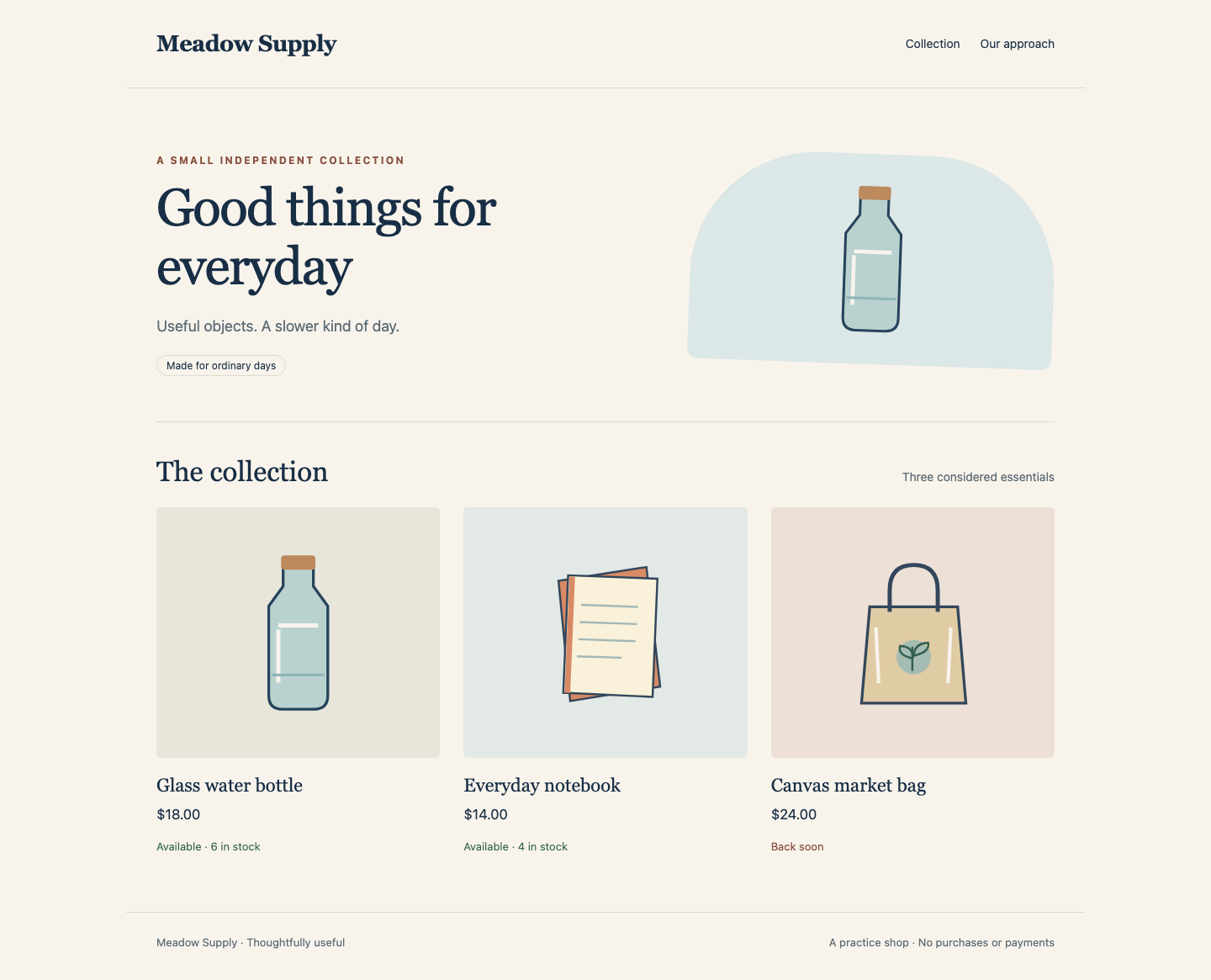
Switch to Shop and reload. Open Glass water bottle, set Quantity to 2, and select Try a basket quote. Expect Ready for collection, Quantity 2, Total $36.00 and Units available 6. Read the training notice: no stock is reserved. Use Back to product and Back to collection.
Open Canvas market bag, which is marked Back soon, and try a quote for Quantity 1. Expect Not enough stock, Total $24.00 and Units available 0. This is a valid business answer, not a network failure; do not alter inventory to make every quote succeed. Use Back to product, then Back to collection. Open Our approach, read the description of training quotes, and use Back to collection.
The finished catalogue has three original products and live availability; compare its heading, prices and availability with this running example:
Switch to Reference and reload. P-104 · Ready and P-108 · Packed must remain visible. Select Download notes and open the actual notes.json download: it contains the two unchanged dispatch records, not stock data. Your browser download and the terminal workspace are different locations; this task does not ask you to copy that file into the workspace.
Return to Workspace and read that same separate Service from Customer:
./tools/network-test customer http http://dispatch.meadow-stock.svc.cluster.local:8080/notes.json
Expect HTTP_REPLY 200 and both original notes. The policy selected inventory Pods, not the entire stock namespace. Keep the dispatch process, data and original Service; turning it off would hide an excessively broad rule.
Your handoff is release/stock-ingress.yaml and the matching live boundary. The full catalogue and both quote outcomes must continue through the original application, while the two direct stock bypasses remain denied. Keep every prepared source file, application object and original Pod. If a page shows Live availability unavailable, return to the taught label, policy and request checks, correct only your release policy and reapply it; a static replacement page is not a repair. Tests here are finite real TCP requests on one prepared cluster, not a production security or uninterrupted availability guarantee.
Summary
You preserved the real customer → API → stock journey while preventing direct stock reads from both a wrong-role customer and a matching-role visitor in another namespace. Your saved ingress policy expresses the namespace-and-role relationship, and the live catalogue, training quotes and separate dispatch service still work.
NetworkPolicy controls Pod network paths, not customer authentication. A timeout is useful evidence only with the target and approved connection still working. The next independent lab considers the other direction: API egress, DNS and permissions contributed by other policies.