Introduction
Juniper Café is serving requests, but the latest menu charges $35.00 for an Oat Latte. A healthy Pod can still serve incorrect business data. You will restore the approved autumn menu while preserving the café, its earlier versions, and the separate reading-room service.
This is a fresh environment with its own prepared release history. It does not use files or processes from the previous lab. You should have completed the seasonal-menu lab: this lesson reuses its menu format, generated ConfigMaps, Deployment, and download checks, then introduces revision selection and recovery. The 35-minute duration is an author estimate, not measured beginner timing.
Restore the Approved Revision
In this step, use the actual menu and the Deployment's history to choose and restore the approved autumn version.
Open Café Menu, select Explore the menu, and find Oat Latte. The current $35.00 price is wrong even though the website and its drink-detail pages load. Switch to Workspace, starting in /home/labex/project/cafe-menu.
Read the counter team's complete approved table and season label. As in the previous lab, prices are integer cents; 350 means $3.50:
cat approved/menu.csv
id,name,price_cents,available
espresso,Espresso,250,true
oat-latte,Oat Latte,350,true
cold-brew,Cold Brew,390,false
maple-latte,Maple Latte,450,true
cat approved/season.txt
Autumn at Juniper
A successful rollout means Kubernetes reached its requested Pod state. It does not validate every menu price. Check the healthy Deployment, then list its revisions. rollout history reads retained ReplicaSets; the change-cause text helps identify each prepared release:
kubectl get deployment cafe -n cafe-menu
kubectl rollout history deployment/cafe -n cafe-menu
The history contains everyday, autumn, and misprint revisions, in that order. Revision numbers belong to this Deployment in this fresh environment; do not treat a number as a universal release name.
The complete saved versions are also available. Compare the earlier everyday menu with the approved autumn one:
cat versions/everyday/menu.json
cat versions/autumn/menu.json
The everyday version has a correct Oat Latte price, but it still offers Cold Brew and does not offer Maple Latte. Restoring just any older release would therefore be wrong. The autumn version matches all the approval values and the season label.
Inspect revision 2, the prepared autumn revision in this environment. --revision=2 requests its Pod-template details:
kubectl rollout history deployment/cafe -n cafe-menu --revision=2
Find the menu volume's generated ConfigMap reference. This saved template can start new Pods with that exact older configuration because the ConfigMap still exists.
Restore that revision. rollout undo changes the Deployment to the selected earlier Pod template; --to-revision=2 selects the approved one explicitly:
kubectl rollout undo deployment/cafe -n cafe-menu --to-revision=2
Wait for both restored replicas:
kubectl rollout status deployment/cafe -n cafe-menu --timeout=120s
deployment "cafe" successfully rolled out
Switch to Café Menu, select Our menu, and refresh if necessary. Confirm Oat Latte is $3.50, Maple Latte is available at $4.50, and Cold Brew is unavailable. If the wait times out, use the kubectl get pods and kubectl describe deployment troubleshooting workflow taught in the previous lab; do not reset the namespace.
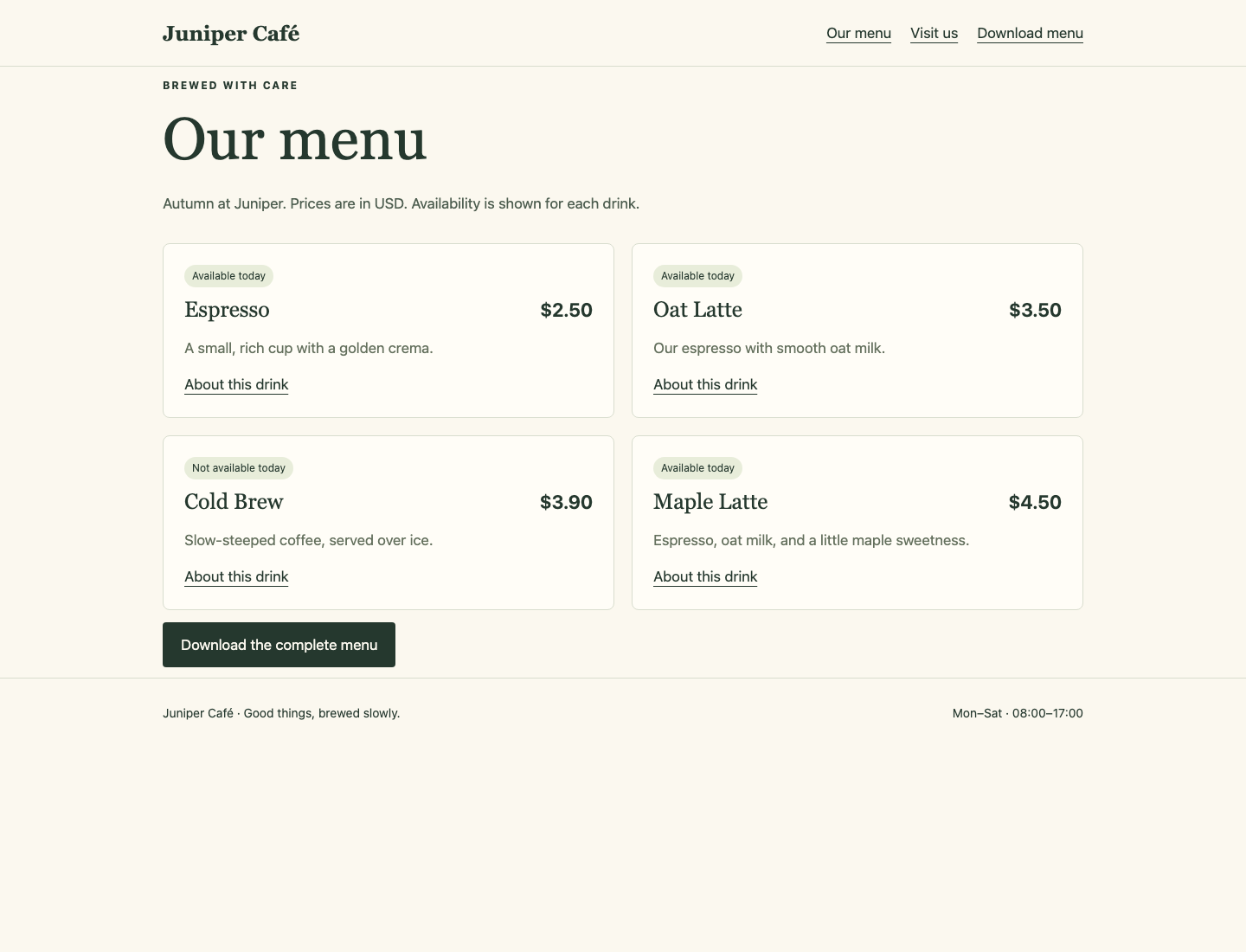
Compare all four cards, including the unavailable Cold Brew.
An important limit: undo restores the Pod template, including its configuration name. It does not restore arbitrary previous contents of a ConfigMap edited in place. Keep each preserved generated configuration unchanged.
Reconcile the Saved Release
In this step, make your saved release reproduce the recovered live application.
Return to Workspace. A live rollback does not edit local files. The release directory still contains the bad candidate; applying it now would bring back the wrong price. Read that file before replacing it:
cat release/menu.json
It still contains 3500 cents for Oat Latte. Copy the approved autumn menu and Deployment definition into your working release. Each cp replaces only its named destination file. Keep the original version directories unchanged:
cp versions/autumn/menu.json release/menu.json
cp versions/autumn/deployment.json release/deployment.json
The Deployment file also carries the approved change-cause annotation. Your existing kustomization.yaml keeps the same generator and namespace. Render the release again:
kubectl kustomize release
The generated configuration name should match the restored autumn template's reference. No new data version is needed because these are the same menu bytes. Apply the reconciled source:
kubectl apply -k release
kubectl rollout status deployment/cafe -n cafe-menu --timeout=120s
The rollout completes with the approved menu still in use. A fresh apply now preserves the recovery rather than undoing it. Keep the whole release directory: the Deployment, menu file, and generator configuration work together. If you copied a wrong path, pwd and ls versions/autumn help locate the supplied files; repeat the two precise copies instead of editing preserved history.
Deliver the Recovered Menu
In this step, finish with a real menu download and confirm the unaffected café still works.
Switch to Café Menu. From Our menu, open Oat Latte's About this drink link, confirm the corrected $3.50 detail, and return using Back to the menu. Open Visit us and confirm the location and hours. Use Download menu to download the actual complete menu.
Switch to Reference Menu and select Our menu. Willow Reading Room must still show its everyday selection; repairing Juniper must not change this separate service.
Return to Workspace. Save the actual download using the same curl options taught in the first lab:
curl --fail --silent --show-error http://127.0.0.1:8081/menu.csv -o menu-handover.csv
Compare it with the approved table:
diff -u approved/menu.csv menu-handover.csv
No output means the complete download matches. If differences appear, use the actual rows to distinguish a wrong restored version from a stale saved source. Correct the release, wait for the rollout, and download again; do not hand-edit the received CSV.
List the configurations to confirm the older versions remain available:
kubectl get configmaps -n cafe-menu
Recovery is complete when the running café, the reusable source, and the actual staff download agree. Earlier source versions and generated configuration objects remain intact.
Summary
You distinguished a healthy application from a correct menu, chose a revision using complete business evidence, and restored its preserved configuration reference. You also reconciled the local release so a later apply keeps the recovery, then checked real pages and the actual menu download without changing the reference service.
The independent challenge changes the café, menu relationships, and approved version. It uses the same configuration, rollout, and handover methods.