Introduction
Fieldlight Studio now needs a complete photo pack: three small photographs, a contact sheet, captions and a gallery that works after download. One Jenkins agent can prepare the photographs; another has the supplied packaging tool. Choosing both agents correctly does not make their workspaces share files.
You will observe that missing-file problem, add a real temporary handoff within one Pipeline run, and retain the resulting ZIP for independent use. This lab starts with its own originals, connected agents and unbuilt job; it does not use files or builds from the preceding lab.
Prerequisites are the agent labels, stage allocation, width option, native artifacts, fingerprint setting and workspace cleanup taught in Choose the Photo Agent, plus basic Jenkins navigation. No Java programming or agent installation is required. Both agents are separate containers with independent filesystems on the same training VM and share its kernel. Fieldlight and its AI-generated study photographs depict no real client or event. The duration is an author estimate, not a measured beginner time.
Observe the Separate Workspaces
In this step, you will follow the work from the image agent to the packing agent and observe why a successful preparation does not make a usable delivery. Start in Photo Desk.
Inspect the three Garden Stories originals: lavender, a garden path and a watering can. Open each image and return with the browser's Back action. The desk says No completed collection yet. These originals must remain unchanged. The desired delivery uses previews exactly 320 pixels wide, with their aspect ratio preserved.
Switch to Jenkins and open build-photo-pack. Choose Configure → Pipeline. Read the prepared Script. The top-level agent none lets each stage allocate its own capable agent. Prepare photos requests photo-imaging and runs /opt/fieldlight/prepare-photos --width 320; Pack collection requests photo-packing and runs /opt/fieldlight/pack-photos.
Each stage begins with deleteDir() and has its own post { always { deleteDir() } } cleanup. A workspace is a directory belonging to a job's allocated agent. Although both stages use the same job name, their directories are on separate container filesystems. They are not two names for a shared directory. The read-only originals live outside the job workspace, under /opt/fieldlight/originals on the image agent.
The image program writes six files relative to its current workspace:
prepared/
  images/
    garden-01.png
    garden-02.png
    garden-03.png
  contact-sheet.png
  captions.csv
  preparation.json
The three previews are 320 × 213 pixels. The contact sheet shows them together; the CSV relates each filename to its caption and dimensions; the JSON identifies the collection, requested width and original-image hashes. The supplied packaging tool consumes these actual files from its own workspace. It does not fetch missing files from the other agent or from the Photo Desk.
Return to the job page without editing the script and choose Build Now once. Open the new numbered build in Build History, then Console Output. Wait for the expected FAILURE. First, image-studio reports 3 previews at 320 pixels wide. After its cleanup, pack-studio runs the packaging command and reports Missing prepared/preparation.json in this agent's workspace. The final cleanup also runs.
This is a file-location failure, not a broken original or a missing program. The preparation stage completed, but there was no handoff. Copying files manually, sharing a mount, removing cleanup or placing both stages on the image agent would avoid the lesson without delivering the intended two-agent workflow. Leave both stage allocations and both cleanup sections in place.
If the build is still running or queued, wait for its final state before checking. If an accidental edit caused another error, restore the original script from the configuration shown below, save, and run it once to observe this expected missing-file failure:
pipeline {
    agent none
    stages {
        stage('Prepare photos') {
            agent { label 'photo-imaging' }
            steps {
                deleteDir()
                sh '/opt/fieldlight/prepare-photos --width 320'
            }
            post {
                always { deleteDir() }
            }
        }
        stage('Pack collection') {
            agent { label 'photo-packing' }
            steps {
                deleteDir()
                sh '/opt/fieldlight/pack-photos'
                archiveArtifacts artifacts: 'photo-pack.zip', fingerprint: true
            }
            post {
                always { deleteDir() }
            }
        }
    }
}
Keep the failed run and its console. Switch to Photo Desk and refresh: it must still say there is no completed collection. The three full originals remain available. The next step will transfer only the small prepared output, then create a retained archive.
Hand Off the Photos and Retain the Pack
In this step, you will transfer the six prepared files within the same Pipeline run, archive the completed ZIP, and inspect it independently. Start in Jenkins, return to build-photo-pack, then choose Configure → Pipeline.
stash saves a small selected file set for use later in the same Pipeline run. Give it a name and an includes pattern. Here prepared/** includes the prepared folder's files and nested images/ files. Relative paths are preserved, so restoring the stash creates prepared/ in the receiving workspace. Stash only these small derivatives, not the originals, Java runtime or tool directories.
unstash restores that named set into the current agent's workspace. Its name must match the earlier stash. Place it after the receiving stage's initial deleteDir() and before the packaging command. Place the stash after processing and before the image stage's cleanup. Otherwise the files either do not exist yet, have already been removed, or are removed immediately after restoration.
A stash is temporary transfer, not a download archive: normally Jenkins discards it after this run ends. archiveArtifacts instead retains the final ZIP with its build. Keeping both operations makes the handoff temporary and the delivery usable later.
Click inside Script, select all with Ctrl+A on Windows/Linux or Command+A on macOS, and replace it with this complete version:
pipeline {
    agent none
    stages {
        stage('Prepare photos') {
            agent { label 'photo-imaging' }
            steps {
                deleteDir()
                sh '/opt/fieldlight/prepare-photos --width 320'
                stash name: 'prepared-photos', includes: 'prepared/**'
            }
            post {
                always { deleteDir() }
            }
        }
        stage('Pack collection') {
            agent { label 'photo-packing' }
            steps {
                deleteDir()
                unstash 'prepared-photos'
                sh '/opt/fieldlight/pack-photos'
                archiveArtifacts artifacts: 'photo-pack.zip', fingerprint: true
            }
            post {
                always { deleteDir() }
            }
        }
    }
}
The two new lines are the named stash and matching unstash. The provided image and packaging commands, correct agents, original-file boundary and cleanup remain in place. The archiveArtifacts setting retains photo-pack.zip and records its native file fingerprint; the fingerprint tracks file identity, not client approval or a digital signature.
Choose Save, then Build Now. Wait for the new run to finish with SUCCESS. Open its Console Output and read the sequence: image-studio prepares the 320-pixel photos, Jenkins reports Stashed 6 file(s), and the image workspace is cleared. Then pack-studio restores the stash, the packaging tool reports Packed 9 collection files into photo-pack.zip, and Jenkins archives and fingerprints the ZIP before clearing the packing workspace.
If the console says No such saved stash, compare the two stash names and their order, restore the complete script, save and run again. If it still reports a missing prepared file, check that the includes pattern is prepared/** and that unstash comes after the receiving cleanup. Each new build starts a new transfer; an earlier build's stash is not a substitute. For a Groovy syntax error, restore the full script and preserve its braces, quotes and commas. Keep all failed and successful runs; ordinary mistakes do not require resetting the VM.
On the successful build's page, choose the photo-pack.zip artifact and save it. Extract the entire ZIP into a new folder on your own computer. Do not open only the HTML file inside an archive viewer: the neighboring files must be extracted too. The folder should contain:
index.html
styles.css
delivery.txt
captions.csv
preparation.json
contact-sheet.png
images/
  garden-01.png
  garden-02.png
  garden-03.png
Open the extracted index.html in a browser. The Fieldlight Studio gallery should display all three correct garden photographs and their captions. Open each photograph and return using browser Back. Choose Open contact sheet to view the real three-photo overview, then use browser Back to return to the gallery. From the extracted folder, open captions.csv, preparation.json and delivery.txt in a text editor; the gallery links point to these same files, and the CSV filenames must point to the actual images/ files, every preview must be 320 × 213 pixels, and the JSON must identify garden with width 320. The notes should identify this actual Jenkins job, build and packaging agent.
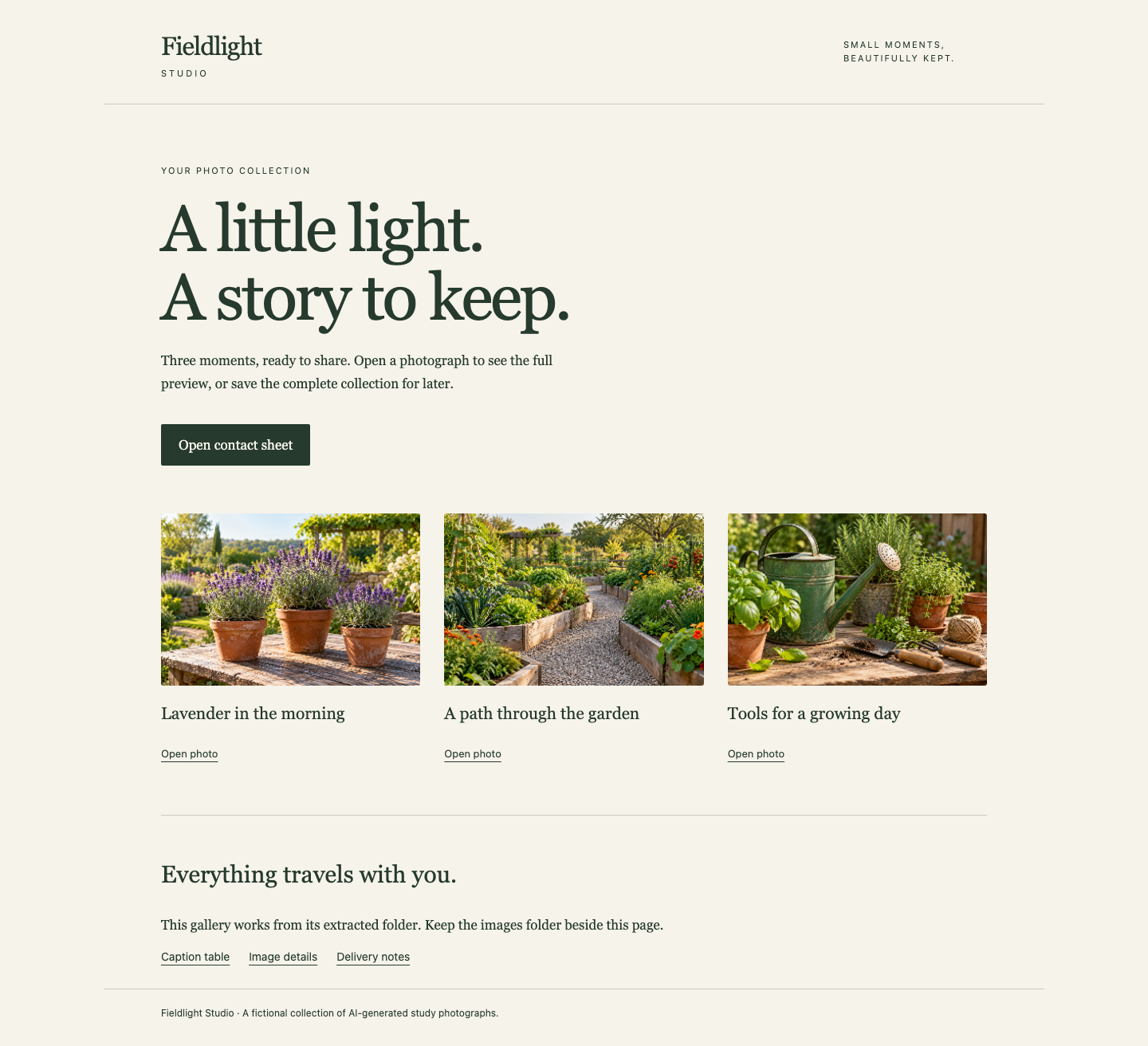
The complete gallery includes the three garden photos, a contact-sheet link and links to the actual caption, image-detail and delivery files. Keep its neighboring files together when opening your extracted copy.
Keep the complete extracted folder together. Open it in a new private browser window without using the Photo Desk: all pictures, styling and file links should still work from local files. The gallery uses no remote fonts or online image fallback. A broken local image means a real delivery file is absent or misplaced; extract the entire original ZIP into a new folder rather than copying missing files from the source website.
Switch to Photo Desk, refresh, and choose Open prepared collection. This view reads the files from your actual native archive. Inspect its photos and attachments, then return with the browser's Back action and choose Download complete ZIP. Its bytes should match the Jenkins artifact you downloaded. Return to the desk and confirm that all three full originals remain unchanged.
Finally switch to Jenkins. Reopen the successful build and confirm that its artifact is still downloadable after cleanup. Preserve the initial missing-file run, all history, originals, tools, node connections and capability labels. If you make another script edit, save and complete a new successful build before checking. You now have a real two-agent handoff and a complete retained delivery.
Summary
You observed independent Jenkins workspaces, then transferred only the needed photo output with a named stash and matching unstash inside one run. The packing agent created a complete local gallery, and native artifact retention kept it usable after both stage workspaces were cleared. The independent challenge changes the collection and width while reusing the same taught mechanisms.