Introduction
Walk Weekender is preparing visitor materials for a fictional riverside event. The pack contains a small website, a route illustration, a stops CSV and visitor notes. Jenkins already has a working pack builder, but its temporary workspace is cleared after each run. Your task is to keep a complete, downloadable result associated with its build.
This lab assumes basic Jenkins navigation, recognition of a short Declarative Pipeline and basic file handling, including extracting a ZIP. It explains archiving, fingerprints and the workspace lifecycle before you use them. You do not need to write the website, install software or know Java.
Use Pack Desk for the reference visitor experience and Jenkins for builds and configuration. These are two services in one prepared VM. Browser downloads are saved on your computer, separately from Jenkins files in the training VM. Every unit starts independently. The duration is an author estimate that includes reading and ordinary mistakes; it has not been measured with beginners.
See Where the Built Files Go
In this step, you will inspect the expected visitor materials, run the original job and see why a successful build does not automatically leave a downloadable pack. Start in Pack Desk.
The request is for Riverwalk Saturday, visitor edition RW-02. In the Reference visitor pack section, choose Open the reference pack. The reference shows the expected visitor experience; your deliverable will be the ZIP retained by your own Jenkins build.
Choose Explore the route. The route has three numbered stops: Garden gate, Willow bridge and Orchard yard. Choose Download all route stops and open the saved CSV with your usual text or spreadsheet viewer. CSV is a text format whose fields are separated by commas; its first row names the columns. The beginning is:
order,stop_id,name,map_x,map_y,visitor_note
1,gate,Garden gate,150,340,Meet beside the blue gate.
Choose Read the visitor notes and read the downloaded text file. The confirmed meeting time is 10:00. These files, the working pages and the route image belong together. Downloading a file does not change the page. Use the browser's Back action twice to return from the route page through the pack overview to the desk.
Switch to the Jenkins Tab. Open create-riverwalk-pack and choose Build with Parameters. Wait for the parameter form to finish loading. Leave EDITION as river-v2 and choose Build. This parameter selects the prepared visitor edition; the supplied program creates its actual ZIP.
Wait until the numbered build finishes. Open that build under Builds, then choose Console Output. Find these lines:
Prepared visitor edition: Riverwalk Saturday / RW-02
Complete event-pack.zip created.
...
Finished: SUCCESS
The program did create the pack. Read farther down the Pipeline log, under the final post actions, for [Pipeline] deleteDir. The supplied cleanup removes this run's workspace files after its stages finish.
A workspace is the working directory Jenkins allocates to a job's execution. A build can create files there and later remove them. SUCCESS describes the run's result; it does not mean Jenkins automatically kept every generated file.
Return to this numbered build's status page using its breadcrumb link. There is no event-pack.zip artifact download for this original run. The job built the files and then cleared them without first retaining an archive. Keep this build in the history so you can compare it with the next run.
Keep the Archive Before Cleanup
In this step, you will retain the complete visitor ZIP, preserve the workspace cleanup and use the downloaded files. Start on the create-riverwalk-pack job page in Jenkins.
Choose Configure, then the Pipeline section. Its Script editor contains the provided build stages and a post block. The always section in that block runs after the stages, including when a run fails. Its deleteDir() operation clears the allocated workspace; keep this cleanup.
archiveArtifacts copies selected workspace files into the build's retained artifacts before cleanup. Its artifacts setting is a filename or pattern relative to that workspace. The single quotes around 'event-pack.zip' make it a string. fingerprint: true also records Jenkins' file-usage identifier, which will help trace this ZIP between jobs in the next guided lab. A fingerprint records file identity and usage; it is not a publisher's signature.
The colon separates each setting from its value, and the comma separates settings. Add an Archive pack stage after Build pack, inside stages. Keep the parameter, build command and cleanup. For a complete copyable version, click inside Script, select all its contents with Ctrl+A on Windows/Linux or Command+A on macOS, and replace it with:
pipeline {
    agent any
    parameters {
        choice(name: 'EDITION', choices: ['river-v2'], description: 'Visitor edition to prepare')
    }
    stages {
        stage('Prepare workspace') {
            steps { deleteDir() }
        }
        stage('Build pack') {
            steps { sh 'sh /var/jenkins_home/walk-pack-fixtures/build-pack.sh' }
        }
        stage('Archive pack') {
            steps {
                archiveArtifacts artifacts: 'event-pack.zip', fingerprint: true
            }
        }
    }
    post {
        always { deleteDir() }
    }
}
Choose Save. Run Build with Parameters again. Wait for the parameter form to finish loading, leave EDITION set to river-v2, and choose Build. Wait for this new numbered build to finish successfully. Its console should show Archiving artifacts, Recording fingerprints and the final cleanup.
Open the new build's status page and find Build Artifacts. Download event-pack.zip. Jenkins retained this ZIP as part of that build even though the workspace was cleared.
Extract the whole ZIP into a new folder using your computer's archive tool. Open index.html from that extracted folder in a browser. Keep all eight files together:
index.html
route.html
styles.css
route-map.png
stops.csv
visitor-notes.txt
event.json
build.json
Confirm Riverwalk Saturday, edition RW-02, and the 10:00 meeting time. Follow Explore the route, inspect all three stops, download the route CSV, and choose Read the visitor notes to read the local text file. Depending on your browser, this text file may open directly in a page instead of starting another download; it is already included in the extracted folder. The image and links use local files, so this visitor pack can be used independently of the training VM.
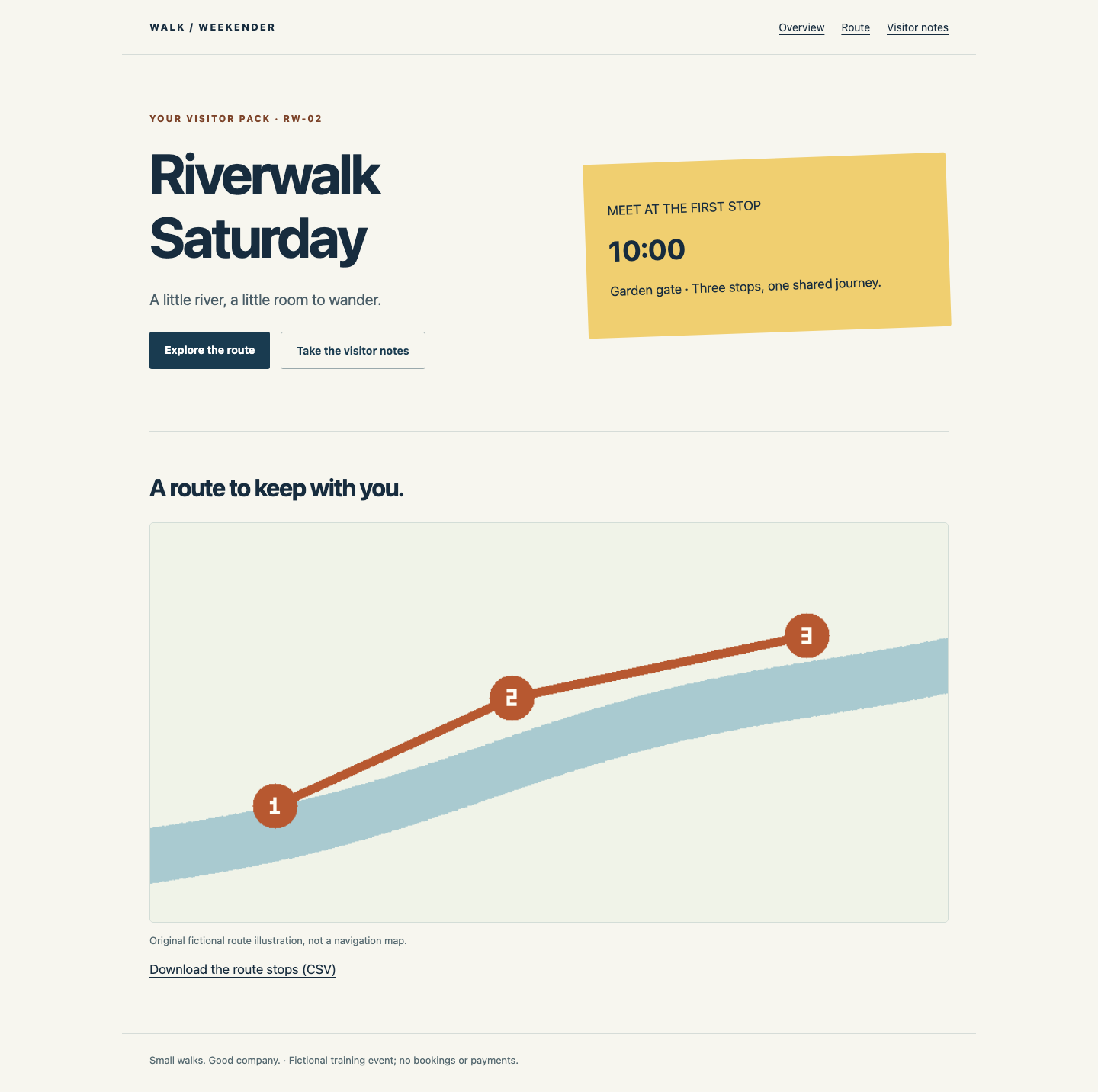
If the extracted page has missing styling or an image, check that you extracted the entire ZIP and opened index.html beside styles.css and route-map.png. Opening only an HTML file from inside a ZIP viewer can separate it from its resources. Extract the original download into a fresh folder rather than rebuilding the files.
If Jenkins reports a Groovy syntax error, return to Configure, restore the complete script above, choose Save and run river-v2 again. Preserve the braces and single quotes. If you edited before making the first original run, temporarily remove only Archive pack, save and run once; then restore the complete script and run again.
The final result must come from the currently saved Pipeline. After any further edit, run it again. Keep the earlier builds and the supplied pack files. This training VM is temporary; keep your downloaded copy when you finish the lab.
Summary
You observed a real pack disappear from a temporary workspace, then retained the complete ZIP with Jenkins archiving and fingerprinting. You kept the cleanup, downloaded the original build artifact and used its pages, image, route data and visitor notes as one self-contained visitor pack.