Introduction
Walk Weekender has confirmed an edition of its Riverwalk Saturday visitor pack. A later draft has also built successfully. The delivery job must retrieve the confirmed pack from its existing Jenkins run, without rebuilding it or depending on a cleared workspace.
This lab assumes the archiving, workspace cleanup and fingerprint concepts taught in Keep a Downloadable Event Pack, plus basic Jenkins navigation and ZIP extraction. This unit starts independently: its source history, earlier current pack and delivery job are already prepared. You do not need files or a running VM from the previous lab.
Use Pack Desk to inspect the real visitor files and Jenkins to inspect and configure jobs. These are two services in one prepared VM. The Copy Artifact plugin is already available. The supplied publisher is a small local training receiver that checks this request; it is not a production artifact registry or an approval service. You will select an already confirmed run, not implement an approval process. The duration is an author estimate, not a measured beginner timing.
Compare the Request with the Copied Pack
In this step, you will identify the confirmed source run, then observe a delivery job copying a different edition. Start in Pack Desk.
Read Requested edition: RW-02. The activity is Riverwalk Saturday, and the source job is create-riverwalk-pack. Choose Open the current pack. The current edition is RW-01, with a 10:30 meeting time. The requested pack should replace this earlier edition while the separate Parkside pack remains available. Use the browser's Back action to return to the desk.
Switch to Jenkins, open create-riverwalk-pack, and inspect its numbered builds under Builds. Build numbers belong to one job; a number alone is not a global artifact identity. Open each build's Console Output to read the prepared visitor edition and final result. The history contains:
| Build | Visitor edition | Result | Meaning for this request |
|---|---|---|---|
| #1 | Parkside Paper Trail / PP-01 | SUCCESS | A different activity |
| #2 | Riverwalk Saturday / RW-02 | SUCCESS | The existing confirmed pack |
| #3 | Riverwalk Saturday / RW-03-DRAFT | SUCCESS | A newer draft, not the request |
| #4 | Riverwalk Saturday / RW-02 | FAILURE | An unsuccessful run, even though it retained a ZIP |
Open build #2 using its breadcrumb link, download event-pack.zip under Build Artifacts, and extract the complete archive. Its overview and notes show RW-02 and 10:00. Its console ends with workspace cleanup. The archive belongs to the build, so the delivery job can retrieve it after that cleanup.
Keep this existing source history. Do not configure, rerun, delete or rename source jobs or their builds. Only the deliver-riverwalk-pack Pipeline and its build parameters are in scope. Keep the provided files, publisher, archiving and cleanup, and leave the separate Parkside pack intact.
Use the Dashboard breadcrumb, open deliver-riverwalk-pack, then choose Configure and the Pipeline section. Read the Copy archive stage without changing it yet:
copyArtifacts projectName: params.SOURCE_JOB,
    selector: lastSuccessful(),
    filter: 'event-pack.zip',
    fingerprintArtifacts: true
copyArtifacts retrieves retained artifacts from another Jenkins job. projectName selects that job; params.SOURCE_JOB reads the value entered for this delivery run. filter chooses files inside its archive. The selector decides which numbered source run to use. lastSuccessful() is a moving selection: it means the latest successful run when this copy happens, not the edition in your request. fingerprintArtifacts: true records file usage for tracing between jobs.
The supplied Archive delivery stage retains the copied ZIP on the delivery build. Deliver pack sends those exact copied bytes to the local desk. The final post cleanup clears the delivery workspace. Keep those parts unchanged. Choose Save without editing.
Choose Build with Parameters. Wait for the form to finish loading. Set SOURCE_JOB to create-riverwalk-pack and SOURCE_BUILD to 2, then choose Build. These values describe the intended source; the current selector still ignores SOURCE_BUILD.
Wait for this delivery build to finish with FAILURE, then open Console Output. Expect Copied 1 artifact from source build 3, followed by The package bytes differ from the selected source archive. The publisher returns HTTP 422: the service was reached, but it rejected the selected package. This is different from a connection failure. The shell step reports a nonzero result, so the build fails.
Open this delivery build's event-pack.zip under Build Artifacts, extract it into a separate folder and read its overview. It contains RW-03-DRAFT, because build #3 is the last successful source run. A retained ZIP and a green source run are insufficient to identify the requested edition.
Switch to Pack Desk, refresh, and open the current pack again. It must still show RW-01 and 10:30. The rejected attempt must not replace valid visitor materials. Return to the desk with the browser's Back action.
Deliver and Trace the Confirmed Run
In this step, you will copy the explicit confirmed run and verify the delivered visitor files and their Jenkins trace. Start on the deliver-riverwalk-pack job page in Jenkins.
Choose Configure, then Pipeline. In Script, change only:
selector: lastSuccessful(),
to:
selector: specific(params.SOURCE_BUILD),
specific(...) selects an explicit source build number. params.SOURCE_BUILD reads the string entered on the build form; together with SOURCE_JOB, it identifies one existing run. Keep the comma: the following filter setting belongs to the same copyArtifacts operation. Keep the provided RECEIVER_URL value, all other stages, and the final cleanup.
In Script, locate the selector line under Copy archive. Wait for the code to finish loading, and scroll within the editor if needed. Double-click lastSuccessful to select just that function name, then type specific. The empty parentheses remain. With the caret immediately after specific, press the Right Arrow key once to move inside (), then type params.SOURCE_BUILD. Check the complete selector line above before saving. If you accidentally replace more text, use Ctrl+Z on Windows/Linux or Command+Z on macOS before saving and try again. Choose Save.
Run Build with Parameters again. Wait for the form to finish loading, enter create-riverwalk-pack for SOURCE_JOB and 2 for SOURCE_BUILD, then choose Build. Wait for SUCCESS. Its console should show the copied artifact, archive and fingerprint actions, a response containing delivered, and final workspace cleanup.
If Jenkins reports a Groovy syntax error, return to Configure and check the selector line, parentheses and comma against the exact replacement above. Save and run again with the same values. If the console reports a missing project, build or artifact, check the two form values and source build #2. Do not rerun the source job to manufacture a new run. A response saying The selected source run does not satisfy this delivery request. means the job or build number is wrong. The package bytes differ from the selected source archive. means the copied ZIP does not match the source run named by those parameters. Both are business refusals after reaching the desk.
Open the successful delivery build's status page and choose See Fingerprints. In Recorded Fingerprints, the event-pack.zip row's Original owner must lead to create-riverwalk-pack build #2. Choose the event-pack.zip link to open its details. The introduced-build link should identify that source run, and Usage must include your successful deliver-riverwalk-pack run. These are Jenkins' records of the same file's origin and use. They do not certify who approved an edition or provide a cryptographic publisher signature.
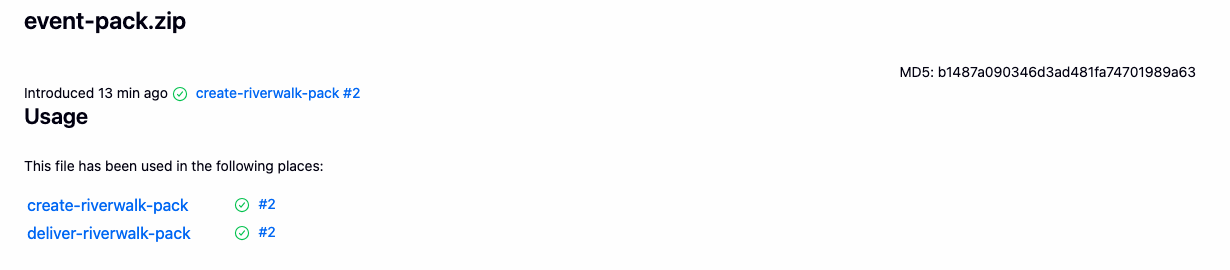
Read the introduced-build link near the top and the two jobs under Usage. Your delivery build number may differ from this example.
Download event-pack.zip from this successful delivery build. Extract it into a new folder, open index.html, and confirm Riverwalk Saturday, RW-02 and 10:00. Open Explore the route and check all three stops and the rendered route image. Choose Download all route stops for the CSV and Read the visitor notes for the local text. The notes may open directly in the browser instead of starting another download; the original text file is already in the extracted folder. Keep all eight files together, including build.json, whose job and number identify create-riverwalk-pack and 2.
Switch to Pack Desk and refresh. The current pack must now show RW-02. Open it and repeat the route, CSV and notes checks. Return with the browser's Back action, then choose Download the current ZIP. This download must be the complete original source archive, not a newly rebuilt substitute. The receiver compares actual bytes before changing the current pack.
Finally choose Parkside pack from the desk navigation and confirm Parkside Paper Trail still opens with its route and notes. The source build history and all supplied files must remain intact. After any further Pipeline edit, run the saved Pipeline again before checking completion.
Summary
You retrieved a confirmed visitor pack from an existing Jenkins build after its workspace was cleared. You saw why a moving selector could choose a successful draft, used an explicit job and build number, and followed the original archive through Jenkins fingerprints to a separate delivery job. The desk now serves the complete original visitor files, while the separate activity remains available.