



Introduction
When an AI model prepares a longer answer, waiting for the entire result can make an application feel frozen. Streaming lets the application receive small pieces as soon as they are ready. It is similar to reading a message while the sender is still typing: the complete answer takes the same general work, but useful text appears earlier.
This lab uses Server-Sent Events (SSE), a text format for sending a sequence of events over one HTTP response. Each Workers AI event begins with data:. Text events carry part of the generated response, and a final data: [DONE] event says that the stream completed normally. A pause between events only means the model is still working; without a completion signal, an application cannot tell a slow response from a connection that will never finish.
You will build POST /help, stream a Cloudflare-hosted Llama response to a supplied command-line client, and exercise two endings: normal completion and deliberate cancellation after the first useful piece. Cancellation means the client no longer needs the remaining answer and closes the work instead of leaving an unused connection open. You will also use deterministic tests to prove that a model startup failure becomes a bounded error and that an interrupted stream terminates rather than hanging.
This is the second lab in the course. It assumes you know that a Cloudflare Worker is application code running on Cloudflare's network, and that an AI binding exposes Workers AI as env.AI. If you entered the course directly, first complete Connect LabEx to Your Cloudflare Account so you know how to use the VM terminal, authorize Wrangler, confirm your learning account and save its account ID.
The lab uses @cf/meta/llama-3.3-70b-instruct-fp8-fast and small synthetic questions. Workers Free accounts currently receive a shared daily allocation of 10,000 Neurons. Local inference also reaches Cloudflare and consumes that allocation. If the allocation is exhausted or the model lacks capacity, stop rather than sending repeated requests; the application should report a terminal error instead of hanging.
Setup installs Node.js 22.22.0 and project-local Wrangler 4.132.0 in /home/labex/project/help-stream. It supplies the SSE client, deterministic fixtures and independent checks. Setup does not log in, invoke a model, deploy a Worker or create a cloud resource. Keep this VM open until you delete the disposable Worker and verify logout.
Authorize the VM and Configure the Stream Worker
In this step, you will authorize this fresh VM and configure the disposable streaming Worker. Your existing Dashboard sign-in does not automatically give terminal commands permission to manage the learning account.
Enter the prepared project and confirm the pinned Wrangler version:
cd /home/labex/project/help-stream
npx wrangler --version
Expect 4.132.0. Request only the permissions needed here. Workers Scripts write access manages the disposable Worker, Workers AI write access lets its binding call the model, and the two read scopes identify the selected account. Wrangler 4.132.0 also inspects KV binding dependencies during Worker deletion, so the narrow KV write scope lets that cleanup command finish even though this lab creates no KV data.
npx wrangler login --device --browser=false --scopes account:read user:read workers_scripts:write workers_kv:write ai:write
Open the displayed link, enter the current device code, inspect the account and permissions, and authorize the learning account. Background Access may also appear because Wrangler continues after the browser closes. Return to the terminal and wait for the success message, then inspect structured identity data:
npx wrangler whoami --json
Confirm loggedIn: true and read the intended account's name and id. Generate a unique disposable Worker name:
RUN="labex-c07-a02-$(openssl rand -hex 6)"
printf '%s\n' "$RUN"
Replace YOUR_ACCOUNT_ID below with that account's actual ID:
cat > wrangler.jsonc <<JSON
{
  "\$schema": "./node_modules/wrangler/config-schema.json",
  "name": "$RUN",
  "account_id": "YOUR_ACCOUNT_ID",
  "main": "src/index.js",
  "compatibility_date": "2026-09-16",
  "compatibility_flags": ["enable_request_signal"],
  "workers_dev": true,
  "preview_urls": false,
  "observability": {
    "enabled": true,
    "head_sampling_rate": 1
  },
  "ai": {
    "binding": "AI",
    "remote": true
  }
}
JSON
The AI binding will become env.AI. remote: true means local development still uses the real cloud model. enable_request_signal makes request.signal announce when the client disconnects, which gives the Worker a cancellation signal to log and act on. Observability saves the lifecycle events you will inspect later. No Worker has been deployed and no inference has run yet.
Inspect the AI Binding and the SSE Client
In this step, you will connect the AI binding to the supplied SSE client before writing the Worker. The model is the producer, the Worker forwards bytes, and client.mjs is the consumer. Keeping these roles separate makes it clear which component should close the work.
Generate the Worker's environment types:
npx wrangler types
grep -A4 'interface __BaseEnv_Env' worker-configuration.d.ts
Look for AI: Ai. It means the configured binding will be available to the handler as env.AI; it is not an API key stored in source code.
Now inspect the supplied client's terminal outcomes:
grep -nE 'chunk:|complete chunks=|cancelled after|stream_error:' client.mjs
The client reads the response a piece at a time. A chunk: line shows newly generated text. complete appears only after data: [DONE]. The cancellation mode closes the reader after the first nonempty piece. stream_error is a terminal failure, including a 45-second timeout; the timeout is a safety boundary, not a prediction that every model response should take that long.
An SSE event is plain text separated by a blank line. A typical successful stream looks like this:
data: {"response":"First piece"}

data: {"response":" and another piece."}

data: [DONE]
Chunk boundaries are transport details: one event can contain a word, punctuation or a longer fragment. Application logic should combine the response strings and wait for [DONE], not assume a fixed number or size of chunks.
Build a Monitored Streaming Endpoint
In this step, you will build the streaming endpoint and its lifecycle monitoring. The Worker will ask the model for a stream with stream: true, then expose that same SSE protocol to the client. It does not collect the whole answer into memory first. A small wrapper watches the stream lifecycle: completion closes normally, cancellation cancels the upstream reader, and a stream error terminates the response.
Create the Worker entrypoint:
cat > src/index.js <<'JS'
const MODEL = "@cf/meta/llama-3.3-70b-instruct-fp8-fast";
const MAX_QUESTION = 800;

function json(data, status = 200) {
  return Response.json(data, { status });
}

async function readQuestion(request) {
  const contentType = request.headers.get("content-type") || "";
  if (!contentType.toLowerCase().includes("application/json")) {
    return { error: json({ error: "json_required" }, 415) };
  }

  const raw = await request.text();
  if (raw.length > 2048) {
    return { error: json({ error: "question_too_large" }, 413) };
  }

  let body;
  try {
    body = JSON.parse(raw);
  } catch {
    return { error: json({ error: "invalid_json" }, 400) };
  }

  const question = typeof body?.question === "string" ? body.question.trim() : "";
  if (!question) {
    return { error: json({ error: "invalid_question" }, 400) };
  }
  if (question.length > MAX_QUESTION) {
    return { error: json({ error: "question_too_large" }, 413) };
  }
  return { question };
}

function monitor(upstream, details) {
  const reader = upstream.getReader();
  let terminal = false;

  return new ReadableStream({
    async pull(controller) {
      try {
        const { done, value } = await reader.read();
        if (done) {
          terminal = true;
          console.log(JSON.stringify({ event: "help_stream_completed", ...details }));
          controller.close();
          return;
        }
        controller.enqueue(value);
      } catch {
        terminal = true;
        console.error(JSON.stringify({ event: "help_stream_failed", ...details }));
        controller.error(new Error("model stream interrupted"));
      }
    },
    async cancel(reason) {
      if (!terminal) {
        terminal = true;
        console.log(JSON.stringify({ event: "help_stream_cancelled", ...details }));
      }
      await reader.cancel(reason);
    }
  });
}

async function streamHelp(request, env) {
  const parsed = await readQuestion(request);
  if (parsed.error) return parsed.error;

  const requestId = crypto.randomUUID();
  const details = { requestId, model: MODEL };
  request.signal.addEventListener("abort", () => {
    console.log(JSON.stringify({ event: "help_client_disconnected", ...details }));
  }, { once: true });

  try {
    const upstream = await env.AI.run(MODEL, {
      messages: [
        {
          role: "system",
          content: "Answer the support question in at most four short sentences. Give safe, practical steps and do not invent account details."
        },
        { role: "user", content: parsed.question }
      ],
      stream: true,
      max_tokens: 160,
      temperature: 0.2
    });

    if (!(upstream instanceof ReadableStream)) {
      throw new Error("stream unavailable");
    }

    console.log(JSON.stringify({ event: "help_stream_started", ...details }));
    return new Response(monitor(upstream, details), {
      headers: {
        "content-type": "text/event-stream; charset=utf-8",
        "cache-control": "no-store",
        "x-request-id": requestId
      }
    });
  } catch {
    console.error(JSON.stringify({ event: "help_stream_start_failed", ...details }));
    return json({ error: "model_unavailable", requestId }, 502);
  }
}

export default {
  async fetch(request, env) {
    const url = new URL(request.url);
    if (request.method === "GET" && url.pathname === "/health") {
      return json({ status: "ok" });
    }
    if (request.method === "POST" && url.pathname === "/help") {
      return streamHelp(request, env);
    }
    return json({ error: "not_found" }, 404);
  }
};
JS
The code logs request IDs and lifecycle events, but never the question or generated answer. A request ID joins one client response to one log entry without copying support content into observability data. The error response also hides internal provider details; operators can use the lifecycle log while clients receive the stable model_unavailable contract.
Run the deterministic tests. Their fake AI binding emits controlled events, fails before streaming, supports cancellation and interrupts one stream without consuming Neurons:
node --test test/worker.test.mjs
Expect six passing tests. Then bundle the real Worker without deploying it:
npx wrangler deploy --dry-run
The tests prove application behavior under controlled timing. The dry run proves the source and configuration bundle together. Neither proves that the cloud model is currently available; the next step uses one real stream.
Observe a Real Local Stream
In this step, you will observe one real stream through a Worker process running from the VM. “Local” describes the request handler; model inference still happens in the selected account and counts toward its daily allocation.
Start Wrangler in the background and save its process ID:
npx wrangler dev --port 8787 > .labex/dev.log 2>&1 &
echo $! > .labex/dev.pid
Wait for the non-AI health route:
for attempt in $(seq 1 30); do
  if curl --silent --fail http://127.0.0.1:8787/health; then
    break
  fi
  sleep 1
done
Now use the supplied client for one small synthetic question:
node client.mjs http://127.0.0.1:8787 \
  "How can I safely retry an invoice upload without creating a duplicate ticket?"
You should see one or more chunk: lines followed by a terminal line similar to:
complete chunks=18 chars=238
Your text, chunk count and character count will differ. The meaningful evidence is nonempty incremental content followed by [DONE], which the client converts into complete. If you see stream_error, inspect .labex/dev.log. A quota, authorization or capacity failure is a failed inference, not a reason to wait forever.
Finally, prove that application validation still happens before inference:
curl --silent --show-error --write-out '\nHTTP %{http_code}\n' \
  http://127.0.0.1:8787/help \
  --header 'Content-Type: application/json' \
  --data '{"question":""}'
Expect {"error":"invalid_question"} and HTTP 400. A stream is useful only after an ordinary request passes its boundary checks.
Deploy, Complete and Cancel a Stream
In this step, you will deploy the Worker, complete one stream and cancel another after its first useful piece. First, stop only the saved development process and wait for it to exit:
kill "$(cat .labex/dev.pid)"
wait "$(cat .labex/dev.pid)" 2>/dev/null || true
Deploy the same Worker code:
npx wrangler deploy
Save the exact workers.dev URL printed by Wrangler:
WORKER_URL="https://YOUR_WORKER_URL"
First observe normal completion:
node client.mjs "$WORKER_URL" \
  "How can I safely retry an invoice upload without creating a duplicate ticket?"
The final complete line means the model sent [DONE]; merely receiving the first piece would not prove a complete response.
Now start a second stream and deliberately stop after its first nonempty piece:
node client.mjs "$WORKER_URL" \
  "Explain four checks to make before retrying a failed file upload." \
  --cancel-after-first
Expect one chunk: line followed by cancelled after 1 chunk. Cancellation is not a model error: the client intentionally decided it no longer needed the rest. Closing the reader propagates cancellation to the upstream stream, while the incoming request signal lets the Worker record the disconnect.
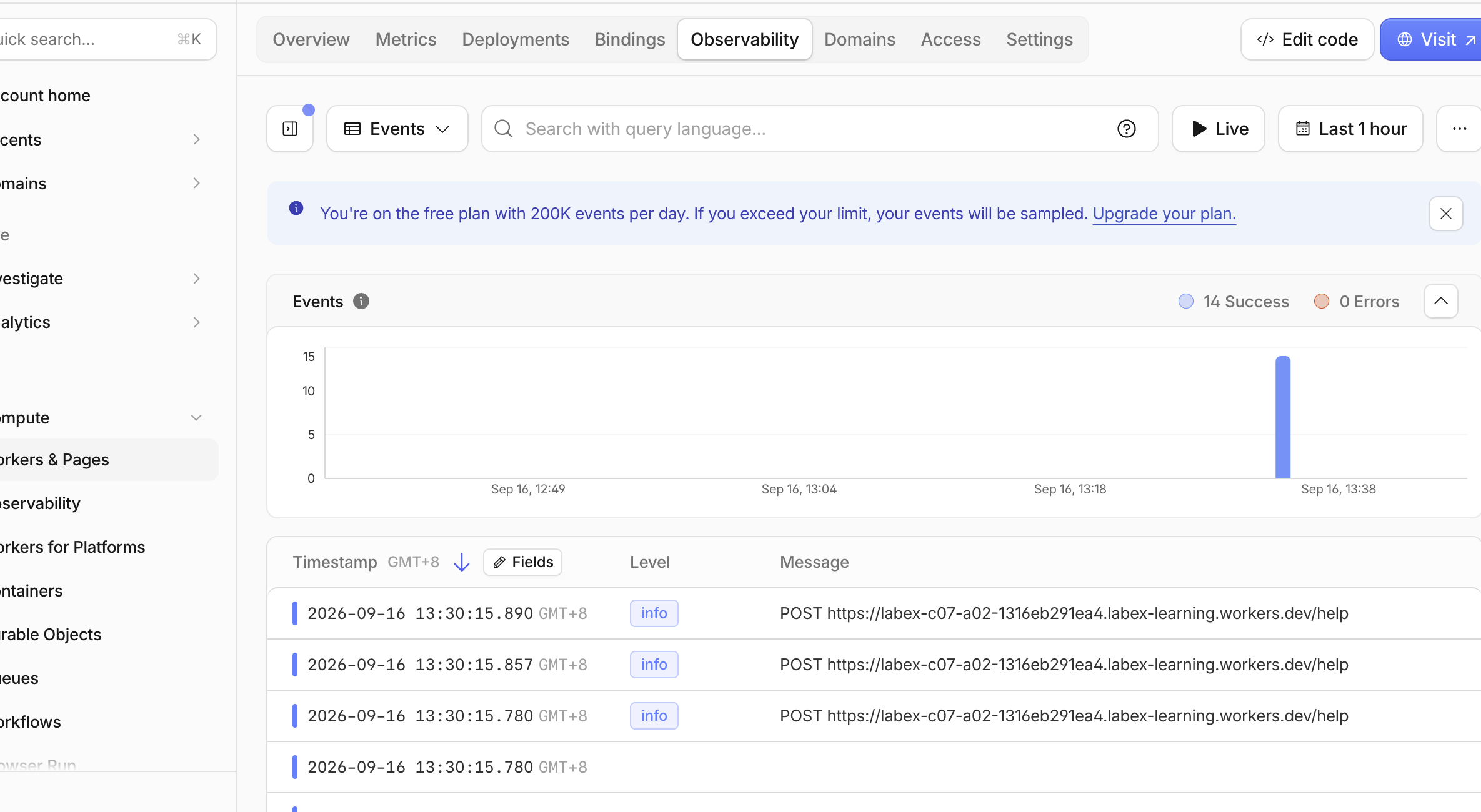
Open the Cloudflare Dashboard and go to Workers & Pages → Overview → your labex-c07-a02-... Worker → Observability → Logs. Find the recent requests. The overview below is from one disposable acceptance run: 14 Success and 0 Errors show that the Worker handled its health checks, complete streams and deliberate disconnects without a failed invocation. Your totals and timestamps will differ.
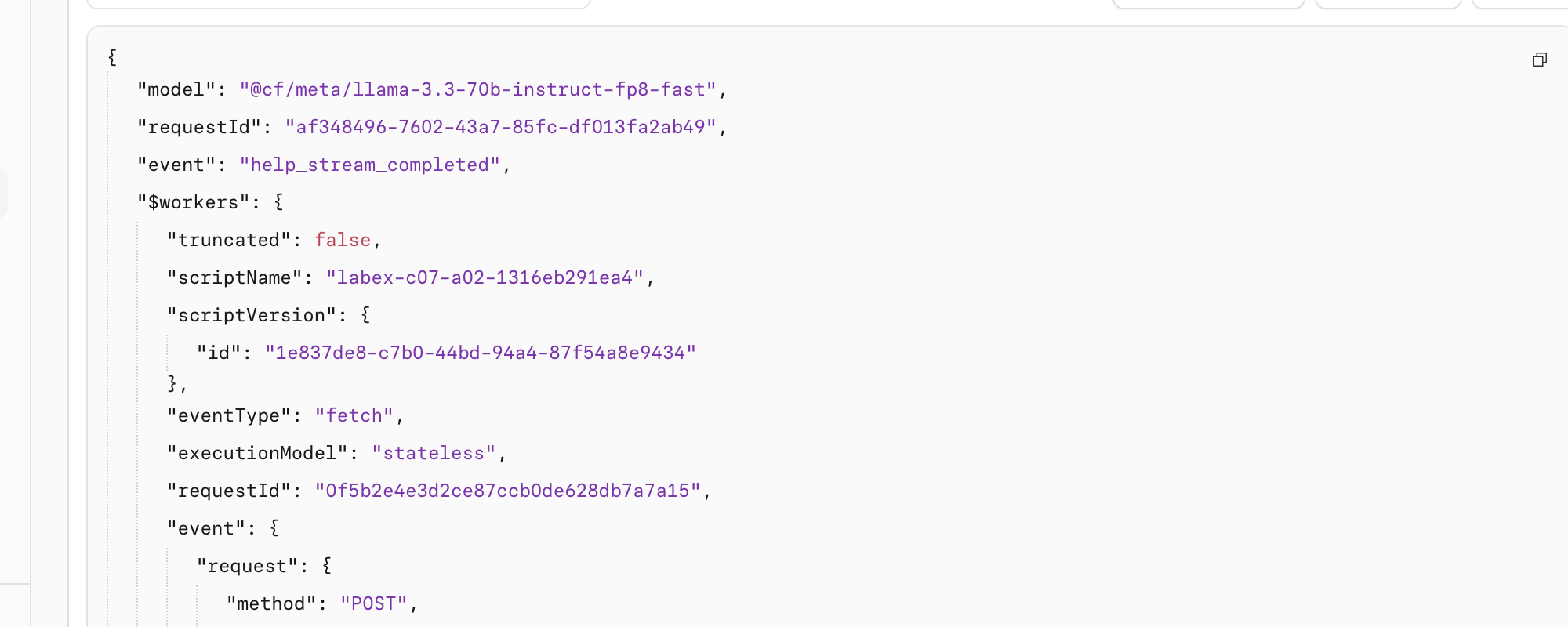
Search for help_stream_completed, expand one result and confirm its model, requestId and event. The request ID is a safe correlation value: it helps an operator connect lifecycle records without storing the learner's question or the generated answer.
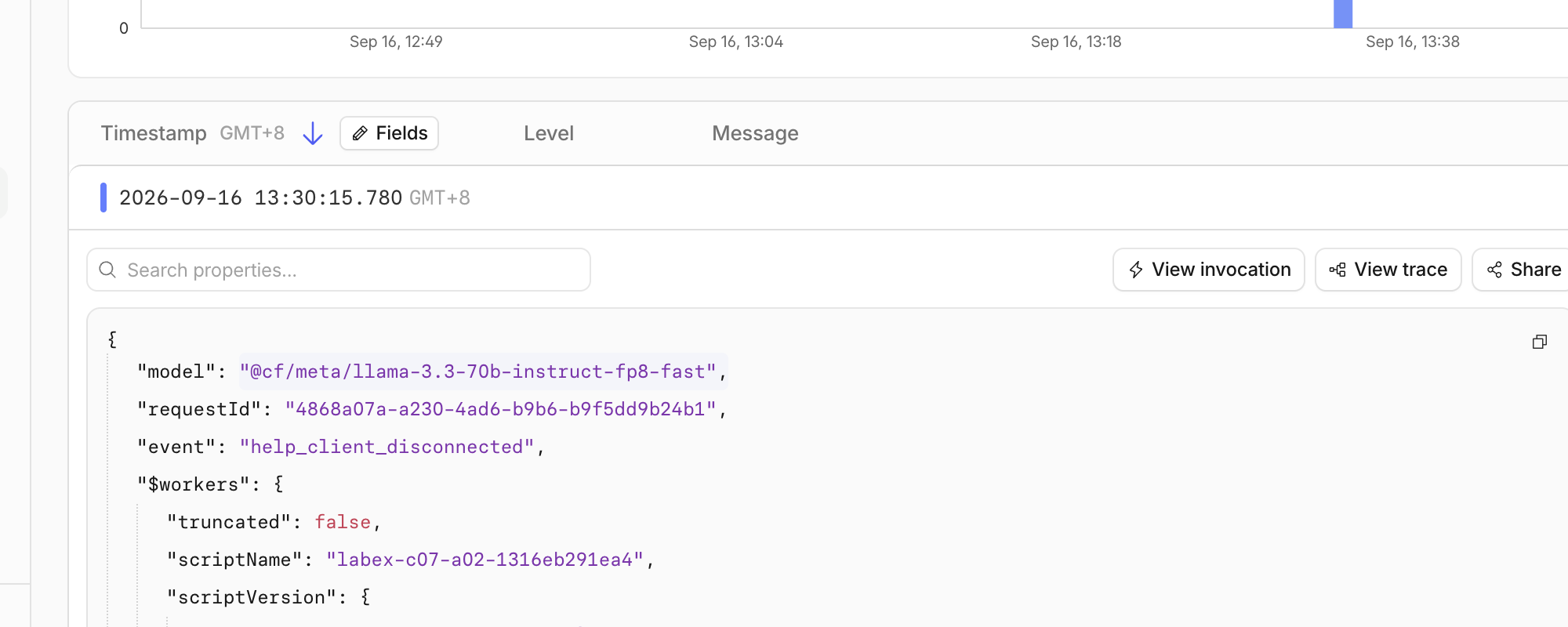
For the deliberately cancelled public request, search for help_client_disconnected. With enable_request_signal, that event is the direct evidence that the incoming client went away. The deterministic test from Step 4 separately proves that downstream cancel() reaches the model fixture and records help_stream_cancelled; real network timing can make the request-signal event the visible cloud record instead. Saved logs can arrive later than the response, so wait briefly and make at most one additional bounded cancellation request if necessary.
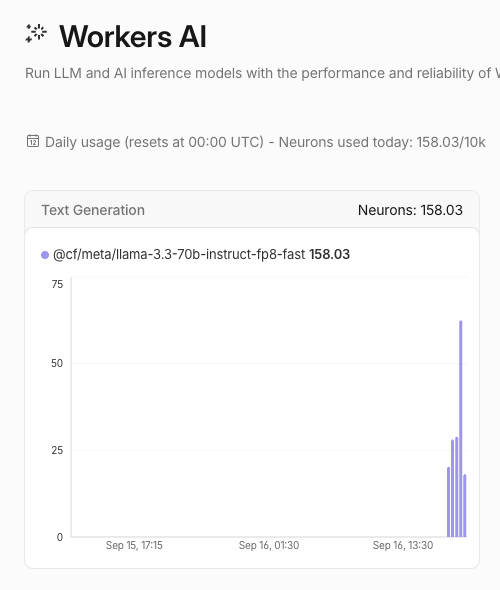
Then open Workers AI and inspect today's model usage. Find the Llama 3.3 model and confirm the small exercises remain within the 10,000-Neuron Free allocation. In the example below, all work on the learning account used 158.03/10k Neurons; this includes other exercises on that account, so your number will differ. A Workers Paid plan is not required for this lab while the account remains within the Free allocation. Usage can lag, so do not repeat inference merely to force a graph update.
The Worker name, request IDs, timestamps and usage in these screenshots are examples from a disposable run. The event names and lifecycle relationship—not the exact values—are the teaching targets.
Remove the Worker and Log Out
In this step, you will remove the disposable Worker and then log this VM out. Workers AI usage records are account-level history, so deleting the Worker removes its public endpoint but does not erase those historical records or change the account plan.
Delete the exact Worker named in wrangler.jsonc:
npx wrangler delete
Confirm only when Wrangler shows this lab's unique labex-c07-a02-... name. The command should end with Successfully deleted. In the Dashboard, refresh Workers & Pages → Overview and confirm that exact name is absent.
While the VM is still authorized, run the independent management check:
python3 .labex/verify.py deleted
Only after it reports PASS: deleted, remove this VM's stored authorization:
npx wrangler logout
npx wrangler whoami --json
Require loggedIn: false. A missing local file, a closed browser tab or a network error would not prove either cloud deletion or logout.
Summary
You built a Workers AI endpoint that forwards incremental SSE output instead of buffering a complete answer. You learned why a client needs an explicit [DONE] signal, how a timeout prevents an indefinite wait, how deliberate cancellation differs from failure, and how stream errors terminate cleanly. You verified real local and deployed inference, connected lifecycle events to Dashboard observability, removed the disposable Worker and logged the fresh VM out.


